Wisconsin Department of Revenue Form Instructions
Form 2 — Wisconsin Fiduciary Income Tax (Estates & Trusts)
I-022 (R. 11-25) Wisconsin Department of Revenue
# Form 2 and Schedule 2K-1
Form 2 and Schedule CC, Request for a Closing Certificate of Fiduciaries, may be filed electronically! Note Schedule CC must be filed separately from Form 2.
- Form 2 may be filed electronically using modernized e-file software. See Third-Party Software for Fiduciary, Estate and Trust e-File Returns on the department's website.
- Schedule CC and required documents may be filed electronically directly from the department's website at https://tap.revenue.wi.gov/ClosingCertificate.
Important Notices
- Wisconsin did not adopt section 199A of the Internal Revenue Code (IRC), as created in the federal Tax Cuts and Jobs Act of 2017, which provides a taxpayer, other than a corporation, a federal deduction of up to 20 percent of qualified business income.
Any federal qualified business income deduction claimed under sec. 199A, IRC, that is included in the computation of federal taxable income of a fiduciary or its beneficiaries must be added back to Wisconsin taxable income using Schedule B of Form
- Note Nonresident and part-year resident estates and trusts may not use Schedule A for Form 2. They must instead use Schedule NR to report adjustments.
- Wisconsin follows the final treasury regulations from the IRS under TD 9918, as they relate to secs. 67(e) and 642(h), IRC, for determining the character, amount, and allocation of deductions in excess of gross income succeeded to by a beneficiary on the termination of an estate or non-grantor trust for taxable years beginning after December 31, 2017.
# Table of Contents
Page
General Instructions . . . . . . . . . . . . . . . . . . . . . . . . . . . . . . . . . . . . . . . . . . . . . . . . . . . . . . . . . . . . . . . . . . . . . . . 2
- Resident Estates or Trusts … 2
- Situs of Income … 2
- Filing Requirements … 2
- Other Filing Requirements … 3
- When and Where to File … 4
- Withholding Requirement for Estates and Trusts Having Nonresident Beneficiaries … 5
- Seven Steps to Filing the Fiduciary Income Tax Return … 5
- Requesting a Closing Certificate … 6
- Tax Help or Additional Forms … 6 Line Instructions . . . . . . . . . . . . . . . . . . . . . . . . . . . . . . . . . . . . . . . . . . . . . . . . . . . . . . . . . . . . . . . . . . . . . . . . . . 6
- Income Computation … 8
Special Instructions . . . . . . . . . . . . . . . . . . . . . . . . . . . . . . . . . . . . . . . . . . . . . . . . . . . . . . . . . . . . . . . . . . . . . . . 12
- Third-Party Designee … 12
- Pass-Through Entity Representative … 12
- Penalties and Interest … 12
- Fraudulent or Reckless Credit Claims … 13
- Internal Revenue Service Adjustments and Amended Returns … 13
- Estimated Tax Payments … 13
- Requesting Copies of Returns … 13 Schedule A Instructions - Additions and Subtractions . . . . . . . . . . . . . . . . . . . . . . . . . . . . . . . . . . . . . . . . . . 13
- Additions … 13
- Subtractions … 16
- Other Additions to or Subtractions from Income … 18 Schedule B Instructions - Conformity with Internal Revenue Code . . . . . . . . . . . . . . . . . . . . . . . . . . . . . . . 19 Schedule C Instructions - Adjustments to Capital Gains/Losses . . . . . . . . . . . . . . . . . . . . . . . . . . . . . . . . . 19 Schedule 2K-1 Instructions - Beneficiary's Share of Income, Deductions, Etc . . . . . . . . . . . . . . . . . . . . . . 19
- Line Instructions … 20
Tax Tables . . . . . . . . . . . . . . . . . . . . . . . . . . . . . . . . . . . . . . . . . . . . . . . . . . . . . . . . . . . . . . . . . . . . . . . . . . . . . . . 22
# General Instructions
# Resident Estates or Trusts
ESTATES: The estate of a decedent is considered resident of Wisconsin if the decedent was domiciled in Wisconsin at the time of death.
TRUSTS: A trust created by a decedent's will (testamentary trust) is resident of Wisconsin if the decedent was domiciled in Wisconsin at the time of death, unless transferred by a court having jurisdiction to another court's jurisdiction.
Inter vivos trusts that are made irrevocable and were administered in Wisconsin before October 29, 1999, are considered resident of Wisconsin if they are being administered in Wisconsin.
The following inter vivos trusts that become irrevocable on or after October 29, 1999, or that became irrevocable before October 29, 1999, and are first administered in Wisconsin on or after October 29, 1999, are resident of Wisconsin:
- Trusts, or portions of trusts, the assets of which consist of property placed in the trust by a person who is a resident of Wisconsin at the time that the property was placed in the trust if, at the time that the assets were placed in the trust, the trust was irrevocable.
- Trusts, or portions of trusts, the assets of which consist of property placed in the trust by a person who is a resident of Wisconsin at the time that the trust became irrevocable if, at the time that the property was placed in the trust, the trust was revocable.
A trust is revocable if the person whose property constitutes the trust may revest title to the property in that person.
A trust is irrevocable if the power to revest title does not exist.
Note For more information regarding the residency of estates and trusts, view the answers to common questions for Estates, Trusts, and Fiduciaries on the department's website at revenue.wi.gov/Pages/FAQS/ise-estate.aspx.
# Situs of Income
ESTATES: During the time the estate is a Wisconsin resident, all income is sourced to Wisconsin. During the time the estate is not a Wisconsin resident, income is sourced to Wisconsin under sec. 71.04, Wis. Stats.
TRUSTS: During the time a trust is a Wisconsin resident, all income is sourced to Wisconsin. During the time a trust is not a Wisconsin resident, income is sourced to Wisconsin under sec. 71.04, Wis. Stats.
For inter vivos trusts that become irrevocable on or after October 29, 1999, or that became irrevocable before
October 29, 1999, and are first administered in Wisconsin on or after October 29, 1999, Wisconsin sourced income must be determined separately for each asset in the trust based on each asset's residency. All income from resident assets is sourced to Wisconsin and income from nonresident assets is sourced to Wisconsin under sec. 71.04, Wis. Stats.
# Filing Requirements
RESIDENT ESTATES: Every personal representative or special administrator of the estate of a Wisconsin decedent must file a Wisconsin fiduciary income tax return if the gross income of the estate is $600 or more.
Gross income means all income (before deducting expenses) reportable to Wisconsin which is received in the form of money, property, or services. It does not include items that are exempt from Wisconsin tax.
Note If an estate sells the decedent's residence and the gross proceeds from the sale are greater than $600, the personal representative is required to file a tax return even if the residence is sold at a loss.
Example: The decedent was a Wisconsin resident. The decedent's personal residence is the only asset of the estate. The residence's value is $100,000 at date of death. The estate sells the residence for a sale price of $90,000. The net loss is ($10,000). Although the sale resulted in a loss, the personal representative is required to file a tax return because gross income from the sale of the residence is $90,000 and that is greater than the $600 filing requirement.
NONRESIDENT ESTATES: A nonresident estate must file a Wisconsin fiduciary return if it has gross income (see definition under "RESIDENT ESTATES") of $600 or more from Wisconsin sources.
Income from Wisconsin sources includes income or gain from: a. Real or tangible personal property located within the state. b. A business, trade, profession, or occupation carried on within the state, including a corporation taxed under Subchapter S of the Internal Revenue Code.
c. Personal or professional services performed within the state either as an individual or a member of a partnership. d. Income received from the Wisconsin state lottery or a multijurisdictional lottery if the winning lottery ticket or lottery share was purchased from a Wisconsin retailer.
GRANTOR TYPE TRUSTS: If the entire trust is a grantor trust that is disregarded for income tax purposes, the trust is not required to file a Wisconsin fiduciary income tax return.
Exception Grantor trusts filing under a federal employer identification number instead of a grantor's social security number, including qualified subchapter S trusts (QSSTs), must file a Form 2. Include a complete copy of the entity's federal return.
RESIDENT TRUSTS: Every trustee of a Wisconsin trust must file a Wisconsin fiduciary income tax return if the trust has:
- Any taxable income for the tax year, or
- Gross income (see definition under "RESIDENT ESTATES") of $600 or more regardless of the taxable income.
Example: A resident trust has $400 of interest income. It makes no distributions and therefore only has an exemption of $100, which would result in taxable income of $300. The trust is required to file a Wisconsin fiduciary return, because it has taxable income.
NONRESIDENT AND PART-YEAR RESIDENT TRUSTS: A nonresident or part-year resident trust must file a Wisconsin fiduciary income tax return if it has:
- Any Wisconsin taxable income for the year, or
- Gross income from Wisconsin sources (see definitions under "RESIDENT ESTATES" and "NONRESIDENT ESTATES") of $600 or more regardless of the taxable income.
# Other Filing Requirements
ENTITY-LEVEL TAX ELECTION: if an estate or trust is a partner or shareholder of a partnership or tax-option (S) corporation making the election to pay tax at the entity level under sec. 71.21(6)(a) or 71.365(4m)(a), Wis. Stats., the estate or trust may still have a filing requirement as provided in sec. 71.13(1), Wis. Stats., "annual returns of income of an estate or trust shall be made to the department by the fiduciary thereof at or before the time such income is required to be reported to the internal revenue service under the internal revenue code."
EXEMPT TRUSTS: (Do NOT file Form 2 if required to file Form 4T.) Trusts that are exempt under the Internal Revenue Code by reason of their purposes or activities are also exempt from Wisconsin income tax. Common law trusts organized or conducted for profit are deemed to be corporations and must file a Wisconsin corporation franchise or income tax return.
Note Trusts that are exempt from federal taxation under sec. 501(a), IRC, including certain pension, profit-sharing, and stock bonus plans described in sec. 401(a), IRC, and individual retirement arrangements (IRAs) are required to report unrelated business taxable income for Wisconsin tax purposes. File a Wisconsin Form 4T if the trust reports unrelated business taxable income for federal purposes on federal Form 990-T and the trust has gross income from an unrelated trade or business of $1,000 or more. For more information, see Wisconsin Form 4T instructions on the department's website at revenue.wi.gov. FINAL RETURN OF AN ESTATE OR TRUST: A final fiduciary return reporting all income received from the beginning of the taxable year of closing to the date of closing may be required.
The net income computed on the final return must be distributed to the beneficiaries and no income tax is payable by the fiduciary.
The beneficiaries of the estate or trust must report income as if it had been received without the intervention of the fiduciary.
Include a copy of the final account or a letter advising that a final account is not required by the probate court with the final fiduciary return.
BANKRUPTCY ESTATE - PROMPT DETERMINATION REQUESTS: Under Rev. Proc. 2006-24, 2006-22 I.R.B. 943, as modified by Announcement 2011-77, the bankruptcy trustee may request a determination of any unpaid tax liability. Requests may be submitted via:
- DORBankruptcySpecialist@wisconsin.gov
- Fax: (608) 224-5700
- Wisconsin Department of Revenue PO Box 8901 Madison WI 53713-8901 CHARITABLE REMAINDER TRUSTS: If you are required to file a federal Form 5227 for a charitable remainder trust, you are not required to file a Wisconsin tax return. However, if the charitable remainder trust has at least $1,000 of Wisconsin sourced gross income from an unrelated trade or business, the charitable remainder trust is required to file a Wisconsin Form 4T.
ESTATE OR TRUST RECEIVING A SCHEDULE 2K-1, 3K-1, OR 5K-1: An estate or trust must include with the Form 2, any Schedule 2K-1, 3K-1 or 5K-1 received by the estate or trust for the taxable year.
INDIVIDUAL TAX RETURN FOR A DECEDENT: A personal representative or petitioner must file an individual return for a decedent to report income from the beginning of the year to the date of death (Form 1 or 1NPR). The due date of the 2025 individual return is April 15, 2026. For information on who must file a Form 1, Income Tax Return, or Form 1NPR, Nonresident and Part-Year Resident Income Tax Return, see the Form 1 instructions or Form 1NPR instructions.
# When and Where to File
A return for a trust is due on or before April 15, 2026. A return for an estate is due on or before April 15, 2026, for a calendar year filer or the 15th day of the 4th month after the close of the taxable year for a fiscal year filer.
Note Form 2 may be filed electronically using modernized e-file software. See Third-Party Software for Fiduciary, Estate and Trust e-File Returns on the department's website.
Short Period Returns. Returns for short taxable years (periods of less than 12 months) are due on or before the federal due date.
Be sure to use the correct year's tax return when filing for a short period. If the tax returns are not yet available, wait until the returns become available and file under extension. For example, if a taxpayer has a short period from January 1, 2026 through March 31, 2026, the 2026 Form 2 will not be ready by July 15, 2026 (unextended due date for a March 31 year-end). Wisconsin law provides for the same extension period (typically 5 1/2 months) as the Internal Service to file the estate or trust return (see Extensions below).
Filing under extension will allow the correct years return to be filed when the 2026 Form 2 is available (typically November 1).
Exception If an estate is submitting a final return (Form 2) that begins and ends in the current tax year and the period ends on or before October 31, the estate may submit a short-period return on the most current Form 2 available.
Extensions. If you cannot file on time, the following options are available for obtaining an extension:
- If you have an extension for filing your federal return, this automatically gives you a Wisconsin extension provided you:
- Estimate your 2025 Wisconsin tax and pay the amount you will owe with your return (line 25 of Form 2) by the unextended due date of the return using 2025 Wisconsin Form 1-ES, and
- Include a copy of your federal extension application with your Form 2 when filed.
- Extensions available under federal law may be used for Wisconsin purposes (typically 5 1/2 months), even if you do not need a federal extension because you file your federal return by the due date. To obtain an extension only for Wisconsin,
- Estimate your 2025 Wisconsin tax and pay the amount you will owe by the unextended due date of the return and
- Include a statement with your Form 2 indicating which federal extension provision you are using or include a copy of a completed federal extension application form.
No extension is allowed if your estimate of tax is not reasonable. For information on submitting a payment, visit the department's Make a Payment web page under "Make a Payment - Individuals and Fiduciaries."
For more information on extensions, see Publication 401, Extensions of Time to File.
Note Even though you may have an extension of time to file your return, you will owe interest on any tax not paid by the original due date. Returns not filed by the extended due date are subject to additional interest and penalties.
Exception You will not be charged interest during an extension period if you qualify for a federal extension due to a federally-declared disaster. See Special Conditions below.
Special Conditions A "Special Conditions" section is located on page 1 of Form 2. If you have an extension of time to file because of a federally-declared disaster, fill in "03" in the box and indicate the specific disaster on the line provided.
Withholding Requirement for Estates and Trusts Having Nonresident Beneficiaries
In general, an estate or trust that has one or more nonresident beneficiaries is required to withhold income or franchise tax on the income allocable to the nonresident beneficiaries. This withholding tax may be required to be paid in quarterly installments. See Form PW-ES, Wisconsin Pass-Through Entity Withholding Estimated Payment Voucher, and instructions for details.
For information on submitting a payment, visit the department's Make a Payment web page under "Make a Payment - Individuals and Fiduciaries."
The estate or trust uses Form PW-1, Wisconsin Nonresident Income or Franchise Tax Withholding on Pass-Through Entity Income, to report the withholding. Form PW-1 is due by the 15th day of the 4th month following the close of the estate's or trust's taxable year.
See the Form PW-1 instructions for details.
A nonresident beneficiary includes an individual who is not domiciled in Wisconsin; a partnership, limited liability company, or corporation whose commercial domicile is outside Wisconsin; and an estate or trust that is nonresident under sec. 71.14(1) to (3m),
Wis. Stats. If the nonresident beneficiary is an individual, estate, or trust, the withholding rate is 7.65%. If the nonresident beneficiary is a partnership, limited liability company, or corporation, the withholding rate is 7.9%.
Exceptions Withholding is not required on behalf of the following nonresident beneficiaries:
- A beneficiary that is exempt from Wisconsin income or franchise taxation. The estate or trust may rely on a written statement from a beneficiary explaining why the beneficiary is exempt from Wisconsin tax. The estate or trust must include a copy of this statement with the Form 2 filed with the department.
- A beneficiary whose share of income from the estate or trust attributable to Wisconsin is less than $2,000.
- A beneficiary who completes Form PW-2, Wisconsin Nonresident Partner, Member, Shareholder, or Beneficiary Withholding Exemption Affidavit, and provides Part 2 of Form PW-2 to the estate or trust. The completed Form PW-2 must be pre-approved by the department. See the Form PW-2 instructions for details.
Caution Nonresidents with a Wisconsin filing requirement must file the appropriate Wisconsin income or franchise tax return.
# Seven Steps to Filing the Fiduciary Income Tax Return
1 Gather all records.
Make sure that all income and expense records are available, including interest and dividend statements, so the return can be prepared correctly.
2 Complete the federal return.
Before completing Wisconsin Form 2, complete the federal return, Form 1041 or 1041-QFT, and its supporting schedules, if required.
3 Complete the Wisconsin return (see tips on last page of these instructions).
4 Sign the return.
The return must be signed by the personal representative or special administrator of an estate or by the trustee of a trust.
5 If filing on paper, assemble the return.
Begin by putting the four pages of Form 2 in numerical order. Then attach, using a paper clip (do not staple), the following in the order listed:
- Payment - If you owe an amount with the return, paper clip your payment to the front of Form 2.
- Wisconsin Schedules - The appropriate copy of each of your withholding statements (Schedules 2K-1, 3K-1, and 5K-1 and Forms W-2 and 1099).
- Federal Return - A complete copy of your federal return (Form 1041 or 1041-QFT) and its supporting schedules and forms.
- Supporting Documents - For example, copies of property tax bills in support of a farmland preservation credit claim.
- Extension Form or Statement - A copy of your federal extension application or required statement if you are filing under an extension.
6 Keep a copy of the return.
7 Form 2 may be filed electronically using modernized e-file software. See Third-Party Software for Fiduciary, Estate and Trust e-File Returns on the department's website. If filing on paper, mail the return and enclosures to the appropriate address as follows:
If tax due . . . . . . . . . . . . . . . . . . . . . Wisconsin Department of Revenue PO Box 8918, Madison WI 53708-8918
If refund or no tax due . . . . . . . . . . Wisconsin Department of Revenue PO Box 8965, Madison WI 53708-8965
Requesting a Closing Certificate
A request for a closing certificate should not be attached to Form 2. See the instructions for Schedule CC.
# Tax Help or Additional Forms
If you have questions or need additional forms, help is available at our Madison office (2135 Rimrock Road):
- Wisconsin Department of Revenue PO Box 8906 Madison WI 53708-8906
- Telephone: (608) 266-2772
- Forms requests: (608) 266-1961
- Email: ᵒ Notices, payments, forms, etc.: DORIncome@wisconsin.gov ᵒ Audit and technical: DOREstateandFiduciary@wisconsin.gov Internet Address You can access the department's website at revenue.wi.gov. From this website, you can:
- Download forms, schedules, instructions, and publications.
- View answers to common questions.
- Email us comments or request help.
TTY Equipment Telephone help is available using TTY equipment. Call the Wisconsin Telecommunications Relay System at 711.
Information Publications Available Following is a list of some of the department publications. These publications provide detailed information relating to specific areas of Wisconsin tax law.
Number and Title
102 Wisconsin Tax Treatment of Tax-Option (S) Corporations and Their Shareholders 103 Reporting Capital Gains and Losses for Wisconsin by Individuals, Estates, and Trusts
111 How to Get a Private Letter Ruling
114 Wisconsin Taxpayer Bill of Rights
117 Guide to Wisconsin Wage Statements and Information Returns
120 Net Operating Losses for Individuals, Estates, and Trusts
125 Credit for Tax Paid to Another State
128 Wisconsin Tax Information for Military Personnel and Veterans
401 Extensions of Time to File
503 Wisconsin Farmland Preservation Credit
600 Wisconsin Taxation of Gambling Income
# Line Instructions
Use black ink to complete Form 2. If completing the form by hand, do not use commas or dollar signs when filling in amounts. For more tips, see the last page of these instructions.
Period Covered File the 2025 return for calendar year 2025 and fiscal years that begin in 2025. For a fiscal year, a 52-53 week period, or a short-period return, fill in the taxable year beginning and ending dates in the taxable year space at the top of the form.
Name and Identifying Number Estates use the first and second lines for the legal name, decedent's social security number, and the federal employer identification number (EIN). Trusts use the third line for the legal name and federal EIN.
Exception Qualifying trusts making the election under sec. 645, IRC, to be treated as part of the decedent's estate use the first and second lines for the legal name, decedent's social security number, and the estate's federal EIN.
Schedules 2K-1 issued Enter the total number of Schedules 2K-1 issued by the estate or trust during the taxable year.
Schedules 2K-1 issued to nonresidents Enter the total number of nonresident beneficiaries that were issued a Schedule 2K-1 by the estate or trust during the taxable year, including individuals, estates, and trusts not domiciled in Wisconsin and partnerships, limited liability companies, and corporations whose commercial domicile is not in Wisconsin.
Name Change If the name of the estate or trust has changed, place a checkmark in the designated area below the name and address area of Form 2.
Type of Estate or Trust Check to indicate the type of estate or trust.
- Electing small business trust (ESBT) - a trust that has income from one or more S corporations. The portion of an ESBT that consists of stock of one or more S corporations is treated as a separate trust. A trust that qualifies as an ESBT for federal purposes under the IRC as amended to December 31, 2022, automatically qualifies as an ESBT for Wisconsin. The trustee isn't required to make a separate Wisconsin election, nor are they permitted to make a different election for Wisconsin. The trust must complete Schedule ESBT, Computation of Wisconsin Taxable Income for Electing Small Business Trusts. See the Schedule ESBT instructions for more information on reporting requirements of an ESBT.
- Qualified subchapter S trust (QSST) - a trust that qualifies as a QSST for federal purposes under sec. 1361, IRC, as amended to December 31, 2022, automatically qualifies as a QSST for Wisconsin. The beneficiary isn't required to make a separate Wisconsin election, nor are they permitted to make a different election for Wisconsin. The QSST must file Wisconsin fiduciary income tax returns, Form 2, to report its share of tax-option (S) corporation income, whether or not all of the trust income is distributed. In addition, the beneficiary of the QSST must file Wisconsin individual income tax returns. See Wisconsin Publication 102 for more information. If the QSST is the shareholder in a tax-option (S) corporation that elects to be taxed at the entity level, the trust must inform the beneficiary of the election and provide all the information reported on the Schedule 5K-1. If the tax-option (S) corporation has made this election, Schedule 5K-1, Item B, box 3 will be checked. The trust must provide the beneficiary with a detailed statement of the items from the electing tax-option (S) corporation and inform the beneficiary that the tax-option (S) corporation made the election to pay tax at the entity level. The beneficiary can refer to Schedule 5K-1 instructions for additional information on reporting items of income, gain, loss, or deduction from an electing tax-option (S) corporation.
- Qualified funeral trust (QFT) - if a trust elects to be taxed as a QFT for federal income tax purposes, the election also applies for Wisconsin. If QFT is checked, see the "Exceptions" in the instructions for line 6a.
- Nonresident estate or trust - complete Wisconsin Schedule NR.
- Part-year estate or trust - complete Wisconsin Schedule NR. Note A trust that consists of resident assets and nonresident assets, as provided under sec. 71.14(3m)(a), Wis. Stats., must check the part-year resident estate or trust box and complete Wisconsin Schedule NR.
- Bankruptcy estate - a separate and distinct taxable entity created when an individual debtor files for bankruptcy under Chapter 7 or 11 of Title 11 of the United States Code. If bankruptcy estate is checked, see the "Exceptions" in the instructions for lines 1 and 6a.
- Inter vivos trust - a trust created during a grantor's lifetime.
- Testamentary trust - a trust created by a decedent's will that comes into existence at the death of the decedent.
- Section 645 election - allows a qualified revocable trust to be treated and taxed as part of the related estate during the election period. If the election is made for federal income tax purposes, it also applies for Wisconsin. Include a copy of federal Form 8855 or letter making the election.
- Decedent's estate - a taxable entity separate from a decedent. It generally continues to exist until the final distribution of the assets is made to the beneficiaries. A fiduciary administers the decedent's assets and reports income earned during administration and income in respect of the decedent (IRD).
Special Conditions Certain estates and trusts have to enter information in the Special Conditions section. For information on when to use the Special Conditions section, see "Special Conditions" under "When and Where to File" earlier in these instructions and "Expenses paid to related entities" later in these instructions. If both special conditions apply, fill in "99" in the Special Conditions box.
Rounding Off to Whole Dollars The form has preprinted zeros in the place used to enter cents. All amounts filled in the form should be rounded to the nearest dollar. To do so, drop amounts under 50¢ and increase amounts from 50¢ to 99¢ to the next whole dollar.
For example, $129.39 becomes $129 and $236.50 becomes $237.
Round off all amounts. But if you have to add two or more amounts to figure the amount to fill in on a line, include cents when adding and only round off the total.
Accounting Periods and Methods Use the same accounting period and method of accounting that are used for federal income tax purposes. If the federal taxable year or method of accounting is changed, such change also applies for Wisconsin. Separate permission to effect such change for Wisconsin is not required. However, include a copy of the federal document authorizing the change with the Wisconsin fiduciary return.
- Elections. An estate or trust can't make different elections for federal and Wisconsin purposes with respect to accounting periods and accounting methods, unless the federal method isn't permitted under the IRC in effect for Wisconsin. In situations where an estate or trust has an option under the IRC and the IRS doesn't consider that option to be a method of accounting, a different election may be made for Wisconsin than that made for federal purposes. If federal law specifies the manner or time period in which an election must be made, those requirements also apply for Wisconsin purposes. For more information, see Wisconsin Tax Bulletin 214 (July 2021, page 8).
Definitions Applicable to Fiduciaries Under Wisconsin income tax law, federal taxable income is used as a starting point in the computation of fiduciary income subject to the Wisconsin income tax. Therefore, most terms have the same meaning under Wisconsin law as in the Internal Revenue Code unless otherwise noted.
# Income Computation
Line 1. Federal Taxable Income of Fiduciary Enter the amount of taxable income of the fiduciary as reported on federal Form 1041.
Exceptions
- Qualified funeral trusts - Enter the taxable income from federal Form 1041-QFT.
- Bankruptcy estates - Leave lines 1 through 5 blank. See instructions for line 6a, under "Exceptions."
Line 2. Additions Resident estates and trusts, enter the total of the nondistributable additions from Schedule A, column 2, line 6.
See Schedule A Instructions later in these instructions.
Nonresident estates and part-year and nonresident trusts, enter the amount from line 3 of Part II of Schedule NR.
Line 4. Subtractions Resident estates and trusts, enter the total of the nondistributable subtractions from Schedule A, column 2, line 12. Enter as a positive amount. See Schedule A Instructions later in these instructions. Nonresident estates and part-year and nonresident trusts, enter the amount from line 4 of Part II of Schedule NR.
# Tax Computation
Line 6a. Tax on income from Line 5 Using the Wisconsin taxable income on line 5, enter the tax from the tax tables provided towards the end of these instructions.
Exceptions
- Qualified funeral trusts (QFTs) - If this is a composite return for a qualified funeral trust and each separate QFT has taxable income of $14,680 or less, multiply the amount on line 5 by 3.50% (.035) and fill in the result on line 6a. If any of the separate QFTs has taxable income of more than $14,680 compute the tax separately for each QFT and fill in the total of the tax computed separately for each QFT on line 6a.
- Bankruptcy estates - Bankruptcy estates must compute tax on Form 1, using the married filing separate standard deduction and tax rates. Enter the amount from line 27 of Form 1 on line 6a, and complete the rest of Form 2 as appropriate. Include Form 1 and a complete copy of the federal return with Form 2.
Line 6b. ESBT Tax Complete Schedule ESBT and enter the amount from line 25 of Schedule ESBT on line 6b. See Schedule ESBT instructions for additional information.
Line 7. Nonrefundable Credits If you are claiming any of the credits listed below, you must complete Schedule CR. Include Schedule CR, along with the appropriate schedule for the credit(s) you are claiming and any required Department of Commerce
(DOC), Wisconsin Economic Development Corporation (WEDC), Wisconsin Housing and Economic Development Authority
(WHEDA), approval, certification, or allocation, with Form 2. Include Schedule CF for each credit for which you claim a carryforward of unused credit. Fill in the amount from line 34 of Schedule CR on line 7. Note Do not include any nonrefundable credits related to the tax-option (S) corporation portion of an electing small business trust, report those credits on line 22 of Schedule ESBT.
- Postsecondary Education Credit Carryforward (Schedule CF)
- Biodiesel Fuel Production Credit Carryforward (Schedule CF)
- Health Insurance Risk-Sharing Plan Assessments Credit Carryforward (Schedule CF)
- Schedule CM - Community Rehabilitation Program Credit The community rehabilitation program credit is available to estates or trusts who enter into a contract with a community rehabilitation program to have the program perform work for the entity. Complete Schedule CM.
- Research Facilities Credit Carryforward (Schedule CF)
- Schedule LI - Low-Income Housing Credit The low-income housing credit is available to qualified development owners who are allocated a credit amount by WHEDA. Complete Schedule LI.
- Schedule HR - Supplement to Federal Historic Rehabilitation Credit The supplement to federal historic rehabilitation credit is available for rehabilitating certified historic structures or qualified rehabilitated buildings. Complete Schedule HR.
- Schedules MA-M and MA-A - Manufacturing and Agriculture Credits The manufacturing and agriculture credits are based on the production gross receipts of a business less certain expenses. Complete Schedule MA-M or MA-A. If an estate or trust is a partner or shareholder in a partnership or tax-option (S) corporation that elected to be taxed at the entity level, and a manufacturing and agriculture credit is passed through on Schedule 3K-1 or 5K-1, the estate or trust may not claim the credit to offset tax imposed on income which is taxable to the partnership or corporation. See Schedule MA-M instructions for additional information on the business income limit computation.
- Schedule R - Research Credits The research expense credit may be passed through to an estate or trust from a partnership, limited liability company, or tax-option (S) corporation. Complete Schedule R.
- Schedule MS - Manufacturer's Sales Tax Credit If the estate or trust had $25,000 or less of unused manufacturer's sales tax credit from 1998 through 2005 and could not use the entire credit on its 2006 through 2024 returns, complete Schedule MS to determine the amount of carryover credit that may be claimed for 2025.
- Manufacturing Investment Credit Carryforward (Schedule CF)
- Dairy and Livestock Farm Investment Credit Carryforward (Schedule CF)
- Ethanol and Biodiesel Fuel Pump Credit Carryforward (Schedule CF)
- Technology Zone Credit Carryforward (Schedule CF)
- Schedule VC (Part II) - Early Stage Seed Investment Credit The early stage seed investment credit is based on an investment paid to a fund manager certified by the WEDC that the fund manager invests in a certified business. Complete Schedule VC.
- Electronic Medical Records Credit Carryforward (Schedule CF)
- Internet Equipment Credit Carryforward (Schedule CF) Line 8. Net Tax Paid to Another State A resident estate or trust or resident portion of a trust that has paid tax both to Wisconsin and another state on the same income may be able to claim a credit for such tax. Read the Schedule OS instructions to determine if you may claim the credit. If you qualify for the credit, complete Schedule OS. Fill in the amount of your credit from Schedule OS on line 8.
Be sure to enter in the brackets on line 8 the 2-letter postal abbreviation for the other state to which you paid tax. If you paid tax to more than one other state, fill in the number 99 in the box. See Schedule OS for other situations where additional code numbers may be required. Include Schedule OS and copies of the other state's return.
Note An estate or trust may not pass through to the beneficiaries a credit for net tax paid to another state.
If an estate or trust is a partner or shareholder in a partnership or tax-option (S) corporation that elected to be taxed at the entity level in Wisconsin, the estate or trust may not use the taxes paid by the partnership or tax-option (S) corporation to compute a credit for tax paid to another state. In addition, a resident estate or trust partner or shareholder may not claim a credit for taxes paid to another state on income taxed at the entity level in Wisconsin.
Caution If the trust is an electing small business trust (ESBT), the trust may not claim a credit for the ESBT portion of net tax paid to another state on line 8. Report the ESBT portion of the credit on Schedule ESBT, line 23.
Line 11b. Sales and Use Tax Due on Internet, Mail Order, or Other Out-of-State Purchases Did the estate or trust make any taxable purchases from out-of-state firms in 2025 on which sales and use tax was not charged? If yes, report Wisconsin sales and use tax on these purchases on line 11b if they were stored, used, or consumed in Wisconsin. Also report sales and use tax on taxable purchases from a retailer located in another country, regardless of whether the estate or trust was charged any tax for that country or any duty by the U.S. Customs Service.
Taxable purchases include furniture, carpet, clothing, computers, books, CDs, DVDs, video tapes, certain digital goods (e.g., greeting cards, video games, music, and books, transferred electronically), artwork, antiques, jewelry, coins purchased for more than face value, etc.
Example: An estate or trust maintains a condo in Wisconsin. The estate or trust purchases $500 of appliances for the condo through a catalog or over the Internet. No sales and use tax was charged. The appliances were delivered to a county in Wisconsin with a 5% tax rate. The estate or trust is liable for $25 Wisconsin tax ($500 x 5% = $25) on this purchase.
Complete the Worksheet for Computing Wisconsin Sales and Use Tax in these instructions to determine whether you are liable for Wisconsin sales and use tax.
- Total purchases subject to Wisconsin sales and use tax (i.e., purchases on which no sales and use tax was charged by the seller) …
- a) Wisconsin (state) sales and use tax … b) County sales and use tax (see rate chart) … c) City sales and use tax (city of Milwaukee only, 2.0% …
- Sales and use tax rate (sum of lines 2. a, b, and c) …
- Amount of sales and use tax due for 2025 (line 1 multiplied by tax rate on line 3). Round this amount to the nearest dollar and fill in on line 11b of Form 2 …
Worksheet for Computing Wisconsin Sales and Use Tax
$
$ x %
5.0
# Sales and Use Tax Rate Chart
In Milwaukee County the county tax rate was 0.9% for all of 2025.
In Racine County the county tax rate was 0.5% as of April 1, 2025.
In all other Wisconsin counties except those shown below, the county tax rate was 0.5% for all of 2025.
If storage, use, or consumption in 2025 was in one of the following counties, there was no county tax:
# Winnebago Waukesha
Note If no amount is included on line 11b, place a checkmark in the space provided to certify the estate or trust did not owe any sales or use tax. Only returns certified as "no use tax due" will be recognized as filing a sales/use tax return.
Line 11c. Penalty on Underpayment of Tax from Inconsistent Estate Basis Reporting An inconsistent estate basis reporting occurs if the property basis claimed on a Wisconsin tax return exceeds the property basis determined for federal estate tax purposes.
The penalty is equal to 20% of the portion of any underpayment of taxes due to the inconsistent estate basis reporting.
Line 12. Wisconsin Tax Withheld Enter the estate's or trust's share of Wisconsin tax withheld by a pass-through entity, as reported on the Schedule 2K-1, 3K-1, or 5K-1 received from the pass-through entity. Include a copy of this Schedule 2K-1, 3K-1, or 5K-1 with the Form 2 that is filed with the department. Include on line 12 only the share of withholding that is attributable to income the estate or trust has reported on Form 2. The share of withholding attributable to income passed through by the estate or trust to its beneficiaries is reported on line 15j of Schedule 2K-1, as reported on Form PW-1.
Caution An estate or trust may not claim Wisconsin withholding from a partnership or tax-option (S) corporation if the partnership or corporation elected to be taxed at the entity level and claimed a refund of the pass-through withholding or submitted a written request to apply the pass-through withholding against the tax liability at the entity level.
Also enter on line 12 Wisconsin tax withheld on salary, wages, or retirement benefits received by the personal representative or petitioner on income in respect of the decedent. Include a copy of the wage statement (Form W-2) or retirement benefit statement (Form 1099-R) with the Form 2 that is filed with the department.
Line 13. 2025 Wisconsin Estimated Payments and Amount Applied From 2024 Return Enter the total of (1) any overpayment of 2024 income tax that the estate or trust was allowed as a credit on its 2025 Wisconsin estimated tax, (2) any Wisconsin estimated tax payments made by the estate or trust for 2025, and (3) advance payments or any payments filed with an extension.
Line 14. Farmland Preservation Credit A credit may be claimed by certain estates and trusts based on Wisconsin farmland which is subject to agricultural use restrictions in the form of a zoning ordinance or a farmland preservation agreement. Fill in on line 14a of Form 2 the amount from line 17 of Schedule FC. Fill in on line 14b of Form 2 the amount from line 13 of Schedule FC-A.
For more information about farmland preservation credit, contact our Farmland Preservation Unit in Madison at (608) 266-2442.
Schedules FC and FC-A are available on the department's website, revenue.wi.gov. Line 15. Refundable Credits If you are claiming any of the credits listed below, you must complete Schedule CR. Include Schedule CR, along with the appropriate schedule for the credit(s) you are claiming and any required approval or certification from the
Department of Agriculture, Trade and Consumer Protection (DATCP), or the Wisconsin Economic Development Corporation
(WEDC), with Form 2. Fill in the amount from line 40 of Schedule CR on line 15. Note include any refundable credits related to the tax-option (S) corporation portion of an electing small business trust on line 15 of Form 2, instead of line 22 of Schedule ESBT.
- Schedule EC - Enterprise Zone Jobs Credit The enterprise zone jobs credit is available to estates and trusts doing business in an enterprise zone. The WEDC must certify the business as eligible for the credit and determine the amount of credit. See Schedule EC.
- Schedule BD - Business Development Credit The credit is available based on wages paid to an eligible employee, training costs, and personal and real property investment. The credit is available to taxpayers who are certified by the WEDC. See Schedule BD.
- Schedule R - 25% Refundable Portion of Research Credit The research expense credit may be passed through to an estate or trust from a partnership, limited liability company, or tax-option (S) corporation. Complete Schedule R.
- Schedule EIT - Electronics and Information Technology Manufacturing Zone Credit The credit is based on payroll and capital expenditures in the zone. The credit is available to taxpayers who are certified by the WEDC. See Schedule CR. Note No interest is paid on refunds issued for the enterprise zone jobs credit, business development credit, or electronics and information technology manufacturing zone credit.
Line 16. Amount Paid With Original Return (Amended Return Only) Enter the amount of tax paid with the original Form 2 plus any additional amount of tax paid after it was filed.
Line 18. Refund From Original Return Less Amount Applied to 2026 Estimated Tax (Amended Return Only) Enter the refund from the original Form 2 plus any additional refunds received after it was filed less the amount applied to 2026 estimated tax.
Line 20. Amount Overpaid If line 19 is larger than line 11d, complete line 20 to determine the amount overpaid.
Note If estimated tax payments were required to be made and were not made in a timely manner, see Schedule U to determine if underpayment interest is owed. If underpayment interest is owed and an overpayment is shown on line 20, reduce the amount on line 20 by the amount of underpayment interest on line 24.
Line 21. Refund Fill in on line 21 the amount from line 20 that you want refunded to you.
Line 22. Amount Applied to 2026 Estimated Tax Fill in on line 22 the amount, if any, of the overpayment on line 20 you want applied to your 2026 estimated tax.
Note An election to apply a refund to estimated tax may be changed to:
- Request payment of the refund,
- Credit the refund against an amended return tax liability for any year, or
- Credit the refund against a notice of amount due for any year.
The notification of a change in election must occur on or before the due date of the final estimated tax installment payment (the 15th day of the 1st month following the end of the taxable year). For example, January 15, 2025, was the due date for a calendar-year filer changing an election to apply a refund from a 2023 return to 2024 estimated tax payments.
Notification of a change in election must be in writing. This includes the filing of an amended return or sending an email, fax, or letter to:
- DOREstateandFiduciary@wisconsin.gov
- Fax: (608) 267-0834
- Wisconsin Department of Revenue PO Box 8906 Madison WI 53708-8906
Line 24. Underpayment Interest If estimated payments were required to be made and were not made in a timely manner, see Schedule U to determine if underpayment interest is owed. If you are due a refund, subtract the underpayment interest from the overpayment shown on line 20 and adjust lines 21 and 22 if necessary. Include Schedule U with your Wisconsin Form 2.
Note Fill in the exception code in the box to the left of line 24 if certain exceptions to underpayment interest apply to you, you are enclosing an application for a waiver of underpayment interest, or are using the annualized income installment method (Part IV of Schedule U) to compute underpayment interest. See the instructions for Schedule U for the exception code to use.
Line 25. Amount Due If the amount you underpaid with your return is $500 or more or you made late estimated tax payments, you may also owe what is called "underpayment interest." This is an interest charge that applies when you have not prepaid enough of your tax through withholding and/or estimated tax payments. See Schedule U instructions to see if you owe underpayment interest.
For more information on submitting a payment, visit the department's Make a Payment web page under "Make a Payment - Individuals and Fiduciaries."
# Special Instructions
# A. Third Party Designee
If you want to allow a tax preparer or tax preparation firm, family member, friend, or any other person you choose to discuss your 2025 tax return with the department, check "Yes" in the "Third Party Designee" area of your return. Also, fill in the designee's name, phone number, and any five digits the designee chooses as their personal identification number (PIN).
If you check "Yes," you are authorizing the department to discuss with the designee any questions that may arise during the processing of your return. You are also authorizing the designee to:
- Give the department any information missing from your return,
- Call the department for information about the processing of your return or the status of your refund or payment(s), and
- Respond to certain department notices about math errors, offsets, and return preparation.
You are not authorizing the designee to receive any refund check, bind you to anything (including any additional tax liability), or otherwise represent you before the department. If you want to expand the designee's authorization, you must submit Form A-222, Power of Attorney.
The authorization will automatically end no later than the due date (without regard to extensions) for filing your 2026 tax return.
# B. Pass-Through Entity Representative
A pass-through entity representative is defined in sec. 71.80(26), Wis. Stats. An estate or trust treated as a pass-through entity for federal income tax purposes must designate a pass-through member or other person with substantial presence in the United States as the representative of the estate or trust. Enter the pass-through entity representative's information on the appropriate lines of Form 2.
If the pass-through entity representative is an individual, enter the individual's full name in the "Representative's Name" box and leave the "Contact's Name" box blank.
If the pass-through entity representative is a firm or entity, enter the firm's or entity's name in the "Representative's Name" box and enter the name of the individual who is the primary contact for the firm or entity in the "Contact's Name" box.
A pass-through entity representative has the following powers and duties:
- Act as the sole authority on behalf of the pass-through entity and its pass-through members with respect to a determination under sec. 71.745, Wis. Stats.
- Provide the department sufficient information to identify each pass-through member and the capital, profit, and loss interest of each pass-through member.
- Enter into extension agreements for statute of limitations.
- Receive notices.
- Notify all pass-through members of their share of corrections and adjustments made to pass-through items within 60 days after a determination under sec. 71.745, Wis. Stats., becomes final.
- File an appeal of a notice of determination.
- Enter into settlement agreements and bind pass-through members to adjustments relating to pass-through items.
Note A pass-through entity representative has specific authorities with respect to audit determinations under sec. 71.745, Wis. Stats., that are not otherwise authorized for a Power of Attorney. However, a Power of Attorney may be appointed as a pass-through entity representative under sec. 71.80(26), Wis. Stats., or a pass-through entity representative may delegate the powers and duties in sec.
71.80(26)(b), Wis. Stats., to a Power of Attorney as provided under sec. 71.80(26)(c), Wis. Stats.
For additional information on the different authorities between a pass-through entity representative and a Power of Attorney, please visit the department's common question number 19 at https://www.revenue.wi.gov/Pages/FAQS/ise-pte-audit.aspx.
Note An estate or trust may at any time provide a written statement to the department appointing or revoking a pass-through entity representative. The statement must be signed by an authorized agent of the estate or trust and include the same information as requested on Form PT-R, Pass-Through Entity Representative. The department recommends using the Wisconsin Form PT-R to appoint or revoke a pass-through entity representative.
The department will treat the most recently appointed pass-through entity representative as the acting representative under sec.
71.80(26), Wis. Stats.
C. Penalties and Interest
Any 2025 Form 2 which is not filed by the due date or within the extension period is subject to a late filing fee of $50. The late fee is assessed even if there is no tax due. The interest rate on delinquent taxes is 18% per year.
# D. Fraudulent or Reckless Credit Claims
If an estate or trust files an improper claim for any refundable credit due to reckless or intentional disregard, the estate or trust will not be allowed to file for a refundable credit for the following 2 claim years. If an estate or trust files a false or excessive claim for any refundable credit with fraudulent intent, the estate or trust will not be allowed to file for a refundable credit for the following 10 claim years. Penalties may also be imposed.
# E. Internal Revenue Service Adjustments and Amended Returns
If a federal fiduciary return is adjusted by the Internal Revenue Service (IRS) and the adjustments affect the amount of Wisconsin income reportable, any credit, or tax payable on Form 2, report the adjustments to the department within 180 days from the date the adjustments become final. If an amended fiduciary return is filed with the IRS or another state and the changes affect the amount of income reportable, any credit, or tax payable on Form 2, file an amended Wisconsin fiduciary return reflecting these changes. The amended Wisconsin return is due within 180 days from the date the amended return is filed with the IRS or another state.
If you are filing an amended return, place a checkmark in the designated area below the name and address area of Form 2. Prepare the return using the corrected amounts. Complete line 16 or 18 as appropriate. Include a copy of any IRS audit report or federal amended return. Also include Schedule AR, Explanation of Amended Return, to explain why the amended return was necessary and what changes were made. If you have already received a Closing Certificate for Fiduciaries, you do not need to request another one unless the court requires it.
# F. Estimated Tax Payments
If the 2026 Wisconsin income tax return of an estate or trust will show a balance due to the department of $500 or more, you must make estimated tax payments using Wisconsin Form 1-ES. Estimated tax payments are due four times during the taxable year.
For more information on submitting a payment, visit the department's Make a Payment web page under "Make a Payment - Individuals and Fiduciaries."
Estates and trusts filing Form 2: If your return is filed on a calendar-year basis, 2026 estimated tax payments are due on or before April 15, 2026, June 15, 2026, September 15, 2026, and January 15, 2027. If your return is filed on a fiscal-year basis, your due dates are the 15th day of the 4th, 6th, and 9th months of your current fiscal year, and the 1st month of the following fiscal year. If any due date falls on a Saturday, Sunday, or legal holiday, use the next business day.
Trusts filing Form 4T: If your return is filed on a calendar-year basis, 2026 estimated tax payments are due on or before May 15 (April 15 for exempt employees' trusts, IRAs and MSAs), June 15, September 15, and December 15 of 2026. If your return is filed on a fiscal-year basis, your due dates are the 15th day of the 5th (4th for exempt employees' trusts, IRAs and MSAs), 6th, 9th, and 12th months of your fiscal year. If any due date falls on a Saturday, Sunday, or legal holiday, use the next business day.
Exception Estates and grantor trusts which are funded on account of a decedent's death are exempt from making estimated tax payments for tax years ending within two years after the date of death.
# G. Requesting Copies of Returns
The department will provide copies of prior year Wisconsin returns. There will be a fee for each return requested, which is required to be prepaid. Requests must be made in person or in writing. You must provide a copy of the domiciliary letters or letters of trust and the trust instrument. If you want certified copies, there is an additional charge for each certification. Call (608) 266-2890 for more information.
# Schedule A Instructions - Additions and Subtractions
Note Nonresident and part-year resident estates and trusts may not use Schedule A. They must instead use the following additions and subtractions to complete Part I of Schedule NR. Schedule 2M must also be completed and included if any of the other additions or subtractions described in these instructions are used.
Certain additions and subtractions must be made to federal taxable income in order to arrive at Wisconsin taxable income. Additions and subtractions are described in detail below.
Enter in column 1, Distributable Income, the additions or subtractions that relate to items of income or deductions which affect the computation of the distributable net income for the taxable year. Enter in column 2, Nondistributable Income, any of the additions or subtractions that affect nondistributable income taxable to the fiduciary.
Additions
Line 1. Adjustments to Convert 2025 Federal Taxable Income to the Amount Allowable for Wisconsin (see Schedule B Instructions later in these instructions).
Line 2. Interest (Less Related Expenses) on State and Municipal Obligations Enter in the appropriate column the amount of interest on state, municipal, and other obligations which was excluded from federal taxable income. (If you were required for federal purposes to allocate expenses to this income, reduce the amount to be filled in by such expenses.) (Exception Interest which is by federal or Wisconsin law exempt from Wisconsin taxation should not be entered on line 2.) Interest income which is exempt for both federal and Wisconsin tax purposes includes interest from:
(1) Public housing authority or community development authority bonds issued by municipalities located in Wisconsin.
(2) Wisconsin municipal redevelopment authority bonds
(3) Wisconsin Housing and Economic Development Authority bonds issued on or after December 11, 2003, to fund multifamily affordable housing projects or elderly housing projects.
(4) Wisconsin Housing and Economic Development Authority bonds issued before January 29, 1987, except business development revenue bonds, economic development revenue bonds, and CHAP housing revenue bonds.
(5) Public housing agency bonds issued before January 29, 1987, by agencies located outside Wisconsin where the interest therefrom qualifies for exemption from federal taxation for a reason other than or in addition to sec. 103, IRC.
(6) Local exposition district bonds
(7) Wisconsin professional baseball park district bonds
(8) Bonds issued by the Government of Puerto Rico, Guam, the Virgin Islands, Northern Mariana Islands, or, for bonds issued after October 16, 2004, the Government of American Samoa.
(9) Local cultural arts district bonds
(10) Wisconsin professional football stadium bonds
(11) Wisconsin Aerospace Authority bonds
(12) Bonds issued on or after October 27, 2007, by the Wisconsin Health and Education Facilities Authority to fund acquisition of information technology hardware or software.
(13) Certain conduit revenue bonds issued by a commission created under sec. 66.0304, Wis. Stats. A listing of the conduit revenue bonds issued and the tax-exempt status is available on the department's website at revenue.wi.gov.
(14) Wisconsin Housing and Economic Development Authority bonds or notes issued to provide loans to a public affairs network under sec. 234.75, Wis. Stats.
(15) Wisconsin Health and Educational Facilities Authority bonds or notes if issued for the benefit of a person who is eligible to receive the proceeds of bonds or notes from another entity for the same purpose for which the bonds or notes are issued under sec. 231.03(6), Wis. Stats., and the interest income received from the other bonds or notes is exempt from Wisconsin taxation.
(16) Bonds or notes issued by a sponsoring municipality borrowing to assist a local exposition district created under subch. II ch. 229,
Wis. Stats.
(17) Wisconsin Housing Economic Development Authority bonds issued under sec. 234.65, Wis. Stats., to fund an economic development loan to finance construction, renovation, or development of property that would be exempt under sec. 70.11(36),
Wis. Stats.
(18) The Wisconsin Health and Educational Facilities Authority under sec. 231.03(6), Wis. Stats., if the bonds or notes are issued in an amount totaling $35,000,000 or less, and to the extent interest income received is not otherwise exempt from Wisconsin taxation.
Interest from these sources is exempt from Wisconsin income tax whether received by a direct owner of these securities or by a shareholder in a mutual fund which invests in these securities.
If a charitable deduction is claimed, reduce the amount of interest added back by the amount of the state municipal interest which is used or set aside for charitable purposes.
Line 3. Taxes Enter the amount of taxes deducted from federal taxable income on line 11, Form 1041. This amount must be allocated between distributable and nondistributable income based on tax benefit.
Line 4. Capital Gain/Loss Adjustment If federal taxable income includes capital gains and/or losses, complete Wisconsin Schedule 2WD to determine if an adjustment must be made to arrive at Wisconsin income. If assets sold during 2025 had a different basis for federal than for Wisconsin purposes, see Schedule C Instructions and item b under Additions To or Subtractions From Income later in these instructions.
If an estate or trust is a partner or shareholder in a partnership or tax-option (S) corporation that elects to be taxed at the entity level, the estate or trust must only report the portion of the electing partnership's or tax-option (S) corporation's capital gains or losses distributable to the beneficiaries on Schedule 2WD, do not include the estate's or trust's nondistributable portion. The nondistributable amount will be adjusted in Part IV of Schedule 2WD as an addition or subtraction modification on line 4 or 9 of Schedule A, Form 2.
Line 5. Other Additions Enter any other amount subject to Wisconsin taxation that has been excluded or deducted in the computation of federal taxable income or distributable net income.
For amounts entered in column 1, include a schedule with a computation or explanation. Caution If a resident estate or trust is a partner or shareholder in a partnership or tax-option (S) corporation that elects to be taxed at the entity level, do not reverse out any of the Schedule 3K-1 or 5K-1 items that the estate or trust is treating as distributable to the beneficiaries. These items must be included on Schedule 2K-1 with a supplemental statement detailing the items included on the Schedule 2K-1 that originated from the electing partnership or tax-option (S) corporation. Nonresident and part-year resident estates and trusts must complete Schedule NR.
Note Charitable contributions reported on a Schedule 5K-1 from an electing tax-option (S) corporation are not deductible and must be added back to income if deducted on the estate's or trust's federal tax return.
Except for charitable contributions that would otherwise be allowed as a deduction for a fiduciary as provided in sec. 642, IRC, charitable contributions reported on a Schedule 3K-1 from an electing partnership are not deductible and must be added back to income if deducted on the estate's or trust's federal tax return.
If an estate or trust is a partner or shareholder in a partnership or tax-option (S) corporation that elects to be taxed at the entity level, use line 17 of Schedule 2M to reverse the estate's or trust's nondistributable items of income, gain, loss, or deduction included on the estate's or trust's Wisconsin Schedule 3K-1 or 5K-1 for which the partnership or tax-option (S) corporation is including on their partnership or corporate income tax return.
Exception Do not include the amount of the estate's or trust's nondistributable capital gain or loss from an electing partnership or tax-option (S) corporation when computing the modification on Schedule 2M. Nonresident and part-year resident estates and trusts must complete Schedule NR, see the Schedule NR instructions for more information.
For amounts entered in column 2, complete and include Schedule 2M. Examples are: a. Federal net operating loss carryover. b. Lump-sum distribution. If you reported lump-sum distribution income on federal Form 4972, you must also include the distribution in Wisconsin income. Fill in on Schedule A, line 5 the amount of lump-sum distribution income which is reported on line 10 of Form 4972 plus any capital gain reported on line 6 of Form 4972. You may reduce this amount by any federal estate tax on line 18 of Form 4972.
Note No portion of a lump-sum distribution may be reported as a capital gain on a Wisconsin Schedule 2WD.
c. Transitional adjustments. These are adjustments required by the Wisconsin Statutes to account for differences between federal basis and Wisconsin basis of changing basis assets (those subject to depreciation or amortization). Include a schedule showing the computation of each transitional adjustment made.
Note Adjustments are required for the difference between the Wisconsin adjusted basis and the federal adjusted basis of depreciated and amortized property on the last day of your taxable year beginning in 2013. As a result of these adjustments, the federal and Wisconsin bases of such property are equal as of the first day of the tax year beginning in 2014. d. Excess distribution from a passive foreign investment company. Fill in the amount of excess distribution from a passive foreign investment company which has not been included in federal taxable income (see federal Form 8621 or 8621-A). e. Addition for computed credits. If you claimed any of the credits listed below, you must include on line 5 the amount of your credit computed for 2025. The amount of your credit is income and must be reported on Form 2. This is true even if you cannot take the full credit this year and must carry part of it forward or if the credit is refundable. Note Do not include on line 5 any credit passed through to you from a partnership, limited liability company, or tax-option (S) corporation. This will be accounted for when you make the adjustments described in paragraph a under "ADDITIONS TO OR SUBTRACTIONS FROM INCOME" later in these instructions.
List each credit separately on line 5. Include the following credits computed for 2025:
- Development Zone Credit
- Enterprise Zone Jobs Credit
• Community Rehabilitation Program Credit
- Business Development Credit
- Electronics and Information Technology Manufacturing Zone Credit
- Manufacturing and Agriculture Credit (see Exception below) Exception The amount of manufacturing and/or agriculture credit computed for 2024 must be added to income on your 2025 Wisconsin income tax return. f. Expenses paid to related entities. Fill in the amount deducted or excluded from federal taxable income for interest, rental expenses, intangible expenses, and management fees paid, accrued, or incurred to a related entity (person or business entity). You must make this addition even though you may be eligible for a deduction for these expenses. If you are eligible for a deduction, you may then make a subtraction for the amount that qualifies, see "Expenses paid to related entities" under "Line 11. Other Subtractions," later in these instructions. g. ABLE accounts The owner (beneficiary) of a qualified ABLE account must include in income any amount withdrawn from a qualified ABLE account for any reason other than the payment of qualified disability expenses for the account beneficiary. Also, upon termination of an account, an addition to income is provided for any amount in the account that is returned to an account owner's estate.
Subtractions
Line 7. Adjustments to Convert 2025 Federal Taxable Income to the Amount Allowable for Wisconsin (see Schedule B Instructions later in these instructions).
Line 8. Interest (Less Related Expenses) on Obligations of the United States Enter in the appropriate column the net amount of interest and dividends on obligations and certain securities of the United States, which are by federal law exempt from taxation by states.
To arrive at the net amount, you must reduce the total U.S. interest by the proportionate share of deductions claimed on Form 1041.
An ordinary dividend received from a mutual fund which invests in U.S. government securities may be partially or completely nontaxable for Wisconsin tax purposes. If information received from a mutual fund advises that any portion of a distribution is from investments in U.S. government securities, that portion of the distribution may be included as U.S. government interest on line 8.
Caution Do not fill in on line 8 interest from Ginnie Mae (Government National Mortgage Association) securities and other similar securities which are "guaranteed" by the U.S. government.
If a charitable deduction is claimed, reduce the amount of U.S. interest subtracted by the amount of U.S. interest included in the charitable deduction on federal Form 1041.
Line 9. Capital Gain/Loss Adjustment If federal taxable income includes capital gains and/or losses, complete Wisconsin Schedule 2WD to determine if an adjustment must be made to arrive at Wisconsin taxable income. For example, an adjustment may be required because Wisconsin law allows a capital gain exclusion for assets held more than one year.
If an estate or trust is a partner or shareholder of an electing partnership or tax-option (S) corporation, the estate or trust must only report the portion of the electing partnership's or tax-option (S) corporation's capital gains or losses distributable to the beneficiaries on Schedule 2WD, do not include the estate's or trust's nondistributable portion. The nondistributable amount will be adjusted in Part IV of Schedule 2WD as an addition or subtraction modification on line 4 or 9 of Schedule A, Form 2.
Line 10. Refunds of State and Local Taxes Enter refunds of state and local income taxes included in income on federal Form 1041.
Line 11. Other Subtractions Enter on this line any amount which is deductible or exempt from taxation by Wisconsin law and which has been included in the computation of federal taxable income.
For amounts entered in column 1, include a schedule with a computation or explanation. Caution If a resident estate or trust is a partner or shareholder in a partnership or tax-option (S) corporation that elects to be taxed at the entity level, do not reverse out the Schedule 3K-1 or 5K-1 items that the estate or trust is treating as distributable to the beneficiaries. These items must be included on Schedule 2K-1 with a supplemental statement detailing the items included on the Schedule 2K-1 that originated from a partnership or tax-option (S) corporation making the election to pay tax at the entity level. Nonresident and part-year resident estates and trusts must complete Schedule NR, see the Schedule NR instructions for more information.
If an estate or trust is a partner or shareholder in a partnership or tax-option (S) corporation that elects to be taxed at the entity level, use line 32 of Schedule 2M to reverse the estate's or trust's nondistributable items of income, gain, loss, or deduction included on the estate's or trust's Wisconsin Schedule 3K-1 or 5K-1 for which the partnership or tax-option (S) corporation is including on their income tax return.
Exception Do not include the amount of the estate's or trust's nondistributable capital gain or loss from an electing partnership or tax-option (S) corporation when computing the modification on Schedule 2M. Nonresident and part-year resident estates and trusts must complete Schedule NR, see the Schedule NR instructions for more information.
For amounts entered in column 2, complete and include Schedule 2M. Examples are: a. Retirement funds. You may subtract payments received from certain retirement funds that are exempt from Wisconsin taxation to the extent included in federal income. However, payments received from a tax-sheltered annuity deposit in such retirement systems are taxable. (See instructions for Wisconsin Schedule SB, Form 1 - Subtractions from Income.) b. Wisconsin NOL. If you had a Wisconsin net operating loss (NOL) in an earlier year to carryforward to 2025, include the allowable amount on Schedule A. Include Schedule NOL1, NOL2, or NOL3, as applicable. See the instructions for these schedules and Publication 120, Net Operating Losses for Individuals, Estates, and Trusts, for details on computing the NOL and the allowable deduction. Publication 120 is available on the department's website, revenue.wi.gov. c. Relocation assistance. Relocation assistance payments received subject to the provisions set forth in section 32.19, Wisconsin Statutes. d. Transitional adjustments. See Item c. for line 5, Schedule A instructions earlier. Include schedule. e. Farm loss carryover. See instructions for Wisconsin Schedule SB, Form 1 - Subtractions from Income, for further details. f. Certain military pay. Military pay that is included on a W-2 for a member of the Reserves or National Guard who served on active duty may be subtracted if the pay was:
- Received from the federal government,
- Received after being called into active federal service or into special state service authorized by the federal Department of Defense, and
- Paid for a period of time during which the member was on active duty and called into active federal service or special state service.
Caution The subtraction only applies to members of the Reserves or National Guard who are called into active federal service under 10 USC 12302(a), 10 USC 12304, or 10 USC 12304b, or special state service under 32 USC 502(f). It does not apply to pay that members of the Reserves and National Guard receive for their weekend or two-week annual training. It also does not apply to a person who is serving on active duty or full-time duty in the active guard reserve (AGR) program. However, persons in the AGR program may qualify for a subtraction under item g., for U.S. Armed Forces Active Duty Pay.
Note Copies of military orders and leave and earning statements are not required to be included with the Wisconsin return; however, including a copy of these documents may speed up the processing of the return. g. U. S. Armed Forces Active Duty Pay. A subtraction is allowed for the amount of basic, special, or inventive pay as defined in 37 USC Chapters 3 and 5 if the following are met:
- Received from the federal government, and
- Received by an individual for active duty in the U.S. armed forces as defined in 26 USC 7701(a)(15).
Caution Do not include the following amounts in the subtraction:
- Amount subtracted under "certain military pay" in item f., above.
- Basic pay for inactive duty training.
- Basic housing allowance, or any other nontaxable income reported on your leave and earnings statement.
Note you are not required to send a copy of your leave and earnings statements; however, including copies with your Wisconsin return, and a worksheet showing how you calculated the amount of your subtraction, may speed up the processing of your return.
For additional information, see Publication 128, Wisconsin Tax Information for Military Personnel and Veterans, available on the department's website, revenue.wi.gov. h. Expenses paid to related entities. Were you required to add interest, rental expenses, intangible expenses, or management fees paid to a related entity to income? If yes, see Schedule RT to find out if you qualify for a subtraction. Although you must meet one of the conditions in Schedule RT, Part II to qualify for a subtraction, you do not need to include Schedule RT with your return unless your total expenses paid, accrued, or incurred to related entities are $100,000 or more. If enclosing Schedule RT, also fill in "16" in the Special Conditions box on page 1 of Form 2. i. ABLE accounts A subtraction may be claimed for the amount contributed to a qualified ABLE (Achieving a Better Life Experience) account during the year. The owner (beneficiary) of an ABLE account must be a disabled person. Distributions from the account must be used to pay the qualified disability expenses of the disabled person. The total maximum subtraction that may be claimed by all contributors to the account for 2025 is $19,000. The subtraction does not apply to rollovers or transfers from another account.
Caution An ABLE account must refund any contributions it receives after reaching the maximum contribution limits for the taxable year. Such refunds must be made by the due date (including extensions) for the federal income tax return of the designated beneficiary for the taxable year in which the excess contribution was made. Your subtraction is limited to the amount contributed during 2025 less any amounts later refunded to you, excluding any portion of the refund that is considered earnings.
See instructions for Wisconsin Schedule SB, Form 1 - Subtractions from Income, for further details. j. AmeriCorps Education Awards. If you received an AmeriCorps education award in 2025 to pay for your qualified student loans or educational expenses or to participate in approved school-to-work programs, you may subtract the amount that was included in federal adjusted gross income. k. Investment in a Wisconsin Qualified Opportunity Fund (QOF). If a trust receives a Schedule 5K-1 from a tax-option (S) corporation with a "Wisconsin QOF subtraction" on Schedule 5K-1, Part IV, Line 19, and the trust is an electing small business trusts (ESBT), report the "Wisconsin QOF subtraction" on line 16 of schedule ESBT.
Other Additions to or Subtractions from Income
The following items may be either an addition to or a subtraction from federal taxable income, depending on your situation. Fill in any additions on Schedule 2M, Part I, lines 17 and 18, and any subtractions on Part II, lines 32 and 33. a. If an estate or trust is a partner or shareholder in a partnership or tax-option (S) corporation that elects to be taxed at the entity level, use line 17 or 32 of Schedule 2M to reverse the estate's or trust's nondistributable items of income, gain, loss, or deduction included on the estate's or trust's Wisconsin Schedule 3K-1 or 5K-1 for which the partnership or tax-option (S) corporation is including on their partnership or corporate income tax return.
Exceptions
- Do not include the amount of the estate's or trust's nondistributable capital gain or loss from an electing partnership or tax-option
(S) corporation when computing the modification on Schedule 2M.
- Nonresident and part-year resident estates and trusts must complete Schedule NR, see the Schedule NR instructions for more information. b. Distributive share of net modifications of a partnership, limited liability company, or tax-option (S) corporation if it increases or reduces the income of the partnership, limited liability company, or corporation. If the estate or trust is a shareholder of a federal S corporation that elects not to be treated as a Wisconsin tax-option (S) corporation, all items of S corporation income, loss, or deduction included on the federal return must be reversed.
Caution Do not reverse any item of S corporation income or loss reported on federal Schedule D. These items are removed from Wisconsin income when Wisconsin Schedule 2WD is completed. c. Adjustment for ordinary gain or loss for assets reported on federal Form 4797. If you reported sales (or other dispositions) of assets on federal Form 4797 and there was a difference between the federal basis and the Wisconsin basis of an asset acquired on or after the first day of your taxable year beginning in 2014, follow the three steps below to figure the adjustment.
STEP 1: Recompute federal Form 4797, Sales of Business Property.
- For assets the estate or trust sold or otherwise disposed of, use the Wisconsin basis instead of the federal basis when recomputing Form 4797.
- For those assets disposed of by a partnership, limited liability company, tax-option (S) corporation, or other estate or trust, from which the estate or trust received a distribution, use the Wisconsin gain or loss instead of the federal gain or loss when recomputing Form 4797.
Note The Wisconsin gain or loss can be found on line 10a of Wisconsin Schedule 3K-1 or line 9a of Wisconsin Schedule 5K-1.
Label this recomputed Form 4797 "Wisconsin." Include the "Wisconsin" Form 4797 with Form 2.
STEP 2: If a net long-term capital gain was entered on the "Wisconsin" Form 4797, the amounts from the "Wisconsin" Form 4797 must be used to complete line 12 of Wisconsin Schedule 2WD.
STEP 3: Complete the Adjustment Worksheet below if Part II was completed on either the federal or "Wisconsin" Form 4797.
- If you have an ordinary gain for both federal and Wisconsin purposes, fill in lines a and b of the worksheet. Also fill in line c or line d, whichever applies.
- If you have an ordinary loss for both federal and Wisconsin purposes, fill in lines e and f of the worksheet. Also fill in line g or h, whichever applies.
- If you have an ordinary gain for federal purposes, but not for Wisconsin purposes, fill in lines a, b, e, and f of the worksheet. Also fill in line d and line g. Add the amounts on lines d and g and fill in the result on line 11 of Schedule A, page 4 Form 2.
- If you have an ordinary loss for federal purposes, but not for Wisconsin purposes, fill in lines a, b, e, and f of the worksheet. Also fill in line c and line h. Add the amounts on lines c and h and fill in the result on line 5 of Schedule A, page 4, Form 2.
Adjustment Worksheet
# Distributable Non-distributable
A Fill in net ordinary gain from federal Form 4797 (if line is blank, fill in zero (0)) … B Fill in net ordinary gain from "Wisconsin" Form 4797 (if line is blank, fill in zero (0)) .
C If line b is more than line a, subtract line a from line b. Fill in the result here and on line 5 of Schedule A, page 4, Form 2 … D If line b is less than line a, subtract line b from line a. Fill in the result here and on line 11 of Schedule A, page 4, Form 2 … E Fill in net ordinary loss from federal Form 4797 (if line is blank, fill in zero (0)) … F Fill in net ordinary loss from "Wisconsin" Form 4797 (if line is blank, fill in zero (0)) .
G If line f is more than line e, subtract line e from line f. Fill in the result here and on line 11 of Schedule A, page 4, Form 2 … H If line f is less than line e, subtract line f from line e. Fill in the result here and on line 5 of Schedule A, page 4, Form 2 …
# Schedule B Instructions - Conformity with Internal Revenue Code
Important The computation of taxable income on the 2025 Wisconsin fiduciary income tax return is based on the provisions of federal law amended to December 31, 2022, with certain exceptions.
A list of some provisions of federal law that may affect Form 2 for 2025 can be found in the instructions for Wisconsin Form 3, Wisconsin Partnership Return, under the Conformity with Internal Revenue Code and Exceptions section.
If any provision of federal law which does not apply for Wisconsin purposes affects your federal taxable income, include a schedule with your Form 2. State the nature of the adjustment and a complete explanation. Enter the total amount on line 1 of Schedule B.
For example, a federal deduction for domestic qualified business income claimed on federal Form 1041, line 20, must be added back in column 2, Nondistributable. The description on the included schedule should be similar to "federal domestic qualified business income deduction."
# Schedule C Instructions - Adjustments to Capital Gains/Losses
Complete Schedule C to adjust capital gains and losses if capital assets sold or otherwise disposed of in 2025 had a different basis for Wisconsin than for federal income tax purposes. The most common reason for a difference in basis is the use of the alternate value for federal estate tax purposes while date of death value is required to be used for Wisconsin inheritance tax purposes for deaths prior to January 1, 1992. For deaths after December 31, 1991, if the alternate value is used for federal estate tax purposes, the alternate value would also be used for Wisconsin estate tax purposes.
To figure the adjustment, first determine the holding period for each capital asset which had a different basis for federal and Wisconsin purposes. Property acquired by a decedent's estate from the decedent is considered to be held more than one year. (Do not list assets reported on federal Form 4797, such as depreciable property used in a trade or business, on Schedule C. Resident estates and trusts, see "Adjustment for ordinary gain or loss for assets reported on federal Form 4797," item b under Additions To or Subtractions From Income earlier in of these instructions. Part-year and nonresident estates and trusts, see the instructions for line 7, Part I of
# Schedule NR.)
For capital assets held one year or less, fill in line 1 of Schedule C. If the Wisconsin adjusted basis is more than the federal adjusted basis, fill in a negative number in the difference column (column C). Combine the amounts in column C and fill in the result on line 2 of Schedule C and on line 6 of Wisconsin Schedule 2WD. Enter a negative number as a loss.
For capital assets held more than one year, fill in line 3 of Schedule C. If the Wisconsin adjusted basis is more than the federal adjusted basis, fill in a negative number in the difference column (column C). Combine the amounts in column C and fill in the result on line 4 of Schedule C and on line 15 of Wisconsin Schedule 2WD. Enter a negative number as a loss.
Note If there is inadequate space on lines 1 and 3 to list each capital asset which had a different basis for Wisconsin than for federal tax purposes, include a separate page with Form 2 giving the required information.
Schedule 2K-1 Instructions -
Beneficiary's Share of Income, Deductions, Etc.
Schedule 2K-1 shows each beneficiary's share of income, deductions, etc., distributed by the estate or trust. Schedule 2K-1 requires an entry for the federal amount, adjustment, and Wisconsin amount of each applicable estate or trust item.
If an estate or trust is a partner or shareholder in a partnership or tax-option (S) corporation that elects to be taxed at the entity level, the portion of the electing partnership's or tax-option (S) corporation's items distributable to the beneficiaries must be included on Schedule 2K-1 as if the election was not made. The estate or trust must check box D under Part II of Schedule 2K-1, and provide the beneficiary a supplemental statement with the Schedule 2K-1 detailing the items from the electing partnership or tax-option (S) corporation and informing the beneficiary that the partnership or tax-option (S) corporation made the election to pay tax at the entity level.
Prepare a Schedule 2K-1 for each individual or entity that was a beneficiary during the estate's or trust's taxable year. Include a copy of each beneficiary's Schedule 2K-1 with the Form 2 filed with the department. Keep a copy as part of the estate's or trust's records and give each beneficiary their own separate copy.
Exceptions A Schedule 2K-1 need not be prepared for a Wisconsin resident beneficiary if there are no differences between federal and Wisconsin income, deductions, gains or losses and there are no Wisconsin credits or withholding to be reported. Schedule 2K-1 need not be prepared for nonresident beneficiaries if the income, deductions, etc., distributed are not from Wisconsin sources and there are no Wisconsin credits to be reported. Income from Wisconsin sources includes:
- Wages, salaries, commissions, and other income for personal services performed in Wisconsin.
- Rents and royalties from tangible property located in Wisconsin, such as land, buildings, and machinery.
- Gains or losses from sales or other dispositions of tangible property located in Wisconsin, such as land, buildings, and machinery.
- Profits or losses from businesses, professions, and farm operations conducted in Wisconsin, including sole proprietorships, partnerships, limited liability companies (LLCs), and tax-option (S) corporations.
- Income from the Wisconsin state lottery, a multijurisdictional lottery if the winning lottery ticket or lottery share was purchased from a Wisconsin retailer, or pari-mutuel wager winnings and purses.
- Winnings from a casino or bingo hall located in Wisconsin and operated by a Native American tribe or band.
On each Schedule 2K-1, enter the name and federal identification number of the estate or trust. Also enter the beneficiary's identifying number (social security number for individuals), name, and address and the fiduciary's name and address in the appropriate spaces.
Column b. Federal Amount - Enter the applicable amount from federal Schedule K-1.
Exception If the federal amount was computed using a provision of federal law that Wisconsin doesn't follow, you must first complete Schedule B on Form 2, page 4. See the instructions for lines 1 through 9 of Schedule 2K-1 for more information.
Column c. Adjustment - Enter the amount of any additions or subtractions from federal income (modifications and any other adjustments) made to arrive at the amount of any item of estate or trust income, deduction, etc., reportable under Wisconsin law.
Column d. Wisconsin Amount - Enter the amount of total income under Wisconsin law. Combine the amount in column b with any adjustment in column c and enter the result in column d.
Column e. Wisconsin Source Amount - For nonresident or part-year Wisconsin residents only. Fill in the Wisconsin source amount of the beneficiary's portion in column d that is attributable to Wisconsin.
Note Unless considered business income subject to apportionment under sec. 71.04, Wis. Stats., intangible income of an estate or trust, such as interest and dividends, and gains and losses resulting from the sale of intangible property such as stocks, bonds, and securities which are distributable or distributed to a nonresident individual beneficiary are not taxable by Wisconsin because the income follows the residence of the individual.
Caution Do not fill in column e for a beneficiary who is a full-year resident of Wisconsin.
# Line Instructions
Note Wisconsin follows the final treasury regulations from the IRS under TD 9918, as they relate to the secs. 67(e) and 642(h), IRC, for determining the character, amount and allocation of deductions in excess of gross income succeeded to by a beneficiary on the termination of an estate or non-grantor trust for taxable years beginning after December 31, 2017.
Lines 1 through 9. Enter in column b the amount from federal Schedule K-1.
Exception If an item is computed under a provision of federal law that cannot be used for Wisconsin purposes, enter in column b the amount from the federal Schedule K-1 plus or minus, as appropriate, the beneficiary's share of the amount from Schedule B, column 1 of Form 2. On line 13, identify the beneficiary's share of the amount from Schedule B, column 1 as a "Schedule I Adjustment" if the beneficiary is an individual or a "Schedule B Adjustment" if the beneficiary is an estate or trust. Each beneficiary must account for this federal - Wisconsin difference on Wisconsin Schedule I (or Schedule B).
Enter the amount of the beneficiary's share of modifications from lines 3, 5, 8, 10, and 11 of Schedule A, Form 2 on the appropriate lines of Schedule 2K-1, column c. Show addition modifications as a positive number and subtraction modifications as a negative number.
Example 1: If the federal amount on line 1, column b of Schedule 2K-1 includes any U.S. government interest, show the beneficiary's share of the amount of U.S. government interest as a subtraction modification in column c.
Example 2: If the federal amount on line 6, 7, or 8, column b of Schedule 2K-1 includes a deduction for state and local income taxes, show the beneficiary's share of the amount of taxes as an addition modification in column c.
Note Do not adjust for state and municipal interest on line 1, column c. Enter state and municipal interest taxable to Wisconsin as a subtraction on line 13, column c as "Tax-exempt interest."
For lines 3 and 4a, enter in column d the beneficiary's share of the amounts from lines 8c and 17c of Wisconsin Schedule 2WD. Enter in column b the amounts from lines 3 and 4a of the federal K-1. The difference between column d and column b is entered as the adjustment in column c.
For line 4b, enter in column d the portion of the amount from column d of line 4a that is attributable to gain on the sale of farm assets, determined as follows: distributable long-term gain from the sale of farm assets listed on federal Form 8949 and taxable to Wisconsin plus distributable gain from the sale of farm assets included in line 12 or 13 of Schedule 2WD x amount from line 4a long-term capital gain included in line 17c of Schedule 2WD*
- do not include any losses in this amount Line 10. If the beneficiary is an individual, the Wisconsin amount in column d is zero. If the beneficiary is another estate or a trust, the amount in column d will be the same as column b.
Line 11. If an amount is entered in column b as "Excess deductions" and the beneficiary is an individual, enter the negative of the amount reported in column b in column c and zero in column d. If the beneficiary is an estate or trust, the amount to enter in column c is determined as explained earlier in these instructions under "Column c. Adjustment."
Note Wisconsin follows final treasury regulations from the IRS under TD 9918, as they relate to sec. 67(e) and 642(h), IRC for determining the character, amount, and allocation of deduction in excess of gross income, succeeded to by a beneficiary on the termination of an estate or non-grantor trust for taxable years beginning after December 31, 2017.
Line 12. Wisconsin does not have an alternative minimum tax for taxable years beginning on or after January 1, 2019.
Estates and trusts fill in column (b) with the amount from federal Schedule K-1. Do not report any amounts under columns (c), (d), and (e).
Line 13. If any portion of an amount entered in column b as "Tax-exempt interest" is taxable for Wisconsin purposes, enter it as a subtraction in column c. The amount in column d is the amount of tax-exempt interest for Wisconsin purposes.
Lines 14a and 14b. Enter the beneficiary's share of related entity expenses required to be added to Wisconsin income and allowed to be subtracted from Wisconsin income.
Lines 15a through 15i. Enter the amount of credit allocable to the beneficiary and the name of the schedule the credit is from (TC, EC, CM, MA-A, MA-M, R, BD, HR, or LI).
Exception If claiming one of the following credits, enter the corresponding three-letter code:
- Angel investment credit - VCA
- Early stage seed investment credit - VCE
- Electronics and information technology manufacturing zone credit - EIT Note Do not include any credits related to the tax-option (S) corporation portion of an electing small business trust (ESBT). See the Form 2 "Tax Computation" instructions for lines 7 and 15, or the Schedule ESBT instructions for reporting requirements of ESBT credits.
Line 15j. Enter the withholding tax paid by the estate or trust on behalf of a nonresident beneficiary, as reported on Form PW-1.
Do not include other types of withholding received, including withholding from Forms 1099-R, W-2, and W2-G. If a nonresident beneficiary claims exemption from withholding because they are an exempt entity, include a copy of the exemption statement with the Form 2 filed with the department.
If the estate or trust is a member of another entity that withheld Wisconsin income tax from that entity's income that is passed through to the trust's or estate's beneficiaries, also include that tax withheld in column d.
Line 16. For each of columns d and e, combine lines 1 through 8. From the result, subtract line 9. Add or subtract, as appropriate, any income or deductions reported on line 13 that affect the computation of taxable income.
Applicable Laws and Rules
This document provides statements or interpretations of the following laws and regulations enacted as of November 6, 2025: secs. 71.05(25) and (26), Wis. Stats.
# 2025 TAX TABLE
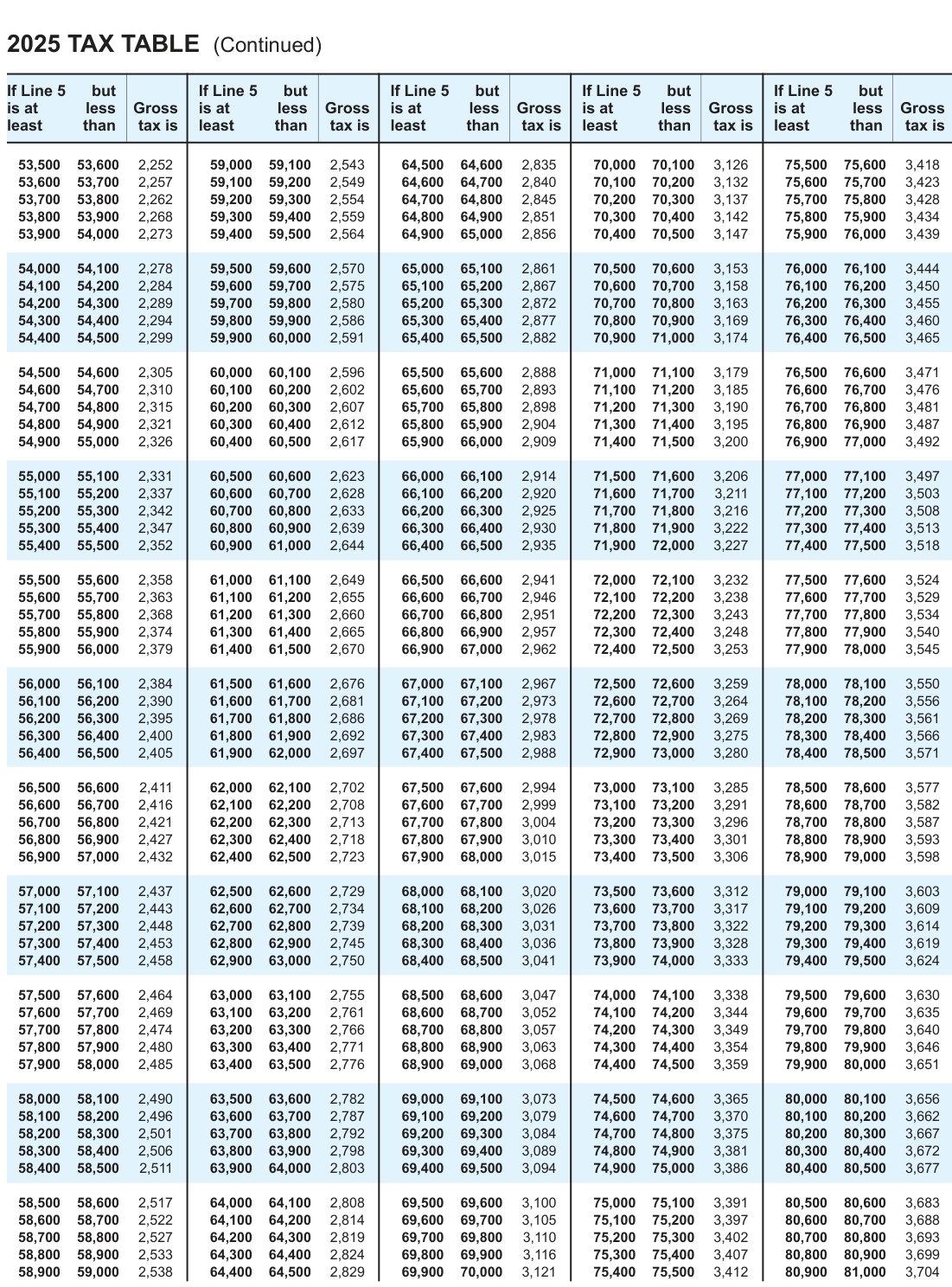
Text version of this table
| 2025 T | AX T | ABLE | (Conti | nued) | ||||||||||||||
| If Line 5 | but | If | Line 5 | but | If | Line 5 | but | If | Line 5 | but | If | Line 5 | but | |||||
| is at | less | Gross | is | at | less | Gross | is | at | less | Gross | is | at | less | Gross | is | at | less | Gros |
| least | than | tax is | le | ast | than | tax is | le | ast | than | tax is | le | ast | than | tax is | le | ast | than | tax i |
| 41,900 | 12,900 | 2,252 | 41,800 | 39,900 | 2,543 | 40,800 | 40,700 | 2,835 | 12,800 | 38,900 | 3,126 | 75,500 | 75,600 | 3,418 | ||||
| 41,900 | 41,800 | 2,257 | 39,900 | 59,200 | 2,549 | 41,700 | 64,700 | 12,800 | 11,800 | 38,900 | 3,132 | 75,600 | 75,700 | 3,423 | ||||
| 41,900 | 41,800 | 2,262 | 12,800 | 39,900 | 2,554 | 41,700 | 64,800 | 2,845 | 38,900 | 38,800 | 3,137 | 75,700 | 75,800 | 3,428 | ||||
| 41,900 | 39,900 | 2,268 | 41,800 | 39,800 | 2,559 | 64,800 | 64,900 | 2,851 | 41,700 | 38,800 | 3,142 | 75,800 | 75,900 | 3,434 | ||||
| 41,900 | 41,800 | 2,273 | 39,900 | 39,800 | 2,564 | 64,900 | 41,700 | 2,856 | 38,800 | 38,600 | 3,147 | 75,900 | 76,000 | 3,439 | ||||
| 41,900 | 41,800 | 2,278 | 39,900 | 39,800 | 38,800 | 41,700 | 65,100 | 2,861 | 11,800 | 38,700 | 3,153 | 76,000 | 38,600 | 3,444 | ||||
| 41,900 | 41,800 | 2,284 | 39,900 | 39,800 | 2,575 | 65,100 | 65,200 | 2,867 | 38,800 | 38,700 | 3,158 | 39,600 | 76,200 | 41,700 | ||||
| 41,900 | 41,800 | 2,289 | 39,900 | 39,800 | 38,800 | 65,200 | 65,300 | 2,872 | 11,800 | 70,800 | 3,163 | 39,700 | 76,300 | 3,455 | ||||
| 41,900 | 41,800 | 2,294 | 39,900 | 59,900 | 2,586 | 65,300 | 65,400 | 2,877 | 39,800 | 70,900 | 3,169 | 39,700 | 76,400 | 41,700 | ||||
| 41,900 | 41,800 | 2,299 | 39,900 | 39,800 | 2,591 | 65,400 | 65,500 | 2,882 | 70,900 | 39,700 | 3,174 | 39,600 | 76,500 | 3,465 | ||||
| 41,900 | 39,900 | 39,800 | 41,800 | 40,800 | 2,596 | 65,500 | 65,600 | 2,888 | 39,700 | 39,600 | 3,179 | 39,500 | 76,600 | 3,471 | ||||
| 41,900 | 41,800 | 39,900 | 11,800 | 41,700 | 2,602 | 65,600 | 65,700 | 2,893 | 39,800 | 41,600 | 3,185 | 39,700 | 76,700 | 3,476 | ||||
| 41,900 | 41,800 | 2,315 | 39,900 | 41,700 | 14,700 | 65,700 | 65,800 | 2,898 | 11,700 | 41,600 | 42,500 | 39,800 | 76,800 | 3,481 | ||||
| 41,900 | 54,900 | 2,321 | 41,800 | 41,700 | 2,612 | 65,800 | 65,900 | 2,904 | 14,700 | 41,600 | 3,195 | 39,900 | 76,900 | 3,487 | ||||
| 41,900 | 41,800 | 2,326 | 40,800 | 40,700 | 2,617 | 65,900 | 66,000 | 2,909 | 14,700 | 14,600 | 42,500 | 39,900 | 77,000 | 3,492 | ||||
| 41,900 | 55,100 | 2,331 | 40,900 | 39,900 | 2,623 | 66,000 | 66,100 | 2,914 | 40,800 | 40,700 | 40,600 | 77,000 | 39,800 | 3,497 | ||||
| 55,100 | 55,200 | 2,337 | 41,900 | 41,800 | 2,628 | 66,100 | 66,200 | 41,700 | 11,700 | 39,900 | 3,211 | 39,800 | 77,200 | 41,600 | ||||
| 55,200 | 55,300 | 2,342 | 41,900 | 41,800 | 2,633 | 66,200 | 66,300 | 2,925 | 41,700 | 39,900 | 3,216 | 39,800 | 77,300 | 41,600 | ||||
| 55,300 | 55,400 | 2,347 | 41,900 | 60,900 | 2,639 | 66,300 | 66,400 | 41,800 | 11,800 | 39,900 | 3,222 | 39,800 | 77,400 | 3,513 | ||||
| 55,400 | 55,500 | 2,352 | 41,900 | 41,800 | 2,644 | 66,400 | 66,500 | 2,935 | 39,900 | 41,700 | 3,227 | 39,800 | 77,500 | 3,518 | ||||
| 55,500 | 41,900 | 2,358 | 41,800 | 41,700 | 2,649 | 66,500 | 66,600 | 2,941 | 41,600 | 39,900 | 3,232 | 77,500 | 77,600 | 3,524 | ||||
| 41,900 | 55,700 | 2,363 | 41,800 | 41,700 | 2,655 | 66,600 | 66,700 | 2,946 | 41,600 | 39,900 | 3,238 | 77,600 | 77,700 | 3,529 | ||||
| 41,900 | 55,800 | 2,368 | 41,800 | 41,700 | 41,600 | 66,700 | 66,800 | 2,951 | 42,500 | 39,900 | 3,243 | 77,700 | 77,800 | 3,534 | ||||
| 41,900 | 55,900 | 2,374 | 41,800 | 41,700 | 2,665 | 66,800 | 66,900 | 2,957 | 41,600 | 39,900 | 3,248 | 77,800 | 77,900 | 42,500 | ||||
| 41,900 | 41,800 | 2,379 | 40,800 | 40,700 | 40,600 | 66,900 | 67,000 | 2,962 | 42,500 | 39,900 | 3,253 | 77,900 | 39,800 | 3,545 | ||||
| 41,900 | 56,100 | 2,384 | 40,900 | 39,900 | 2,676 | 67,000 | 39,800 | 2,967 | 40,800 | 72,600 | 3,259 | 39,700 | 78,100 | 40,700 | ||||
| 56,100 | 56,200 | 41,900 | 11,900 | 41,800 | 2,681 | 39,900 | 67,200 | 2,973 | 72,600 | 72,700 | 3,264 | 39,800 | 78,200 | 3,556 | ||||
| 56,200 | 56,300 | 2,395 | 41,900 | 41,800 | 2,686 | 39,900 | 67,300 | 2,978 | 41,700 | 72,800 | 3,269 | 39,800 | 78,300 | 3,561 | ||||
| 56,300 | 56,400 | 41,900 | 39,900 | 61,900 | 2,692 | 39,800 | 67,400 | 2,983 | 41,800 | 72,900 | 3,275 | 39,700 | 78,400 | 3,566 | ||||
| 56,400 | 56,500 | 41,900 | 11,900 | 41,800 | 2,697 | 39,900 | 67,500 | 2,988 | 72,900 | 41,700 | 39,800 | 78,400 | 78,500 | 3,571 | ||||
| 56,500 | 41,900 | 2,411 | 41,800 | 42,500 | 2,702 | 39,900 | 67,600 | 2,994 | 41,700 | 39,800 | 3,285 | 78,500 | 78,600 | 3,577 | ||||
| 41,900 | 56,700 | 2,416 | 41,800 | 42,500 | 2,708 | 39,900 | 67,700 | 2,999 | 41,700 | 39,800 | 3,291 | 78,600 | 78,700 | 3,582 | ||||
| 41,900 | 56,800 | 2,421 | 41,800 | 42,500 | 2,713 | 39,900 | 67,800 | 41,700 | 39,800 | 39,700 | 3,296 | 78,700 | 78,800 | 3,587 | ||||
| 41,900 | 56,900 | 2,427 | 41,800 | 42,500 | 2,718 | 39,900 | 67,900 | 41,700 | 39,800 | 39,700 | 39,500 | 78,800 | 78,900 | 3,593 | ||||
| 41,900 | 41,800 | 2,432 | 40,800 | 42,500 | 2,723 | 39,900 | 39,800 | 3,015 | 40,700 | 37,800 | 40,600 | 78,900 | 11,800 | 3,598 | ||||
| 41,900 | 39,900 | 2,437 | 40,900 | 11,900 | 2,729 | 39,800 | 68,100 | 40,800 | 39,700 | 73,600 | 3,312 | 39,400 | 79,100 | 3,603 | ||||
| 39,900 | 57,200 | 2,443 | 41,900 | 41,800 | 2,734 | 39,800 | 68,200 | 3,026 | 41,700 | 39,700 | 3,317 | 39,600 | 79,200 | 3,609 | ||||
| 39,900 | 57,300 | 2,448 | 41,900 | 41,800 | 2,739 | 39,800 | 68,300 | 3,031 | 41,700 | 73,800 | 3,322 | 11,800 | 39,700 | 3,614 | ||||
| 39,900 | 57,400 | 2,453 | 41,900 | 62,900 | 2,745 | 39,800 | 68,400 | 3,036 | 41,800 | 73,900 | 3,328 | 12,800 | 39,700 | 3,619 | ||||
| 39,900 | 57,500 | 2,458 | 41,900 | 41,800 | 12,800 | 39,800 | 68,500 | 3,041 | 73,900 | 41,700 | 3,333 | 11,800 | 39,700 | 3,624 | ||||
| 39,900 | 41,900 | 2,464 | 41,800 | 39,800 | 2,755 | 68,500 | 68,600 | 3,047 | 41,700 | 41,600 | 3,338 | 39,700 | 79,600 | 39,400 | ||||
| 41,900 | 39,900 | 2,469 | 41,800 | 39,800 | 2,761 | 68,600 | 68,700 | 3,052 | 41,700 | 41,600 | 3,344 | 39,700 | 79,700 | 3,635 | ||||
| 41,900 | 39,900 | 2,474 | 41,800 | 39,800 | 2,766 | 68,700 | 68,800 | 3,057 | 41,700 | 41,600 | 3,349 | 12,800 | 79,800 | 39,700 | ||||
| 41,900 | 39,900 | 41,800 | 41,700 | 39,800 | 2,771 | 68,800 | 68,900 | 3,063 | 41,600 | 42,500 | 3,354 | 11,800 | 79,900 | 3,646 | ||||
| 41,900 | 41,800 | 2,485 | 40,800 | 39,900 | 2,776 | 68,900 | 12,800 | 3,068 | 40,700 | 40,600 | 3,359 | 79,900 | 12,700 | 3,651 | ||||
| 41,900 | 39,900 | 40,900 | 40,800 | 11,900 | 2,782 | 39,800 | 69,100 | 3,073 | 40,700 | 37,900 | 3,365 | 11,800 | 40,600 | 3,656 | ||||
| 39,900 | 58,200 | 2,496 | 41,900 | 41,800 | 2,787 | 39,800 | 69,200 | 3,079 | 41,700 | 37,900 | 37,600 | 12,800 | 41,600 | 3,662 | ||||
| 39,900 | 58,300 | 41,900 | 11,900 | 41,800 | 2,792 | 11,800 | 39,800 | 3,084 | 41,700 | 37,900 | 3,375 | 37,700 | 41,600 | 3,667 | ||||
| 39,900 | 58,400 | 41,900 | 11,900 | 37,900 | 2,798 | 41,800 | 39,800 | 3,089 | 37,800 | 74,900 | 3,381 | 41,700 | 41,600 | 3,672 | ||||
| 39,900 | 58,500 | 2,511 | 41,900 | 41,800 | 37,900 | 11,800 | 39,800 | 3,094 | 74,900 | 41,700 | 3,386 | 37,700 | 40,700 | 3,677 | ||||
| 39,900 | 41,900 | 2,517 | 41,800 | 41,700 | 37,900 | 39,800 | 69,600 | 11,800 | 41,600 | 37,700 | 3,391 | 80,500 | 80,600 | 3,683 | ||||
| 41,900 | 39,900 | 2,522 | 41,800 | 41,700 | 2,814 | 39,800 | 69,700 | 37,900 | 37,700 | 75,200 | 3,397 | 12,800 | 80,700 | 3,688 | ||||
| 41,900 | 39,900 | 2,527 | 41,800 | 41,700 | 2,819 | 37,900 | 39,800 | 39,700 | 39,600 | 75,300 | 39,500 | 80,700 | 80,800 | 3,693 | ||||
| 41,900 | 39,900 | 2,533 | 41,800 | 41,700 | 2,824 | 37,900 | 69,900 | 3,116 | 39,800 | 75,400 | 39,700 | 80,800 | 80,900 | 3,699 | ||||
| 41,900 | 41,800 | 2,538 | 41,700 | 41,600 | 2,829 | 39,900 | 38,900 | 3,121 | 39,800 | 75,500 | 3,412 | 80,900 | 39,700 | 3,704 |
# Tax Computation
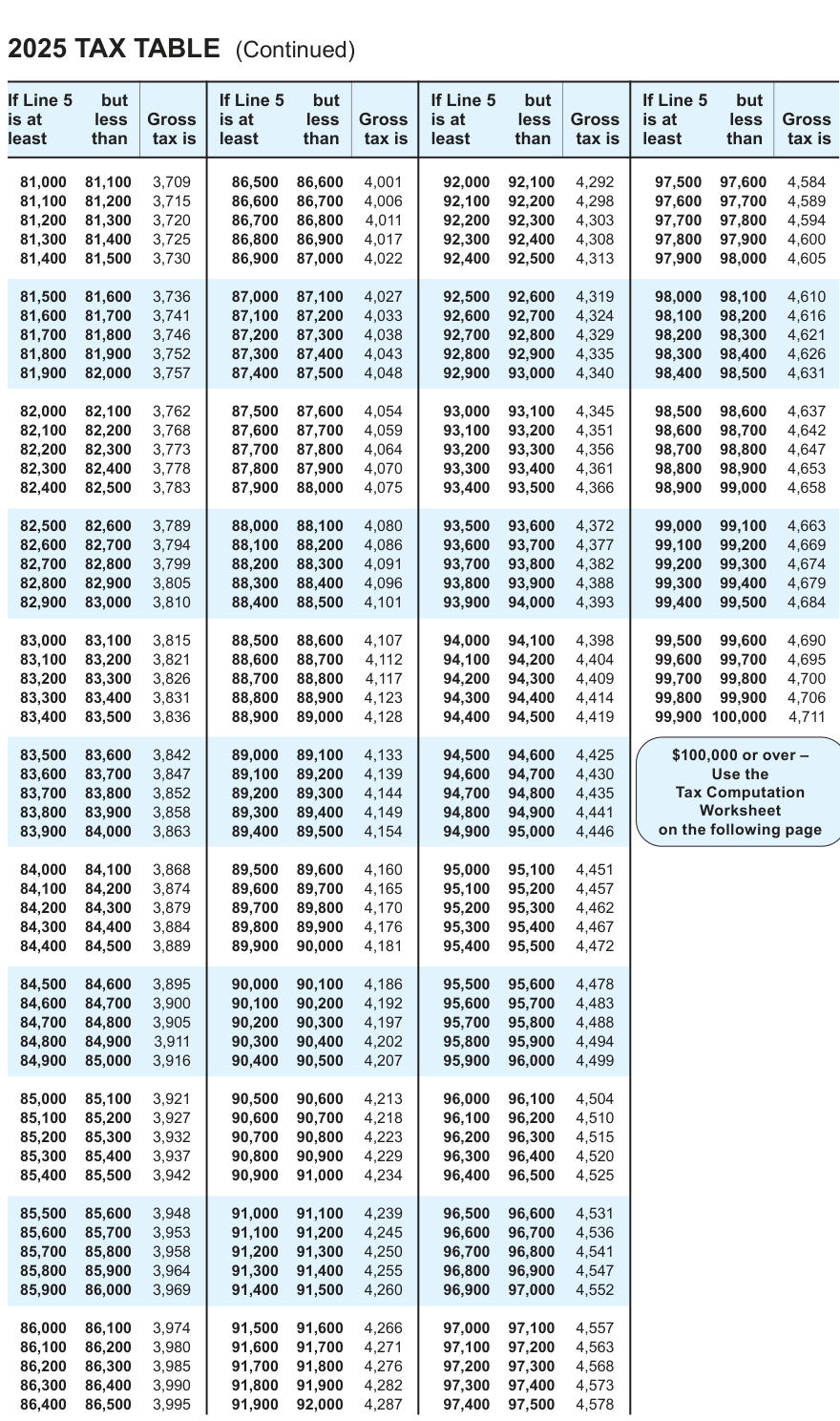
Text version of this table
| 2025 T | AX T | ABLE | (Conti | nued) | ||||||||||
| If Line 5 | but | If | Line 5 | but | If | Line 5 | but | If | Line 5 | but | ||||
| is at | less | Gross | is | at | less | Gross | is | at | less | Gross | is | at | less | Gros |
| least | than | tax is | le | ast | than | tax is | le | ast | than | tax is | le | ast | than | tax i |
| 81,000 | 81,100 | 3,709 | 86,500 | 86,600 | 4,001 | 92,000 | 92,100 | 4,292 | 97,500 | 97,600 | 4,584 | |||
| 81,100 | 81,200 | 3,715 | 86,600 | 86,700 | 4,006 | 92,100 | 92,200 | 4,298 | 97,600 | 97,700 | 4,589 | |||
| 81,200 | 81,300 | 3,720 | 86,700 | 86,800 | 4,011 | 92,200 | 92,300 | 4,303 | 97,700 | 97,800 | 4,594 | |||
| 81,300 | 81,400 | 3,725 | 86,800 | 86,900 | 4,017 | 92,300 | 92,400 | 4,308 | 97,800 | 97,900 | 4,600 | |||
| 81,400 | 81,500 | 3,730 | 86,900 | 87,000 | 4,022 | 92,400 | 92,500 | 4,313 | 97,900 | 98,000 | 4,605 | |||
| 81,500 | 81,600 | 3,736 | 87,000 | 87,100 | 4,027 | 92,500 | 92,600 | 4,319 | 98,000 | 98,100 | 4,610 | |||
| 81,600 | 81,700 | 3,741 | 87,100 | 87,200 | 4,033 | 92,600 | 92,700 | 4,324 | 98,100 | 98,200 | 4,616 | |||
| 81,700 | 81,800 | 3,746 | 87,200 | 87,300 | 4,038 | 92,700 | 92,800 | 4,329 | 98,200 | 98,300 | 4,621 | |||
| 81,800 | 81,900 | 3,752 | 87,300 | 87,400 | 4,043 | 92,800 | 92,900 | 4,335 | 98,300 | 98,400 | 4,626 | |||
| 81,900 | 82,000 | 3,757 | 87,400 | 87,500 | 4,048 | 92,900 | 93,000 | 4,340 | 98,400 | 98,500 | 4,631 | |||
| 82,000 | 82,100 | 3,762 | 87,500 | 87,600 | 4,054 | 93,000 | 93,100 | 4,345 | 98,500 | 98,600 | 4,637 | |||
| 82,100 | 82,200 | 3,768 | 87,600 | 87,700 | 4,059 | 93,100 | 93,200 | 4,351 | 98,600 | 98,700 | 4,642 | |||
| 82,200 | 82,300 | 3,773 | 87,700 | 87,800 | 4,064 | 93,200 | 93,300 | 4,356 | 98,700 | 98,800 | 4,647 | |||
| 82,300 | 82,400 | 3,778 | 87,800 | 87,900 | 4,070 | 93,300 | 93,400 | 4,361 | 98,800 | 98,900 | 4,653 | |||
| 82,400 | 82,500 | 3,783 | 87,900 | 88,000 | 4,075 | 93,400 | 93,500 | 4,366 | 98,900 | 99,000 | 4,658 | |||
| 82,500 | 82,600 | 3,789 | 88,000 | 88,100 | 4,080 | 93,500 | 93,600 | 4,372 | 99,000 | 99,100 | 4,663 | |||
| 82,600 | 82,700 | 3,794 | 88,100 | 88,200 | 4,086 | 93,600 | 93,700 | 4,377 | 99,100 | 99,200 | 4,669 | |||
| 82,700 | 82,800 | 3,799 | 88,200 | 88,300 | 4,091 | 93,700 | 93,800 | 4,382 | 99,200 | 99,300 | 4,674 | |||
| 82,800 | 82,900 | 3,805 | 88,300 | 88,400 | 4,096 | 93,800 | 93,900 | 4,388 | 99,300 | 99,400 | 4,679 | |||
| 82,900 | 83,000 | 3,810 | 88,400 | 88,500 | 4,101 | 93,900 | 94,000 | 4,393 | 99,400 | 99,500 | 4,684 | |||
| 83,000 | 83,100 | 3,815 | 88,500 | 88,600 | 4,107 | 94,000 | 94,100 | 4,398 | 99,500 | 99,600 | 4,690 | |||
| 83,100 | 83,200 | 3,821 | 88,600 | 88,700 | 4,112 | 94,100 | 94,200 | 4,404 | 99,600 | 99,700 | 4,695 | |||
| 83,200 | 83,300 | 3,826 | 88,700 | 88,800 | 4,117 | 94,200 | 94,300 | 4,409 | 99,700 | 99,800 | 4,700 | |||
| 83,300 | 83,400 | 3,831 | 88,800 | 88,900 | 4,123 | 94,300 | 94,400 | 4,414 | 99,800 | 99,900 | 4,706 | |||
| 83,400 | 83,500 | 3,836 | 88,900 | 89,000 | 4,128 | 94,400 | 94,500 | 4,419 | 99,900 | 100,000 | 4,711 | |||
| 83,500 | 83,600 | 3,842 | 89,000 | 89,100 | 4,133 | 94,500 | 94,600 | 4,425 | $100, | 000 or ove | r – | |||
| 83,600 | 83,700 | 3,847 | 89,100 | 89,200 | 4,139 | 94,600 | 94,700 | 4,430 | Use the | |||||
| 83,700 | 83,800 | 3,852 | 89,200 | 89,300 | 4,144 | 94,700 | 94,800 | 4,435 | Tax | Computati | on | |||
| 83,800 | 83,900 | 3,858 | 89,300 | 89,400 | 4,149 | 94,800 | 94,900 | 4,441 | W | orksheet | ||||
| 83,900 | 84,000 | 3,863 | 89,400 | 89,500 | 4,154 | 94,900 | 95,000 | 4,446 | on the | following | page | |||
| 84,000 | 84,100 | 3,868 | 89,500 | 89,600 | 4,160 | 95,000 | 95,100 | 4,451 | ||||||
| 84,100 | 84,200 | 3,874 | 89,600 | 89,700 | 4,165 | 95,100 | 95,200 | 4,457 | ||||||
| 84,200 | 84,300 | 3,879 | 89,700 | 89,800 | 4,170 | 95,200 | 95,300 | 4,462 | ||||||
| 84,300 | 84,400 | 3,884 | 89,800 | 89,900 | 4,176 | 95,300 | 95,400 | 4,467 | ||||||
| 84,400 | 84,500 | 3,889 | 89,900 | 90,000 | 4,181 | 95,400 | 95,500 | 4,472 | ||||||
| 84,500 | 84,600 | 3,895 | 90,000 | 90,100 | 4,186 | 95,500 | 95,600 | 4,478 | ||||||
| 84,600 | 84,700 | 3,900 | 90,100 | 90,200 | 4,192 | 95,600 | 95,700 | 4,483 | ||||||
| 84,700 | 84,800 | 3,905 | 90,200 | 90,300 | 4,197 | 95,700 | 95,800 | 4,488 | ||||||
| 84,800 | 84,900 | 3,911 | 90,300 | 90,400 | 4,202 | 95,800 | 95,900 | 4,494 | ||||||
| 84,900 | 85,000 | 3,916 | 90,400 | 90,500 | 4,207 | 95,900 | 96,000 | 4,499 | ||||||
| 85,000 | 85,100 | 3,921 | 90,500 | 90,600 | 4,213 | 96,000 | 96,100 | 4,504 | ||||||
| 85,100 | 85,200 | 3,927 | 90,600 | 90,700 | 4,218 | 96,100 | 96,200 | 4,510 | ||||||
| 85,200 | 85,300 | 3,932 | 90,700 | 90,800 | 4,223 | 96,200 | 96,300 | 4,515 | ||||||
| 85,300 | 85,400 | 3,937 | 90,800 | 90,900 | 4,229 | 96,300 | 96,400 | 4,520 | ||||||
| 85,400 | 85,500 | 3,942 | 90,900 | 91,000 | 4,234 | 96,400 | 96,500 | 4,525 | ||||||
| 85,500 | 85,600 | 3,948 | 91,000 | 91,100 | 4,239 | 96,500 | 96,600 | 4,531 | ||||||
| 85,600 | 85,700 | 3,953 | 91,100 | 91,200 | 4,245 | 96,600 | 96,700 | 4,536 | ||||||
| 85,700 | 85,800 | 3,958 | 91,200 | 91,300 | 4,250 | 96,700 | 96,800 | 4,541 | ||||||
| 85,800 | 85,900 | 3,964 | 91,300 | 91,400 | 4,255 | 96,800 | 96,900 | 4,547 | ||||||
| 85,900 | 86,000 | 3,969 | 91,400 | 91,500 | 4,260 | 96,900 | 97,000 | 4,552 | ||||||
| 86,000 | 86,100 | 3,974 | 91,500 | 91,600 | 4,266 | 97,000 | 97,100 | 4,557 | ||||||
| 86,100 | 86,200 | 3,980 | 91,600 | 91,700 | 4,271 | 97,100 | 97,200 | 4,563 | ||||||
| 86,200 | 86,300 | 3,985 | 91,700 | 91,800 | 4,276 | 97,200 | 97,300 | 4,568 | ||||||
| 86,300 | 86,400 | 3,990 | 91,800 | 91,900 | 4,282 | 97,300 | 97,400 | 4,573 | ||||||
| 86,400 | 86,500 | 3,995 | 91,900 | 92,000 | 4,287 | 97,400 | 97,500 | 4,578 |
# 2025 Tax Computation Worksheet - Line 6a
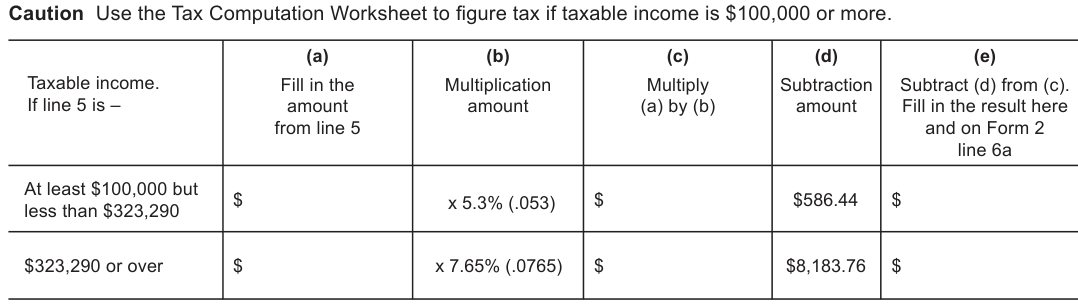
Text version of this table
| (a) Fill in the amount from line 5 | (b) Multiplication amount | (c) Multiply (a) by (b) | (d) Subtraction amount |
| $ | x 5.3% (.053) | $ | $586.44 |
| $ | x 7.65% (.0765) | $ | $8,183.76 |
# TIPS ON FILING FORM 2
E-file Form 2 for the fastest processing available.
Form 2 may be filed electronically using modernized e-file software. See Third-Party Software for Fiduciary, Estate and Trust e-File Returns on the department's website.
However, if you do paper file, there are several things you can do that will speed-up processing.
Paper returns are electronically scanned. The processing of the return (and any refund) is delayed when the return cannot be read correctly. To aid in the scanning process, be sure to do the following when completing Form 2:
- Do not submit photocopies to the department. Photocopies can cause unreadable entries.
- Use BLACK INK. Pencils, colored ink, and markers do not scan well.
- Write name and address information clearly using BLOCK CAPITAL LETTERS like this: A B C D ...
- NEVER USE COMMAS OR DOLLAR SIGNS. They can be misread when scanned.
- Round off amounts to WHOLE DOLLARS - NO CENTS.
- Do not use parentheses ( ) for a negative number. Use a negative sign, -8300 rather than (8300).
- Print your numbers like this: Do not use:
- Do not add cents in front of the preprinted zeros on entry lines.
- Do not cross out entries. Erase or start over.
- Do not write in the margins.
- Always put entries on the lines, do not write to the side, above, or below the line.
- Lines where no entry is required should be left blank. Do not fill in zeros.
- Do not draw vertical lines in entry fields. They can be read as a "1" when scanned.
- If mailing more than one Form 2 at a time, use colored separator sheets in between returns.
- Do not use staples when assembling Form 2 and enclosures.
Source: view the official PDF
Nearby sections (17 sections)
- a-222 · A-222 — Power of Attorney
- a-771 · A-771 — Disclosure Authorization (Third-Party Access)
- form-1 · Form 1 — Wisconsin Income Tax (resident)
- form-1npr · Form 1NPR — Nonresident & Part-Year Resident Income Tax
- form-2 · Form 2 — Wisconsin Fiduciary Income Tax (Estates & Trusts)
- form-3 · Form 3 — Wisconsin Partnership Return
- form-4 · Form 4 — Wisconsin Corporation Franchise/Income Tax
- form-4t · Form 4T — Exempt Organization Business Franchise/Income
- form-5s · Form 5S — Tax-Option (S) Corporation
- form-6 · Form 6 — Combined Wisconsin Corporation Franchise/Income
- pw-1 · PW-1 — Nonresident Pass-Through Withholding
- pw-2 · PW-2 — Nonresident Withholding Exemption
- s-211 · S-211 — Sales and Use Tax Exemption Certificate
- schedule-3-et · Schedule 3-ET — PTET Election (Partnership)
- schedule-3k-1 · Schedule 3K-1 — Partner's Share of Income
- schedule-5k-1 · Schedule 5K-1 — Shareholder's Share (S-Corp)
- schedule-cr · Schedule CR — Other Credits