Wisconsin Department of Revenue Form Instructions
Form 1 — Wisconsin Income Tax (resident)
Wisconsin Income Tax
Form 1 Instructions
Use WisTax to electronically file your Wisconsin individual income tax return (Form 1) and standalone homestead credit claim (Schedule H) for free (see page 5).
Use My Tax Account (MTA) to manage and protect your Wisconsin tax account. MTA allows taxpayers to:
- File with WisTax
- Sign up for Wisconsin Identity Protection PIN (see page 34)
- View and schedule estimated payments and cancel previously scheduled payments
- Opt in to receive electronic notices - no need to wait for the mail
- Check refund status and more New in 2025 New Retirement Income Subtraction - Individuals who are at least 67 years old at the end of 2025 may subtract up to $24,000 of retirement income. See the Schedule SB instructions.
College Savings Account - The subtraction for contributions to a Wisconsin state-sponsored college savings account is increased to $5,130 per beneficiary ($2,560 per beneficiary if you are married and file a separate return). See the Schedule CS instructions.
Tuition and Fee Expenses - The subtraction for tuition and fees increased to $7,649 per student and the phase-out range increased.
See the Schedule SB instructions.
Adoption Expenses Subtraction - The maximum subtraction for expenses paid for a qualifying adoption is now $15,000 per child.
See the Schedule SB Instructions.
Reminder
IRS Adjustments - If the IRS adjusted any of your federal income tax returns, you must notify us within 180 days of any adjustment affecting your Wisconsin income tax returns. See page 9.
# WIS MY TAX TAX ACCOUNT
Tax returns are due:
Wednesday
April 15, 2026
Free help with your taxes
You may be eligible for free tax help. See page 2 for:
- Who can get help
- How to find a location
- What to bring with you
# Para Assistencia Gratuita en Español
Ver página 2
FEDERAL PRIVACY ACT In compliance with federal law, you are hereby notified that the request for your Social Security number on the Wisconsin income tax return is made under the authority of sec. 71.03(6)(a) of the Wisconsin Statutes. The disclosure of this number on your return is mandatory. It will be used for identification purposes throughout the processing, filing and auditing of your return, and issuing refund checks.
I-111
Para ayuda gratuita para la declaración de sus impuestos y de el Crédito por Vivienda Familiar, llame al "211" para encontrar un sitio de Asistencia de Voluntarios para Impuestos (Volunteer Income Tax Assistance también conocido como VITA) cerca de usted. Muchos lugares ofrecen servicios en español.
Para respuestas a las preguntas sobre impuestos, por favor llame el Departamento de Impuestos al (608) 266-2486 para impuestos individuales y al (608) 266-2776 para impuestos de negocios. Oprima el "2" para ayuda en español.
Para más información, visite revenue.wi.gov, en el vinculo (link) "En Español" usted encontrará información sobre el Credito por Ingreso de Trabajo, información del Crédito por Vivienda Familiar, y mucho más - todo disponible en español.
# Servicio en Español
Free Tax Preparation Available (commonly referred to as VITA or TCE)
Need help filing your taxes?
Wisconsin residents can have their taxes prepared for free at any IRS sponsored Volunteer Income Tax Assistance (VITA) site or at any AARP sponsored Tax Counseling for the Elderly (TCE) site. These two programs have helped millions of individuals across the country in preparing their taxes. Trained volunteers will fill out your tax return. Many sites will even e-file your return.
Who can use these services?
- Low to moderate income individuals • Individuals with disabilities • Elderly individuals
- Individuals who qualify for the homestead credit or the earned income tax credit
What should you bring?
- W-2 wage and tax statements • Information on other sources of income and any deductions
- Photo ID of taxpayer(s) • Social security cards of taxpayer(s) and dependents
- If you are claiming a homestead credit, bring a • Both spouses must be present to file a joint return completed rent certificate or a copy of your 2025 property tax bill, a record of any Wisconsin Works (W2) payments received in 2025, and a statement from your physician or the Veteran's Administration, or a document from the Social Security Administration if disabled and under age 62
VITA and TCE locations:
- In Wisconsin, call 1-800-906-9887 • Visit revenue.wi.gov and search "VITA sites"
- Call the AARP at 1-888-227-7669 • Call "211" for local free tax sites
# Table of Contents
Page
General Instructions … 3
- Which Form to File … 3
- Who Must File … 3
- Age … 3
- Other Filing Requirements … 3
- Who Should File … 4
- How To Get An Extension Of Time To File … 4
- Filing Your Return … 4
- Questions About Refunds … 6
- Amending Your Return … 7
Special Instructions … 9
Tax Help / Resources … 11
Line Instructions … 12
2025 Standard Deduction Table … 35 2025 Tax Table … 38 2025 Tax Computation Worksheet … 44 Wisconsin School District Number … 45 Index … 46
# Which Form to File
You must file Form 1 if you were a full-year resident of Wisconsin. You must file Form 1NPR if you:
- Were domiciled* in another state or country at any time during the year, OR
- Are married filing a joint return and your spouse was domiciled* in another state or country at any time during the year.
*Your domicile is your true, fixed, and permanent home to which, whenever absent, you intend to return. You can be physically present or residing in one locality but maintain your domicile in another.
Your domicile, once established, does not change unless all three of the following circumstances occur or exist:
(1) You intend to abandon your old domicile and take actions consistent with that intent
(2) You intend to acquire a new domicile and take actions consistent with that intent
(3) You are physically present in the new domicile
Service members and their spouses State tax residence for service members and their spouses is controlled in part by 50 U.S.C. 4001. See Publication 128, Wisconsin Tax Information for Military Personnel and Veterans, for more information. If you are married and filing jointly, both spouses must be a full-year resident of Wisconsin or elect to claim Wisconsin as their state of residence to file on Form 1.
# Who Must File
Refer to the table to see if you are required to file a return for 2025.
Age as of
Filing status December 31, 2025 Single Under 65 65 or older Married-filing joint Both spouses under 65 return One spouse 65 or older Both spouses 65 or older Married-filing separate Under 65 return 65 or older Head of household Under 65 65 or older
You must file if your gross income*
(or total gross income of a married couple) during 2025 was:
$14,260 or more
$14,510 or more
$26,510 or more
$26,760 or more
$27,010 or more
$12,630 or more
$12,880 or more (applies to each spouse individually) $18,220 or more $18,470 or more
- Gross income means all income (before deducting expenses) reportable to Wisconsin. The income may be received in the form of money, property, or services. It does not include items that are exempt from Wisconsin tax. For example, it does not include social security benefits or U.S. government interest.
Age
If your birthday falls on January 1, 2026, you are considered to be a year older as of December 31, 2025. Example: If you were born on January 1, 1961, you are considered to be age 65 as of December 31, 2025.
Other Filing Requirements
You may have to file a return even if your income is less than the amounts shown on the table. You must file a return for 2025 if:
- You could be claimed as a dependent on someone else's return and either of the following applies: (1) Your gross income was more than $1,350 and it included at least $451 of unearned income, or (2) Your gross income (total unearned income and earned income) was more than -$13,560 if single, $17,520 if head of household, $25,110 if married filing jointly, or $11,930 if married filing separately.
Unearned income includes taxable interest, dividends, capital gain distributions, and taxable scholarship and fellowship grants that were not reported to you on a Form W-2. Earned income includes wages, tips, self-employment income, and scholarship and fellowship grants that were reported to you on a Form W-2.
- You owe a penalty on an IRA, retirement plan, Coverdell education savings account (excess contribution), ABLE account, health savings account, or Archer medical savings account.
- You were a nonresident or part-year resident of Wisconsin for 2025 and your gross income was $2,000 or more. If you were married, you must file a return on Form 1NPR if the combined gross income of you and your spouse was $2,000 or more. A return does not have to be filed by a nonresident of Wisconsin if all income is exempt from tax as disaster relief work performed during a state of emergency declared by the Governor. For further information, see Publication 411, Disaster Relief.
# Who Should File
Even if you do not have to file, you should file to get a refund if:
- You had Wisconsin income tax withheld from your wages
- You paid estimated taxes for 2025
- You claim the earned income credit or the veterans and surviving spouses property tax credit
# How To Get An Extension Of Time To File
Your return is due April 15, 2026.
If you cannot file on time, you can get an extension. You can use any federal extension provision for Wisconsin, even if you are filing your federal return by April 15.
How to get an extension You do not need to submit a request for an extension to us prior to the time you file your Wisconsin return. When you file your Form 1 include either of the following:
- A copy of your federal extension application (for example, Form 4868)
- A statement indicating which federal extension provision you want to apply for Wisconsin (for example, the federal automatic 6-month extension provision) Note You will owe interest on any tax that you have not paid by April 15, 2026. This applies even though you may have an extension of time to file. If you do not file your return by April 15, 2026, or during an extension period, you may have to pay additional interest and penalties. If you expect to owe tax with your return, you can avoid the 1% per month interest charge during the extension period by paying the tax by April 15, 2026. Submit the payment with a 2025 Wisconsin Form 1-ES. You can get this form by using our estimated income tax interactive voucher on our website. Use Form 1-ES to make an extension payment even if you will be filing your return electronically - do not use Form PV. Exception: You will not be charged interest during an extension period if (1) you qualify for a federal extension because of service in a combat zone or contingency operation, or (2) you qualify for a federal extension due to a federally declared disaster. See Special Conditions below.
If you were a farmer or fisher and you did not make estimated tax payments, you must file your return and pay any tax due by March 2, 2026, to avoid paying interest for underpayment of estimated tax. Farmers and fishers are individuals who earn at least two-thirds of their gross income (gross income of both spouses if married filing a joint return) from farming or fishing.
Special Conditions A "Special Conditions" section is located to the right of the Filing Status section on page 1 of Form 1. If you qualify for an extension because of service in a combat zone or contingency operation, enter "02" in the box. If you qualify for a 2-month extension because you live outside or are on duty in military or naval service outside the United States and Puerto Rico on the due date of the return, enter "18" in the box. If you qualify for an extension because of a federally declared disaster, enter "03" in the box and indicate the specific disaster on the line provided.
# Filing Your Return
Preparing to file
Before filing your return, follow the steps below in the order listed:
- Gather your records - Make sure that you have all of your income expense records (for example, wage, interest, and dividend statements)
- Electronic filing (e-filing) vs. paper filing - If you e-file, follow the instructions included in your software; otherwise, for paper filing, continue with step 3
- Complete federal return - Complete your federal return and its supporting schedules; however, if you are not required to file a federal return, list the sources and amounts of your income and deductions on a separate sheet Electronic filing (e-filing) Electronic filing is the fastest way to get your federal and state income tax refunds. We can deposit your Wisconsin refund directly into a financial institution account.
You may pay by electronic funds transfer if you file electronically. File early and schedule payment as late as April 15. Go to revenue. wi.gov/Pages/FAQs/pcs-e-faq.aspx for more information.
There are several options to file your Wisconsin income tax return electronically:
- WisTax - WisTax is the department's free e-file application using My Tax Account. In order to use WisTax to file your individual income tax return, you must meet the requirements below. Go to our website at revenue.wi.gov/Pages/WisTax/home.aspx for more information.
- Full-year Wisconsin resident
- Have a valid Wisconsin driver's license or identification card and filed a Wisconsin individual income tax return or homestead credit claim within the past five years
- Only claiming limited additions to income on Schedule AD and/or subtractions from income on Schedule SB
- Only claiming Wisconsin tax withheld from the following forms: W-2, 1099-R, 1099-MISC, 1099-NEC, and W-2G
- Only claiming the following credits: school property tax credit, itemized deduction credit, additional child and dependent care credit, blind worker transportation services credit, married couple credit, earned income credit, and/or veterans and surviving spouses property tax credit Note: A homestead credit claim may be filed separately through WisTax. See Schedule H instructions for qualifications to claim the homestead credit through WisTax.
- Tax professional - Visit our website at revenue.wi.gov/Pages/OnlineServices/city-home.aspx for information on finding a tax professional
- Tax preparation software - Purchase off-the-shelf tax preparation software to install on your computer (see revenue.wi.gov/Pages/OnlineServices/offshelf.aspx), or connect to one of the private vendor websites that offer electronic filing (see revenue.wi.gov/Pages/OnlineServices/webased.aspx)
Paper filing
Electronic filing (e-filing) is the fastest way to receive your refund. However, if you paper file, there are several things you can do to ensure you receive your refund faster.
Important information:
- Send original copies
- Use black ink
- Clearly write your name and address using capital letters (do not use mailing labels)
- Do not use commas and dollar signs as they can be misread when scanned
- Round amounts to whole dollars
- Do not add cents in front of the preprinted zeros on entry lines
- To indicate a negative number, use a negative sign (for example, -8300 not (8300))
- Print your numbers clearly: Do not use:
- If you make a mistake, erase or start over (do not cross out entries)
- Put entries on the lines and do not write in the margins or above or below the lines
- Lines where no entry is required should be left blank (do not enter zeros)
- Do not draw vertical lines in entry fields (they can be read as an "ı" or "1" when scanned)
- Do not staple your return as stapling will delay the processing of your return and any refund
Filing your return
When filing your return, complete the steps below in the order listed:
- Complete Wisconsin return - Follow the line instructions as you fill in your return and sign your complete return (a joint return must be signed by both spouses)
- Check and assemble return - Check your return for any errors or missing documents and see below for information on how to assemble your return
- Make a copy - Make a copy of your return for your records
- Mail return - Mail your return and all required documents (see page 6 for the address)
Assembling your return
Begin by putting the five pages of Form 1 in numerical order. Then, attach, using a paper clip, the following in the order listed.
Note: If filing Form 804, Claim for Decedent's Wisconsin Income Tax Refund, with the return, place Form 804 on top of Form 1.
Do not attach a Form W-RA if you are filing your return on paper. Form W-RA is used only when submitting information for an electronically filed return.
- Payment - If you owe an amount with your return, paper clip your payment to the front of Form 1, unless you are paying by credit card or online.
- Wisconsin schedules - Copies of appropriate Wisconsin schedules and supporting documents, such as Schedule H or H-EZ (homestead credit), Schedule FC or FC-A (farmland preservation credit), or Schedule CR. If you are reporting income and expenses of a disregarded entity, attach Schedule DE, Disregarded Entity Schedule.
- Amended return - Include Schedule AR, Explanation of Amended Return, with your amended return and all supporting forms and schedules for items changed. Don't send a copy of your original return.
- Form W-2 or 1099 - The appropriate copy of each of your withholding statements (Forms W-2, W-2G, 1099-G, 1099-R, 1099-MISC, and 1099-NEC).
- Federal return - A complete copy of your federal return (Form 1040 or 1040-SR) and its supporting schedules and forms (such as federal Form 8886, Reportable Transaction Disclosure Statement.)
- Extension form or statement - A copy of your federal extension application form or required statement if you are filing under an extension of time to file.
- Divorce decree -
- Persons divorced after June 20, 1996, who compute a refund - If your divorce decree apportions any tax liability owed to the department to your former spouse, include a copy of the decree with your Form 1. Enter "04" in the Special Conditions box on page 1 of Form 1. This will prevent your refund from being applied against such tax liability.
- Persons divorced who file a joint return - If your divorce decree apportions any refund to you or your former spouse, or between you and your former spouse, the department will issue the refund to the person(s) to whom the refund is awarded under the terms of the divorce. Include a copy of the portion of your divorce decree that relates to the tax refund with your Form 1. Enter "04" in the Special Conditions box on page 1 of Form 1.
- Injured spouse - If you are filing federal Form 8379, Injured Spouse Allocation, include a copy with your Form 1. Enter "05" in the Special Conditions box on page 1 of Form 1.
CAUTION Be sure to file all five pages of Form 1. Send the original of your return. Do not send a photocopy.
# Where to File
Mail your return (an original return or amended return) to the Wisconsin Department of Revenue at:
(if payment enclosed) (if refund or no payment enclosed) (if homestead credit claimed) PO Box 268 PO Box 59 PO Box 34
# Madison WI Madison WI
53790-0001 53785-0001 53786-0001 Envelopes without enough postage will be returned to you by the post office. Your envelope may need additional postage if it contains more than five pages or is oversized (for example, it is over ¼" thick). Also, include your complete return address.
Private Delivery Services You can use certain private delivery services approved by the Internal Revenue Service (IRS) to meet the timely filing rule. The approved private delivery services are listed in the instructions for your federal tax form. Items must be delivered to Wisconsin Department of Revenue, 2135 Rimrock Rd., Madison WI 53713. Private delivery services cannot deliver items to PO boxes. The private delivery service can tell you how to get written proof of the mailing date.
# Questions About Refunds
Call: (608) 266-8100 in Madison, Visit our website at: revenue.wi.gov
(414) 227-4907 in Milwaukee, or 1-866-WIS-RFND (1-866-947-7363) toll-free within the U.S. or Canada If you need to contact us about your refund, please wait at least 12 weeks after filing your Form 1. Refund information may not be available until that time. The department may not issue a refund before March 1 unless both the individual and the individual's employer have filed all required returns and forms with the department for the taxable year for which the refund was claimed.
You may call one of the numbers listed above or write to:
Mail Stop 5-77
# Wisconsin Department of Revenue
PO Box 8949
Madison WI 53708-8949
If you call, you will need your social security number and the dollar amount of your refund.
An automated response is available when you call one of the numbers listed above. If you need to speak with a person, assistance is available Monday through Friday from 7:45 a.m. to 4:30 p.m. by calling (608) 266-2486 in Madison (long-distance charges, if applicable, will apply).
You may also get information on your refund using our secure website at revenue.wi.gov.
# Amending Your Return
File an amended return only after you file your original return. Generally, a claim for refund must be filed within 4 years after the unextended due date of your original return (for example, April 15, 2030, for 2025 calendar-year returns). However, a claim for refund to recover all or part of any tax paid as a result of an office or field audit may be filed within 4 years after the date assessed.
This applies only if you paid the tax and did not file a petition for redetermination (written appeal).
If you filed an amended return with the IRS or another state, you generally must also file an amended Wisconsin return within 180 days. You must file an amended Wisconsin return if the changes affect your Wisconsin income, any credit, or tax payable. You should also file an amended Wisconsin return to claim a refund or pay any additional tax due even though you are not amending your federal or other state return.
If your original return was filed on Form 1, you would file an amended return using Form 1 and checking the amended return space at the top of page 1. Exception: If you incurred a net operating loss (NOL) on your 2025 Form 1 and elect to carry the NOL back to 2023 and/or 2024, you must file Form X-NOL, Carryback of Wisconsin Net Operating Loss, for the appropriate year to amend your return and claim a refund.
Be sure to include Schedule AR with your amended return to explain all changes and the reason for the change.
Check the space on Form 1 to indicate your filing status on the amended return. If you are changing from separate returns to a joint return, both of you must sign the amended return. If there is any tax due, it must be paid in full. You cannot change from joint to separate returns after the due date for filing your original return has passed.
If you are changing your filing status, the amount to fill in on line 1 of Form 1 as federal adjusted gross income must be based on the same filing status used for Wisconsin. For example, you and your spouse both originally filed Form 1 as married filing a separate return. You are amending to change your filing status to married filing a joint return. The amount to fill in on line 1 must be taken from a federal return based on a married filing joint status. If you did not file a joint federal return, you should prepare a pro forma federal return using a married filing joint return status. The federal adjusted gross income and other amounts from this pro forma return are then used to complete the amended return. Follow the Form 1 instructions to complete your amended return.
If you are changing an amount on any line of Form 1, fill in the corrected amount on that line. If you are not changing an amount on a line, fill in the amount from your 2025 return as originally filed or as you later amended it. If your latest filed return was changed or audited by the department, use the corrected figures from the adjustment notice.
# Credit Repayments
If you are required to repay a Wisconsin credit, you must amend your Wisconsin return for the year in which the disposal of the property occurred to report the amount of the repayment. Report the repayment on line 26. See below for examples of credits which you may have to repay.
- State historic rehabilitation credit You may have to repay all or part of the state historic rehabilitation credit if you disposed of the property within 5 years after the date on which the preservation or rehabilitation work was complete or the Wisconsin Historical Society determines that you have not complied with all of the requirements. If sale, conveyance, or noncompliance of the property on which the historic rehabilitation credit is computed occurs during the 1st, 2nd, 3rd, 4th, or 5th year after the date on which the preservation or rehabilitation is completed, then 100%, 80%, 60%, 40%, or 20%, respectively, of the amount of the credits received for rehabilitating or preserving the property will be calculated and added back into the individual's tax liability, according to sec. 71.07(9r)(k), Wis. Stats. The repayment is made for the taxable year in which the recapture event occurs. The IRS created federal Form 4255, Recapture of Investment Credit, and the federal Form 4255 instructions in order to compute the amount of the historic rehabilitation tax credit required to be repaid. While Wisconsin has a separate historic tax credit for personal residences, federal Form 4255 can be used to determine the repayment by substituting the Wisconsin credit for the federal credit.
Example: Taxpayer completed $20,000 of historic rehabilitation expenditures which were approved on November 1, 2023.
Taxpayer computes a Wisconsin historic rehabilitation credit of $5,000 ($20,000 qualified rehabilitation expenses x 25% credit rate). Taxpayer uses $1,000 of credit to offset tax in 2023 and $2,000 of credit to offset tax in 2024. On December 1, 2025, the property is sold. The repayment is figured as follows:
- Compute the number of full years between the date the property was approved and when it was sold, and use the result to find the recapture percentage in the chart on the next page. The number of full years between November 1, 2023, and December 1, 2025, is two, so the recapture percentage is 60%.
Number of Full Years from Date Approved Recapture to Recapture Date Percentage 0 100% 1 80% 2 60% 3 40% 4 20% 5 0% 
Text version of this table
1 Total amount of historic credit used to offset tax $3,000 2 Less: Historic tax credits not used to offset tax from an additional property $ 0 3 Total (subtract line 2 from line 1) $3,000 4 Recapture percentage from table above 0.60 5 Multiply line 3 by line 4. This is the amount of repayment required on the 2025 tax return $1,800 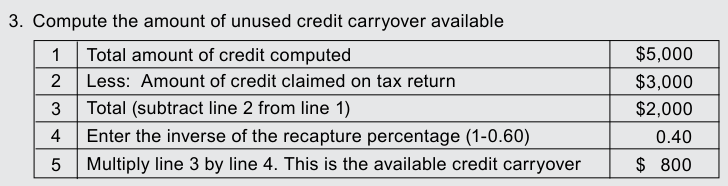
Text version of this table
1 Total amount of credit computed $5,000 2 Less: Amount of credit claimed on tax return $3,000 3 Total (subtract line 2 from line 1) $2,000 4 Enter the inverse of the recapture percentage (1-0.60) 0.40 5 Multiply line 3 by line 4. This is the available credit carryover $ 800
- Supplement to federal historic rehabilitation credit If you were required to repay to the IRS a portion of the federal historic rehabilitation credit and you claimed the same qualified rehabilitation expenditures for the Wisconsin credit, you must repay to the department a proportionate amount of the Wisconsin credit. Note: The amount of the credit recapture percentage figured for federal purposes is used for the Wisconsin credit repayment percentage, unless a different amount of qualified rehabilitation expenditures is used for the Wisconsin credit. If a different amount is used, substitute those amounts on federal Form 4255 to figure the amount of repayment for Wisconsin. Include a copy or attach a PDF of the refigured federal Form 4255 and write "Wisconsin" at the top. If you did not claim the federal historic rehabilitation tax credit and only claimed the Wisconsin supplement to federal historic rehabilitation credit, the computation for repayment of the supplement to the federal historic rehabilitation credit is the same as the computation for repayment of the state historic rehabilitation credit shown above.
- Angel investment credit or early stage seed investment credit If an investment for which you claimed the angel investment credit or early stage seed investment credit in a prior year was held for less than three years, you must repay the amount of the credit that you received related to the investment. This does not apply if the investment becomes worthless, as determined by WEDC, during the 3-year period or if you kept the investment for at least 12 months and a bona fide liquidity event, as determined by WEDC, occurs during the 3-year period.
- Low-income housing credit If the qualified basis of the qualified development is less than the amount of the qualified basis of the last day of the immediately preceding taxable year, you must repay an amount equal to the amount you were required to repay to the IRS for the federal low-income housing credit.
Applicable Laws and Rules
This document provides statements or interpretations of the following laws and regulations enacted as of October 8, 2025: ch.
71, Wis. Stats., and secs. 42, 50, 67, 72, 220, 223, 265, 529A, 530, 4975, 6081, 6402, 7508, and 7508A, IRC.
Special Instructions
# Penalties for Not Filing Returns or Filing Incorrect Returns
If you do not file an income tax return which you are required to file, or if you file an incorrect return due to negligence or fraud, penalties and interest may be assessed against you. The interest rate on delinquent taxes is 18% per year.
Civil penalties can be as much as 100% of the amount of tax not reported on the return. Criminal penalties for failing to file or filing a false return include a fine up to $10,000 and imprisonment.
# Fraudulent or Reckless Credit Claims
Fraudulent or reckless claims for any refundable credit, including, but not limited to, the earned income credit, homestead credit, or the veterans and surviving spouses property tax credit, are subject to filing limitations. If you file a "fraudulent claim," you will not be allowed to take any refundable credit for 10 years. "Fraudulent claim" means a claim that is false or excessive and filed with fraudulent intent. If you file a "reckless claim," you will not be allowed to take any refundable credit for 2 years. "Reckless claim" means a claim that was improper, due to reckless or intentional disregard of income tax law or department rules and regulations. You may also have to pay penalties.
# Internal Revenue Service Adjustments
Did the IRS adjust any of your federal income tax returns? If yes, you may have to notify the Department of Revenue of such adjustments. You must notify the department if the adjustments affect your Wisconsin income, any credit, or tax payable.
The department must be notified within 180 days after the adjustments are final. You must submit a copy of the final federal audit report by doing one of the following:
(1) Including it with an amended return that reflects the federal adjustments
(2) Mailing the copy to: Wisconsin Department of Revenue
Audit Bureau
PO Box 8906
Madison WI 53708-8906
# Estimated Tax Payments Required for Next Year
If your 2026 Wisconsin income tax return will show a tax balance due to the department of $500 or more, you must do one of the following:
- Make estimated tax payments for 2026 in installments beginning April 15, 2026, using Wisconsin Form 1-ES
- Increase the amount of income tax withheld from your 2026 pay For example, you may have a tax balance due with your return if you have income from which Wisconsin tax is not withheld. If you do not make required installment payments, you may be charged interest.
For more information, contact the department's Customer Service Bureau at (608) 266-2486 or visit any Department of Revenue office. For additional information on making payments, see our Make a Payment webpage.
If you must file Form 1-ES and do not receive a form in the mail, go to our website to fill out the revenue.wi.gov/Pages/OnlineServices/voucher-1es.aspxWisconsin Estimated Income Tax Interactive Voucher or contact any Department of Revenue office.
# Armed Forces Personnel
If you were a Wisconsin resident on the date you entered military service, you are considered a Wisconsin resident during your entire military career unless you take action to change your legal residency or qualify to make an election under 50 U.S.C. 4001. For more information, get Publication 128, Wisconsin Tax Information for Military Personnel and Veterans.
Homestead Credit
The Wisconsin homestead credit program provides direct relief to homeowners and renters. You may qualify if you were:
- At least 18 years old on December 31, 2025
- If you were under age 62, and not disabled, you must have earned income to qualify
# Special Instructions
- A legal resident of Wisconsin for all of 2025
- Not claimed as a dependent on anyone's 2025 federal tax return (unless you were 62 or older on December 31, 2025)
- Not living in tax-exempt public housing for all of 2025 (Note: Some exceptions apply to this rule and are explained in the instructions for the homestead credit schedule)
- Not living in a nursing home and receiving medical assistance (Title XIX) when you file for homestead credit
- Had total household income, including wages, interest, social security, and income from certain other sources, below $24,680 in 2025 If you (or your spouse if married) claim the veterans and surviving spouses property tax credit or farmland preservation credit, you are not eligible for homestead credit.
For more information about homestead credit, contact our Homestead Unit in Madison at (608) 266-8641 or any department office. See page 11 for information on obtaining Schedule H or H-EZ, which you must complete to apply for the credit. Schedules H and H-EZ are also available at many libraries.
# Farmland Preservation Credit
The farmland preservation credit program provides an income tax credit to Wisconsin residents who own farmland in Wisconsin. If you claim homestead credit or the veterans and surviving spouses property tax credit, you are not eligible for farmland preservation credit. For more information about farmland preservation credit, contact our Farmland Preservation Unit in Madison at (608) 266-2442 or visit any department office. See page 11 for information on obtaining Schedule FC or FC-A, which you must complete to apply for the credit.
Death of a Taxpayer
A return for a taxpayer who died in 2025 should be filed on the same form which would have been used if they had lived. Include only the taxpayer's income up to the date of their death.
If there is no estate to probate, a surviving heir may file Form 1 for the person who died. If there is an estate, the personal representative for the estate must file the return. The person filing the Form 1 should sign it and indicate their relationship to the person who died (for example, "surviving heir" or "personal representative").
Be sure to fill in the surviving heir's or personal representative's mailing address in the address area of Form 1. If the taxpayer did not have to file a return but paid estimated tax or had tax withheld, a return must be filed to get a refund.
If your spouse died during 2025 and you did not remarry in 2025, you can file a joint return. You can also file a joint return if your spouse died in 2026 before filing a 2025 return. A joint return should show your spouse's 2025 income before death and your income for all of 2025. Write "Filing as surviving spouse" in the area where you sign the return.
If someone else is the personal representative, they must also sign.
If the return for the decedent is filed as single, head of household, or married filing separate, enter "06" in the Special Conditions box and indicate the date of death on the line provided. If a joint return is being filed, enter "06" in the box if it is the primary taxpayer (person listed first on the tax form) who is deceased and the date of death. If it is the spouse who is deceased, enter "07" in the box and the date of death. If both spouses are deceased, enter "08" in the box and both dates of death.
If your spouse died before 2025 and you have not remarried, you must file as single or, if qualified, as head of household. For more information about the final income tax return to be filed for a deceased person, visit any Department of Revenue office or call the department's Customer Service Bureau at (608) 266-2486.
Claiming a Refund:
If you are filing a return on behalf of a decedent, submit Form 804, Claim for Decedent's Wisconsin Income Tax Refund, with the return and check the box below the special conditions box on page 1 of Form 1. If you did not submit Form 804 with the return, you were issued a refund, and you are not able to cash the refund check, complete Form 804 and mail the completed form and refund check to the address shown on Form 804. Note: If there is an estate, the personal representative for the estate must file the return and claim for refund. See Form 804 for more information and required documentation.
# Requesting Copies of Your Returns
The Department of Revenue will provide copies of your Wisconsin returns for prior years. Persons requesting copies should complete the online application at tap.revenue.wi.gov/mta, then click on Request Tax Record Copy under Additional Services. Include all required information and fee with your application.
Tax Help and Additional Forms
Tax Help / Resources
Customer assistance: phone: (608) 266-2486 email: DORIncome@wisconsin.gov Forms requests: phone: (608) 266-1961 website: revenue.wi.gov Madison -
# Mail Stop 5-77
2135 Rimrock Rd.
PO Box 8949
Madison WI 53708-8949
Milwaukee -
State Office Bldg., 819 N. 6th St., Rm. 408 Milwaukee WI 53203-1606 Appleton -265 W. Northland Ave.
Appleton WI 54911-2016
Eau Claire -
State Office Bldg., 718 W. Clairemont Ave.
Eau Claire WI 54701-4558
Green Bay -
200 N. Jefferson St., Rm. 140 Green Bay WI 54301-5189 Wausau -Check website
# Internet Address
Our website, revenue.wi.gov, has many resources to help you with your tax needs, including:
- Completing electronic forms and submitting them for free
- Downloading forms, schedules, instructions, and publications
- Viewing answers to common questions
- Emailing us comments or requesting help
- Filing your return electronically TTY Equipment - Telephone help is available using TTY equipment. Call the Wisconsin Telecommunications Relay System at 711.
Publications Available
The following is a list of some of our publications. These publications give detailed information on specific areas of Wisconsin tax law. You can get these publications from our website.
Number and Title
102 Wisconsin Tax Treatment of Tax-Option (S) Corporations and Their Shareholders
103 Reporting Capital Gains and Losses for Wisconsin
106 Wisconsin Tax Information for Retirees 109 Tax Information for Married Persons Filing Separate Returns and Persons Divorced in 2025
111 How to Get a Private Letter Ruling 113 Federal and Wisconsin Income Tax Reporting Under the Marital Property Act
117 Guide to Wisconsin Wage Statements and Information Returns
120 Net Operating Losses for Individuals, Estates, and Trusts
121 Reciprocity
122 Tax Information for Part-Year Residents and Nonresidents
125 Credit for Tax Paid to Another State
126 How Your Retirement Benefits Are Taxed
127 Wisconsin Homestead Credit Situations and Solutions
128 Wisconsin Tax Information for Military Personnel and Veterans
401 Extensions of Time to File
405 Wisconsin Taxation Related to Native Americans
503 Wisconsin Farmland Preservation Credit
# 600 Wisconsin Taxation of Gambling Income
You can get tax help and some forms at any of the following Department of Revenue offices:
(Note: Mail completed returns to the address shown on the return.)
Before completing Form 1, first fill in your federal return and its supporting attachments. If you are not required to file a federal return, list the sources and amounts of your income and deductions on a separate sheet and include it with your Form 1.
Follow these instructions to complete Form 1. Prepare one copy for your records and another to be filed with the department.
Use black ink to complete the copy of Form 1 that you submit to the department. Do not use pencil or red ink.
Amended Return If you already filed your original return and this is an amended return, place a check mark where indicated at the top of Form 1. For more information, see Amending Your Return on page 7 of these instructions. Be sure to include a copy of Schedule AR with your amended return.
Period Covered File your 2025 return for calendar year 2025 and fiscal years that begin in 2025. For a fiscal year (a 52-53 week period) or a short-period return, fill in the taxable year beginning and ending dates in the taxable year space at the top of the form. If your return is for a fiscal year or a short-period, also enter "11" in the Special Conditions box located to the right of the Filing Status section on page 1 of Form 1.
Name and Address Print or type your legal name and address. Include your apartment number, if any. If you are married filing a joint return, fill in your spouse's legal name (even if your spouse did not have any income). If you filed a joint return for 2024 and you are filing a joint return for 2025 with the same spouse, be sure to enter your names and social security numbers in the same order as on your 2024 return.
Fill in your PO Box number only if your post office does not deliver mail to your home.
Social Security Number Fill in your social security number. You must also fill in your spouse's social security number if you are married filing a joint return or married filing a separate return (including married filing as head of household).
Filing Status Check the appropriate space to indicate your filing status. More than one filing status may apply to you. If it does, choose the one that will give you the lowest tax.
If you became divorced during 2025 or are married and will file a separate return (including a married person filing as head of household), you should get Publication 109, Tax Information for Married Persons Filing Separate Returns and Persons Divorced in 2025, for information on what income you must report.
Single You may check "single" if any of the following was true on December 31, 2025:
- You were never married
- You were legally separated under a final decree of divorce or separate maintenance. Note: A decree of separate maintenance in Wisconsin is a judgement of legal separation granted by a judge under sec. 767.35, Wis. Stats.
- You were widowed before January 1, 2025, and did not remarry in 2025 Married filing joint return Most married couples will pay less tax if they file a joint return. You may check "married filing joint return" if any of the following is true:
- You were married as of December 31, 2025
- Your spouse died in 2025 and you did not remarry in 2025
- You were married at the end of 2025, and your spouse died in 2026 before filing a 2025 return A married couple may file a joint return even if only one had income or if they did not live together all year. However, both spouses must sign the return. If you file a joint return, you may not, after the due date for filing that return, amend it to file as married filing separately. A joint return cannot be filed if you and your spouse have different tax years.
If you file a joint return, both you and your spouse are responsible for any tax due on the return. This means that if one spouse does not pay the tax due, the other may have to.
Married filing separate return If you file separate returns, you will usually pay more state tax than if you file a joint return.
Your tax may be higher on separate returns because:
- You cannot take the married couple credit
- If you lived with your spouse at any time in 2025, a greater amount of any unemployment compensation that you received may be taxable
- You will not qualify for the disability income exclusion
Head of household If you qualify to file your federal return as head of household, you may also file as head of household for Wisconsin. Unmarried individuals who paid over half the cost of keeping up a home for a qualifying person (such as a child) can use this filing status. Certain married persons who lived apart from their spouse for the last 6 months of 2025 and paid over half the cost of keeping up a home that was the main home of their child, stepchild, or foster child for more than half of 2025 may be able to use this status.
If you qualify to file as head of household and are NOT married, check "Head of household, NOT married".
If you are married and qualify to file as head of household, be sure to check "Head of household, married". Also fill in your spouse's name and social security number in the spaces provided.
If you do not have to file a federal return, contact any Department of Revenue office to see if you qualify. If you file your federal return as a qualifying surviving spouse, you may file your Wisconsin return as head of household.
Tax District Check either city, village, or town and fill in the name of the Wisconsin city, village, or town in which you lived on December 31, 2025. Also fill in the name of the county in which you lived.
School District Number See the list of school district numbers on page 45. Fill in the number of the school district in which you lived on December 31, 2025.
Special Conditions Below is a list of the special condition codes that you may need to enter in the special conditions box on Form 1. Be sure to read the instruction on the page listed for each code before using it. Using the wrong code or not using a code when appropriate could result in an incorrect tax computation or a delay in processing your return.
Code
# Extension - Combat zone (page 4)
Code
Extension - Federally declared disaster (page 4)
Code
Divorce decree (page 6)
Code
Injured spouse (page 6)
Code
Code
Both taxpayers deceased (page 10)
Code
Fiscal filer (page 12)
Code
Schedule RT attached (Schedule SB instructions, line 32)
Code
Extension - Live outside or military naval service outside U.S. and Puerto Rico (page 4) Single decedent or primary taxpayer if joint return (page 10)
Code
Spouse deceased if joint return (page 10)
Code
Multiple special conditions
If more than one special condition applies, only enter "99" in the Special Conditions box and list the separate code numbers on the line next to the box, in addition to any other information required on the line.
Rounding Off to Whole Dollars The form has preprinted zeros in the place used to enter cents. All amounts filled in on the form should be rounded to the nearest dollar. Drop amounts under 50¢ and increase amounts from 50¢ to 99¢ to the next whole dollar. For example, $129.39 becomes $129 and $236.50 becomes $237.
Round off all amounts. But if you have to add two or more amounts to figure the amount to fill in on a line, include cents when adding and only round off the total. If completing the form by hand, DO NOT USE COMMAS when filling in amounts.
Line 1 Federal Adjusted Gross Income Fill in your federal adjusted gross income from line 11 of your federal Form 1040 or 1040-SR.
Adjustments to Federal Adjusted Gross Income
# Line 2
If you completed Schedule I, enter the amount from Schedule I, line 3. If the amount is a negative number, place a minus sign (-) in front of the number. Adjustments may be needed because Wisconsin uses the provisions of federal law amended to December 31, 2022, with certain exceptions. Laws enacted after December 31, 2022, may not be used for Wisconsin unless adopted by the Legislature.
A comprehensive list of provisions of federal law that may not be used for Wisconsin for 2025 can be found in the instructions for Wisconsin Schedule I. Following is a partial list of the items that may affect the largest number of taxpayers.
- Bonus depreciation
- Business interest expense deduction limitation
- Student loan forgiveness
- Entertainment, amusement, and recreation expenses Note: Due to law changes which may occur after the Schedule I instructions have been completed, the Schedule I instructions are not being printed by the department. You may view the Schedule I instructions on our website by visiting
Line 2 Adjustments to Federal Adjusted Gross Income - continued If any provision of federal law which does not apply for Wisconsin purposes affects your federal adjusted gross income, itemized deductions, or earned income credit, you must complete Wisconsin Schedule I and include it with your Form 1.
The amount you fill in on line 2 of Form 1 should be the net adjustment amount determined on Schedule I, line 3. Any revisions to your itemized deductions (Part II of Schedule I) or earned income credit (Part III of Schedule I) should be used to complete Schedule 1 on page 4 of Form 1 or line 30 of Form 1, respectively.
If Schedule I adjustments in any prior year affect income or expense items, depreciation, amortization, or sec. 179 expense in 2025, you must also make adjustments on Schedule I for 2025. For example, you had to make an adjustment on Schedule I because Wisconsin did not allow bonus depreciation. You must continue to make an adjustment on Schedule I each year until the depreciable asset is fully depreciated or you sell or otherwise dispose of the asset.
You may also be required to complete Schedule I if you sold assets during 2025, and the gain or loss from the sale is different for Wisconsin and federal purposes due to Schedule I adjustments made in a prior year. Note: The basis of a depreciated or amortized asset owned on December 31, 2013, or on the last day of your tax year beginning in 2013, is the same for federal and Wisconsin purposes and no further Schedule I adjustment is required.
Total Additions to Income from Schedule AD
# Line 4
Complete Schedule AD if you are affected by any of the modifications listed below. See the Schedule AD instructions for more information on these modifications. Enter the amount from Schedule AD, line 33, on line 4.
- State and municipal interest
- Capital gain/loss addition
- Nonqualified distributions from Edvest and Tomorrow's Scholar college savings account
- Nonqualified distributions from ABLE accounts
- Federal net operating loss deduction
- Income (lump-sum distributions) reported on federal Form 4972
- Excess distribution from a passive foreign investment company
- Expenses paid to or incurred with related entities
- Expenses for moving business outside Wisconsin or the United States
- Addition required for certain credits
- Farmland preservation credit
- Enterprise zone jobs credit
- Community rehabilitation program credit
- Research credits
- Manufacturing and agricultural credit
- Business development credit
- Electronics and information technology manufacturing zone credit
- Employee college savings account contribution credit
- Differences in federal and Wisconsin basis of assets
- Differences in federal and Wisconsin reporting of marital property (community) income
- Tax-option (S) corporation adjustments
- Tax-option (S) corporation entity level tax election adjustments
- Partnership, limited liability company, trust, or estate adjustments
- Partnership entity level tax election adjustments
- Other additions to income
Total Subtractions from Income from Schedule SB
# Line 6
Complete Schedule SB if you are affected by any of the modifications listed below. See the Schedule SB instructions for more information on these modifications. Enter the amount from Schedule SB, line 50, on line 6.
- Taxable refund of state income tax
- United States government interest
- Unemployment compensation
- Social security adjustment
- Capital gain/loss subtraction
- Medical care insurance
- Long-term care insurance
- Tuition and fee expenses
- Private school tuition
- Contributions to Edvest or Tomorrow's Scholar college savings account
- Distribution of certain earnings from Wisconsin state-sponsored college tuition programs
- Military and uniformed services retirement benefits
- Local and state retirement benefits
- Federal retirement benefits
- Railroad retirement benefits, railroad unemployment insurance, and sickness benefits
- Retirement income subtraction (credits restricted)
- $5,000 retirement income subtraction (income restricted)
- U.S. Armed Forces active duty pay
- Combat zone related death
- Adoption expenses
- Contributions to ABLE accounts
- Disability income exclusion
- Wisconsin net operating loss deduction
- Farm loss carryover
- Certain income received by a Native American
- Sale of business assets or assets used in farming to a related person
- Recoveries of federal itemized deductions
- Repayment of income previously taxed
Line 6 Total Subtractions from Income from Schedule SB - continued
- Human organ donation
- Expenses paid to related entities
- Income from a related entity
- Legislator's per diem
- Olympic, Paralympic, and Special Olympic medals and United States Olympic Committee and Special Olympic Board of Directors prize money
- Sales of certain insurance policies
- Physician or psychiatrist grant
- AmeriCorps education awards
- Differences in federal and Wisconsin basis of assets
- Differences in federal and Wisconsin reporting of marital property (community) income
- Charitable contributions from tax-option (S) corporations
- Tax-option (S) corporation adjustments
- Tax-option (S) corporation entity level tax election adjustments
- Partnership, limited liability company, trust or estate adjustments
- Partnership entity level tax election adjustments
- Other subtractions
# Line 8 Standard Deduction
Most people can find their standard deduction by using the Standard Deduction Table on page 35. Use the amount on line 7 to find the standard deduction for your filing status. Do not use the table if any one of the following applies:
- You (or your spouse if filing a joint return) can be claimed as a dependent on another person's (for example, parent's) income tax return. Use the Standard Deduction Worksheet for Dependents to figure your standard deduction.
- You are filing a short period income tax return or are filing federal Form 4563 to claim an exclusion of income from sources within U.S. possessions. You are not allowed any amount of standard deduction. Enter 0 (zero) on line 8.
# Line 10 Exemptions
Complete lines 10a and 10b. Fill in the number of exemptions on the lines provided. Multiply that number by the amount indicated ($700 or $250), and fill in the result on line a or b, as appropriate. Add lines a and b and fill in on line 10c.
# Line 10a
The exemptions allowed for you (and your spouse, if married) on line 10a are equal to:
0 - If you are single and can be claimed as a dependent on someone else's return, or if you are married filing jointly and both you and your spouse can be claimed as a dependent on someone else's return.
1 - If you are single and cannot be claimed as a dependent on someone else's return, or if you are married filing jointly and either you or your spouse (not both) can be claimed as a dependent on someone else's return.
2 - If you are married filing jointly and neither you nor your spouse can be claimed as a dependent on someone else's return.
Additional exemptions are allowed equal to the number of dependents you may claim, which is the number of dependents listed on the front of federal Form 1040 or 1040-SR. Enter an additional exemption for each dependent filled in on federal Form 1040 or 1040-SR.
# Line 10b
If you or your spouse were 65 or older on December 31, 2025, check the appropriate lines. Your number of exemptions is equal to the number of lines checked.
- Earned income* included on line 7 of Form 1 … 1. .00
- Addition amount … 2. 450.00
- Add lines 1 and 2. If total is less than $1,350, enter $1,350 … 3. .00
- Using the amount on line 7 of Form 1, fill in the standard deduction for your filing status from table, page 35 … 4. .00
- Fill in the SMALLER of line 3 or 4 here and on line 8 of Form 1 … 5. .00
# Standard Deduction Worksheet for Dependents
- Earned income includes wages, salaries, tips, professional fees, and any other compensation received for services you performed. It does not include scholarship or fellowship income that is not reported on a Form W-2.
You may claim the $250 exemption on line 10b for you and/or your spouse only if you and/or your spouse are 65 years of age or older and are allowed the $700 exemption on line 10a.
# Line 12 Tax
Use the amount on line 11 to find your tax in the Tax Table on pages 38-43. Find your income-level bracket and read across to the column showing your filing status to find your tax. Be sure you use the correct column in the Tax Table for your filing status. Fill in your tax on line 12.
EXCEPTION If line 11 is $100,000 or more, use the Tax Computation Worksheet on page 44 to compute your tax.
# Line 13 Itemized Deduction Credit
If the total of certain federal itemized deductions exceeds your Wisconsin standard deduction, you may be able to claim the itemized deduction credit.
Complete Schedule 1 on page 4 of Form 1 to see if you can claim the credit. Schedule 1 lists the specific deductions to use from federal Schedule A (Form 1040) (see EXCEPTIONS below).
If you did not itemize deductions for federal tax purposes, use the amounts which would be deductible if you had itemized deductions. To determine the amounts to use, complete a federal Schedule A (Form 1040). Write "Wisconsin" at the top of this Schedule A and include it with your Form 1.
Caution: If your federal adjusted gross income has been increased or decreased in Part I of Schedule I, itemized deductions which are computed using federal adjusted gross income may require adjustment. The deductible amounts of any such items used to compute the Wisconsin itemized deduction credit must be determined by using the federal adjusted gross income computed on line 3 of Form 1. Complete Part II of Schedule I to figure the amount to enter on Schedule 1 on page 4 of Form 1.
Example: You made charitable contributions in 2025 in the amount of $20,000. Your federal adjusted gross income for federal purposes is $20,000. Your charitable contributions reported on line 11 of Schedule A are $12,000 based on an income limitation of 60%. Due to a difference in depreciation allowed for federal and Wisconsin purposes, an adjustment to your federal adjusted gross income is required. The amount of federal adjusted gross income for Wisconsin purposes, as reported on line 3 of Form 1, is $30,000. The amount of charitable contributions allowed as an itemized deduction for Wisconsin purposes is $18,000 ($30,000 x 60% = $18,000). Enter $18,000 on line 3 of Schedule 1. Note: The difference in this example also impacts the amount of charitable contributions carried forward to a future year and may require further adjustments on Schedule I and Schedule 1 in those years.
EXCEPTIONS Even though Schedule 1 has entry lines for medical expenses, interest paid, and gifts to charity, not all of the amounts of these items that are deducted on federal Schedule A (Form 1040) can be used for the itemized deduction credit. The following describes the portion of these items that may not be used to compute the itemized deduction credit.
- Amounts allocated to you on Schedule 5K-1 or 3K-1 by a tax-option (S) corporation or partnership if the entity elected to be taxed at the entity level.
- Medical expenses - the amount of medical care insurance and long-term care insurance claimed as a subtraction on Schedule SB, lines 6 and 7. If this applies to you, complete the worksheet on the next page to figure the amount allowable, if any, for purposes of the itemized deduction credit. Note: Any reference in the worksheet to an amount from or on federal Schedule A is after accounting for any changes reported on Schedule I for differences in the adopted IRC.
- Interest - Paid to purchase a second home located outside Wisconsin
- Paid to purchase a residence which is a boat
- Paid to purchase or hold U.S. government securities
- Contributions and interest allocated to you by a tax-option (S) corporation if you treated the amount as a subtraction on Schedule SB, line 42.
Line 10 Exemptions - continued
# Line 13 Itemized Deduction Credit - continued
Worksheet for Medical Care Insurance and Long-Term Care Insurance Allowable for the Itemized Deduction Credit
- Amount of medical care insurance (MCI) included on line 1 of federal Schedule A (Form 1040) If none, skip lines 1-5 and go to line 6 … 1.
- Total medical expenses from line 1 of federal Schedule A (Form 1040) … 2.
- Divide the amount on line 1 by the amount on line 2. Carry the decimal to 4 places. This is your MCI ratio … 3. .
- Fill in the amount from line 4 of federal Schedule A (Form 1040) … 4.
- Multiply line 4 by the decimal on line 3 … 5.
- Long-term care insurance (LTCI) included on line 1 of federal Schedule A (Form 1040). If none, skip lines 7 and 8 and go to line 9 … 6.
- Divide the amount on line 6 by the amount on line 2. Carry the decimal to 4 places. This is your LTCI ratio … 7. .
- Multiply line 4 by the decimal amount on line 7 … 8.
- Add lines 5 and 8 … 9.
- Subtract line 9 from line 4. If zero or less, enter 0 (zero) … 10.
- MCI subtracted on line 6 of Schedule SB. If none, skip to line 13 … 11.
- Subtract line 11 from line 5. If zero or less, enter 0 (zero) … 12.
- LTCI subtracted on line 7 of Schedule SB. If none, skip to line 15 … 13.
- Subtract line 13 from line 8. If zero or less, enter 0 (zero) … 14.
- Add lines 10, 12, and 14. This is the amount that may be used as medical expenses for the itemized deduction credit on line 1 of Schedule 1 … 15.
# Line 14 Additional Child and Dependent Care Tax Credit
If you qualify for the federal child and dependent care tax credit, you may claim the additional child and dependent care tax credit. To claim the additional child and dependent care tax credit, complete Schedule WI-2441 and enter the amount from line 14 of the schedule on line 14 of Form 1.
You must have been a legal resident of Wisconsin for the entire year to claim the credit. If you are filing a joint return and one spouse is a full-year Wisconsin resident, you may claim the additional child and dependent care tax credit.
What to include with your return You must include a copy of your completed Schedule WI-2441 with Form 1. If you have an amount on line 13 of Schedule WI-2441, you must also submit a copy of the completed Worksheet A (found in the Schedule WI-2441 instructions). Failure to provide this information may delay your refund.
You are not required to send in any documentation of your qualifying expenses with your return; however, including copies of any payment statements received from a care provider or other documentation with your Wisconsin return may speed up the processing of your return if it is selected for review.
# Line 15 Blind Worker Transportation Services Credit
If you (or your spouse if filing a joint return) are blind, employed, and paid for qualifying transportation services to get to work, you may claim a credit for 50% of the expenses paid. The credit may not exceed $1,500 ($3,000 of expenses) per qualifying person.
Blind: You are considered blind if you meet the definition in sec. 63(f)(4), IRC, to claim the increased federal standard deduction for being blind. See the federal Form 1040 instructions for more information.
Qualifying transportation services: Any transportation services provided between a person's home (place of residence) and a place of employment by means of mass transit, paratransit, taxicab, or transportation network company, as defined in sec. 440.40(6), Wis. Stats.
Caution: Amounts paid for qualifying transportation services that are reimbursed to you, or that are paid using funds from an ABLE account (sec. 529A, IRC) with the contribution having been subtracted from income under sec. 71.05(6)(b)52.,
Wis. Stats., do not qualify and may not be used to compute the credit.
# Line 15 Blind Worker Transportation Services Credit - continued
Step 1 Fill in the amount you paid for qualifying transportation services during 2025 on the line provided next to "Qualifying expenses". Do not enter more than $3,000 of expenses paid per qualifying person.
Step 2 Multiply the amount of your qualifying expenses (Step 1) by 50%. Fill in the result on line 15. This is your blind worker transportation services credit.
# Line 16 Renter's and Homeowner's School Property Tax Credit
You may claim a credit if you paid rent during 2025 for living quarters used as your primary residence OR you paid property taxes during 2025 on your home. You are eligible for a credit whether or not you claim homestead credit on line 33.
You may not claim the school property tax credit if you or your spouse are claiming the veterans and surviving spouses property tax credit.
# Special Cases
If You Paid Both Property Taxes and Rent You may claim both the renter's credit and the homeowner's credit. The total combined credit claimed on lines 16a and 16b may not be more than $300 ($150 if married filing a separate return or married filing as head of household).
Married Persons Filing a Joint Return Figure your credit by using the rent and property taxes paid by both spouses.
Married Persons Filing Separate Returns or Married Persons Filing as Head of Household Each spouse may claim a credit. Each of you may use only your own property taxes and rent to figure the credit. The maximum credit allowable to each spouse is $150.
Persons Who Jointly Own a Home or Share Rented Living Quarters When two or more persons (other than a married couple) jointly own a home or share rented living quarters, each may claim a credit. However, the property taxes and rent paid must be divided among the owners or occupants. See the instructions for lines 16a and 16b.
Line 16a How to Figure the Renter's School Property Tax Credit Step 1 Rent Paid in 2025 Fill in on the appropriate line(s) the total rent that you paid in 2025 for living quarters (1) where the heat was included in the rent, and (2) where the heat was not included in the rent. These living quarters must have been used as your principal home. Do not include rent that you may claim as a business expense. Do not include rent paid for housing that is exempt from property taxes, for example, rent for a university dorm, nonprofit senior housing, or public housing. Note: Property owned by a public housing authority is considered tax-exempt unless that authority makes payments in place of property taxes to the city or town in which it is located. If you live in public housing, you may wish to ask your manager about this.
If the rent you paid included food, housekeeping, medical, or other services, reduce the amount filled in for rent paid in 2025 by the value of these items. If you shared living quarters with one or more persons (other than your spouse or dependents), fill in only the portion of the rent which you paid in 2025. For example, if you and two other persons rented an apartment and paid total rent of $6,000 in 2025, and you each paid $2,000 of the rent, each could claim a credit based on $2,000 of rent.
Step 2 Refer to the Renter's School Property Tax Credit Table below to figure your credit. If heat was included in your rent, use Column 1 of the table. If heat was not included, use Column 2. Fill in your credit on line 16a.
Exception If you paid both rent where heat was included and rent where heat was not included, complete the worksheet below.
- Credit for rent with heat included (from Column 1 of Table on page 19) … 1.
- Credit for rent with heat not included (from Column 2 of Table on page 19) … 2.
- Add lines 1 and 2. Fill in on line 16a of Form 1* … 3.
Renter's Worksheet
Complete only if Exception described above applies
- Do not enter more than $300 ($150 if married filing a separate return or married filing as head of household).
Line 16a How to Figure the Renter's School Property Tax Credit - continued
Renter's School Property Tax Credit Table*
# Heat Heat
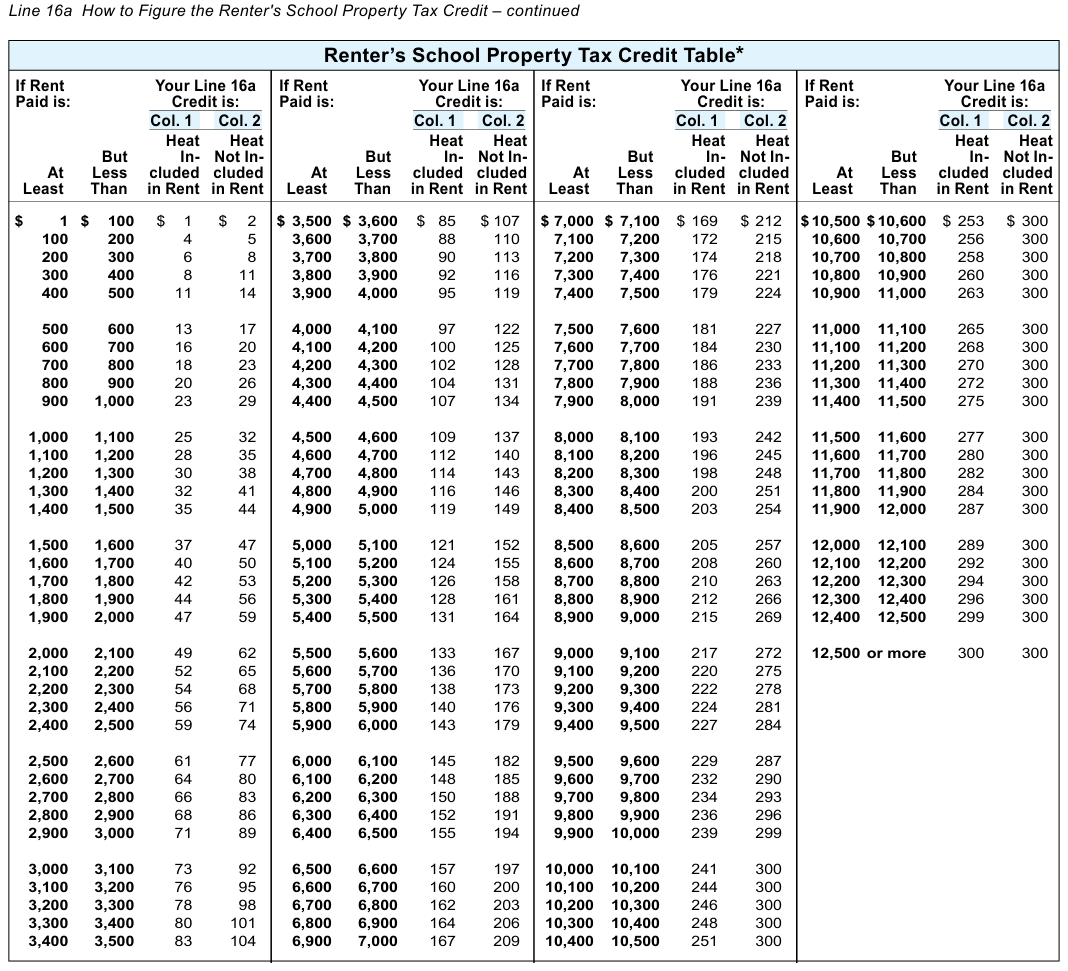
Text version of this table
| Renter’s School Property Tax Credit Table* | |||
| If Rent Your Line 16a Paid is: Credit is: Col. 1 Col. 2 Heat Heat But In- Not In- At Less cluded cluded Least Than in Rent in Rent | If Rent Your Line 16a Paid is: Credit is: Col. 1 Col. 2 Heat Heat But In- Not In- At Less cluded cluded Least Than in Rent in Rent | If Rent Your Line 16a Paid is: Credit is: Col. 1 Col. 2 Heat Heat But In- Not In- At Less cluded cluded Least Than in Rent in Rent | If Rent Your Line 16a Paid is: Credit is: Col. 1 Col. 2 Heat Heat But In- Not In- At Less cluded cluded Least Than in Rent in Rent |
| $ 1 $ 100 $ 1 $ 2 100 200 4 5 200 300 6 8 300 400 8 11 400 500 11 14 500 600 13 17 600 700 16 20 700 800 18 23 800 900 20 26 900 1,000 23 29 1,000 1,100 25 32 1,100 1,200 28 35 1,200 1,300 30 38 1,300 1,400 32 41 1,400 1,500 35 44 1,500 1,600 37 47 1,600 1,700 40 50 1,700 1,800 42 53 1,800 1,900 44 56 1,900 2,000 47 59 2,000 2,100 49 62 2,100 2,200 52 65 2,200 2,300 54 68 2,300 2,400 56 71 2,400 2,500 59 74 2,500 2,600 61 77 2,600 2,700 64 80 2,700 2,800 66 83 2,800 2,900 68 86 2,900 3,000 71 89 3,000 3,100 73 92 3,100 3,200 76 95 3,200 3,300 78 98 3,300 3,400 80 101 3,400 3,500 83 104 | $ 3,500 $ 3,600 $ 85 $ 107 3,600 3,700 88 110 3,700 3,800 90 113 3,800 3,900 92 116 3,900 4,000 95 119 4,000 4,100 97 122 4,100 4,200 100 125 4,200 4,300 102 128 4,300 4,400 104 131 4,400 4,500 107 134 4,500 4,600 109 137 4,600 4,700 112 140 4,700 4,800 114 143 4,800 4,900 116 146 4,900 5,000 119 149 5,000 5,100 121 152 5,100 5,200 124 155 5,200 5,300 126 158 5,300 5,400 128 161 5,400 5,500 131 164 5,500 5,600 133 167 5,600 5,700 136 170 5,700 5,800 138 173 5,800 5,900 140 176 5,900 6,000 143 179 6,000 6,100 145 182 6,100 6,200 148 185 6,200 6,300 150 188 6,300 6,400 152 191 6,400 6,500 155 194 6,500 6,600 157 197 6,600 6,700 160 200 6,700 6,800 162 203 6,800 6,900 164 206 6,900 7,000 167 209 | $ 7,000 $ 7,100 $ 169 $ 212 7,100 7,200 172 215 7,200 7,300 174 218 7,300 7,400 176 221 7,400 7,500 179 224 7,500 7,600 181 227 7,600 7,700 184 230 7,700 7,800 186 233 7,800 7,900 188 236 7,900 8,000 191 239 8,000 8,100 193 242 8,100 8,200 196 245 8,200 8,300 198 248 8,300 8,400 200 251 8,400 8,500 203 254 8,500 8,600 205 257 8,600 8,700 208 260 8,700 8,800 210 263 8,800 8,900 212 266 8,900 9,000 215 269 9,000 9,100 217 272 9,100 9,200 220 275 9,200 9,300 222 278 9,300 9,400 224 281 9,400 9,500 227 284 9,500 9,600 229 287 9,600 9,700 232 290 9,700 9,800 234 293 9,800 9,900 236 296 9,900 10,000 239 299 10,000 10,100 241 300 10,100 10,200 244 300 10,200 10,300 246 300 10,300 10,400 248 300 10,400 10,500 251 300 | $ 10,500 $ 10,600 $ 253 $ 300 10,600 10,700 256 300 10,700 10,800 258 300 10,800 10,900 260 300 10,900 11,000 263 300 11,000 11,100 265 300 11,100 11,200 268 300 11,200 11,300 270 300 11,300 11,400 272 300 11,400 11,500 275 300 11,500 11,600 277 300 11,600 11,700 280 300 11,700 11,800 282 300 11,800 11,900 284 300 11,900 12,000 287 300 12,000 12,100 289 300 12,100 12,200 292 300 12,200 12,300 294 300 12,300 12,400 296 300 12,400 12,500 299 300 12,500 or more 300 300 |
# Heat Heat
How to Figure the Homeowner's School Property Tax Credit
# Line 16b
Step 1 Property Taxes Paid on Home in 2025 Fill in the amount of property taxes that you paid in 2025 on your home.
Do not include:
- Charges for special assessments, delinquent interest, or services that may be included on your tax bill (such as trash removal, recycling fee, or a water bill)
- Property taxes that you can claim as a business expense (for example, farm taxes or rental property taxes)
- Property taxes paid on property that is not your primary residence (such as a cottage or vacant land)
- Property taxes that you paid in any year other than 2025
Note: The date the property taxes are paid is the date the property taxes are received by the municipality.
Property taxes are further limited as follows: a. If you bought or sold your home during 2025, the property taxes of the seller and buyer are the taxes set forth for each in the closing agreement made at the sale or purchase. If the closing agreement does not divide the property taxes between the seller and buyer, divide them on the basis of the number of months each owned the home.
Line 16b How to Figure the Homeowner's School Property Tax Credit - continued b. If you owned a mobile home during 2025, property taxes include the municipal permit fees paid to your municipality and/ or the property taxes paid on your mobile home. (Payments for space rental for parking a mobile home or manufactured home should be filled in as rent on line 16a.) c. If you, or you and your spouse, owned a home jointly with one or more other persons, you may only use that portion of the property taxes that reflects your percentage of ownership. For example, if you and another person (other than your spouse) jointly owned a home on which taxes of $1,500 were paid, each of you would claim a credit based on $750 of taxes.
CAUTION Property taxes paid during 2025 must be reduced by any amount received as a refund of such taxes. For example, a taxpayer claimed farmland preservation credit on Schedule FC (which is considered a refund of property taxes) on their 2024 Wisconsin return. The taxpayer received a farmland preservation credit in 2025 of $600 that was based on 2024 property taxes accrued of $6,000. The 2024 property taxes were paid in 2025 and 10% of such taxes were allocable to the personal residence and 90% to the farm property. Thus, for tax purposes, property taxes paid on the entire property during 2025 are $5,400 ($6,000 less $600 farmland preservation credit). Of this amount, $540 (10% of $5,400) is used to compute the 2025 school property tax credit.
Step 2 Use the Homeowner's School Property Tax Credit Table below to figure your credit. Fill in the amount of your credit on line 16b.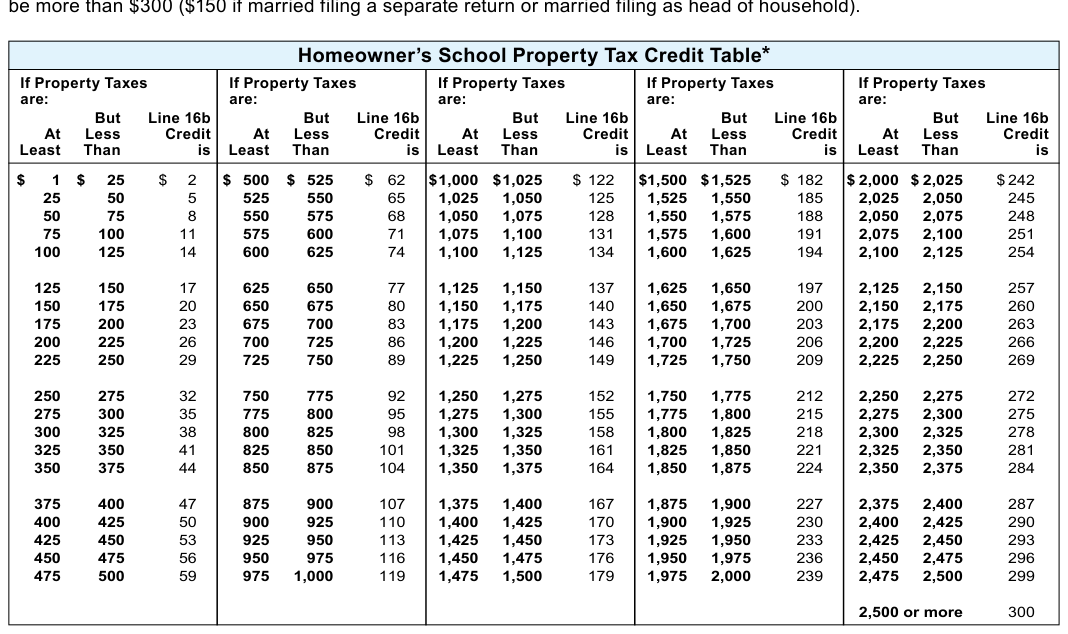
Text version of this table
Homeowner's School Property Tax Credit Table* If Property Taxes are: But Line 16b At Less Credit Least Than is If Property Taxes are: But Line 16b At Less Credit Least Than is If Property Taxes are: But Line 16b At Less Credit Least Than is If Property Taxes are: But Line 16b At Less Credit Least Than is If Property Taxes are: But Line 16b At Less Credit Least Than is $ 1 $ 25 $ 2 25 50 5 50 75 8 75 100 11 100 125 14 125 150 17 150 175 20 175 200 23 200 225 26 225 250 29 250 275 32 275 300 35 300 325 38 325 350 41 350 375 44 375 400 47 400 425 50 425 450 53 450 475 56 475 500 59 $ 500 $ 525 $ 62 525 550 65 550 575 68 575 600 71 600 625 74 625 650 77 650 675 80 675 700 83 700 725 86 725 750 89 750 775 92 775 800 95 800 825 98 825 850 101 850 875 104 875 900 107 900 925 110 925 950 113 950 975 116 975 1,000 119 $ 1,000 $ 1,025 $ 122 1,025 1,050 125 1,050 1,075 128 1,075 1,100 131 1,100 1,125 134 1,125 1,150 137 1,150 1,175 140 1,175 1,200 143 1,200 1,225 146 1,225 1,250 149 1,250 1,275 152 1,275 1,300 155 1,300 1,325 158 1,325 1,350 161 1,350 1,375 164 1,375 1,400 167 1,400 1,425 170 1,425 1,450 173 1,450 1,475 176 1,475 1,500 179 $ 1 ,500 $ 1,525 $ 182 1,525 1,550 185 1,550 1,575 188 1,575 1,600 191 1,600 1,625 194 1,625 1,650 197 1,650 1,675 200 1,675 1,700 203 1,700 1,725 206 1,725 1,750 209 1,750 1,775 212 1,775 1,800 215 1,800 1,825 218 1,825 1,850 221 1,850 1,875 224 1,875 1,900 227 1,900 1,925 230 1,925 1,950 233 1,950 1,975 236 1,975 2,000 239 $ 2,000 $ 2,025 $242 2,025 2,050 245 2,050 2,075 248 2,075 2,100 251 2,100 2,125 254 2,125 2,150 257 2,150 2,175 260 2,175 2,200 263 2,200 2,225 266 2,225 2,250 269 2,250 2,275 272 2,275 2,300 275 2,300 2,325 278 2,325 2,350 281 2,350 2,375 284 2,375 2,400 287 2,400 2,425 290 2,425 2,450 293 2,450 2,475 296 2,475 2,500 299 2,500 or more 300
# Credit At Less Credit
Line 17 Working Families Tax Credit Do not enter any amount on this line. No credit is allowable for any individual or couple filing this form, since any taxpayer(s) who would qualify will not have a tax to offset.
Line 18 Married Couple Credit You can claim the married couple credit if all of the following apply:
- You are married filing a joint return
# Line 18 Married Couple Credit - continued
- Both you and your spouse have qualified earned income
- You do not file federal Form 2555 or Form 2555-EZ to claim an exclusion of foreign earned income or Form 4563 to claim an exclusion of income from sources in U.S. possessions To figure the credit, complete Schedule 2 on page 4 of Form 1. Figure earned income separately for yourself and your spouse on lines 1 through 3 in Columns (A) and (B) of Schedule 2.
"Earned income" includes taxable wages, salaries, tips, scholarships or fellowships (only amounts reported on a Form W-2), other employee compensation, disability income treated as wages, and net earnings from self-employment.
Example You are a member of the U.S. Armed Forces on active duty. You claimed a subtraction on line 18 of Schedule SB for the amount of military pay you received for active duty. Because this military pay is not taxable to Wisconsin, it cannot be used when computing the married couple credit.
"Earned income" does not include other income such as interest, dividends, IRA distributions, deferred compensation (even though it may be reported on a W-2), unemployment compensation, rental income, social security, pensions, annuities, or income that is not taxable to Wisconsin. Do not consider marital property law, marital property agreements, or unilateral statements in figuring each spouse's earned income.
The credit is based on qualified earned income. You must figure qualified earned income separately for yourself and your spouse. Figure it on lines 4 and 5 of Schedule 2 by subtracting the total of certain adjustments from earned income. These adjustments (as reported as an adjustment to income on federal Schedule 1 (Form 1040)) are:
- IRA deduction (line 20 of federal Schedule 1)
- Self-employed SEP, SIMPLE, and qualified plans (line 16 of federal Schedule 1)
- Repayment of supplemental unemployment benefits (line 24e of federal Schedule 1)
- Certain business expenses of reservists, performing artists, and fee-basis government officials (line 12 of federal Schedule 1)
- Contributions to secs. 501(c)(18)(D) and 403(b) pension plans (lines 24f and 24g of federal Schedule 1)
- Disability income exclusion (from line 22 of Wisconsin Schedule SB)
# Line 19 Nonrefundable Credits
If you are claiming any of the credits listed below, you must complete Schedule CR.
Include Schedule CR, along with the appropriate schedule for the credit(s) you are claiming and any required Department of Commerce (DOC), Wisconsin Economic Development Corporation (WEDC), or Wisconsin Housing and Economic Development Authority (WHEDA) approval, certification, or allocation with Form 1. Include Schedule CF for each credit for which you claim a carryforward of unused credit. Fill in the amount from line 34 of Schedule CR on line 19. See page 11 for information on obtaining Schedule CR.
- Postsecondary Education Credit Carryforward (Schedule CF)
- Biodiesel Fuel Production Credit Carryforward (Schedule CF)
- Health Insurance Risk-Sharing Plan Assessments Credit Carryforward (Schedule CF)
- Schedule ES - Employee College Savings Account Contribution Credit The employee college savings account contribution credit is available to employers who contribute an amount into an employee's college savings account. Complete Schedule ES.
- Schedule CM - Community Rehabilitation Tax Program Credit The community rehabilitation program credit is available to persons who enter into a contract with a community rehabilitation program to have the program perform work for the entity. Complete Schedule CM.
- Research Facilities Credit Carryforward (Schedule CF)
- Schedule LI - Low-Income Housing Credit The low-income housing credit is available to qualified development owners who are allocated a credit amount by WHEDA. Complete Schedule LI.
- Schedule HR - Supplement to Federal Historic Rehabilitation Tax Credit The supplement to the federal historic rehabilitation tax credit is available for rehabilitating certified historic structures used for business purposes. Complete Schedule HR.
- Schedule MA-A or MA-M - Manufacturing and Agriculture Credit The manufacturing and agriculture credit is based on the production gross receipts of a business less certain expenses. Complete Schedule MA-A or MA-M. If you are a shareholder of a tax-option (S) corporation or partner of a partnership that elected to be taxed at the entity level, and the manufacturing and agricultural credit is passed through to you on Schedule 5K-1 or 3K-1, you may not claim the credit to offset tax imposed on income which is taxable to the entity. See the instructions for Schedule MA-A or MA-M for additional information on the business income limit computation.
- Schedule HR - State Historic Rehabilitation Credit An individual who has received certification or approval of a project for rehabilitating a personal residence from the State Historical Society of Wisconsin may be eligible for the credit.
Complete Schedule HR.
- Schedule R - Research Credits The research credits are available for increasing research activities in Wisconsin. This includes credits related to internal combustion engines and certain energy efficient products. Complete Schedule R.
- Schedule MS - Manufacturer's Sales Tax Credit If you had $25,000 or less of unused manufacturer's sales tax credit from 1998 through 2005 and could not use the entire credit on your 2006-2024 returns, complete Schedule MS to determine the amount of carryover credit you may claim for 2025.
- Manufacturing Investment Credit Carryforward (Schedule CF)
- Dairy and Livestock Farm Investment Credit Carryforward (Schedule CF)
- Ethanol and Biodiesel Fuel Pump Credit Carryforward (Schedule CF)
- Technology Zone Credit Carryforward (Schedule CF)
- Development Zones Credits Carryforward (Schedule CF)
- Capital Investment Credit Carryforward (Schedule CF)
- Economic Development Tax Credit Carryforward (Schedule CF)
- Schedule VC (Part II) - Early Stage Seed Investment Credit The early stage seed investment credit is based on an investment paid to a fund manager certified by the WEDC that the fund manager invests in a certified business. Complete Schedule VC.
- Schedule VC (Part I) - Angel Investment Credit The angel investment credit is available to accredited investors who make a bona fide angel investment in a qualified new business venture that is certified by the WEDC. Complete Schedule VC.
- Electronic Medical Records Credit Carryforward (Schedule CF)
- Internet Equipment Credit Carryforward (Schedule CF)
# Line 20 Credit for Net Tax Paid to Another State
If you paid tax both to Wisconsin and another state on the same income, you may be able to claim a credit for such tax. Read the Schedule OS instructions to determine if you may claim the credit. If you qualify for the credit, complete Schedule OS.
Fill in the amount of your credit from Schedule OS on line 20. Be sure to enter in the brackets on line 20 the 2-letter postal abbreviation for the other state to which you paid tax. If you paid tax to more than one other state, enter the number "99" in the brackets. See Schedule OS for other situations where additional code numbers may be required. Include Schedule OS and copies of the other states' returns.
If you are a shareholder of a tax-option (S) corporation or partner of a partnership that elected to be taxed at the entity level for Wisconsin, you may not claim a credit for taxes paid to other states on your distributive share of income from the pass-through entity since none of it is included in your Wisconsin income.
# Line 19 Nonrefundable Credit - continued
Line 20 Credit for Net Tax Paid to Another State - continued In Milwaukee County the county tax rate was 0.9% for 2025.
If storage, use, or consumption in 2025 was in Waukesha County or Winnebago County, there was no county tax. In all other Wisconsin counties, the county tax rate was 0.5% for all of 2025 (see note).
Note: The 0.5% county tax rate only applies in Racine County to applicable purchases on or after April, 1, 2025.
Prior to that date there was no county tax.
Sales and Use Tax Rate Chart
# Line 24 Donations
Complete Part I of Schedule 3 (page 5 of Form 1) if you wish to make a financial donation to one or more of the designated programs. Enter the amount from line 2 of Schedule 3, Part I on line 24 of Form 1. Your donation will either reduce your refund or be added to the tax due.
CAUTION Credit cannot be claimed for taxes paid to Illinois, Indiana, Kentucky, or Michigan on earned income (such as wages, salaries, tips, commissions, bonuses, etc.) you received from working in one of those states. Instead, file a return with that state to get a refund of any tax withheld from your wages. Be sure to explain on that state's return that you were a Wisconsin resident when earning the wages in that state. See Publication 121, Reciprocity, for more information.
Line 23 Sales and Use Tax Due on Internet, Mail Order, or Other Out-of-State Purchases Did you make any taxable purchases from out-of-state firms in 2025 on which sales and use tax was not charged? If yes, you must report Wisconsin sales and use tax on these purchases on line 23 if they were stored, used, or consumed in Wisconsin. You must also report sales and use tax on taxable purchases from a retailer located in another country, regardless of whether you were charged any tax for that country or any duty by the U.S. Customs Service.
Taxable purchases include furniture, carpet, clothing, computers, books, CDs, DVDs, video tapes, certain digital goods (e.g., greeting cards, video games, music, and books, transferred electronically), artwork, antiques, jewelry, most coins purchased for more than face value, etc.
Example You purchased $300 of clothing through a catalog or over the internet. No sales and use tax was charged. The clothing was delivered in a county with a 5% tax rate. You are liable for $15 Wisconsin tax ($300 x 5% = $15) on this purchase.
Complete the worksheet that follows to determine the amount of Wisconsin sales and use tax you are liable for on any untaxed purchases.
If you do not have sales or use tax to report on line 23, place a checkmark in the space provided to certify that you do not owe any sales or use tax. Only returns certified as "no use tax due" will be recognized as filing a sales/use tax return.
- Total purchases subject to Wisconsin sales and use tax (i.e., purchases on which no sales and use tax was charged by the seller) … $
- a) Wisconsin (state) sales and use tax … 5.0 b) County sales and use tax (see rate chart) … c) City sales and use tax (city of Milwaukee only, 2.0%) …
- Sales and use tax rate (sum of lines 2. a, b, and c) … x %
- Amount of sales and use tax due for 2025 (line 1 multiplied by tax rate on line 3). Round this amount to the nearest dollar and fill in on line 23 of Form 1 … $
Worksheet for Computing Wisconsin Sales and Use Tax
# Part I of Schedule 3 (Financial Donations)
Enter the amount you wish to donate to one or more of the programs listed on lines 1a through 1h and fill in the total on line 2.
Line 1a Endangered Resources Donation With your gift, the Endangered Resources Program works to protect and manage native plant and animal species, natural communities, and other natural features. Gifts up to a predetermined amount will be matched by state general purpose revenue. Fill in the amount you want to donate on line 1a.
Line 1b Cancer Research Donation Your cancer research donation will be divided equally between the Medical College of Wisconsin, Inc., and the University of Wisconsin Carbone Cancer Center for cancer research projects. Fill in the amount you want to donate on line 1b.
Line 1c Veterans Trust Fund Donation Your donation to the Veterans Trust Fund will be used by the Wisconsin Department of Veterans Affairs for the benefit of veterans or their dependents. Fill in the amount you want to donate on line 1c.
Line 1d Multiple Sclerosis Donation Donations will be forwarded to the National Multiple Sclerosis Society to be distributed to entities located in Wisconsin that operate health-related programs for people in Wisconsin with multiple sclerosis. Fill in the amount you want to donate on line 1d.
Line 1e Military Family Relief Fund The Wisconsin Department of Military Affairs will use donations to the military family relief fund to provide financial aid to eligible members of the immediate family of members of the U.S. Armed Forces or of the National Guard who are residents of Wisconsin serving on active duty. Fill in the amount you want to donate on line 1e.
Line 1f Second Harvest / Feeding America Your donation to the food banks supports efforts to feed the hungry and will be divided as follows: 65% to Feeding America Eastern Wisconsin (located in Milwaukee); 20% to Second Harvest Foodbank of Southern Wisconsin (located in Madison); and 15% to Feed My People (located in Eau Claire). The food banks provide food to food pantries, meal programs, shelters, and soup kitchens throughout the state. Fill in the amount you want to donate on line 1f.
Line 1g Red Cross Wisconsin Disaster Relief You may donate an amount to the American Red Cross for its Wisconsin Disaster Relief Fund. Fill in the amount you want to donate on line 1g.
Line 1h Special Olympics Wisconsin You may donate an amount to Special Olympics Wisconsin, Inc. Fill in the amount you want to donate on line 1h.
Amended return only - Fill in the amount of your donations from your original return. If you did not make a donation on your original return, but now wish to, or if you want to increase your donation, fill in the new amount on the appropriate line(s). If you want to decrease the amount of your donation, you may only fill in a smaller amount if you file an amended return by October 15, 2027, or if your original return was filed after April 15, 2026, within 18 months of the date your return was filed.
# Part II of Schedule 3 (Anatomical Gift Registration)
If you are not currently on the Wisconsin Donor Registry for organ and tissue donations upon your death and wish to have your name added, complete Part II of Schedule 3. All fields must be completed to become registered.
Visit donatelifewisconsin.org to learn about organ and tissue donation in Wisconsin, become a donor, update your registration information, or remove your name from the registry. Also visit the National Donor Registry Program at donatelife.net to learn about organ and tissue donation in the United States.
Line 25 Penalties on IRAs, Other Retirement Plans, MSAs, Etc.
The Wisconsin penalty on IRAs, retirement plans, medical savings accounts (MSAs), etc., is equal to 33% of the following federal taxes:
- Tax on IRAs, other qualified retirement plans, etc., from line 8 of federal Schedule 2 (Form 1040). Exception: Do not include any amount based on line 8 of federal Form 5329. Wisconsin does not assess penalty on distributions from education savings accounts and ABLE accounts.
- Total tax due from lines 4, 17, 25, 33, 41, 49, 51, and 55 of federal Form 5329. Include only if the tax due on this form was paid separately and is not included on line 8 of federal Schedule 2 (Form 1040).
# Line 24 Donations- continued
- Tax on excess contributions from line 2 of federal Form 5330.
- Tax on prohibited transactions from lines 3a and 3b of federal Form 5330.
- Section 72(m)(5) excess benefits tax from line 17j of federal Schedule 2 (Form 1040).
- Tax on Archer MSA distributions from line 9b of federal Form 8853.
- Tax on health savings account distributions from line 17b of federal Form 8889.
If you were subject to any of the above federal taxes for 2025, fill in the total of such taxes in the space provided on line 25.
Multiply the amount filled in by .33 (33%) and fill in the result on line 25.
You are not subject to the penalty on payments from certain retirement plans if the payments are exempt from Wisconsin tax or excluded from Wisconsin income. See the instructions for lines 13, 14, 16, and 17 of Schedule SB for information on retirement payments that are exempt from Wisconsin tax or excluded from Wisconsin income and to which the penalty does not apply.
If you were required to file federal Form 5329 or 5330, include a copy of your Form 5329 and/or 5330 with your Form 1.
# Line 26 Other Penalties
If you are subject to a penalty for selling business or farming assets purchased from a related person or inconsistent estate basis reporting, or repayment of the state historic rehabilitation credit, angel investment credit, early stage seed investment credit, supplement to federal historic rehabilitation credit, or low-income housing credit, fill in the amount of the penalty or repayment on line 26. See page 7 for more information on repayment of the credits. See below for further information on the penalties.
- Penalty for selling business assets (or assets used in farming) purchased from a related person Capital gain on the sale or disposition of business or farming assets may be excluded from Wisconsin taxation if the assets were held more than one year and are disposed of to certain related persons. The related person who purchases or otherwise receives the assets on which the gain is excluded is subject to a penalty if they sell or dispose of the assets within two years. The penalty does not apply in the case of an involuntary conversion (for example, assets are destroyed by fire or livestock dies). Visit any Department of Revenue office or contact the department's Customer Service Bureau at (608) 266-2486 for information on how to compute the penalty.
- Penalty for underpayment of taxes due to inconsistent estate basis reporting An inconsistent estate basis reporting occurs if the property basis claimed on a Wisconsin tax return exceeds the property basis determined for federal estate tax purposes. The penalty is equal to 20% of the portion of any underpayment of taxes due to the inconsistent estate basis reporting.
# Line 28 Wisconsin Tax Withheld
Add the Wisconsin income tax withheld shown on your withholding statements (Forms W-2, W-2G, 1099-R, 1099-MISC, and 1099-NEC). Also, if any Wisconsin pass-through entity withholding tax was allocated to you from a tiered pass-through entity of which you are a member, you may include that withholding. Fill in the total on line 28. Include readable copies of your withholding statements with Form 1. (See Assembling Your Return on page 5) Wisconsin tax withheld is shown in Box 17 of Form W-2 or Box 14 of Form 1099-R, but only if Wisconsin is the state identified in Box 15 of Form W-2 or Box 15 of Form 1099-R.
DO NOT:
- Claim credit for tax withheld for other states
- Claim amounts marked social security or Medicare tax withheld
- Claim credit for federal tax withheld
- Include withholding statements from other tax years
- Write on, change, or attempt to correct the amounts on your withholding statements
- Claim Wisconsin withholding from a tax-option (S) corporation or partnership, if an election was made to be taxed at the entity level and a refund of the pass-through withholding or a written request to apply the pass-through withholding against the tax liability at the entity level was made by the entity.
It is your responsibility to ensure that your employer or other payer has provided withholding statements that:
- Are clear and easy to read
- Show withholding was paid to Wisconsin If you do not have a withholding statement or need a corrected withholding statement, contact your employer or other payer.
Line 25 Penalties on IRAs, Other Retirement Plans, MSAs, Etc. - continued
Line 29 2025 revenue.wi.gov/Pages/OnlineServices/voucher-1es.aspxWisconsin Estimated Tax Payments and Amount Applied From 2024 Return Fill in any payments you made on your 2025 estimated Wisconsin income tax (2025 Form 1-ES). This includes any extension payments made on 2025 Form 1-ES. Include any overpayment from your 2024 return that you were allowed as credit to your 2025 Wisconsin estimated tax.
Check Your Estimated Tax Payments Before filling in line 29, check the amount of your estimated tax payments on the department's website at tap.revenue.wi.gov/eslookup. Processing of your return will be delayed if there is a difference between the amount of estimated tax payments you claim and the amount the department has on record.
If you are married filing a joint return, fill in the total of all of the following:
- Any separate estimated tax payments made by each spouse
- Any joint estimated tax payments
- Any overpayments from your 2024 returns that you and your spouse were allowed as credit to 2025 Wisconsin estimated tax.
If you are filing a separate tax return, you may not claim any part of your spouse's separate estimated tax payments or credits. However, you and your spouse may split your joint estimated tax payments and credits between you as you choose on your separate returns. If you cannot agree on how joint amounts are to be split between you, the department will split them between you according to your respective income tax liabilities.
Follow the above instructions even if your spouse died during 2025.
Name Change If you changed your name because of marriage, divorce, etc., and made estimated tax payments using your former name, include a statement with Form 1. On the statement, explain all the payments you and your spouse made for 2025 and the name(s) and social security number(s) under which you made them.
# Line 30 Earned Income Credit
If you qualify for the federal earned income credit and you have at least one qualifying child, you likely qualify for the Wisconsin earned income credit. However, you must have been a legal resident of Wisconsin for the entire year. Exception:
You are ineligible for the Wisconsin credit if you are married and file a separate return unless you meet the requirements of sec. 7703(b), IRC. If this is the case, your filing status for Wisconsin should be head of household, married.
"Federal earned income credit" means the credit computed using the IRC as adopted by Wisconsin. If you had to make adjustments to your income in Part I of Schedule I, complete Part III of Schedule I to show your recomputed federal earned income credit for Wisconsin purposes.
If you recklessly or fraudulently claim a false credit, you may be ineligible to claim this credit and any other refundable credit for up to 10 years and could also owe a penalty.
To claim the Wisconsin earned income credit, complete the following steps and fill in the required information in the spaces provided on line 30.
Step 1 Fill in the number of children who meet the requirements of a "qualifying child" for purposes of the federal earned income credit (see the instructions for earned income credit in your federal return for definition of a "qualifying child").
Step 2 If you entered adjustments to federal adjusted gross income in Part I of Schedule I, fill in the federal earned income credit from Column II of line 1a for Part III of Schedule I. Otherwise, fill in the federal credit from line 27 of federal Form 1040 or 1040SR.
Step 3 Fill in the percentage rate which applies to you.
Number of qualifying Children Fill in this (see Step 1) percentage rate 1 4% 2 11% 3 or more 34%
Step 4 Multiply the amount of your federal credit (Step 2) by the percentage determined in Step 3. Fill in the result on line 30.
This is your Wisconsin earned income credit.
What to Include With Your Return You must include a copy of your completed federal Schedule EIC with Form 1. If you used a paid preparer to complete your federal return, also include federal Form 8867. Failure to provide this information may delay your refund.
If the IRS is computing your federal earned income credit and you want the department to compute your Wisconsin earned income credit for you, fill in the number of your qualifying children in the space provided on line 30. Write "EIC" in the space to the right of line 30. Complete your return through line 35 of Form 1. Include a copy of your federal return (Form 1040 or 1040-SR) with your Form 1.
# Line 31 Farmland Preservation Credit
If you are claiming farmland preservation credit, include a completed Schedule FC or FC-A with your Form 1. Fill in on line 31a of Form 1 the amount from line 17 of your Schedule FC. Fill in on line 31b of Form 1 the amount from line 13 of Schedule FC-A.
Note: For a description of the farmland preservation credit program, see the Special Instructions on page 10. You cannot claim farmland preservation credit if you (or your spouse, if married) claim the veterans and surviving spouses property tax credit or homestead credit.
If you recklessly or fraudulently claim a false credit, you may be ineligible to claim this credit and any other refundable credit for up to 10 years and could also owe a penalty.
# Line 32 Repayment Credit
If you had to repay during 2025 an amount that you had included in income in an earlier year because at that time you thought you had an unrestricted right to it, you may be able to claim a credit based on the amount repaid. To qualify for the credit, the amount repaid must be over $3,000 and the amount repaid cannot have been subtracted in computing Wisconsin adjusted gross income.
Use the following steps to compute your credit:
(1) Refigure your tax from the earlier year without including in income the amount you repaid in 2025.
(2) Subtract the tax in (1) from the tax shown on your return for the earlier year. The difference is your credit.
Fill in the amount of your credit on line 32 of Form 1. Include a statement showing how you computed your credit.
# Line 33 Homestead Credit
If you are claiming homestead credit, attach Schedule H or H-EZ to your Form 1. Fill in on line 33 the amount from line 19 of your Schedule H or line 14 of Schedule H-EZ.
To see if you qualify for homestead credit, refer to the Special Instructions on page 9. You cannot claim homestead credit if you (or your spouse, if married) claim the veterans and surviving spouses property tax credit or farmland preservation credit.
If you recklessly or fraudulently claim a false credit, you may be ineligible to claim this credit and any other refundable credit for up to 10 years and could also owe a penalty.
# Line 34 Eligible Veterans and Surviving Spouses Property Tax Credit
Who May Claim the Credit An eligible unremarried surviving spouse or an eligible veteran may claim the veterans and surviving spouses property tax credit. (Note: If you claim the veterans and surviving spouses property tax credit, you or your spouse may not claim the school property tax credit, homestead credit, or farmland preservation credit.)
# Line 30 Earned Income Credit - continued
If you recklessly or fraudulently claim a false credit, you may be ineligible to claim this credit and any other refundable credit for up to 10 years and could also owe a penalty.
An "eligible unremarried surviving spouse" means an unremarried surviving spouse of an individual who meets all of the following requirements:
- Served on active duty in the U.S. Armed Forces or in forces incorporated as part of the U.S. Armed Forces or in the National Guard or a reserve component of the U.S. Armed Forces
- Was a resident of Wisconsin at the time of entry into active service or who had been a resident of Wisconsin for any consecutive 5-year period after entry into that active duty service
- Met one of the following conditions:
- Died while on active duty and while a resident of Wisconsin
- Was a resident of Wisconsin at the time of their death and had either a service-connected disability rating of 100% under 38 USC 1114 or 1134 or a 100% disability rating based on individual unemployability
- In the case of an individual who served in the National Guard or a reserve component, while a resident of Wisconsin died in the line of duty while on active or inactive duty for training
- Was a resident of Wisconsin at the time of their death and following the individual's death, their spouse began to receive, and continues to receive, dependency and indemnity compensation, as defined in 38 USC 101(14) The unremarried surviving spouse must be certified by the Wisconsin Department of Veterans Affairs.
"Eligible veteran" means an individual who is certified by the Wisconsin Department of Veterans Affairs as meeting all of the following conditions:
- Served on active duty under honorable conditions in the U.S. Armed Forces or in forces incorporated in the U.S. Armed Forces
- Was a resident of Wisconsin at the time of entry into active service or who had been a resident of Wisconsin for any consecutive 5-year period after entry into that active duty service
- Is currently a resident of Wisconsin for purposes of receiving veterans benefits under ch. 45, Wis. Stats.
- Has a service-connected disability rating of 100% under 38 USC 1114 or 1134 or a 100% disability rating based on individual unemployability.
Computing the Credit The credit is equal to the property taxes paid by the claimant during the year on the claimant's principal dwelling in Wisconsin. The credit is based on property taxes, exclusive of special assessments, delinquent interest, and charges for service. Do not include any property taxes that are properly includable as a trade or business expense.
Note: The date the property taxes are paid is the date the property taxes are received by the municipality.
Example: Taxpayer received a property tax bill on the house they owned in the amount of $3,000 for the 2025 tax year on December 22, 2025. Taxpayer did not pay any of their 2024 property tax bill in 2025. Taxpayer paid their 2025 property tax bill in 2 installments:
- $1,500 on December 28, 2025
- $1,500 on April 11, 2026
The amount allowed for purposes of computing the veterans and surviving spouses property tax credit for 2025 is $1,500, which is the amount they paid on December 28, 2025. The remaining amount paid on April 11, 2026, of $1,500 may be claimed on the 2026 Wisconsin income tax return if the taxpayer is still eligible for the credit.
"Principal dwelling" means any dwelling and the land surrounding it that is reasonably necessary for use of the dwelling as a primary dwelling, but not more than one acre. It may include a part of a multidwelling or multipurpose building and a part of the land upon which it is built that is used as the primary dwelling. Complete Worksheet 1 below if your principal dwelling is located on more than one acre of land.
Line 34 Eligible Veterans and Surviving Spouses Property Tax Credit - continued
Line 34 Eligible Veterans and Surviving Spouses Property Tax Credit - continued
Worksheet 1 - Property Tax Bill Shows More Than 1 Acre of Land
- Assessed value of land (from tax bill) … 1.
- Number of acres of land … 2.
- Divide line 1 by line 2 … 3.
- Assessed value of principal dwelling … 4.
- Add line 3 and line 4 … 5.
- Total assessed value of all land and improvements (from tax bill) … 6.
- Divide line 5 by line 6 … 7. .
- Net property taxes paid … 8.
- Multiply line 8 by line 7. This is the amount of property tax allowed for the credit … 9.
If your property contains land assessed as a type other than residential, complete Worksheet 2 below. You may have to contact your municipality to find the value of land which contains multiple classifications (agricultural, undeveloped, other, etc.).
Worksheet 2 - Property Tax Bill Contains Non-residential Land
# Part I
- Value of land from property tax bill, residential … 1.
- Value of land from property tax bill, other … 2.
- Value of land from property tax bill, undeveloped … 3.
- Value of land from property tax bill, agricultural … 4.
- Value of land from property tax bill, agricultural forest … 5.
- Value of land from property tax bill, forest … 6.
- Total value of land (add lines 1 through 6) … 7.
- Total value of residential land (from Part I, line 1) … 1.
- Number of acres of residential land (not less than 1.0) … 2.
- Divide line 1 by line 2 … 3.
- Value of improvements … 4.
- Add lines 3 and 4 … 5.
- Total value of all land (Part 1, line 7) and improvements … 6.
- Divide line 5 by line 6 … 7. .
- Net property taxes paid … 8.
- Multiply line 8 by line 7. This is the amount of property tax allowed for the credit … 9.
# Part II
If your property contains structures in addition to the primary dwelling, provide a copy of the assessor's report with the return.
If the principal dwelling on which the taxes were paid is owned by two or more persons or entities as joint tenants or tenants in common, use only that part of property taxes paid that reflects the ownership percentage of the claimant.
Exceptions
- Married filing a joint return If property is owned by an eligible veteran and spouse as joint tenants, tenants in common, or as marital property, the credit is based on 100% of their combined share of property taxes paid on the principal dwelling (subject to the 1-acre limitation).
- Married filing a separate return If property is owned by an eligible veteran and spouse as joint tenants, tenants in common, or as marital property, each spouse may claim the credit based on their respective ownership interest in the eligible veteran's principal dwelling (subject to the 1-acre limitation).
If the principal dwelling is sold during the taxable year, the property taxes for the seller and buyer shall be the amount of the tax prorated to each in the closing agreement pertaining to the sale. If not provided for in the closing agreement, the tax shall be prorated between the seller and buyer in proportion to months of ownership.
If you owned and lived in a mobile home as your principal dwelling, "property taxes" include monthly mobile home municipal permit fees you paid to the municipality. If you paid the fee directly to the landowner, or community licensee, include proof of payment by the landowner or community licensee to the municipality.
If you did not own your principal dwelling but were required to pay the property taxes as rent, you may claim the credit based on the property taxes paid during the year if all of the following are met:
- The rental unit must be the principal dwelling of the eligible veteran or surviving spouse
- The principal dwelling must be located in Wisconsin
- The eligible veteran or surviving spouse is required to pay the property taxes under the rental agreement or other written agreement entered into with the landlord
- The eligible veteran or surviving spouse must pay the property taxes directly to the municipality A copy of the agreement with the landlord and proof of payment to the municipality must be included with the Wisconsin income tax return.
The credit must be claimed within 4 years of the unextended due date of the return. However, you may request an extension of time to file a return to claim the tax credit if the deadline for claiming the credit is approaching and WDVA is reviewing your eligibility for that year. See Fact Sheet 1122, Veterans and Surviving Spouses Property Tax Credit Verification of Eligibility -Extension of Time to Claim Credit, for additional information.
Certification of Eligibility for the Credit If you did not claim the credit in a prior year, before claiming the credit for 2025 you must request certification from the Wisconsin Department of Veterans Affairs (WDVA) indicating that you qualify for the credit. Use Form WDVA 2097 (which you can find in WDVA Brochure B0106) to submit your request, along with a copy of the veteran's DD Form 214 and Veterans Administration disability award letter and, if applicable, the veteran's death certificate, a marriage certificate, and a completed copy of Form WDVA 0001 (if the veteran never previously submitted one). The WDVA 0001 and the brochure are available from your county veterans service officer or on the internet at dva.wi.gov/services/housing-and-financial-services/property-tax-credit/. You may submit these forms and supporting documents to your county veterans service officer or mail them to: Wisconsin Department of Veterans Affairs, Attn: BRC-PTC Application, 201 West Washington Ave., PO Box 7843, Madison WI 53707-7843. The WDVA will send you a certification of your eligibility.
You do not have to obtain certification from the WDVA for 2025 if you previously received certification for a prior year.
If you still qualify for the credit, you may claim the credit but do not have to include certification.
What to Include Include a copy of your property tax bill, proof of payment made in 2025, and the certification, if required, received from the WDVA with your return.
# Line 35 Refundable Credits From Schedule CR
If you are claiming any of the credits listed below, you must complete Schedule CR. Include Schedule CR, along with the appropriate schedule for the credit(s) you are claiming and any required approval or certification from the
Wisconsin Economic Development Corporation (WEDC). Fill in the amount from line 40 of Schedule CR on line 35.
- Schedule EC - Enterprise Zone Jobs Credit The enterprise zone jobs credit is available to persons doing business in an enterprise zone. The WEDC must certify the business as eligible for the credit and determine the amount of credit.
See Schedule EC.
- Schedule BD - Business Development Credit The credit is available based on wages paid to an eligible employee; training costs; and investments in personal and real property, workforce housing, and employee childcare programs. The credit is available to taxpayers who are certified by the WEDC. See Schedule BD.
- Schedule EIT - Electronics and Information Technology Manufacturing Zone Credit The credit is based on payroll and capital expenditures in the zone. The credit is available to taxpayers who are certified by the WEDC. See Schedule EIT.
- Schedule R - Research Credits The research credits are available for increasing research activities in Wisconsin. This includes credits related to internal combustion engines and certain energy efficient products. Complete Schedule R.
No interest is paid on refunds issued for the enterprise zone jobs credit, business development credit, or electronics and information technology manufacturing zone credit.
Line 34 Eligible Veterans and Surviving Spouses Property Tax Credit - continued
# Line 36 Amounts Previously Paid
Amended return only - Complete this line only if this is an amended 2025 Form 1. Fill in the amount of tax you paid with your original Form 1 plus any additional amounts paid after it was filed.
If you did not pay the full amount shown on your original Form 1, fill in only the portion that you actually paid. Also, include any additional tax that may have resulted if your original return was changed or audited. This includes additional tax paid with a previously filed 2025 amended return and additional tax paid as a result of a department adjustment to your return.
Do not include payments of interest or penalties.
# Line 38 Amounts Previously Refunded
Amended return only - Complete this line only if this is an amended 2025 Form 1. Fill in the refund from your original 2025 return (not including the amount applied to your 2026 estimated tax). This is generally the amount from line 41 of Form 1.
If your refund was reduced because you owed underpayment interest or any penalties, fill in the amount of your refund before the reduction for underpayment interest or penalties. If your 2025 return was adjusted by the department, fill in the refund shown on the adjustment notice you received. If the adjustment notice shows a tax due rather than a refund, complete line 36 instead of line 38.
# Line 39 Subtraction
If line 38 is less than line 37, subtract line 38 from line 37 and fill in the result on line 39. If line 38 is more than line 37, subtract line 37 from line 38 and fill in the result on line 39 as a negative number by placing a minus sign (−) in front of the number.
# Line 40 Amount You Overpaid
If line 27 is less than line 39, subtract line 27 from line 39. Fill in the result on line 40. If line 39 is a negative number, do not complete line 40.
If you were required to make estimated tax payments and you did not make such payments timely, you may owe what is called "underpayment interest." You may owe underpayment interest even if you are due a refund. Read the line 44 instructions to see if you owe underpayment interest. If you owe underpayment interest and you show an overpayment on line 40, reduce the amount on line 40 by the amount of underpayment interest on line 44.
# Line 41 Refund
Fill in on line 41 the amount from line 40 that you want refunded to you. The department may not issue a refund before March 1 unless both the individual and the individual's employer have filed all required returns and forms with the department for the taxable year for which the refund was claimed.
Note: If you are divorced, see item 7 on page 6. You may need to include a copy of your divorce decree with your return.
The amount on line 41 cannot be more than the amount on line 40 less the amount applied to your estimated tax on line 42.
Note: If appropriate, we will figure interest and include it in your refund check. Interest is at a rate of 3% per year from the due date of your 2025 return. However, interest is not allowed on (1) a refund issued within 90 days of the due date of the return or within 90 days of the date an original return was filed, whichever is later, (2) a refund due from the homestead credit, enterprise zone jobs credit, business development credit, and electronics and information technology manufacturing zone credit, or (3) any portion of the refund that is applied to 2026 estimated tax.
# Line 42 Amount Applied to 2026 Estimated Tax
Fill in on line 42 the amount, if any, of the overpayment on line 40 you want applied to your 2026 estimated tax.
If you are married filing a joint return, we will apply the amount on line 42 to your joint estimated tax. If you are married filing a separate return, we will apply the amount on line 42 to your separate estimated tax.
Amended return only - Generally, the amount filled in on line 42 must be the same as the amount shown on line 42 of your original Form 1 (or as adjusted by the department). However, if you file your amended return by January 15, 2027, you may increase or decrease the amount to be applied to your 2026 estimated tax.
# Line 43 Amount You Underpaid
If line 39 is less than line 27, complete line 43 to determine the amount you underpaid.
Interest on any tax due is 12% per year from the due date of your 2025 return. If you owe any interest, figure the interest on the amount of tax you underpaid. Enter the amount of interest on line 46. Do not include the amount of interest in the total on either line 43 or 45.
Amended return only - If the total of the amount on line 27 and line 42 is greater than line 39, you owe additional tax.
Subtract line 39 from the total of lines 27 and 42. CAUTION If line 39 is a negative number because line 38 exceeds line 37, treat the amount on line 39 as a positive number and add (rather than subtract) line 39 to lines 27 and 42.
If the amount you underpaid with your return is $500 or more or you made late estimated tax payments, you may also owe what is called "underpayment interest." This is an interest charge that applies when you have not prepaid enough of your tax through withholding and/or estimated tax payments. Read the line 44 instructions to see if you owe underpayment interest.
If you owe an amount with your return, you can pay online or by check, money order, or credit card. Do not include any 2026 estimated tax payments in your check, money order, or amount you charge. Instead, make the estimated tax payments separately.
To pay by direct debit Go to the department's website at tap.revenue.wi.gov/pay. This is a free service.
To pay by check or money order Make your check or money order payable to the Wisconsin Department of Revenue. If the name of the taxpayer does not match the printed name on the check, print the taxpayer's name on the memo line of the check. Paper clip it to the front of your Form 1.
If you e-filed your return and are paying by check or money order, include your payment with Form PV. Mail Form PV and your payment to the address shown on Form PV. You can get this form by using our electronic payment interactive voucher on our website.
Other payment methods You may also pay by credit card (MasterCard®, American Express®, Visa®, or Discover®), Apple Pay, or PayPal. To pay using one of these methods, go to the department's website at tap.revenue.wi.gov/pay. You will be redirected to the department's third-party processor at the appropriate step. A $1 transaction fee plus a processing fee of 2.25% will be charged by the service provider based on the amount you are paying. You will be told what the fee is during the transaction, and you will have the option to either continue or cancel the transaction. For the most up to date information, see the department's webpage for Credit Card and Other Payment Options.
What if you cannot pay? If you cannot pay the full amount shown as due on your tax return when you file, you may ask to make installment payments to the Department of Revenue. It is generally to your advantage to pay your liability in full rather than in installments. Installment agreements with the department are subject to a $20 installment agreement fee. In addition, bills not paid in full by the due date become liable for additional interest of 18% per year and a delinquent tax collection fee of the greater of $35 or 6.5% of the unpaid amount. For more information concerning payments, go to revenue.wi.gov/Pages/ OnlineServices/Pay.aspx. To obtain the Payment Plan Request (Form A-771), go to revenue.wi.gov/DORForms/a-771.pdf.
To file an installment agreement request electronically, go to revenue.wi.gov/Pages/HTML/payplan.aspx.
Note: Failure to pay your Wisconsin income tax may result in certification of your unpaid liability to the Treasury Offset Program. Federal law authorizes the U.S. Department of Treasury to reduce, or offset, any federal income tax refunds payable to you by the IRS to satisfy unpaid state income tax debts. Any unpaid liability will remain eligible for this offset until paid.
# Line 44 Underpayment Interest
You may owe underpayment interest if the amount of Wisconsin income tax withheld from your wages was less than your tax liability, or if you had income that was not subject to withholding and you did not make timely estimated payments. In general, in each quarter of the year, you should be paying enough tax through withholding payments and quarterly estimated
# Line 42 Amount Applied to 2026 Estimated Tax - continued
tax payments to cover the taxes you expect to owe for the tax year. For more information on making estimated tax payments, see Estimated Tax Payments Required for Next Year on page 9.
You owe underpayment interest if one of the following applies:
- Line 43 is at least $500 and it is more than 10% of the tax shown on your return.
- You did not pay enough estimated tax by any of the due dates. This is true even if you are due a refund.
The "tax shown on your return" is the amount on line 22 minus the amounts on lines 30 through 35.
Exceptions You will not owe underpayment interest if your 2024 tax return was for a tax year of 12 full months (or would have been had you been required to file) AND either of the following applies.
- You had no tax liability for 2024 and you were a Wisconsin resident for all of 2024.
- The amounts on lines 28 and 29 of your 2025 return are at least as much as the tax shown on your 2024 return. Your estimated tax payments for 2025 must have been made on time and for the required amount. This does not apply if you did not file a 2024 return.
The tax shown on your 2024 return is the amount on line 22 minus the amounts on lines 30 through 35.
Fill in the exception code in the brackets to the left of line 44 if you are enclosing an application for a waiver, qualify for an exception, or are using the annualized income installment method to compute underpayment interest. See Schedule U, Underpayment of Estimated Tax by Individuals and Fiduciaries, and its instructions for further information on the exception codes.
Example Farmers and fishers are not subject to underpayment interest if two-thirds of their total gross income (gross income of both spouses if married filing a joint return) is from farming or fishing and they file their return and pay any tax due by March 2, 2026. Qualified farmers and fishers must enter exception code "04" in the brackets to the left of line 44.
Failure to fill in the exception code may result in an assessment for underpayment interest.
# Figuring Underpayment Interest
If the Exceptions above do not apply, see Schedule U to find out if you owe underpayment interest. If you do, you can use the schedule to figure the amount. In certain situations, you may be able to lower your underpayment interest. For details, see the instructions for Schedule U. Fill in the underpayment interest from Schedule U on line 44. If you are due a refund, subtract the underpayment interest from the overpayment you show on line 40 and adjust lines 41 and 42 if necessary. Include Schedule U with your Form 1.
Amended return only - If you were subject to underpayment interest on your original return and you are now changing the amount of such interest, include a corrected Schedule U with Form 1. Fill in the appropriate exception code in the brackets on line 44 only if you are enclosing an application for a waiver, qualify for an exception, or are using the annualized income installment method (Part IV of Schedule U) to compute underpayment interest. See Schedule U instructions for the exception codes. Figure the difference between the amount of underpayment interest as reported on your original return (or as assessed by the department) and the amount of underpayment interest shown on your corrected Schedule U. Fill in the difference on line 44. If the amount of underpayment interest is reduced, put a minus sign (−) in front of the amount on line 44.
If line 40 of Form 1 shows an overpayment and you are reducing the amount of underpayment interest, add the amount on line 44 to the amount on line 40 of Form 1. Adjust lines 41 and 42 accordingly.
If line 43 of Form 1 shows an underpayment and you are reducing the amount of underpayment interest, add the amount on line 44 to the amount on line 43 of Form 1. If the sum of lines 43 and 44 is greater than zero, enter the net amount on line 45.
If the sum of lines 43 and 44 is less than zero, enter the net amount on line 40 as a positive number and complete lines 41 and 42 accordingly. Note: You may still owe interest (line 46) on the amount of tax you underpaid even if the sum of lines 43 and 44 is zero or an overpayment.
Line 46 Interest
Interest on the amount you underpaid is 12% per year from the due date of your 2025 return. Figure the interest on the additional tax you owe. Enter the amount of interest on line 46. Do not include this interest in the total on line 43 or 45.
# Line 44 Underpayment Interest - continued
■ Third Party Designee If you want to allow a tax preparer or tax preparation firm, family member, friend, or any other person you choose to discuss your 2025 tax return with the Department of Revenue, check "Yes" in the "Third Party Designee" area of your return. Also, fill in the designee's name, phone number, and any five digits the designee chooses as their personal identification number (PIN).
If you check "Yes," you (and your spouse if filing a joint return) are authorizing the department to discuss with the designee any questions that may arise during the processing of your return. You are also authorizing the designee to do all of the following:
- Give the department any information missing from your return
- Call the department for information about the processing of your return or the status of your refund or payment(s)
- Respond to certain department notices about math errors, offsets, and return preparation You are not authorizing the designee to receive any refund check, bind you to anything (including any additional tax liability), or otherwise represent you before the department. If you want to expand the designee's authorization, you must submit Form A-222, Power of Attorney.
The authorization will automatically end no later than the due date (without regard to extensions) for filing your 2026 tax return. This is April 15, 2027, for most people.
■ Sign and Date Your Return Sign and date your return at the bottom of page 3. Form 1 is not considered a valid return unless you sign it. Your spouse must also sign if it is a joint return. Also fill in your daytime phone number. Keep a copy of your dated return.
■ Wisconsin Identity Protection PIN If you received a Wisconsin Identity Protection PIN from the Department of Revenue, enter it in the Wisconsin Identity Protection PIN spaces provided to the right of your signature. You must correctly enter all seven characters of your Wisconsin Identity Protection PIN. If you didn't receive a Wisconsin Identity Protection PIN, leave these spaces blank. Caution: This Wisconsin Identity Protection PIN is different from any Identity Protection PIN you may have received from the IRS.
If you are filing a joint return and both taxpayers receive a Wisconsin Identity Protection PIN, enter both Wisconsin Identity Protection PINs in the spaces provided. For more information, see our Wisconsin Identity Protection PIN common questions at revenue.wi.gov/Pages/FAQS/IP-PIN.aspx.
# 35 2025 Standard Deduction Table
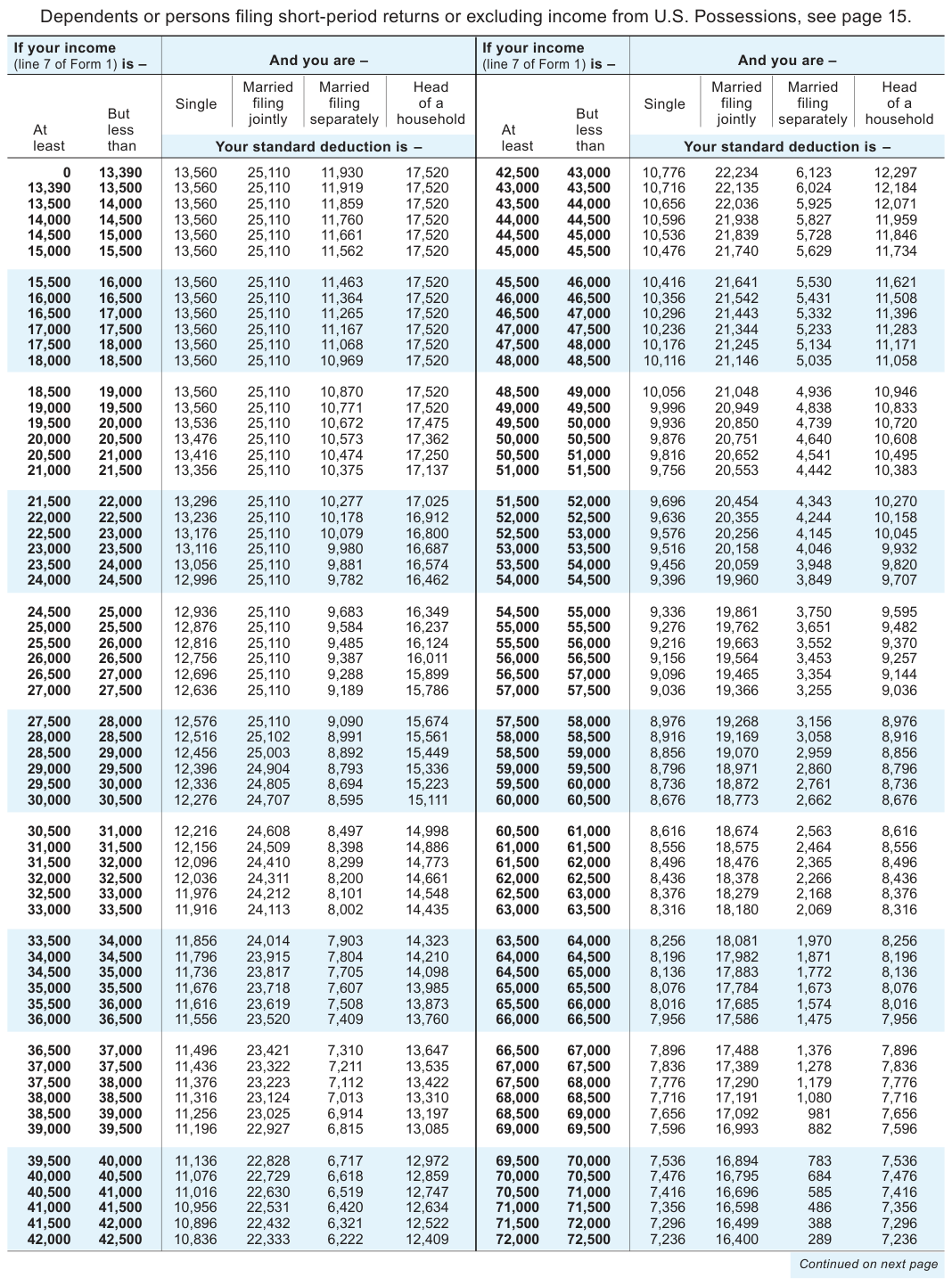
Text version of this table
| If your income (line 7 of Form 1) is – | And you are - | If your income (line 7 of Form 1) is – | And you are – | |
| But At less least than | Married Married Head Single filing filing of a jointly separately household | But At less least than | Married Married Head Single filing filing of a jointly separately household | |
| At than least Your standard deduction is - | Your standard deduction is – | |||
| 0 13,390 13,390 13,500 13,500 14,000 14,000 14,500 14,500 15,000 15,000 15,500 | 13,560 25,110 11,930 17,520 13,560 25,110 11,919 17,520 13,560 25,110 11,859 17,520 13,560 25,110 11,760 17,520 13,560 25,110 11,661 17,520 13,560 25,110 11,562 17,520 | 42,500 43,000 43,000 43,500 43,500 44,000 44,000 44,500 44,500 45,000 45,000 45,500 | 10,776 22,234 6,123 12,297 10,716 22,135 6,024 12,184 10,656 22,036 5,925 12,071 10,596 21,938 5,827 11,959 10,536 21,839 5,728 11,846 10,476 21,740 5,629 11,734 | |
| 15,500 16,000 16,000 16,500 16,500 17,000 17,000 17,500 17,500 18,000 18,000 18,500 | 13,560 25,110 11,463 17,520 13,560 25,110 11,364 17,520 13,560 25,110 11,265 17,520 13,560 25,110 11,167 17,520 13,560 25,110 11,068 17,520 13,560 25,110 10,969 17,520 | 45,500 46,000 46,000 46,500 46,500 47,000 47,000 47,500 47,500 48,000 48,000 48,500 | 10,416 21,641 5,530 11,621 10,356 21,542 5,431 11,508 10,296 21,443 5,332 11,396 10,236 21,344 5,233 11,283 10,176 21,245 5,134 11,171 10,116 21,146 5,035 11,058 | |
| 18,500 19,000 19,000 19,500 19,500 20,000 20,000 20,500 20,500 21,000 21,000 21,500 | 13,560 25,110 10,870 17,520 13,560 25,110 10,771 17,520 13,536 25,110 10,672 17,475 13,476 25,110 10,573 17,362 13,416 25,110 10,474 17,250 13,356 25,110 10,375 17,137 | 48,500 49,000 49,000 49,500 49,500 50,000 50,000 50,500 50,500 51,000 51,000 51,500 | 10,056 21,048 4,936 10,946 9,996 20,949 4,838 10,833 9,936 20,850 4,739 10,720 9,876 20,751 4,640 10,608 9,816 20,652 4,541 10,495 9,756 20,553 4,442 10,383 | |
| 21,500 22,000 22,000 22,500 22,500 23,000 23,000 23,500 23,500 24,000 24,000 24,500 | 13,296 25,110 10,277 17,025 13,236 25,110 10,178 16,912 13,176 25,110 10,079 16,800 13,116 25,110 9,980 16,687 13,056 25,110 9,881 16,574 12,996 25,110 9,782 16,462 | 51,500 52,000 52,000 52,500 52,500 53,000 53,000 53,500 53,500 54,000 54,000 54,500 | 9,696 20,454 4,343 10,270 9,636 20,355 4,244 10,158 9,576 20,256 4,145 10,045 9,516 20,158 4,046 9,932 9,456 20,059 3,948 9,820 9,396 19,960 3,849 9,707 | |
| 24,500 25,000 25,000 25,500 25,500 26,000 26,000 26,500 26,500 27,000 27,000 27,500 | 12,936 25,110 9,683 16,349 12,876 25,110 9,584 16,237 12,816 25,110 9,485 16,124 12,756 25,110 9,387 16,011 12,696 25,110 9,288 15,899 12,636 25,110 9,189 15,786 | 54,500 55,000 55,000 55,500 55,500 56,000 56,000 56,500 56,500 57,000 57,000 57,500 | 9,336 19,861 3,750 9,595 9,276 19,762 3,651 9,482 9,216 19,663 3,552 9,370 9,156 19,564 3,453 9,257 9,096 19,465 3,354 9,144 9,036 19,366 3,255 9,036 | |
| 27,500 28,000 28,000 28,500 28,500 29,000 29,000 29,500 29,500 30,000 30,000 30,500 | 12,576 25,110 9,090 15,674 12,516 25,102 8,991 15,561 12,456 25,003 8,892 15,449 12,396 24,904 8,793 15,336 12,336 24,805 8,694 15,223 12,276 24,707 8,595 15,111 | 57,500 58,000 58,000 58,500 58,500 59,000 59,000 59,500 59,500 60,000 60,000 60,500 | 8,976 19,268 3,156 8,976 8,916 19,169 3,058 8,916 8,856 19,070 2,959 8,856 8,796 18,971 2,860 8,796 8,736 18,872 2,761 8,736 8,676 18,773 2,662 8,676 | |
| 30,500 31,000 31,000 31,500 31,500 32,000 32,000 32,500 32,500 33,000 33,000 33,500 | 12,216 24,608 8,497 14,998 12,156 24,509 8,398 14,886 12,096 24,410 8,299 14,773 12,036 24,311 8,200 14,661 11,976 24,212 8,101 14,548 11,916 24,113 8,002 14,435 | 60,500 61,000 61,000 61,500 61,500 62,000 62,000 62,500 62,500 63,000 63,000 63,500 | 8,616 18,674 2,563 8,616 8,556 18,575 2,464 8,556 8,496 18,476 2,365 8,496 8,436 18,378 2,266 8,436 8,376 18,279 2,168 8,376 8,316 18,180 2,069 8,316 | |
| 33,500 34,000 34,000 34,500 34,500 35,000 35,000 35,500 35,500 36,000 36,000 36,500 | 11,856 24,014 7,903 14,323 11,796 23,915 7,804 14,210 11,736 23,817 7,705 14,098 11,676 23,718 7,607 13,985 11,616 23,619 7,508 13,873 11,556 23,520 7,409 13,760 | 63,500 64,000 64,000 64,500 64,500 65,000 65,000 65,500 65,500 66,000 66,000 66,500 | 8,256 18,081 1,970 8,256 8,196 17,982 1,871 8,196 8,136 17,883 1,772 8,136 8,076 17,784 1,673 8,076 8,016 17,685 1,574 8,016 7,956 17,586 1,475 7,956 | |
| 36,500 37,000 37,000 37,500 37,500 38,000 38,000 38,500 38,500 39,000 39,000 39,500 | 11,496 23,421 7,310 13,647 11,436 23,322 7,211 13,535 11,376 23,223 7,112 13,422 11,316 23,124 7,013 13,310 11,256 23,025 6,914 13,197 11,196 22,927 6,815 13,085 | 66,500 67,000 67,000 67,500 67,500 68,000 68,000 68,500 68,500 69,000 69,000 69,500 | 7,896 17,488 1,376 7,896 7,836 17,389 1,278 7,836 7,776 17,290 1,179 7,776 7,716 17,191 1,080 7,716 7,656 17,092 981 7,656 7,596 16,993 882 7,596 | |
| 39,500 40,000 40,000 40,500 40,500 41,000 41,000 41,500 41,500 42,000 42,000 42,500 | 11,136 22,828 6,717 12,972 11,076 22,729 6,618 12,859 11,016 22,630 6,519 12,747 10,956 22,531 6,420 12,634 10,896 22,432 6,321 12,522 10,836 22,333 6,222 12,409 | 69,500 70,000 70,000 70,500 70,500 71,000 71,000 71,500 71,500 72,000 72,000 72,500 | 7,536 16,894 783 7,536 7,476 16,795 684 7,476 7,416 16,696 585 7,416 7,356 16,598 486 7,356 7,296 16,499 388 7,296 7,236 16,400 289 7,236 | |
| Continued on next page |
# 2025 Standard Deduction Table
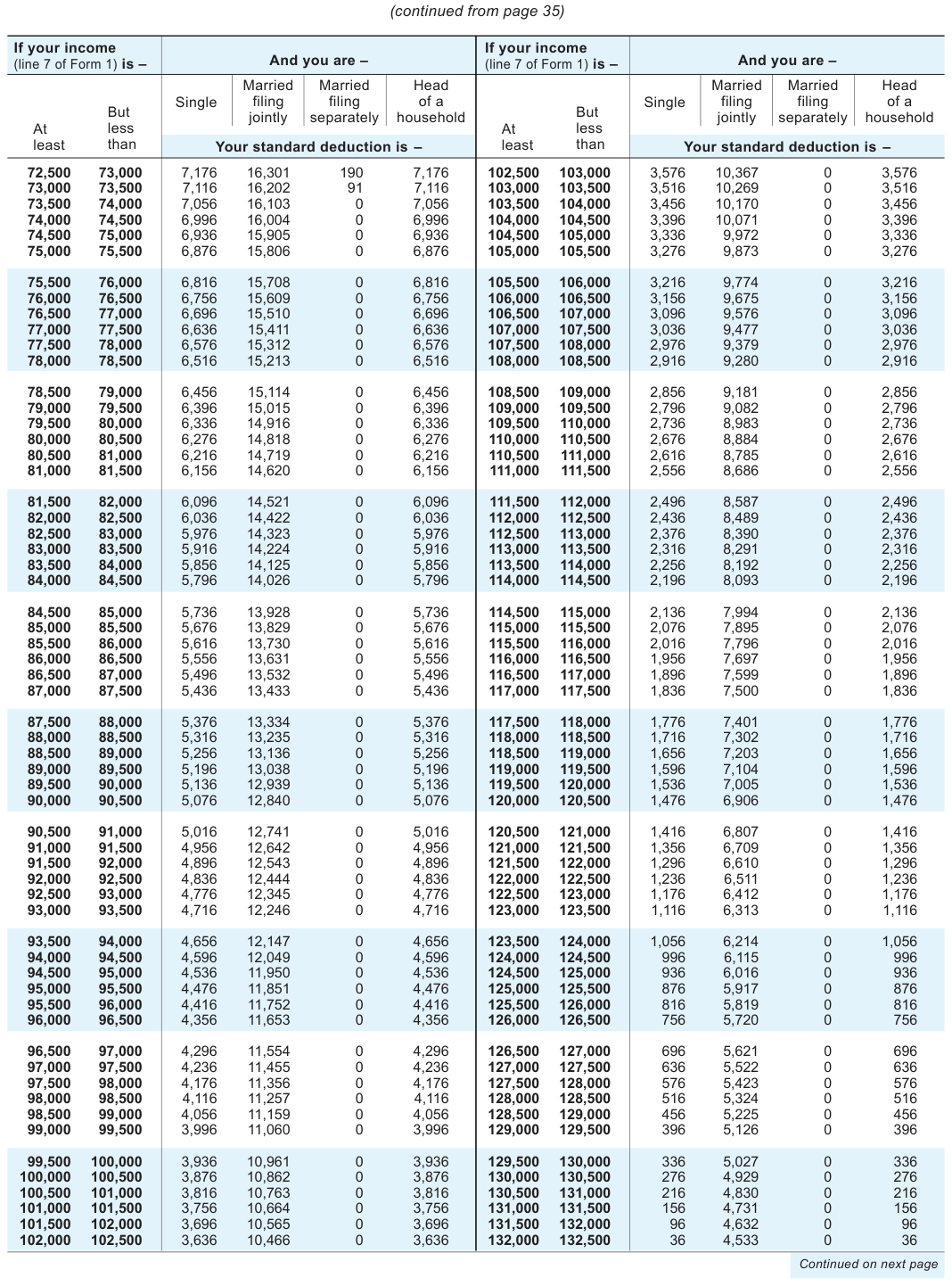
Text version of this table
| If your income (line 7 of Form 1) is – | And you are - | If your income (line 7 of Form 1) is – | And you are – | |
| But At less least than | Married Married Head Single filing filing of a jointly separately household | But At less least than | Married Married Head Single filing filing of a jointly separately household | |
| At than least Your standard deduction is - | Your standard deduction is – | |||
| 72,500 73,000 73,000 73,500 73,500 74,000 74,000 74,500 74,500 75,000 75,000 75,500 | 7,176 16,301 190 7,176 7,116 16,202 91 7,116 7,056 16,103 0 7,056 6,996 16,004 0 6,996 6,936 15,905 0 6,936 6,876 15,806 0 6,876 | 102,500 103,000 103,000 103,500 103,500 104,000 104,000 104,500 104,500 105,000 105,000 105,500 | 3,576 10,367 0 3,576 3,516 10,269 0 3,516 3,456 10,170 0 3,456 3,396 10,071 0 3,396 3,336 9,972 0 3,336 3,276 9,873 0 3,276 | |
| 75,500 76,000 76,000 76,500 76,500 77,000 77,000 77,500 77,500 78,000 78,000 78,500 | 6,816 15,708 0 6,816 6,756 15,609 0 6,756 6,696 15,510 0 6,696 6,636 15,411 0 6,636 6,576 15,312 0 6,576 6,516 15,213 0 6,516 | 105,500 106,000 106,000 106,500 106,500 107,000 107,000 107,500 107,500 108,000 108,000 108,500 | 3,216 9,774 0 3,216 3,156 9,675 0 3,156 3,096 9,576 0 3,096 3,036 9,477 0 3,036 2,976 9,379 0 2,976 2,916 9,280 0 2,916 | |
| 78,500 79,000 79,000 79,500 79,500 80,000 80,000 80,500 80,500 81,000 81,000 81,500 | 6,456 15,114 0 6,456 6,396 15,015 0 6,396 6,336 14,916 0 6,336 6,276 14,818 0 6,276 6,216 14,719 0 6,216 6,156 14,620 0 6,156 | 108,500 109,000 109,000 109,500 109,500 110,000 110,000 110,500 110,500 111,000 111,000 111,500 | 2,856 9,181 0 2,856 2,796 9,082 0 2,796 2,736 8,983 0 2,736 2,676 8,884 0 2,676 2,616 8,785 0 2,616 2,556 8,686 0 2,556 | |
| 81,500 82,000 82,000 82,500 82,500 83,000 83,000 83,500 83,500 84,000 84,000 84,500 | 6,096 14,521 0 6,096 6,036 14,422 0 6,036 5,976 14,323 0 5,976 5,916 14,224 0 5,916 5,856 14,125 0 5,856 5,796 14,026 0 5,796 | 111,500 112,000 112,000 112,500 112,500 113,000 113,000 113,500 113,500 114,000 114,000 114,500 | 2,496 8,587 0 2,496 2,436 8,489 0 2,436 2,376 8,390 0 2,376 2,316 8,291 0 2,316 2,256 8,192 0 2,256 2,196 8,093 0 2,196 | |
| 84,500 85,000 85,000 85,500 85,500 86,000 86,000 86,500 86,500 87,000 87,000 87,500 | 5,736 13,928 0 5,736 5,676 13,829 0 5,676 5,616 13,730 0 5,616 5,556 13,631 0 5,556 5,496 13,532 0 5,496 5,436 13,433 0 5,436 | 114,500 115,000 115,000 115,500 115,500 116,000 116,000 116,500 116,500 117,000 117,000 117,500 | 2,136 7,994 0 2,136 2,076 7,895 0 2,076 2,016 7,796 0 2,016 1,956 7,697 0 1,956 1,896 7,599 0 1,896 1,836 7,500 0 1,836 | |
| 87,500 88,000 88,000 88,500 88,500 89,000 89,000 89,500 89,500 90,000 90,000 90,500 | 5,376 13,334 0 5,376 5,316 13,235 0 5,316 5,256 13,136 0 5,256 5,196 13,038 0 5,196 5,136 12,939 0 5,136 5,076 12,840 0 5,076 | 117,500 118,000 118,000 118,500 118,500 119,000 119,000 119,500 119,500 120,000 120,000 120,500 | 1,776 7,401 0 1,776 1,716 7,302 0 1,716 1,656 7,203 0 1,656 1,596 7,104 0 1,596 1,536 7,005 0 1,536 1,476 6,906 0 1,476 | |
| 90,500 91,000 91,000 91,500 91,500 92,000 92,000 92,500 92,500 93,000 93,000 93,500 | 5,016 12,741 0 5,016 4,956 12,642 0 4,956 4,896 12,543 0 4,896 4,836 12,444 0 4,836 4,776 12,345 0 4,776 4,716 12,246 0 4,716 | 120,500 121,000 121,000 121,500 121,500 122,000 122,000 122,500 122,500 123,000 123,000 123,500 | 1,416 6,807 0 1,416 1,356 6,709 0 1,356 1,296 6,610 0 1,296 1,236 6,511 0 1,236 1,176 6,412 0 1,176 1,116 6,313 0 1,116 | |
| 93,500 94,000 94,000 94,500 94,500 95,000 95,000 95,500 95,500 96,000 96,000 96,500 | 4,656 12,147 0 4,656 4,596 12,049 0 4,596 4,536 11,950 0 4,536 4,476 11,851 0 4,476 4,416 11,752 0 4,416 4,356 11,653 0 4,356 | 123,500 124,000 124,000 124,500 124,500 125,000 125,000 125,500 125,500 126,000 126,000 126,500 | 1,056 6,214 0 1,056 996 6,115 0 996 936 6,016 0 936 876 5,917 0 876 816 5,819 0 816 756 5,720 0 756 | |
| 96,500 97,000 97,000 97,500 97,500 98,000 98,000 98,500 98,500 99,000 99,000 99,500 | 4,296 11,554 0 4,296 4,236 11,455 0 4,236 4,176 11,356 0 4,176 4,116 11,257 0 4,116 4,056 11,159 0 4,056 3,996 11,060 0 3,996 | 126,500 127,000 127,000 127,500 127,500 128,000 128,000 128,500 128,500 129,000 129,000 129,500 | 696 5,621 0 696 636 5,522 0 636 576 5,423 0 576 516 5,324 0 516 456 5,225 0 456 396 5,126 0 396 | |
| 99,500 100,000 100,000 100,500 100,500 101,000 101,000 101,500 101,500 102,000 102,000 102,500 | 3,936 10,961 0 3,936 3,876 10,862 0 3,876 3,816 10,763 0 3,816 3,756 10,664 0 3,756 3,696 10,565 0 3,696 3,636 10,466 0 3,636 | 129,500 130,000 130,000 130,500 130,500 131,000 131,000 131,500 131,500 132,000 132,000 132,500 | 336 5,027 0 336 276 4,929 0 276 216 4,830 0 216 156 4,731 0 156 96 4,632 0 96 36 4,533 0 36 | |
| Continued on next page |
# 37 2025 Standard Deduction Table
At than least
Your standard deduction is -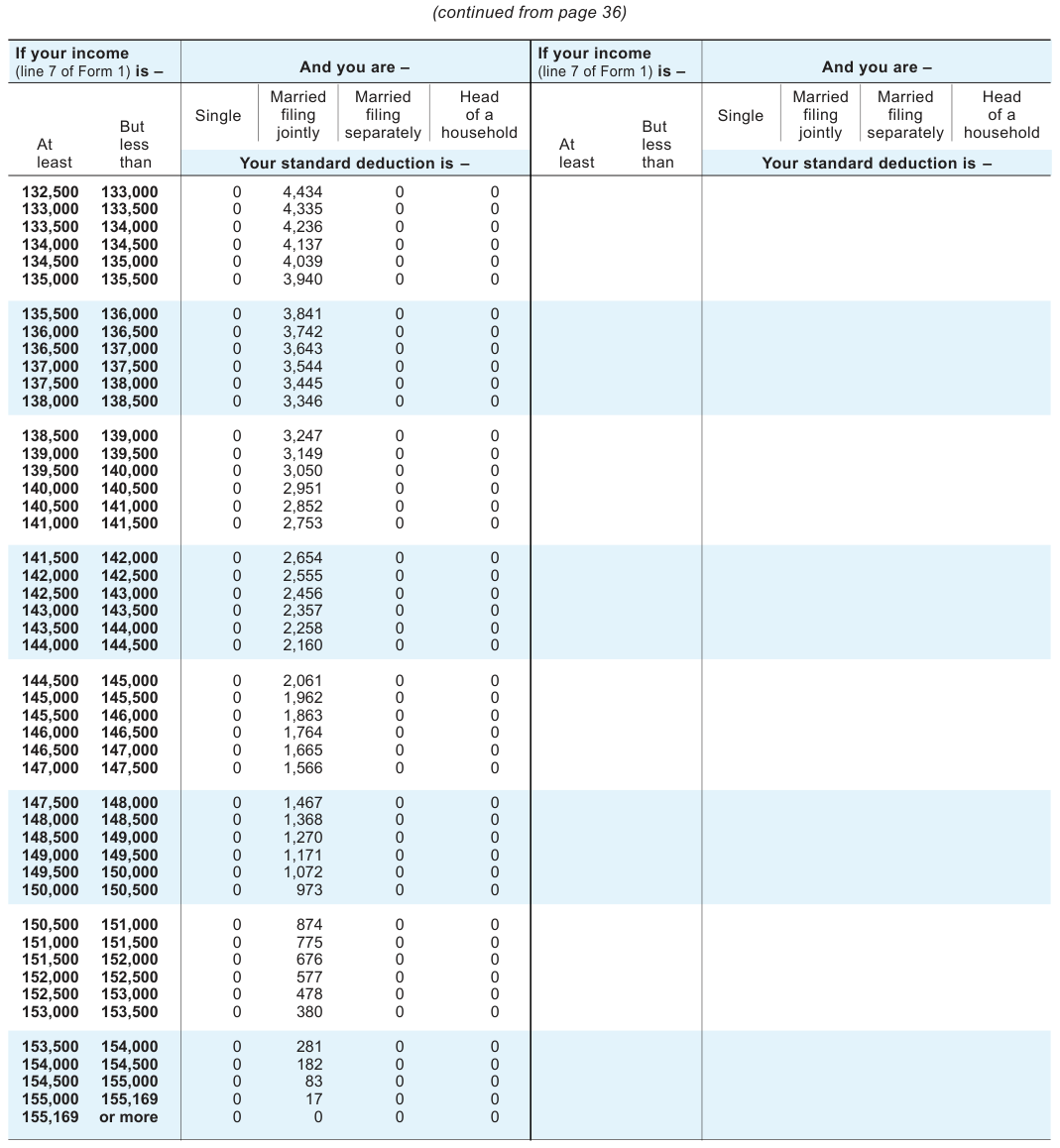
Text version of this table
If your income (line 7 of Form 1) is – And you are – If your income (line 7 of Form 1) is – And you are – But At less least than Married Married Head Single filing filing of a jointly separately household But At less least than Married Married Head Single filing filing of a jointly separately household Your standard deduction is – Your standard deduction is – 132,500 133,000 133,000 133,500 133,500 134,000 134,000 134,500 134,500 135,000 135,000 135,500 0 4,434 0 0 0 4,335 0 0 0 4,236 0 0 0 4,137 0 0 0 4,039 0 0 0 3,940 0 0 135,500 136,000 136,000 136,500 136,500 137,000 137,000 137,500 137,500 138,000 138,000 138,500 0 3,841 0 0 0 3,742 0 0 0 3,643 0 0 0 3,544 0 0 0 3,445 0 0 0 3,346 0 0 138,500 139,000 139,000 139,500 139,500 140,000 140,000 140,500 140,500 141,000 141,000 141,500 0 3,247 0 0 0 3,149 0 0 0 3,050 0 0 0 2,951 0 0 0 2,852 0 0 0 2,753 0 0 141,500 142,000 142,000 142,500 142,500 143,000 143,000 143,500 143,500 144,000 144,000 144,500 0 2,654 0 0 0 2,555 0 0 0 2,456 0 0 0 2,357 0 0 0 2,258 0 0 0 2,160 0 0 144,500 145,000 145,000 145,500 145,500 146,000 146,000 146,500 146,500 147,000 147,000 147,500 0 2,061 0 0 0 1,962 0 0 0 1,863 0 0 0 1,764 0 0 0 1,665 0 0 0 1,566 0 0 147,500 148,000 148,000 148,500 148,500 149,000 149,000 149,500 149,500 150,000 150,000 150,500 0 1,467 0 0 0 1,368 0 0 0 1,270 0 0 0 1,171 0 0 0 1,072 0 0 0 973 0 0 150,500 151,000 151,000 151,500 151,500 152,000 152,000 152,500 152,500 153,000 153,000 153,500 0 874 0 0 0 775 0 0 0 676 0 0 0 577 0 0 0 478 0 0 0 380 0 0 153,500 154,000 154,000 154,500 154,500 155,000 155,000 155,169 155,169 or more 0 281 0 0 0 182 0 0 0 83 0 0 0 17 0 0 0 0 0 0
Your standard deduction is -
0 0
0 0
0 0
0 0
0 0
0 0
0 0
0 0
0 0
0 0
0 0
0 0
0 0
0 0
0 0
0 0
0 0
0 0
0 0
0 0
0 0
0 0
0 0
0 0
0 0
0 0
0 0
0 0
0 0
0 0
0 0
0 0
0 0
0 0
0 0
0 0
0 0
0 0
0 0
0 0
0 0
0 0
0 0
0 0
0 0
0 0
0 0
2025 Tax Table for Form 1 Filers
Use this Tax Table if your taxable income is less than $100,000. If $100,000 or more, use the
Tax Computation Worksheet on page 44.
# Single or Married
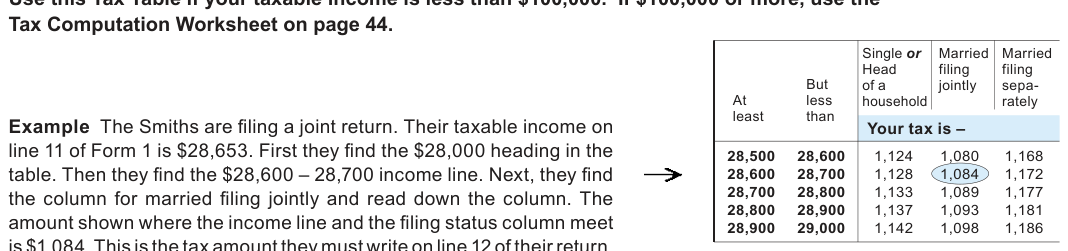
Text version of this table
But At less least than Single or Head of a household Married filing jointly Married filing sepa- rately Your tax is – 28,500 28,600 28,600 28,700 28,700 28,800 28,800 28,900 28,900 29,000 1,124 1,080 1,168 1,128 1,084 1,172 1,133 1,089 1,177 1,137 1,093 1,181 1,142 1,098 1,186
If line 11
And you are - And you are -
(Taxable income) is -
# Married
Single or
Single or Single or
Head
Head filing filing of a jointly of a sepa-But But filing Head filing filing filing jointly of a jointly sepa- sepa-But household household rately At less At less least than least than Your tax is -3,000 3,000 3,100 3,100 3,200 3,200 3,300 3,300 3,400 3,400 3,500 3,500 3,600 3,600 3,700 3,700 3,800 3,800 3,900 3,900 4,000 0 20 0 0 0 20 40 1 1 1 4,000 40 100 2 2 2 4,000 4,100 4,100 4,200 100 200 5 5 5 4,200 4,300 200 300 9 9 9 4,300 4,400 300 400 12 12 12 4,400 4,500 400 500 16 16 16 4,500 4,600 500 600 19 19 19 4,600 4,700 600 700 23 23 23 4,700 4,800 700 800 26 26 26 4,800 4,900 800 900 30 30 30 4,900 5,000 900 1,000 33 33 33 1,000 5,000 5,000 5,100 1,000 1,100 37 37 37 5,100 5,200 1,100 1,200 40 40 40 5,200 5,300 1,200 1,300 44 44 44 5,300 5,400 1,300 1,400 47 47 47 5,400 5,500 1,400 1,500 51 51 51 5,500 5,600 1,500 1,600 54 54 54 5,600 5,700 1,600 1,700 58 58 58 5,700 5,800 1,700 1,800 61 61 61 5,800 5,900 1,800 1,900 65 65 65 5,900 6,000 1,900 2,000 68 68 68 2,000 6,000 6,000 6,100 2,000 2,100 72 72 72 6,100 6,200 2,100 2,200 75 75 75 6,200 6,300 2,200 2,300 79 79 79 6,300 6,400 2,300 2,400 82 82 82 6,400 6,500 2,400 2,500 86 86 86 6,500 6,600 2,500 2,600 89 89 89 6,600 6,700 2,600 2,700 93 93 93 6,700 6,800 2,700 2,800 96 96 96 6,800 6,900 2,800 2,900 100 100 100 6,900 7,000 2,900 3,000 103 103 103 household rately rately At less least than Your tax is - Your tax is -7,000 7,000 7,100 107 107 107 247 247 247 7,100 7,200 110 110 110 250 250 250 7,200 7,300 114 114 114 254 254 254 7,300 7,400 117 117 117 257 257 257 7,400 7,500 121 121 121 261 261 261 7,500 7,600 124 124 124 264 264 264 7,600 7,700 128 128 128 268 268 268 7,700 7,800 131 131 131 271 271 271 7,800 7,900 135 135 135 275 275 275 7,900 8,000 138 138 138 278 278 278 8,000 8,000 8,100 142 142 142 282 282 282 8,100 8,200 145 145 145 285 285 285 8,200 8,300 149 149 149 289 289 289 8,300 8,400 152 152 152 292 292 292 8,400 8,500 156 156 156 296 296 296 8,500 8,600 159 159 159 299 299 299 8,600 8,700 163 163 163 303 303 303 8,700 8,800 166 166 166 306 306 306 8,800 8,900 170 170 170 310 310 310 8,900 9,000 173 173 173 313 313 313 9,000 9,000 9,100 177 177 177 317 317 317 9,100 9,200 180 180 180 320 320 320 9,200 9,300 184 184 184 324 324 324 9,300 9,400 187 187 187 327 327 327 9,400 9,500 191 191 191 331 331 331 9,500 9,600 194 194 194 334 334 334 9,600 9,700 198 198 198 338 338 338 9,700 9,800 201 201 201 341 341 341 9,800 9,900 205 205 205 345 345 345 9,900 10,000 208 208 208 348 348 350 10,000 10,000 10,100 212 212 212 352 352 354 10,100 10,200 215 215 215 355 355 358 10,200 10,300 219 219 219 359 359 363 10,300 10,400 222 222 222 362 362 367 10,400 10,500 226 226 226 366 366 372 10,500 10,600 229 229 229 369 369 376 10,600 10,700 233 233 233 373 373 380 10,700 10,800 236 236 236 376 376 385 10,800 10,900 240 240 240 380 380 389 10,900 11,000 243 243 243 383 383 394
If line 11 If line 11
And you are -
(Taxable income) is - (Taxable income) is -
Married Married
If line 11
And you are - And you are -
(Taxable income) is -
# Married
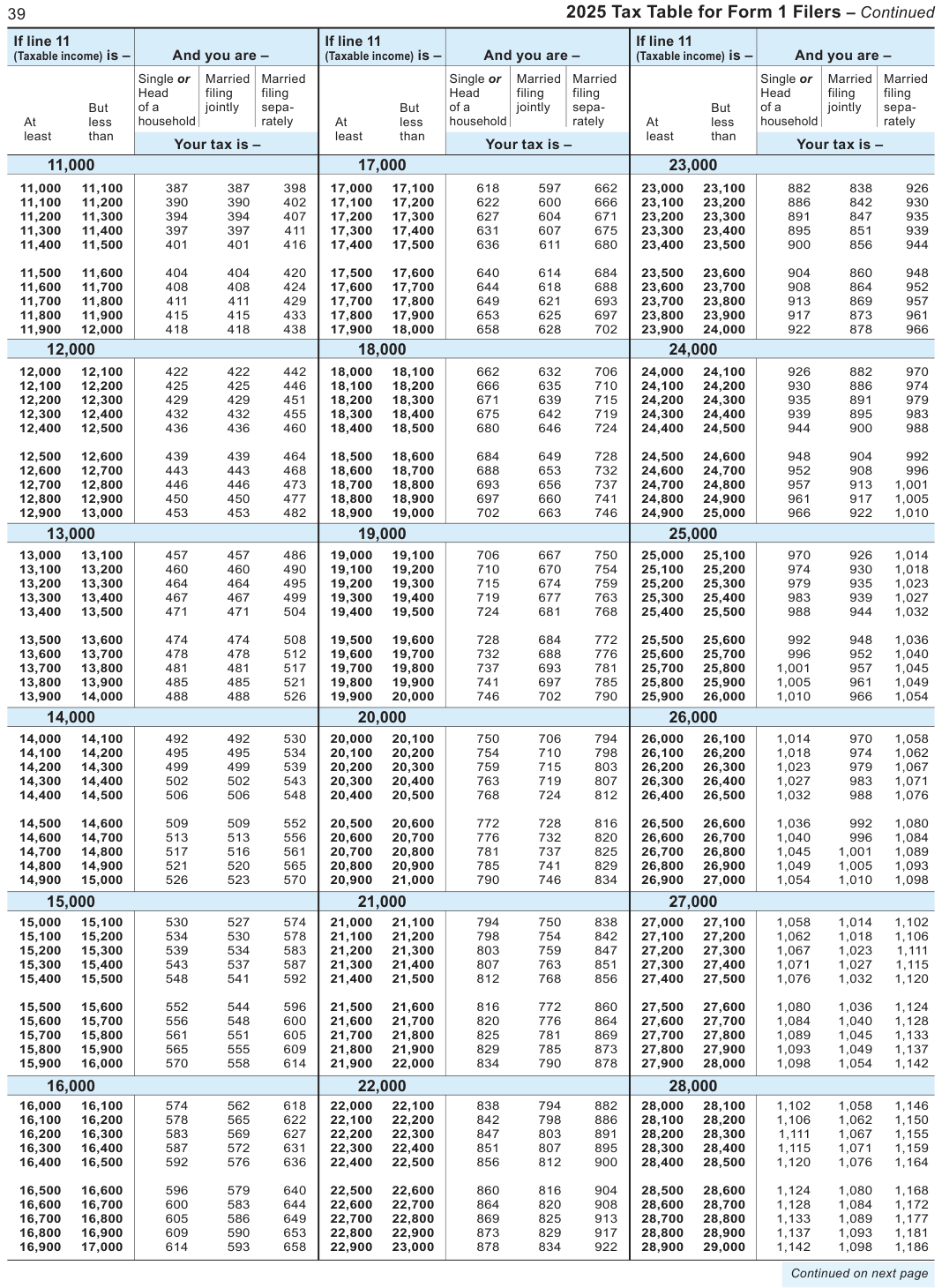
Text version of this table
| If line 11 | If line 11 | If line 11 | ||||||||||||
| (Taxable income) is - | me) is – | And | you are | – | (Taxable inco | me) is – | And | you are | – | (Taxable inco | me) is – | And | you are | – |
| Singl | e or | Married | Married | Singl | e or | Married | Married | Sin | gle or | Married | Married | |||
| Head | filing | filing | Head | filing | filing | He | ad | filing | filing | |||||
| But of a | jointly | sepa- | But of a | jointly | sepa- | But of | a | jointly | sepa- | |||||
| At | less hous | ehold | rately | At | less hous | ehold | rately | At | less ho | usehold | rately | |||
| least | than | least | than | least | than | |||||||||
| Your | tax is – | Your | tax is – | Your | tax is – | |||||||||
| 11,0 | 00 | 17,0 | 00 | 23,0 | 00 | |||||||||
| 11,000 | 11,100 | 387 | 387 | 398 | 17,000 | 17,100 | 618 | 597 | 662 | 23,000 | 23,100 | 882 | 838 | 926 |
| 11,100 | 11,200 | 390 | 390 | 402 | 17,100 | 17,200 | 622 | 600 | 666 | 23,100 | 23,200 | 886 | 842 | 930 |
| 11,200 | 11,300 | 394 | 394 | 407 | 17,200 | 17,300 | 627 | 604 | 671 | 23,200 | 23,300 | 891 | 847 | 935 |
| 11,300 | 11,400 | 397 | 397 | 411 | 17,300 | 17,400 | 631 | 607 | 675 | 23,300 | 23,400 | 895 | 851 | 939 |
| 11,400 | 11,500 | 401 | 401 | 416 | 17,400 | 17,500 | 636 | 611 | 680 | 23,400 | 23,500 | 900 | 856 | 944 |
| 11,500 | 11,600 | 404 | 404 | 420 | 17,500 | 17,600 | 640 | 614 | 684 | 23,500 | 23,600 | 904 | 860 | 948 |
| 11,600 | 11,700 | 408 | 408 | 424 | 17,600 | 17,700 | 644 | 618 | 688 | 23,600 | 23,700 | 908 | 864 | 952 |
| 11,700 | 11,800 | 411 | 411 | 429 | 17,700 | 17,800 | 649 | 621 | 693 | 23,700 | 23,800 | 913 | 869 | 957 |
| 11,800 | 11,900 | 415 | 415 | 433 | 17,800 | 17,900 | 653 | 625 | 697 | 23,800 | 23,900 | 917 | 873 | 961 |
| 11,900 | 12,000 | 418 | 418 | 438 | 17,900 | 18,000 | 658 | 628 | 702 | 23,900 | 24,000 | 922 | 878 | 966 |
| 12,0 | 00 | 18,0 | 00 | 24,0 | 00 | |||||||||
| 12,000 | 12,100 | 422 | 422 | 442 | 18,000 | 18,100 | 662 | 632 | 706 | 24,000 | 24,100 | 926 | 882 | 970 |
| 12,100 | 12,200 | 425 | 425 | 446 | 18,100 | 18,200 | 666 | 635 | 710 | 24,100 | 24,200 | 930 | 886 | 974 |
| 12,200 | 12,300 | 429 | 429 | 451 | 18,200 | 18,300 | 671 | 639 | 715 | 24,200 | 24,300 | 935 | 891 | 979 |
| 12,300 | 12,400 | 432 | 432 | 455 | 18,300 | 18,400 | 675 | 642 | 719 | 24,300 | 24,400 | 939 | 895 | 983 |
| 12,400 | 12,500 | 436 | 436 | 460 | 18,400 | 18,500 | 680 | 646 | 724 | 24,400 | 24,500 | 944 | 900 | 988 |
| 12,500 | 12,600 | 439 | 439 | 464 | 18,500 | 18,600 | 684 | 649 | 728 | 24,500 | 24,600 | 948 | 904 | 992 |
| 12,600 | 12,700 | 443 | 443 | 468 | 18,600 | 18,700 | 688 | 653 | 732 | 24,600 | 24,700 | 952 | 908 | 996 |
| 12,700 | 12,800 | 446 | 446 | 473 | 18,700 | 18,800 | 693 | 656 | 737 | 24,700 | 24,800 | 957 | 913 | 1,001 |
| 12,800 | 12,900 | 450 | 450 | 477 | 18,800 | 18,900 | 697 | 660 | 741 | 24,800 | 24,900 | 961 | 917 | 1,005 |
| 12,900 | 13,000 | 453 | 453 | 482 | 18,900 | 19,000 | 702 | 663 | 746 | 24,900 | 25,000 | 966 | 922 | 1,010 |
| 13,0 | 00 | 19,0 | 00 | 25,0 | 00 | |||||||||
| 13,000 | 13,100 | 457 | 457 | 486 | 19,000 | 19,100 | 706 | 667 | 750 | 25,000 | 25,100 | 970 | 926 | 1,014 |
| 13,100 | 13,200 | 460 | 460 | 490 | 19,100 | 19,200 | 710 | 670 | 754 | 25,100 | 25,200 | 974 | 930 | 1,018 |
| 13,200 | 13,300 | 464 | 464 | 495 | 19,200 | 19,300 | 715 | 674 | 759 | 25,200 | 25,300 | 979 | 935 | 1,023 |
| 13,300 | 13,400 | 467 | 467 | 499 | 19,300 | 19,400 | 719 | 677 | 763 | 25,300 | 25,400 | 983 | 939 | 1,027 |
| 13,400 | 13,500 | 471 | 471 | 504 | 19,400 | 19,500 | 724 | 681 | 768 | 25,400 | 25,500 | 988 | 944 | 1,032 |
| 13,500 | 13,600 | 474 | 474 | 508 | 19,500 | 19,600 | 728 | 684 | 772 | 25,500 | 25,600 | 992 | 948 | 1,036 |
| 13,600 | 13,700 | 478 | 478 | 512 | 19,600 | 19,700 | 732 | 688 | 776 | 25,600 | 25,700 | 996 | 952 | 1,040 |
| 13,700 | 13,800 | 481 | 481 | 517 | 19,700 | 19,800 | 737 | 693 | 781 | 25,700 | 25,800 | 1,001 | 957 | 1,045 |
| 13,800 | 13,900 | 485 | 485 | 521 | 19,800 | 19,900 | 741 | 697 | 785 | 25,800 | 25,900 | 1,005 | 961 | 1,049 |
| 13,900 | 14,000 | 488 | 488 | 526 | 19,900 | 20,000 | 746 | 702 | 790 | 25,900 | 26,000 | 1,010 | 966 | 1,054 |
| 14,0 | 00 | 20,0 | 00 | 26,0 | 00 | |||||||||
| 14,000 | 14,100 | 492 | 492 | 530 | 20,000 | 20,100 | 750 | 706 | 794 | 26,000 | 26,100 | 1,014 | 970 | 1,058 |
| 14,100 | 14,200 | 495 | 495 | 534 | 20,100 | 20,200 | 754 | 710 | 798 | 26,100 | 26,200 | 1,018 | 974 | 1,062 |
| 14,200 | 14,300 | 499 | 499 | 539 | 20,200 | 20,300 | 759 | 715 | 803 | 26,200 | 26,300 | 1,023 | 979 | 1,067 |
| 14,300 | 14,400 | 502 | 502 | 543 | 20,300 | 20,400 | 763 | 719 | 807 | 26,300 | 26,400 | 1,027 | 983 | 1,071 |
| 14,400 | 14,500 | 506 | 506 | 548 | 20,400 | 20,500 | 768 | 724 | 812 | 26,400 | 26,500 | 1,032 | 988 | 1,076 |
| 14,500 | 14,600 | 509 | 509 | 552 | 20,500 | 20,600 | 772 | 728 | 816 | 26,500 | 26,600 | 1,036 | 992 | 1,080 |
| 14,600 | 14,700 | 513 | 513 | 556 | 20,600 | 20,700 | 776 | 732 | 820 | 26,600 | 26,700 | 1,040 | 996 | 1,084 |
| 14,700 | 14,800 | 517 | 516 | 561 | 20,700 | 20,800 | 781 | 737 | 825 | 26,700 | 26,800 | 1,045 | 1,001 | 1,089 |
| 14,800 | 14,900 | 521 | 520 | 565 | 20,800 | 20,900 | 785 | 741 | 829 | 26,800 | 26,900 | 1,049 | 1,005 | 1,093 |
| 14,900 | 15,000 | 526 | 523 | 570 | 20,900 | 21,000 | 790 | 746 | 834 | 26,900 | 27,000 | 1,054 | 1,010 | 1,098 |
| 15,0 | 00 | 21,0 | 00 | 27,0 | 00 | |||||||||
| 15,000 | 15,100 | 530 | 527 | 574 | 21,000 | 21,100 | 794 | 750 | 838 | 27,000 | 27,100 | 1,058 | 1,014 | 1,102 |
| 15,100 | 15,200 | 534 | 530 | 578 | 21,100 | 21,200 | 798 | 754 | 842 | 27,100 | 27,200 | 1,062 | 1,018 | 1,106 |
| 15,200 | 15,300 | 539 | 534 | 583 | 21,200 | 21,300 | 803 | 759 | 847 | 27,200 | 27,300 | 1,067 | 1,023 | 1,111 |
| 15,300 | 15,400 | 543 | 537 | 587 | 21,300 | 21,400 | 807 | 763 | 851 | 27,300 | 27,400 | 1,071 | 1,027 | 1,115 |
| 15,400 | 15,500 | 548 | 541 | 592 | 21,400 | 21,500 | 812 | 768 | 856 | 27,400 | 27,500 | 1,076 | 1,032 | 1,120 |
| 15,500 | 15,600 | 552 | 544 | 596 | 21,500 | 21,600 | 816 | 772 | 860 | 27,500 | 27,600 | 1,080 | 1,036 | 1,124 |
| 15,600 | 15,700 | 556 | 548 | 600 | 21,600 | 21,700 | 820 | 776 | 864 | 27,600 | 27,700 | 1,084 | 1,040 | 1,128 |
| 15,700 | 15,800 | 561 | 551 | 605 | 21,700 | 21,800 | 825 | 781 | 869 | 27,700 | 27,800 | 1,089 | 1,045 | 1,133 |
| 15,800 | 15,900 | 565 | 555 | 609 | 21,800 | 21,900 | 829 | 785 | 873 | 27,800 | 27,900 | 1,093 | 1,049 | 1,137 |
| 15,900 | 16,000 | 570 | 558 | 614 | 21,900 | 22,000 | 834 | 790 | 878 | 27,900 | 28,000 | 1,098 | 1,054 | 1,142 |
| 16,0 | 00 | 22,0 | 00 | 28,0 | 00 | |||||||||
| 16,000 | 16,100 | 574 | 562 | 618 | 22,000 | 22,100 | 838 | 794 | 882 | 28,000 | 28,100 | 1,102 | 1,058 | 1,146 |
| 16,100 | 16,200 | 578 | 565 | 622 | 22,100 | 22,200 | 842 | 798 | 886 | 28,100 | 28,200 | 1,106 | 1,062 | 1,150 |
| 16,200 | 16,300 | 583 | 569 | 627 | 22,200 | 22,300 | 847 | 803 | 891 | 28,200 | 28,300 | 1,111 | 1,067 | 1,155 |
| 16,300 | 16,400 | 587 | 572 | 631 | 22,300 | 22,400 | 851 | 807 | 895 | 28,300 | 28,400 | 1,115 | 1,071 | 1,159 |
| 16,400 | 16,500 | 592 | 576 | 636 | 22,400 | 22,500 | 856 | 812 | 900 | 28,400 | 28,500 | 1,120 | 1,076 | 1,164 |
| 16,500 | 16,600 | 596 | 579 | 640 | 22,500 | 22,600 | 860 | 816 | 904 | 28,500 | 28,600 | 1,124 | 1,080 | 1,168 |
| 16,600 | 16,700 | 600 | 583 | 644 | 22,600 | 22,700 | 864 | 820 | 908 | 28,600 | 28,700 | 1,128 | 1,084 | 1,172 |
| 16,700 | 16,800 | 605 | 586 | 649 | 22,700 | 22,800 | 869 | 825 | 913 | 28,700 | 28,800 | 1,133 | 1,089 | 1,177 |
| 16,800 | 16,900 | 609 | 590 | 653 | 22,800 | 22,900 | 873 | 829 | 917 | 28,800 | 28,900 | 1,137 | 1,093 | 1,181 |
| 16,900 | 17,000 | 614 | 593 | 658 | 22,900 | 23,000 | 878 | 834 | 922 | 28,900 | 29,000 | 1,142 | 1,098 | 1,186 |
| Contin | ued on ne | xt page |
# Married
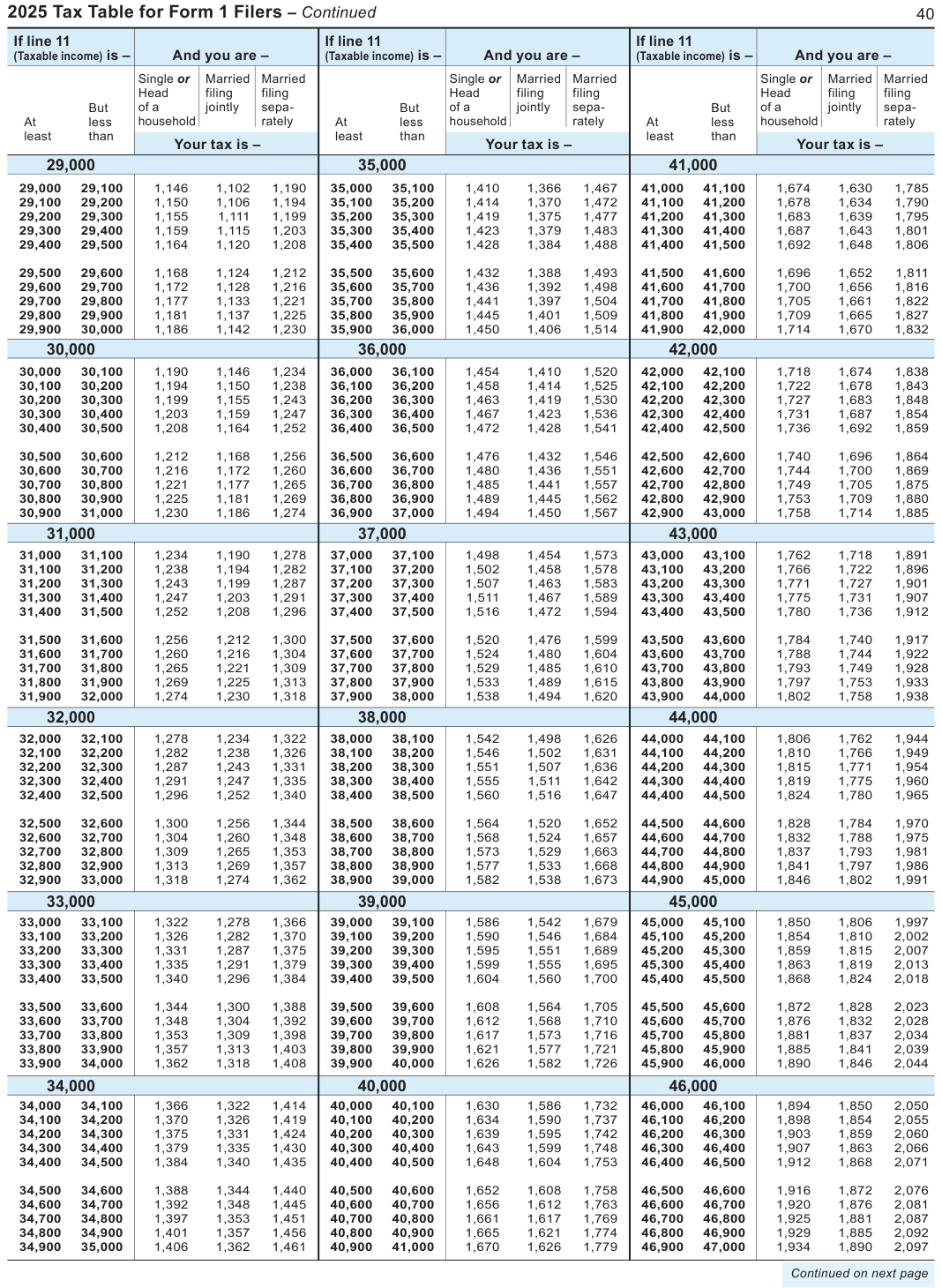
Text version of this table
| If line 11 | If line 11 | If line 11 | ||||||||||||
| (Taxable income) is - | me) is – | And | you are | – | (Taxable inco | me) is – | And | you are | – | (Taxable inco | me) is – | And | you are | – |
| Si | ngle or | Married | Married | Si | ngle or | Married | Married | Si | ngle or | Married | Married | |||
| He | ad | filing | filing | He | ad | filing | filing | He | ad | filing | filing | |||
| But of | a | jointly | sepa- | But of | a | jointly | sepa- | But of | a | jointly | sepa- | |||
| At | less ho | usehold | rately | At | less ho | usehold | rately | At | less ho | usehold | rately | |||
| least | than | least | than | least | than | |||||||||
| Your | tax is – | Your | tax is – | Your | tax is – | |||||||||
| 29,0 | 00 | 35,0 | 00 | 41,0 | 00 | |||||||||
| 29,000 | 29,100 | 1,146 | 1,102 | 1,190 | 35,000 | 35,100 | 1,410 | 1,366 | 1,467 | 41,000 | 41,100 | 1,674 | 1,630 | 1,785 |
| 29,100 | 29,200 | 1,150 | 1,106 | 1,194 | 35,100 | 35,200 | 1,414 | 1,370 | 1,472 | 41,100 | 41,200 | 1,678 | 1,634 | 1,790 |
| 29,200 | 29,300 | 1,155 | 1,111 | 1,199 | 35,200 | 35,300 | 1,419 | 1,375 | 1,477 | 41,200 | 41,300 | 1,683 | 1,639 | 1,795 |
| 29,300 | 29,400 | 1,159 | 1,115 | 1,203 | 35,300 | 35,400 | 1,423 | 1,379 | 1,483 | 41,300 | 41,400 | 1,687 | 1,643 | 1,801 |
| 29,400 | 29,500 | 1,164 | 1,120 | 1,208 | 35,400 | 35,500 | 1,428 | 1,384 | 1,488 | 41,400 | 41,500 | 1,692 | 1,648 | 1,806 |
| 29,500 | 29,600 | 1,168 | 1,124 | 1,212 | 35,500 | 35,600 | 1,432 | 1,388 | 1,493 | 41,500 | 41,600 | 1,696 | 1,652 | 1,811 |
| 29,600 | 29,700 | 1,172 | 1,128 | 1,216 | 35,600 | 35,700 | 1,436 | 1,392 | 1,498 | 41,600 | 41,700 | 1,700 | 1,656 | 1,816 |
| 29,700 | 29,800 | 1,177 | 1,133 | 1,221 | 35,700 | 35,800 | 1,441 | 1,397 | 1,504 | 41,700 | 41,800 | 1,705 | 1,661 | 1,822 |
| 29,800 | 29,900 | 1,181 | 1,137 | 1,225 | 35,800 | 35,900 | 1,445 | 1,401 | 1,509 | 41,800 | 41,900 | 1,709 | 1,665 | 1,827 |
| 29,900 | 30,000 | 1,186 | 1,142 | 1,230 | 35,900 | 36,000 | 1,450 | 1,406 | 1,514 | 41,900 | 42,000 | 1,714 | 1,670 | 1,832 |
| 30,0 | 00 | 36,0 | 00 | 42,0 | 00 | |||||||||
| 30,000 | 30,100 | 1,190 | 1,146 | 1,234 | 36,000 | 36,100 | 1,454 | 1,410 | 1,520 | 42,000 | 42,100 | 1,718 | 1,674 | 1,838 |
| 30,100 | 30,200 | 1,194 | 1,150 | 1,238 | 36,100 | 36,200 | 1,458 | 1,414 | 1,525 | 42,100 | 42,200 | 1,722 | 1,678 | 1,843 |
| 30,200 | 30,300 | 1,199 | 1,155 | 1,243 | 36,200 | 36,300 | 1,463 | 1,419 | 1,530 | 42,200 | 42,300 | 1,727 | 1,683 | 1,848 |
| 30,300 | 30,400 | 1,203 | 1,159 | 1,247 | 36,300 | 36,400 | 1,467 | 1,423 | 1,536 | 42,300 | 42,400 | 1,731 | 1,687 | 1,854 |
| 30,400 | 30,500 | 1,208 | 1,164 | 1,252 | 36,400 | 36,500 | 1,472 | 1,428 | 1,541 | 42,400 | 42,500 | 1,736 | 1,692 | 1,859 |
| 30,500 | 30,600 | 1,212 | 1,168 | 1,256 | 36,500 | 36,600 | 1,476 | 1,432 | 1,546 | 42,500 | 42,600 | 1,740 | 1,696 | 1,864 |
| 30,600 | 30,700 | 1,216 | 1,172 | 1,260 | 36,600 | 36,700 | 1,480 | 1,436 | 1,551 | 42,600 | 42,700 | 1,744 | 1,700 | 1,869 |
| 30,700 | 30,800 | 1,221 | 1,177 | 1,265 | 36,700 | 36,800 | 1,485 | 1,441 | 1,557 | 42,700 | 42,800 | 1,749 | 1,705 | 1,875 |
| 30,800 | 30,900 | 1,225 | 1,181 | 1,269 | 36,800 | 36,900 | 1,489 | 1,445 | 1,562 | 42,800 | 42,900 | 1,753 | 1,709 | 1,880 |
| 30,900 | 31,000 | 1,230 | 1,186 | 1,274 | 36,900 | 37,000 | 1,494 | 1,450 | 1,567 | 42,900 | 43,000 | 1,758 | 1,714 | 1,885 |
| 31,0 | 00 | 37,0 | 00 | 43,0 | 00 | |||||||||
| 31,000 | 31,100 | 1,234 | 1,190 | 1,278 | 37,000 | 37,100 | 1,498 | 1,454 | 1,573 | 43,000 | 43,100 | 1,762 | 1,718 | 1,891 |
| 31,100 | 31,200 | 1,238 | 1,194 | 1,282 | 37,100 | 37,200 | 1,502 | 1,458 | 1,578 | 43,100 | 43,200 | 1,766 | 1,722 | 1,896 |
| 31,200 | 31,300 | 1,243 | 1,199 | 1,287 | 37,200 | 37,300 | 1,507 | 1,463 | 1,583 | 43,200 | 43,300 | 1,771 | 1,727 | 1,901 |
| 31,300 | 31,400 | 1,247 | 1,203 | 1,291 | 37,300 | 37,400 | 1,511 | 1,467 | 1,589 | 43,300 | 43,400 | 1,775 | 1,731 | 1,907 |
| 31,400 | 31,500 | 1,252 | 1,208 | 1,296 | 37,400 | 37,500 | 1,516 | 1,472 | 1,594 | 43,400 | 43,500 | 1,780 | 1,736 | 1,912 |
| 31,500 | 31,600 | 1,256 | 1,212 | 1,300 | 37,500 | 37,600 | 1,520 | 1,476 | 1,599 | 43,500 | 43,600 | 1,784 | 1,740 | 1,917 |
| 31,600 | 31,700 | 1,260 | 1,216 | 1,304 | 37,600 | 37,700 | 1,524 | 1,480 | 1,604 | 43,600 | 43,700 | 1,788 | 1,744 | 1,922 |
| 31,700 | 31,800 | 1,265 | 1,221 | 1,309 | 37,700 | 37,800 | 1,529 | 1,485 | 1,610 | 43,700 | 43,800 | 1,793 | 1,749 | 1,928 |
| 31,800 | 31,900 | 1,269 | 1,225 | 1,313 | 37,800 | 37,900 | 1,533 | 1,489 | 1,615 | 43,800 | 43,900 | 1,797 | 1,753 | 1,933 |
| 31,900 | 32,000 | 1,274 | 1,230 | 1,318 | 37,900 | 38,000 | 1,538 | 1,494 | 1,620 | 43,900 | 44,000 | 1,802 | 1,758 | 1,938 |
| 32,0 | 00 | 38,0 | 00 | 44,0 | 00 | |||||||||
| 32,000 | 32,100 | 1,278 | 1,234 | 1,322 | 38,000 | 38,100 | 1,542 | 1,498 | 1,626 | 44,000 | 44,100 | 1,806 | 1,762 | 1,944 |
| 32,100 | 32,200 | 1,282 | 1,238 | 1,326 | 38,100 | 38,200 | 1,546 | 1,502 | 1,631 | 44,100 | 44,200 | 1,810 | 1,766 | 1,949 |
| 32,200 | 32,300 | 1,287 | 1,243 | 1,331 | 38,200 | 38,300 | 1,551 | 1,507 | 1,636 | 44,200 | 44,300 | 1,815 | 1,771 | 1,954 |
| 32,300 | 32,400 | 1,291 | 1,247 | 1,335 | 38,300 | 38,400 | 1,555 | 1,511 | 1,642 | 44,300 | 44,400 | 1,819 | 1,775 | 1,960 |
| 32,400 | 32,500 | 1,296 | 1,252 | 1,340 | 38,400 | 38,500 | 1,560 | 1,516 | 1,647 | 44,400 | 44,500 | 1,824 | 1,780 | 1,965 |
| 32,500 | 32,600 | 1,300 | 1,256 | 1,344 | 38,500 | 38,600 | 1,564 | 1,520 | 1,652 | 44,500 | 44,600 | 1,828 | 1,784 | 1,970 |
| 32,600 | 32,700 | 1,304 | 1,260 | 1,348 | 38,600 | 38,700 | 1,568 | 1,524 | 1,657 | 44,600 | 44,700 | 1,832 | 1,788 | 1,975 |
| 32,700 | 32,800 | 1,309 | 1,265 | 1,353 | 38,700 | 38,800 | 1,573 | 1,529 | 1,663 | 44,700 | 44,800 | 1,837 | 1,793 | 1,981 |
| 32,800 | 32,900 | 1,313 | 1,269 | 1,357 | 38,800 | 38,900 | 1,577 | 1,533 | 1,668 | 44,800 | 44,900 | 1,841 | 1,797 | 1,986 |
| 32,900 | 33,000 | 1,318 | 1,274 | 1,362 | 38,900 | 39,000 | 1,582 | 1,538 | 1,673 | 44,900 | 45,000 | 1,846 | 1,802 | 1,991 |
| 33,0 | 00 | 39,0 | 00 | 45,0 | 00 | |||||||||
| 33,000 | 33,100 | 1,322 | 1,278 | 1,366 | 39,000 | 39,100 | 1,586 | 1,542 | 1,679 | 45,000 | 45,100 | 1,850 | 1,806 | 1,997 |
| 33,100 | 33,200 | 1,326 | 1,282 | 1,370 | 39,100 | 39,200 | 1,590 | 1,546 | 1,684 | 45,100 | 45,200 | 1,854 | 1,810 | 2,002 |
| 33,200 | 33,300 | 1,331 | 1,287 | 1,375 | 39,200 | 39,300 | 1,595 | 1,551 | 1,689 | 45,200 | 45,300 | 1,859 | 1,815 | 2,007 |
| 33,300 | 33,400 | 1,335 | 1,291 | 1,379 | 39,300 | 39,400 | 1,599 | 1,555 | 1,695 | 45,300 | 45,400 | 1,863 | 1,819 | 2,013 |
| 33,400 | 33,500 | 1,340 | 1,296 | 1,384 | 39,400 | 39,500 | 1,604 | 1,560 | 1,700 | 45,400 | 45,500 | 1,868 | 1,824 | 2,018 |
| 33,500 | 33,600 | 1,344 | 1,300 | 1,388 | 39,500 | 39,600 | 1,608 | 1,564 | 1,705 | 45,500 | 45,600 | 1,872 | 1,828 | 2,023 |
| 33,600 | 33,700 | 1,348 | 1,304 | 1,392 | 39,600 | 39,700 | 1,612 | 1,568 | 1,710 | 45,600 | 45,700 | 1,876 | 1,832 | 2,028 |
| 33,700 | 33,800 | 1,353 | 1,309 | 1,398 | 39,700 | 39,800 | 1,617 | 1,573 | 1,716 | 45,700 | 45,800 | 1,881 | 1,837 | 2,034 |
| 33,800 | 33,900 | 1,357 | 1,313 | 1,403 | 39,800 | 39,900 | 1,621 | 1,577 | 1,721 | 45,800 | 45,900 | 1,885 | 1,841 | 2,039 |
| 33,900 | 34,000 | 1,362 | 1,318 | 1,408 | 39,900 | 40,000 | 1,626 | 1,582 | 1,726 | 45,900 | 46,000 | 1,890 | 1,846 | 2,044 |
| 34,0 | 00 | 40,0 | 00 | 46,0 | 00 | |||||||||
| 34,000 | 34,100 | 1,366 | 1,322 | 1,414 | 40,000 | 40,100 | 1,630 | 1,586 | 1,732 | 46,000 | 46,100 | 1,894 | 1,850 | 2,050 |
| 34,100 | 34,200 | 1,370 | 1,326 | 1,419 | 40,100 | 40,200 | 1,634 | 1,590 | 1,737 | 46,100 | 46,200 | 1,898 | 1,854 | 2,055 |
| 34,200 | 34,300 | 1,375 | 1,331 | 1,424 | 40,200 | 40,300 | 1,639 | 1,595 | 1,742 | 46,200 | 46,300 | 1,903 | 1,859 | 2,060 |
| 34,300 | 34,400 | 1,379 | 1,335 | 1,430 | 40,300 | 40,400 | 1,643 | 1,599 | 1,748 | 46,300 | 46,400 | 1,907 | 1,863 | 2,066 |
| 34,400 | 34,500 | 1,384 | 1,340 | 1,435 | 40,400 | 40,500 | 1,648 | 1,604 | 1,753 | 46,400 | 46,500 | 1,912 | 1,868 | 2,071 |
| 34,500 | 34,600 | 1,388 | 1,344 | 1,440 | 40,500 | 40,600 | 1,652 | 1,608 | 1,758 | 46,500 | 46,600 | 1,916 | 1,872 | 2,076 |
| 34,600 | 34,700 | 1,392 | 1,348 | 1,445 | 40,600 | 40,700 | 1,656 | 1,612 | 1,763 | 46,600 | 46,700 | 1,920 | 1,876 | 2,081 |
| 34,700 | 34,800 | 1,397 | 1,353 | 1,451 | 40,700 | 40,800 | 1,661 | 1,617 | 1,769 | 46,700 | 46,800 | 1,925 | 1,881 | 2,087 |
| 34,800 | 34,900 | 1,401 | 1,357 | 1,456 | 40,800 | 40,900 | 1,665 | 1,621 | 1,774 | 46,800 | 46,900 | 1,929 | 1,885 | 2,092 |
| 34,900 | 35,000 | 1,406 | 1,362 | 1,461 | 40,900 | 41,000 | 1,670 | 1,626 | 1,779 | 46,900 | 47,000 | 1,934 | 1,890 | 2,097 |
| Contin | ued on ne | xt page |
# Married
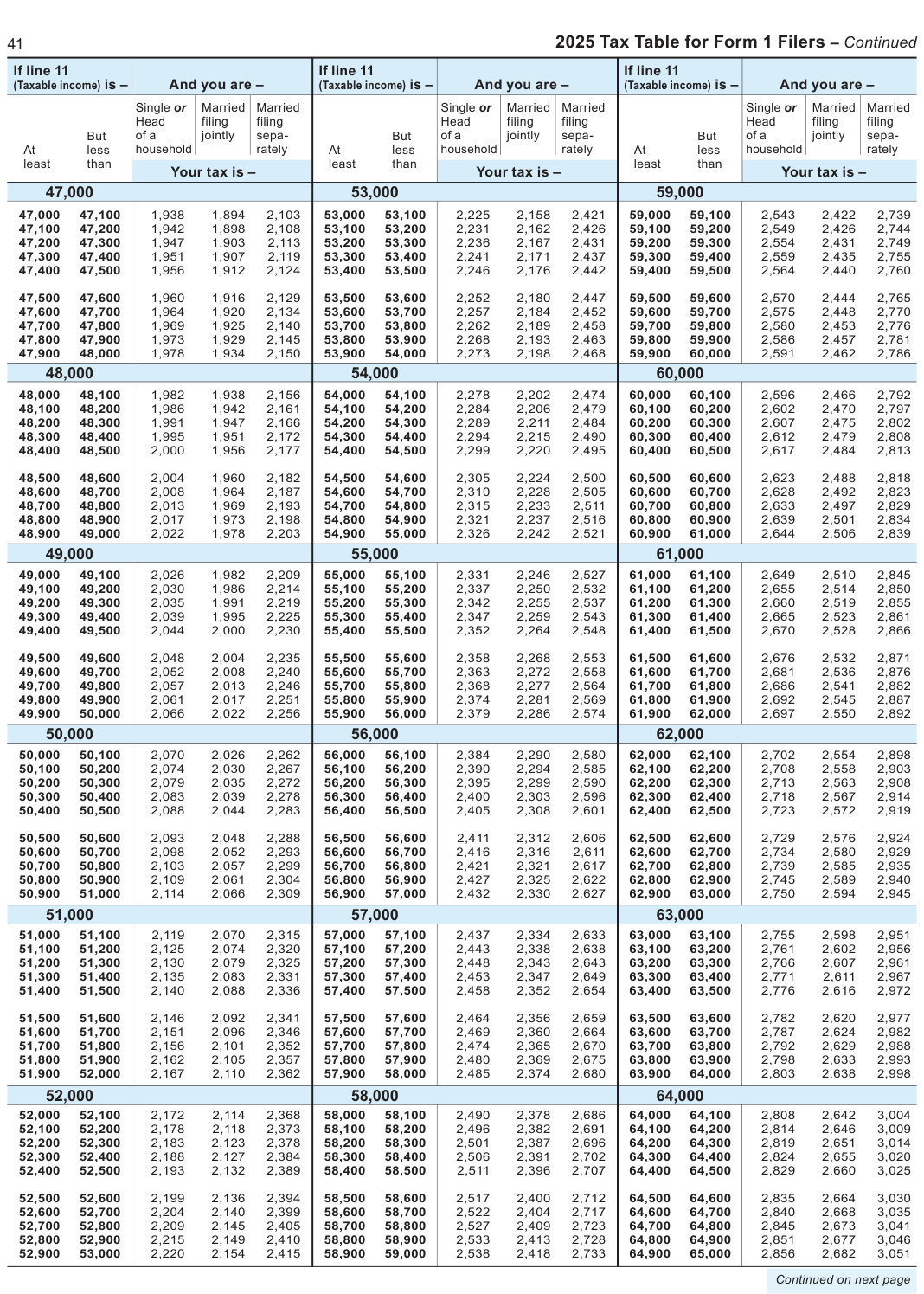
Text version of this table
| 1 | 2 | 025 Ta | x Table f | or Form | 1 Filer | s – Co | ntinue | |||||||
| If line 11 | If line 11 | If line 11 | ||||||||||||
| (Taxable income) is - | me) is – | And | you are | – | (Taxable inco | me) is – | And | you are | – | (Taxable inco | me) is – | And | you are | – |
| Si | ngle or | Married | Married | Si | ngle or | Married | Married | Si | ngle or | Married | Married | |||
| He | ad | filing | filing | He | ad | filing | filing | He | ad | filing | filing | |||
| But of | a | jointly | sepa- | But of | a | jointly | sepa- | But of | a | jointly | sepa- | |||
| At | less ho | usehold | rately | At | less ho | usehold | rately | At | less ho | usehold | rately | |||
| least | than | least | than | least | than | |||||||||
| Your | tax is – | Your | tax is – | Your | tax is – | |||||||||
| 47,0 | 00 | 53,0 | 00 | 59,0 | 00 | |||||||||
| 47,000 | 47,100 | 1,938 | 1,894 | 2,103 | 53,000 | 53,100 | 2,225 | 2,158 | 2,421 | 59,000 | 59,100 | 2,543 | 2,422 | 2,739 |
| 47,100 | 47,200 | 1,942 | 1,898 | 2,108 | 53,100 | 53,200 | 2,231 | 2,162 | 2,426 | 59,100 | 59,200 | 2,549 | 2,426 | 2,744 |
| 47,200 | 47,300 | 1,947 | 1,903 | 2,113 | 53,200 | 53,300 | 2,236 | 2,167 | 2,431 | 59,200 | 59,300 | 2,554 | 2,431 | 2,749 |
| 47,300 | 47,400 | 1,951 | 1,907 | 2,119 | 53,300 | 53,400 | 2,241 | 2,171 | 2,437 | 59,300 | 59,400 | 2,559 | 2,435 | 2,755 |
| 47,400 | 47,500 | 1,956 | 1,912 | 2,124 | 53,400 | 53,500 | 2,246 | 2,176 | 2,442 | 59,400 | 59,500 | 2,564 | 2,440 | 2,760 |
| 47,500 | 47,600 | 1,960 | 1,916 | 2,129 | 53,500 | 53,600 | 2,252 | 2,180 | 2,447 | 59,500 | 59,600 | 2,570 | 2,444 | 2,765 |
| 47,600 | 47,700 | 1,964 | 1,920 | 2,134 | 53,600 | 53,700 | 2,257 | 2,184 | 2,452 | 59,600 | 59,700 | 2,575 | 2,448 | 2,770 |
| 47,700 | 47,800 | 1,969 | 1,925 | 2,140 | 53,700 | 53,800 | 2,262 | 2,189 | 2,458 | 59,700 | 59,800 | 2,580 | 2,453 | 2,776 |
| 47,800 | 47,900 | 1,973 | 1,929 | 2,145 | 53,800 | 53,900 | 2,268 | 2,193 | 2,463 | 59,800 | 59,900 | 2,586 | 2,457 | 2,781 |
| 47,900 | 48,000 | 1,978 | 1,934 | 2,150 | 53,900 | 54,000 | 2,273 | 2,198 | 2,468 | 59,900 | 60,000 | 2,591 | 2,462 | 2,786 |
| 48,0 | 00 | 54,0 | 00 | 60,0 | 00 | |||||||||
| 48,000 | 48,100 | 1,982 | 1,938 | 2,156 | 54,000 | 54,100 | 2,278 | 2,202 | 2,474 | 60,000 | 60,100 | 2,596 | 2,466 | 2,792 |
| 48,100 | 48,200 | 1,986 | 1,942 | 2,161 | 54,100 | 54,200 | 2,284 | 2,206 | 2,479 | 60,100 | 60,200 | 2,602 | 2,470 | 2,797 |
| 48,200 | 48,300 | 1,991 | 1,947 | 2,166 | 54,200 | 54,300 | 2,289 | 2,211 | 2,484 | 60,200 | 60,300 | 2,607 | 2,475 | 2,802 |
| 48,300 | 48,400 | 1,995 | 1,951 | 2,172 | 54,300 | 54,400 | 2,294 | 2,215 | 2,490 | 60,300 | 60,400 | 2,612 | 2,479 | 2,808 |
| 48,400 | 48,500 | 2,000 | 1,956 | 2,177 | 54,400 | 54,500 | 2,299 | 2,220 | 2,495 | 60,400 | 60,500 | 2,617 | 2,484 | 2,813 |
| 48,500 | 48,600 | 2,004 | 1,960 | 2,182 | 54,500 | 54,600 | 2,305 | 2,224 | 2,500 | 60,500 | 60,600 | 2,623 | 2,488 | 2,818 |
| 48,600 | 48,700 | 2,008 | 1,964 | 2,187 | 54,600 | 54,700 | 2,310 | 2,228 | 2,505 | 60,600 | 60,700 | 2,628 | 2,492 | 2,823 |
| 48,700 | 48,800 | 2,013 | 1,969 | 2,193 | 54,700 | 54,800 | 2,315 | 2,233 | 2,511 | 60,700 | 60,800 | 2,633 | 2,497 | 2,829 |
| 48,800 | 48,900 | 2,017 | 1,973 | 2,198 | 54,800 | 54,900 | 2,321 | 2,237 | 2,516 | 60,800 | 60,900 | 2,639 | 2,501 | 2,834 |
| 48,900 | 49,000 | 2,022 | 1,978 | 2,203 | 54,900 | 55,000 | 2,326 | 2,242 | 2,521 | 60,900 | 61,000 | 2,644 | 2,506 | 2,839 |
| 49,0 | 00 | 55,0 | 00 | 61,0 | 00 | |||||||||
| 49,000 | 49,100 | 2,026 | 1,982 | 2,209 | 55,000 | 55,100 | 2,331 | 2,246 | 2,527 | 61,000 | 61,100 | 2,649 | 2,510 | 2,845 |
| 49,100 | 49,200 | 2,030 | 1,986 | 2,214 | 55,100 | 55,200 | 2,337 | 2,250 | 2,532 | 61,100 | 61,200 | 2,655 | 2,514 | 2,850 |
| 49,200 | 49,300 | 2,035 | 1,991 | 2,219 | 55,200 | 55,300 | 2,342 | 2,255 | 2,537 | 61,200 | 61,300 | 2,660 | 2,519 | 2,855 |
| 49,300 | 49,400 | 2,039 | 1,995 | 2,225 | 55,300 | 55,400 | 2,347 | 2,259 | 2,543 | 61,300 | 61,400 | 2,665 | 2,523 | 2,861 |
| 49,400 | 49,500 | 2,044 | 2,000 | 2,230 | 55,400 | 55,500 | 2,352 | 2,264 | 2,548 | 61,400 | 61,500 | 2,670 | 2,528 | 2,866 |
| 49,500 | 49,600 | 2,048 | 2,004 | 2,235 | 55,500 | 55,600 | 2,358 | 2,268 | 2,553 | 61,500 | 61,600 | 2,676 | 2,532 | 2,871 |
| 49,600 | 49,700 | 2,052 | 2,008 | 2,240 | 55,600 | 55,700 | 2,363 | 2,272 | 2,558 | 61,600 | 61,700 | 2,681 | 2,536 | 2,876 |
| 49,700 | 49,800 | 2,057 | 2,013 | 2,246 | 55,700 | 55,800 | 2,368 | 2,277 | 2,564 | 61,700 | 61,800 | 2,686 | 2,541 | 2,882 |
| 49,800 | 49,900 | 2,061 | 2,017 | 2,251 | 55,800 | 55,900 | 2,374 | 2,281 | 2,569 | 61,800 | 61,900 | 2,692 | 2,545 | 2,887 |
| 49,900 | 50,000 | 2,066 | 2,022 | 2,256 | 55,900 | 56,000 | 2,379 | 2,286 | 2,574 | 61,900 | 62,000 | 2,697 | 2,550 | 2,892 |
| 50,0 | 00 | 56,0 | 00 | 62,0 | 00 | |||||||||
| 50,000 | 50,100 | 2,070 | 2,026 | 2,262 | 56,000 | 56,100 | 2,384 | 2,290 | 2,580 | 62,000 | 62,100 | 2,702 | 2,554 | 2,898 |
| 50,100 | 50,200 | 2,074 | 2,030 | 2,267 | 56,100 | 56,200 | 2,390 | 2,294 | 2,585 | 62,100 | 62,200 | 2,708 | 2,558 | 2,903 |
| 50,200 | 50,300 | 2,079 | 2,035 | 2,272 | 56,200 | 56,300 | 2,395 | 2,299 | 2,590 | 62,200 | 62,300 | 2,713 | 2,563 | 2,908 |
| 50,300 | 50,400 | 2,083 | 2,039 | 2,278 | 56,300 | 56,400 | 2,400 | 2,303 | 2,596 | 62,300 | 62,400 | 2,718 | 2,567 | 2,914 |
| 50,400 | 50,500 | 2,088 | 2,044 | 2,283 | 56,400 | 56,500 | 2,405 | 2,308 | 2,601 | 62,400 | 62,500 | 2,723 | 2,572 | 2,919 |
| 50,500 | 50,600 | 2,093 | 2,048 | 2,288 | 56,500 | 56,600 | 2,411 | 2,312 | 2,606 | 62,500 | 62,600 | 2,729 | 2,576 | 2,924 |
| 50,600 | 50,700 | 2,098 | 2,052 | 2,293 | 56,600 | 56,700 | 2,416 | 2,316 | 2,611 | 62,600 | 62,700 | 2,734 | 2,580 | 2,929 |
| 50,700 | 50,800 | 2,103 | 2,057 | 2,299 | 56,700 | 56,800 | 2,421 | 2,321 | 2,617 | 62,700 | 62,800 | 2,739 | 2,585 | 2,935 |
| 50,800 | 50,900 | 2,109 | 2,061 | 2,304 | 56,800 | 56,900 | 2,427 | 2,325 | 2,622 | 62,800 | 62,900 | 2,745 | 2,589 | 2,940 |
| 50,900 | 51,000 | 2,114 | 2,066 | 2,309 | 56,900 | 57,000 | 2,432 | 2,330 | 2,627 | 62,900 | 63,000 | 2,750 | 2,594 | 2,945 |
| 51,0 | 00 | 57,0 | 00 | 63,0 | 00 | |||||||||
| 51,000 | 51,100 | 2,119 | 2,070 | 2,315 | 57,000 | 57,100 | 2,437 | 2,334 | 2,633 | 63,000 | 63,100 | 2,755 | 2,598 | 2,951 |
| 51,100 | 51,200 | 2,125 | 2,074 | 2,320 | 57,100 | 57,200 | 2,443 | 2,338 | 2,638 | 63,100 | 63,200 | 2,761 | 2,602 | 2,956 |
| 51,200 | 51,300 | 2,130 | 2,079 | 2,325 | 57,200 | 57,300 | 2,448 | 2,343 | 2,643 | 63,200 | 63,300 | 2,766 | 2,607 | 2,961 |
| 51,300 | 51,400 | 2,135 | 2,083 | 2,331 | 57,300 | 57,400 | 2,453 | 2,347 | 2,649 | 63,300 | 63,400 | 2,771 | 2,611 | 2,967 |
| 51,400 | 51,500 | 2,140 | 2,088 | 2,336 | 57,400 | 57,500 | 2,458 | 2,352 | 2,654 | 63,400 | 63,500 | 2,776 | 2,616 | 2,972 |
| 51,500 | 51,600 | 2,146 | 2,092 | 2,341 | 57,500 | 57,600 | 2,464 | 2,356 | 2,659 | 63,500 | 63,600 | 2,782 | 2,620 | 2,977 |
| 51,600 | 51,700 | 2,151 | 2,096 | 2,346 | 57,600 | 57,700 | 2,469 | 2,360 | 2,664 | 63,600 | 63,700 | 2,787 | 2,624 | 2,982 |
| 51,700 | 51,800 | 2,156 | 2,101 | 2,352 | 57,700 | 57,800 | 2,474 | 2,365 | 2,670 | 63,700 | 63,800 | 2,792 | 2,629 | 2,988 |
| 51,800 | 51,900 | 2,162 | 2,105 | 2,357 | 57,800 | 57,900 | 2,480 | 2,369 | 2,675 | 63,800 | 63,900 | 2,798 | 2,633 | 2,993 |
| 51,900 | 52,000 | 2,167 | 2,110 | 2,362 | 57,900 | 58,000 | 2,485 | 2,374 | 2,680 | 63,900 | 64,000 | 2,803 | 2,638 | 2,998 |
| 52,0 | 00 | 58,0 | 00 | 64,0 | 00 | |||||||||
| 52,000 | 52,100 | 2,172 | 2,114 | 2,368 | 58,000 | 58,100 | 2,490 | 2,378 | 2,686 | 64,000 | 64,100 | 2,808 | 2,642 | 3,004 |
| 52,100 | 52,200 | 2,178 | 2,118 | 2,373 | 58,100 | 58,200 | 2,496 | 2,382 | 2,691 | 64,100 | 64,200 | 2,814 | 2,646 | 3,009 |
| 52,200 | 52,300 | 2,183 | 2,123 | 2,378 | 58,200 | 58,300 | 2,501 | 2,387 | 2,696 | 64,200 | 64,300 | 2,819 | 2,651 | 3,014 |
| 52,300 | 52,400 | 2,188 | 2,127 | 2,384 | 58,300 | 58,400 | 2,506 | 2,391 | 2,702 | 64,300 | 64,400 | 2,824 | 2,655 | 3,020 |
| 52,400 | 52,500 | 2,193 | 2,132 | 2,389 | 58,400 | 58,500 | 2,511 | 2,396 | 2,707 | 64,400 | 64,500 | 2,829 | 2,660 | 3,025 |
| 52,500 | 52,600 | 2,199 | 2,136 | 2,394 | 58,500 | 58,600 | 2,517 | 2,400 | 2,712 | 64,500 | 64,600 | 2,835 | 2,664 | 3,030 |
| 52,600 | 52,700 | 2,204 | 2,140 | 2,399 | 58,600 | 58,700 | 2,522 | 2,404 | 2,717 | 64,600 | 64,700 | 2,840 | 2,668 | 3,035 |
| 52,700 | 52,800 | 2,209 | 2,145 | 2,405 | 58,700 | 58,800 | 2,527 | 2,409 | 2,723 | 64,700 | 64,800 | 2,845 | 2,673 | 3,041 |
| 52,800 | 52,900 | 2,215 | 2,149 | 2,410 | 58,800 | 58,900 | 2,533 | 2,413 | 2,728 | 64,800 | 64,900 | 2,851 | 2,677 | 3,046 |
| 52,900 | 53,000 | 2,220 | 2,154 | 2,415 | 58,900 | 59,000 | 2,538 | 2,418 | 2,733 | 64,900 | 65,000 | 2,856 | 2,682 | 3,051 |
| Contin | ued on ne | xt page |
# Married
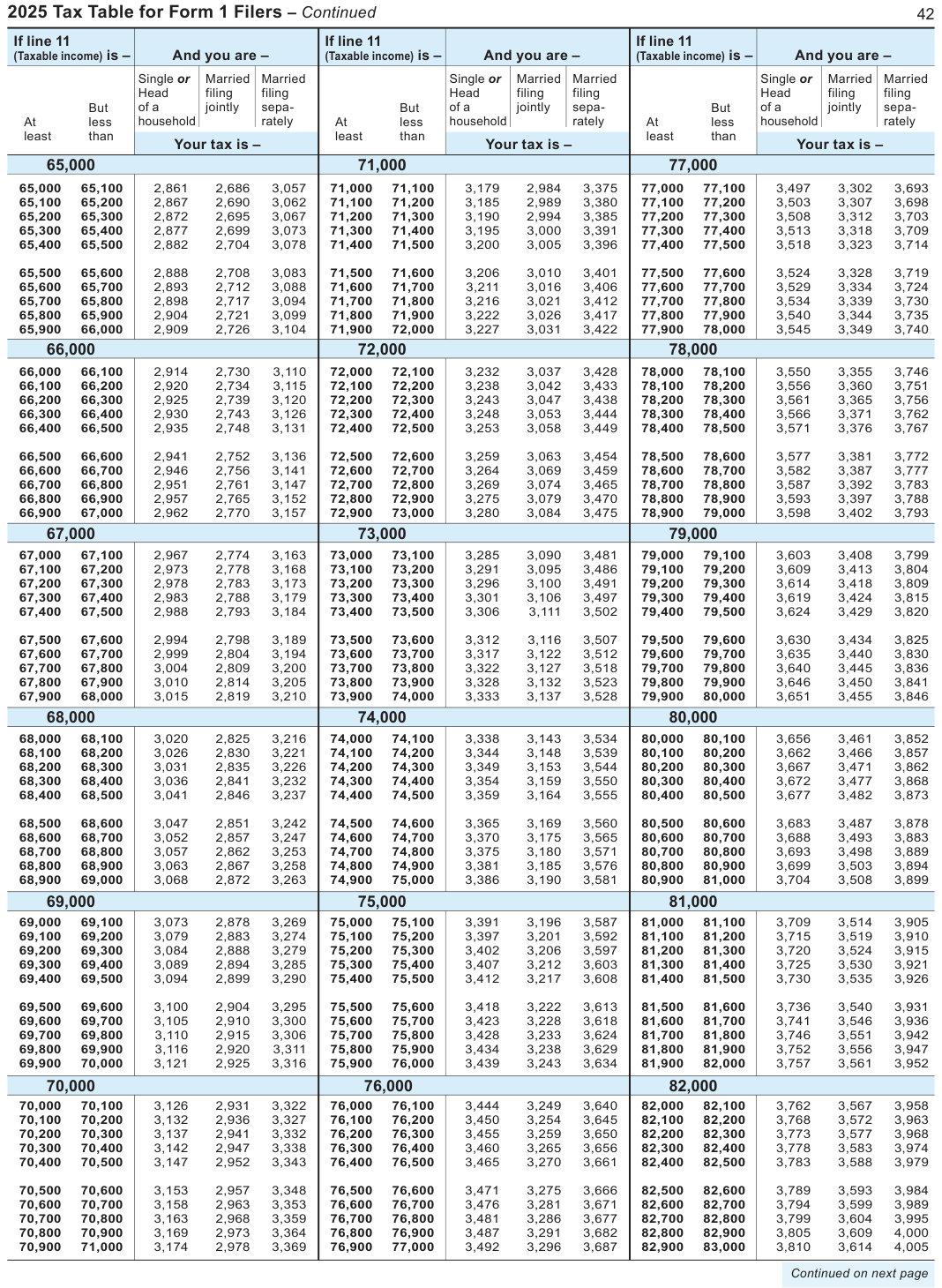
Text version of this table
| If line 11 | If line 11 | If line 11 | ||||||||||||
| (Taxable income) is - | me) is – | And | you are | – | (Taxable inco | me) is – | And | you are | – | (Taxable inco | me) is – | And | you are | – |
| Si | ngle or | Married | Married | Si | ngle or | Married | Married | Si | ngle or | Married | Married | |||
| He | ad | filing | filing | He | ad | filing | filing | He | ad | filing | filing | |||
| But of | a | jointly | sepa- | But of | a | jointly | sepa- | But of | a | jointly | sepa- | |||
| At | less ho | usehold | rately | At | less ho | usehold | rately | At | less ho | usehold | rately | |||
| least | than | least | than | least | than | |||||||||
| Your | tax is – | Your | tax is – | Your | tax is – | |||||||||
| 65,0 | 00 | 71,0 | 00 | 77,0 | 00 | |||||||||
| 65,000 | 65,100 | 2,861 | 2,686 | 3,057 | 71,000 | 71,100 | 3,179 | 2,984 | 3,375 | 77,000 | 77,100 | 3,497 | 3,302 | 3,693 |
| 65,100 | 65,200 | 2,867 | 2,690 | 3,062 | 71,100 | 71,200 | 3,185 | 2,989 | 3,380 | 77,100 | 77,200 | 3,503 | 3,307 | 3,698 |
| 65,200 | 65,300 | 2,872 | 2,695 | 3,067 | 71,200 | 71,300 | 3,190 | 2,994 | 3,385 | 77,200 | 77,300 | 3,508 | 3,312 | 3,703 |
| 65,300 | 65,400 | 2,877 | 2,699 | 3,073 | 71,300 | 71,400 | 3,195 | 3,000 | 3,391 | 77,300 | 77,400 | 3,513 | 3,318 | 3,709 |
| 65,400 | 65,500 | 2,882 | 2,704 | 3,078 | 71,400 | 71,500 | 3,200 | 3,005 | 3,396 | 77,400 | 77,500 | 3,518 | 3,323 | 3,714 |
| 65,500 | 65,600 | 2,888 | 2,708 | 3,083 | 71,500 | 71,600 | 3,206 | 3,010 | 3,401 | 77,500 | 77,600 | 3,524 | 3,328 | 3,719 |
| 65,600 | 65,700 | 2,893 | 2,712 | 3,088 | 71,600 | 71,700 | 3,211 | 3,016 | 3,406 | 77,600 | 77,700 | 3,529 | 3,334 | 3,724 |
| 65,700 | 65,800 | 2,898 | 2,717 | 3,094 | 71,700 | 71,800 | 3,216 | 3,021 | 3,412 | 77,700 | 77,800 | 3,534 | 3,339 | 3,730 |
| 65,800 | 65,900 | 2,904 | 2,721 | 3,099 | 71,800 | 71,900 | 3,222 | 3,026 | 3,417 | 77,800 | 77,900 | 3,540 | 3,344 | 3,735 |
| 65,900 | 66,000 | 2,909 | 2,726 | 3,104 | 71,900 | 72,000 | 3,227 | 3,031 | 3,422 | 77,900 | 78,000 | 3,545 | 3,349 | 3,740 |
| 66,0 | 00 | 72,0 | 00 | 78,0 | 00 | |||||||||
| 66,000 | 66,100 | 2,914 | 2,730 | 3,110 | 72,000 | 72,100 | 3,232 | 3,037 | 3,428 | 78,000 | 78,100 | 3,550 | 3,355 | 3,746 |
| 66,100 | 66,200 | 2,920 | 2,734 | 3,115 | 72,100 | 72,200 | 3,238 | 3,042 | 3,433 | 78,100 | 78,200 | 3,556 | 3,360 | 3,751 |
| 66,200 | 66,300 | 2,925 | 2,739 | 3,120 | 72,200 | 72,300 | 3,243 | 3,047 | 3,438 | 78,200 | 78,300 | 3,561 | 3,365 | 3,756 |
| 66,300 | 66,400 | 2,930 | 2,743 | 3,126 | 72,300 | 72,400 | 3,248 | 3,053 | 3,444 | 78,300 | 78,400 | 3,566 | 3,371 | 3,762 |
| 66,400 | 66,500 | 2,935 | 2,748 | 3,131 | 72,400 | 72,500 | 3,253 | 3,058 | 3,449 | 78,400 | 78,500 | 3,571 | 3,376 | 3,767 |
| 66,500 | 66,600 | 2,941 | 2,752 | 3,136 | 72,500 | 72,600 | 3,259 | 3,063 | 3,454 | 78,500 | 78,600 | 3,577 | 3,381 | 3,772 |
| 66,600 | 66,700 | 2,946 | 2,756 | 3,141 | 72,600 | 72,700 | 3,264 | 3,069 | 3,459 | 78,600 | 78,700 | 3,582 | 3,387 | 3,777 |
| 66,700 | 66,800 | 2,951 | 2,761 | 3,147 | 72,700 | 72,800 | 3,269 | 3,074 | 3,465 | 78,700 | 78,800 | 3,587 | 3,392 | 3,783 |
| 66,800 | 66,900 | 2,957 | 2,765 | 3,152 | 72,800 | 72,900 | 3,275 | 3,079 | 3,470 | 78,800 | 78,900 | 3,593 | 3,397 | 3,788 |
| 66,900 | 67,000 | 2,962 | 2,770 | 3,157 | 72,900 | 73,000 | 3,280 | 3,084 | 3,475 | 78,900 | 79,000 | 3,598 | 3,402 | 3,793 |
| 67,0 | 00 | 73,0 | 00 | 79,0 | 00 | |||||||||
| 67,000 | 67,100 | 2,967 | 2,774 | 3,163 | 73,000 | 73,100 | 3,285 | 3,090 | 3,481 | 79,000 | 79,100 | 3,603 | 3,408 | 3,799 |
| 67,100 | 67,200 | 2,973 | 2,778 | 3,168 | 73,100 | 73,200 | 3,291 | 3,095 | 3,486 | 79,100 | 79,200 | 3,609 | 3,413 | 3,804 |
| 67,200 | 67,300 | 2,978 | 2,783 | 3,173 | 73,200 | 73,300 | 3,296 | 3,100 | 3,491 | 79,200 | 79,300 | 3,614 | 3,418 | 3,809 |
| 67,300 | 67,400 | 2,983 | 2,788 | 3,179 | 73,300 | 73,400 | 3,301 | 3,106 | 3,497 | 79,300 | 79,400 | 3,619 | 3,424 | 3,815 |
| 67,400 | 67,500 | 2,988 | 2,793 | 3,184 | 73,400 | 73,500 | 3,306 | 3,111 | 3,502 | 79,400 | 79,500 | 3,624 | 3,429 | 3,820 |
| 67,500 | 67,600 | 2,994 | 2,798 | 3,189 | 73,500 | 73,600 | 3,312 | 3,116 | 3,507 | 79,500 | 79,600 | 3,630 | 3,434 | 3,825 |
| 67,600 | 67,700 | 2,999 | 2,804 | 3,194 | 73,600 | 73,700 | 3,317 | 3,122 | 3,512 | 79,600 | 79,700 | 3,635 | 3,440 | 3,830 |
| 67,700 | 67,800 | 3,004 | 2,809 | 3,200 | 73,700 | 73,800 | 3,322 | 3,127 | 3,518 | 79,700 | 79,800 | 3,640 | 3,445 | 3,836 |
| 67,800 | 67,900 | 3,010 | 2,814 | 3,205 | 73,800 | 73,900 | 3,328 | 3,132 | 3,523 | 79,800 | 79,900 | 3,646 | 3,450 | 3,841 |
| 67,900 | 68,000 | 3,015 | 2,819 | 3,210 | 73,900 | 74,000 | 3,333 | 3,137 | 3,528 | 79,900 | 80,000 | 3,651 | 3,455 | 3,846 |
| 68,0 | 00 | 74,0 | 00 | 80,0 | 00 | |||||||||
| 68,000 | 68,100 | 3,020 | 2,825 | 3,216 | 74,000 | 74,100 | 3,338 | 3,143 | 3,534 | 80,000 | 80,100 | 3,656 | 3,461 | 3,852 |
| 68,100 | 68,200 | 3,026 | 2,830 | 3,221 | 74,100 | 74,200 | 3,344 | 3,148 | 3,539 | 80,100 | 80,200 | 3,662 | 3,466 | 3,857 |
| 68,200 | 68,300 | 3,031 | 2,835 | 3,226 | 74,200 | 74,300 | 3,349 | 3,153 | 3,544 | 80,200 | 80,300 | 3,667 | 3,471 | 3,862 |
| 68,300 | 68,400 | 3,036 | 2,841 | 3,232 | 74,300 | 74,400 | 3,354 | 3,159 | 3,550 | 80,300 | 80,400 | 3,672 | 3,477 | 3,868 |
| 68,400 | 68,500 | 3,041 | 2,846 | 3,237 | 74,400 | 74,500 | 3,359 | 3,164 | 3,555 | 80,400 | 80,500 | 3,677 | 3,482 | 3,873 |
| 68,500 | 68,600 | 3,047 | 2,851 | 3,242 | 74,500 | 74,600 | 3,365 | 3,169 | 3,560 | 80,500 | 80,600 | 3,683 | 3,487 | 3,878 |
| 68,600 | 68,700 | 3,052 | 2,857 | 3,247 | 74,600 | 74,700 | 3,370 | 3,175 | 3,565 | 80,600 | 80,700 | 3,688 | 3,493 | 3,883 |
| 68,700 | 68,800 | 3,057 | 2,862 | 3,253 | 74,700 | 74,800 | 3,375 | 3,180 | 3,571 | 80,700 | 80,800 | 3,693 | 3,498 | 3,889 |
| 68,800 | 68,900 | 3,063 | 2,867 | 3,258 | 74,800 | 74,900 | 3,381 | 3,185 | 3,576 | 80,800 | 80,900 | 3,699 | 3,503 | 3,894 |
| 68,900 | 69,000 | 3,068 | 2,872 | 3,263 | 74,900 | 75,000 | 3,386 | 3,190 | 3,581 | 80,900 | 81,000 | 3,704 | 3,508 | 3,899 |
| 69,0 | 00 | 75,0 | 00 | 81,0 | 00 | |||||||||
| 69,000 | 69,100 | 3,073 | 2,878 | 3,269 | 75,000 | 75,100 | 3,391 | 3,196 | 3,587 | 81,000 | 81,100 | 3,709 | 3,514 | 3,905 |
| 69,100 | 69,200 | 3,079 | 2,883 | 3,274 | 75,100 | 75,200 | 3,397 | 3,201 | 3,592 | 81,100 | 81,200 | 3,715 | 3,519 | 3,910 |
| 69,200 | 69,300 | 3,084 | 2,888 | 3,279 | 75,200 | 75,300 | 3,402 | 3,206 | 3,597 | 81,200 | 81,300 | 3,720 | 3,524 | 3,915 |
| 69,300 | 69,400 | 3,089 | 2,894 | 3,285 | 75,300 | 75,400 | 3,407 | 3,212 | 3,603 | 81,300 | 81,400 | 3,725 | 3,530 | 3,921 |
| 69,400 | 69,500 | 3,094 | 2,899 | 3,290 | 75,400 | 75,500 | 3,412 | 3,217 | 3,608 | 81,400 | 81,500 | 3,730 | 3,535 | 3,926 |
| 69,500 | 69,600 | 3,100 | 2,904 | 3,295 | 75,500 | 75,600 | 3,418 | 3,222 | 3,613 | 81,500 | 81,600 | 3,736 | 3,540 | 3,931 |
| 69,600 | 69,700 | 3,105 | 2,910 | 3,300 | 75,600 | 75,700 | 3,423 | 3,228 | 3,618 | 81,600 | 81,700 | 3,741 | 3,546 | 3,936 |
| 69,700 | 69,800 | 3,110 | 2,915 | 3,306 | 75,700 | 75,800 | 3,428 | 3,233 | 3,624 | 81,700 | 81,800 | 3,746 | 3,551 | 3,942 |
| 69,800 | 69,900 | 3,116 | 2,920 | 3,311 | 75,800 | 75,900 | 3,434 | 3,238 | 3,629 | 81,800 | 81,900 | 3,752 | 3,556 | 3,947 |
| 69,900 | 70,000 | 3,121 | 2,925 | 3,316 | 75,900 | 76,000 | 3,439 | 3,243 | 3,634 | 81,900 | 82,000 | 3,757 | 3,561 | 3,952 |
| 70,0 | 00 | 76,0 | 00 | 82,0 | 00 | |||||||||
| 70,000 | 70,100 | 3,126 | 2,931 | 3,322 | 76,000 | 76,100 | 3,444 | 3,249 | 3,640 | 82,000 | 82,100 | 3,762 | 3,567 | 3,958 |
| 70,100 | 70,200 | 3,132 | 2,936 | 3,327 | 76,100 | 76,200 | 3,450 | 3,254 | 3,645 | 82,100 | 82,200 | 3,768 | 3,572 | 3,963 |
| 70,200 | 70,300 | 3,137 | 2,941 | 3,332 | 76,200 | 76,300 | 3,455 | 3,259 | 3,650 | 82,200 | 82,300 | 3,773 | 3,577 | 3,968 |
| 70,300 | 70,400 | 3,142 | 2,947 | 3,338 | 76,300 | 76,400 | 3,460 | 3,265 | 3,656 | 82,300 | 82,400 | 3,778 | 3,583 | 3,974 |
| 70,400 | 70,500 | 3,147 | 2,952 | 3,343 | 76,400 | 76,500 | 3,465 | 3,270 | 3,661 | 82,400 | 82,500 | 3,783 | 3,588 | 3,979 |
| 70,500 | 70,600 | 3,153 | 2,957 | 3,348 | 76,500 | 76,600 | 3,471 | 3,275 | 3,666 | 82,500 | 82,600 | 3,789 | 3,593 | 3,984 |
| 70,600 | 70,700 | 3,158 | 2,963 | 3,353 | 76,600 | 76,700 | 3,476 | 3,281 | 3,671 | 82,600 | 82,700 | 3,794 | 3,599 | 3,989 |
| 70,700 | 70,800 | 3,163 | 2,968 | 3,359 | 76,700 | 76,800 | 3,481 | 3,286 | 3,677 | 82,700 | 82,800 | 3,799 | 3,604 | 3,995 |
| 70,800 | 70,900 | 3,169 | 2,973 | 3,364 | 76,800 | 76,900 | 3,487 | 3,291 | 3,682 | 82,800 | 82,900 | 3,805 | 3,609 | 4,000 |
| 70,900 | 71,000 | 3,174 | 2,978 | 3,369 | 76,900 | 77,000 | 3,492 | 3,296 | 3,687 | 82,900 | 83,000 | 3,810 | 3,614 | 4,005 |
| Contin | ued on ne | xt page |
# Married
At At than than least least
Your tax is -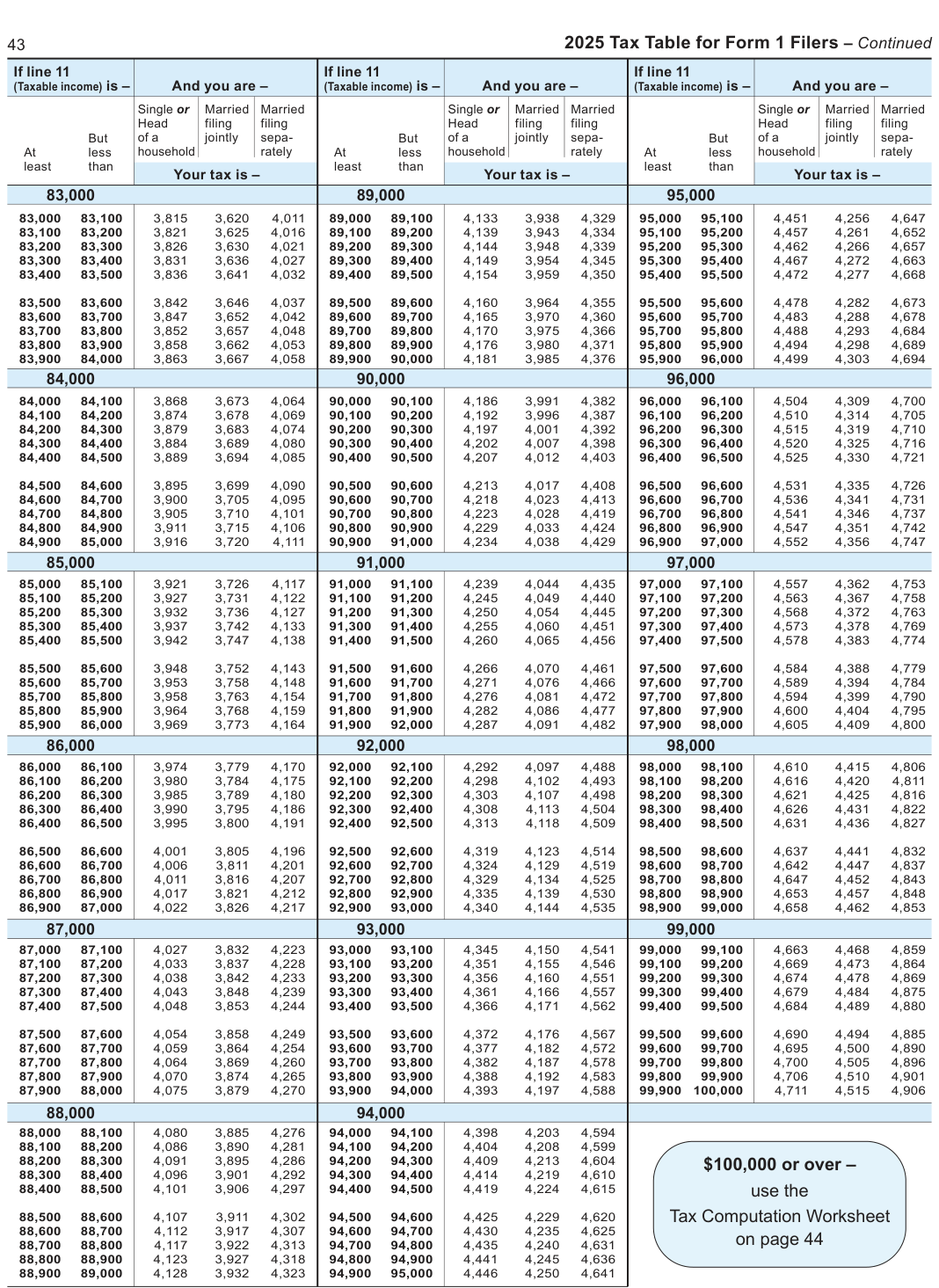
Text version of this table
3 2 025 Ta x Table f or Form 1 Filer s – Co ntinue If line 11 If line 11 If line 11 (Taxable inco me) is – And you are – (Taxable inco me) is – And you are – (Taxable inco me) is – And you are – Si ngle or Married Married Si ngle or Married Married Si ngle or Married Married He ad filing filing He ad filing filing He ad filing filing But of a jointly sepa- But of a jointly sepa- But of a jointly sepa- At less ho usehold rately At less ho usehold rately At less ho usehold rately least than least than least than Your tax is – Your tax is – Your tax is – 83,0 00 89,0 00 95,0 00 83,000 83,100 3,815 3,620 4,011 89,000 89,100 4,133 3,938 4,329 95,000 95,100 4,451 4,256 4,647 83,100 83,200 3,821 3,625 4,016 89,100 89,200 4,139 3,943 4,334 95,100 95,200 4,457 4,261 4,652 83,200 83,300 3,826 3,630 4,021 89,200 89,300 4,144 3,948 4,339 95,200 95,300 4,462 4,266 4,657 83,300 83,400 3,831 3,636 4,027 89,300 89,400 4,149 3,954 4,345 95,300 95,400 4,467 4,272 4,663 83,400 83,500 3,836 3,641 4,032 89,400 89,500 4,154 3,959 4,350 95,400 95,500 4,472 4,277 4,668 83,500 83,600 3,842 3,646 4,037 89,500 89,600 4,160 3,964 4,355 95,500 95,600 4,478 4,282 4,673 83,600 83,700 3,847 3,652 4,042 89,600 89,700 4,165 3,970 4,360 95,600 95,700 4,483 4,288 4,678 83,700 83,800 3,852 3,657 4,048 89,700 89,800 4,170 3,975 4,366 95,700 95,800 4,488 4,293 4,684 83,800 83,900 3,858 3,662 4,053 89,800 89,900 4,176 3,980 4,371 95,800 95,900 4,494 4,298 4,689 83,900 84,000 3,863 3,667 4,058 89,900 90,000 4,181 3,985 4,376 95,900 96,000 4,499 4,303 4,694 84,0 00 90,0 00 96,0 00 84,000 84,100 3,868 3,673 4,064 90,000 90,100 4,186 3,991 4,382 96,000 96,100 4,504 4,309 4,700 84,100 84,200 3,874 3,678 4,069 90,100 90,200 4,192 3,996 4,387 96,100 96,200 4,510 4,314 4,705 84,200 84,300 3,879 3,683 4,074 90,200 90,300 4,197 4,001 4,392 96,200 96,300 4,515 4,319 4,710 84,300 84,400 3,884 3,689 4,080 90,300 90,400 4,202 4,007 4,398 96,300 96,400 4,520 4,325 4,716 84,400 84,500 3,889 3,694 4,085 90,400 90,500 4,207 4,012 4,403 96,400 96,500 4,525 4,330 4,721 84,500 84,600 3,895 3,699 4,090 90,500 90,600 4,213 4,017 4,408 96,500 96,600 4,531 4,335 4,726 84,600 84,700 3,900 3,705 4,095 90,600 90,700 4,218 4,023 4,413 96,600 96,700 4,536 4,341 4,731 84,700 84,800 3,905 3,710 4,101 90,700 90,800 4,223 4,028 4,419 96,700 96,800 4,541 4,346 4,737 84,800 84,900 3,911 3,715 4,106 90,800 90,900 4,229 4,033 4,424 96,800 96,900 4,547 4,351 4,742 84,900 85,000 3,916 3,720 4,111 90,900 91,000 4,234 4,038 4,429 96,900 97,000 4,552 4,356 4,747 85,0 00 91,0 00 97,0 00 85,000 85,100 3,921 3,726 4,117 91,000 91,100 4,239 4,044 4,435 97,000 97,100 4,557 4,362 4,753 85,100 85,200 3,927 3,731 4,122 91,100 91,200 4,245 4,049 4,440 97,100 97,200 4,563 4,367 4,758 85,200 85,300 3,932 3,736 4,127 91,200 91,300 4,250 4,054 4,445 97,200 97,300 4,568 4,372 4,763 85,300 85,400 3,937 3,742 4,133 91,300 91,400 4,255 4,060 4,451 97,300 97,400 4,573 4,378 4,769 85,400 85,500 3,942 3,747 4,138 91,400 91,500 4,260 4,065 4,456 97,400 97,500 4,578 4,383 4,774 85,500 85,600 3,948 3,752 4,143 91,500 91,600 4,266 4,070 4,461 97,500 97,600 4,584 4,388 4,779 85,600 85,700 3,953 3,758 4,148 91,600 91,700 4,271 4,076 4,466 97,600 97,700 4,589 4,394 4,784 85,700 85,800 3,958 3,763 4,154 91,700 91,800 4,276 4,081 4,472 97,700 97,800 4,594 4,399 4,790 85,800 85,900 3,964 3,768 4,159 91,800 91,900 4,282 4,086 4,477 97,800 97,900 4,600 4,404 4,795 85,900 86,000 3,969 3,773 4,164 91,900 92,000 4,287 4,091 4,482 97,900 98,000 4,605 4,409 4,800 86,0 00 92,0 00 98,0 00 86,000 86,100 3,974 3,779 4,170 92,000 92,100 4,292 4,097 4,488 98,000 98,100 4,610 4,415 4,806 86,100 86,200 3,980 3,784 4,175 92,100 92,200 4,298 4,102 4,493 98,100 98,200 4,616 4,420 4,811 86,200 86,300 3,985 3,789 4,180 92,200 92,300 4,303 4,107 4,498 98,200 98,300 4,621 4,425 4,816 86,300 86,400 3,990 3,795 4,186 92,300 92,400 4,308 4,113 4,504 98,300 98,400 4,626 4,431 4,822 86,400 86,500 3,995 3,800 4,191 92,400 92,500 4,313 4,118 4,509 98,400 98,500 4,631 4,436 4,827 86,500 86,600 4,001 3,805 4,196 92,500 92,600 4,319 4,123 4,514 98,500 98,600 4,637 4,441 4,832 86,600 86,700 4,006 3,811 4,201 92,600 92,700 4,324 4,129 4,519 98,600 98,700 4,642 4,447 4,837 86,700 86,800 4,011 3,816 4,207 92,700 92,800 4,329 4,134 4,525 98,700 98,800 4,647 4,452 4,843 86,800 86,900 4,017 3,821 4,212 92,800 92,900 4,335 4,139 4,530 98,800 98,900 4,653 4,457 4,848 86,900 87,000 4,022 3,826 4,217 92,900 93,000 4,340 4,144 4,535 98,900 99,000 4,658 4,462 4,853 87,0 00 93,0 00 99,0 00 87,000 87,100 4,027 3,832 4,223 93,000 93,100 4,345 4,150 4,541 99,000 99,100 4,663 4,468 4,859 87,100 87,200 4,033 3,837 4,228 93,100 93,200 4,351 4,155 4,546 99,100 99,200 4,669 4,473 4,864 87,200 87,300 4,038 3,842 4,233 93,200 93,300 4,356 4,160 4,551 99,200 99,300 4,674 4,478 4,869 87,300 87,400 4,043 3,848 4,239 93,300 93,400 4,361 4,166 4,557 99,300 99,400 4,679 4,484 4,875 87,400 87,500 4,048 3,853 4,244 93,400 93,500 4,366 4,171 4,562 99,400 99,500 4,684 4,489 4,880 87,500 87,600 4,054 3,858 4,249 93,500 93,600 4,372 4,176 4,567 99,500 99,600 4,690 4,494 4,885 87,600 87,700 4,059 3,864 4,254 93,600 93,700 4,377 4,182 4,572 99,600 99,700 4,695 4,500 4,890 87,700 87,800 4,064 3,869 4,260 93,700 93,800 4,382 4,187 4,578 99,700 99,800 4,700 4,505 4,896 87,800 87,900 4,070 3,874 4,265 93,800 93,900 4,388 4,192 4,583 99,800 99,900 4,706 4,510 4,901 87,900 88,000 4,075 3,879 4,270 93,900 94,000 4,393 4,197 4,588 99,900 1 00,000 4,711 4,515 4,906 88,0 00 94,0 00 88,000 88,100 4,080 3,885 4,276 94,000 94,100 4,398 4,203 4,594 88,100 88,200 4,086 3,890 4,281 94,100 94,200 4,404 4,208 4,599 88,200 88,300 4,091 3,895 4,286 94,200 94,300 4,409 4,213 4,604 $100,000 or ov er – 88,300 88,400 4,096 3,901 4,292 94,300 94,400 4,414 4,219 4,610 88,400 88,500 4,101 3,906 4,297 94,400 94,500 4,419 4,224 4,615 us e the 88,500 88,600 4,107 3,911 4,302 94,500 94,600 4,425 4,229 4,620 Tax Computa tion W orkshee t 88,600 88,700 4,112 3,917 4,307 94,600 94,700 4,430 4,235 4,625 88,700 88,800 4,117 3,922 4,313 94,700 94,800 4,435 4,240 4,631 on p age 44 88,800 88,900 4,123 3,927 4,318 94,800 94,900 4,441 4,245 4,636 88,900 89,000 4,128 3,932 4,323 94,900 95,000 4,446 4,250 4,641
# Tax Computation Worksheet
# 45 Wisconsin School District Number
Appearing below is an alphabetical listing of Wisconsin school districts.
Refer to this listing and find the number of the district in which you lived on December 31, 2025. Fill in this number in the name and address area of your return. Failure to include your school district number may delay the processing of your return and any refund due.
The listing is divided into two sections. SECTION I lists all districts which operate high schools. SECTION II lists those districts which operate schools having only elementary grades.
Your school district will generally be the name of the municipality where the public high school is located which any children at your home would be entitled to attend. However, if such high school is a "union high school," refer to SECTION II and find the number of your elementary district.
The listing has the names of the school districts only to help you find your district number. Don't write in the name of your school district or the name of any specific school. Fill in only your school district's number on the school district line in the name and address area of your return.
For example:
- If you lived in the city of Milwaukee, you will enter the number 3619 on the school district line.
- If you lived in the city of Hartford, you would refer to SECTION II and find the number 2443, which is the number for Jt. No. 1 Hartford elementary district.
The following are other factors to be considered in determining your school district number:
- If you lived in one school district but worked in another, fill in the district number where you lived.
- If you were temporarily living away from your permanent home, fill in the district number of your permanent home.
Note If you can't identify your school district, contact your municipal clerk or local school for help.
# SECTION I - School Districts Operating High Schools
School District No. School District No. School District No.
ABBOTSFORD … 0007 CLEAR LAKE … 1127 GREENDALE … 2296 ADAMS-FRIENDSHIP ... 0014 CLINTON … 1134 GREENFIELD … 2303 ALBANY … 0063 CLINTONVILLE … 1141 GREEN LAKE … 2310 ALGOMA … 0070 COCHRANE- GREENWOOD … 2394 ALMA … 0084 FOUNTAIN CITY … 1155 GRESHAM … 2415 ALMA CENTER … 0091 COLBY … 1162 HAMILTON … 2420 ALMOND- COLEMAN … 1169 HARTFORD UHS … * BANCROFT … 0105 COLFAX … 1176 HAYWARD … 2478 ALTOONA … 0112 COLUMBUS … 1183 HIGHLAND … 2527 AMERY … 0119 CORNELL … 1204 HILBERT … 2534 ANTIGO … 0140 CRANDON … 1218 HILLSBORO … 2541 APPLETON … 0147 CRIVITZ … 1232 HOLMEN … 2562 ARCADIA … 0154 CUBA CITY … 1246 HORICON … 2576 ARGYLE … 0161 CUDAHY … 1253 HORTONVILLE AREA ... 2583 ARROWHEAD UHS … * CUMBERLAND … 1260 HOWARD-SUAMICO … 2604 ASHLAND … 0170 D C EVEREST … 4970 HOWARDS GROVE … 2605 ASHWAUBENON … 0182 DARLINGTON … 1295 HUDSON … 2611 ATHENS … 0196 DEERFIELD … 1309 HURLEY … 2618 AUBURNDALE … 0203 DE FOREST … 1316 HUSTISFORD … 2625 AUGUSTA … 0217 DELAVAN-DARIEN … 1380 INDEPENDENCE … 2632 BALDWIN-WOODVILLE .0231 DENMARK … 1407 IOLA-SCANDINAVIA … 2639 BANGOR … 0245 DE PERE … 1414 IOWA-GRANT … 2646 BARABOO … 0280 DE SOTO … 1421 ITHACA … 2660 BARNEVELD … 0287 DODGELAND … 2744 BARRON … 0308 DODGEVILLE … 1428 JANESVILLE … 2695 BAYFIELD … 0315 DRUMMOND … 1491 JEFFERSON … 2702 BEAVER DAM … 0336 DURAND -JOHNSON CREEK … 2730 BEECHER-DUNBAR- ARKANSAW … 1499 JUDA … 2737 PEMBINE … 4263 EAST TROY … 1540 BELLEVILLE … 0350 KAUKAUNA … 2758 EAU CLAIRE … 1554 BELMONT … 0364 KENOSHA … 2793 EDGAR … 1561 BELOIT … 0413 KETTLE MORAINE … 1376 EDGERTON … 1568 BELOIT TURNER … 0422 KEWASKUM … 2800 ELCHO … 1582 BENTON … 0427 KEWAUNEE … 2814 ELEVA-STRUM … 1600 BERLIN … 0434 KICKAPOO … 5960
# ELKHART LAKE-
BIG FOOT UHS … *
KIEL … 2828
GLENBEULAH … 1631
BIRCHWOOD … 0441
KIMBERLY … 2835
ELKHORN … 1638
BLACK HAWK … 2240
KOHLER … 2842
ELK MOUND … 1645
BLACK RIVER FALLS ... 0476
ELLSWORTH … 1659
BLAIR-TAYLOR … 0485
LA CROSSE … 2849
ELMBROOK … 0714
BLOOMER … 0497
LADYSMITH … 2856
ELMWOOD … 1666
BONDUEL … 0602
LA FARGE … 2863
EVANSVILLE … 1694
BOSCOBEL AREA … 0609
# LAKE GENEVA-
BOWLER … 0623
GENOA CITY UHS ... *
FALL CREEK … 1729
BOYCEVILLE … 0637
LAKE HOLCOMBE … 2891
FALL RIVER … 1736
BRILLION … 0658
LAKELAND UHS … *
FENNIMORE … 1813
BRODHEAD … 0700
LAKE MILLS … 2898
FLAMBEAU … 5757
BROWN DEER … 0721
LANCASTER … 2912
FLORENCE CO … 1855
BRUCE … 0735
LAONA … 2940
FOND DU LAC … 1862
BURLINGTON … 0777
LENA … 2961
FORT ATKINSON … 1883
BUTTERNUT … 0840
LITTLE CHUTE … 3129
FRANKLIN … 1900
LODI … 3150
FREDERIC … 1939
CADOTT … 0870
LOMIRA … 3171
FREEDOM … 1953
CAMBRIA-FRIESLAND .0882
LOYAL … 3206
CAMBRIDGE … 0896
LUCK … 3213
# GALESVILLE-ETTRICK-
CAMERON … 0903
LUXEMBURG-CASCO .. 3220
TREMPEALEAU … 2009
CAMPBELLSPORT … 0910
GERMANTOWN … 2058
CASHTON … 0980
MADISON … 3269
GIBRALTAR … 2114
CASSVILLE … 0994
MANAWA … 3276
GILLETT … 2128
CEDARBURG … 1015
MANITOWOC … 3290
GILMAN … 2135
# CEDAR GROVE-
MAPLE … 3297
GILMANTON … 2142
BELGIUM … 1029
MARATHON CITY … 3304
GLENWOOD CITY … 2198
CENTRAL/WESTOSHA . *
MARINETTE … 3311
GOODMAN-
CHEQUAMEGON … 1071
MARION … 3318
ARMSTRONG … 2212
# CHETEK-
MARKESAN … 3325
GRAFTON … 2217
WEYERHAEUSER ... 1080
MARSHALL … 3332
GRANTON … 2226
CHILTON … 1085
MARSHFIELD … 3339
GRANTSBURG … 2233
CHIPPEWA FALLS … 1092
MAUSTON … 3360
GREEN BAY … 2289
CLAYTON … 1120
School District No. School District No. School District No.
MAYVILLE … 3367 PEPIN … 4270 STANLEY-BOYD … 5593 MCFARLAND … 3381 PESHTIGO … 4305 STEVENS POINT … 5607 MEDFORD … 3409 PEWAUKEE … 4312 STOCKBRIDGE … 5614 MELLEN … 3427 PHELPS … 4330 STOUGHTON … 5621 MELROSE-MINDORO .. 3428 PHILLIPS … 4347 STRATFORD … 5628 MENASHA … 3430 PITTSVILLE … 4368 STURGEON BAY … 5642 MENOMINEE INDIAN ... 3434 PLATTEVILLE … 4389 SUN PRAIRIE … 5656 MENOMONEE FALLS ... 3437 PLUM CITY … 4459 SUPERIOR … 5663 MENOMONIE … 3444 PLYMOUTH … 4473 SURING … 5670 MEQUON- PORTAGE … 4501 THORP … 5726 THIENSVILLE … 3479 PORT EDWARDS … 4508 THREE LAKES … 5733 MERCER … 3484 PORT WASHINGTON-TIGERTON … 5740 MERRILL … 3500 SAUKVILLE … 4515 TOMAH … 5747 MIDDLETON-CROSS POTOSI … 4529 TOMAHAWK … 5754 PLAINS … 3549 POYNETTE … 4536 TOMORROW RIVER … 0126 MILTON … 3612 PRAIRIE DU CHIEN … 4543 TRI-COUNTY … 4375 MILWAUKEE … 3619 PRAIRIE FARM … 4557 TURTLE LAKE … 5810 MINERAL POINT … 3633 PRENTICE … 4571 TWO RIVERS … 5824 MISHICOT … 3661 PRESCOTT … 4578 MONDOVI … 3668 PRINCETON … 4606 UNION GROVE UHS … * MONONA GROVE … 3675 PULASKI … 4613 UNITY … 0238 MONROE … 3682 VALDERS … 5866 RACINE … 4620 MONTELLO … 3689 VERONA … 5901 RANDOLPH … 4634 MONTICELLO … 3696 VIROQUA … 5985 RANDOM LAKE … 4641 MOSINEE … 3787 REEDSBURG … 4753 MOUNT HOREB … 3794 WABENO … 5992 REEDSVILLE … 4760 MUKWONAGO … 3822 WASHBURN … 6027 RHINELANDER … 4781 MUSKEGO-NORWAY ... 3857 WASHINGTON … 6069 RIB LAKE … 4795 WATERFORD UHS … * NECEDAH … 3871 RICE LAKE … 4802 WATERLOO … 6118 NEENAH … 3892 RICHLAND … 4851 WATERTOWN … 6125 NEILLSVILLE … 3899 RIO … 4865 WAUKESHA … 6174 NEKOOSA … 3906 RIPON AREA … 4872 WAUNAKEE … 6181 NEW AUBURN … 3920 RIVERDALE … 3850 WAUPACA … 6195 NEW BERLIN … 3925 RIVER FALLS … 4893 WAUPUN … 6216 NEW GLARUS … 3934 RIVER RIDGE … 4904 WAUSAU … 6223 NEW HOLSTEIN … 3941 RIVER VALLEY … 5523 WAUSAUKEE … 6230 NEW LISBON … 3948 ROSENDALE-WAUTOMA … 6237 NEW LONDON … 3955 BRANDON … 4956 WAUWATOSA … 6244 NEW RICHMOND … 3962 ROSHOLT … 4963 WAUZEKA-STEUBEN ... 6251 NIAGARA … 3969 ROYALL … 1673 WEBSTER … 6293 NICOLET UHS … *
WEST ALLIS -
SAINT CROIX
NORRIS … 3976
WEST MILWAUKEE . 6300
CENTRAL … 2422
NORTH CRAWFORD … 2016
WEST BEND … 6307
SAINT CROIX FALLS … 5019
NORTH FOND DU LAC .3983
WEST SALEM … 6370
SAINT FRANCIS … 5026
NORTHERN OZAUKEE .1945
WESTBY … 6321
SAUK PRAIRIE … 5100
NORTHLAND PINES … 1526
WEST DE PERE … 6328
SENECA … 5124
NORTHWOOD … 3654
WESTFIELD … 6335
SEVASTOPOL … 5130
NORWALK-ONTARIO-
WESTON … 6354
SEYMOUR … 5138
WILTON … 3990
# WEYAUWEGA-
SHAWANO … 5264
FREMONT … 6384
OAK CREEK- SHEBOYGAN … 5271
WHITEFISH BAY … 6419
FRANKLIN … 4018 SHEBOYGAN FALLS … 5278 WHITEHALL … 6426 OAKFIELD … 4025 SHELL LAKE … 5306 WHITE LAKE … 6440 OCONOMOWOC … 4060 SHIOCTON … 5348 WHITEWATER … 6461 OCONTO … 4067 SHOREWOOD … 5355 WHITNALL … 6470 OCONTO FALLS … 4074 SHULLSBURG … 5362 WILD ROSE … 6475 OMRO … 4088 SIREN … 5376 WILLIAMS BAY … 6482 ONALASKA … 4095 SLINGER … 5390 WILMOT UHS … * OOSTBURG … 4137 SOLON SPRINGS … 5397 WINNECONNE … 6608 OREGON … 4144 SOMERSET … 5432 WINTER … 6615 OSCEOLA … 4165 SOUTH MILWAUKEE … 5439 WISCONSIN DELLS … 6678 OSHKOSH … 4179 SOUTH SHORE … 4522 WISCONSIN HEIGHTS .0469 OSSEO-FAIRCHILD … 4186 SOUTHERN DOOR CO .5457 WISCONSIN RAPIDS ... 6685 OWEN-WITHEE … 4207 SOUTHWESTERN
# WITTENBERG-
WISCONSIN … 2485
PALMYRA-EAGLE … 4221 BIRNAMWOOD … 6692 SPARTA … 5460 PARDEEVILLE … 4228 WONEWOC-UNION SPENCER … 5467 PARKVIEW … 4151 CENTER … 6713 SPOONER … 5474 PECATONICA … 0490 WRIGHTSTOWN … 6734 SPRING VALLEY … 5586 *This is a "Union High School" district. Refer to Section II of this listing and determine the number of your elementary school district.
SECTION II - School Districts Operating Only Elementary Schools BRIGHTON, #1 … 0657 GLENDALE- LAC DU FLAMBEAU #1 .1848 BRISTOL, #1 … 0665 RIVER HILLS … 2184 LAKE COUNTRY … 3862 DOVER, #1 … 1449 HARTFORD, JT #1 … 2443 LAKE GENEVA, JT #1 ...2885 ERIN … 1687 HARTLAND- LINN, JT #4 … 3087 FONTANA, JT #8 … 1870 LAKESIDE, JT #3 … 2460 LINN, JT #6 … 3094 FOX POINT, JT #2 … 1890 HERMAN-NEOSHO- MAPLE DALE-GENEVA, JT #4 … 2044 RUBICON … 2525 INDIAN HILL … 1897 GENOA CITY, JT #2 … 2051 HOLY HILL AREA … 2570 MERTON COMMUNITY .3528 MINOCQUA, JT #1 … 3640 RICHMOND … 3122 UNION GROVE, JT #1 ..5859 NORTH CAPE … 4690 SALEM … 5068 WALWORTH, JT #1 … 6022 NORTH LAKE … 3514 SHARON, JT #11 … 5258 WASHINGTON-NORTH LAKELAND … 0616 SILVER LAKE, JT #1 … 5369 CALDWELL … 6104 NORWAY, JT #7 … 4011 STONE BANK … 3542 WATERFORD, JT #1 … 6113 PARIS, JT #1 … 4235 SWALLOW … 3510 WHEATLAND, JT #1 … 6412 RANDALL, JT #1 … 4627 TREVOR-WILMOT … 5780 WOODRUFF, JT #1 … 6720 RAYMOND, #14 … 4686 TWIN LAKES, #4 … 5817 YORKVILLE, JT #2 … 6748
Index
Page
ABLE accounts … 14
Additions to income … 14
Adoption expenses … 14
Age … 3
Amended returns … 6, 7, 12, 24, 31, 32, 33 AmeriCorps education awards … 15 Amount you underpaid … 32 Armed forces personnel … 9 Assembling your return … 5 Basis of assets … 14, 15 Capital gain and loss … 14 Charitable contributions (shareholders) … 15 College savings and tuition programs … 14 Combat zone death … 14 Copies of prior returns … 10 Credit card payments … 32 Credits Additional child and dependent care … 17 Angel Investment … 8, 22, 25 Biodiesel fuel production … 21 Blind worker transportation services … 17 Business development … 14, 30, 31 Capital investment … 22 Community rehabilitation program … 14, 21 Dairy and livestock farm investment … 22 Development zones … 22 Earned income … 26 Early stage seed investment … 8, 22, 25 Economic development … 22 Electronic medical records … 22 Electronics and information technology manufacturing zone … 14, 30, 31 Employee college savings account contribution . . . 14, 21 Enterprise zone jobs … 14, 30, 31 Ethanol and biodiesel fuel pump … 22 Farmland preservation … 10, 14, 27 Health insurance risk-sharing … 21 Homestead … 9, 27, 31 Internet equipment … 22 Itemized deduction … 16 Low-income housing … 8, 21, 25 Manufacturer's sales tax … 22 Manufacturing and agriculture … 14, 22 Manufacturing investment … 22 Married couple … 21 Postsecondary education … 21 Repayment … 27 Research … 14, 22, 30 School property tax credit … 18 State historic rehabilitation … 7, 22, 25 Supplement to federal historic rehabilitation … 8, 22, 25 Tax paid to another state … 22 Technology zone … 22 Veterans and surviving spouses property tax … 27 Working families tax … 20 Death of a taxpayer … 10 Dependents … 3, 15 Differences in federal and Wisconsin law … 13 Disability income exclusion … 14 Disregarded entity … 6 Donations … 23 Electronic filing … 4 Estimated tax … 9, 26, 31 Exemptions … 15 Extension of time to file … 4 Farm loss carryover … 15 Federal adjusted gross income … 13 Filing Paper filing … 5
Page
Prepare to file … 4
When to file / Extension … 4 Where to file … 6 Which form to file … 3 Who must file … 3 Who should file … 4 Filing assistance … 2, 11 Filing status … 12 Forms-where to get … 11 Injured spouse … 6 Installment payments … 32 Insurance sale … 15 Interest income … 14 Internal Revenue Service adjustments … 9 Internet address … 11 Legislator's per diem … 15 Long-term care insurance … 14 Lump-sum distributions … 14 Marital property income … 14, 15 Medical care insurance … 14 Name and address … 12 Native Americans … 14 Net operating loss … 14 Olympics medals and prize money … 15 Organ donation … 15, 24 Other additions to income … 14 Other subtractions … 15 Partnership, trust, or estate … 14, 15 Passive foreign investment company … 14 Penalties Fraudulent or reckless credit claim … 9 Inconsistent estate basis … 25 IRAs, retirement plans, MSAs, etc … 24 Not filing or incorrect returns … 9 Selling assets purchased from related person … 25 Period covered … 12 Physician or psychiatrist grant … 15 Private school tuition … 14 Publications … 11 Railroad retirement benefits … 14 Reciprocity … 23 Recoveries of federal itemized deductions … 14 Refund … 6, 31 Related entities … 14, 15 Repayment of income previously taxed … 14 Retirement benefits … 14 Rounding to whole dollars … 13 Sales and use tax due on out-of-state purchases … 23 Sales to related persons … 14, 25 School district number … 13, 45 Sign your return … 34 Social security benefits … 14 Social security numbers … 12 Special conditions … 13 Standard deduction … 15, 35 State income tax refunds … 14 Subtractions from income … 14 Tax … 16, 38 Tax district … 13 Tax-option (S) corporation … 14, 15 Tax computation worksheet … 44 Telephone numbers … 11 Third party designee … 34 Tuition and fees … 14 U.S. Armed Forces active duty pay … 14 Underpayment interest … 32 Unemployment compensation … 14 Withholding … 25
Tables and rate charts from the source document
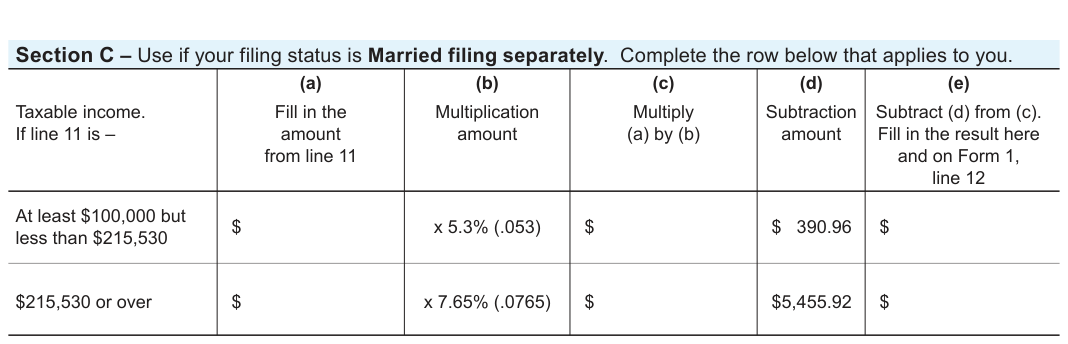
Text version of this table
| Section C – Use if your filing status is Married filing separately. Complete the row below that applies to you. | |||||
| Taxable income. If line 11 is – | (a) Fill in the amount from line 11 | (b) Multiplication amount | (c) Multiply (a) by (b) | (d) Subtraction amount | (e) Subtract (d) from (c). Fill in the result here and on Form 1, line 12 |
| At least $100,000 but less than $215,530 | $ | x 5.3% (.053) | $ | $ 390.96 | $ |
| $215,530 or over | $ | x 7.65% (.0765) | $ | $5,455.92 | $ |
Source: view the official PDF
Nearby sections (15 sections)
- a-222 · A-222 — Power of Attorney
- a-771 · A-771 — Disclosure Authorization (Third-Party Access)
- form-1 · Form 1 — Wisconsin Income Tax (resident)
- form-1npr · Form 1NPR — Nonresident & Part-Year Resident Income Tax
- form-2 · Form 2 — Wisconsin Fiduciary Income Tax (Estates & Trusts)
- form-3 · Form 3 — Wisconsin Partnership Return
- form-4 · Form 4 — Wisconsin Corporation Franchise/Income Tax
- form-4t · Form 4T — Exempt Organization Business Franchise/Income
- form-5s · Form 5S — Tax-Option (S) Corporation
- form-6 · Form 6 — Combined Wisconsin Corporation Franchise/Income
- pw-1 · PW-1 — Nonresident Pass-Through Withholding
- pw-2 · PW-2 — Nonresident Withholding Exemption
- s-211 · S-211 — Sales and Use Tax Exemption Certificate
- schedule-3-et · Schedule 3-ET — PTET Election (Partnership)
- schedule-3k-1 · Schedule 3K-1 — Partner's Share of Income