Massachusetts DOR Form Instructions
Form 1 — Resident Income Tax Return
Department of Revenue Commonwealth of Massachusetts Mass.gov/eFile
# Before using paper, consider
Massachusetts
# Resident Income Tax
Fast — Filing electronically, rather than on paper, can mean faster processing of your refund and money in your account sooner.
Accurate — Generally, electronic filings have fewer errors than paper forms. Online programs make it easy to ensure you don't miss anything important.
Ecofriendly — A great majority of Massachusetts taxpayers file electronically. Help us to continue reducing our carbon footprint.
Affordable — Many Massachusetts taxpayers qualify to use commercial tax preparation software at no charge. Check out the free filing option through MassTaxConnect.
Get ready to e-file this year!
# E-File for Free
Many Massachusetts taxpayers qualify to file their federal and state returns for free. Check if you qualify at mass.gov/efile.
You may also be able to file your tax return online through DOR's MassTaxConnect. You qualify for this option if you previously filed a Massachusetts return, and the forms you need for your return are supported by the program.
# Tax Preparation Software
You can also e-file using commercial tax filing products. Visit our website for a complete list of approved products. While some of these products offer a paper filing option, you may only use that if it includes a 2D barcode in the upper right corner of all pages. If you experience issues with 2D printing, contact the software company for instructions before filing to prevent rejection. Also, be sure to use the correct mailing address for 2D barcode forms: Massachusetts Department of Revenue, PO Box 7000, Boston, MA, 02204 for refunds or no payments, or Massachusetts Department of Revenue, PO Box 7003, Boston, MA, 02204 for payments. For more information, see DOR's online tax form instructions.
# Tax Preparers
Most paid tax preparers offer e-filing services to help clients avoid errors, delays, and longer refund times. Legally, any preparer who files more than 10 Massachusetts income tax returns must e-file (TIR 11-13 includes a specific taxpayer opt-out option for this law). Preparers submitting paper returns for clients must meet certain requirements to avoid penalties and fines. A list of tax preparers is available on our website.
Additionally, free tax return preparation is available for qualifying taxpayers. Visit mass.gov/taxassistance to check if you qualify. mass.gov/efile
# If Paper is Your Only Option
For some, filing on paper may be the only option. DOR now offers fillable PDF forms to complete your tax return, which makes the processing of your return easier and avoids delays. You can directly enter your tax information and print and send it to DOR. For more information, see mass.gov/dor/incomeforms.
There are three easy and convenient ways to do it.
Major 2025
Tax Changes
For more up-to-date and detailed information and to view all of the public written statements referenced in these instructions, visit mass.gov/dor.
Filing Due Dates
Form 1 is due on or before April 15, 2026.
# 4% Surtax
Starting with tax year 2023, personal income taxpayers must pay an additional 4% on taxable income over $1,000,000, increased annually for inflation. For the 2025 tax year, the threshold is $1,083,150.
Employer-Provided Parking, Transit Pass, and Commuter Highway Vehicle Benefits
# Exclusion Amounts
Massachusetts conforms to the federal income exclusion for employer-provided parking, transit pass, and commuter highway vehicle transportation benefits. The IRS has determined that the 2025 inflation-adjusted monthly exclusion amounts are $325 for employer-provided parking and $325 for combined transit pass and commuter highway vehicle transportation benefits.
# Penalty for Failure to Obtain Health
Insurance
Massachusetts requires most adults 18 and over with access to affordable health insurance to obtain it. In 2025, individuals must be enrolled in health insurance policies that meet minimum creditable coverage standards defined in regulations adopted by the Commonwealth Health Insurance Connector Authority (Health Connector).
Individuals who are deemed able to afford health insurance but fail to obtain it are generally subject to penalties in Massachusetts for each month of noncompliance in the tax year. The monthly penalties for 2025, which will be imposed through the individual's personal income tax return, are set out in Technical Information Release (TIR) 25-1 and are based on the monthly insurance premium for which an individual would have qualified through the Health Connector.
Withholding on Sales of Massachusetts
# Real Estate
Sales of Massachusetts real estate are subject to withholding on the gross sales price or estimated net gain from the sale, when the gross sales price equals or exceeds $1,000,000. The amount withheld is calculated based on the gross sales price of the real estate, unless the seller elects the alternative withholding calculation based on the seller's estimated net gain from the sale of the real estate. The seller must report gain from the sale of real estate on their return for the tax year in which the sale takes place, and the seller may claim the amount withheld as a credit on their return. The credit is available for tax years beginning on or after January 1, 2025, for real estate closings that occur on or after November 1, 2025. There are many exemptions from the withholding requirement, including for sales by residents, but there are reporting requirements applicable to all sellers.
For additional information see 830 CMR 62B.2.4 and the Department's website at mass.gov/dor.
# Circuit Breaker Tax Credit
Taxpayers aged 65 or older who own or rent residential property located in Massachusetts are allowed a credit equal to the amount by which their total real estate tax payments, or 25% of their rent in the case of a renter, exceeds 10% of the taxpayer's total income. The credit cannot exceed a certain maximum amount that is determined by multiplying a statutory base amount by a cost-ofliving adjustment for the calendar year in which the taxable year begins. The maximum credit for tax year 2025 is $2,820.
The amount of the credit is subject to limitations based on the taxpayer's total income and the assessed value of the real estate, which for tax year 2025 must not exceed $1,298,000. For purposes of calculating the credit, total income and maximum credit thresholds are adjusted annually for inflation. For tax year 2025, an eligible taxpayer's total income cannot exceed $75,000 in the case of a single filer who is not a head of household filer;
$94,000 in the case of a head of household filer; and $112,000 in the case of a joint filer.
To qualify for the credit, a taxpayer must be age 65 or older and must occupy the property as his or her principal residence.
Massachusetts Credits
Several new credits are available. In addition, certain existing credits have been revised. These are discussed in detail in TIR 24-16 and TIR 25-5.
# New Climatetech Tax Incentive Program
The Climatetech Tax incentive program adds three new credits for eligible expenses incurred by climatetech companies in developing and deploying technologies aimed at mitigating or adapting to climate change. The credit takes effect for tax years beginning on or after January 1, 2024. A climatetech company must be certified as such by the Massachusetts clean energy technology center ("MassCEC").
The credits include the following.
- The Climatetech Incentive Jobs Credit is awarded in an amount determined by MassCEC (in consultation with the Department of Revenue) to climatetech companies that create at least five new jobs in the climatetech sector. The credit is available to both corporate excise and personal income tax filers.
- The Climatetech Capital Investment Credit is awarded in an amount, determined by MassCEC, up to fifty percent of a climatetech company's investment in a climatetech facility. The credit is available to both corporate excise and personal income tax filers.
- The Climatetech Qualified Research Expenses Credit is awarded at the discretion of MassCEC in an amount equal to the sum of (i)10% of the excess of qualified research expenses for the taxable year, over a base amount, and (ii)15% of the basic research payments as determined for federal tax purposes. The credit is available to corporate excise filers only.
See TIR 25-5, Section I, for a more detailed discussion of the credits, including eligibility, refundability, carryover of unused credits, and limitations on the credits.
# New Live Theater Credit
The Live Theater Credit is available for costs incurred in presenting certain live theater productions in Massachusetts. The credit is equal to the sum of (i) 35% of a theater company's total instate payroll costs, (ii) 25% of its total in-state production and performance expenditures, and
(iii) 25% of its total in-state transportation expenses. The Massachusetts Office of Business Development awards the credit based on applications submitted by theater companies. The credit is available to both corporate excise and personal income tax filers. The credit is transferable but is not refundable. Unused credit may be carried forward for five years. The credit is available for tax years beginning on or after January 1, 2025, and will expire on January 1, 2030. For additional information see TIR 25-5, Section II.
# New Homeownership Credit
The Homeownership Credit is available to real estate developers that build certain new housing units. The credit is awarded in an amount determined by the Massachusetts Housing Finance Agency based on applications submitted by developers. The credit is available to both corporate excise and personal income tax filers. The credit is transferable but not refundable. The credit is available for tax years beginning on or after January 1,
- For additional information, including eligibility rules, see TIR 24-16, Section II.
# New Qualified Conversion Credit
The Qualified Conversion Credit is available to real estate developers that convert existing commercial property to residential or mixed use. The credit is awarded in an amount determined by the Executive Office of Housing and Livable Communities based on applications submitted by developers.
The credit cannot exceed 10% of a developer's costs. The credit is available to both corporate excise and personal income tax filers. The credit is transferable but not refundable. The credit is avail- able for tax years beginning on or after January 1, 2025, and expires on December 31, 2029. For additional information see TIR 24-16, Section III.
# Other Credits
Certain existing credits have been revised by recent legislation. These revisions expand the availability of the following credits for the tax years indicated:
- Community Investment Credit (effective for tax years beginning on or after January 1, 2025);
- Economic Development Incentive Program Credit, (effective for credits awarded on or after November 20, 2024);
- Historic Rehabilitation Credit, (effective for tax years beginning on or after January 1, 2024);
- Life Sciences Tax Incentive Program (effective for tax years beginning on or after January 1, 2024);
- Research Credit (effective for research expenses incurred on or after November 20, 2024);
- Offshore Wind Investment Tax Credit (effective retroactively for tax years beginning on or after January 1, 2023); and
- Offshore Wind Jobs Tax Credit (effective retroactively for tax years beginning on or after January 1, 2023).
For additional information see TIR 24-16 Sections IV and V and TIR 25-5 Sections V through VIII and X through XIII.
# Singles Sales Factor Apportionment
Effective for tax years beginning on or after January 1, 2025, personal income tax filers that are required to apportion their income to Massachusetts must do so by using the sales factor only.
See TIR 24-4, Section IV, for a general discussion of this change.
# Federal Conformity
In general, a taxpayer's Massachusetts gross income and many deductions are based on the taxpayer's federal gross income and deductions under the Internal Revenue Code (IRC) as of a specific date. For tax years beginning on or after January 1, 2024, the Massachusetts personal income tax generally conforms to the IRC as amended and in effect on January 1, 2024. For further information regarding federal tax law changes see
TIR 24-14 and Working Draft TIR: Massachusetts
# Conformity to Certain Provisions in Public Law
No. 119-21.
As a general rule, Massachusetts does not conform to personal income tax law changes to the IRC made after January 1, 2024. However, certain specific Massachusetts personal income tax provisions, asset forth in MGL ch. 62, § 1(c), automatically conform to the IRC currently in effect.
The provisions of the IRC that Massachusetts conforms to on a current basis include those provisions relating to:
- Roth IRAs;
- IRAs;
- The exclusion for gain on the sale of a principal residence;
- Trade or business expenses;
- Travel expenses;
- Meals and entertainment expenses;
- The maximum deferral amount of government employees' deferred compensation plans;
- The deduction for health insurance costs of self-employed taxpayers;
- Medical and dental expenses;
- Annuities;
- Health savings accounts;
- Employer-provided health insurance coverage;
- Amounts received by an employee under a health and accident plan; and
- Contributions to qualified tuition programs.
# Federal Tax Law Changes
Federal legislation passed in 2025 made a number of changes to the IRC. The Massachusetts personal income tax adopts only those changes that relate to provisions that Massachusetts adopts on a current basis (as listed above).
Note: Massachusetts does not adopt the federal deduction for tip income (IRC § 224) or the federal deduction for overtime pay (IRC § 225). For further information regarding federal tax law changes see TIR 24-14 and Working Draft TIR: Massachusetts Conformity to Certain Provisions in Public Law No. 119-21.
# Privacy Act Notice
Under the authority of 42 USC § 405(c)(2)(C)(i), and MGL ch 62C, § 5, DOR has the right to require an individual to furnish his or her Social Security number on a state tax return. This information is mandatory. DOR uses Social Security numbers for taxpayer identification to assist in processing and keeping track of returns and in determining and collecting the proper amount of tax due.
Under MGL ch 62C, § 40, the taxpayer's identifying number is required to process a refund of overpaid taxes. Although tax return information is generally confidential pursuant to MGL ch 62C, § 21, DOR may disclose return information to other taxing authorities and those entities specified in MGL ch 62C, §§ 21, 22 or 23, and as otherwise authorized by law.
# Filing Your
Massachusetts
Return
If you were a resident of Massachusetts and your gross income was more than $8,000 — whether received from sources inside or outside of Massachusetts — you are required to file a Massachusetts income tax return. If your gross income was $8,000 or less, you do not need to file a return.
If you did not live in Massachusetts but received Massachusetts source income in excess of your personal exemption amount multiplied by the ratio of your Massachusetts income to your total income, you must file as a nonresident on the Nonresident/Part-Year Resident Income Tax Return, Form 1-NR/PY.
If, during the taxable year, you either moved to Massachusetts or terminated your status as a Massachusetts resident to establish residency outside the state, and your gross income was more than $8,000 — whether received from sources inside or outside of Massachusetts — you must file as a part-year resident on the Form 1-NR/PY.
# What Is Gross Income?
Massachusetts gross income includes the following:
- All wages, salaries, tips, bonuses, fees and other compensation;
- Taxable pensions and annuities;
- Pension income from another state or political subdivision before any deduction;
- Taxable IRA/Keogh and Roth IRA distributions;
- Taxable alimony, see Schedule X instructions;
- Income from a business, trade, profession, partnership, S corporation, trust or estate;
- Rental, royalty and REMIC income;
- Unemployment compensation;
- Taxable interest and dividends;
- Gambling winnings;
- Capital gains;
- Forgiveness of debt;
- Mortgage forgiveness;
- Taxable portion of scholarships and fellow ships; and
- Any other income not specifically exempt.
- Massachusetts gross income also includes the following, which are not subject to U.S. income tax:
- Interest from obligations of states and their political subdivisions, other than Massachusetts and its political subdivisions; and
- Income earned by a resident from foreign employment.
Massachusetts gross income does not include:
- Interest on obligations of the U.S. and U.S. territories;
- Pension income received from a contributory annuity, pension, endowment or retirement fund of the U.S. government or the Commonwealth of Massachusetts and its political subdivisions.
- Amounts received as U.S. Social Security, public welfare assistance, Veterans Administration disability payments, G.I. Bill education payments, certain worker's compensation, gifts, accident or life insurance payments, or certain payments received by Holocaust survivors; and
- Compensation earned by members of the armed forces for service in a combat zone (excluded to the same extent as under federal law).
Am I a Resident, Nonresident, or
# Part-Year Resident?
There are four different categories of resident status under Massachusetts tax law:
- You are a full-year resident if your residence (domicile) is in Massachusetts or if you maintain a permanent place of abode in Massachusetts and during the year spend more than 183 days, in the aggregate, in the state. If you fit this description you should file a Massachusetts Resident Income Tax Return, Form 1.
- You are a nonresident if you were not a resident of Massachusetts but received Massachusetts income (e.g., from a job in Massachusetts).
You must report such income by filing a Massachusetts Form 1-NR/PY.
- You are a part-year resident if you either moved into or moved out of Massachusetts during the taxable year. In this case, you must reduce certain income, deductions and exemptions based on the number of days you were a resident or on the amount of your income that is subject to Massachusetts tax. Part-year residents must file a Massachusetts Form 1-NR/PY.
- You are both a nonresident and part-year resident if you meet the criteria above for both the part-year resident and nonresident categories. If filing as a nonresident and part-year resident, the Schedule R/NR must be completed.
# Are Military Personnel Required to File?
If you enlisted in the service as a Massachusetts resident and have not established a new domicile (residence) elsewhere (refer to military guidelines), and if your gross income is more than $8,000, you are required to file a Massachusetts resident income tax return. This applies even though you may be stationed outside of Massachusetts. The words residence and domicile are used to denote the place where you have your permanent home and to which, whenever you are absent, you have the intention of returning. Nonresident military personnel stationed in Massachusetts may be subject to Massachusetts taxes and should file Form 1-NR/PY if they earn income from outside military sources.
Military Spouses. The Military Spouses Residency Relief Act (P.L. 111-97) prohibits a service-member's spouse from either losing or acquiring a residence or domicile for purposes of taxation because of being absent or present in any U.S. tax jurisdiction solely to be with the servicemember in compliance with the servicemember's military orders. In general, for Massachusetts tax purposes, the law affects only servicemembers and their spouses who are domiciled in a state other than Massachusetts.
As of January 5, 2023, the Veterans Auto and Education Improvement Act (P.L. 117-333) allows a servicemember and the spouse of such servicemember to choose as their residence or domicile for each taxable year of the marriage, regardless of the date of the marriage, from any of the following: (a) the residence or domicile of the servicemember; (b) the residence or domicile of the spouse; or (c) the permanent duty station of the servicemember.
# What Are the Rules for Filing a Joint
Return?
A joint Form 1 is generally not allowed unless both spouses were Massachusetts residents for the same portion of 2025.
If your spouse died during 2025, you may still choose to file a joint return.
If you are legally married, you have the option of filing either a joint return or a married filing separate return. Married taxpayers who file a joint return are allowed to claim the following exemptions, deductions and credits which married taxpayers filing separate returns may not claim:
- A credit of $440 for a Child and Family Tax Credit for a dependent member of household under age 13, a dependent who is over age 65 or disabled or the taxpayer's spouse, who is physically or mentally incapable of taking care of himself or herself;
- No Tax Status if joint Massachusetts AGI was $16,400 or less plus $1,000 for each dependent;
- Limited Income Credit if joint Massachusetts AGI is between $16,400 and $28,700 plus $1,750 for each dependent;
- Excess unused exemptions against interest income (other than interest from Massachusetts banks), dividends or capital gain income; and
- A senior circuit breaker tax credit allows senior citizens meeting certain eligibility criteria to claim a refundable credit on their state income taxes for the real estate taxes paid on the Massachusetts residential property they own or rent, and which they occupy as their principal residence. The credit is the amount by which the real estate tax payment or 25% of the rent constituting real estate tax payments exceeds 10% of their total income, but not more than $2,820. The credit is refundable to the extent the credit exceeds the taxpayer's tax liability.
# How Do I File a Decedent's Return?
A final income tax return must be filed for a taxpayer who died during the taxable year. This return should include income received until date of death. It must be signed and filed by his/her personal representative, administrator or surviving spouse for the portion of the year before the taxpayer's death. Be sure to fill in oval 1 if the taxpayer who was listed first on last year's income tax return is deceased, or oval 2 if the taxpayer who was listed second on last year's income tax return is deceased. Enter the date of death for the deceased taxpayer. Also, enclose Form M-1310, Statement of Claimant to Refund Due on Behalf of Deceased Taxpayer, with the refund claimant's name and Social Security number clearly printed.
A joint return may be filed by a surviving spouse.
In the case of the death of both spouses, a final return must be filed by their legal representative.
Any income of $100 or more received for the decedent for the taxable year after the decedent's death, and for succeeding taxable years until the estate is completed, must be reported each year on Massachusetts Form 2, Massachusetts Fiduciary Income Tax Return. Form 2 is available online at mass.gov/dor.
If the decedent's return shows a refund due, and if the Probate Court has not appointed a legal representative and none is contemplated, a Massachusetts Form M-1310 must be enclosed with the return so the refund check may be made payable to the proper person.
Should I Make Estimated Tax Payments in
2026?
Every resident or nonresident who expects to pay more than $400 in Massachusetts income tax on income which is not covered by Massachusetts withholding must pay Massachusetts estimated taxes. Estimated tax payments can be made online by using MassTaxConnect at mass.gov/masstaxconnect or by filing Massachusetts Form 1-ES.
See line 40 instructions and TIR 04-25 for more information.
When to File Your
Return
Your 2025 Massachusetts Form 1 is due on or before April 15, 2026. See "Filing Due Dates" above.
# Automatic Extensions
All taxpayers filing personal income tax returns are automatically granted a six-month extension of time to file their tax return as long as at least 80% of the total amount of tax ultimately due on or before the due date prescribed for payment of the tax has been paid. See TIR 16-10.
Also, if you are making a payment of $5,000 or more, you are required to submit your extension payment electronically. Failure to do so will result in a penalty. If you are making a payment of less than $5,000, you also have the option of filing your extension electronically. You do not need to file an extension if no payment is due. If there is a tax due with your extension, payment can be made through Electronic Funds Withdrawal.
# Form 1 Extension Worksheet
1. Enter amount from
Form 1, line 32 . . . . . . . . . . . . . .
- Enter the total of Form 1, lines 38 through 40 and 43 through 47 . . . . . . . . . . . . . . . . .
3. Amount due . Subtract line
2 from line 1, not less than 0 . . . . . . . . . . . . . . . . . . . . .
Note: Your extension will not be valid if you fail to pay 80% of your total tax liability through withholding, estimated tax payments or with your extension .
# Must I File on a Calendar Year Basis?
No. You may file on a fiscal year basis if you keep your books and records on that fiscal year basis and if you receive permission from the Commissioner of Revenue. If you file on a fiscal year basis, you must file on or before the fifteenth day of the fourth month after the end of your fiscal year.
Taxpayers filing on a fiscal year basis must complete and file Form 13, Notice of Designation of Fiscal Year, available at mass.gov/dor or by calling (617) 887-6367 or toll-free in Massachusetts
(800) 392-6089.
# Fiscal Year Filers
should file using the tax form for the calendar year within which the short year falls.
If the short year spans more than one calendar year, the filer should file using the tax form for the calendar year in which the short year began. If the current form is not available at the time the short year filer must file, the filer should follow the rules explained in TIR 11-12.
# What If I am Unable to Pay?
If you are unable to pay the full amount of tax that you owe, you should pay as much of your tax liability as possible with this return. You will receive a bill from DOR for the remaining amount of tax due plus accrued interest and penalty charges. If the amount of that bill is less than $10,000 and you still cannot pay it in full, you must apply formally to DOR for a small payment agreement in order to avoid collection activity. You can apply for a small payment agreement by visiting Mass TaxConnect at mass.gov/masstaxconnect.
Note: Do not mail your request for a payment agreement with your tax return. Requests can be made once a bill is issued through DOR's Mass TaxConnect application at mass.gov/dor or by calling DOR at (617) 887-6367. Setting up a small payment agreement will allow you to make monthly payments within a set time period to satisfy your unpaid liability.
Name and Address
Print the full name, address, and Social Security number of each person filing the return in the spaces provided. Enter names as they appear on your federal return.
# Filing an Amended Return
Note: When filing an Amended return, the Amended return oval must be filled in. For example, if you are filing an Amended return due to a Federal amendment, both the Amended return oval and the Federal amendment oval must be filled in.
# Filing an Amended Return
If you need to change a line item on your return, complete a new return with the corrected information and fill in the Amended return oval.
Your amended return must include all schedules filed with the original return even if there are no changes to the schedules. Mail your amended return to the same address used for original returns.
Do not file Form ABT with your amended return.
An amended return can be filed to either increase or decrease your tax. An amended return should also be filed to correct a credit amount (such as withholding) or to dispute a health care penalty.
Generally, an amended return must be filed within three years of the date that your original return was filed. Visit mass.gov/dor/amend for more information about filing an amended return.
Federal Changes
If your amended return includes changes you have reported on an amended federal return filed with the IRS for the same tax year or if you are amending due to changes as a result of a federal audit, fill in the Federal amendment oval.
If your amended return does not report changes that result from the filing of a federal amended return or from a federal audit (for example, if the amended Massachusetts return is reporting a rental deduction not claimed on the original return) fill in only the Amended return oval.
Other Jurisdiction Change
If your amended return includes changes resulting from another state or jurisdiction audit or change, fill in the Other Jurisdiction change oval and enter date of change in the space provided.
Amended return due to IRS BBA
Partnership Audit
If your amended return includes changes made due to an IRS BBA Audit, fill in the Amended return due to IRS BBA Partnership Audit oval.
Consent to Extend the Time to Act on an
Amended Return treated as Abatement
Application
In certain instances, an amended return showing a reduction of tax may be treated by DOR as an abatement application. Under such circumstances, by filing an amended return, you are giving your consent for the Commissioner of Revenue to act upon the abatement application after six months from the date of filing. See TIR 16-11. You may withdraw such consent at any time by con- tacting the DOR in writing. If consent is withdrawn, any requested reduction in tax will be deemed denied either at the expiration of six months from the date of filing or the date consent is withdrawn, whichever is later.
Filing an Application for Abatement
File an Application for Abatement only to dispute one of the following:
- Penalties
- Audit assessments
- Responsible person determinations For the fastest response time, file your dispute online at mass.gov/masstaxconnect. If you cannot file online, use Form ABT.
Visit mass.gov/dor/amend for additional information about filing an amended return, or filing an application for abatement.
# Form 1 Frequent Errors
Not entering the information below correctly may result in an item being adjusted or removed.
- Name Enter your name as shown on your government-issued ID with the first, last and middle in the designated fields for each type.
- Line 2c You must fill in the bubble for each spouse over 65 and enter a "1" or "2" in the Total box accordingly.
- Line 3 If you are a Massachusetts state, city, town, or county employee, you must report the State wages, tips etc. amount from box 16 of Form W-2.
• Line 14 Enter the total qualified rent paid in 2025 in the box, then divide by 2.
- Line 38 You must submit all documents that have Massachusetts withholding, including passthrough entity or K-1 withholding. You must also include Schedule 62-WH.
- Lines 39 and 40 Be sure to differentiate any overpayment from 2024 as a credit carry forward on line 39 and do not list it as 2025 estimated tax payment on line 40.
- Line 44 Schedule CB must be completed and submitted with your return.
• Line 49 Excess Paid Family Leave withholding
(PFML) is not the amount shown on your Form W-2. You must use the worksheet for line 49 to see if you qualify and to calculate the excess amount.
Each taxpayer would need to have multiple W-2's and to have paid PFML greater than $810.06 to qualify. Or, have paid on the gross amount of self-employment income, not the net.
- Schedules B, C, D Entries should be positive values unless there is a box to mark to indicate a negative value.
• Schedule HC You must complete and submit Schedule HC showing the subscriber number, member ID or group number from insurance card.
Form 1095 is a federal form and cannot be used to report health care coverage in Massachusetts.
Voluntary Contribution to State Election
# Campaign Fund
You, and your spouse if filing jointly, may voluntarily contribute $1 each to the State Election Campaign Fund. The purpose of this fund is to provide limited public financing for campaigns of eligible candidates for statewide and elective office. This contribution will not change your tax or reduce your refund.
# Veterans Benefits
Fill in the appropriate oval(s) for you, and/or your spouse if married filing a joint return, if you are a veteran who served in the Armed Forces of the United States in active service as part of Operation Enduring Freedom, Operation Iraqi Freedom, Operation Noble Eagle or Operation Sinai Peninsula and were discharged under honorable conditions and were domiciled for six months in Massachusetts immediately prior to entry into the Armed Forces. DOR will then forward the name and address to the Department of Veterans' Services and the adjutant general of the Massachusetts National Guard to verify eligibility for any benefits you may be entitled to.
Deceased Taxpayer
If a taxpayer died during the taxable year, be sure to fill in the appropriate oval and enter the date of death. For further information, refer to the section
How Do I File a Decedent's Return?
Under Age 18
If you are under age 18 as of January 1, 2026, be sure to fill in the oval(s).
# Name Change
If you legally changed your name since the last time you filed a Massachusetts tax return, fill in the oval. Enclose a copy of your Social Security card or government-issued ID (i.e., driver's license, passport, etc.) showing your new name. Failure to include this documentation could delay processing of your return.
# Noncustodial Parent
Fill in the oval if you are a noncustodial parent. A noncustodial parent is defined as a person who has a minor child, but does not live with the child.
Note: If you are the biological parent of a child, but your parental rights have been terminated, you are not the noncustodial parent of that child.
# Custodial Parent
Fill in the Custodial parent who has released claim to exemption for child(ren) oval if you are claiming the head of household filing status and you have released your claim to one or more dependent exemptions on U.S. Form 8332, or partic ipated in a decree or agreement to allow the noncustodial parent to claim a dependency exemption.
Schedule TDS. Inconsistent Filing
# Position Penalty
Fill in the oval and enclose Schedule TDS, Taxpayer Disclosure Statement, if you are disclosing any inconsistent filing positions. Schedule TDS is available on our website at mass.gov/dor. The inconsistent filing position penalty (see TIR 06-5, Section IV) applies to taxpayers that take an inconsistent position in reporting income. These taxpayers must "disclose the inconsistency" when filing their Massachusetts return. If such inconsistency is not disclosed, the taxpayer will be subject to a penalty equal to the amount of tax attributable to the inconsistency. This penalty is in addition to any other penalties that may apply.
A taxpayer is deemed to have taken an "inconsistent position" when the taxpayer pays less tax in Massachusetts based upon an interpretation of Massachusetts law that differs from the position taken by the taxpayer in another state where the taxpayer files a return and the governing law in that other state "is the same in all material respects" as the Massachusetts law. The Commissioner may waive or abate the penalty if the inconsistency or failure to disclose was attributable to reasonable cause and not willful neglect.
# Schedule FCI. Foreign Corporation Income
Fill in the oval and enclose Schedule FCI (Foreign Corporation Income) if you are required to complete and file Schedule FCI with your return. All taxpayers with foreign corporation income (including Global Intangible Low-Taxed Income (GILTI)) must complete Schedule FCI. GILTI should be included in dividend income on Schedule B, Part 1, line 3.
Detailed instructions for completing Schedule FCI are available on DOR's website. See Schedule FCI and Instructions.
# Digital Assets
Fill in the oval if at any time during 2025 you received (as a reward, award, or payment for property or services) a digital asset, or sold, exchanged, or otherwise disposed of a digital asset (or a finacial interest in a digital asset) or if you received a Form 1099-DA. Digital assets include non-fungible tokens (NFTs) and virtual currencies, such as cryptocurrencies and stablecoins.
Note: Lines without specific instructions are considered to be self-explanatory. a. Total Federal Income Enter your total federal income (from U.S. Form 1040, line 9). If married filing separately and living in the same household for the last 6 months of 2025, each spouse must combine their income figures from their separate U.S. returns when completing this section, unless you did not live with your spouse on 12/31/2025 and were legally separated under a written separation agreement or a decree of separate maintenance.
Do not combine your income figures if you are a victim of domestic abuse and living apart from your spouse at the time you file your return.
If you did not have a requirement to file a U.S. return, you must enter 0 in this section.
Note: Failure to enter this information will delay the processing of your return. b. Federal Adjusted Gross Income Enter your federal adjusted gross income (from U.S. Form 1040, line 11a). If married filing separately and living in the same household for the last 6 months of 2025, each spouse must combine their income figures from their separate U.S. returns when completing this section, unless you did not live with your spouse on 12/31/2025 and were legally separated under a written separation agreement or a decree of separate maintenance.
Do not combine your income figures if you are a victim of domestic abuse and living apart from your spouse at the time you file your return.
If you did not have a requirement to file a U.S. return, you must enter 0 in this section.
Note: Failure to enter this information will delay the processing of your return.
# Line 1. Filing Status
Note: More than one filing status may apply to you.
If so, you may wish to figure your taxes based upon more than one filing status to see which status is to your benefit. Be sure to select only one filing status.
Fill in the if not using same filing status on the federal return oval if you and your spouse filed a joint federal return but are not filing a joint Massachusetts return. For tax years beginning on or after January 1, 2024, a consistent filing requirement exists which requires married couples to file a joint Massachusetts return in any year in which they file a joint federal return. If one of the spouses does not have a Massachusetts filing requirement because their Massachusetts gross income does not exceed $8,000, an exemption applies where they may choose the married filing separate return status. To claim this exemption, fill in the "if joint filing exemption for spouses with Massachusetts gross income under $8,000" oval. Generally, a joint Form 1 is not allowed unless both spouses were Massachusetts residents for the same portion of 2025.
See TIR 24-4 for additional information.
Single
Fill in the Single oval if you were single as of December 31, 2025. This status applies to you if at the close of the taxable year you fit into any of the following categories:
- You were unmarried;
- You were a widow or widower whose spouse died before 2025; or
- You were legally separated under a final judgment of the probate court.
Note: You are not single if:
- You have obtained a judgment of divorce which has not yet become final;
- You have a temporary support order; or
- You and your spouse simply choose to live apart.
# Married Filing Joint Return
Fill in the Married filing joint return oval if you were legally married as of December 31, 2025.
Both spouses are responsible for the accuracy of all information entered on a joint return and both must sign. A joint return is allowed even if only one spouse had income or if one spouse died during
- For further information, refer to the section
"What Are the Rules for Filing a Joint Return?"
# Married Filing Separate Return
Fill in the Married filing separate return oval if you were legally married as of December 31, 2025, and if you and your spouse are not filing a joint return.
Be sure to enter your spouse's name and Social Security number in the space provided.
If your spouse is a nonresident alien and does not have and is not required to have a Social Security number (SSN) or Individual Taxpayer Identification Number (ITIN), fill in the NRA oval.
Note: Only fill in the NRA oval if, on your U.S. 1040, you entered NRA in the space below the filing status checkboxes to indicate that your spouse is a nonresident alien who does not have and is not required to have a SSN or ITIN.
# Head of Household
Fill in the Head of household oval if you qualify to file this status federally. This status is for unmarried people who paid over half the cost of keeping up a home for a qualifying person, such as a child who lived with you or your dependent parent. Be sure to include such qualifying person on Schedule DI, Dependent Information. Certain married people who lived apart from their spouse for the last six months of 2025 and who meet all of the other federal requirements may also be able to use this status. See IRS Publication 501, Dependents, Standard Deduction, and Filing Information, for more information.
# Whole Dollar Method Required
DOR requires that the whole dollar method be used for entries made on forms or schedules. For example, amounts between $1.00 and $1.49 should be entered as $1.00 and amounts between $1.50 and $2.00 should be entered as $2.00. However, calculations on worksheets used to reach amounts shown on the return may be made in one of two ways:
- Round amounts before adding them up and enter the resulting total on the form; or
- Add amounts to the penny, and then round to the whole dollar for entry on the form. Either method is acceptable as long as one method is used consistently throughout the return.
# Line 2. Exemptions
# Line 2a. Personal Exemptions
Each taxpayer is entitled to claim a personal exemption. The amount of your personal exemption depends on your filing status in line 1.
- If you are single or married filing a separate return, enter $4,400 in line 2a.
- If filing as head of household, enter $6,800 in line 2a.
- If married filing a joint return, enter $8,800 in line 2a.
# Line 2b. Number of Dependents
You may claim a $1,000 exemption for each of your dependents if you claimed them on your U.S. return. Enter in the box in item b the number of dependents you listed on U.S. Form 1040. Do not include yourself or your spouse. Then, multiply that total by $1,000 and enter the total amount in line
2b. Be sure to fill out Schedule DI, Dependent Information, if you are claiming a dependent exemption(s). Failure to do so will delay the processing of your return.
Note: Only one person (or married couple filing jointly) may claim the dependent exemption for any one child or other dependent.
# Line 2c. Age 65 or Over Before 2026
You are allowed an additional $700 exemption if you were age 65 or over before January 1, 2026. If your spouse was age 65 or over and you are filing a joint return, you may also claim a $700 exemption for your spouse. Fill in the appropriate oval(s) and enter the total number of persons age 65 or over in the small box. Multiply that total by $700 and enter the total in line 2c.
# Line 2d. Blindness Exemption
You are allowed an additional $2,200 exemption if you are legally blind. If your spouse is also legally blind and you are filing a joint return, you may also claim a $2,200 exemption for your spouse. Fill in the appropriate oval(s) and enter the total number of blindness exemptions in the small box. Multiply that total by $2,200 and enter the total in line 2d.
# Legal Definition of Blindness
You are legally blind and qualify for the blindness exemption if your visual acuity with correction is 20/200 or less in the better eye, or if your peripheral field of vision has been contracted to a 10-degree radius or less, regardless of visual acuity.
# Line 2e. Medical/Dental Expenses
You may claim an exemption for medical and dental expenses paid during 2025 only if you itemized these expenses on your U.S. Form 1040, Sched- ule A. If you are married filing a joint U.S. Form 1040, you must file a joint Massachusetts Form 1 to claim this exemption. Enter in line 2e the amount reported on your U.S. Form 1040, Schedule A, line 4.
# Line 2f. Adoption Agency Fee
If you paid adoption fees to a licensed adoption agency during 2025, you are eligible for an exemption of the total amount of the fees paid during the year. Fees paid during 2025 to an agency licensed to place children for adoption on account of the adoption process of a minor child regardless of whether an adoption actually took place during 2025 should also be included for this exemption.
Enter this amount in line 2f.
# 5.0% Income
Note: DOR and the IRS maintain an extensive exchange program, routinely sharing computer tapes and audit results. Discrepancies between income, deductions, and schedules reported federally and on this return, except those allowed under state law, will be identified and may result in a state audit or further investigation.
Line 3. Wages, Salaries, Tips and Other
# Employee Compensation
Report in line 3 total state wages and allocated tips from Form(s) W-2. Generally, your total wages and allocated tips will be the same amount reported on your U.S. Form 1040, line 1z.
Note: Massachusetts does not adopt the federal deduction for tip income (IRC § 224) or the federal deduction for overtime pay (IRC § 225).
The following are instances that require an adjustment to these amounts:
Massachusetts Residents Working in a
# Foreign Country
Income earned by a Massachusetts resident in a foreign country is subject to taxation in Massachusetts. If you excluded part or all of the compensation earned in a foreign country on your U.S. return (under IRC § 911), you must include any such amount in line 3 for Massachusetts tax purposes.
State or Local Employees Contributing to
# Pension Plans
If you are a Massachusetts state, city, town or county employee and contributed to your pension plan, enter in line 3 the Massachusetts W-2 state wage amount. This is generally box 16 of Form W-2. This amount will be higher than the U.S. amount because your pension contributions are excluded from your income for U.S. tax purposes.
Contributions up to $2,000 per taxpayer may be deducted in lines 11a and/or 11b.
Medicaid Waiver Payments
To the extent included in Form 1 line 3, enter in Schedule Y, line 9a the amount of Medicaid waiver payments reported on U.S. Schedule 1, line 8s to be excluded from Massachusetts wages.
# Line 4. Taxable Pensions and Annuities
Income from most private pensions or annuity plans is taxable in Massachusetts. Certain government pensions, however, are exempt under Massachusetts law. In general, exempt pensions include contributory pensions from the U.S. Government or the Commonwealth of Massachusetts and its political subdivisions, and noncontributory military pensions. The following section describes some specific pensions which are exempt. If your pension is exempt, enter 0 in line 4 and note the source on the dotted line to the left.
If your pension is not exempt, you should generally enter in line 4 the taxable amount reported on your U.S. Form 1040, line 5b. In some cases, however, Massachusetts law requires an adjustment to the federal amount. Distributions from annuity, stock bonus, pension, profit-sharing or deferred payment plans or contracts described in §§ 403(b) and 404 of the IRC must be adjusted to account for your contributions (including rollover contributions) that have been previously taxed.
Subtract from such income (as reported on your U.S. Form 1040, line 5a) the amount of your contributions which was previously taxed by Massachusetts until the total of your taxed contributions is received. If your pension falls into this category, enter the adjusted amount in line 4. If you are receiving distributions from an IRA or Keogh plan, do not report the income here; instead, see the instructions for Schedule X, line 2.
Note: Massachusetts does not tax Social Security income; therefore, you should not report such income on Massachusetts Form 1.
What pensions are exempt?
- Pension income received from a contributory annuity, pension, endowment or retirement fund of the U.S. Government or the Commonwealth of Massachusetts and its political subdivisions.
- Pension income from other states or their political subdivisions which do not tax such income from Massachusetts, or its political subdivisions must be reported in line 4. However, this income may be eligible for a deduction on Schedule Y line
- Refer to the instructions for Schedule Y line 13 to determine eligibility for this deduction.
- Noncontributory pension income or survivorship benefits received from the U.S. uniformed services (Army, Navy, Marine Corps, Air Force, Coast Guard, commissioned corps of the Public Health Service and National Oceanic and Atmospheric Administration) are exempt from taxation in Massachusetts.
- Massachusetts state court judges who were appointed on or after January 2, 1975 are participants in the Massachusetts contributory retirement system and their pensions are nontaxable.
State court judges who were appointed prior to January 2, 1975 receive taxable noncontributory pensions.
If you retired under MGL ch 32, §§ 56-60 and are a veteran who began Massachusetts state service prior to July 1, 1939, all or part of your pension income may be subject to tax. If you elected to receive your proceeds from contributions in one lump-sum distribution, your original contributions to the retirement system are not taxable. Noncontributory pension income received after a lumpsum distribution is fully taxable and should be reported in line 4.
How do I report lump-sum distributions?
If you were an employee of the U.S., Massachusetts or one of its political subdivisions and left public employment prior to retirement, you are not required to report as income the lump-sum distribution of your previously-taxed pension contributions.
Lump-sum distributions of qualified employee benefit plans in excess of the employee's contributions which were previously subject to Massachusetts tax (or not previously excluded from Massachusetts tax) must be reported in line 4. Generally, qualified rollovers are not taxable in Massachusetts to the extent they are not taxable on your U.S. return. Lump-sum distributions related to IRA/Keogh and Roth IRA distributions should be reported in Form 1, line 9, "Other Income (from
# Schedule X)."
Rollover from a traditional IRA to a Roth IRA.
Taxpayers are allowed to make partial or complete rollovers from existing IRAs to Roth IRAs. Any taxable portion of these rollovers included in federal gross income is also included in Massachusetts gross income, except for amounts previously subject to Massachusetts personal income tax. See Schedule X, line 2 instructions for further details.
# Line 5. Interest from Massachusetts Banks
Enter in line 5 the total amount of interest received or credited to deposit accounts (term and time deposits, including certificates of deposit, savings accounts, savings shares, and NOW accounts) in Massachusetts banks.
Do not subtract interest forfeited or penalties charged to you for early savings withdrawal. You will be allowed to deduct these amounts on Schedule Y, line 2.
All other interest, unless exempt, should be entered on Massachusetts Schedule B. Interest on an IRA/ Keogh is not taxable until distributed.
# Lines 6, 7 and 10
If showing a loss in lines 6, 7 or 10, be sure to mark over the X in the box to the left. Do not use parentheses or negative signs to indicate losses.
Line 6a. Business/Profession Income or
Loss
Enter in line 6a the amount of income or loss from a business or profession from Massachusetts Schedule C, line 37. You must enclose Massachusetts Schedule C with this return. U.S. Schedule C is no longer allowed as a substitute for the Massachusetts Schedule C.
Note: Following the Code Update, you may not deduct an excess business loss (EBL) for tax year
- For federal purposes, your EBL, if any, is determined using U.S. Form 461 and is added back to your income on U.S. Form 1040, Schedule 1, line 8p. You must also add back EBL to Massachusetts income. To do so, use Massachusetts Schedule X, line 6. See instructions for that line for more information.
# Line 6b. Farm Income or Loss
If you operate a farm as an individual or cooperative, enter in line 6b the amount of income or loss from operating a farm from U.S. Schedule F, Profit or Loss from Farming, line 34. Enclose a copy of U.S. Schedule F. Complete a pro forma U.S. Schedule F to report Massachusetts differences, such as bonus depreciation.
Line 7. Rental, Royalty, REMIC, Part nership, S Corporation, Trust Income or Loss Taxpayers with income or loss reported on a Schedule E must file his or her tax return using computer-generated forms produced by thirdparty software. The tax return may be generated by the taxpayer or by a tax professional. The taxpayer is encouraged, but not required, to submit the return electronically. Paper forms produced using the third-party software product will contain a two-dimensional (2D) bar code and will also be accepted. If the taxpayer hires an income tax preparer to complete the taxpayer's taxes, the preparer must follow the Commissioner's electronic filing rules. See TIRs 08-22 and 16-9 for more information.
If you do not have access to a software package when filing your 2025 income tax return, you may file your Schedule(s) E on paper. Visit our website at mass.gov/dor to download a paper copy of the 2025 Schedule(s) E, E-1, E-2, E-3 (and instructions) to file with your income tax return.
# Line 8a. Unemployment Compensation
If you received unemployment compensation, enter in line 8a the amount from U.S. Form 1040, Schedule 1, line 7. If you elected voluntary withholding of Massachusetts state income taxes on your unemployment compensation, be sure to include the amount of Massachusetts state income tax withheld, as reported on Form 1099-G, on Form 1, line 38b.
Note: DOR routinely matches the amounts in line 8a with files from the Division of Unemployment Assistance.
# Line 8b. Massachusetts State Lottery
Winnings
Enter in line 8b net winnings (total winnings minus cost of winning ticket(s)) from the Massachusetts state lottery. Do not enter less than 0. You may only deduct the price of your winning ticket. Lottery losses claimed as itemized deductions on U.S.
Form 1040, Schedule A are not allowed on your Massachusetts return.
Note: DOR routinely matches the amounts in line 8b with files from the Lottery Commission.
Line 9. Other Income (from Schedule X)
Taxable Alimony Received, Taxable
IRA/Keogh and Roth IRA Conversion
Distributions, Other Gambling Winnings,
Fees and Other 5.0% Income, PFML
Taxable Distributions and Excess Business
# Loss Adjustment
"Other 5.0% income" includes the items listed above and must be included on Schedule X.
Enter the total from Schedule X, line 7. Not less than 0. Be sure to enclose Schedule X with your return. Failure to enclose this schedule will delay the processing of your return.
Deductions
Lines 11 through 15
Massachusetts allowable deductions differ from itemized deductions on Schedule A of U.S. Form
- You may claim only the deductions specified on Massachusetts Form 1, lines 11 through 14 and Schedule Y.
You are not allowed to deduct amounts unless they are directly related to income that is subject to taxation and reported on Massachusetts Form 1.
Line 11. Amount Paid to Social Security and Medicare (FICA), Railroad, U.S. or
# Massachusetts Retirement Systems
If you have paid into any of the retirement systems listed above during 2025, you may deduct those contributions, up to a maximum of $2,000.
Enter in lines 11a and 11b the amount you, and your spouse if filing jointly, paid to Social Security (FICA), Medicare or Railroad Retirement and the U.S. or Massachusetts retirement systems during 2025 as shown on your Form W-2, but not more than $2,000 each. Payment amounts may not be combined or transferred from one spouse to the other. Be sure to add any amount of Medicare tax withheld as shown on Form W-2 and any amount of self-employment tax as reported on your U.S. Form 1040 to the amount of Social Security tax withheld, the total not to exceed $2,000 per person.
Note: Medicare premiums deducted from your Social Security or retirement payments are not deductible.
Payments to an IRA, Keogh, Simplified Employee
Pension Plan (SEP), or Savings Incentive Match Plan for Employees (SIMPLE) Account are not deductible for Massachusetts income tax purposes.
# Line 14. Rental Deduction
You may be entitled to a rental deduction equal to one-half (50%) of the rent you paid during 2025 (up to a maximum of $4,000 per return) for your principal residence in Massachusetts. Enter the total amount of qualified rent paid by you during 2025 in line 14a. Divide line 14a by 2 and enter the result, or $4,000 ($2,000 if married filing a separate return), whichever is smaller, in line 14.
Note: This deduction amount does not apply to your U.S. tax return.
# What Qualifies for the Rental Deduction?
The deduction must be for rent you paid to a landlord for the rental or lease of your principal residence in Massachusetts. If two or more persons jointly rent a unit, each occupant using it as his/ her principal residence is entitled to a deduction based on the amount of rent that each person paid.
If the rent is paid by a third party (such as a parent) who maintains a principal residence elsewhere, no 50% rental deduction is allowed for either party.
A principal residence does not include any residence for vacation, an apartment for a person on a temporary assignment or a student or faculty member who has a principal residence elsewhere.
It also does not include any apartment or house in Massachusetts of a nonresident who has a residence in another state or country. Payment for occupying a hotel, motel or rooming house is not considered rent unless a rental agreement exists.
Nor are payments by a tenant-stockholder of a cooperative housing corporation to the corporation and payments by an owner of a condominium unit to the condominium association considered rent.
All separately stated charges such as utilities, furnishings or parking cannot be included in rent for purposes of this deduction. Also, rent does not include any advance payments (such as security deposit, last month's rent, etc.) until actually applied as rent.
How Do I Calculate My Rental Deduction If
# I Am Married Filing Separately?
If married taxpayers file separate returns, they are each entitled to a rental deduction equal to 50% of the rent each pays, not to exceed $2,000 per return. However, a married couple filing sepa- rately may allocate the rent deduction differently, provided the amount taken by each spouse does not exceed 50% of the rent actually paid by that spouse, and provided their combined rental deductions do not exceed $4,000. If the allocation results in one spouse claiming a deduction in excess of $2,000, that spouse must enclose with his/ her return a statement signed by the other spouse indicating consent to the allocation. The statement must contain the name, address and Social Security number of the consenting spouse and the amount of rental deduction taken by that spouse.
Line 15. Other Deductions (from
Schedule Y)
Enter the total from Schedule Y, line 19. Be sure to enclose Schedule Y with your return. Failure to do so will delay the processing of your return.
Line 17. 5.0% Income After Deductions
Subtract line 16 from line 10. Enter the result in line 17. If line 16 exceeds line 10, enter 0 in line 17.
# Line 19. 5.0% Income After Exemptions
Subtract line 18 from line 17. If line 18 exceeds line 17, enter 0 in line 19.
If line 18 exceeds line 17 and you received interest income (other than interest from Massachusetts banks), dividends or capital gain income, complete the Schedule B, Line 36 and Schedule D, Line 20 Worksheet, if applicable. All others proceed to line 20.
Schedule B, Line 36 and Schedule D, Line 20
Worksheet. Excess Exemptions from Interest and
Dividend Income, 8.5% and 12% Income and
Long-Term Capital Gain Income (Only if Single,
# Head of Household, or Married Filing Jointly)
If your total exemptions in Form 1, line 18 are more than the amount of your 5 .0% income after deductions in Form 1, line 17, the excess may be applied against any interest and dividend income and income taxed at 8 .5% or 12% . Any remaining excess amount may then be applied against any long-term capital gain income . Complete this worksheet only if Form 1, line 17 is less than Form 1, line 18 and you received interest income (other than interest from Massachusetts banks), dividends or capital gain income to determine if you qualify for the excess exemption . Enter all losses as 0 .
1. Enter amount from
Schedule B, line 35 . Not less than 0 . . . . . . . . . . . . . . . . .
2. Enter amount from
Form 1, line 18 . . . . . . . . . . . . . .
3. Enter amount from
Form 1, line 17 . . . . . . . . . . . . . .
- Subtract line 3 from line 2 . If 0 or less, you do not qualify for this exemption . Omit remainder of worksheet . . . . . . . . . . . . . . . .
- Excess exemptions applied against interest and dividend income and 8 .5% or 12% income . If line 1 is larger than line 4, enter line 4 here and in Schedule B, line 36 . If line 4 is equal to or larger than line 1, enter line 1 here and in Schedule B, line 36 . Complete lines 6 through 8 . . . . . . . . . . . . . . . . . .
6. Subtract line 5 from line 4 .
If 0, omit remainder of worksheet . . . . . . . . . . . . . . . . . .
# 7. Enter Schedule D, line
19 . Not less than 0 . . . . . . . . . . .
- Excess exemptions applied against long-term capital gain income . If line 7 is larger than line 6, enter line 6 here and in Schedule D, line 20 . If line 6 is equal to or larger than line 7, enter line 7 here and in Schedule D, line 20 . . . . . . . .
# Line 20. Interest and Dividend Income
If you have any interest income other than interest from deposits in banks located in Massachusetts, dividend income, certain capital gains or losses, or any adjustments to interest income (other than interest from Massachusetts banks), you must complete Schedule B. Be sure to enclose Massachusetts Schedule B. To determine if you need to file Schedule B, refer to the Schedule B instructions in this booklet.
Enter in line 20 the amount from Schedule B, line 38.
Tax on 5.0%
# Income
Line 22. 5.0% Tax (from tax table)
If line 21 is less than $24,000, find the proper tax by using the tax tables found in the back of this booklet. If line 21 is greater than $24,000 multiply by 0.05 and enter the result in line 22.
Note: Personal income tax forms must provide an election to voluntarily pay tax at a rate of 5.85% on taxable income which would otherwise be taxed at a rate of 5.0%. The election to pay tax at the rate of 5.85% does not apply to items of income taxed at 8.5% (short-term capital gains) and 12% (gains on collectibles). If choosing the optional 5.85% tax rate, multiply line 21 and Schedule D, line 21 by 0.0585 and fill in the oval.
8.5% and 12%
Income & Tax
Line 23a. 8.5% Income from Certain
Capital Gains
Enter in line 23a the amount from Schedule B, line 39. Multiply this amount by 0.085 (8.5%) and enter the tax in line 23.
Line 23b. 12% Income from Certain
# Capital Gains
Enter in line 23b Capital Gains taxed at 12%. Multiply this amount by .12 (12%) and enter the tax in line 23b.
Be sure to enclose Massachusetts Schedule B. To determine if you need to file Schedule B, refer to the Schedule B instructions in this booklet.
Tax on Long-Term
Capital Gains
Line 24. Schedule D (Long-Term Capital
Gains and Losses Excluding Collectibles)
Enter in line 24 the amount from Schedule D, line 22, but not less than 0. To determine if you need to file Schedule D, refer to the Schedule D instructions in this booklet.
Excess Exemptions
If excess exemptions were used in calculating lines 20, 23 or 24 (see Schedule B, line 36 and/ or Schedule D, line 20), be sure to fill in the oval in line 24.
# Line 25. Credit Recapture Amount
If any Brownfields Credit (BC), Economic Opportunity Area Credit (EOA), Low-Income Housing Credit (LIH) or Historic Rehabilitation Credit (HR) property is disposed of or ceases to be in qualified use prior to the end of its useful life, the difference between the credit taken and the total credit allowed for actual use must be added back to your tax on Form 1. Complete and enclose Schedule CRS, Credit Recapture Schedule.
# Line 26. Additional Tax on Installment
Sale
An addition to tax applies for taxpayers who have deferred the gain, and the tax associated with that gain, on certain installment sales. This addition to tax is measured by an interest charge on the tax that has been deferred.
Include in line 26 an additional tax amount representing an interest charge on the deferred tax on gain from certain installment sales with a sales price over $150,000 if you are not a dealer and the aggregate face amount of installment obligations arising during the tax year and outstanding as of the close of the tax year exceeds $5 million. For
2025 Form 1 Instructions 12 significant tax reduction for people whose income more information see MGL ch 62C, § 32A (a) and IRC § 453A (a)-(c).
Also include in line 26 an additional tax amount representing an interest charge on the deferred is close to the No Tax Status threshold.
# Massachusetts AGI
If you are single and the total in line 7 is $8,000 or less, you qualify for No Tax Status. See line 27 instructions below. If you are single but do not qualify for No Tax Status, complete Form 1, Massachusetts AGI is not the same as taxable ingain from the installment sale of timeshares and residential lots, if the sale meets one of the following criteria:
- The sale is of a timeshare right for six weeks or less; come. Massachusetts AGI includes:
- Wages, salaries, tips;
- Taxable pensions and annuities; line 28 and see Form 1, line 29 instructions for the Limited Income Credit.
If married and filing a joint return and line 7 is less than or equal to the following amounts,
- Pension income from another state or political
- The sale is for the recreational use of specified campgrounds; or subdivision before any deduction; you qualify for No Tax Status. See line 27 instructions below. If you do not qualify for NTS
- Taxable IRA/Keogh and Roth IRA distributions;
- The sale is for a residential lot and neither the dealer nor someone related to the dealer is obligated to make any improvements on the lot.
Note: If you have installment sales occurring be-
- Fees and unemployment compensation;
- Income or loss from a business or profession; complete Form 1, line 28 and see Form 1, line 29 instructions for the Limited Income Credit.
- $16,400 with 0 dependents;
- 17,400 with 1 dependent;
- Income or loss from partnerships, S corporatween January 1, 1996 and December 31, 2002, you must complete and submit Schedule D-IS.
For more information see MGL ch 62C, § 32A (b) and IRC § 453(l)(2)(B).
If you are a partner in a partnership or a shareholder in an S corporation, the entity is required to send you the information you need to calculate the tions and trusts;
- Rents, royalties and REMIC income;
- Taxable alimony and other 5.0% income;
- Interest from Massachusetts banks; and
- Other interest, dividends, and capital gains.
- 18,400 with 2 dependents;
- 19,400 with 3 dependents;
- 20,400 with 4 dependents;
- 21,400 with 5 dependents;
- 22,400 with 6 dependents.
If the number of dependents is more than 6, add Complete the Form 1, Line 27 Massachusetts AGI addition to tax under this provision.
$1,000 per additional dependent.
Worksheet to see if you may qualify for the Col-If Head of Household and line 7 is less than or equal lege Tuition Deduction (Schedule Y, line 11), No To the extent practicable, Massachusetts follows federal income tax rules in determining the deferred gain from installment sales subject to the Tax Status or the Limited Income Credit. to the amounts listed below, you qualify for No Tax Status. See line 27 instructions below. If you do not Form 1, Line 27 Massachusetts AGI Worksheet. interest-charge addition to tax. For more informaqualify for No Tax Status, complete Form 1, line 28 No Tax Status (Only If Single, Head of Household tion, visit DOR's website at mass.gov/dor and IRS Publication 537.
Massachusetts
Adjusted Gross
Income (AGI)
No Tax Status. Single, Married Filing a
# Joint Return or Head of Household Only
If your Massachusetts AGI was $8,000 or less if single, $14,400 or less plus $1,000 per dependent if head of household, or $16,400 or less plus $1,000 per dependent if married filing a joint return, you qualify for No Tax Status and are not required to pay any Massachusetts income taxes.
Limited Income Credit. Single, Married
# Filing a Joint Return or Head of Household
Only
If you do not qualify for No Tax Status, but you are single and your Massachusetts AGI is between $8,000 and $14,000, or if you are filing as head of household and your Massachusetts AGI is between $14,400 and $25,200 plus $1,750 per dependent, or if you are married filing a joint return and your Massachusetts AGI is between $16,400 and $28,700 plus $1,750 per dependent, you may qualify for the Limited Income Credit. This credit is an alternative tax calculation that can result in a or Married Filing Jointly)
1. Enter your total 5 .0% income from Form 1, line
10 . Not less than 0 . (Add back any Abandoned
Building Renovation deduction claimed on
Schedule(s) C and/or E before entering an amount in line 1 .) . . .
- Add Schedule Y, lines 2 through 9b and line 10 . . . . . . .
- Subtract line 2 from line 1 . Not less than 0 . . . . . . . . .
4. Reserved . . . . . . . . . . . . . . . . .
- Enter amount from Schedule B, line 35 . If there is no entry in Schedule B, line 35 or if not filing Schedule B, enter the amount from Form 1, line 20 . . . . . . . . . . .
- Enter the amount from Schedule D, line 19 . Not less than 0 . (If filing Schedule D-IS, Installment Sales, see the Schedule D-IS instructions, available at mass .gov/dor, for the amount to enter in line 6 .) . . . . . . . . . . . . . . . . . . . .
- Add lines 3 through 6 . . . . . . and see Form 1, line 29 instructions for the Limited Income Credit.
- $14,400 with 0 dependents;
- 15,400 with 1 dependent;
- 16,400 with 2 dependents;
- 17,400 with 3 dependents;
- 18,400 with 4 dependents;
- 19,400 with 5 dependents;
- 20,400 with 6 dependents.
If the number of dependents is more than 6, add $1,000 per additional dependent.
# Line 27. No Tax Status
If you qualify for No Tax Status, fill in the oval in line 27, enter 0 in line 28 and omit lines 29 through
- Also, enter 0 in line 32 and complete Form 1.
However, if there is an amount entered in line 25, Credit Recapture Amount and/or line 26, Additional Tax on Installment Sale, enter that amount in line 28 and complete line 31.
Note: If married filing separately, you do not qualify for No Tax Status.
Line 28. Total Tax
Line 28a. Income Tax
Add lines 22 through 26 and enter the total in line 28a.
# Line 28b. 4% Surtax
Enter in line 28b the amount from line 7 of the Schedule 4% Surtax.
The 4% surtax applies to Massachusetts residents on the portion of their annual taxable income ex- ceeding $1,083,150 and to non-residents on the portion of their annual taxable income sourced to Massachusetts that exceeds $1,083,150.
Line 28
Add lines 28a and 28b , enter the total in line 28.
Line 29. Limited Income Credit
If single and line 7 of the line 27 Mass AGI worksheet is $14,000 or less you may qualify for the
# Limited Income Credit. Complete the Form 1, line
29 worksheet to see if you may qualify for the Limited Income Credit. If married and filing a joint return and line 7 of the LIne 27 Massachusetts AGI worksheet is less than or equal to the following amounts, you may qualify for the Limited Income Credit. Complete the Form 1, line 29 worksheet to see if you may qualify for the Limited Income Credit.
- $28,700 with 0 dependents;
- 30,450 with 1 dependents;
- 32,200 with 2 dependents;
- 33,950 with 3 dependents;
- 35,700 with 4 dependents;
- 37,450 with 5 dependents;
- 39,200 with 6 dependents.
If the number of dependents is more than 6, add $1,750 per additional dependent.
If Head of Household and line 7 of the Line 27 Massachusetts AGI worksheet is less than or equal to the following amounts, you may qualify for the Limited Income Credit. Complete the Form 1, Line 29 worksheet to see if you may qualify for the Limited Income Credit.
- $25,200 with 0 dependents;
- 26,950 with 1 dependent;
- 28,700 with 2 dependents;
- 30,450 with 3 dependents;
- 32,200 with 4 dependents;
- 33,950 with 5 dependents;
- 35,700 with 6 dependents.
If the number of dependents is more than 6, add $1,750 per additional dependent.
Form 1, Line 29 Worksheet. Limited Income
Credit (Only if Single, Head of Household, or
Married Filing Jointly)
1. Enter amount from line 7 of
# Massachusetts AGI
Worksheet . . . . . . . . . . . . . . . . . .
- Enter $8,000 if single . If married and filing a joint return, multiply the number of dependents (from Form 1, line 2b) by $1,000 and add $16,400 to that amount . If head of household, multiply the number of dependents (from Form 1, line 2b) by $1,000 and add $14,400 to that amount and enter the result here . . . . . . .
- Subtract line 2 from line 1 . . . . . . . . . . . . . . . . . . . . . .
- Enter in line 4 the amount of tax from Form 1, line 28 less any Credit Recapture Amount entered in line 25 and/or Additional Tax on Installment Sales in line 26 . .
- Multiply line 3 by 10% ( .10) . . . . . . . . . . . . . . . . . . . . . .
- If line 4 is smaller than line 5, you are not eligible for this credit . Enter 0 . If line 4 is larger than line 5, subtract line 5 from line 4 and enter result here and on Form 1, line 29 . . . . . . . . . . .
# Line 30. Taxes Due Any Other State
If any of the income reported on this return is subject to taxation in another state or jurisdiction and you have filed a return and paid taxes in the other state or jurisdiction, complete the following worksheet and enter the amount of credit in line 30.
Do not include taxes paid to the U.S. government.
(This credit does not apply to city or local taxes.) You are allowed to claim a credit for taxes due to the following jurisdictions:
- Other states in the U.S., including payments made under the Rhode Island Temporary Disability Insurance Act (see DOR Directive (DD) 12-1);
- Any territory or dependency of the U.S. (including Puerto Rico, the Virgin Islands, Guam, the District of Columbia); or
- The Dominion of Canada or any of its provinces (less any U.S. credit amount allowable from U.S.
Form 1116).
The total credit that you calculate on the worksheet is the smaller of the amount of taxes due to other jurisdictions (net of certain adjustments) or the portion of your Massachusetts tax due on your gross income that is taxed in such other jurisdictions.
Credit is not given for a property tax due to another jurisdiction on account of capital stock or property.
This does not refer to a tax on gain or income from the sale of capital stock or property, as included on Schedule B or Schedule D. Credit is also not given for any interest and penalties paid on a tax due to another jurisdiction.
Note: For questions on the Pass-through Entity Tax credit and its effect on this credit, refer to DOR Directive 19-1.
For residents that are subject to the 4% surtax and that paid tax in another jurisdiction, complete the online Schedule OJC worksheet(s).
You must complete separate worksheets if you had 5.0% income and interest income (other than interest from Massachusetts banks), dividends or capital gain income taxed by another jurisdiction.
If you use this worksheet to calculate a credit for interest income (other than interest from Massachusetts banks), dividends or capital gain income, substitute interest income (other than interest from Massachusetts banks), dividends or capital gain income for 5.0% income in line 1 of the worksheet. You must also substitute Schedule B, line 7 (interest and dividend income) and Schedule B, line 13c (taxable 8.5% and 12% capital gains) or Schedule D, line 13, (gross long-term capital gains and losses), but not less than 0, for Form 1, line 10 in line 2 of the worksheet, and the total of Form 1, line 20 multiplied by 0.05 (tax on interest and dividend income) and Form 1, line 23 (8.5% and 12% tax) or line 24 (tax on long-term capital gains) for Form 1, line 19 in line 4 of the worksheet.
If completing multiple worksheets, the amount calculated as an Other Jurisdiction Credit on each worksheet should be combined for the total allowable Other Jurisdiction Credit. Online worksheets are available at mass.gov/dor.
When using the worksheet to calculate credit for interest income (other than interest from Massachusetts banks), dividends or capital gain income, enter in line 1 such income taxed in another jurisdiction calculated as if it was earned in Massachusetts.
If you choose to pay the optional 5.85% tax rate, substitute 0.0585 for 0.05 in line 4 of the worksheet.
Note: Be sure to complete and enclose Schedule OJC, Income Tax Due to Other Jurisdictions, and enter the two-letter state or jurisdictional postal code for each state or jurisdiction for which you are taking the credit. Taxpayers from a territory or dependency of the U.S., or the Dominion of Canada or any of its provinces, must enter "FC" as the postal code.
Form 1, Line 30 Worksheet for Taxes Due Any
# Other State
1. Enter the total 5 .0% income included in
Form 1, line 10 subject to income tax in another jurisdiction . . . . . . . . . . . . . . . . .
2. Enter the total of
Form 1, line 10 . . . . . . . . . . . . . .
3. Divide line 1 by line 2 .
Not greater than 1 . . . . . . . . . . . .
# 4. Multiply Form 1, line
19 by 0 .05 . . . . . . . . . . . . . . . . . .
- Enter any Limited In- come Credit from Form 1, line 29 . . . . . . . . . . . . . . . . . . . . .
- Subtract line 5 from line 4 . . . . . . . . . . . . . . . . . . . . . .
- Multiply line 6 by line 3 . . . . . continue on next page ...
- Enter the amount of tax due to another jurisdiction on income also reported on this return before credits and payments . This includes payments made under the Rhode Island Temporary Disability Insurance Act, if applicable . If you are claiming a credit for tax due to Canada or a Province of Canada, the amount reported on this line must be reduced by the amount claimed as a foreign tax credit on U .S . Form
1040, Schedule 3, line 1 . . . . . . .
- Enter the smaller of lines 7 or 8 here and on Form 1, line 30 . . . . . . . . . . . . . . . . . . . . .
Line 31. Other Credits (from Schedule CMS)
Enter the total from Schedule CMS, Credit Manager Schedule. Be sure to enclose Schedule CMS with your return. Failure to do so will delay the processing of your return or result in the credit being adjusted or disallowed.
# Line 33. Voluntary Contributions
You may contribute any amount you choose to the following funds. Remember, these amounts are added to your tax. They increase the amount of your payment or reduce the amount of your refund. a. Endangered Wildlife Conservation. The Natural Heritage and Endangered Species Fund is administered by the Division of Fisheries and Wildlife. Contributions are used to protect and restore rare and endangered wildlife and plants, and their habitats. This fund has helped restore and conserve in the Commonwealth populations of the Bald Eagle, Hessel's Hairstreak Butterfly, the Redbelly Turtle and the Plymouth Gentian. b. Organ Transplant Fund. The Organ Transplant Fund is administered by the Massachusetts Department of Public Health. All contributions received by the Fund assist patients with the costs of medications without which they might lose their transplanted organs. For information on how to become an organ donor, visit the Registry of Motor Vehicle's website at mass.gov/rmv. c. Massachusetts Public Health HIV and Hepatitis Fund. The Massachusetts Public Health HIV and Hepatitis Fund is administered by the Massachusetts Department of Public Health. Contributions are used for research, experimental treatment and education related to Acquired Immune Deficiency Syndrome (AIDS). Massachusetts residents living with AIDS receive experimental treatment through clinical trials which are wholly supported with this Fund. The Fund also educates people with AIDS about treatment options and how to gain access to medication and experimental treatment. d. Massachusetts United States Olympic Fund.
Contributions to this fund are used to assist Massachusetts residents in paying all or part of any costs associated with the development, maintenance and operation of the United States Olympic Team participating in the Olympics and the United States Paralympic Team participating in the Paralympics. e. Massachusetts Military Family Relief Fund.
The Massachusetts Military Family Relief Fund Is administered by the Friends of Massachusetts National Guard and Reserve Families. Contributions to this fund are used to help members of the Massachusetts National Guard and Massachusetts residents who are members of the reserves of the armed forces of the United States and who have been called to active duty after the September 11, 2001 terrorist attacks, and their families, to defray the costs of food, housing, utilities, medical services, and other expenses. f. Homeless Animal Prevention and Care Fund.
The Homeless Animal Prevention and Care Fund is administered by the Department of Agricultural Resources. Contributions will help animals by reducing the number of homeless cats and dogs by spaying, neutering and vaccinating animals in shelters and animal control facilities and assisting families who would not otherwise be able to afford these services for their pets. The Fund also provides training to municipal animal control officers so that they can safely and effectively protect animals and people in their communities.
Line 34. Massachusetts Use Tax Due On
Internet, Mail Order and Other Out-of-
# State Purchases Made in 2025
If you purchased taxable tangible personal property out of state, over the Internet or from a catalog and did not pay Massachusetts sales tax at purchase, a Massachusetts use tax is due. If an item is exempt from sales tax (such as food, or clothing that costs $175 or less), it is exempt from use tax.
If you paid a sales or use tax to another state or territory of the United States when purchasing this item, you are generally entitled to a credit against the Massachusetts use tax, up to 6.25%. See TIR 03-1 for more information. No credit is allowed for a value-added tax (VAT) paid to another country.
The following are items that are often purchased without paying sales tax. Residents owe use tax based on the purchase price.
- Electronics • Software
- Appliances • Computers
- Furniture • CDs and DVDs
- Jewelry • Video games
- Books • Carpet
- Artwork • Antiques
For example:
You purchased several DVDs on the Internet for $100 and paid no sales tax. Your use tax liability to Massachusetts on these items is $6.25 ($100 x .0625 = $6.25).
You purchased a computer for $1,550 from a seller located outside of Massachusetts and paid no sales tax. Your use tax liability to Massachusetts on this item is $96.88 ($1,550 x .0625 = $96.88).
Taxpayers may choose the safe-harbor option for purchases of individual items each having a total sales price of less than $1,000. The safe-harbor provision makes it easier to comply with the use tax law by allowing taxpayers to self-report an estimated amount of use tax based on the average amount of online and/or out of state purchases a taxpayer in their income bracket would likely make during the year. Taxpayers do not need to keep receipts with safe-harbor reporting and will not be assessed additional use tax if audited, even if the actual amount of use tax due is greater than the safe-harbor amount reported.
Mass AGI per return* Use tax liability $ 0 - $ 25,000 $ 0 25,001 - 40,000 20 40,001 - 60,000 31 60,001 - 80,000 44 80,001 - 100,000 56 If the Massachusetts AGI per return* is more than $100,000, multiply by .000625.
*From line 7 of Massachusetts AGI worksheet.
If you did not purchase any items with a total sales price of $1,000 or more, you may enter the safe-harbor amount from the table above directly on Form 1, line 34.
Complete the following Form 1, line 34 Worksheet to calculate your use tax if you are not reporting a safe-harbor amount or if you purchased any individual items with a sales price of $1,000 or more. If you did purchase items with a sales price over $1,000 and you are reporting a safe-harbor amount, add the amount from the worksheet line 4 to the safe-harbor amount.
Form 1, Line 34 Worksheet. Use Tax Due on
# Internet, Mail Order and Other Out-of-State
Purchases
- Total of purchases in 2025 subject to Massachusetts use tax . . . . . . . . . . . . . . . . . . . .
- Use tax . Multiply line 1 by .0625 (6 .25%) . . . . . . . . . . . .
- Credit for sales/use tax paid to other states or jurisdictions . Add the amount of any sales/use tax paid to another state or jurisdiction, or 6 .25% of the sales price, whichever is less, on each purchase reported in line 1 .
- Total amount due . Subtract line 3 from line 2 . Not less than 0 . Enter here and on Form 1, line 34 . . . . .
# Line 35. Health Care Penalty
If you are subject to the Health Care Penalty for 2025 and are not appealing the application of the penalty, enter the penalty amount from line 8 of the Health Care Penalty Worksheet in line 35a for you and/or line 35b for your spouse.
If married filing a joint return and both you and your spouse are subject to the penalty, separate Health Care Penalty Worksheets must be filled out to calculate the separate penalty amounts for you and your spouse, using your married filing jointly income.
A taxpayer who does not have health insurance that meets the Massachusetts standard of minimum creditable coverage may be subject to a Massachusetts penalty.
Enter the total of lines 35a and 35b in line 35, but not less than 0.
Be sure to enclose Schedule HC with your return. Failure to do so will delay the processing of your return.
Line 36. Overpayment from Original
Return (amended return only)
Include the amount listed on line 52 of your original return.
Line 38a. Massachusetts Income Tax
Withheld from Form(s) W-2
Add the amounts shown as Massachusetts income tax withheld on your Form(s) W-2. Enter the total on line 38a. The amount withheld should be shown in box 17 of Form W-2. Enclose your Form(s) W-2 with your return.
Line 38b. Massachusetts Income Tax
Withheld from Form(s) 1099
Include on line 38b any Massachusetts income tax withheld from line 5 of Schedule 62-WH, Part 1:
Withholding from Form(s) 1099, Form(s) LOA, or Form(s) PWH-WA.
# Enclose Schedule 62-WH, Form(s) 1099, Form(s)
LOA, and Form(s) PWH-WA with your return if Massachusetts income tax was withheld, failure to do so may delay the processing of your return.
If you received a Form 1099 showing Massachusetts income tax withheld on retirement income, dividends, taxable or tax-exempt interest income, unemployment compensation, or other income you received, include the amount withheld in the total on line 38b.
Line 38c. Massachusetts Income Tax
# Withheld from Other Forms
Include on line 38c any Massachusetts income tax withheld from line 5 of Schedule 62-WH, Part 2:
Withholding from Form(s) W-2G, 2G, or Massachusetts K-1 Schedule(s) (2K-1, 3K-1, or SK-1).
Enclose Schedule 62-WH, W-2G, 2G, or Massachusetts Schedule K-1s with your return if Massachusetts income tax was withheld, failure to do so may delay the processing of your return.
Line 39. 2024 Overpayment Applied to
Your 2025 Estimated Tax
Include the exact amount of any 2024 overpayment you applied to your 2025 estimated taxes from your 2024 Massachusetts Form 1, line 52 or Form 1-NR/PY, line 56. Do not include any 2024 refund in this line.
Line 40. 2025 Massachusetts Estimated
# Tax Payments
If you paid Massachusetts estimated income tax for 2025, enter in line 40 the total of all Massachusetts estimated tax payments. Be sure to include any last quarter (of 2025) payment made on or before January 15, 2026. Do not include any 2024 overpayment applied to your 2025 estimated tax.
Every resident who expects to pay more than $400 in Massachusetts income tax on income which is not covered by Massachusetts withholding must pay Massachusetts estimated taxes. Estimated tax payments can be made online by using MassTax-Connect by visiting mass.gov/dor or by filing Massachusetts Form 1-ES.
Income that is not subject to withholding includes:
- Salaries and wages where the employer is not subject to Massachusetts withholding;
- Dividends and interest, including interest from Massachusetts banks;
- Gains from capital assets;
- Income from an individual trade, business or profession;
- Income from any estate or trust not taxed directly;
- Certain pensions;
- Taxable Keogh or IRA distributions (only if you elected not to have federal withholding);
- Rental, royalty or REMIC income;
- Unemployment compensation (from which no Massachusetts income tax was withheld);
- Taxable alimony received;
- Distributions from SIMPLE accounts;
- Illegal income; and
- Any other income received while a Massachusetts resident from which Massachusetts tax will not be withheld.
Generally, the first payment must be filed on or before April 15 of the taxable year. The estimated tax may be paid in full with the first payment or in four installments on or before April 15, June 15, September 15 of the current taxable year and January 15 of the following year.
You may verify estimated tax payments that have already been made through your MassTax-Connect account. If you don't have a MassTax-Connect account, you can sign up at mass.gov/ masstaxconnect.
You may request that your employer withhold additional amounts from your salary on Form M-4, Massachusetts Employee's Withholding Exemption Certificate to cover the taxes on other income so that you do not have to file and pay estimated taxes.
If 80% of the tax is not paid throughout the year through withholding and/or estimated payments, a penalty may be imposed.
# Line 41. Payments Made with Extension
If you filed Massachusetts Form M-4868, Application for Automatic Six-Month Extension of Time to File Massachusetts Income Tax Return, or made an electronic extension payment for 2025 on or before April 15, 2026, enter in line 41 the amount you paid with Massachusetts Form M-4868.
# Line 42. Payments Made with Original
Return (amended return only)
Use this line only if you are amending the original return. Enter in line 42 the amount of tax you paid with the original return from line 55, "Tax Due." If estimated tax payments were made on the original return, they should be reflected on line 40, as on the original return. Select the appropriate Amended return oval on page 1. Complete the entire return, correct the appropriate line(s) with the new information and recompute the tax liability. On an enclosed sheet, explain the reason for the amendment(s) and identify the line(s) and amount(s) being changed on the amended return. Mail the amended return to Massachusetts Department of Revenue, PO Box 7000, Boston, MA 02204. If you owe additional tax, mail the amended return to Massachusetts Department of Revenue, PO Box 7003, Boston, MA 02204.
# Line 43. Earned Income Credit
The Earned Income Credit (EIC) is a tax credit for certain taxpayers who work and have earned income under $68,675 (maximum amount may be lower depending on filing status and number of eligible children). Taxpayers who qualify for and claim the federal EIC are allowed a refundable credit equal to 40% of the federal amount. If the credit due the taxpayer exceeds the amount of the total income tax payable for the year by the taxpayer, the excess amount of the credit will be refunded to the taxpayer without interest. You must enter the number of qualifying children, if any, in line 43a. Then, enter in line 43b the federal EIC amount from your U.S. Form 1040, line 27a. Multiply this amount by 0.40 (40%) and enter the result in line 43. Be sure to fill out Schedule DI, Dependent Information, if you are claiming this credit for one or more qualifying children/dependents. Failure to do so will delay the processing of your return.
If you choose to have the IRS compute your federal EIC, wait until the IRS notifies you of that amount before making an entry in line 43. If you do not receive this information before April 15, 2026, and you are expecting a refund, you may have additional time to file your return. See When to File Your Return on page 6 for more information. For more information about the federal EIC, see IRS publication 596, available at irs.gov.
Note: If you are considered married for federal and Massachusetts income tax purposes, you generally must file a joint return with your spouse to claim the EIC. However, recent federal legislation has expanded this beginning with tax year 2022.
Massachusetts adopts the expansion of the federal EIC in calculating the Massachusetts EIC. In addition, even if you don't qualify under the newly expanded rules, if you are a victim of domestic abuse you may file a return as married filing separately and still claim the EIC in Massachusetts if the following apply to you:
- You are living apart from your spouse at the time you file your tax return; and
- You are unable to file a joint return because you are a victim of domestic abuse.
If you have a filing status of married filing separately and you claim the EIC under the Massachusetts exception, you should keep records demonstrating the existence of domestic abuse. What constitutes adequate records will vary depending upon your circumstances. Some examples of documents that may meet this record-keeping requirement include (do not enclose these records with your tax return):
- Protective and/or restraining order;
- Police report;
- Doctor's report or letter;
- A statement from someone who was aware of, or who witnessed, the abuse or the results of the abuse. The statement should be notarized if possible; or
- A sworn statement from you attesting to the abuse.
To claim this exception, you must fill in the oval on line 43. To determine if you qualify for the credit with a filing status exception as a victim of domestic abuse, you should complete the IRS EIC worksheet.
Note: You should answer No to question 4 of the EIC worksheet and when looking up the amount of the credit in the EIC table you should use the column for the filing status "single" and the number of children you have.
To determine line 43, "Amount from U.S. return":
- U.S. Form 1040, EIC Worksheet A filers should use the amount from Worksheet A, line 6.
- U.S. Form 1040, EIC Worksheet B filers should use the amount from Worksheet B, line 11.
See TIR 17-10 for more information.
# Line 44. Senior Circuit Breaker Credit
Certain senior citizens in Massachusetts may be eligible to claim a refundable credit on their state income taxes for the real estate taxes paid on the Massachusetts residential property they own or rent and which they occupy as their principal residence. The maximum credit allowed is $2,820 for the tax year beginning January 1, 2025. If the credit due the taxpayer exceeds the amount of the total income tax payable for the year by the taxpayer, the excess amount of the credit will be refunded to the taxpayer without interest. To determine if you qualify for this credit, refer to the Senior Circuit Breaker Credit instructions in this booklet.
If you qualify for this credit and you are a homeowner, enter the amount from Schedule CB, Circuit Breaker Credit, line 17; if you are a renter, enter the amount from line 21. Be sure to complete and enclose Schedule CB with your return.
# Line 46. Child and Family Tax Credit
You may claim a credit of $440 for an individual who is (1) under the age of 13 and who qualifies for exemption as a dependent for federal purposes;
(2) a dependent, or the taxpayer's spouse, who is physically or mentally incapable of taking care of himself or herself and principally lives with the taxpayer; or (3) a dependent who is age 65 or over or disabled. Starting with tax years beginning on or after January 1, 2024, a noncustodial parent may claim the credit with respect to a child dependent that is age 13 or older and who is physically or mentally incapable of caring for himself or herself.
Enter the number of qualified dependents in line 46a and multiply that amount by $440. Enter the result in line 46. You may only claim the credit if you file as single, head of household, or married filing jointly. You cannot claim this credit if you file as married filing separately.
# Line 47. Other Refundable Credits
Enter in line 47 the amount from Schedule CMS, Credit Manager Schedule.
Be sure to enclose Schedule CMS with your return. Failure to do so will delay the processing of your return. For more information on Schedule CMS, refer to the Schedule CMS instructions on page 32.
# Line 49. Excess Paid Family Leave
Withholding
Businesses are required to withhold Paid Family and Medical Leave (PFML) contributions from employees and individuals whose payments for services are reported on U.S. Form 1099-MISC (1099-MISC workers) up to the annual income limit set by the Social Security Administration for the Social Security Program.
Self-employed individuals not otherwise covered by PFML may opt to participate in the PFML program and pay PFML contributions from their net earnings from their self-employment income, subject to this same limitation. For the 2025 tax year, the income limit is set at $176,100 and the maximum PFML contribution amount for most individuals is $810.06. For a self employed individual not subject to PFML withholding who opts into PFML, the maximum PFML contribution is $1,549.68.
A single employer may not withhold, and a self-employed individual may not contribute, more than the maximum PFML contribution amount in a tax year. If a single employer withholds more than the maximum yearly PFML contribution amount, the employee should contact their employer directly regarding a refund. If your PFML contributions or the amount of PFML contributions withheld on your behalf during the tax year exceeded the maximum PFML contribution amount, or you are self-employed and your contributions were made based on your gross earnings and did not take into account your business expenses, you may have excess PFML contributions that entitles you to seek a credit on your individual tax return, subject to certain requirements.
W-2 filers: If you worked for two or more Massachusetts businesses that each remitted PFML contributions on your behalf during the 2025 tax year, and the total amount of your combined Massachusetts W-2 wage income exceeded $176,100, you should complete the worksheet below to determine if you have excess PFML withholding.
The PFML law follows the unemployment statute, for determining what counts as wages. If all of the wages reported on your W-2s are subject to PFML withholding, you should use the greater of Box 3 (Social Security Wages) or Box 5 (Medicare Wages) when completing the worksheet. If a portion of your wages are not subject to PFML withholding, you should reduce your Box 3 (Social Security Wages) or Box 5 (Medicare Wages) by any wages that were not subject to PFML withholding. To be eligible for a credit the total PFML contribution amount remitted on your behalf must exceed $810.06. If only one employer withheld PFML contributions, and your PFML contributions exceeded the proper amount due, you must seek reimbursement from your employer. You are not eligible to claim a credit on line 49.
1099-MISC workers: If you worked for one or more Massachusetts businesses that remitted PFML contributions on your behalf based on your 1099-MISC gross earnings during the 2025 tax year, you should complete the worksheet below to determine if you have any excess PFML contributions.
Self-employed individuals that opt in to PFML: If you are a self-employed individual that has opted to participate in the PFML program, your required PFML contributions are based on your net earnings from self-employment. You may complete the worksheet below to determine if you have any excess PFML contributions.
Joint returns: The maximum PFML contribution amount applies on an individual basis. If filing a joint return, figure the amount of excess PFML withholding separately for each spouse and enter the combined total.
For more information about the PFML program, including how PFML contributions are calculated, see the Department of Family and Medical Leave's
(DFML) regulation at 458 CMR 2.00, and DFML's website at mass.gov.
Line 49. Excess Paid Family and Medical
Leave Contributions Worksheet
If you are eligible to claim a credit for excess PFML contributions, enter in line 49 the amount of excess PFML contributions as determined by completing the below worksheet .
1. Enter your income as shown on your combined
Form W-2s . If greater
than $176,100, then enter
$176,100 . . . . . . . . . . . . . . . . .
# 2. W-2 PFML contribution
amount . Multiply line 1 by
0 .0046 . . . . . . . . . . . . . . . . . . . .
- Enter the lesser of your 1099-MISC worker net income or ($176,100 - line 1) .
If you have a loss, enter 0 . . . . . .
- 1099-MISC PFML contribution amount . Multiply line 3 by
0 .0046 . . . . . . . . . . . . . . . . . . . .
- Enter the lesser of your self-employed opt-in net income or ($176,100- (line 1 + line 3)) .
If you have a loss, enter 0 . . . . . . . . . . . . . . . . . . . . .
- Self-employed opt-in PFML contribution amount . Multiply line 5 by 0 .0088 . . . . . . . . . . . . .
7. Total combined PFML contribution amount .
Add lines 2, 4 and 6 . . . . . . . . . . . . . . . . . . . . . .
- Combine actual amounts of PFML contributions shown as withheld on Forms W-2, 1099-MISC and all amounts actually contributed by a self-employed individual that opted in (No single employer can exceed the maximum PFML contribution amount) . . . . . . . . .
9. Excess PFML Contributions withheld .
If line 8 is equal to or less than line 7, enter zero in line 9 . If line 8 is greater than line 7, subtract line 7 from line 8 and enter difference in line 9 . . . . . . . . . . .
Enter total in line 9 on line 49 of Form 1 .
*If filing a joint return add the amounts on line 9 from each spouse's worksheet and enter the total, in whole dollars only, on line 49 of Form 1 .
Line 50. Nonresident Withholding on
Sales of Massachusetts Real Estate
Include on line 50 any Massachusetts income tax withheld from line 5 of Schedule 62-WH, Part 3:
Withholding from Form(s) NRW (Nonresident Real
Estate withholding). Enclose Schedule 62-WH and Form(s) NRW with your return if Massachusetts income tax was withheld, failure to do so may delay the processing of your return.
Refund Amount
Line 53. Amount of Overpayment You
Want Applied to Your 2026 Massachusetts
# Estimated Tax
Enter the amount of your 2025 overpayment that you wish to apply to your 2026 Massachusetts estimated tax. Once an election is made to apply your overpayment to your 2026 estimated tax, it cannot be refunded after the due date of the return or applied to any additional tax you may owe for 2025, including any tax due on an amended return. The amount entered in this line can only be claimed as a credit on your 2026 Massachusetts return.
Note: This amount cannot be changed on an amended return.
# Line 54. Refund Amount
Subtract line 53 from line 52. Enter the result in line 54. This is the amount of your refund.
Note: Your state tax refund may be taxable on your federal tax return if you deducted state income tax paid as an itemized deduction on U.S. Schedule A.
You may elect to have your refund deposited directly into your savings or checking account.
Check with your financial institution to make sure that it accepts direct deposit and verify the routing transit number (RTN) of the issuing financial institution. If we are unable to honor your request for a direct deposit, a paper check will be sent to you.
The routing number of your financial institution is nine digits and begins with 01 through 12 or 21 through 32. The account number can be up to 17 characters (both numbers and letters). Omit hyphens, spaces and special symbols. Enter the number from left to right and leave any unused boxes blank. You must enter the routing number and the account number in the spaces provided in line 54 if you are requesting direct deposit. Failure to do so will result in your request for direct deposit being denied.
Tax Due
# Line 55. Tax Due
If line 37 is larger than line 51, subtract line 51 from line 37, and enter the result in line 55. This is the amount of tax you owe with your return. Pay in full with your return. Go to mass.gov/masstaxconnect for online payment options. If you need to mail your payment, make your check or money order payable to the Commonwealth of Massachusetts and write your Social Security number on the front of your check or money order in the lower left corner. Enclose the check with your return. Be sure to use the light blue mailing label when mailing your Form 1.
Failure to file or failure to pay the proper amount of tax when due will result in an increasing amount of interest and penalties. It is to your advantage to file when your return is due, whether or not you are able to make full payment.
If you owe any interest, penalty or addition for the underpayment of estimated tax, add those amounts to the tax you owe when making your payment.
# What Are Interest and Penalties?
Interest. If you fail to pay the tax when due, interest will be charged. For an explanation of how interest is compounded in Massachusetts, see TIR 92-6, available at mass.gov/dor.
Penalty for late payment. The penalty for late payment is 1% per month (or fraction thereof) of the tax due, up to a maximum of 25%.
Penalty for failure to file. The penalty for failure to file a tax return by the due date is 1% per month (or fraction thereof) of the tax due, up to a maximum of 25%. If you were required to file a tax return for income received in any prior year and you did not file, you must file for that prior year.
Penalty for protested ("bad") payment. If your payment is not honored by your bank because of insufficient funds or any other reason, a penalty may be added of $30 or the amount of the payment, whichever is less.
Addition for underpayment of estimated tax. You will generally be subject to this addition to tax if you did not have withholding and/or estimated payments equal to 80% of the total tax liability required to be paid and your 2025 tax due after credits and withholding is greater than $400. The 80% requirement is reduced to 66.67% for individuals who receive two-thirds of their income from fishing or farming. If you failed to meet these requirements, you must complete and enclose Massa- chusetts Form M-2210 to calculate the amount you must add to line 55. You do not have to complete Form M-2210 if the balance due with your return is $400 or less.
You may not be subject to an underpayment penalty if you qualify for one of the following exceptions:
- You are a qualified farmer or fisherman and are paying the full amount of the tax due on or before March 1, 2026;
- You were a Massachusetts resident and were not liable for 2024 taxes (where the taxable year was 12 months); or
- The sum of your estimated payments and withholding equals or exceeds your 2024 tax (where the taxable year was 12 months and a return was filed).
If you qualify for one of these exceptions, fill in the Exception oval under line 55 on Form 1 and enclose Form M-2210 indicating which of the exceptions applies to your circumstances.
A limited number of taxpayers may also qualify for a waiver of the underpayment penalty for one or more installments if:
- The underpayment was because of casualty or disaster; or
- During 2024 or 2025 you retired after reaching age 62 or became disabled and the underpayment was due to reasonable cause and not willful neglect.
If you think you qualify for one of these waivers, go to mass.gov/dor and use DOR's online application for abatement return or enclose Form M-2210 and an explanatory statement with your return and fill in the Exception oval under line 55.
If your waiver is not for all four installments, complete Form M-2210 to calculate the underpayment penalty for the installments which are not covered by the waiver. Form M-2210 is available by visiting mass.gov/dor.
Penalty for failure to report federal change. If the IRS changes your federal taxable income for a prior year (generally through audit), file an amended return within one year of the final federal determination to avoid this penalty. This penalty is equal to 10% of the additional tax due. If the change indicates a refund, you must file an amended return within one year of federal determination, including acceptance of an amended federal return by the IRS.
# Sign Here
Now that you have completed Form 1, sign your name at the bottom of page 1 of Form 1. Your spouse must also sign if this is a joint return. Write the date you signed the return.
Note: Be sure to include all four pages of Form 1, as well as Schedule HC and all other applicable schedules.
Enclose with your Form 1 Schedule 62-WH and all state copies of your Forms W-2, 1099, PWH-WA, W-2G, 2G, NRW and Schedule K-1s which included Massachusetts withholding, failure to do so may delay the processing of your return. Go to mass.gov/masstaxconnect for online payment options. If you need to mail your payment, make your check or money order payable to Commonwealth of Massachusetts and be sure to sign the check and write your Social Security number on it. Also, be sure to use the light blue mailing label when mailing your Form 1 with a payment.
# Paid Preparer Must Sign Your Return
Generally, anyone you pay to prepare your return must sign it in the space provided at the bottom of page 4 of the Form 1. Tax return preparers are authorized to sign the return by means of a rubber stamp, mechanical device, or computer software program, which must include either a facsimile or printed name of the preparer. Preparers are personally responsible for affixing their signatures to returns. Preparers must also provide their Social Security number (SSN) or Preparer Tax Identification Number (PTIN) and Employer Identification Number (EIN) in the spaces provided at the bottom of page 4 of the Form 1. The preparer must give you a copy of the return for your records.
Someone who prepares your return but does not charge you should not sign your return.
# Paid Preparer Authorization
If you want to allow the DOR to discuss your 2025 tax return with the paid preparer who signed it, fill in the Yes oval in the signature area of the return at the bottom of page 4 of the Form 1. This authorization applies only to the individual whose signature appears in the paid preparer section of your return. It does not apply to the firm, if any, shown in that section.
If you fill in the Yes oval, you, and your spouse if filing a joint return, are authorizing DOR to call the paid preparer to answer any questions that may arise during the processing of your return. You are also authorizing the paid preparer to:
- Give DOR any information that is missing from your return;
- Call DOR for information about the processing of your return or the status of your refund or payment(s); and
- Respond to certain DOR notices that you have shared with the preparer about math errors, offsets and return preparation. The notices will not be sent to the preparer.
You are not authorizing the paid preparer to receive any refund check, bind you to anything (including any additional tax liability), or otherwise represent you before DOR. If you want to expand the paid preparer's authorization, see Form M-2848, Power of Attorney and Declaration of Representative. Form M-2848 is available at mass.gov/dor.
The authorization cannot be revoked. However, the authorization will automatically end no later than the due date (without regard to extensions) for filing your 2026 tax return. This is April 15, 2027 for most people.
# E-File Opt Out
Income tax return preparers who completed more than 10 original Massachusetts Forms 1 and 1-NR/PY (including those E-filed) during the previous calendar year are required to use electronic means to file all personal income tax returns, unless the taxpayer specifically directs on the paper form that the filing be on paper and signs Form
# EFO, Personal Income Tax Declaration of Paper
Filing. Fill in the oval at the bottom of page 4 of Form 1 if you do not want your preparer to file your return electronically. See TIR 11-13 for more information.
Mailing
E-filing is the fastest most efficient way to submit your return and to receive your refund. However, if you are mailing your return follow these guidelines:
- If you are expecting a refund or if you have no tax due, use the white mailing label on the back of the envelope that came with this booklet. If you do not have one, mail your original or amended Form
# 1 to Massachusetts Department of Revenue, PO
Box 7000, Boston, MA 02204-7000. If using a tax software product, be sure to use the correct PO box. See the inside front cover for this information.
- If you have a tax due, use the light blue mailing label on the back of the envelope that came with this booklet. If you do not have one, mail your original or amended Form 1 to Massachusetts Department of Revenue, PO Box 7003, Boston, MA 02204-7003. If using a tax software product, be sure to use the correct PO box. See the inside front cover for this information.
Note: Schedule lines without specific instructions are considered to be self-explanatory. Be sure to list on each schedule the name and Social Security number that appears first on Form 1. Do not cut or separate schedules.
Schedule DI
# Dependent Information
Be sure to enclose with Form 1.
You must complete this schedule if you are claiming a dependent exemption(s) on Form 1, line 2b or taking a credit(s) on Form 1, lines 43 or 46 (if applicable). Failure to provide this information will delay the processing of your return. You must complete the information for each dependent.
In the spaces provided enter the name, Social Security number, date of birth and the relationship of the dependent to you (son, daughter, mother, father, etc.). Also, if the dependent is a qualifying child for the Earned Income Credit, fill in the oval.
If you are claiming more than 10 dependents, enclose a statement listing the name, Social Security number, date of birth and the relationship of the dependent to you and if the dependent is a qualifying child for the Earned Income Credit.
Schedule X
# Other Income
Be sure to enclose with Form 1.
Line 1. Taxable Alimony Received
Enter in Schedule X, line 1 the total amount of taxable alimony and separate maintenance received as reported on U.S. Form 1040, Schedule 1, line 2a.
Note: Payments specified as child support are not taxable.
Line 2. Taxable IRA/Keogh, Qualified
Charitable IRA Distributions and Roth IRA
Conversion Distributions
Complete the Schedule X, Line 2 Worksheet to calculate the taxable portion of any amount you received from an Individual Retirement Account (IRA), Keogh, qualified charitable IRA distribution or Roth IRA conversion distribution. Since Massachusetts does not allow a deduction for amounts originally contributed to an IRA or Keogh, the distributions are not taxable until the full amount of your contributions (including rollover contributions) which were previously subject to Massachusetts taxes are recovered.
Contributions made to Keogh accounts prior to 1975 were deductible when made. Therefore, no deduction may be taken from a Keogh distribution for amounts contributed before 1975.
Note: Contributions from a deferred plan, such as a 401(k), that were rolled over into an IRA are generally not considered previously taxed contributions and are generally fully taxable upon distribution. Contributions from a deferred plan, such as a 401(k), that were converted into a Roth IRA and were taxed at the time of the conversion are generally considered previously taxed contributions when distributed.
Schedule X, Line 2 Worksheet. Taxable IRA/
Keogh Plan, Qualified Charitable IRA Distributions and Roth IRA Conversion
Distributions
- Total IRA/Keogh plan distributions, qualified charitable IRA distributions, Roth IRA conversion distributions received during 2025 . . . . . . . . .
- Total contributions previously taxed by Massachusetts . . . . . . .
- Total distributions re- ceived in previous years . . . . . . .
- Subtract line 3 from line 2 . If line 3 is larger than line 2, enter 0 . . . . . . . . . . . . . . . . . . . . .
- Subtract line 4 from line 1 and enter the result here . Not less than 0 . . . . . . . . . . . . . . . . .
6. Total qualified charitable
IRA distributions in 2025 included in line 1 . . . . . . . . . . . .
7. Taxable IRA/Keogh distributions or
Roth IRA conversion distributions . Subtract line 6 from line 5 . Enter the result here and in
Schedule X, line 2 .
Not less than 0 . . . . . . . . . . . . . .
Note: You must complete separate worksheets if married filing a joint return and both you and your spouse received IRA/Keogh Plan, qualified charitable IRA distributions, and/or Roth IRA conversion distributions .
Line 3. Other Gambling Winnings
Enter in Schedule X, line 3 all sports wagering winnings and all gambling winnings from casinos, raffles, races, beano or other events of chance, wherever held, and winnings from non-Massachusetts lotteries. Do not enter less than 0. You may only deduct the price of the winning ticket. Certain sports wagering and all gambling losses are now deductible under Massachusetts law. See Schedule Y, line 17 and TIR 15-14 for more information.
Note: Do not report Massachusetts state lottery winnings in Schedule X, line 3. Instead, report them on Form 1, line 8b.
Line 4. Fees and Other 5.0% Income
The following items should be reported on line 4 of Schedule X. Do not enter less than 0. Enclose additional statements if more space is needed.
- All fee income, such as payments for jury duty, election worker payments, director's fees, compensation received as executor or administrator of an estate, and commission income or tips not reported in line 3 of Form 1 are taxable. Also, report all bartering income not reported on Schedule C (the fair market value of goods or services received in payment for your services).
- All prizes and awards won in a quiz program, drawing, beauty contest, etc. are taxable at fair market value. Awards and bonuses received from your employer for performance of services not part of a qualified award plan are also taxable.
- Forgiveness of debt and mortgage forgiveness.
- Other Massachusetts 5.0% income reported on U.S. Form 1040, Schedule 1, line 9 and not reported elsewhere in Form 1, lines 3 through 8 or Schedule X, lines 1 through 3 must be reported in line 4 of Schedule X.
Note: Do not include U.S. Shareholders IRC § 965(a) inclusion amounts that are included in the U.S. Form 1040, Schedule 1, line 9 in line 4 of Schedule X. These amounts are included in Schedule B, see Schedule FCI for additional details and instructions.
- Pre-1996 installment sales classified as ordinary income for Massachusetts purposes (from Massachusetts Schedule D, line 10) are taxed as 5.0% income and must be reported on line 4 of Schedule X.
- Embezzled or other income from illegal activities is taxable and should be reported on Schedule X, line 4.
- Any benefits paid to you by a union as strike or lockout benefits to the extent included on U.S.
Form 1040, line 1h.
The following items should not be reported on your Massachusetts return:
- Any net operating loss reported as a negative amount on U.S. Form 1040, Schedule 1, line 9 cannot be entered on Schedule X. A net operating loss from a business or profession cannot be carried forward or backward to offset individual income in any other year under Massachusetts law.
- Refunds of U.S. and Massachusetts income taxes are not considered income under Massachusetts law. If you received interest on refunds, report such interest on Massachusetts Schedule B.
Line 5. PFML Taxable Distributions
Enter in Schedule X, line 5 all income received from the Department of Family and Medical Leave. The amount should be in box 1 of the 1099-G issued to you by the Commonwealth Of Massachusetts, MA Department of Family and Medical Leave.
Line 6. Excess Business Loss Adjustment
For tax year 2025, taxpayers must report on Schedule X, line 6 any excess business loss (EBL) stated on U.S. Form 1040, Schedule 1, line 8p.
Generally, EBL is the amount by which the total deductions attributable to a taxpayer's trades or businesses exceed the sum of (i) the taxpayer's total gross income and gains attributable to those trades or businesses and (ii) a threshold amount of $313,000 for single filers and $626,000 for joint returns. Differences between Massachusetts and federal income and deductions (e.g., bonus depreciation) should be taken into account by adjusting the amount reported on Massachusetts Schedule X, line 6. Explain any difference between amounts reported on Massachusetts Schedule X, line 6, and on U.S. Schedule 1, line 8p, using Massachusetts Schedule TDS. Unlike on federal returns, you may not carry forward disallowed EBL because those losses are treated, for federal purposes, as net operating losses, which are not allowed as a Massachusetts deduction.
Schedule Y
# Other Deductions
Be sure to enclose with Form 1.
# Line 2. Penalty on Early Savings
Withdrawal
If you were charged a penalty because of early withdrawal of savings, and interest on the savings that such a penalty relates to is income reported in line 5 or line 20 of this return or on a prior-year Massachusetts return, you may deduct the penalty. This deduction is the same as the amount allowable on U.S. Form 1040, Schedule 1, line 18.
Enter this amount in line 2 of Schedule Y.
Line 3. Deductible Alimony Paid
Enter in Schedule Y, line 3 the total deductible alimony paid to your former spouse as reported on U.S. Form 1040, Schedule 1, line 19a.
Line 4. Amounts Excludible Under MGL Ch
41, § 111F or U.S. Tax Treaty Included in
Form 1, Line 3
Massachusetts allows an exclusion from income of amounts received by a firefighter or police officer incapacitated in the line of duty, per MGL ch 41, § 111F, and an exclusion from income of amounts received by a qualifying student or taxpayer exempt under a U.S. tax treaty.
Enter any excludible amount of income received while you were a firefighter or police officer incapacitated in the line of duty in line 4a of Schedule Y that was included in Form 1, line 3.
If you were a qualifying student or a taxpayer with income exempt under a United States tax treaty, enter any excludible amount of income received that was exempt under such tax treaty in line 4b of Schedule Y that was included in Form 1, line 3, and fill in the appropriate oval.
Line 5. Moving Expenses for Members of the Armed Forces For tax years 2018 through 2026, for qualifying members of the Armed Forces, enter in Schedule Y, line 5 the amount of moving expenses as reported on U.S. Form 1040, Schedule 1, line 14.
Line 6. Medical Savings Account
Enter in Schedule Y, line 6 the amount of the Medical Savings Account deduction included in U.S.
Form 1040, Schedule 1, line 23, "MSA."
# Line 7. Self-Employed Health Insurance
Enter in Schedule Y, line 7 the amount from U.S.
Form 1040, Schedule 1, line 17.
Note: The amount on Schedule Y, line 7 should be the same as the amount on U.S. 1040, Schedule 1, line 17. If you elected to claim the federal credit for health insurance costs and were required to reduce the U.S. Form 1040, Schedule 1, line 17 deduction by the amount of the federal credit, you may not add the federal credit to the amount on Schedule Y, line 7.
Line 8. Health Savings Accounts
Enter in Schedule Y, line 8 the amount from U.S.
Form 1040, Schedule 1, line 13.
# Line 9. Other Qualified Deductions
You may claim only the deductions listed below for Schedule Y, line 9.
9a Certain qualified deductions from U.S. Form
- Enter the sum of the amounts reported on U.S. Form 1040, Schedule 1, line 11 (Educator expenses), line 24a (Jury duty pay), line 24b (Deductible expenses related to income reported on line 8l from the rental of personal property engaged in for profit) but only to the extent it relates to income reported on Massachusetts Schedule X, line 4, line 24c (nontaxable value of Olympic and Paralympic medals and the amount of United States Olympic Committee (USOC) prize money), line 24d (Reforestation amortization and expenses), line 24e (Repayment of supplemental unemployment benefits under the Trade Act of 1974), line 24g (Contributions by certain chaplains to § 403(b) plans), line 24h (Attorney fees and court costs for action involving certain unlawful discrimination claims), line 24i (Attorney fees and court costs you paid in connection with an award from the IRS for information you provided that helped the IRS detect tax law violations), and line 24z (Other adjustments), but only to the extent deductible in Massachusetts.
Do not include amounts reported on U.S. Form 1040, Schedule 1, lines 12 through 23, or amounts not identified above in line 24; including but not limited to amounts contributed to § 501(c)(18) pension plans and IRC § 404 deduction for contributions on behalf of IRC § 401(c)(1) employees (sole proprietors and partners). See DD 08-3.
9b Business Expenses of National Guard and
Reserve Members, Performing Artists, and
Fee-Basis Government Officials; Impairment-related Work Expenses of Persons with Qualifying
Disabilities.
Note: No deduction is allowed to a taxpayer who files a joint federal income tax return unless a MA joint return is also filed. MGL, ch 62, § 2(d)(2).
Enter the sum of 1) the amount from U.S Form 1040, Schedule 1, line 12; and 2) certain impairment-related work expenses included on U.S.
Form 1040, Schedule A, line 16.
If you're a National Guard or Reserve member who has to travel more than 100 miles from home to perform services as a National Guard or Reserve member, you're allowed a deduction for unreimbursed overnight travel, meals and lodging expenses.
If you perform services as an official state or local government employee, and you're compensated in whole or part on a fee basis, you're allowed a deduction for the expenses you paid related to those services.
Generally, this applies to officials who provide certain services to the government, and who hire employees and incur expenses related to their official duties.
If you meet the federal qualifications to be considered a qualified performing artist, you're allowed a deduction for expenses you paid related to your performances.
Impairment-related Work Expenses of Persons with Qualifying Disabilities are the allowable expenses of an individual with physical or mental disabilities for attendant care at his or her place of employment. They also include other expenses in connection with the place of employment that enable the employee to work.
Employees who are not salespersons who solicit business for an employer away from the employer's place of business may only report impairment-related expenses from U.S. Form 1040, Schedule A, line 16 that are expenses of travel, meals, and lodging while away from home, or expenses of transportation 9c Charitable Contribution Deduction. Massachusetts allows a charitable deduction in an amount equal to the federal charitable deduction, except that the state deduction does not include any amounts for contributions of household goods or used clothing. Taxpayers do not have to itemize their deductions for federal tax purposes to claim the Massachusetts deduction.
The Massachusetts deduction may only be used to reduce Part B adjusted gross income - e.g. wages
- and cannot be used to reduce capital gain, dividend, or interest income other than interest from Massachusetts banks.
Taxpayers must keep records to substantiate cash and non-cash charitable contributions to the same extent as specified in U.S. Form 1040, Schedule A instructions.
On line 9c, enter the amount entered on U.S. Form 1040, Schedule A, line 14, excluding the value of household goods or used clothing.
If you did not itemize deductions on your U.S. return, enter on line 9c the amount you would have entered on U.S. Form 1040, Schedule A, line 14 (excluding the value of household goods or used clothing) if you had itemized.
If you deduct more than $500 of non-cash contributions, you must complete and attach U.S.
Form 8283.
# Line 10. Student Loan Interest Deduction
Enter the amount from U.S. Form 1040, Schedule 1, line 21, not to exceed $2,500. This deduction is only allowed if not claiming the same expenses in line 12 of Schedule Y, Undergraduate Student Loan Interest Deduction.
# Line 11. College Tuition Deduction
A deduction is allowed for tuition payments paid by you, for yourself or a dependent, to a qualifying two- or four-year college leading to an undergraduate or associate's degree, diploma or certificate.
Tuition payments for students pursuing graduate degrees at such a college or university are not eligible for the college tuition deduction. The deduction is equal to the amount by which the tuition payments, less any scholarships, grants or financial aid received, exceed 25% of Massachusetts
AGI. The amount of the college tuition deduction is limited to qualified tuition expenses paid during a taxable year in connection with an academic term beginning during such taxable year or during the first three months of the next taxable year.
Qualified tuition expenses include only those expenses designated as tuition or mandatory fees required for the enrollment or attendance of the taxpayer or any dependent of the taxpayer at an eligible educational institution. No deduction is allowed for any amount paid for room and board, books, supplies, equipment, personal living expenses, meals, lodging, travel or research, athletic fees, insurance expenses or other expenses unrelated to an individual's academic course of instruction. Also, no deduction is allowed for reimbursements or refunds of qualified tuition and related expenses made by an insurer. Complete the
Massachusetts AGI Worksheet and the Schedule Y, line 11 worksheet to see if you may qualify for this deduction. This deduction is only available to full year residents. See TIRs 97-13 and 16-15 for more information.
Schedule Y, Line 11 Worksheet. College
# Tuition Deduction
- Enter total tuition payments paid by you, for yourself or a dependent, to a qualifying two- or four-year college in 2025 . . . . . . . . . . . . . .
- Enter amount of scholarships, grants or financial aid received in 2025 for amounts shown in line 1 . . . . . . . . . . . . . . . . . . . .
- Enter amount of reimbursements or refunds received in 2025 of amounts shown in line 1 reported by an insurer (from
U .S . Form 1098-T, box 10) . . . . .
4. Subtract lines 2 and 3 from line 1 .
If 0 or less, you do not qualify for this deduction . . . . . .
- Enter amount from line 7 of the Massachusetts AGI
Worksheet . . . . . . . . . . . . . . . . . .
6. Multiply line 5 by .25 . . . . . . .
- If line 4 is smaller than line 6, you are not eligible for this deduction . Enter 0 . If line 4 is larger than line 6, subtract line 6 from line 4 and enter the result here and on
Schedule Y, line 11 . . . . . . . . . . .
Line 12. Undergraduate Student Loan
# Interest Deduction
A deduction is allowed for interest paid on a qualified undergraduate student loan. To be eligible for the deduction, the "education debt" must be a loan that is administered by the financial aid office of a two-year or four-year college at which you, or a qualified dependent, were enrolled as an undergraduate student. Additionally, the loan must have been secured through a state student loan program, a federal student loan program, or a commercial lender, and must have been spent solely for the purposes of paying tuition and other expenses directly related to the school enrollment.
Enter the amount of such interest paid in Schedule Y, line 12. This deduction is only allowed if not claiming the same expenses in line 10 of Schedule Y, Student Loan Interest Deduction.
Line 13. Deductible Amount of Qualified
Contributory Pension Income from Another
State or Political Subdivision Included in
Form 1, Line 4
Massachusetts allows a deduction for contributory pension income received from another state or one of its political subdivisions that does not tax such income from Massachusetts or its political subdivisions. For guidelines to determine which state's pensions are exempt in Massachusetts, see TIR 95-9. Enter any deductible amount of such income in line 13 of Schedule Y that was included in Form 1, line 4.
# Line 14. Claim of Right Deduction
Taxpayers who have paid Massachusetts personal income taxes in a prior year on income attributed to them under a "claim of right" may deduct the amount of that income from their gross income if it later develops that they were not in fact entitled to the income, and have repaid the amounts in question. The deduction is allowed in the year of repayment, provided that the repayment is not otherwise deductible in determining Massachusetts income taxable under MGL ch 62. Some examples in which the claim of right may be applied for are Stock under claim of ownership. Gains from sales of stock under a claim of ownership must be included, regardless of whether the taxpayer actually owned it Employment contracts. Amounts in settlement of employment contracts must be included notwithstanding the prospect of eventual repayment to the employer of an amount equivalent to or greater than the amount received Dividends. Where a taxpayer receives a dividend that must be repaid in a later year (e.g., because it impaired corporate capital), the dividend must be included in the year of receipt;
Corporate notes. Where a taxpayer receives a distribution with respect to holding of notes, the income must be included regardless of whether it could be challenged by senior creditors Mistake in validity of claim. The claim of right doctrine applies where a taxpayer merely mistakes the validity of his claim
Advanced insurance commissions; or Repayment of unemployment compensation and supplemental unemployment benefits in a subsequent year.
If you are entitled to claim this deduction, enter the amount claimed in Schedule Y, line 14. For more information, see TIR 06-4.
# Line 15. Commuter Deduction
A deduction is allowed for certain amounts paid by an individual for tolls paid for through an E-Z Pass account or all MBTA fares, not just weekly or monthly transit commuter passes, and includes RTA fares, bikeshare memberships, bike purchases (including e-bikes), bike improvements/ repair/storage, and fares on non-MBTA commuter boats that are owned, operated or contracted by a municipality or a public or quasi-public entity, agency or authority, not including amounts reimbursed or otherwise deductible.
In the case of a single person or a married person filing a separate return or as head of household, this deduction applies only to the portion of such expended amount that exceeds $150, and the total amount deducted cannot exceed $750. In the case of a married couple filing a joint return, this deduction applies only to the portion of such amount expended by each individual that exceeds $150, and the total amount deducted cannot exceed $750 for each individual. Also, one spouse cannot transfer his or her excess deduction to the other spouse; separate worksheets must be completed to calculate the deduction. See TIR 06-14 for additional information.
The deduction is allowed where an individual purchases an MBTA pass for a dependent who is claimed on that individual's tax return, provided the dependent does not also claim the deduction.
However, the total amount deducted cannot exceed $750 for each individual taxpayer who is filing a return. In the case of married taxpayers filing a joint return, the total amount deducted cannot exceed $750 per taxpayer; thus, the maximum deduction for a joint return is $1,500.
Complete the Schedule Y, Line 15 Worksheet to calculate the commuter deduction.
# Schedule Y, Line 15 Worksheet. Commuter
Deduction
- Enter amount paid in 2025 for tolls through an E-Z Pass account . . . . . . . . . . . . . . . . . . . .
- Enter amount paid in 2025 for commuting costs . (Do not include amounts reimbursed or otherwise deductible) . . . . . . .
- Add lines 1 and 2 . If $150 or less, you do not qualify for this deduction .
Omit remainder of this worksheet .
Otherwise, complete lines 4 through 6 . . . . . . . . . . . .
4. Enter $150 . . . . . . . . . . . . . . .
- Subtract line 4 from line 3 . . . . . . . . . . . . . . . . . . . . . .
- Enter the lesser of line 5 or $750 here and on
Schedule Y, line 15 . . . . . . . . . . .
# Line 16. Deduction for Expenses of Human Organ Transplant
An individual may deduct certain expenses and other costs incurred in the process of donating an organ for a human organ transplant to another individual. For purposes of this deduction, "human organ" shall mean all or part of human bone marrow, liver, pancreas, kidney, intestine or lung. In the case of an individual who donates an organ to another person for human organ transplantation, the individual may deduct the following expenses that are incurred by the individual and related to the individual's organ donation:
- Travel expenses;
- Lodging expenses; and
- Lost wages not to exceed $10,000.
An individual who is a nonresident of Massachusetts for all or part of the taxable year is not eligible to claim this deduction. If you are entitled to claim this deduction, enter the amount claimed in Schedule Y, line 16. See TIR 11-6 for further information.
# Line 17. Certain Gambling Losses
Massachusetts allows a deduction from 5.0% income for losses from wagering transactions that were incurred in a calendar year at a Massachusetts gaming establishment licensed in accordance with MGL ch 23K or a racing meet ing licensee or simulcasting licensee, only to the extent of the gains from such transactions. See TIR 15-14 for more information. For tax years beginning on or after January 1, 2024, this deduction also includes losses from sports wagers that were incurred through a Massachusetts sports wagering operator licensed under MGL ch 23N.
A taxpayer may claim a deduction for qualifying sports wagering and gambling losses incurred in the calendar year from the above Massachusetts sources only if the taxpayer had sports wagering or gambling winnings in the same calendar year from any such Massachusetts source. The deduction allowed for such losses may not exceed the amount of such winnings included in gross income for the calendar year.
Because Massachusetts does not adopt the deductions under IRC § 165(d), the deduction for sports wagering and gambling losses set forth in MGL ch 62, § 3(B)(a)(18) is the only deduction for such losses allowed a Massachusetts taxpayer, unless the sports wagering and gambling activities of the taxpayer constitute a trade or business.
Example
For calendar year 2025, taxpayer, a Massachusetts resident, has:
- Gambling winnings of $500 from Massachusetts state lottery;
- Gambling winnings of $800 from a casino licensed under MGL ch 23K;
- Gambling winnings of $1200 from a Las Vegas casino;
- Sports wagering winnings of $500 from a sports wagering operator licensed under MGL ch 23N;
- Sports wagering winnings of $600 from a sports wagering operator in Las Vegas;
- Gambling losses of $1600 from a Las Vegas casino;
- Gambling losses of $510 from Massachusetts Lottery scratch tickets;
- Gambling losses of $1000 from a casino licensed under MGL ch 23K;
- Sports wagering losses of $700 from a sports wagering operator licensed under MGL ch 23N;
- Sports wagering losses of $200 from a sports wagering operator in Las Vegas.
For Massachusetts income tax purposes, the taxpayer must include $500 of their Massachusetts state lottery winnings on Form 1, line 8b and the remaining $3,100 of their gambling and sports wagering winnings on Schedule X, line 3. The taxpayer may claim a deduction for gambling losses from casinos licensed under ch 23K and for sports wagering losses from sports wagering operators licensed under MGL ch 23N but only to the extent of winnings from casinos licensed under ch 23K and sports wagering operators licensed under MGL ch 23N. No deduction is available for the taxpayer's gambling and sports wagering losses from other sources. The taxpayer had winnings of $800 and losses of $1,000 from casinos licensed under ch 23K. The taxpayer had winnings of $500 and losses of $700 from sports wagering operators licensed under MGL ch 23N. Thus, the taxpayer may claim a deduction of $1300, the extent of aggregate winnings from qualifying Massachusetts sources. The remaining $400 of loss from casinos licensed under ch 23K and sports wagering operators licensed under MGL ch 23N may not be deducted. Gambling losses from the Massachusetts state lottery are not deductible.
If you are entitled to claim this deduction, enter the qualified amount in Schedule Y, line 17.
Line 18a. Prepaid Tuition or College
# Savings Plan Deduction
A deduction is available for purchases of or contributions made to an account in a pre-paid tuition program or a college savings program established by the Commonwealth. The deduction is capped at $1,000 for a single person, married filing separate, or head of household and $2,000 for a married couple filing a joint return. The deduction is subject to recapture in the taxable year or years in which distributions or refunds are made from the tuition or college savings account for any reason other than:
- To pay qualified higher education expenses, as defined by IRC § 529(e)(3); or
- The beneficiary's death, disability or receipt of a scholarship.
Enter the allowable amount on Schedule Y, Line
18a. For more information, see TIR 16-15.
Line 18b. Student Loan Repayment
# Assistance Deduction
A deduction is available for employer-provided student loan repayment assistance to the extent not already excluded from federal gross income.
Employer-provided student loan repayment assistance is the employer's payment of an employee's principal or interest on a qualified education loan, as defined in IRC § 221. Employees enter on line 18b the amount of such employer-provided student loan repayment assistance that exceeds $5,250.
Schedule B
Note: If showing a loss, be sure to mark over the X in the box to the left. Also, be sure to enclose with Form 1.
# Capital Gains and Losses
You must file Massachusetts Schedule B if you had:
- Dividend income;
- Any interest income other than from Massachusetts banks taxed at 5.0%;
- Short-term capital gains or losses;
- Carryover short-term losses from prior years;
- Long-term gains on collectibles and pre-1996 installment sales classified as capital gain income for Massachusetts purposes;
- Gains or losses from the sale, exchange or involuntary conversion of property used in a trade or business;
- Net long-term capital gains and losses; or
- Excess exemptions.
Collectibles are defined as any capital asset that is a collectible within the meaning of IRC § 408(m), as amended and in effect for the taxable year, including works of art, rugs, antiques, metals, gems, stamps, alcoholic beverages, certain coins, and any other items treated as collectibles for federal tax purposes.
You need not file Massachusetts Schedule B if all interest income you had was from Massachusetts banks (reportable in Form 1, line 5), and you have no short-term capital gains or losses, long-term gains on collectibles and pre-1996 installment sales, gains or losses from the sale, exchange or involuntary conversion of property used in a trade or business, allowable deductions from your trade or business, carryover short-term losses from prior years, net long-term capital gains or losses, or excess exemptions.
You must complete Massachusetts Schedule B if your interest or dividend income includes: dividends taxed directly to trusts or estates on a Massachusetts Fiduciary Return, Form 2; or distributions that are returns of capital.
# Income
Line 1. Total Interest Income
Enter your total interest income from your U.S.
Form 1040, lines 2a and 2b.
Line 2. Total Ordinary Dividends
Enter your total ordinary dividends from your U.S.
Schedule B, Part II, line 6. If you did not file U.S.
Schedule B, enter the amount from U.S. Form 1040, line 3b.
Line 3. Other Interest and Dividends
Enter the following amounts and their sources (enclose additional statement if more space is necessary):
- Interest from obligations of other states and their political subdivisions (including your share, if any, from a partnership, an S corporation and a grantor-type trust or non-Massachusetts trust).
Do not include exempt interest already included in Schedule B, line 1;
- Taxable distributions from Massachusetts S corporations not reported in Schedule B, line 2.
Distributions in excess of the Massachusetts accumulated adjustments account are dividends to the extent of the corporation's Massachusetts accumulated earnings and profits. For more information, see 830 CMR 62.17A.1;
- Interest and dividends from a partnership, S corporation, grantor-type trust, or non-Massachusetts estate or trust from Massachusetts Schedule E. Generally, portfolio interest and dividend income from partnerships and S corporations should already be included in Schedule B, line 1 and line 2 amounts;
- Interest from a trade or business that is reported on Massachusetts Schedule C;
- Interest or dividends from a mutual fund, if such distributions are not included in Schedule B, line 1 or line 2. See Schedule B, line 6a; or
- Global Intangible Low-Taxed Income (GILTI), to the extent included in income reported on federal Schedule 1. See Technical Information Release
(TIR) 19-11.
# Lines 5 and 6
Enter only amounts related to income that you have already included in lines 1, 2, and 3.
Line 5. Total Interest from Massachusetts
Banks
Enter the total interest included in Form 1, line 5.
Line 6a. Other Interest and Dividends to Be
Excluded
Enter the total interest and dividends from the following sources (enclose an additional statement, if necessary) only if it has been included in lines 1 or 3 of this schedule:
- Interest on U.S. debt obligations. Enter interest received on treasury bills, notes and bonds, savings bonds or other obligations of the United States, including its territories or dependencies.
Such interest is tax-exempt in Massachusetts. For further information concerning exempt obligations of the United States, see TIR 89-8;
- Interest and dividends taxed directly to Massachusetts estates and trusts. Enter the interest and dividends that are taxed directly to a Massachusetts estate or trust (reportable on a Massachusetts Fiduciary Return, Form 2);
- Any distribution which is a return of capital included in total gross dividends, line 2;
- Any interest or dividends from obligations of the Commonwealth of Massachusetts or its political subdivisions held by you;
- Any exempt portion of interest or dividends from a mutual fund included in lines 1, 2 or 3 of this schedule. Enter only the exempt portion of interest or dividends derived from obligations of the U.S. government or the Commonwealth of Massachusetts or its political subdivisions; or
- Any interest on pre-retirement distributions from state and municipal contributory pension plans.
Do not enter in line 6a either of the following:
- Dividends from the earnings and profits accumulated prior to January 1, 1971, by any corporate trust which was not taxed directly by Massachusetts in prior years, even though such an entity is taxed directly now (obtain from the entity the taxable status of dividends paid to you); or
- Dividends from any corporate trust which is not taxed directly by Massachusetts. Such entities include: those not doing business in Massachusetts; regulated investment companies or real estate investment trusts (as defined under IRC §§ 851 and 856 respectively); or holding companies (as defined in MGL ch 62, § 8).
Line 8. Allowable Deductions from Your
Trade or Business
Enter the appropriate amount from Massachusetts Schedule C-2 if you qualify for an excess trade or business deduction. Generally, taxpayers may not use excess 5.0% deductions to offset other income. However, where the taxpayer files a Massachusetts Schedule C or Schedule E, Massachusetts law allows such offsets if the following requirements are met: the excess 5.0% deductions must be adjusted gross income deductions allowed under MGL ch 62, § 2(d); and these excess deductions may only be used to offset other income which is effectively connected with the active conduct of a trade or business or any other income allowed under IRC, § 469(d)(1)(B) to offset losses from passive activities.
Line 9. Subtotal Interest and Dividend
# Income
Subtract line 8 from line 7.
Part 2. Short-Term Capital Gains and Losses and Long-Term Gains on Collectibles and Pre-1996
# Installment Sales
If you do not have short-term capital gains or losses, long-term capital gains on collectibles, pre-1996 installment sales, short-term capital gains or losses from the sale, exchange or involuntary conversion of property used in a trade or business, or Massachusetts short-term losses from prior year carryover, omit Part 2, lines 10-28 and go to Part 3, line 29.
If there are any differences between U.S. and Massachusetts amounts reported in lines 10, 11, 12, 16 and 17, be sure to enter the Massachusetts amount. Possible differences include:
- Short-term capital gains taxed directly to Massachusetts estates and trusts (reportable on a Massachusetts Fiduciary Return, Form 2);
- Upon the sale of stock of an S corporation, the federal basis must be modified according to
Massachusetts Income Tax Regulation, 830 CMR 62.17A.1; and
- Massachusetts has adopted basis adjustment rules to take into account differences between Massachusetts and federal tax laws. For more information regarding basis adjustment rules, see TIR 88-7.
Line 10. Massachusetts Short-Term
Capital Gains
Enter the gross short-term capital gains from U.S.
Schedule D, lines 1 through 5, column h.
Note: If there are any differences between U.S. and Massachusetts complete the line 10 worksheet.
# Schedule B, Line 10 Worksheet
1. Gross short-term capital gains from U .S .
Schedule D, lines 1 through
5, column h . . . . . . . . . . . . . . . .
- U .S . and Massachusetts differences . . . . . . . . . . . . . . . . .
3. Combine lines 1 and 2 . . . . . . .
- Capital loss transactions now included in line 3 . Enter here and on line 6 of the Schedule B,
Line 16 Worksheet . . . . . . . . . . .
5. Subtract line 4 from line 3 . . .
- Capital gain transactions from line 4 of the Schedule B,
Line 16 Worksheet . . . . . . . . . . .
- Total Massachusetts short-term capital gains . Add lines 5 and 6 .
Enter here and on Schedule B, line 10 . . . . . . . . . . . . . . . . . . . . . .
Line 11. Long-Term Capital Gains on
Collectibles and Pre-1996 Installment
Sales
Enter the amount of long-term capital gains on collectibles and pre-1996 installment sales classified as capital gain income for Massachusetts purposes, from Massachusetts Schedule D, line 12.
# Line 12. Gain on Sale of Business
Property
Enter from U.S. Form 4797 the amount of gain from the sale, exchange or involuntary conversion of property used in a trade or business and held for one year or less.
Schedule B, Line 12 Worksheet.
- Gross gain on sale of business property held for one year or less from U .S . Form 4797 . . . . . . . . .
- U .S . and Massachusetts differences . . . . . . . . . . . . . . . . . .
3. Combine lines 1 and 2 . . . . . . .
- Loss transactions now included in line 3 . Enter here and in line 6 of the Schedule B, Line 17
Worksheet . . . . . . . . . . . . . . . . . .
5. Subtract line 4 from line 3 . . .
- Gain transaction from line 4 of the Schedule B, Line 17
Worksheet . . . . . . . . . . . . . . . . . .
- Total Massachusetts gain on the sale, exchange or involuntary conversion of property used in a trade or business and held for one year or less . Add lines 5 and 6 . Enter here and on Schedule B, line 12 . . . . . . . .
Line 13a. Add lines 10, 11 and 12
Full-year residents enter this amount here and on line 13c.
Line 14. Allowable Deductions from Your
# Trade or Business
Enter the appropriate amount from Massachusetts Schedule C-2 if you qualify for an excess trade or business deduction. Generally, taxpayers may not use excess 5.0% deductions to offset other income. However, where the taxpayer files a Massachusetts Schedule C or Schedule E, Massachusetts law allows such offsets if the following requirements are met: the excess 5.0% deductions must be adjusted gross income deductions allowed under MGL Ch 62, § 2(d); and these excess deductions may only be used to offset other income which is effectively connected with the active conduct of a trade or business or any other income allowed under IRC, § 469(d)(1)(B) to offset losses from passive activities.
Line 16. Short-Term Capital Losses
Enter the gross short-term capital losses included in U.S. Schedule D, lines 1 through 5, column h. If there are any differences between U.S. and Massachusetts complete the line 16 worksheet.
# Schedule B, Line 16 Worksheet
1. Gross short-term capital losses from U .S .
Schedule D, lines 1 through
5, column h . . . . . . . . . . . . . . . . .
- U .S . and Massachusetts differences . . . . . . . . . . . . . . . . . .
3. Combine lines 1 and 2 . . . . . . .
- Capital gain transaction now included in line 3 . Enter here and on line 6 of the Schedule B,
Line 10 Worksheet . . . . . . . . . . . .
5. Subtract line 4 from line 3 . . .
- Capital loss transactions from line 4 of the Schedule B,
Line 10 Worksheet . . . . . . . . . . .
7. Total Massachusetts Short-term
Capital losses . Add lines 5 and 6 . Enter here and on
Schedule B, line 16 . . . . . . . . . . . . . . . . . . . . .
# Line 17. Loss on Sale of Business
Property
Enter from U.S. Form 4797 the amount of loss from the sale, exchange or involuntary conversion of property used in a trade or business and held for one year or less. If there are any differences between U.S. and Massachusetts complete the line 17 worksheet.
# Schedule B, Line 17 Worksheet
- Gross loss on sale of business property held for one year or less from U .S . Form 4797 . . . . . . . . .
- U .S . and Massachusetts differences . . . . . . . . . . . . . . . . .
3. Combine lines 1 and 2 . . . . . .
- Gain transactions now included in line 3 . Enter here and in line 6 of the Schedule B, Line 12
Worksheet . . . . . . . . . . . . . . . . . . .
5. Subtract line 4 from line 3 . . .
- Loss transactions from line 4 of the Schedule B, Line 12
Worksheet . . . . . . . . . . . . . . . . . .
- Total Massachusetts losses on the sale, exchange or involuntary conversion of property used in a trade or business and held for one year or less . Add lines 5 and 6 .
Enter here and on
Schedule B, line 17 . . . . . . . . . . .
# Line 18. Prior Years Short-Term Unused
Losses
Enter here the amount from your 2024 Massachusetts Schedule B, line 40.
19a. Combine lines 15, 16, 17 and 18.
Enter here and in line 19c.
Line 20. Short-term losses applied against interest and dividends.
If you have a loss on line 19c you can apply up to $2,000 of it against interest and dividends reported in line 9. If line 19c is zero or greater, go to line 24. If line 19 c is zero or less, enter the smaller of line 9 or line 19c on line 20 (considered as a positive amount). Not more than $2,000.
# Line 21. Available Short-Term Losses
Combine lines 19c and 20. This amount should be 0 or less. If line 21 is less than 0, go to line
- If line 21 is 0, omit lines 22 through 28 and go to Part 3.
If Schedule B, line 21 is a loss and Schedule D, line 13 is a loss, omit line 22, enter the amount from line 21 in line 23 and line 40, omit lines 24 through 28 and complete Part 3.
Line 22. Short-Term Losses Applied
Against Long-Term Gains
If Schedule B, line 21 is a loss and Schedule D, line 13 is greater than 0, enter the smaller of Schedule B, line 21 (considered as a positive amount) or Schedule D, line 13 in Schedule B, line 22 and in Schedule D, line 14.
Line 24. Short-Term Gains and Long-Term
Gains on Collectibles
Enter the amount from Schedule B, line 19c. If Schedule D, line 13 is 0 or greater, omit line 25 and enter the amount from line 24 in line 26. If Schedule D, line 13 is a loss, go to Schedule B, line 25.
Line 25. Long-Term Losses Applied
Against Short-Term Gains
If Schedule B, line 24 is greater than 0, and Schedule D, line 13 is a loss, enter the smaller of Schedule B, line 24 or Schedule D, line 13 (considered as a positive amount) in Schedule B, line 25 and in Schedule D, line 14.
Line 27. Long-Term Gains Deduction
Schedule B, Line 27 Worksheet. Long-Term
# Gains Deduction
Complete only if line 26 is greater than 0 and there is an entry in line 11 .
1. Enter amount from
Schedule B, line 11 . . . . . . . . . . . .
- Enter the total of Schedule B, lines 10 and 12 . . . . . . . . . . . . . .
3. Enter the total of Schedule
B, lines 16, 17, 18, and 25 . . . . .
- If line 3, considered as a positive amount, is less than line 2, enter 0 . If line 3, considered as a positive amount, is greater than line 2, combine lines
2 and 3 . . . . . . . . . . . . . . . . . . . .
5. Combine lines 1 and 4 . . . . . . .
6. Multiply line 5 by .5 (50%) . .
7. Enter the amount from
Schedule B, line 26 . . . . . . . . . . .
- Enter the smaller of line 6 or line 7 here and on Schedule B, line 27 . Not less than 0 . . . . . . . .
- If there are no losses reported on lines 16, 17, 18 and 25, enter 50% of line 11.
- If the losses reported on lines 16, 17, 18 and 25 do not exceed the total amount of gain on lines 10 and 12, enter 50% of line 11.
- If the losses reported on lines 16, 17, 18 and 25 exceed the total amount of gain on lines 10 and 12 enter 50% of line 11 minus 50% of the excess loss (total of lines 16, 17, 18 and 25 minus the total of lines 10 and 12).
Example
Jack has a long-term capital gain on collectibles of $1,000 entered in line 11 and line 15. He does not have any other interest income (other than interest from Massachusetts banks) and dividend income.
Jack also has a short-term capital loss of $100 entered in line 16 and a prior-year short-term unused loss of $200 entered in line 18. Jack enters $350 in line 27: $500 (50% of $1,000) - $150 (50% of $300) = $350.
# Collectibles
# Line 31. Subtotal Interest and Dividends
If Schedule D, line 15 is 0 or greater, omit Schedule B, line 32 and enter the amount from Schedule B, line 31 in Schedule B, line 33. If Schedule D, line 15 is a loss, go to Schedule B, line 32.
Line 32. Long-Term Losses Applied
Against Interest and Dividends
If Schedule B, line 31 is a positive amount and Schedule D, line 15 is a loss, complete the Long-
Term Capital Losses Applied Against Interest and Dividends Worksheet for Schedule B, Line 32 and Schedule D, Line 16. When completing the worksheet, be sure to enter all losses as a positive amount.
Schedule B, Line 32 and Schedule D, Line 16
Worksheet. Long-Term Capital Losses Applied
# Against Interest and Dividends
Complete only if Schedule B, line 31 is a positive amount and Schedule D, line 15 is a loss . Enter all losses as positive amounts .
1. Enter amount from
Schedule B, line 29 . . . . . . . . . . .
- Enter the lesser of line 1 or $2,000 . . . . . . . . . . . . .
3. Enter the amount from
Schedule B, line 30 . . . . . . . . . . .
- Subtract line 3 from line 2 . If 0 or less omit the remainder of worksheet .
Otherwise, complete lines 5 and 6 . . . . . . . . . . . . . . . . . . . . . .
- Enter any loss from Schedule D, line 15 as a positive amount .
Otherwise, enter 0 . . . . . . . . . . . .
- If line 4 is less than or equal to line 5, enter line 4 here and in Schedule B, line 32 and in Schedule D, line 16 . If line 4 is larger than line 5, enter line 5 here and in Schedule B, line 32 and in Schedule D, line 16 . . . . . .
# Line 36. Excess Exemptions
Enter the amount from line 5 of the Schedule B, Line 36 and Schedule D, Line 20 Worksheet on page 11 (only if single, head of household or married filing a joint return and Form 1, line 18 is greater than Form 1, line 17).
Line 39. Total Taxable 8.5% and 12%
Capital Gains
# Schedule B, Line 39 Worksheet
Complete only if reporting an amount in Schedule
B, Part 2, line 11 . If no entry in Schedule B, Part 2, line 11, omit this worksheet and report the amount from Schedule B, line 39 on Form 1, line 23a, 8 .5%
Income .
1. Total taxable gains from
Schedule B, line 39 . . . . . . . . . . . .
2. Long-term gains deductions from
Schedule B, line 27 less the amount on
Schedule B, line 36 .
Not less than 0. . . . . . . . . . . . . . .
- Enter the smaller of line 1 or line 2 . Enter result here and on Form 1, line 23b, 12% Income . . . . . . . .
- Subtract line 3 from line 1 . Enter result here and on Form 1, line 23a,
8 .5% Income . . . . . . . . . . . . . . . .
# Schedule D
Note: If showing a loss, be sure to mark over the X in the box to the left. Also, be sure to enclose with Form 1.
Long-Term Capital Gains and Losses
# Excluding Collectibles
You must complete Massachusetts Schedule D if you had long-term gains or losses from the sale or exchange of capital assets or from similar transactions which are granted capital gain or loss treatment on your U.S. return, or if you had capital gain distributions. If you did not file U.S. Schedule D but are reporting capital gain distributions on U.S.
Form 1040, line 7a, you must complete Massachusetts Schedule D (see line 6 instructions). Include gains from all property, wherever located.
Long-term capital gains are gains on the sale or exchange of capital assets that have been held for more than one year on the date of the sale or exchange. Long-term capital losses are losses on the sale or exchange of capital assets that have been held for more than one year on the date of the sale or exchange.
The law defines capital gain income as gain from the sale or exchange of a capital asset. The definition of capital asset includes:
- An asset which is a capital asset under IRC § 1221; or
- Property that is used in a trade or business within the meaning of IRC § 1231(b) without regard to the holding period as defined in said § 1231(b).
Differences
Significant differences between the U.S. and Massachusetts capital gain provisions are:
- IRC § 1244 losses reported as ordinary losses on your U.S. return must be reported on Massachusetts Schedule D;
- If you made a federal election under § 311 of the Tax Relief Act of 1997 to recognize gain on the deemed sale of a capital asset held on January 1, 2001, Massachusetts does not follow the federal rules at § 311 for determining the basis of the asset. See TIR 02-3. If you sold a capital asset in 2025 for which you made a federal § 311 election, the Massachusetts initial basis will not be the federal basis. The Massachusetts initial basis will be determined as of the date the asset was first acquired;
- Upon the sale of stock of an S corporation, the federal basis must be modified according to 830 CMR 62.17A.1; and
- Massachusetts has adopted basis adjustment rules to take into account differences between Massachusetts and federal tax laws. For more information regarding basis adjustment rules, see TIR 88-7.
Net ordinary losses that are itemized deductions on U.S. Schedule A are not allowable.
# Installment Sales
If a sale was treated as an installment sale for U.S. income tax purposes, it may be treated the same way on your Massachusetts income tax return.
Gains from pre-1996 installment sales are classified as either capital gains or ordinary income under the Massachusetts law in effect on the date the sale or exchange took place.
Gains from pre-1996 installment sales that are classified as capital gains should be reported as 12% income on Massachusetts Schedule B. If the asset was held for more than one year when it was sold, the gain will be eligible for a 50% longterm deduction. Gains from pre-1996 installment sales that are classified as capital gains included on Massachusetts Schedule D, line 4 should be reported on Massachusetts Schedule D, line 12 (Long-term gains on collectibles and pre-1996 installment sales). The amount of such gain is then reported on Massachusetts Schedule B, Part 2, line 11.
Gains from pre-1996 installment sales classified as ordinary income and that are included on Massachusetts Schedule D, line 4 should be reported on Massachusetts Schedule D, line 10 (Differences). The amount of such gain classified as ordinary income should then be reported on Form 1, line 9 (Other income) and included on Schedule X, line 4 and identified as 2025 gain from pre-1996 installment sale.
Note: If you are reporting an installment sale occurring on or after January 1, 2003, report those gains on Schedule D. If you are reporting capital gains on installment sales that occurred during January 1, 1996 through December 31, 2002, do not file Schedule D. Instead, you must file Schedule D-IS, Installment Sales. Schedule D-IS can be obtained on DOR's website at mass.gov/dor.
Effective for sales on or after January 1, 2005, if you wish to report a sale on your Massachusetts return as an installment sale and the Massachusetts gain is $1 million or greater, you must apply in writing to DOR's Installment Sales Unit. See TIR 04-28. The Commissioner of Revenue must approve your application to report the sale on the installment basis in Massachusetts before you file your return, and appropriate security must be posted. An explanatory statement must be enclosed with each return for the life of the installment sale. For further information contact the Installment Sales Unit at (617) 887-6950.
Exclusion of Gains from the Sale of
Qualified Small Business (QSB) Stock or
Reduced Capital Gains Tax Rate for Gains from the Sale of Stock in Certain
Massachusetts-Based Start-Up
Corporations
Massachusetts excludes from gross income 100% of gain on sales or exchanges of qualified small business (QSB) stock held for more than 5 years to the same extent as allowed under IRC § 1202, as amended and in effect on January 1,
- The exclusion applies to gain on QSB stock acquired on or after September 27, 2010. See TIR 23-5 for more information. Note: Massachusetts does not conform to the expansion of the exclusion made by Public Law 119-21. See Working Draft TIR: Massachusetts Conformity to Certain Provisions in Public Law No. 119-21.
In addition, gains derived from the sale of investments in small businesses which do not qualify for the above exclusion may be eligible for a reduced tax rate of 3%. In order to qualify for the 3% rate, investments must have been made within five years of the corporation's date of incorporation and must be in stock that generally satisfies the definition of QSB stock under IRC § 1202 (c), other than the requirement that the stock be stock of a C corporation. In addition, the stock must be held for three years or more and the investments must be in a corporation which:
- Is domiciled in Massachusetts;
- Is incorporated on or after January 1, 2011;
- Has less than $50 million in assets at the time of investment; and
- Complies with applicable portions of the active business requirements of § 1202 of the IRC, i.e., §§ 1202 (e)(1), (e)(2), (e)(5), and (e)(6).
Note: If you are reporting a sale of stock in a certain Massachusetts-based start-up corporation(s), do not file Schedule D. Instead, you must report that gain(s) on Schedule D-IS, Installment Sales or qualified small business stock gains. Schedule D-IS can be obtained on DOR's website at mass.gov/dor.
# Losses, Excluding Collectibles
Line 1. Long-Term Capital Gains and
Losses
Enter the gain or loss from U.S. Schedule D, lines 8a and 8b, column h.
Line 2. Long-Term Capital Gains and
Losses
Enter the gain or loss from U.S. Schedule D, line 9, column h.
Line 3. Long-Term Capital Gains and
Losses
Enter the gain or loss from U.S. Schedule D, line 10, column h.
Line 4. Gain from Sales of Business
Property and Other Long-Term Gains and
Losses
Enter the gain or loss from U.S. Schedule D, line 11, column h.
Line 5. Net Long-Term Gain or Loss from
Partnerships, S Corporations, Estates and
Trusts
Enter the gain or loss from U.S. Schedule D, line 12, column h.
# Line 6. Capital Gain Distributions
If you did not file U.S. Schedule D, enter the capital gain distributions reported to you by a mutual fund or real estate investment trust from U.S.
Form 1040, line 7a.
If you did file a U.S. Schedule D, enter the capital gain distributions reported to you by a mutual fund or real estate investment trust from U.S. Schedule D, line 13, column h.
Line 7. Massachusetts Long-Term Capital
Gains and Losses from U.S. Form 4797,
# Part II
Enter amounts from U.S. Form 4797, Part II treated as capital gains or losses for Massachusetts purposes (not included in lines 1 through 6). These include ordinary gains from the sale of 1231 property, recapture amounts under §§ 1245, 1250 and 1255, § 1244 losses and the loss on the sale, exchange or involuntary conversion of property used in a trade or business not held for one year or less.
Line 8. Massachusetts Carryover Losses from Previous Years If you have a carryover loss from a prior year, enter in line 8 the total amount of Massachusetts carryover losses from your 2024 Massachusetts Schedule D, line 23.
# Line 10a. Massachusetts Adjustments
Enter any differences between the gains or losses reportable for Massachusetts tax purposes and the U.S. gains or losses reported in Massachusetts Schedule D, lines 1 through 8 and on line
10c. Differences include:
- Pre-1996 installment sales classified as ordinary income for Massachusetts purposes;
- Long-term capital gains or losses from transactions reported as installment sales for U.S. income tax purposes but not for Massachusetts (Note: Income and gain transactions should be reported as positive and loss transactions should be reported as negative in line 10a.); and
- Massachusetts has adopted basis adjustment rules to take into account differences between Massachusetts and federal tax laws (Note: Massachusetts basis adjustment increases should be reported as negative and Massachusetts basis adjustment decreases should be reported as positive in line 10a).
Line 10c. Total Massachusetts
Adjustments
Enter the amount from line 10a.
Line 11. Massachusetts Capital Gains and
Losses
Exclude/subtract line 10c from line 9 and enter the result in line 11.
- If line 9 is positive and line 10c is positive, subtract line 10c from line 9.
- If line 9 is positive and line 10c is negative, add line 10c as a positive value to line 9.
- If line 9 is negative and line 10c is negative, subtract line 10c from line 9.
- If line 9 is negative and line 10c is positive, add line 10c as a negative value to line 9.
Line 12. Long-Term Gains on Collectibles and Pre-1996 Installment Sales Enter in line 12 the amount of long-term gains on collectibles and pre-1996 installment sales classified as capital gain income for Massachusetts purposes that are included in line 11.
Long-term gains on collectibles and pre-1996 installment sales classified as capital gain income for Massachusetts purposes are taxed at the 12% rate and should be entered on Schedule B, line 11.
Collectibles are defined as any capital asset that is a collectible within the meaning of IRC § 408(m), as amended and in effect for the taxable year, including works of art, rugs, antiques, metals, gems, stamps, alcoholic beverages, certain coins, and any other items treated as collectibles for federal tax purposes.
# Line 13. Subtotal
Subtract line 12 from line 11 and enter the result in line 13.
If Schedule D, line 13 is a loss and Schedule B, line 21 is less than 0, omit Schedule D, lines 14 through 16, enter the amount from Schedule D, line 13 in Schedule D, line 17, omit Schedule D, lines 18 through 22 and enter the amount from Schedule D, line 17 in Schedule D, line 23, and enter 0 on Form 1, line 24.
If Schedule D, line 13 is a gain and Schedule B, line 21 is a loss, go to Schedule D, line 14.
If Schedule D, line 13 is a loss and Schedule B, line 24 is 0 or greater, go to Schedule D, line 14.
If Schedule D, line 13 is a gain, and Schedule B, line 24 is 0 or greater, omit Schedule D, lines 14 through 16 and enter the amount from Schedule D, line 13 in Schedule D, line 17.
Line 14. Capital Losses Applied Against
# Capital Gains
If Schedule D, line 13 is a positive amount and Schedule B, line 21 is a loss, enter the smaller of Schedule D, line 13 or Schedule B, line 21 (considered as a positive amount) in Schedule D, line 14 and in Schedule B, line 22.
If Schedule D, line 13 is a loss and Schedule B, line 24 is a positive amount, enter the smaller of Schedule D, line 13 (considered as a positive amount) or Schedule B, line 24 in Schedule D, line 14 and in Schedule B, line 25.
# Line 15. Subtotal
If line 13 is greater than 0, subtract line 14 from line 13. If line 13 is less than 0, combine lines 13 and 14.
If Schedule D, line 15 is a loss and Schedule B, line 24 is 0 or greater and Schedule B, line 31 is a positive amount, go to Schedule D, line 16.
If Schedule D, line 15 is a loss, and Schedule B, line 21 is 0 or less, omit Schedule D, line 16, enter the amount from Schedule D, line 15 in Schedule D, line 17, omit Schedule D, lines 18 through 22 and enter the amount from Schedule D, line 17 in Schedule D, line 23, and enter 0 on Form 1, line 24.
Line 16. Long-Term Capital Losses
Applied Against Interest and Dividends
If Schedule D, line 15 is a loss, and Schedule B, line 24 is 0 or greater and Schedule B, line 31 is a positive amount, complete the Long-Term Capital Losses Applied Against Interest and Dividends
Worksheet for Schedule B, Line 32 and Schedule D, Line 16 on page 25.
Line 17. Subtotal
Combine line 15 and line 16. If Schedule D, line 17 is 0, enter 0 in lines 18 through 21 and omit lines 22 and 23. If Schedule D, line 17 is a loss, omit lines 18 through 22 and enter the amount from line 17 in line 23.
Line 18. Allowable Deductions From Your
# Trade or Business
Enter the appropriate amount from Massachusetts Schedule C-2 if you qualify for an excess trade or business deduction. Generally, taxpayers may not use excess 5.0% deductions to offset other income. However, where the taxpayer files a Massachusetts Schedule C or Schedule E, Massachusetts law allows such offsets if the following requirements are met: the excess 5.0% deductions must be adjusted gross income deductions allowed under MGL ch 62, § 2(d); and these excess deductions may only be used to offset other income which is effectively connected with the active conduct of a trade or business or any other income allowed under IRC, § 469(d)(1)(B) to offset losses from passive activities.
Line 20. Excess Exemptions
Enter in line 20 the amount from line 8 of the
Schedule B, Line 36 and Schedule D, Line 20
Worksheet on page 11 (only if single, head of household or married filing joint return).
Line 22. Tax On Long-Term Capital Gains
Multiply line 21 by 0.05 and enter the result here and in Form 1, line 24.
Note: If choosing the optional 5.85% tax rate, multiply line 21 by 0.0585 and enter the result here and in Form 1, line 24.
Line 23. Available Losses for Carryover
Enter the amount from Schedule D, line 17, only if it is a loss.
Schedule C
Note: If showing a loss, be sure to mark over the X in the box to the left. Also, be sure to enclose with Form 1.
# Substituting U.S. Schedule C
U.S. Schedule C is not allowed as a substitute for Massachusetts Schedule C.
Profit or Loss from Business or Profession
Massachusetts Schedule C is provided to report income and deductions from each business or profession operated as a sole proprietorship.
If your business deductions, excluding the Abandoned Building Renovation Deduction, exceed Schedule C income and any other income taxable at the 5.0% rate, such excess deductions may be subtracted from the other income that is effectively connected with the active conduct of your trade or business and any other income allowed under IRC § 469(d)(1)(B) to offset losses from passive activities. To compute the excess trade or business deductions use Massachusetts Schedule C-2. This form is available by visiting mass.gov/ dor, or you may have one mailed to you by calling
(617) 887-6367.
# Registration Information
In the space provided, describe the business or professional activity that provided your principal source of income reported on line 1. If you owned more than one business, you must complete a separate Schedule C for each business. Give the general field or activity and the type of product or service.
# Employer Identification Number
You need an Employer Identification number (EIN) only if you had a Keogh plan, were required to file an employment, excise, estate, trust, or alcohol, tobacco and firearms tax return or employ contract labor. If you do not have an EIN, leave the line blank. Do not enter your Social Security number.
# Accounting Method
If you filed a return on the accrual basis last year, your return for this year must be on the same basis. If a taxpayer requesting permission to change an accounting method for Massachusetts purposes is eligible for an automatic change of accounting method federally, and has correctly followed the most recently issued federal revenue procedure for requesting an automatic change, then the taxpayer should file his/her annual return using the new method and write at the top, "Automatic Change of Accounting Method — filed in compliance with DD 02-13." The taxpayer should enclose a copy of U.S. Form 3115, together with any required statements. See DD 02-13 for further information. See also, TIR 19-6: Impact of the Federal Tax Cuts and Jobs Act on a Taxpayer's Overall Method of Accounting for Massachusetts Purposes.
Material Participation
Indicate if you materially participated in the operation of this business during 2025. If you did not materially participate and have a loss from this business, see line 33 for further instructions.
Started or Acquired this Business
Indicate if you started or acquired this business in 2025. Also, fill in the oval if you are reopening or restarting this business after temporarily closing it, and you did not file a 2024 Schedule C for this business.
Suspended Passive-Activity Loss
Indicate if you have any suspended passive-activity losses that relate to the schedule being completed. See TIR 89-2 for further information and line 36 instructions.
Small Business Energy Exemption
If you are claiming the small business energy exemption from the sales tax on purchases of taxable energy or heating fuel during 2025, you must have five or fewer employees. You must enter the number of your employees in the space provided.
# Statutory Employee
If you received a Form W-2 and the "Statutory employee" box in item 13 of that form was checked, report your income and expenses related to that income on Schedule C. Enter your statutory employee income from box 1 of Form W-2 on line 1a of Schedule C and fill in the oval. Statutory employees include full-time life insurance agents, certain agent or commission drivers and traveling salespersons and certain homeworkers. If you had both self-employment income and statutory employee income, do not combine these amounts on a single Schedule C. In this case, you must file separate Schedule Cs.
Interest (other than from Massachusetts banks) and Dividend Income If you have interest (other than from Massachusetts banks) and dividend income reported on U.S.
Schedule C, lines 1 and/or 6, fill in the oval and enter that amount in the space provided and in Massachusetts Schedule B, line 3. Do not include such amounts on Massachusetts Schedule C, lines 1 and/or 4. Examples of interest (other than from Massachusetts banks) and dividend income are interest received on loans, notes receivable or charge accounts that you accept in the ordinary course of business, and dividends on stocks received in payment for goods and services. Capital gains from the sale or exchange of assets used in your business are not reported on Schedule
C. Use U.S. Form 4797 and report the amount in Form 1, Schedule B and/or Schedule D. You must also exclude from Schedule C any income and expenses that pertain to activities for yourself as distinguished from those performed for your customers. Such income must be reported by class of income in Schedules B and D. Personal expenses are not deductible.
# Line 1a. Gross Receipts or Sales
In the boxes provided, enter gross receipts or sales from your business. Be sure to include on this line amounts you received in your trade or business as shown on Form 1099-MISC, Miscellaneous Income. If the nature of your business is such that you have gross or other income that is interest (other than from Massachusetts banks) and dividend income, exclude this income from lines 1 and 4 on Massachusetts Schedule C and include it in the space provided and in Schedule B, line 3.
Note: Personal expenses are not deductible. To determine if you need to file Schedule B, refer to the Schedule B instructions in this booklet.
Line 4. Other Income
If you received bartering income, you must report the fair market value of goods or services received in payment for your goods and services in line 4.
Do not include interest income (other than from Massachusetts banks) and dividends here.
# Line 7. Bad Debts From Sales or Services
Include debts and partial debts from sales or services that were included in income and are definitely known to be worthless. If you later collect a debt that you deducted as a bad debt, include it as income in the year collected.
Note: Cash method taxpayers cannot take a bad debt deduction unless the amount was previously included in income.
Line 9. Commissions, Fees and Contract
Labor
Line 9a. Commissions and Fees
Enter the total commissions and fees for the tax year. Do not include commissions or fees that are capitalized or deducted elsewhere on your return.
# Line 9b. Contract Labor
Enter the total cost of contract labor for the tax year. Contract labor includes payments to persons you do not treat as employees (for example, independent contractors) for services performed for your trade or business. Do not include contract labor deducted elsewhere on your return, such as contract labor included on line 15, 19, 25, or Schedule C-1, line 3. Also, do not include salaries and wages paid to your employees; instead, see Line 25, later.
Line 11. Depreciation and § 179 Deduction
Massachusetts adopts the current federal §179 rules for expensing certain depreciable business assets. The maximum § 179 expensing allowance is $2,500,000.
# Line 17. Pension and Profit-Sharing Plans
Enter your deduction for contributions to a pension, profit-sharing or annuity plan, or plans for the benefit of your employees. If the plan includes you as a self-employed person, do not include contributions made as an employer on your behalf. See DD 08-3 for more information.
# Line 22. Travel
Enter your expenses for lodging and transportation connected with overnight travel for business while away from your tax home. Generally, your tax home is your main place of business regardless of where you maintain your family home. You cannot deduct expenses paid or incurred in connection with employment away from home if that period of employment exceeds one year. Spouse's and other family members' travel expenses are generally disallowed as a business deduction.
Do not include expenses for meals and entertainment on this line.
# Line 23. Deductible Meals
Your deductible business meal expenses are a percentage of your actual business meal expenses.
Include meals while traveling away from home for business. Instead of the actual cost of your meals while traveling away from home, you may use the standard meal allowance. Business meal expenses are deductible only if they are:
- Directly related to or associated with the conduct of your trade or business;
- Not lavish or extravagant; and
- Incurred while you or your employee is present at the meal.
Generally, you may deduct only 50% of your business meal expenses, including meals incurred while traveling away from home on business.
Business meals are 100% deductible if:
- The meals and incidentals are furnished or reimbursed to an employee if you properly treat the expense as wages subject to withholding; and
- The meals and incidentals are provided to a nonemployee to the extent the expenses are includible in the gross income of that person and reported on Form 1099-NEC.
For individuals subject to the Department of Transportation (DOT) hours of service limits, the percentage is 80% of business meals consumed during, or incident to, any period of duty for which those limits are in effect.
Daycare providers can deduct 100% of the actual cost of food consumed by daycare recipients.
Providers who qualify as family daycare providers may use the standard meal and snack rates to compute their deductible meals and snacks.
Figure how much of your business meal expenses are subject to limitations, add that amount to your fully deductible meals amount and enter there sult in line 23 of Massachusetts Schedule C.
Schedule C, Line 23 Worksheet
1. 100% deductible meals . . . . . .
2. 80% deductible meals . . . . . . .
3. 50% deductible meals . . . . . . .
4. Total deductible meals . Add lines 1 through 3
Enter here and on
Schedule C, line 23 . . . . . . . . . . .
Line 26. Other Expenses
Ordinary and Necessary Business Expense Deductions Available for Licensed Massachusetts
# Marijuana Businesses
IRC § 280E prohibits marijuana businesses from deducting expenses and claiming tax credits for federal tax purposes. Effective for taxable years beginning on or after January 1, 2024, Massachusetts decoupled from the IRC § 280E deduction disallowance with respect to licensed marijuana businesses only. As a result, for Massachusetts tax purposes, a licensed Massachusetts marijuana business can deduct ordinary and necessary business expenses that would otherwise be disallowed under IRC § 280E.
These ordinary and necessary trade or business expenses should be reported on Schedule C, Line 26 "Other expenses."
# Line 30. Abandoned Building Renovation
Deduction
Massachusetts allows businesses to deduct 10% of the costs incurred in renovating certain buildings located in an Economic Opportunity Area (EOA). The buildings must be designated as abandoned by the Economic Assistance Coordinating Council. The renovation deduction may be taken in addition to any other deduction for which the renovation costs may qualify. For more information, contact the Massachusetts Office of Business Development by calling (617) 973-8600.
In line 30 enter 10% of the costs of renovating a qualifying abandoned building.
# Line 31. Profit or Loss
Subtract the total of line 29 and line 30 from line
- If a profit enter here and on line 34. If a loss enter here and go to line 32.
Line 32. Deductible Loss.
If line 31 is a loss do not enter the loss in line 32 until you have applied the at-risk rules and the passive-activity loss rules. (For the at-risk rules, see instructions for line 33. For the passive-activity loss rules, see instructions for U.S. Form 8582.) The amount on line 32 will be your deductible loss; note that it might be smaller than the line 31 loss.
# Line 33. If You Have a Loss
Fill in the oval in line 33a if all of your investment is at risk. Enter your loss from line 31 on line 32.
If you did not fill in the oval to this question, complete a pro forma copy of U.S. Form 8582 that reflects only income being reported on your Massachusetts return. Enter in Massachusetts Schedule C, line 32 your allowable loss calculated on Form 8582.
Fill in the oval in line 33b if only some of your investment is at risk. To determine the amount of your allowable loss, complete a pro forma copy of U.S. Form 6198 that reflects only income being reported on your Massachusetts return. Enter the amount calculated on U.S. Form 6198 in line 32. If you did not materially participate in the operation of this business, your loss is further limited. Use the amounts calculated on your pro forma U.S.
Form 6198 to complete a pro forma U.S. Form
- If your at-risk amount is 0 or less, enter 0 in line 32.
Line 34. Profit
Enter the profit from line 31.
Line 35. Total Profit or Loss.
If line 31 is a profit enter the amount from line 34.
If line 31 is a loss enter the amount from line 32.
# Line 36. Allowable Prior-Year Suspended
PAL
If your gross income is more than your expenses and you do not have prior-year unallowed passive-activity losses, enter 0 in line 36.
If your gross income is more than your expenses and you have prior-year unallowed passive-activity losses, calculate the amount of Massachusetts prior-year unallowed passive-activity losses claimable for this activity. Use a pro forma version of U.S. Form 8582 to calculate the amount of eligible
Massachusetts prior-year unallowed passive-activity losses (PAL). If you are claiming PAL, enter the amount of those allowable prior-year suspended PAL you are ap plying in line 36.
Line 37. Net Profit or Loss.
Combine lines 35 and 36, then include on Form 1, line 6a.
Schedule CB
# What Is It?
Senior citizens in Massachusetts may be eligible to claim a refundable credit on their state income taxes for the real estate taxes they paid on the Massachusetts residential property they own or rent and which they occupy as their principal residence. The maximum credit allowed is $2,820 for the tax year beginning January 1, 2025. See TIR 25-7 for more information.
Eligible taxpayers who own their property may claim a credit equal to the amount by which their property tax payments in tax year 2025 (excluding any exemptions and/or abatements), including water and sewer debt charges, exceed 10% of their total income for the same current tax year. Taxpayers residing in communities that do not include water and sewer debt service in their property tax assessments may claim, in addition to their property tax payments, 50% of the water and sewer use charges, including stormwater fees, actually paid during the tax year when figuring their credit.
Renters may claim a credit in the amount by which 25% of their annual rental payment is more than 10% of their total income.
If your principal residence is held in trust
If your principal residence is owned by a grantor trust, and either you or your spouse is a trustee, then you would qualify as a homeowner.
If your principal residence is owned by a grantor trust, and you or your spouse are not Trustees, then renter rules are applied when determining the allowable credit. For example, you're a former owner who creates a life estate and puts property into the trust for your children's benefit.
Generally, if you're under the terms of the trust, you pay to the trust in lieu of rent, you may treat these payments the same as if they were rent and should follow the renter rules when filing for the credit.
Renter rules also apply if the principal residence is owned by an irrevocable trust, regardless of whether you or your spouse is a trustee
# Who Is Eligible for the Credit?
To be eligible for the credit for the 2025 tax year, a taxpayer must be 65 years of age or older before January 1, 2026, (for joint filers, it is sufficient if one taxpayer is 65 years of age or older), must own or rent residential property in Massachusetts and occupy the property as his or her principal residence, and must not be the dependent of another taxpayer. The taxpayer's total income cannot exceed $75,000 for a single filer who is not the head of a household, $94,000 for a head of household, or $112,000 for taxpayers filing jointly.
No credit is allowed for a married taxpayer unless a joint return is filed. Moreover, the assessed valuation of the real estate cannot exceed $1,298,000.
No credit is allowed if the taxpayer claims the status of married filing separate, receives a federal or state rent subsidy, rents from a tax-exempt entity, or is the dependent of another taxpayer.
Note: Make sure the over age 65 oval(s) is filled in on Form 1, line 2c.
Is the Tax Credit Considered Income?
Tax credits received by eligible taxpayers are not considered income for the purpose of obtaining eligibility or benefits under other means-tested assistance programs including food, medical, housing, energy and educational assistance programs.
# How Does a Taxpayer Claim the Credit?
Taxpayers who are eligible for the tax credit in the 2025 tax year can claim the credit by submitting a completed Schedule CB, Circuit Breaker Credit, with their 2025 state income tax return. Eligible taxpayers who do not normally file a state income tax return may obtain a refund by filing a return with Schedule CB. As with all claimed tax credits and deductions, the taxpayer must keep all pertinent records, receipts and other documentation supporting his or her claim for the credit.
# Line 1. Living Quarters Status During 2025
Be sure to fill in the appropriate oval. If you were a renter in 2025 and you received any federal and/or state subsidy, or you rent from a tax-exempt entity, you do not qualify for the Circuit Breaker Credit.
Homeowners must fill in the appropriate oval to indicate if they owned a multi-use or multi-family property or if their land exceeds one acre. A taxpayer who owns a principal residence with a land area in excess of one acre or a multi-use building or land area, for example, a storefront with an apartment above, may only claim the taxpayer's proportional share of the real estate tax payments (Schedule CB, line 10), including water and sewer use charges (Schedule CB, line 13), which corresponds to the portion of the residence used and occupied as principal residence. A taxpayer who owns a multiple family dwelling (a multi-family residence that includes the taxpayer's personal residence), may only claim the taxpayer's proportional share of the taxes (Schedule CB, line 10) or sewer and water use charges (Schedule CB, line
- paid. For example, where a condominium association pays one sewer and water bill for multiple owners, each owner may only claim the proportional share of the use charges attributable to the taxpayer's condominium (for example, the condominium owner's percentage interest in the undivided interest of common areas and facilities).
# Line 2. Assessed Value of Principal
Residence as of January 1, 2025
Enter the amount of the assessed value of your principal residence as of January 1, 2025. If you own a multi-family home, mixed-use property, or more than one acre of land, only the assessed value of your principal residence, together with the land that immediately surrounds and is associated with that residence, not to exceed one acre, should be used (see worksheet in Schedule CB instructions). If the assessed value is over $1,298,000, you do not qualify for the credit. Contact your local city or town's assessors' office if you have any questions in determining the amount of the assessed value of your principal residence as of January 1, 2025.
# Income Calculation
Qualifying income for the Circuit Breaker Credit (Schedule CB, lines 3 through 9) is the taxpayer's Massachusetts AGI as defined in MGL ch 62, § 2 increased by various amounts that may have been excluded or subtracted when originally calculating the taxpayer's Massachusetts AGI, less certain exemptions claimed by the taxpayer. Amounts added back to Massachusetts AGI in computing qualifying income include income from Social Security, retirement, pension or annuities, cash public assistance, tax-exempt interest and dividends, net capital losses, long-term capital losses, certain capital gains, income from a partnership or trust not otherwise included in the taxpayer's Massachusetts AGI, and gross receipts (for example, the return of capital or gifts) from any other source except the tax credit itself. The exemptions allowed which decrease the total income amount are those allowed for blindness, dependents and taxpayers who are at least age 65 by the end of the tax year.
# Line 4. Total Social Security Benefits
Enter in line 4 the amount of Social Security benefits received in 2025. Social Security benefits include retirement, disability, dependent, survivorship and insurance. Medicare premiums withheld from Social Security payments should not be excluded.
Line 5. Pension, Annuities, IRA/Keogh
Distributions Not Taxed on Your
# Massachusetts Tax Return
Enter in line 5 the amount of pension, annuities, IRA/Keogh distributions not taxed on your Massachusetts Form 1. See Form 1, line 4 instructions, Pension and Annuities, for a list of exempt items that must be included in Schedule CB, line 5 as part of total income for the purposes of calculating the Circuit Breaker Credit.
Line 6. Miscellaneous Income Including
Cash Public Assistance
Enter the amount of miscellaneous income, including cash public assistance, received during
- This includes but is not limited to food stamps and welfare payments, disability income, gifts, sick pay, worker's compensation and return of capital.
# Line 9. Total Qualifying Income
Total income is not the same as taxable income for purposes of the tax credit, a taxpayer's total qualifying income includes taxable income as well as exempt income such as Social Security, Treasury bills and public pensions. For a complete list of what constitutes total qualifying income to calculate your total income and determine if you qualify for the credit, please visit our website at mass.gov/dor.
Credit Calculation
If you filled in the Homeowner oval in line 1, complete lines 10 through 17, if you filled in the Renter oval in line 1, go to line 18.
Line 10. Real Estate Taxes Paid in
Calendar Year 2025 for Your Principal
Residence
Enter the amount of real estate taxes paid in calendar year 2025. Be sure to include real estate tax payments made pursuant to the Community
# Preservation Act, the Cape Cod Open Space Land
Acquisition Program and/or paid to a tax-levying district.
If you own a multi-family home, mixed-use property, or your principal residence has a land area in excess of one acre, see TIR 01-19 for information on how to prorate real estate taxes paid.
If your property is in excess of one acre, please see the Schedule CB Line 10 Property in Excess of One Acre Real Estate Tax Calculation Worksheet in the Schedule CB instructions.
Note: Real estate taxes paid in a calendar or taxable year generally reflect taxes assessed for two different fiscal years. If a community collects taxes quarterly, a taxpayer may have made four payments during a calendar year. These payments are billed as due on the following dates: February 1, May 1, August 1, and November 1. If a community collects taxes semi-annually, a taxpayer may have made two payments during the calendar year.
The first payment is billed as due on May 1 and the second as due on November 1, or 30 days after it is mailed, if the bill is mailed after October 1. If you own a multi-family home, mixed-use property, or your principle residence has a land area in excess of one acre, contact your local city or town's collector's office if you have any questions in determining the amount of real estate taxes paid in calendar year 2025 for your principal residence.
# Line 11. Adjustments to Real Estate Taxes
Paid
Enter the amount from line 4 of the Adjustments to Real Estate Taxes Paid Worksheet for Schedule CB, line 11, on page 2 of Schedule CB. Adjustments to real estate taxes paid include:
- Abatements granted by local assessors or earned through the Senior Work Program (do not exclude this amount if it was already reflected on your tax bill and you did not pay it);
- Exemptions granted by cities or towns to qualifying veterans, surviving spouses, blind persons and the elderly (do not exclude this amount if it was already reflected on your tax bill and you did not pay it);
- Interest charges assessed due to delinquent payments; and
- Betterments or special assessments levied upon the property.
# Line 13. Water and Sewer Use Charges
Paid in 2025
Contact your town official to determine if your community has elected to include water and sewer debt charges in the property tax assessment. Taxpayers residing in communities that do not include water and sewer debt charges in the property tax assessments may include 50% of the actual water and sewer use charges, including stormwater fees, paid during the taxable year. If they have elected to include those charges in the property tax assessment, enter 0 in line 13. If they have not elected to include those charges, enter 50% of your actual water and sewer use charges paid in 2025 in line 13.
If you own a multi-family home, mixed-use property, or your principal residence has a land area in excess of one acre, see TIR 01-19 for information on how to prorate water and sewer use charges.
# Line 18. Rent Paid for Your Principal
Residence in 2025
Enter in line 18a the total amount of rent paid for your principal Massachusetts residence in 2025.
Divide that amount by 4 (25%) and enter the result in line 18. In the space provided, be sure to enter your landlord's name and address. If you received any federal and/or state rent subsidy, or you rent from a tax-exempt entity, you do not qualify for the Circuit Breaker Credit.
# Schedule 62-WH
Be sure to enclose with Form 1.
# Tax Withholding
Taxpayers with Massachusetts withholding from sources other than Form W-2 must complete this schedule. Report only withholding from Massachusetts sources. Enter the amounts reported to you on Forms 1099, PWH-WA, W-2G, 2G, Schedule K-1s and Form NRW in the appropriate section. Complete all applicable sections and columns. Full-year residents, see Form 1 instructions; non-residents and part-year residents, see Form 1-NR/PY instructions. If you are filing Form 2, Form M-990T-62, or Form MA-NRCR, see respective instructions.
Note: Be sure to submit Schedule 62-WH with your return. Failure to do so may delay the processing of your return. Enclose with your return all state copies of your Forms 1099, PWH-WA, W-2G, 2G, Schedule K-1s, Form NRW and any form(s) which include Massachusetts withholding.
Part 1: Withholding from Form(s) 1099 or
# Form (s) PWH WA
If you received a Form 1099 showing Massachusetts income tax withheld on retirement income, dividends, taxable or tax-exempt interest income, unemployment compensation, or other income you received, include the name in line 1a, the ID number in line 1b and the amount withheld in line
1c. Continue reporting information from each Form 1099 on lines 2 through 4.
If you received a Form PWH WA showing Massachusetts income tax withheld, complete the lines in the same way as done for Form 1099.
If you have withholding from more than four forms, complete the Schedule 62-WH Continuation Sheet on page 2. Be sure to identify the source (1099 or PWH-WA) in the first column of page 2 entitled Massachusetts source. Add the Massachusetts income tax withheld from Forms 1099 and PWH-WA and report the total on line 15a. Add the amount from line 15a to the total on page 1, Part 1, line 5.
Include the total from Schedule 62-WH, Part 1, line 5 on Form 1, line 38b; Form 1-NR/PY, line 42b;
Form 2, line 50; Form M-990T-62, line 36; or Form MA-NRCR line 17.
Part 2: Withholding from Form(s) W-2G, 2G, or Massachusetts K-1 Schedule(s) (2K-1, 3K-1, or SK-1) If you received a W-2G, 2G, or Massachusetts K-1 showing Massachusetts income tax withheld, include the name in Part 2, line 1a, the ID number in line 1b and the amount withheld in line 1c. Continue reporting information from each form on lines 2 through 4.
If you have withholding from more than four forms, complete the Schedule 62-WH continuation sheet on page 2. Be sure to identify the source (W-2G, 2G, or Massachusetts K-1) in the first column of page 2 entitled Massachusetts source. Add the Massachusetts income tax withheld on these forms and report the total on line 15b.
Add the amount from line 15b to the total on page 1, Part 2, line 5. Include the total from Schedule 62-WH, Part 2, line 5 on Form 1, line 38c;
Form 1-NR/PY, line 42c; Form 2, line 50; Form M-990T-62, line 36; or Form MA-NRCR, line 17.
# Part 3: Withholding from Form(s) NRW
(Nonresident Real Estate Withholding)
Note: Non-resident trusts that sell real estate located in Massachusetts are subject to withholding based on the sales price or net gain from such sales. See 830 CMR 62B.2.4.
If you received a Form NRW showing Massachusetts income tax withheld on Nonresident Real Estate Sales, include the Withholding Agent name in line 1a, the Withholding Agent Account ID number in line 1b and the amount withheld in line 1c.
Continue reporting information from each form on lines 2 through 4.
If you have withholding from more than four forms, complete the Schedule 62-WH continuation sheet on page 2. Be sure to identify the source
(NRW) in the first column of page 2 entitled Massachusetts source. Add the Massachusetts income tax withheld on Form NRW and report the total on line 15c. Add the amount from line 15c to the total on page 1, Part 3, line 5.
Include the total from Schedule 62-WH, Part 3, line 5 on Form 1 line 50; Form 1-NR/PY, line 54;
Form 2, line 50; Form M-990T-62, line 36; or Form MA-NRCR, line 17.
# Schedule CMS, Example 1
2b. Period end date
2a. Credit type
(mm/dd/yyyy)
FLMCRD
CNSLND
Schedule CMS
Be sure to enclose with Form 1.
Credit Manager Schedule
You must complete Schedule CMS to claim most credits available for use in the current taxable year (the Child and Family, Earned Income, Limited Income and Circuit Breaker Tax credits are claimed directly on the tax return). Credits may be used to offset a tax due, may be passed or shared with another person or entity, or, in some cases credits may be fully or partially refundable.
For each credit claimed on a Schedule CMS, report the amount of the credit available for use and the amount of credit claimed to reduce tax for the current taxable year. For pass-through entities, report the amount of credit distributed to partners/shareholders/beneficiaries in the credit shared column.
Taxpayers also report the amount of a refundable credit they are using to request a refund of tax.
See the Credit Manager Schedule Instructions for more information on how to complete the Schedule CMS and claim the credits.
Credits reported on the Schedule CMS are generally identified either by a certificate number assigned by the issuing agency (which may be the Department of Revenue) or by the tax period end date in which the credit originated. If a credit has been assigned a certificate number, the certificate number must be included on the Schedule CMS.
A taxpayer that does not include an assigned certificate number on the Schedule CMS will not be allowed the credit on the tax return and will have their tax liability adjusted by the Department of
2d. Credit available or
2c. Certificate number certificate balance 0000000011 $10,000 1110000000 $1,000 Revenue. Be sure to omit hyphens, spaces, decimals and other special symbols when entering the certificate number. Also, enter the number from left to right.
Likewise, a taxpayer that is required to complete a separate schedule to claim a credit must include the separate schedule with the taxpayer's return filing. Failure to do so may result in the credit being disallowed.
If, by operation of MGL ch 63, § 32C or another provision of law, a credit normally identified by tax period end date is eligible for indefinite carryover, the credit should be reported as "non-expiring" and identification of the tax period of origin is not necessary.
Overview of Schedule CMS
The following is a brief overview of the Schedule CMS sections and where certain credits should be reported. If a taxpayer is using a credit to reduce a taxpayer's current year tax liability, whether it is a non-refundable credit or a refundable credit, the credit should be reported in Section 1 or 3 of the Schedule CMS. Only a refundable credit that the taxpayer is seeking a refund for should be reported in either Section 2 or 4 of the Schedule
CMS. Generally, a credit should only be reported in one section on the Schedule CMS unless a portion of it is being used to offset a tax and a portion is being refunded.
Section 1. Non-Refundable Credits
Section 1 is for reporting credits the taxpayer is using (i) to offset or reduce the taxpayer's total tax due (ii) to pass to any partner, shareholder or beneficiary of the taxpayer or (iii) to share with
2e. Reduction in 2f. Refundable credit balance for refund taken (100% or 90%) $10,000 $9,000 $1,000 $1,000 The total of the amounts shown in column f are shown on the appropriate line of the taxpayer's return.
# Schedule CMS, Example 2
1e. Credit available
1c. Period end date
1b. Fill in if 1d. Certificate 1f. Credit taken 1g. Credit shared or certificate
1a. Credit type non-expiring number this year this year (mm/dd/yyyy) balance 12/31/2025 O
SEPTIC $18,000 $4,000
12/31/2025
O
# LEAD PAINT $1,000
The Credit Manager Schedule will now also be used by individual taxpayers tor certain credits. In Example 2, the taxpayer is an individual filing a return for the taxable year ending December 31, 2025 and has an available Septic Credit of $18,000 in the current year. The individual taxpayer must also enclose a Schedule SC. The individual should file Part 1 of the Schedule CMS to reflect a claimed credit of $4,000 (Schedule SC, line 13).
# taxpayer affiliates. The Brownfields Credit, Film
Incentive Credit, or Medical Device Credit should always be included in Section 1, unless the taxpayer is requesting a refund of the Film Incentive Credit. However, a taxpayer that received a credit on a Massachusetts K-1 schedule from a passthrough entity or a credit transfer should report such credit in Section 3 or 4, as applicable.
# Section 2. Refundable Credits
Section 2 is for reporting refundable credits the taxpayer is using to request a refund. The Film Incentive Credit should always be included in Section 2 to the extent that the taxpayer is requesting a refund. However, a taxpayer that received a refundable credit on a Massachusetts K-1 from a pass-through entity or a credit transfer should report such credit in Section 4, to the extent that the taxpayer is requesting a refund. For each refundable credit, report the amount of the credit available after taking into consideration any amount of the credits that may have been taken to offset a tax or shared as reported in Section 1 of this schedule. Enter the amount by which the available credit balance is being reduced and the amount to be treated as a refundable credit, which may be either 90% or 100% of the reduction. See TIR 13-6, Example 3, for an illustration.
Section 3. Non-Refundable Credits
# Received from Massachusetts K-1
Schedules
Section 3 is for reporting credits the taxpayer received on a Massachusetts K-1 schedule (SK-1, 2K-1 or 3K-1) that the taxpayer is using (i) to offset or reduce the taxpayer's total tax due (ii) to pass to any partner, shareholder or beneficiary Credit Table of the taxpayer or (iii) to share with taxpayer affiliates. The Brownfields Credit, Film Incentive The Credit Table located at the end of these in-Credit, or Medical Device Credit should never be structions lists all of the Massachusetts credit included in Section 3. types with their respective attributes. Credits that may be available to a taxpayer subject to tax under
Note: You do not report the Brownfields Credit, MGL ch 62 must be claimed on Schedule CMS.
Film Incentive Credit, and Medical Device Credit in The taxpayer should refer to this table for guidance this section because these credits are issued new when completing Schedule CMS. certificate numbers from the Department of Revenue when they are received from a pass-through entity or a credit transfer. These credits should always be reported in Section 1, unless the taxpayer is requesting a refund of the Film Incentive Credit.
Section 4. Refundable Credits Received from Massachusetts K-1 Schedules Section 4 is for reporting credits the taxpayer received on a Massachusetts K-1 schedule (SK-1, 2K-1 or 3K-1) and that the taxpayer is using to request a refund. The Film Incentive Credit should never be included in Section 4. For each refundable credit, report the amount of the credit available after taking into consideration any amount of the credits that may have been used to offset a tax or shared as reported in Section 3 of this schedule. Enter the amount by which the available credit balance is being reduced and the amount to be treated as a refundable credit, which may be either 90% or 100% of the reduction. See TIR 13-6, Example 3, for an illustration.
Note: You do not report the refundable Film Incentive Credit in this section because these credits are issued new certificate numbers from the Department of Revenue when they are received from a pass-through entity or a credit transfer. If the taxpayer is requesting a refund of the Film Incentive Credit, it should be reported in Section 2.
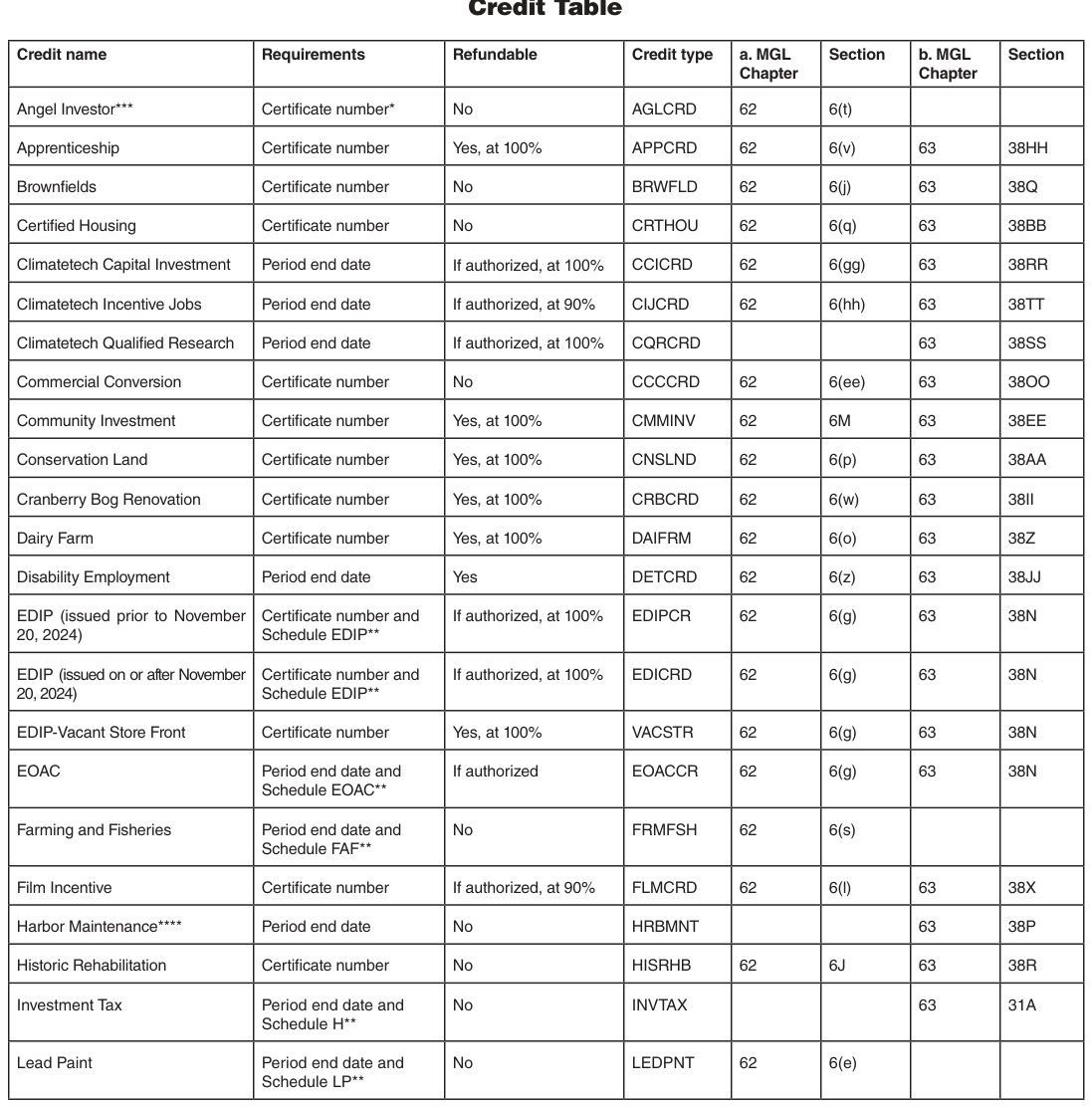
Text version of this table
| Credit name | Requirements | Refundable | Credit type | a. MGL Chapter | Section | b. MGL Chapter | Section |
|---|---|---|---|---|---|---|---|
| Angel Investor*** | Certifci ate number* | No | AGLCRD | 62 | 6(t) | ||
| Apprenticeship | Certifci ate number | Yes, at 100% | APPCRD | 62 | 6(v) | 63 | 38HH |
| Brownfei lds | Certifci ate number | No | BRWFLD | 62 | 6(j) | 63 | 38Q |
| Certifei d Housing | Certifci ate number | No | CRTHOU | 62 | 6(q) | 63 | 38BB |
| Climatetech Capital Investment | Period end date | If authorized, at 100% | CCICRD | 62 | 6(gg) | 63 | 38RR |
| Climatetech Incentive Jobs | Period end date | If authorized, at 90% | CIJCRD | 62 | 6(hh) | 63 | 38TT |
| Climatetech Qualifei d Research | Period end date | If authorized, at 100% | CQRCRD | 63 | 38SS | ||
| Commercial Conversion | Certifci ate number | No | CCCCRD | 62 | 6(ee) | 63 | 38OO |
| Community Investment | Certifci ate number | Yes, at 100% | CMMINV | 62 | 6M | 63 | 38EE |
| Conservation Land | Certifci ate number | Yes, at 100% | CNSLND | 62 | 6(p) | 63 | 38AA |
| Cranberry Bog Renovation | Certifci ate number | Yes, at 100% | CRBCRD | 62 | 6(w) | 63 | 38II |
| Dairy Farm | Certifci ate number | Yes, at 100% | DAIFRM | 62 | 6(o) | 63 | 38Z |
| Disability Employment | Period end date | Yes | DETCRD | 62 | 6(z) | 63 | 38JJ |
| EDIP (issued prior to November 20, 2024) | Certifci ate number and Schedule EDIP** | If authorized, at 100% | EDIPCR | 62 | 6(g) | 63 | 38N |
| EDIP (issued on or after November 20, 2024) | Certifci ate number and Schedule EDIP** | If authorized, at 100% | EDICRD | 62 | 6(g) | 63 | 38N |
| EDIP-Vacant Store Front | Certifci ate number | Yes, at 100% | VACSTR | 62 | 6(g) | 63 | 38N |
| EOAC | Period end date and Schedule EOAC** | If authorized | EOACCR | 62 | 6(g) | 63 | 38N |
| Farming and Fisheries | Period end date and Schedule FAF** | No | FRMFSH | 62 | 6(s) | ||
| Film Incentive | Certifci ate number | If authorized, at 90% | FLMCRD | 62 | 6(l) | 63 | 38X |
| Harbor Maintenance**** | Period end date | No | HRBMNT | 63 | 38P | ||
| Historic Rehabilitation | Certifci ate number | No | HISRHB | 62 | 6J | 63 | 38R |
| Investment Tax | Period end date and Schedule H** | No | INVTAX | 63 | 31A | ||
| Lead Paint | Period end date and Schedule LP** | No | LEDPNT | 62 | 6(e) |
# LEDPNT 62 6(e)
- As of 2023, the method for reporting the Angel Investor credit on Schedule CMS is by certificate number. Prior to 2023, the method of reporting was by period end date.
A schedule is required when the credit is generated or awarded in the current year.
* Eligibility for obtaining the Angel Investor Tax Credit has been repealed for tax years beginning on or after January 1, 2024. Taxpayers must continue to report available carryover credits on Schedule CMS to the extent they are allowed to use them.
Eligibility for obtaining the Harbor Maintenance Tax Credit has been repealed for tax years beginning on or after January 1, 2022. Taxpayers must continue to report available carryover credits on Schedule CMS to the extent they are allowed to use them.
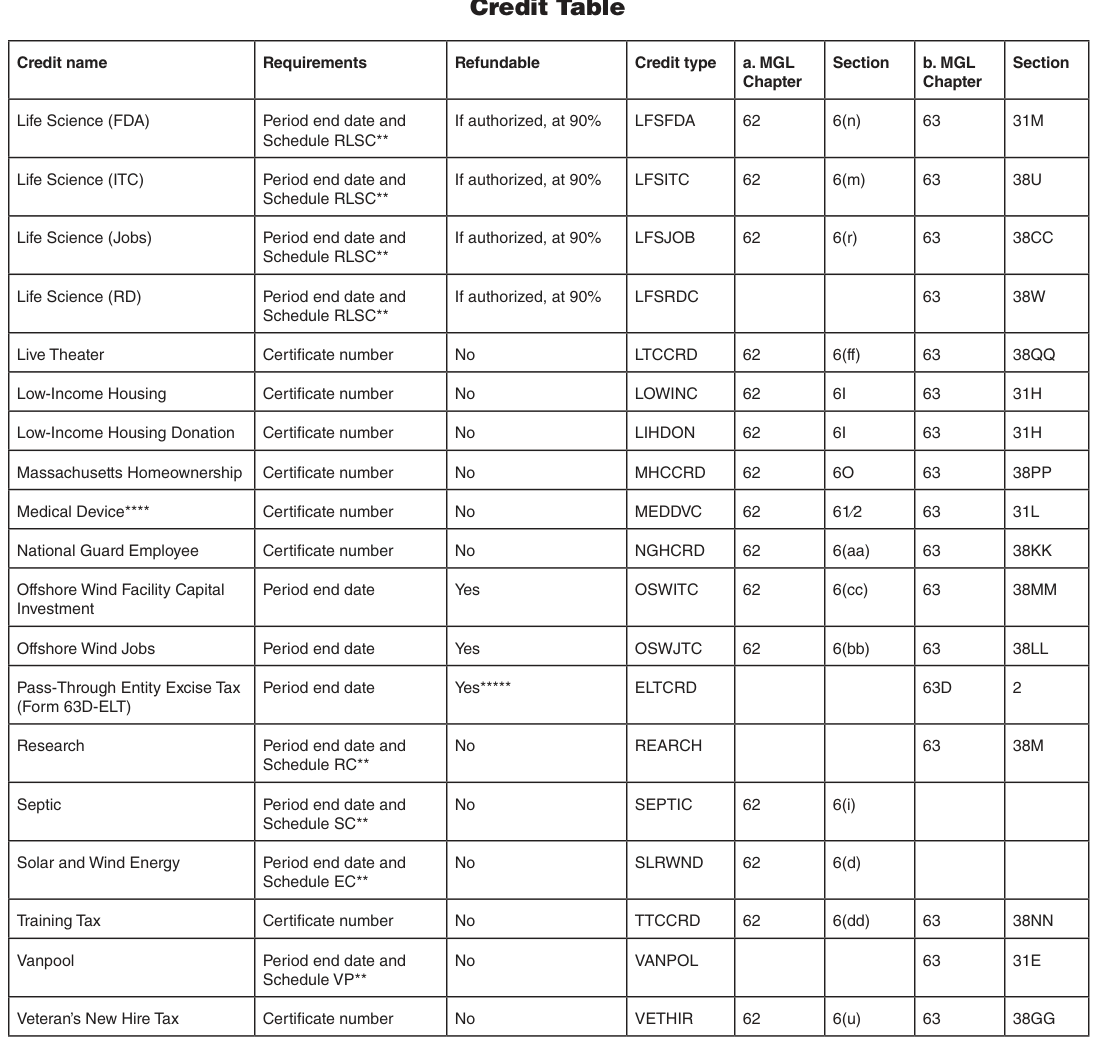
Text version of this table
| Credit name | Requirements | Refundable | Credit type | a. MGL Chapter | Section | b. MGL Chapter | Section |
|---|---|---|---|---|---|---|---|
| Life Science (FDA) | Period end date and Schedule RLSC** | If authorized, at 90% | LFSFDA | 62 | 6(n) | 63 | 31M |
| Life Science (ITC) | Period end date and Schedule RLSC** | If authorized, at 90% | LFSITC | 62 | 6(m) | 63 | 38U |
| Life Science (Jobs) | Period end date and Schedule RLSC** | If authorized, at 90% | LFSJOB | 62 | 6(r) | 63 | 38CC |
| Life Science (RD) | Period end date and Schedule RLSC** | If authorized, at 90% | LFSRDC | 63 | 38W | ||
| Live Theater | Certificate number | No | LTCCRD | 62 | 6(ff) | 63 | 38QQ |
| Low-Income Housing | Certificate number | No | LOWINC | 62 | 6I | 63 | 31H |
| Low-Income Housing Donation | Certificate number | No | LIHDON | 62 | 6I | 63 | 31H |
| Massachusetts Homeownership | Certificate number | No | MHCCRD | 62 | 6O | 63 | 38PP |
| Medical Device**** | Certificate number | No | MEDDVC | 62 | 61⁄2 | 63 | 31L |
| National Guard Employee | Certificate number | No | NGHCRD | 62 | 6(aa) | 63 | 38KK |
| Offshore Wind Facility Capital Investment | Period end date | Yes | OSWITC | 62 | 6(cc) | 63 | 38MM |
| Offshore Wind Jobs | Period end date | Yes | OSWJTC | 62 | 6(bb) | 63 | 38LL |
| Pass-Through Entity Excise Tax (Form 63D-ELT) | Period end date | Yes***** | ELTCRD | 63D | 2 | ||
| Research | Period end date and Schedule RC** | No | REARCH | 63 | 38M | ||
| Septic | Period end date and Schedule SC** | No | SEPTIC | 62 | 6(i) | ||
| Solar and Wind Energy | Period end date and Schedule EC** | No | SLRWND | 62 | 6(d) | ||
| Training Tax | Certificate number | No | TTCCRD | 62 | 6(dd) | 63 | 38NN |
| Vanpool | Period end date and Schedule VP** | No | VANPOL | 63 | 31E | ||
| Veteran’s New Hire Tax | Certificate number | No | VETHIR | 62 | 6(u) | 63 | 38GG |
# VETHIR 62 6(u) 63 38GG
A schedule is required when the credit is generated or awarded in the current year.
Eligibility for obtaining the Medical Device Tax Credit has been repealed for tax years beginning on or after January 1, 2022. Taxpayers must continue to report available carryover credits on Schedule CMS to the extent they are allowed to use them.
* Shareholders, partners, or beneficiaries of an eligible pass-through entity (qualified members) may claim a refundable credit equal to 90% of their allocable share of PTE Excise paid by such pass-through entity. See MGL ch 63D §§ 1-7; TIR 22-6 Pass-through Entity Excise. See also Elective passthrough entity excise FAQs.
Note: Certified life sciences companies with a Research Credit exceeding the amount of credit that may be claimed under section 38M for a taxable year may, to the extent authorized under the Life Sciences Tax Incentive Program, elect to make 90% of the balance of remaining credits refundable. See MGL ch 63, § 38M(j).
# 2025 Massachusetts Income Tax Table at the 5.0% Rate
Use this table to calculate tax for taxable 5.0% income (line 21) of not more than $24,000
Line 22 instructions: To find your tax on 5.0% Income (line 22), read down the tax table income column to the line containing the amount you entered in line 21. Then read across to the TAX column and enter this amount in line 22. If your taxable 5.0% income in line 21 is greater than $24,000, multiply the amount by .05. Enter the result in line 22.
If your 5.0% income for the tax table is less than $10, your tax is 0. Note: If choosing the optional 5.85% tax rate, multiply line 21 and the amount in Schedule D, line 21 by .0585.
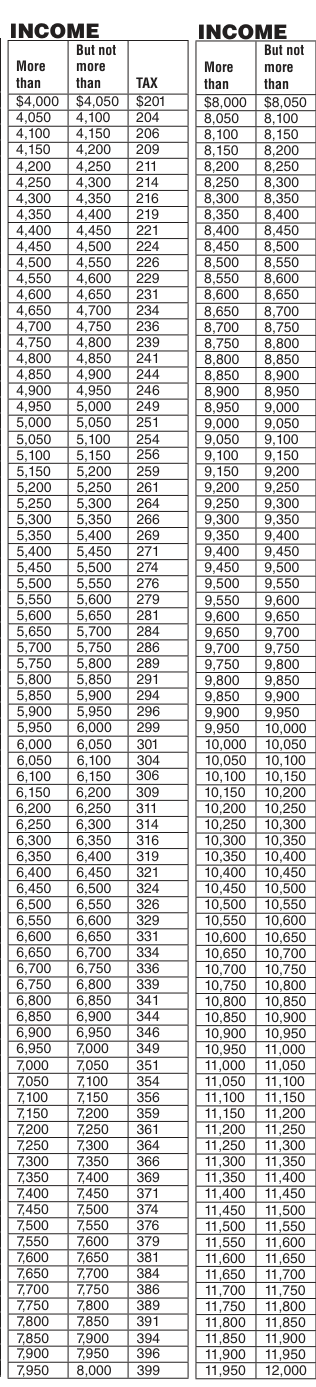
Text version of this table
| More than | But not more than | TAX |
|---|---|---|
| $4,000 | $4,050 | $201 |
| 4,050 | 4,100 | 204 |
| 4,100 | 4,150 | 206 |
| 4,150 | 4,200 | 209 |
| 4,200 | 4,250 | 211 |
| 4,250 | 4,300 | 214 |
| 4,300 | 4,350 | 216 |
| 4,350 | 4,400 | 219 |
| 4,400 | 4,450 | 221 |
| 4,450 | 4,500 | 224 |
| 4,500 | 4,550 | 226 |
| 4,550 | 4,600 | 229 |
| 4,600 | 4,650 | 231 |
| 4,650 | 4,700 | 234 |
| 4,700 | 4,750 | 236 |
| 4,750 | 4,800 | 239 |
| 4,800 | 4,850 | 241 |
| 4,850 | 4,900 | 244 |
| 4,900 | 4,950 | 246 |
| 4,950 | 5,000 | 249 |
| 5,000 | 5,050 | 251 |
| 5,050 | 5,100 | 254 |
| 5,100 | 5,150 | 256 |
| 5,150 | 5,200 | 259 |
| 5,200 | 5,250 | 261 |
| 5,250 | 5,300 | 264 |
| 5,300 | 5,350 | 266 |
| 5,350 | 5,400 | 269 |
| 5,400 | 5,450 | 271 |
| 5,450 | 5,500 | 274 |
| 5,500 | 5,550 | 276 |
| 5,550 | 5,600 | 279 |
| 5,600 | 5,650 | 281 |
| 5,650 | 5,700 | 284 |
| 5,700 | 5,750 | 286 |
| 5,750 | 5,800 | 289 |
| 5,800 | 5,850 | 291 |
| 5,850 | 5,900 | 294 |
| 5,900 | 5,950 | 296 |
| 5,950 | 6,000 | 299 |
| 6,000 | 6,050 | 301 |
| 6,050 | 6,100 | 304 |
| 6,100 | 6,150 | 306 |
| 6,150 | 6,200 | 309 |
| 6,200 | 6,250 | 311 |
| 6,250 | 6,300 | 314 |
| 6,300 | 6,350 | 316 |
| 6,350 | 6,400 | 319 |
| 6,400 | 6,450 | 321 |
| 6,450 | 6,500 | 324 |
| 6,500 | 6,550 | 326 |
| 6,550 | 6,600 | 329 |
| 6,600 | 6,650 | 331 |
| 6,650 | 6,700 | 334 |
| 6,700 | 6,750 | 336 |
| 6,750 | 6,800 | 339 |
| 6,800 | 6,850 | 341 |
| 6,850 | 6,900 | 344 |
| 6,900 | 6,950 | 346 |
| 6,950 | 7,000 | 349 |
| 7,000 | 7,050 | 351 |
| 7,050 | 7,100 | 354 |
| 7,100 | 7,150 | 356 |
| 7,150 | 7,200 | 359 |
| 7,200 | 7,250 | 361 |
| 7,250 | 7,300 | 364 |
| 7,300 | 7,350 | 366 |
| 7,350 | 7,400 | 369 |
| 7,400 | 7,450 | 371 |
| 7,450 | 7,500 | 374 |
| 7,500 | 7,550 | 376 |
| 7,550 | 7,600 | 379 |
| 7,600 | 7,650 | 381 |
| 7,650 | 7,700 | 384 |
| 7,700 | 7,750 | 386 |
| 7,750 | 7,800 | 389 |
| 7,800 | 7,850 | 391 |
| 7,850 | 7,900 | 394 |
| 7,900 | 7,950 | 396 |
| 7,950 | 8,000 | 399 |
# INCOME
But not But not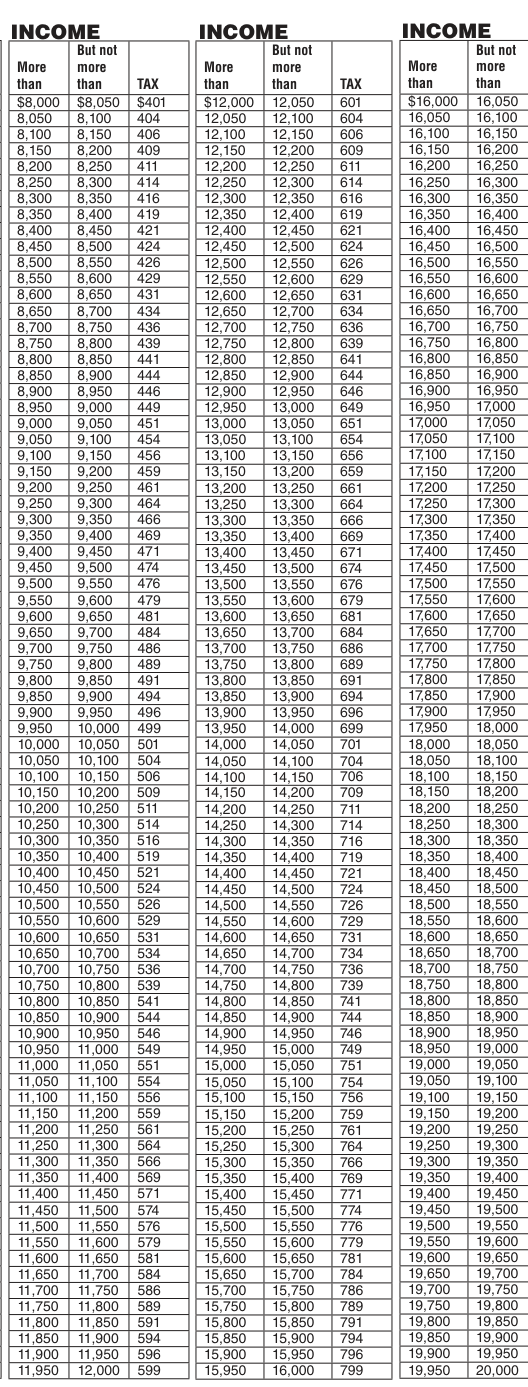
Text version of this table
More than But not more than TAX More than But not more than TAX $8,000 $8,050 $401 $12,000 12,050 601 8,050 8,100 404 12,050 12,100 604 8,100 8,150 406 12,100 12,150 606 8,150 8,200 409 12,150 12,200 609 8,200 8,250 411 12,200 12,250 611 8,250 8,300 414 12,250 12,300 614 8,300 8,350 416 12,300 12,350 616 8,350 8,400 419 12,350 12,400 619 8,400 8,450 421 12,400 12,450 621 8,450 8,500 424 12,450 12,500 624 8,500 8,550 426 12,500 12,550 626 8,550 8,600 429 12,550 12,600 629 8,600 8,650 431 12,600 12,650 631 8,650 8,700 434 12,650 12,700 634 8,700 8,750 436 12,700 12,750 636 8,750 8,800 439 12,750 12,800 639 8,800 8,850 441 12,800 12,850 641 8,850 8,900 444 12,850 12,900 644 8,900 8,950 446 12,900 12,950 646 8,950 9,000 449 12,950 13,000 649 9,000 9,050 451 13,000 13,050 651 9,050 9,100 454 13,050 13,100 654 9,100 9,150 456 13,100 13,150 656 9,150 9,200 459 13,150 13,200 659 9,200 9,250 461 13,200 13,250 661 9,250 9,300 464 13,250 13,300 664 9,300 9,350 466 13,300 13,350 666 9,350 9,400 469 13,350 13,400 669 9,400 9,450 471 13,400 13,450 671 9,450 9,500 474 13,450 13,500 674 9,500 9,550 476 13,500 13,550 676 9,550 9,600 479 13,550 13,600 679 9,600 9,650 481 13,600 13,650 681 9,650 9,700 484 13,650 13,700 684 9,700 9,750 486 13,700 13,750 686 9,750 9,800 489 13,750 13,800 689 9,800 9,850 491 13,800 13,850 691 9,850 9,900 494 13,850 13,900 694 9,900 9,950 496 13,900 13,950 696 9,950 10,000 499 13,950 14,000 699 10,000 10,050 501 14,000 14,050 701 10,050 10,100 504 14,050 14,100 704 10,100 10,150 506 14,100 14,150 706 10,150 10,200 509 14,150 14,200 709 10,200 10,250 511 14,200 14,250 711 10,250 10,300 514 14,250 14,300 714 10,300 10,350 516 14,300 14,350 716 10,350 10,400 519 14,350 14,400 719 10,400 10,450 521 14,400 14,450 721 10,450 10,500 524 14,450 14,500 724 10,500 10,550 526 14,500 14,550 726 10,550 10,600 529 14,550 14,600 729 10,600 10,650 531 14,600 14,650 731 10,650 10,700 534 14,650 14,700 734 10,700 10,750 536 14,700 14,750 736 10,750 10,800 539 14,750 14,800 739 10,800 10,850 541 14,800 14,850 741 10,850 10,900 544 14,850 14,900 744 10,900 10,950 546 14,900 14,950 746 10,950 11,000 549 14,950 15,000 749 11,000 11,050 551 15,000 15,050 751 11,050 11,100 554 15,050 15,100 754 11,100 11,150 556 15,100 15,150 756 11,150 11,200 559 15,150 15,200 759 11,200 11,250 561 15,200 15,250 761 11,250 11,300 564 15,250 15,300 764 11,300 11,350 566 15,300 15,350 766 11,350 11,400 569 15,350 15,400 769 11,400 11,450 571 15,400 15,450 771 11,450 11,500 574 15,450 15,500 774 11,500 11,550 576 15,500 15,550 776 11,550 11,600 579 15,550 15,600 779 11,600 11,650 581 15,600 15,650 781 11,650 11,700 584 15,650 15,700 784 11,700 11,750 586 15,700 15,750 786 11,750 11,800 589 15,750 15,800 789 11,800 11,850 591 15,800 15,850 791 11,850 11,900 594 15,850 15,900 794 11,900 11,950 596 15,900 15,950 796 11,950 12,000 599 15,950 16,000 799
# Where to find help
DOR's website at mass.gov/dor is a valuable resource for tax information 24 hours a day. Thousands of taxpayers use it to find answers to tax questions and to check the status of their refunds. Through MassTaxConnect, taxpayers can make estimated tax payments or review their estimated tax payment histories, in addition to many other options.
# Where to get forms and publications
For Massachusetts tax forms and publications, visit mass.gov/dor/forms.
For Massachusetts tax forms and publications, call us at (617) 887-6367 or toll-free in Massachusetts at (800) 392-6089.
During the income tax filing season, you can obtain Massachusetts personal income tax forms at most local libraries.
Forms may also be available at local IRS district offices. Call ahead to verify availability.
To obtain federal tax information and forms online, go to irs.gov or call the IRS toll-free at (800) 829-3676.
# For help in one of the following specific areas
- Certificates of Good Standing: Call (617) 887-6400
- Installment Sales: Call (617) 887-6950
- Requests for this publication in an alternative format, such as large print, can be sent to the Problem Resolution Office at (617) 626-3833. Requests for other reasonable accommodations for individuals with disabilities can be directed to the Office of Diversity and Equal Opportunity by phone at (857) 286-1554 or by email at knightg@dor.state.ma.us.
To report allegations of suspected misconduct or impropriety involving DOR employees, call the Office of Ethics and Employee Responsibility's Integrity Hotline at (800) 568-0085 or write to PO Box 9568, Boston, MA 02114-9567.
Massachusetts
Department of
Revenue
PO Box 7011
Boston, MA 02204
PRSRT STD
U.S. POSTAGE
PAID
COMMONWEALTH OF
MASSACHUSETTS
# A Special Message from Revenue Commissioner Geoffrey E. Snyder
I hope you find this Form 1 booklet helpful in preparing your taxes. When you are ready to file, I encourage you to consider e-filing instead of submitting a paper return. There are several benefits to e-filing your tax return, including using approved tax software and hiring a tax preparer.
Here are some advantages of e-filing:
- You will receive a faster refund compared to a return filed on paper.
- Automatic corrections provide a more accurate return.
- Enhanced security features protect your e-filed tax return.
- If you owe taxes, you can set up an online payment plan and choose a payment date, saving you a trip to the post office.
Additionally, free e-filing options are available for qualifying taxpayers at mass.gov/efile.
Last year, nearly 95% of Massachusetts taxpayers chose to e-file. This tax season, I hope that e-filing becomes your first choice.
Sincerely,
Commissioner Geoffrey E. Snyder 75M 12/25 2026E02PRINTOFF48006 partially printed on recycled paper mass.gov/efile
Tables and rate charts from the source document
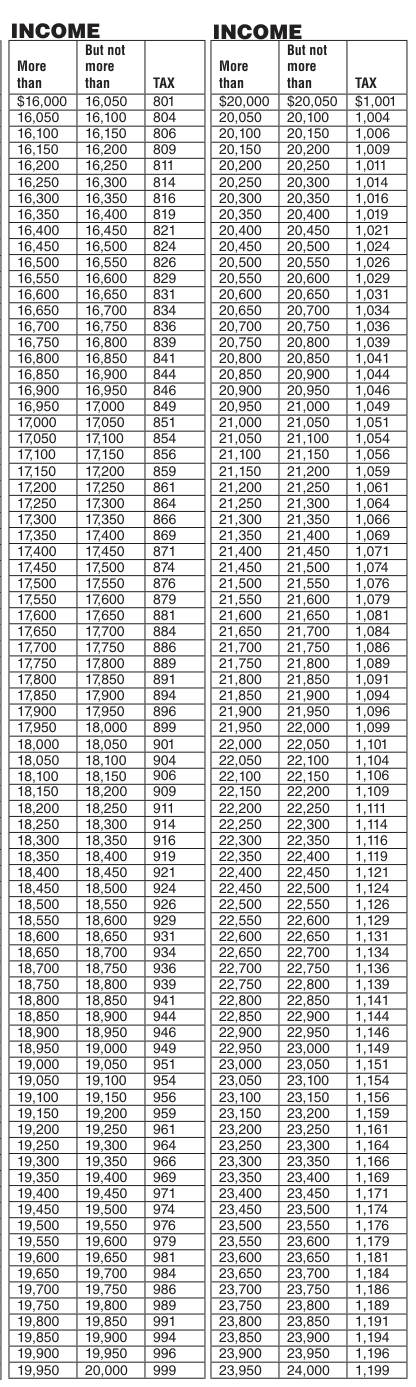
Text version of this table
| More than | But not more than | TAX | More than | But not more than | TAX |
|---|---|---|---|---|---|
| $16,000 | 16,050 | 801 | $20,000 | $20,050 | $1,001 |
| 16,050 | 16,100 | 804 | 20,050 | 20,100 | 1,004 |
| 16,100 | 16,150 | 806 | 20,100 | 20,150 | 1,006 |
| 16,150 | 16,200 | 809 | 20,150 | 20,200 | 1,009 |
| 16,200 | 16,250 | 811 | 20,200 | 20,250 | 1,011 |
| 16,250 | 16,300 | 814 | 20,250 | 20,300 | 1,014 |
| 16,300 | 16,350 | 816 | 20,300 | 20,350 | 1,016 |
| 16,350 | 16,400 | 819 | 20,350 | 20,400 | 1,019 |
| 16,400 | 16,450 | 821 | 20,400 | 20,450 | 1,021 |
| 16,450 | 16,500 | 824 | 20,450 | 20,500 | 1,024 |
| 16,500 | 16,550 | 826 | 20,500 | 20,550 | 1,026 |
| 16,550 | 16,600 | 829 | 20,550 | 20,600 | 1,029 |
| 16,600 | 16,650 | 831 | 20,600 | 20,650 | 1,031 |
| 16,650 | 16,700 | 834 | 20,650 | 20,700 | 1,034 |
| 16,700 | 16,750 | 836 | 20,700 | 20,750 | 1,036 |
| 16,750 | 16,800 | 839 | 20,750 | 20,800 | 1,039 |
| 16,800 | 16,850 | 841 | 20,800 | 20,850 | 1,041 |
| 16,850 | 16,900 | 844 | 20,850 | 20,900 | 1,044 |
| 16,900 | 16,950 | 846 | 20,900 | 20,950 | 1,046 |
| 16,950 | 17,000 | 849 | 20,950 | 21,000 | 1,049 |
| 17,000 | 17,050 | 851 | 21,000 | 21,050 | 1,051 |
| 17,050 | 17,100 | 854 | 21,050 | 21,100 | 1,054 |
| 17,100 | 17,150 | 856 | 21,100 | 21,150 | 1,056 |
| 17,150 | 17,200 | 859 | 21,150 | 21,200 | 1,059 |
| 17,200 | 17,250 | 861 | 21,200 | 21,250 | 1,061 |
| 17,250 | 17,300 | 864 | 21,250 | 21,300 | 1,064 |
| 17,300 | 17,350 | 866 | 21,300 | 21,350 | 1,066 |
| 17,350 | 17,400 | 869 | 21,350 | 21,400 | 1,069 |
| 17,400 | 17,450 | 871 | 21,400 | 21,450 | 1,071 |
| 17,450 | 17,500 | 874 | 21,450 | 21,500 | 1,074 |
| 17,500 | 17,550 | 876 | 21,500 | 21,550 | 1,076 |
| 17,550 | 17,600 | 879 | 21,550 | 21,600 | 1,079 |
| 17,600 | 17,650 | 881 | 21,600 | 21,650 | 1,081 |
| 17,650 | 17,700 | 884 | 21,650 | 21,700 | 1,084 |
| 17,700 | 17,750 | 886 | 21,700 | 21,750 | 1,086 |
| 17,750 | 17,800 | 889 | 21,750 | 21,800 | 1,089 |
| 17,800 | 17,850 | 891 | 21,800 | 21,850 | 1,091 |
| 17,850 | 17,900 | 894 | 21,850 | 21,900 | 1,094 |
| 17,900 | 17,950 | 896 | 21,900 | 21,950 | 1,096 |
| 17,950 | 18,000 | 899 | 21,950 | 22,000 | 1,099 |
| 18,000 | 18,050 | 901 | 22,000 | 22,050 | 1,101 |
| 18,050 | 18,100 | 904 | 22,050 | 22,100 | 1,104 |
| 18,100 | 18,150 | 906 | 22,100 | 22,150 | 1,106 |
| 18,150 | 18,200 | 909 | 22,150 | 22,200 | 1,109 |
| 18,200 | 18,250 | 911 | 22,200 | 22,250 | 1,111 |
| 18,250 | 18,300 | 914 | 22,250 | 22,300 | 1,114 |
| 18,300 | 18,350 | 916 | 22,300 | 22,350 | 1,116 |
| 18,350 | 18,400 | 919 | 22,350 | 22,400 | 1,119 |
| 18,400 | 18,450 | 921 | 22,400 | 22,450 | 1,121 |
| 18,450 | 18,500 | 924 | 22,450 | 22,500 | 1,124 |
| 18,500 | 18,550 | 926 | 22,500 | 22,550 | 1,126 |
| 18,550 | 18,600 | 929 | 22,550 | 22,600 | 1,129 |
| 18,600 | 18,650 | 931 | 22,600 | 22,650 | 1,131 |
| 18,650 | 18,700 | 934 | 22,650 | 22,700 | 1,134 |
| 18,700 | 18,750 | 936 | 22,700 | 22,750 | 1,136 |
| 18,750 | 18,800 | 939 | 22,750 | 22,800 | 1,139 |
| 18,800 | 18,850 | 941 | 22,800 | 22,850 | 1,141 |
| 18,850 | 18,900 | 944 | 22,850 | 22,900 | 1,144 |
| 18,900 | 18,950 | 946 | 22,900 | 22,950 | 1,146 |
| 18,950 | 19,000 | 949 | 22,950 | 23,000 | 1,149 |
| 19,000 | 19,050 | 951 | 23,000 | 23,050 | 1,151 |
| 19,050 | 19,100 | 954 | 23,050 | 23,100 | 1,154 |
| 19,100 | 19,150 | 956 | 23,100 | 23,150 | 1,156 |
| 19,150 | 19,200 | 959 | 23,150 | 23,200 | 1,159 |
| 19,200 | 19,250 | 961 | 23,200 | 23,250 | 1,161 |
| 19,250 | 19,300 | 964 | 23,250 | 23,300 | 1,164 |
| 19,300 | 19,350 | 966 | 23,300 | 23,350 | 1,166 |
| 19,350 | 19,400 | 969 | 23,350 | 23,400 | 1,169 |
| 19,400 | 19,450 | 971 | 23,400 | 23,450 | 1,171 |
| 19,450 | 19,500 | 974 | 23,450 | 23,500 | 1,174 |
| 19,500 | 19,550 | 976 | 23,500 | 23,550 | 1,176 |
| 19,550 | 19,600 | 979 | 23,550 | 23,600 | 1,179 |
| 19,600 | 19,650 | 981 | 23,600 | 23,650 | 1,181 |
| 19,650 | 19,700 | 984 | 23,650 | 23,700 | 1,184 |
| 19,700 | 19,750 | 986 | 23,700 | 23,750 | 1,186 |
| 19,750 | 19,800 | 989 | 23,750 | 23,800 | 1,189 |
| 19,800 | 19,850 | 991 | 23,800 | 23,850 | 1,191 |
| 19,850 | 19,900 | 994 | 23,850 | 23,900 | 1,194 |
| 19,900 | 19,950 | 996 | 23,900 | 23,950 | 1,196 |
| 19,950 | 20,000 | 999 | 23,950 | 24,000 | 1,199 |
Source: official DOR forms index (mass.gov)
Nearby sections (13 sections)
- form-1 · Form 1 — Resident Income Tax Return
- form-1-nr-py · Form 1-NR/PY — Nonresident/Part-Year Resident Return
- form-2 · Form 2 — Fiduciary Income Tax Return
- form-3 · Form 3 — Partnership Return of Income
- form-355 · Form 355 — Business/Manufacturing Corporation Excise Return
- form-355s · Form 355S — S Corporation Excise Return
- form-355u · Form 355U — Combined Reporting (Unitary)
- form-63d-elt · Form 63D-ELT — Pass-Through Entity Excise Tax (PTET)
- form-m-941 · Form M-941 — Employer's Quarterly Withholding Return
- form-ma-nrcr · Form MA NRCR — Nonresident Composite Return
- schedule-62-wh · Schedule 62-WH — Withholding for Composite Returns
- schedule-cms · Schedule CMS — Combined Manufacturer Submission
- schedule-tds · Schedule TDS — Taxpayer Disclosure Statement
# Social Security Number(s)
Be sure to enter your Social Security number(s) on your return. Also, enter your Social Security number on pages 2 through 4 of Form 1 and on page 2 of Schedule B or Schedule C, if filed. Failure to show the correct Social Security number in the space provided will delay the processing of your return. If filing jointly, list your number and your spouse's number in the order they appear on your federal return. Taxpayers filing their U.S. return using an Individual Taxpayer Identification number (ITIN) should enter that ITIN as their Social Security number in the appropriate space. Also, be sure your employer has listed the correct Social Security number on your Form W-2. If you are married, you must list your spouse's name and Social Security number even if you are filing a separate return, except as provided below. See line 1 instructions for married filing a separate return.
To apply for an SSN, you must complete Form SS-5. Form SS-5 is available online at socialsecurity.gov, from your local Social Security Administration (SSA) office, or by calling the SSA at (800) 772-1213. It usually takes about two weeks to receive an SSN. If you are a nonresident or resident alien and you do not have and are not eligible for an SSN, you must apply for an ITIN. For details on how to do so, see Form W-7 and its instructions.
Form W-7 is available online at irs.gov or by calling the IRS at (800) 829-1040. It usually takes about four to six weeks to receive an ITIN.
Note: You must wait until you receive an ITIN or SSN to file your Massachusetts return.