South Carolina Department of Revenue Form Instructions
SC1040ES — Individual Declaration of Estimated Tax
Individual Declaration of Estimated Tax
Pay online with MyDORWAY!
No account or additional paperwork required!
By paying on MyDORWAY you:
- receive immediate confirmation for transactions
- can make your payment anytime, 24/7
- don't have to worry about using the correct tax year voucher
How to pay with MyDORWAY
Visit dor.sc.gov/pay
- Select Individual Income Tax Payment
- Enter SSN, ITIN, or FEIN and Legal Name, and select Individual Income Tax
- Next, select Estimated Payment
- Enter the required information, and select a payment method
- Next, complete the required steps for the selected payment method
- Do not mail a paper copy of the SC1040ES if you pay online Manage your tax accounts online for FREE!
Fast. Easy. Secure.
Why MyDORWAY?
- Make ACH debit or credit card payments with no convenience fees
- Option to schedule payments (SC1040ES and SC1040V)
- Access and update your account information 24/7
- Automatic calculations reduce errors
Ready to sign up for MyDORWAY?
Go to dor.sc.gov/MyDORWAY to get started You'll need:
- Your SSN, ITIN, or FEIN
- Your last payment amount or copy of your last return Want more information about Individual Income Taxes? Visit dor.sc.gov/iit
1350 STATE OF SOUTH CAROLINA
STATE OF SOUTH CAROLINA
DEPARTMENT OF REVENUE
DEPARTMENT OF REVENUE
SC1040ES
(Rev. 10/13/25)
# INDIVIDUAL DECLARATION OF ESTIMATED TAX INSTRUCTIONS
Pay online using our free tax portal, MyDORWAY, at dor.sc.gov/pay. Select Individual Income Tax
Payment to get started. Do not mail a paper copy of the SC1040ES if you pay online.
- If you owe $15,000 or more in connection with any SCDOR return, you must file and pay electronically according to SC Code Section 12-54-250.
- If you're making an Individual Income Tax return payment, use the SC1040V.
- If you file by paper, use only black ink on the SC1040ES form and on your check.
- Enter your Social Security Number (SSN) and your spouse's SSN (if filing jointly).
- Check the Composite Filer box if this payment will be claimed on a SC1040, Individual Income Tax Return, filed for nonresident partners or shareholders of a Partnership or S Corporation.
- Mark the box for the quarter the payment is being made.
- Enter your name and address, including apartment number and ZIP.
- Enter your payment amount in whole dollars without a dollar sign (for example: 154.00).
- Your payment amount should match the amount on line 11 of your 2026 Estimated Tax Worksheet.
- If no payment is due, do not mail the SC1040ES.
- Make your check payable to SCDOR. Include your name, SSN, and 2026 SC1040ES in the memo. Do not send cash.
- Mail your SC1040ES and payment in one envelope.
Mail your SC1040ES and payment to: SCDOR, IIT Voucher, PO Box 100123, Columbia, SC 29202 cut along dotted line SC1040ES
(Rev. 10/13/25)
SC DEPARTMENT OF REVENUE dor.sc.gov 3080
# INDIVIDUAL DECLARATION OF ESTIMATED TAX
Pay online! It's quick and easy! Use our free online tax portal, MyDORWAY, at dor.sc.gov/pay.
Your SSN Spouse's SSN (if filing jointly) Composite Filer Name and address (include spouse's name if filing jointly)
Mark quarter with X (required)
1st Qtr 2nd Qtr
Jan, Feb, Mar Apr, May, Jun
3rd Qtr 4th Qtr
Jul, Aug, Sep Oct, Nov, Dec
Payment . 00 amount
Do not send cash. Make your check payable to SCDOR and include your name, SSN, and 2026 SC1040ES in the memo.
SC1040ES
(Rev. 10/13/25)
SC DEPARTMENT OF REVENUE dor.sc.gov 3080
# INDIVIDUAL DECLARATION OF ESTIMATED TAX
Pay online! It's quick and easy! Use our free online tax portal, MyDORWAY, at dor.sc.gov/pay.
Your SSN Spouse's SSN (if filing jointly) Name and address (include spouse's name if filing jointly) Composite Filer Mark quarter with X (required) 1st Qtr 2nd Qtr Jan, Feb, Mar Apr, May, Jun 3rd Qtr 4th Qtr Jul, Aug, Sep Oct, Nov, Dec Payment . 00 amount Do not send cash. Make your check payable to SCDOR and include your name, SSN, and 2026 SC1040ES in the memo. cut along dotted line SC1040ES
(Rev. 10/13/25)
SC DEPARTMENT OF REVENUE dor.sc.gov 3080
# INDIVIDUAL DECLARATION OF ESTIMATED TAX
Pay online! It's quick and easy! Use our free online tax portal, MyDORWAY, at dor.sc.gov/pay.
Your SSN Spouse's SSN (if filing jointly) Name and address (include spouse's name if filing jointly) Composite Filer Mark quarter with X (required) 1st Qtr 2nd Qtr Jan, Feb, Mar Apr, May, Jun 3rd Qtr 4th Qtr Jul, Aug, Sep Oct, Nov, Dec Payment . 00 amount Do not send cash. Make your check payable to SCDOR and include your name, SSN, and 2026 SC1040ES in the memo. cut along dotted line SC1040ES
(Rev. 10/13/25)
SC DEPARTMENT OF REVENUE dor.sc.gov 3080
# INDIVIDUAL DECLARATION OF ESTIMATED TAX
Pay online! It's quick and easy! Use our free online tax portal, MyDORWAY, at dor.sc.gov/pay.
Your SSN Spouse's SSN (if filing jointly) Name and address (include spouse's name if filing jointly)
Composite Filer Mark quarter with X (required)
1st Qtr 2nd Qtr
Jan, Feb, Mar Apr, May, Jun
3rd Qtr 4th Qtr
Jul, Aug, Sep Oct, Nov, Dec
Payment . 00 amount
Do not send cash. Make your check payable to SCDOR and include your name, SSN, and 2026 SC1040ES in the memo.
# SC1040ES INSTRUCTIONS 2026
Filing requirements
You must file a Declaration of Estimated Tax if you expect to owe an Income Tax liability of $100 or more with the filing of your SC1040, Individual Income Tax Return.
Use the Estimated Tax Worksheet to compute your Estimated Tax:
- If you are a resident of South Carolina, use your 2025 SC1040 as a basis for figuring your Estimated Tax.
- If you are a nonresident of South Carolina, use your 2025 SC1040 and Schedule NR as a basis to calculate the modified South Carolina taxable income to enter on line 3 of the Worksheet.
Exceptions to filing a Declaration of Estimated Tax:
- Farmers and commercial fishermen whose gross income from farming or fishing for 2025 or 2026 is at least two-thirds (66.67%) of their total gross income from all sources. Instead of making four quarterly Estimated Tax payments, farmers and commercial fishermen may choose to pay all of their Estimated Tax by January 15, 2027 or file their 2026 SC1040 and pay the total tax due by March 1, 2027
- Individuals whose prior year tax liability was $0 for a full 12 months
- Nonresidents of South Carolina doing business in this state on a contract basis where the contract is more than $10,000 and tax is withheld at 2% from each contract payment
Declaration adjustment
If your Estimated Tax has substantially increased or decreased due to a change in income, dependents, or Income Tax withholding, file the adjusted Declaration by the next payment due date. Use the SC1040ES to make the adjusted payment.
Complete the Adjusted Declaration Schedule, found on page 4 of these instructions, to determine the amount to be paid. Use the corrected amounts of income and deductions from your federal information.
Payment due dates
- If you file using a calendar year end of December 31, your Estimated Tax payments are due in four equal installments:
- 1st quarter: due April 15, 2026
- 2nd quarter: due June 15, 2026
- 3rd quarter: due September 15, 2026
- 4th quarter: due January 15, 2027 You can choose to pay all of your Estimated Tax on April 15, the due date of the first installment. Instead of making your last payment on January 15, you can choose to file your SC1040 by February 1 and pay the full balance of Income Tax due.
- If you are not required to file on April 15:
- Your first Estimated Tax payment is due on June 15, 2026 if you meet your Estimated Tax filing requirement after April 1 and before June 1.
- Your first Estimated Tax payment is due on September 15, 2026 if you meet your Estimated Tax filing requirement after June 1 and before September 1.
- Your first Estimated Tax payment is due on January 15, 2027 if you meet your Estimated Tax filing requirement after September 1.
- If you file on a fiscal tax year, your Estimated Tax payments are due on the 15th day of the fourth, sixth, and ninth months of the fiscal year and the first month of the following fiscal year.
Penalty for failure to file and pay Estimated Tax
You may be charged a penalty if:
- you do not pay enough Estimated Tax.
- you do not make your payments by the due date and for the required amount.
- you do not pay at least 90% of the total tax due.
A penalty will not be charged if your underpayment results from personal service income earned in another state and tax was withheld to the other state.
Generally, you can avoid a penalty if you make timely Estimated Tax payments equal to 100% of the tax shown due on your SC1040 for the prior tax year. You must have filed a SC1040 for the prior tax year, and it must have covered a 12-month year.
If the adjusted gross income on your prior year SC1040 was more than $150,000, the 100% rule is adjusted to 110% of last year's tax liability. Calculate adjusted gross income by using federal guidelines and making South Carolina adjustments.
Refer to the SC2210, Underpayment of Estimated Tax By Individuals, Estates, and Trusts, available at dor.sc.gov/forms, for more information on computing the underpayment penalty.
# 2026 Estimated Tax Worksheet
- Enter the federal taxable income from your 2026 federal 1040ES, line 3 …
- South Carolina state adjustments (positive or negative)
- $
For purposes of the 110% rule, include Active Trade or Business Income … 2. $
- South Carolina taxable income (add line 1 and line 2) … 3. $
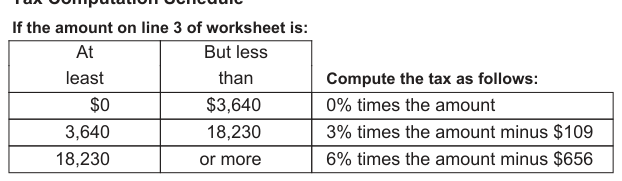
- Tax (calculate the tax on line 3 using the Tax Computation Schedule in these instructions) … 4. $
- Enter any additional tax (from your SC4972 or I-335) … 5. $
- Add line 4 and line 5 … 6. $
- Nonrefundable credits (Child and Dependent Care Credit, Two Wage Earner Credit, and credits from your SC1040TC) … 7. $
- Subtract line 7 from line 6 … 8. $
- State Income Tax withheld and estimated to be withheld during year 2026 Include withholding from wages, pension, and annuities … 9. $
- Balance of Estimated Tax (subtract line 9 from line 8) If $100 or more, you must make Estimated Tax payments.
If less than $100, no payment is required. Round to the nearest dollar … 10. $
- If the first payment you are required to file is: due April 15, 2026, enter 1/4 due June 15, 2026, enter 1/2 of line 10, minus any 2025 overpayment applied to 2026 Estimated } due September 15, 2026, enter 3/4 due January 15, 2027, enter amount Tax. Enter here and as the payment amount on your voucher … 11. $ 2026 Tax Computation Schedule for South Carolina Residents and Nonresidents
# Tax Computation Schedule
Text version of this table
At least But less than Compute the tax as follows: $0 $3,640 0% times the amount 3,640 18,230 3% times the amount minus $109 18,230 or more 6% times the amount minus $656
Example of computation
South Carolina income subject to tax on line 3 of worksheet is $25,000. The tax is calculated as follows:
$25,000 income from line 3 of worksheet X .06 percent from tax computation schedule 1,500 (1,500 rounded to the nearest dollar)
- 656 amount from tax computation schedule $ 844 tax to be entered on line 4 of worksheet
# 2026 Adjusted Declaration Schedule
- Adjusted Estimated Tax (line 11 of Estimated Tax Worksheet) … 1. a. Amount of 2025 overpayment applied to Estimated Tax for 2026 …
- Subtract: 2a. b. Total Estimated Tax payments made … 2b. c. Total (add line 2a and line 2b) … 2c.
- Unpaid balance (subtract line 2c from line 1) …
- Amount to be paid (line 3 divided by number of remaining payments) 3.
Enter here and as the payment amount on the SC1040ES voucher … 4.
Record of Estimated Tax Payment
The SCDOR does not mail a statement of the amount of Estimated Tax paid during the year. Complete this section for your records.
Overpayment credit on Voucher 1 Voucher 2 2025 return Amount Date
# Voucher 3 Voucher 4 Total
It is mandatory that you provide your Social Security Number on this tax form if you are an individual taxpayer. 42 U.S.C. 405(c)(2)(C)(i) permits a state to use an individual's Social Security Number as means of identification in administration of any tax. SC Regulation 117-201 mandates that any person required to make a return to the SCDOR must provide identifying numbers, as prescribed, for securing proper identification. Your Social Security Number is used for identification purposes.
# The Family Privacy Protection Act
Under the Family Privacy Protection Act, the collection of personal information from citizens by the SCDOR is limited to the information necessary for the SCDOR to fulfill its statutory duties. In most instances, once this information is collected by the SCDOR, it is protected by law from public disclosure. In those situations where public disclosure is not prohibited, the Family Privacy Protection Act prevents such information from being used by third parties for commercial solicitation purposes.
Source: view the official PDF
The source document contains 1 figure (charts or worksheet graphics) not reproduced in this text version. See the official PDF above.
Nearby sections (18 sections)
- i338 · I-338 — Composite Return Affidavit
- i348 · I-348 — Composite Filing Instructions
- i435 · I-435 — Active Trade or Business Income for Electing…
- iit-packet · Individual Income Tax Packet — SC1040 Instructions (full…
- sc1040 · SC1040 — Individual Income Tax Return
- sc1040es · SC1040ES — Individual Declaration of Estimated Tax
- sc1041 · SC1041 — Fiduciary Income Tax Return
- sc1041es · SC1041ES — Fiduciary Declaration of Estimated Tax
- sc1065 · SC1065 — Partnership Return
- sc1065es · SC1065ES — Partnership Declaration of Estimated Income Tax
- sc1120 · SC1120 — 'C' Corporation Income Tax Return
- sc1120cdp · SC1120-CDP — Corporation Declaration of Estimated Income Tax
- sc1120i · SC1120 Instructions — 'C' and 'S' Corporation Income Tax…
- sc1120s · SC1120S — 'S' Corporation Income Tax Return
- sc1120swh · SC1120S-WH — Withholding Tax on Income of Nonresident…
- sc1120t · SC1120-T — Application for Automatic Extension (Corporate)
- sc2210 · SC2210 — Underpayment of Estimated Tax by Individuals,…
- sc2220 · SC2220 — Underpayment of Estimated Tax by Corporations