South Carolina Department of Revenue Form Instructions
Individual Income Tax Packet — SC1040 Instructions (full booklet)
2025 SC1040
Individual Income
Tax Form and
# Instructions
# South Carolina Department of Revenue | dor.sc.gov | July 2025
Contents
Reminders … 1
Ready for your refund? … 2
New For 2025 … 3
Before You File … 3
Tax Help … 5
Individual Income Tax: General Information and FAQs … 6 SC1040 Instructions … 17 SC1040 … 43 SC Individual Income Tax Tables … 46
Reminders
The due date for filing your 2025 Individual Income Tax return is April 15, 2026.
Paying online is quick and easy! Pay any balance due using our free online tax portal, MyDORWAY.
Visit dor.sc.gov/pay and select Individual Income Tax Payment to get started.
If you're expecting a refund, your options are direct deposit or paper check.
● The SCDOR recommends direct deposit. It's the fastest, safest, and easiest way to get your refund.
● Paper checks cost taxpayers 10 times more to process, take longer to get to you, and can be lost or stolen from the mail.
If you need more time to file your 1040, visit dor.sc.gov/pay, select Individual Income Tax Payment, then select Extension Payment on the following screen. Your payment on MyDORWAY automatically submits your filing extension request-no additional paperwork is required! If you request an extension on your federal return, you do not need to request an extension on your state return.
South Carolina Use Tax is due on purchases made outside of South Carolina for use, storage, or consumption in South Carolina, when the state Sales and Use Tax has not already been collected by the seller. Examples include purchases made online, when visiting another state, or through out‐of‐state catalog companies and home shopping networks. Use Tax can be paid on the SC1040 (line 26), online with your MyDORWAY account, or by completing the UT‐3/UT‐3W. A worksheet is included in the SC1040 Instructions to help you calculate and pay Use Tax.
Forms are available at dor.sc.gov/forms.
Mail returns to:
Refunds or zero tax:
SC1040 Processing Center
PO Box 101100
Columbia, SC 29211-0100
Balance due:
# Taxable Processing Center
PO Box 101105
Columbia, SC 29211-0105
Ready for your refund?
File online and choose direct deposit.
Filing online and choosing direct deposit is the fastest, safest way to complete your
South Carolina return and get your refund.
Visit dor.sc.gov/iit-filing for information on your electronic filing options. Free and low cost options are available!
You may qualify to file online for free! Visit dor.sc.gov/iit-filing to find vendors and qualification information.
Whether you file online or by paper, choose to receive your refund by direct deposit.
It's fast, accurate, and secure! Paper checks cost taxpayers 10 times more to process, take longer to get to you, and can be lost or stolen.
Learn more at dor.sc.gov/refund.
Go direct!
Have a balance due?
Use MyDORWAY to pay electronically
Whether you file online or by paper, if you have a balance due, we recommend paying your taxes electronically!
Paying is quick and easy with our free online tax portal, MyDORWAY!
Go to dor.sc.gov/pay to make your payment.
● Select Individual Income Tax Payment to get started.
● Pay electronically by ACH Debit when you file your return. Enter your bank information.
● If you pay by ACH Debit, the SCDOR will request payment from your bank. They will automatically debit your account for the South Carolina taxes you owe. No further action is needed on your part!
File your return electronically by the April
15, 2026 due date and pay your balance due electronically by May 1, 2026 to avoid penalties and interest.
This does not apply to federal returns or returns submitted by paper.
New For 2025
# 2025 Legislative Updates
A list of significant changes in tax and regulatory laws and regulations enacted during the 2025 legislative session is available at dor.sc.gov/policy.
Conformity
South Carolina recognizes the Internal Revenue Code as amended through December 31, 2024, unless otherwise provided. If adopted Internal Revenue Code sections that expired on December 31, 2024 are extended, but were otherwise not amended by congressional act during 2025, these sections will also be extended for South Carolina Income Tax purposes.
# Reduction In Income Tax Rates
For tax year 2025, the top marginal Individual Income Tax rate changed to 6%. Use the SC1040TT, 2025 South Carolina Individual Income Tax Tables, available at dor.sc.gov/forms, to determine your tax.
Increase In South Carolina Dependent Exemption (Line w of the SC1040)
The South Carolina dependent exemption amount for 2025 is $4,930 and is allowed for each eligible dependent, including both qualifying children and qualifying relatives.
# Before You File
Follow these guidelines to make sure your return is processed quickly and your refund is not delayed.
● Make sure you have received ALL of your W-2 forms and other tax documents.
● You need to have your correct Social Security Number (SSN). If you cannot get an SSN, you need to apply for an Individual Taxpayer Identification Number (ITIN) from the IRS. Contact the IRS at 1-800-829-1040 or register at irs.gov using the federal form W-7.
● Double check all SSNs, your name, address, and all of your calculations.
● Keep a copy of your complete return for your records.
● Documents and schedules (if needed) should be placed in the following order:
- W-2 forms
- 1099 forms with South Carolina Withholding
- SC1040 - all three pages
- Schedule NR Nonresident Schedule
- SC1040TC Tax Credits
- I‐319 Tuition Tax Credit
- I‐330 Contributions for Check‐Offs
- Any other South Carolina forms and schedules
- Any federal forms and schedules
# INCOME TAX FILING DOS AND DON'TS
DO
✔ File online.
✔ Choose direct deposit to get the fastest access to your refund.
✔ Pay your balance due electronically. It's fast and easy! Use our free online tax portal, MyDORWAY, at dor.sc.gov/pay or enter your bank information on your SC1040 and pay by ACH Debit.
✔ Use the form for the correct tax year.
✔ Include all SSNs and make sure they're correct.
✔ Mark your filing status. Generally, it will match your federal return.
✔ Send all three pages of the SC1040.
✔ Attach your Schedule NR to your SC1040 and make sure you mark the SC Schedule NR box, if applicable.
✔ Sign your return! If married and filing jointly, both taxpayers must sign.
✔ File using your correct legal name.
✔ Make sure your mailing address is complete and accurate.
✔ Sign your check, make it payable to SCDOR, and make sure the wording matches the dollar amount.
✔ Include SC Withholding on line 16 for W‐2 forms and line 20 for 1099 forms.
✔ If you claim a tax credit, attach an SC1040TC and all supplemental tax credit schedules to support the tax credits claimed on the SC1040TC.
✔ To amend your return, file a new SC1040, check the
Amended Return box, and include a SCH AMD.
DON'T
✖ Claim the Two Wage Earner Credit if your filing status is not married filing jointly.
✖ Claim state withholding paid to another state.
✖ Claim federal withholding paid to the IRS.
✖ Send additional copies of your return. If you file online, you don't need to submit a paper copy.
# Tax Help
SCDOR Taxpayer Service Centers are located across the state. Visit dor.sc.gov/contact/in-person for locations and hours.
The SCDOR Taxpayer Advocate provides assistance for innocent spouse requests for SCDOR debts, certificates of tax compliance, and lottery compliance.
If you have a general question or concern, you should first call 1-844-898-8542. If you receive a letter or notice, use the contact information provided on the notice.
Taxpayer Advocate: 803-898-5444 Innocent Spouse: 803-898-5199 Compliance: 803-898-5381 Volunteer Income Tax Assistance (VITA) provides free tax assistance to lower income taxpayers, those with disabilities, the elderly, and limited-English speaking taxpayers who need assistance preparing their tax returns. Generally, those who receive these services cannot afford professional tax assistance.
Volunteers are located throughout the state. Call 211 for more information.
Copies of prior year Individual Income Tax return transcripts starting with tax year 2021 are available on our free online tax portal, MyDORWAY, at MyDORWAY.dor.sc.gov. You must sign up for a MyDORWAY account to access copies of past transcripts. After you've signed up:
● Log in and click the Accounts tab.
● Scroll to your Individual Income Tax account and select View Returns and Periods.
● Under Period, select any period starting with tax year 2021 or newer (example: for tax year 2021, you would select period 31-Dec-2021) ● On the next screen, select Print Return Transcript, then download your transcript as a PDF.
For tax years 2020 and older, you must request transcripts by completing a paper version of the SC4506, available at dor.sc.gov/forms.
If you used a paid preparer to file your return, your preparer should have a copy of your return.
The SCDOR has a six year retention period on previously filed returns.
Individual
Income Tax:
General
Information and FAQs
South Carolina Department of Revenue | dor.sc.gov | Updated February 2025
# Table of Contents
Frequently Asked Questions … 1
Getting Started … 1
Use Tax … 2
Submitting Your SC1040 and Due Dates … 3 Extensions … 3 Rounding … 4 Refunds … 4 Deceased Taxpayers … 5 Tax Records … 5 Estimated Tax … 5 Amended Returns and Adjustments … 7 Filing an Amended Return … 7 Audits and Adjustments … 7 Reminders … 8 Paying Electronically … 8 Changing a Name or Address … 8 Prior Year Individual Income Tax Return Transcripts … 9
Do I need to file a South Carolina Individual Income Tax return?
If you answer YES to any of these questions, you must file a South Carolina Individual Income Tax return.
● Resident taxpayers under age 65:
■ Were you required to file a federal Income Tax return which included income taxable by South Carolina? (Residents of SC are taxed on their entire income, regardless of where it was earned, unless specifically exempted by law.) ■ Did you have South Carolina Income Tax withheld from your wages?
● Resident taxpayers age 65 or older:
■ Married filing jointly (both age 65 or older) - Is your gross income greater than the federal gross income filing requirement amount plus $30,000?
■ Any other filing status - Is your gross income greater than the federal gross income filing requirement amount plus $15,000?
■ Find the federal gross income filing requirement amount in the federal 1040 instructions, available at irs.gov.
■ Did you have South Carolina Income Tax withheld from your wages?
● Nonresidents:
■ Did you have South Carolina Income Tax withheld from your wages?
■ Did you have South Carolina gross income, including income from rental property, businesses, or other investments in South Carolina?
Am I a resident or nonresident?
You are a South Carolina resident, even if you live outside of South Carolina, if all of the following are true:
- Your intention is to maintain South Carolina as your permanent home.
- South Carolina is the center of your financial, social, and family life.
- When you are away, you intend to return to South Carolina.
You are a nonresident if your permanent home is outside of South Carolina for the entire year and none of the above applies.
For more information on residency and domicile, refer to Determining a Taxpayer's Domicile for
Income Tax Purposes, available at dor.sc.gov/policy.
Frequently Asked Questions
# Getting Started
What is my residency status if I moved into or out of South Carolina during the tax year?
You are a part-year resident and may consider yourself a full-year resident or nonresident.
If you file as a full-year resident, file the SC1040. Report all of your income as though you were a resident for the entire year. You will be allowed credit for taxes paid on income taxed by South Carolina and another state, if applicable. Complete the SC1040TC and attach a copy of the other state's Income Tax return.
If you file as a nonresident, file the SC1040 with the Schedule NR. You will be taxed only on income earned while a resident in South Carolina and income from South Carolina sources. You will prorate your deductions. All personal service income earned in South Carolina must be reported.
You may choose the filing method that is most beneficial to you. This option is only available for the tax year that you are a part-year resident.
How should I file if I am a nonresident of South Carolina but work in this state?
File the SC1040 with the Schedule NR. You will be taxed only on income earned in South Carolina and will prorate your deductions. You must report all personal service income earned in South Carolina.
How should I file if I am a full-year South Carolina resident but my spouse is not?
If you file a joint federal return, you must file a joint SC1040 with the Schedule NR. You will report all income for the entire year to South Carolina. Your spouse will only report income earned in this state.
If you file separate federal returns, you must file a separate South Carolina return. Your spouse must also file a separate South Carolina return if they have income taxable by South Carolina.
What is my residency status if I am in the armed forces?
● If you enter the armed forces when you are a South Carolina resident, you keep your South Carolina residency status, even if you are absent from the state on military orders. You are subject to the same residency requirements as any other South Carolina resident and are required to file a South Carolina Individual Income Tax return.
● If you are not a South Carolina resident but are stationed in this state by military orders, your military income is not subject to South Carolina Income Tax. If you have other earned income subject to South Carolina tax, file the SC1040 with the Schedule NR. Your spouse may be exempt from South Carolina Income Tax on income from services performed in South Carolina under the Federal Military Spouses Residency Relief Act. For more information, see the Schedule NR instructions, available at dor.sc.gov/forms and SC Revenue Ruling #24-5, available at
Use Tax
Do I need to pay South Carolina Use Tax?
Use Tax is due on purchases outside of South Carolina for use, storage, or consumption in South Carolina. Use Tax is paid to the SCDOR when state Sales and Use Tax has not been collected by the seller.
# Submitting Your SC1040 and Due Dates
When is my return due?
A return for calendar year 2025 is due by April 15, 2026.
A return for a fiscal year tax period is due by the 15th day of the fourth month following the close of your tax year. On the front of the return, complete the dates covered by the fiscal year.
South Carolina offers an electronic incentive until May 1, 2026, without being charged penalties and interest, if you:
- file your return electronically by the due date of April 15, 2026, and
- pay your balance due electronically by May 1, 2026.
If you don't meet both requirements, penalties and interest will be charged from the tax due date of April 15, 2026 until you file and pay.
The May 1, 2026 electronic incentive doesn't apply to federal returns or returns submitted by paper.
You may need to pay Use Tax if you make purchases:
● from retailers online
● from out-of-state catalog companies ● from home shopping networks ● when visiting another state The tax rate for the Use Tax is the same as the Sales Tax rate. The rate is determined by where the tangible personal property will be used, stored, or consumed, regardless of where the sale takes place.
For more information and updated tax rates, visit dor.sc.gov/tax/use.
You have three options for reporting and paying Use Tax:
- On line 26 of your SC1040. Calculate your Use Tax using the SC Use Tax Worksheet included in the SC1040 Instructions, available at dor.sc.gov/forms. No additional paperwork is required.
- Use our free online tax portal, MyDORWAY, at MyDORWAY.dor.sc.gov. Log in to your existing account or create a new account to get started. No additional form or paperwork is required.
- Mail the UT-3 with your check to: SCDOR, Sales Taxable, PO Box 100193, Columbia, SC 29202.
Make your check payable to SCDOR. Include your name, SSN, and UT-3 in the memo.
Do not send cash.
Extensions
How do I get more time to file?
If you need more time to file your South Carolina return:
● Request an extension to file by paying your balance due on our free online tax portal, MyDORWAY, at dor.sc.gov/pay. Select Individual Income Tax Payment to get started. You do not need to log in or create a MyDORWAY account. Your payment on MyDORWAY automatically submits your filing extension request. No additional form or paperwork is required. You must pay at least 90% of your state tax due with the extension by April 15, 2026.
Can I extend the time to pay my taxes?
An extension allows additional time to file your SC1040, but not to pay any taxes due. You will be charged interest, at the prevailing federal rates, on any unpaid tax. Interest is applied from the original due date of the tax return to the date of the payment. In addition to the interest, you will be charged a penalty of 0.5% per month for failure to pay at least 90% of the total tax due by the original due date.
The penalty will be imposed on the difference between the amount paid with the extension and the tax to be paid for the period.
A Penalty and Interest Calculator is available on MyDORWAY, our free online tax portal, at
What are the penalties for failing to file a return or filing a fraudulent return?
Any person who deliberately fails to file a return, files a fraudulent return, or attempts to evade the tax in any manner may be liable for a penalty up to $10,000, imprisoned for up to 5 years, or both.
Rounding
Do I need to round amounts on my return?
Round cents to the nearest whole dollar on your return and schedules. For amounts less than 50 cents, round down to 0. For amounts of 50-99 cents, round up to the next dollar. For example: $2.15 becomes $2, $3.50 becomes $4, and $4.75 becomes $5.
● If no Income Tax is due, and you have been granted an extension of time to file your federal Income Tax return, we will accept a copy of the federal extension. You do not need to send us a copy of the federal form by the due date of the tax return.
● If you do not have a federal extension, and you have not paid your balance due on MyDORWAY, you must file the SC4868, Request for Extension of Time to File, by April 15, 2026.
● When you file your return, mark the Extension box on the front of your SC1040 return to indicate you filed an extension.
● Enter any payment made with your extension request on line 18 of your SC1040.
Refunds
When will I get my refund?
Learn more about our refund processing timeline at dor.sc.gov/refund. Once you're there, click the Where's My Refund link to check your current year refund status.
To avoid long waiting times, we recommend checking your status online before calling us. Our refund status application is updated nightly and has the same information as our representatives. Processing your return and refund is expected to take up to 8 weeks from the date you filed. If you have not received your refund more than 8 weeks after filing your return, contact us at 1-844-898-8542.
# Deceased Taxpayers
How do I file a return for a deceased taxpayer?
If a person received income during this tax year but died before filing a return, their surviving spouse, or an executor or administrator should file their SC1040. Use the same filing status that was used on their federal Income Tax return. Mark the check if deceased box next to the decedent's Social Security Number.
The due date for filing is the same as for federal purposes. In the signature area of the return, write Filing as surviving spouse, if applicable. A personal representative filing the return must sign in their official capacity and attach the SC1310, Statement of Person Claiming Refund Due a Deceased Taxpayer, available at dor.sc.gov/forms. Any refund will be issued to the decedent's surviving spouse or estate.
# Tax Records
What tax records do I need to keep?
Keep a copy of your return and any schedules, worksheets, or statements used to prepare your return. Keep records that support an item of income or a deduction appearing on the return until the limitations period for the return runs out. The limitations period is generally three years from the date the return was filed or due, whichever is later.
Save any records concerning property, home, stocks, and business property you bought and may sell later. The records kept should show the purchase price, date, and related cost. For real property, records should show the costs and date of the improvements.
Your return may be audited by the IRS or the SCDOR. If audited, the law requires you to show proof of your income, expenses, and the cost of assets.
# Estimated Tax
Do I need to file a Declaration of Estimated Tax?
You must file an SC1040ES, Declaration of Estimated Tax, if you expect to owe an Income Tax liability of $100 or more with the filing of your SC1040.
Use the Estimated Tax Worksheet, found in the instructions of the SC1040ES, to compute your Estimated Tax for tax year 2026:
● If you are a resident of South Carolina, use your 2025 SC1040 as a basis for figuring your Estimated Tax.
● If you are a nonresident of South Carolina, use your 2025 SC1040 and the Schedule NR as a basis to calculate the modified South Carolina taxable income to enter on line 3 of the worksheet.
Forms are available at dor.sc.gov/forms.
The following taxpayers do not have to file a Declaration of Estimated Tax:
● Farmers and commercial fishermen whose gross income from farming or fishing for 2025 or 2026 is at least two-thirds (66.67%) of their total gross income from all sources. Instead of making four quarterly Estimated Tax payments, farmers and commercial fishermen may choose to pay all of their Estimated Tax by January 15, 2027 or file their 2026 SC1040 and pay the total tax due by March 1, 2027.
● Individuals whose prior tax year liability was $0 for a full 12 months.
● Nonresidents of South Carolina doing business in this state on a contract basis where the contract is more than $10,000 and tax is withheld at 2% from each contract payment.
What are the penalties for failing to pay Estimated Tax?
You may be charged a penalty if:
● You do not pay enough Estimated Tax.
● You do not make your payments by the due date and for the required amount.
● You do not pay at least 90% of the total due. You will not be charged a penalty if your underpayment results from personal service income earned in another state and tax was withheld by the other state.
You can avoid a penalty if you make timely Estimated Tax payments equal to 100% of the tax shown on your SC1040 for the prior tax year (the 100% rule). You must have filed an SC1040 for the prior tax year, and it must have covered a 12-month year.
If the adjusted gross income on your prior year South Carolina Individual Income Tax return was more than $150,000, the 100% rule is adjusted to 110% of the last year's tax liability. Calculate adjusted gross income by using federal guidelines and making South Carolina adjustments.
Refer to the SC2210, Underpayment of Estimated Tax by Individuals, Estates, and Trusts, available at dor.sc.gov/forms, for more information on computing the underpayment penalty.
How do I file the Declaration of Estimated Tax?
Save time and paper by filing using our free online tax portal, MyDORWAY, at dor.sc.gov/pay. Select Individual Income Tax Payment to get started. You do not need to log in or create a MyDORWAY account. Do not mail the SC1040ES if you pay online.
If you pay by check, make your check payable to SCDOR. Include your SSN, tax year, and SC1040ES in the memo. Do not send cash.
Mail your SC1040ES and payment to SCDOR, IIT Voucher, PO Box 100123, Columbia, SC 29202. Forms are available at dor.sc.gov/forms.
# Filing an Amended Return
When should I file an amended return?
File an amended return if you were audited by the IRS, or if you amended your federal tax return, unless there was no impact on your state return. An amended return is also necessary if you omitted income, claimed deductions or credits that you were not entitled to, failed to claim deductions or credits you were entitled to, or changed your filing status after you filed your initial return.
You may apply for a refund on either an amended or delinquent return for any tax period which is open under the statute of limitations. The SCDOR will not issue a refund for requests received beyond the limitations period.
In general, a claim for refund must be filed within three years from the date the return was filed or originally due. The refund is limited to the tax paid within the past three years plus the period of any extension. Withholding, Estimated Taxes, and amounts paid with extensions are considered to have been paid on the date the return was originally due.
If a claim is not filed within three years from the date when the return was filed or originally due, the refund is limited to tax paid during the past two years.
How do I file an amended return?
● File a new SC1040 and check the Amended Return box on page one of your return. Complete the return as it should have been filed, including all schedules and attachments. Complete the Schedule AMD, Amended Return Schedule, and submit it with your amended SC1040.
● The SCDOR accepts electronically-filed amended returns. Check with your software provider to be sure their products can file amended returns. If you're filing electronically, the Schedule AMD will be included as part of the electronic return process.
Forms are available at dor.sc.gov/forms.
Amended Returns and Adjustments
# Audits and Adjustments
What if I am audited by the IRS?
If you receive a refund or owe additional federal tax, you must file an amended SC1040, along with a Schedule AMD, after the federal audit report becomes final. If filing by paper, check the Amended
Return box on page one of the SC1040 to indicate that the return is amended.
Why was my refund adjusted?
The SCDOR assists other state agencies, institutions of higher learning, political subdivisions of the state, and the IRS in collecting overdue balances. All or part of your refund can be sent directly to these claimant agencies if they notify us that you have a past-due account with them. This may include balances for hospital bills, EMS bills, student loans, and utility bills.
The SCDOR charges a $25 administrative fee to complete a refund setoff. If any of your refund is sent to a claimant agency, the SCDOR will notify you in writing. If your refund exceeds the amount owed the claimant agency plus the $25 administrative fee, the balance will be issued to you.
If you believe that you do not owe the debt, the amount sent was incorrect, or the debt has already been paid, you must contact the claimant agency, not the SCDOR. Our written notification to you will include contact information for the claimant agency.
Reminders
# Paying Electronically
If I owe $15,000 or more in connection with any SCDOR return, do I have to file and pay electronically?
Yes, according to the Electronic Mandate provided in SC Code Sections 12-54-250 and 12-54-210, you must file and pay electronically.
How do I file and pay electronically?
File electronically by using Fed/State EFile. This option allows you to file both federal and state or just the state return electronically and pay with ACH debit using one of our approved vendors. Visit dor.sc.gov/iit-filing for more information.
Make your payment using our free online tax portal by logging in to MyDORWAY.dor.sc.gov and scrolling to your Individual Income Tax account. If you don't have an account, you can still pay electronically by visiting dor.sc.gov/pay. You cannot file your return through MyDORWAY.
# Changing a Name or Address
How do I change my name or address?
If you have a MyDORWAY account, log in to MyDORWAY.dor.sc.gov and select the More tab, then click
Manage Names & Addresses under the Names & Addresses section.
If you don't have a MyDORWAY account, complete the SC8822I, Update Name/Address/Contact Information for Individual, available at dor.sc.gov/forms, and email it along with any required documents to TaxSupport@dor.sc.gov.
How do I get copies of my prior year return transcripts?
Copies of prior year Individual Income Tax return transcripts are available for tax years starting with 2021 on our free online tax portal, MyDORWAY, at MyDORWAY.dor.sc.gov. You must sign up for a MyDORWAY account to access copies of past transcripts. After you've signed up:
● Log in and click the Accounts tab.
● Scroll to your Individual Income Tax account and select View Returns and Periods.
● Under Period, select any period starting with tax year 2021 or after (example: for tax year 2021 you would select period 31‐Dec‐2021).
● On the next screen, select Print Return Transcript, then download your transcript as a PDF.
For tax years 2020 and older, you must request transcripts by completing a paper version of the SC4506, available at dor.sc.gov/forms.
If you used a paid preparer to file your return, your preparer should have a copy of your return.
The SCDOR has a six year retention period for previously filed returns.
Prior Year Individual Income Tax Return Transcripts
# Instructions
South Carolina Department of Revenue | dor.sc.gov | August 2025
# 2025 Individual Income Tax Instructions
Before You Begin … 1
Identification and Filing Status … 1 Social Security Number, Name, and Address … 1 Checkboxes … 2 Dependent Exemption … 2 Line Instructions … 3 Federal Taxable Income … 3 Additions to Federal Taxable Income … 3 Subtractions From Federal Taxable Income … 6 South Carolina Tax … 14 Nonrefundable Credits … 15 Tax Payments and Refundable Credits … 17 Refund or Amount You Owe … 20 Important Reminders … 23
Contents
# Before You Begin
● For tax year 2025, unless you have a valid extension, the due date is April 15, 2026, and the deadline to claim a refund is April 15, 2029.
● Complete your federal return before you begin your SC1040. You will need information from your federal return when preparing your South Carolina return.
● South Carolina conforms to the Internal Revenue Code as amended through December 31, 2024, except as otherwise provided. If Internal Revenue Code sections adopted by South Carolina which expired on December 31, 2024 are extended, but otherwise not amended, by congressional enactment during 2025, these sections are also extended for South Carolina Income Tax purposes in the same manner that they are extended for federal Income Tax purposes.
● The references to form numbers and line descriptions on federal Income Tax forms were correct at the time of printing. If they have changed and you are unable to determine the proper line to use, contact the SCDOR's Individual Income Tax section at 1-844-898-8542.
● Use these instructions as a guide when preparing your SC1040. They are not intended to cover all provisions of the law. These instructions reflect the law as of the end of the 2025 South Carolina legislative session.
● If you used federal Schedules C, D, E, or F when filing your federal return or filed a Schedule NR, SC1040TC, I-319, or I-335 with your South Carolina return, attach a copy of your federal return and schedules to your South Carolina return.
● If you need to amend your return, file a new SC1040 and check the Amended Return box on the front. Complete the return as it should have been filed, including all schedules and attachments.
Complete the SCH AMD, Amended Return Schedule, and submit it with your amended SC1040.
Identification and Filing Status
# Individual Taxpayer Identification Number (ITIN)
If you are a nonresident or resident alien and cannot get an SSN, contact the IRS to apply for an Individual Taxpayer Identification Number (ITIN) for the purpose of filing Income Tax returns. South Carolina will accept this number in place of an SSN to process your Individual Income Tax returns. For more information, contact the IRS at 1-800-829-1040 or visit irs.gov. We cannot accept your return for processing without complete SSNs or ITINs.
Checkboxes
- If you are filing an amended SC1040, check the Amended Return box. Complete the return as it should have been filed. Complete the SCH AMD, Amended Return Schedule, and submit it with your amended SC1040. Your amended return cannot be processed without the SCH AMD.
- If you are a nonresident for the entire year or a part-year resident electing to file as a nonresident, check the appropriate box and attach your Schedule NR to the completed SC1040.
Do not submit the Schedule NR separately.
- If you are filing a composite return for a partnership or S Corporation, check the appropriate box.
See the I-348, Composite Filing Instructions, available at dor.sc.gov/forms, for more information on filing a composite return. Do not check the box if you are an individual.
- If you filed a federal or state extension, check the appropriate box.
- If you served in a Military Combat Zone during the filing period, check the appropriate box and enter the combat zone.
# Filing Status
Choose the same filing status that you used on your federal return. Check only one box.
Dependent Exemption
● You can take a South Carolina dependent exemption for each eligible dependent, including both qualifying children and qualifying relatives.
● Enter the total number of eligible dependents. The total number of dependents claimed on your South Carolina return must equal the number of dependents claimed on your federal return.
● Attach the federal 8332, Release/Revocation of Release of Claim to Exemption for Child by Custodial Parent, if you are required to file this form with your federal return.
● Claim your deduction for dependent exemptions on line w.
● If you are claiming a deduction for dependent children under age 6, enter the number of children under age 6. Claim your deduction for dependents under age 6 on line t.
● Enter the number of taxpayers who are age 65 or older.
● Enter the first and last name, SSN, relationship, and date of birth of each dependent.
# Line 1: Federal Taxable Income
Enter your taxable income from your federal form. If your federal taxable income is zero or less, enter zero here and enter your negative amount on line r.
STOP! If you are a nonresident/part-year filer, you must complete the Schedule NR and go to line 5. See the Schedule NR instructions, available at dor.sc.gov/forms.
Federal Taxable Income
# Line Instructions
Round all amounts to the nearest whole dollar.
Line a: State tax addback
If you itemized your deductions on your federal Income Tax return and deducted state and local Income Tax or general Sales Tax, you may be required to add back all or part of this amount to your federal taxable income when computing your South Carolina taxable income.
Federal law limits your total deduction for state and local Income, Sales, and Property Taxes to a combined total deduction of $40,000 ($20,000 if Married Filing Separately). You can't deduct any state or local taxes paid above this amount.
In determining the state tax addback for a taxpayer whose tax deduction is limited to $40,000, you may first apply real or personal Property Taxes reported on federal Schedule A, lines 5b and 5c before applying state and local Income Taxes or general Sales Taxes reported on federal Schedule A, line 5a.
The state tax addback required for South Carolina is the lesser of your: a. itemized deductions in excess of the standard deduction that would have been allowed if you had used the standard deduction for federal Income Tax purposes; b. state and local Income Taxes or general Sales Taxes from your federal 1040, Schedule A, line 5a; or c. the $40,000 federal tax deduction limit less deductible Property Taxes.
Use the worksheet below to compute the state tax addback on the SC1040. Do not submit this worksheet with your return. Keep it with your tax records.
# Additions to Federal Taxable Income
Enter all numbers on line a through line e as positive numbers even if they are negative numbers on the federal return. Line a through line e are adjustments which must be added to your federal taxable income to determine your South Carolina taxable income. Line 2 is the total of these additions.
Line b: Out-of-state losses
Enter losses from:
● out-of-state rental property
● businesses located outside South Carolina ● real property located in another state Enter the total amount of out-of-state loss from your federal return, including any related expenses.
Personal service income (W-2 or business wages) is taxable to South Carolina no matter where it is earned.
Line c: Expenses related to National Guard and Military Reserve income
Enter the expenses from your service in the National Guard or Reserves that you deducted on your federal return. You will deduct your income from the National Guard or Reserves on line n of the SC1040.
Worksheet for state tax addback
- Itemized deductions from 2025 federal 1040, Schedule A line 17. 1.
- Enter the federal standard deduction you would have been allowed if you had not itemized. Enter zero if your filing status is Married Filing Separately (MFS). (See federal instructions.) 2.
- Subtract line 2 from line 1. (Enter zero if line 2 is greater than line 1.) 3.
- Enter the amount of state and local Income Tax or general Sales Tax from federal Schedule A. 4.
- Subtract real estate taxes and personal property taxes reported on federal Schedule A from the federal limit. Enter the difference but not less than zero. 5.
- Enter the lesser of line 3, line 4, or line 5. Enter this amount on SC1040 line a. 6.
Line d: Interest income
Enter the amount of interest income that was exempt on the federal return and comes from obligations of states and political subdivisions other than South Carolina. For a mutual fund, add back the percentage of exempt interest income attributable to out-of-state, non-federal obligations.
Line e: Other additions to income
Attach an explanation of your entry for this line. Some examples of items to enter on this line are:
● Taxpayers who claim bonus depreciation under federal law must add back the difference between the bonus depreciation taken and the depreciation which would have been allowed without bonus depreciation.
● Taxpayers who claim a nonrefundable credit for contributions to Exceptional SC (TC-57) are not allowed a deduction for these contributions. Add back the amount of the contribution deducted on the federal return.
● Taxpayers who claim a child care program credit for donations to a nonprofit corporation (TC-9) are not allowed a deduction for those donations. Add back the donation deducted on the federal return.
● Taxpayers who claim credits such as the Community Development Credit (TC-14), the Industry Partnership Fund Credit (TC-36), and the Credit for Child Care Program (TC-9) may not claim a deduction for the same qualified contribution which results in the credit. Add back the amount deducted on the federal return.
● Add back the federal net operating loss when it is larger than the South Carolina net operating loss being claimed.
● Add back any expenses deducted on the federal return related to any income not taxed by South Carolina. Some examples are investment interest to out-of-state partnerships and interest paid to purchase US obligations.
● Add back foreign area allowances, cost of living allowances, and income from US possessions.
● For qualifying investments made after June 30, 1998, taxpayers must reduce the basis of the qualifying property to the extent the Capital Investment Tax Credit is claimed. Add back any resulting reduction in depreciation.
● Add back the qualified business income deduction under IRC Section 199A.
● Add back any charitable contribution of land deducted under IRC Section 170 unless it meets the donative intent requirements of SC Code Section 12-6-5590.
● Include any withdrawals during the tax year from a Catastrophe Savings Account that were:
- necessary because contributions were more than the allowable limits; or
- more than the amount needed to cover qualified catastrophe expenses.
Do not include any withdrawals made by the surviving spouse of the account owner.
Qualified catastrophe expenses are expenses paid or incurred because of a major disaster as declared by the Governor.
● A business must add back any amount paid for services performed by an unauthorized alien if the amount is $600 or more a year.
● Add back any federal deductions resulting from IRC sections that South Carolina does not adopt.
Depending on how a particular item was reported or deducted, the following may be additions or subtractions.
● A change in the accounting method to conform in the same manner and the same amount to the federal. At the end of the federal adjustment, any balance will continue until fully adjusted.
● Adjust the installment method of reporting if:
■ the entire sale has been reported for state purposes, or ■ the entire sale was reported for federal purposes and you wish to continue on an installment basis for state purposes.
● Adjust the federal gain or loss to reflect any difference in the South Carolina basis and federal basis.
Line 2:
Add line a through line e.
Line f: State tax refund
If you included your state tax refund on your federal 1040, enter that amount on this line.
Line g: Total and permanent disability retirement income
If disability retirement income was taxed on your federal Income Tax return, and you are totally and permanently disabled, you may be able to deduct this income from your South Carolina taxable income.
You must be totally and permanently disabled, unable to be substantially gainfully employed, receiving income from a disability retirement plan, and eligible for the homestead exemption under SC Code Section 12-37-250. Attach a copy of the physician's statement establishing that you are totally and permanently disabled.
The deduction is limited to payments received from retirement plans. Third-party sick pay reported on a W-2 does not qualify for the total and permanent disability retirement deduction.
If you deduct total and permanent disability retirement income on this line, do not include that income in your qualified retirement income in the worksheets for line p-1 or line p-2.
A surviving spouse may take a disability retirement deduction for amounts received in the year the disabled spouse died. In following years, a surviving spouse is eligible for the retirement deduction on line p but not the disability deduction.
Line h: Out-of-state income/gain
Enter:
● income from out-of-state rental property ● income from a business located outside South Carolina, or ● gain from real property located in another state.
Enter the amount as reported on your federal return. Check the appropriate box to indicate the type of income or gain.
Personal service income (W-2 or business wages) is taxable to South Carolina no matter where it is earned.
Line i: Net capital gain deduction
Net capital gains included in taxable income are reduced by 44% for South Carolina Income Tax purposes.
Net capital gain means the excess of the net long-term capital gain for the tax year over the net shortterm capital loss for the tax year. The South Carolina holding period for long-term capital gains is the same as the federal holding period. Income received from installment sales and capital gain distribution qualifies for this deduction if the more than one year holding period has been met. Multiply the net capital gain by 44% and enter the result.
# Subtractions From Federal Taxable Income
Enter all numbers on line f through line w as positive numbers even if they are negative numbers on the federal return.
Line f through line w are adjustments which are subtracted from your federal taxable income to determine your South Carolina taxable income.
Line j: Volunteer deduction
Qualifying volunteer firefighters, rescue squad workers, volunteer hazardous material (HAZMAT) team members, reserve police officers, Department of Natural Resources (DNR) deputy enforcement officers, members of the State Guard, and state constables are allowed to deduct $6,000.
● Volunteer firefighters, rescue squad workers, and HAZMAT members qualify only if their employer provides them with a form stating they have earned the minimum number of points established by the State Fire Marshal during the year.
● Reserve police officers, DNR deputy enforcement officers, and State Guard members qualify only if the appropriate authority provides them with an I-332, Written Certification for Reserve Police Officer, DNR Deputy Enforcement Officer, or Member of the State Guard, certifying their eligibility.
● Volunteer state constables qualify if they complete at least 240 logged service time hours per year. They must be designated as a state constable by the State Law Enforcement Division
(SLED) prior to the tax year the deduction is first claimed. SLED must provide the volunteer state constable with documentation verifying that they have completed the annual training required for the recently completed fiscal year.
An individual is limited to one deduction of $6,000. If a taxpayer and spouse both qualify, enter $12,000. Enter the type and amount of deduction.
Example: A taxpayer reports a long-term (LT) gain on stock (held more than one year) of $10,000 and a long-term loss on stock held since 1985 of $3,000. The taxpayer also reports a short-term (ST) loss on stock held for six months of $5,000.
SC Net LT Capital Gain $7,000 (10,000 - 3,000)
- SC Net ST Capital Loss - $5,000
SC Net Capital Gain $2,000 x Gain Deduction x 44% Amount to be deducted $880
Line k: Contributions to the SC College Investment Program (Future Scholar) or to the SC Tuition
# Prepayment Program
You may deduct 100% of any contributions to the SC College Investment Program made between January 1, 2025 and April 15, 2026.
You may deduct 100% of any contributions to the SC Tuition Prepayment Program made between January 1, 2025 and December 31, 2025.
Line l: Active trade or business income deduction
You may be able to elect to have South Carolina active trade or business income from a pass-through business taxed at a flat 3% rate. For more information see the I-335, Active Trade or Business Income Reduced Rate Computation, available at dor.sc.gov/forms. Enter the amount from the I-335, line 5 here.
Line m: Interest from US obligations
Enter the interest income from US obligations that you reported as income on your federal Income Tax return. US obligations include savings bonds, treasury notes, and treasury bills. For more information, see SC Revenue Ruling #16-2, available at dor.sc.gov/policy.
Line n: Certain nontaxable National Guard or Reserve pay
Income received by National Guard or Reserve members for customary annual training, weekend drills, and other inactive duty training is generally exempt from South Carolina Income Tax.
● Members of the National Guard or Reserves may deduct all inactive duty pay from the United States or any state for weekend drills and other inactive duty training they attended.
● Members of the National Guard and active duty Reserve members may also deduct up to 15 days of customary annual training pay, referred to as active duty training or ADT.
● Inactive duty Reserve members may also deduct up to 14 days of customary annual training pay, referred to as active duty training or ADT, plus up to two days of travel time listed on official orders.
● Full time Active Guard and Reserve (AGR) employees may deduct up to 15 days of annual training they attended and up to 24 days of weekend drills (a maximum of 39 days) at the daily rate of pay.
For more information, see SC Revenue Ruling #09-16, available at dor.sc.gov/policy. Do not enter amounts for Military Reserve and National Guard pay included in retirement income. See the instructions for line v: Other subtractions for information about deducting Military Reserve and National Guard retirement income.
Line o: Social Security and/or railroad retirement if taxed on your federal return
Enter the amount of Social Security from Title 2 of the Social Security Act or railroad retirement that was taxed on your federal return.
Line p-1 through line p-3: Retirement deduction
The deduction is allowed for an individual taxpayer who is the original owner of a qualified retirement account. An individual who is under age 65 may claim a retirement deduction up to $3,000 on qualified retirement income from their own plan.
An individual who is age 65 or older during the tax year may claim a retirement deduction up to $10,000 on qualified retirement income from their own plan.
Line p-1: Include only qualified withdrawals from the taxpayer's own qualified retirement plan.
Line p-2: Include only qualified withdrawals from the spouse's own qualified retirement plan.
Line p-3: A surviving spouse receiving qualified retirement income on behalf of a deceased spouse may deduct up to $3,000 or $10,000 of the qualified retirement income, based on the age of the deceased spouse if they were alive. The surviving spouse must receive the decedent's retirement income as a surviving spouse.
The surviving spouse retirement deduction is in addition to the individual retirement deduction claimed from the taxpayer's own retirement plan.
If you are claiming the surviving spouse retirement deduction for more than one deceased spouse, calculate the deduction separately for each deceased spouse. Add the surviving spouse retirement Interest income from the following obligations are taxable for state purposes:
● Federal Home Loan Mortgage Corporation (Freddie Mac)
● Federal National Mortgage Association (Fannie Mae)
# ● Government National Mortgage Association (Ginnie Mae)
deductions and enter the total on line p-3. Attach a statement showing the date of birth for each deceased spouse and the separate calculation for each deduction.
Qualified retirement income is income from plans defined in IRC 401, 403, 408, and 457, and all public employee retirement plans of the federal, state, and local governments, including individual retirement plans, Keogh plans, and military retirement.
Disability retirement income due to total and permanent disability, Social Security income, and railroad retirement income do not qualify because these items are not taxed by South Carolina. See line g and line o.
Any portion of qualified retirement income received this tax year that resulted in a federal premature withdrawal penalty does not qualify for a retirement deduction.
Reduce the taxpayer and spouse retirement deductions by any military retirement deductions taken.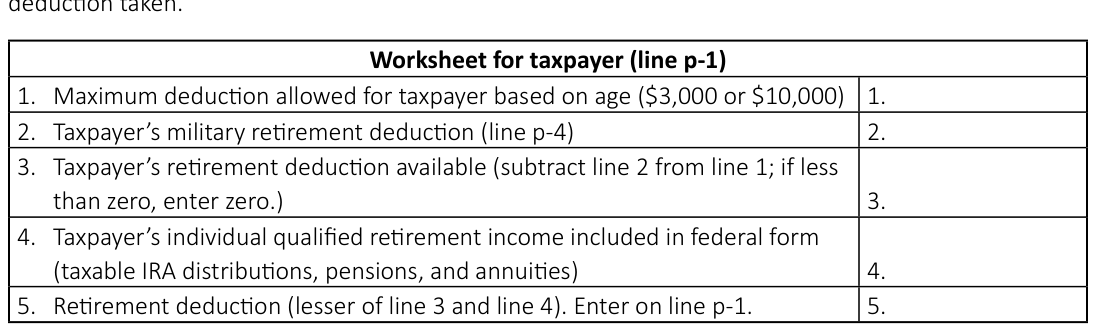
Text version of this table
Worksheet for taxpayer (line p-1) 1. Maximum deduction allowed for taxpayer based on age ($3,000 or $10,000) 1. 2. Taxpayer's military retirement deduction (line p-4) 2. 2. 3. Taxpayer’s retirement deduction available (subtract line 2 from line 1; if less than zero, enter zero.) 3. 4. Taxpayer’s individual qualified retirement income included in federal form (taxable IRA distributions, pensions, and annuities) 4. 5. Retirement deduction (lesser of line 3 and line 4). Enter on line p-1. 5. 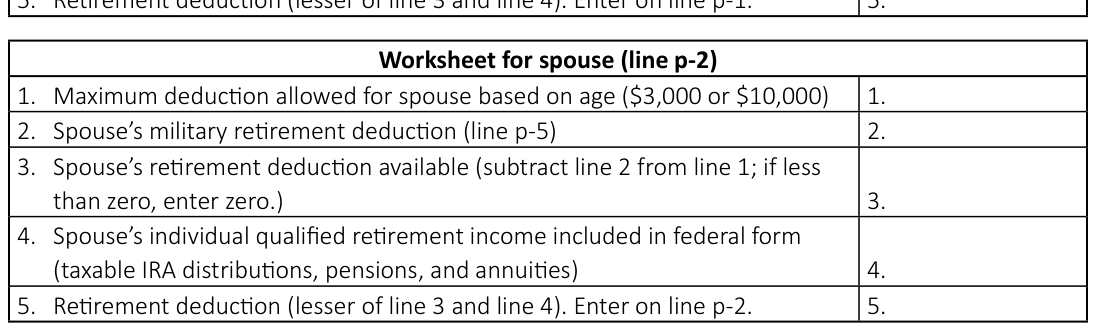
Text version of this table
Worksheet for spouse (line p-2) 1. Maximum deduction allowed for spouse based on age ($3,000 or $10,000) 1. 2. Spouse's military retirement deduction (line p-5) 2. 2. 3. Spouse’s retirement deduction available (subtract line 2 from line 1; if less than zero, enter zero.) 3. 4. Spouse’s individual qualified retirement income included in federal form (taxable IRA distributions, pensions, and annuities) 4. 5. Retirement deduction (lesser of line 3 and line 4). Enter on line p-2. 5. 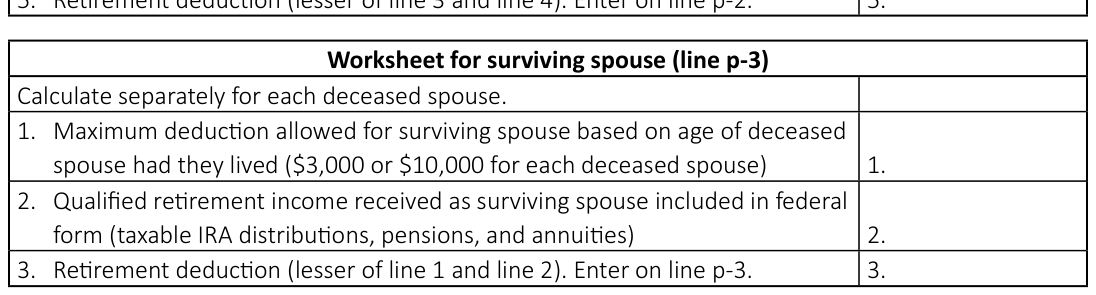
Text version of this table
Worksheet for surviving spouse (line p-3) Calculate separately for each deceased spouse. 1. Maximum deduction allowed for surviving spouse based on age of deceased spouse had they lived ($3,000 or $10,000 for each deceased spouse) 1. 2. Qualified retirement income received as surviving spouse included in federal form (taxable IRA distributions, pensions, and annuities) 2. 3. Retirement deduction (lesser of line 1 and line 2). Enter on line p-3. 3.
Line p-4 through line p-6: Military retirement deduction
Beginning with tax year 2022, individuals may deduct all military retirement income included in their South Carolina taxable income. Reduce the retirement deduction (line p-1 and line p-2) and the age 65 and older deduction (line q-1 and line q-2) by the amount of military retirement deduction taken.
Military retirement income means taxable income received by the taxpayer or the taxpayer's surviving spouse from a qualified military retirement plan. Income that is subject to a penalty for premature distribution does not qualify as military retirement income. For a surviving spouse, military retirement income includes a retirement benefit plan and dependent indemnity compensation received due to the deceased spouse's military service.
Retirement benefits received for service in the National Guard or Reserves due to inactive time are subtracted on line v and are not included in taxable income. Do not include these amounts in the deduction on line p.
Line p-4: Include military retirement income related to the taxpayer's military service.
Line p-5: Include military retirement income related to the spouse's military service.
Line p-6: Include military retirement income received on behalf of a deceased spouse. Apply the deduction in the same manner that it was applied to the deceased spouse.
The surviving spouse military retirement deduction is in addition to any retirement deductions claimed on the taxpayer's own retirement income.
If you are claiming the surviving spouse military retirement deduction for more than one deceased spouse, calculate the deduction separately for each deceased spouse. Add the surviving spouse military retirement deductions and enter the total on line p-6. Attach a statement showing the date of birth for each deceased spouse and the separate calculation for each deduction.
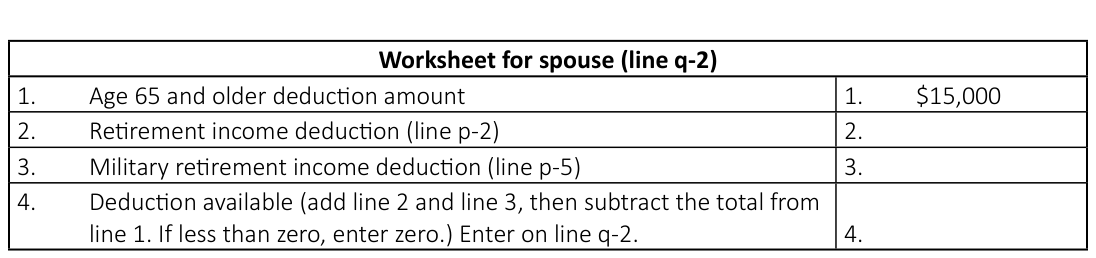
Line q: Age 65 and older deduction
Beginning in the tax year a resident taxpayer reaches age 65, they are entitled to a deduction of $15,000 against any South Carolina income.
Line q-1 applies to the taxpayer whose name appears first on the return.
Line q-2 applies to the spouse whose name appears second on the return.
Reduce the age 65 and older deduction claimed on line q-1 and line q-2 by:
● any individual retirement deduction claimed on line p-1 and line p-2, and ● any military retirement deduction claimed on line p-4 and line p-5 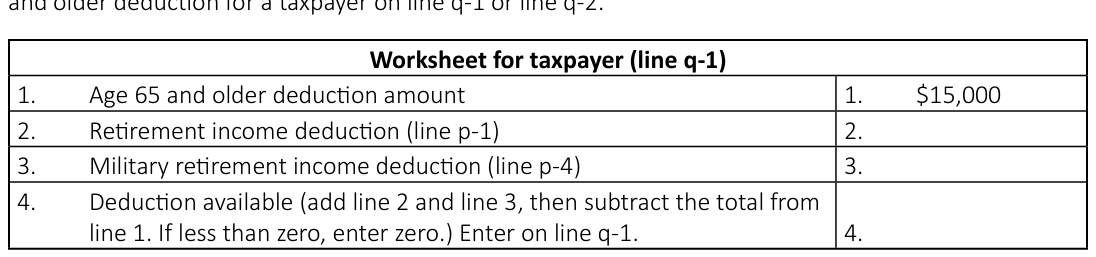
Text version of this table
Worksheet for taxpayer (line q-1) 1. Age 65 and older deduction amount 1. $15,000 2. Retirement income deduction (line p-1) 2. 3. Military retirement income deduction (line p-4) 3. 4. Deduction available (add line 2 and line 3, then subtract the total from line 1. If less than zero, enter zero.) Enter on line q-1. 4.
Text version of this table
Worksheet for spouse (line q-2) 1. Age 65 and older deduction amount 1. $15,000 2. Retirement income deduction (line p-2) 2. 3. Military retirement income deduction (line p-5) 3. 4. Deduction available (add line 2 and line 3, then subtract the total from line 1. If less than zero, enter zero.) Enter on line q-2. 4.
Assume for all examples that taxpayers have income to qualify for the age 65 and older deduction in addition to the retirement deductions.
Example 1: A taxpayer age 65 or older has no military or other sourced retirement income on line p-1 or line p-4. The taxpayer is eligible for a deduction of $15,000 on line q-1.
Example 2: A taxpayer age 65 or older has no military retirement income but has other sourced retirement of $14,000. The taxpayer is allowed a deduction of $10,000 on line p-1 and a deduction of $5,000 on line q-1.
Example 3: A taxpayer age 65 or older has military retirement income of $13,000 and is allowed a deduction on line p-4 of $13,000. The taxpayer is allowed a deduction of $2,000 on line q-1. The maximum allowed deduction for 2025 is $15,000.
Example 4: A taxpayer age 65 or older has military retirement income of $36,000 and no other earned income. The taxpayer is eligible for a military retirement deduction of $36,000 on line p-4. The taxpayer is not allowed an additional amount on line q-1.
Example 5: A taxpayer age 65 or older has military retirement income of $16,000 and other sourced retirement income of $8,000. The taxpayer is allowed a deduction on line p-4 of $16,000. The taxpayer is not allowed an additional amount on line p-1 or line q-1.
For more information about retirement deductions and the age 65 and older deduction, refer to SC
Revenue Ruling #22-11, available at dor.sc.gov/policy.
Line r: Negative amount of federal taxable income
Because the South Carolina return begins with your federal taxable income, it is important that you get the benefit of the negative amount from the taxable income line of the federal return. On the SC1040, start with zero on line 1. Do not enter a negative amount. On line r of the SC1040, enter the negative amount from the taxable income line of the federal return. Enter as a positive number.
Line s: Subsistence allowance
Police and all commissioned law enforcement officers paid by South Carolina municipal, county, or state governments or the federal government, full-time firefighters, and full-time emergency medical service personnel are entitled to a subsistence allowance of $16 per regular workday. Your employer should provide you with the number of work days.
Line t: Dependents under 6 years of age
A deduction is allowed for each dependent claimed on your federal Income Tax return who had not reached the age of 6 by December 31 of the tax year. Birth dates and SSNs are required. See worksheet below.
Line u: Consumer protection services
An individual may deduct the costs of a monthly or annual contract or subscription for identity theft protection and resolution services. The deduction is only for individuals who filed a return with the SCDOR for a tax year between 1998 and 2012 or whose Personal Identifiable Information (PII) was included on another's return. An individual who deducted the same actual costs as a business expense may not claim the deduction.
The deduction is limited to:
● $300 for an individual taxpayer
● $1,000 for a married filing jointly return ● $1,000 for a return claiming dependents Identity theft protection includes products and services designed to prevent an incident of identity fraud or identity theft. It protects against the disclosure of your PII (for example, your SSN) by preventing a third party from using unauthorized access to your PII to obtain financial resources or other products, benefits, or services.
Identity theft resolution services include products and services designed to assist persons whose PII was obtained by a third party. This minimizes the effects of the identity fraud or identity theft incident and restores the person's identity to its pre-theft status.
Line v: Other subtractions from income
Attach an explanation of your entry on this line. Some examples of items which may be subtracted on this line:
● You may deduct 100% of any contributions made to a Palmetto ABLE Account Expense Fund, subject to program limitations, between January 1, 2025 and December 31, 2025. For more information, visit treasurer.sc.gov.
● South Carolina does not recognize bonus depreciation in IRC Section 168(k). With or without bonus depreciation, the depreciable life of the property is the same for federal and state purposes. For the tax year the property is placed in service, a taxpayer must add back, on line e of the SC1040, the difference between the depreciation deduction allowed for federal purposes and the deduction that would have been allowed without bonus depreciation. The South Carolina adjusted basis will then be greater than the federal adjusted basis. For all other years of the depreciable life of the property, an additional depreciation deduction is available for South Carolina purposes.
● South Carolina net operating loss that is larger than the federal amount is a subtraction. The same loss can only be deducted once. Attach your own worksheet or keep with your tax records.
No carryback losses are allowed.
● Legislators within a 50-mile radius of the State House are allowed to subtract travel expenses.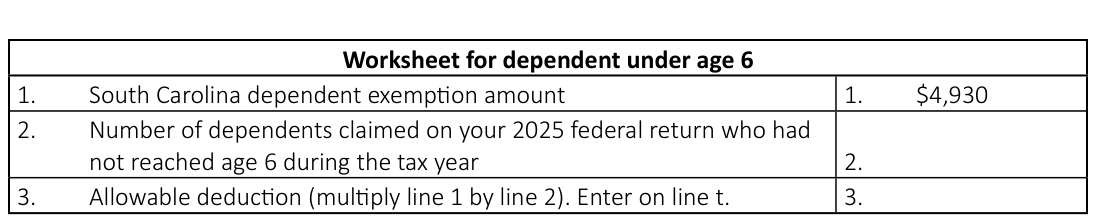
Text version of this table
Worksheet for dependent under age 6 1. South Carolina dependent exemption amount 1. $4,930 2. Number of dependents claimed on your 2025 federal return who had not reached age 6 during the tax year 2. 3. Allowable deduction (multiply line 1 by line 2). Enter on line t. 3.
Worksheet for military retirement exclusion
Inactive Reserve Time
# + Inactive National Guard Time = % exclusion
Total Military time (active and inactive) Determine the excludable amount of your military retirement income by multiplying it by the percentage of exclusion as follows:
% exclusion X total taxable military retirement income shown on federal return = excludable military retirement income to be entered on line v ● Retirement income paid by the US government for service in the Reserves or National Guard is not taxed for South Carolina purposes. You may deduct the entire amount of any stipend paid by the state of South Carolina for National Guard service. Determine the percentage of your military retirement income which is excludable by dividing the length of time you served in the Reserves and/or National Guard (not full-time) by the length of time of your total military service as follows:
If you deduct retirement income on this line, do not include that income in your qualified retirement income in the worksheets for line p-1 or line p-2.
● If you have adopted a special needs child, you may subtract $2,000 per year per child as long as the adopted child qualifies as a dependent on your federal return.
A qualifying special needs child is:
- a person under the age of 18 at the time of adoption
- a dependent of a public or private non-profit adoption agency
- legally free for adoption
- determined by the agency to have specific conditions Attach a copy of the letter you received at the time of adoption from the SC Department of Social Services which certified the person as a special needs child.
● Subtract amounts contributed to a Catastrophe Savings Account and interest income earned by the account.
If your legal residence is insured against hurricane, rising floodwaters, or other catastrophic windstorm event damage, you are allowed to contribute:
■
$2,000 if the qualified deductible is $1,000 or less ■ twice the qualified deductible if it is between $1,000 and $7,500 ■ $15,000 if the qualified deductible is more than $7,500 If your legal residence is not insured against hurricane, rising floodwaters, or other catastrophic windstorm event damage, the limit is $250,000 or the value of your legal residence, whichever is less.
● If you are eligible for the Preceptor Credit on the TC-62 and you served additional rotations that exceeded the credit limit for the tax year, you may be eligible for a deduction equal to the amount that the credit would have been for the additional rotations. Refer to the TC-62, available at dor.sc.gov/forms, for information on calculating the deduction. Find more information about the Preceptor Credit and deduction, available at dor.sc.gov/policy.

Text version of this table
| Worksheet for South Carolina dependent exemption | |
| 1. South Carolina dependent exemption amount | 1. $4,930 |
| 2. Number of dependents claimed on your federal return | 2. |
| 3. Allowable deduction (multiply line 1 by line 2). Enter on line w. | 3. |
# Line 4: Total subtractions
Add line f through line w and enter the total.
Depending upon how a particular item was reported or deducted, the following may be additions or subtractions.
● A change in accounting method to conform in the same manner and same amount as federal. At the end of the federal adjustment, any balance will continue until fully adjusted.
● Adjust the installment method of reporting if:
■ the entire sale was reported for state purposes, or ■ the entire sale was reported for federal purposes, and you wish to continue on an installment basis for state purposes.
● Adjust the federal gain or loss to reflect any difference in the South Carolina basis and federal basis.
Line w: South Carolina dependent exemption
A South Carolina dependent exemption is allowed for each eligible dependent, including both qualifying children and qualifying relatives. Eligible dependents are dependents claimed on your federal Income Tax return. See worksheet below.
South Carolina Tax
# Line 6: Tax on South Carolina taxable income
If your income subject to tax on line 5 is less than $100,000, use the SC1040TT, South Carolina Individual Income Tax Tables, to determine your South Carolina tax. Enter the tax on line 6.
If your income subject to tax on line 5 is $100,000 or more, use the tax rate schedule provided in the SC1040TT to compute your tax. Enter the tax on line 6. The SC1040TT is available at dor.sc.gov/forms.
# Line 7: Tax on lump-sum distribution
South Carolina follows the federal provisions regarding lump-sum distributions. If you used the federal 4972 for a lump-sum distribution, you must use the SC4972 to compute the South Carolina tax. The SC4972 is available at dor.sc.gov/forms.
This separate tax on lump-sum distributions is in addition to the tax computed on line 6.
Do not enter the federal 10% premature early withdrawal penalty on line 7.
Line 8: Tax on active trade or business income
Enter the amount from the I-335, line 9.
# Line 9: Tax on excess withdrawals from catastrophe savings accounts
Excess withdrawals from a Catastrophe Savings Account are taxed an additional 2.5% unless:
● the taxpayer no longer owns a qualifying legal residence in South Carolina
Nonrefundable Credits
# Line 11: Child and Dependent Care Credit
For a full-year resident, the credit is calculated at 7% of the federal child and dependent care expense.
If you are a part-year resident or nonresident, you are not eligible for this credit if you are a resident of a state that does not offer a credit for child and dependent care expense to nonresidents of that state.
If you are an eligible part-year resident or nonresident, calculate the credit at 7% of the prorated federal expenses using your proration percentage from the Schedule NR.
The maximum credit allowed is $210 for one child or $420 for two or more children.
You cannot claim this credit if your filing status is Married Filing Separately.
Example A: Full-year resident
Federal child care expense from the federal 2441 is $2,000 $2,000 x .07 = $140 (allowable credit)
Example B: Part-year resident or nonresident Federal child care expense from the federal 2441 is $2,000, and the proration percent from line 45 of Schedule NR is 30%.
$2,000 x .30 = $600 x .07 = $42 (allowable credit)
# Line 12: Two Wage Earner Credit
This credit is available to a married couple filing jointly when both spouses have earned income taxed to South Carolina. This credit is not allowed on returns with a filing status of Single, Married Filing Separately, or Head of Household.
For 2025, the credit is computed at .007 of the lesser of $50,000 or the South Carolina qualified earned income of the spouse with the lower South Carolina qualified earned income for the taxable year.
Use your South Carolina qualified earned income to calculate the credit. Compute your South Carolina qualified earned income by subtracting certain adjustments reported on your federal 1040 from your South Carolina earned income.
Adjustments to subtract are:
● deductible part of self-employment tax ● self-employment SEP, simple and qualified plans ● self-employment health insurance deduction ● IRA deduction ● repayment of sub-pay South Carolina earned income is generally income you receive from services you provide. Compute the earned income for you and your spouse separately.
● the amount contributed was within the allowable limits, and the withdrawal occurred after the taxpayer reached age 70, or ● the withdrawal followed the death of the individual who set up the account or the surviving spouse.
Earned income includes Earned income does not include wages salaries tips commissions sub-pay self-employment income business income or loss partnership income or loss farm income or loss gambling winnings bingo winnings interest dividends
# Social Security benefits
IRA distributions retirement plan or annuity benefits deferred compensation any amount your spouse paid you Example: A taxpayer earned a salary taxed to South Carolina of $40,000. The taxpayer's qualified earned income is $40,000. Their spouse earned wages of $17,000 taxed to South Carolina and had an IRA deduction of $1,000. The spouse's qualified earned income is $16,000 ($17,000 - $1,000). The credit is based on the spouse's qualified earned income, because it is the lesser of the two. The credit is $112 ($16,000 x .007).
# Worksheet for Two Wage Earner Credit
(a) You (b) Your spouse
- Wages, salaries, and tips taxed to South Carolina (Do not include pensions or annuities)
- Net profit or loss from self-employment (from Schedule C) and any other income taxed to South Carolina
- Add line 1 and line 2. (This is your total earned income taxed to
# South Carolina.)
- Add the adjustment amounts from your federal 1040. (See adjustments above.) If filing Schedule NR, enter amounts from Column B, lines 21, 22, 23, 26, and any repayment of supplemental unemployment benefits (sub-pay) allocable to South Carolina income.
- Subtract line 4 from line 3. (This is your qualified earned income taxed to South Carolina.) If the amount in Column (a) or Column
(b) is zero or less, you may not take this credit.
- Enter the lesser of 5(a) or 5(b). Cannot be greater than $50,000.
- Allowable credit (multiply line 6 by .007). Enter on line 12. Cannot be greater than $350.
# Line 13: Other nonrefundable credits
Refer to the instructions for the SC1040TC for descriptions of the nonrefundable tax credits along with the required tax credit schedule for each credit. Most tax credits are computed on separate tax credit schedules.
Attach tax credit schedules for all tax credits you claim, along with the SC1040TC Worksheet and the SC1040TC, to your Income Tax return. We may disallow your tax credits if you do not attach necessary schedules to your return. Forms are available at dor.sc.gov/forms.
Tax Payments and Refundable Credits
# Line 16: South Carolina Income Tax withheld from wages
Enter the total South Carolina tax withheld:
● from your wages and reported on your W-2 forms as state Income Tax, and ● by a fiduciary on your behalf and reported on your SC41 forms Do not include:
● withholding paid to another state
● federal withholding paid to the IRS ● withholding from a federal 1099 ● amounts reported on a South Carolina substitute 1099G/INT ● Withholding from a 1099 MISC "for SC purposes only" reporting withholding by an S Corporation or Partnership on behalf of nonresident shareholders or partners.
Attach readable copies of your W-2 forms to the front of your return.
If filing an amended return, you must enter your South Carolina Income Tax withheld from wages on line 16 of your SC1040 and on line 1 of your SCH AMD.
Your employer is responsible for providing you with a W-2. If you do not have a W-2, complete the SC4852, Substitute for Form W-2 Wage and Tax Statement, and provide proof of tax withheld. The SC4852 is available at dor.sc.gov/forms.
Line 17: 2025 Estimated Tax payments
Enter the total Estimated Tax payments you made, including any amount transferred from your 2024 tax return. Do not include nonresident sale of real estate withholding paid on an I-290. Report it on line 19.
# Line 18: Amount paid with extension
Enter the amount you paid with your extension request. Check the box on the front of the return to indicate you requested an extension of time to file your return.
# Line 19: Nonresident sale of real estate
A nonresident of South Carolina who sells real property located in this state is subject to withholding of South Carolina Income Tax. The sale is reported to South Carolina on an Individual Income Tax return.
The state Income Tax withheld at the time of the sale is reported to you on an I-290 provided by the closing attorney. Enter the withholding from the I-290 and attach the form to your return.
# Line 20: Other SC withholding
Enter the total South Carolina tax withheld from federal 1099 forms. Attach copies of all 1099 forms to the front of your return. If you have a 1099 MISC that includes withholding "for SC purposes only"
(withholding by an S Corporation or Partnership on behalf of nonresident shareholders or partners), include it on this line.
Do not include:
● withholding from a W-2
● amounts reported on a South Carolina substitute 1099G/INT ● federal withholding paid to the IRS If filing an amended return, you must enter your Other SC withholding on line 20 of your SC1040 and on line 1 of your SCH AMD.
# Line 21: Tuition Tax Credit
Refer to the I-319, available at dor.sc.gov/forms, to see if you qualify to claim this credit. If you qualify, complete all information on the I-319 and attach it to your return. If you have more than one qualifying student, complete a separate I-319 for each student. Attach a copy of your federal return.
# Line 22: Other refundable credits
Refer to the I-333, I-334, I-360, and I-361, available at dor.sc.gov/forms, to see if you qualify to claim these credits. Attach the appropriate credit forms to the SC1040.
● Enter the amount from the I-333, Anhydrous Ammonia Additive Credit, on line 22a.
● Enter the amount from the I-334, Milk Credit, on line 22b.
● Enter the amount from the I-360, Classroom Teacher Expenses Credit, on line 22c.
● Enter the amount from the I-361, Parental Refundable Credit, on line 22d.
● Enter the total other refundable credits on line 22.
# Line 23: Total payments
Add line 16 through line 22 and enter the total.
Amended return: Enter the amount from SCH AMD, line 7. If a negative, enter in [brackets]
# Line 24: Overpayment
If line 23 is larger than line 15, subtract line 15 from line 23 and enter the overpayment.
Amended return: Enter the amount from line 24 on line 30. (Do not enter amounts on line 26 through line 29.)
Example 1 (amended return)
Line 15 = 200
Line 23 = 250 (calculated on SCH AMD) Line 24 = 50 (250 - 200) Enter the $50 refund amount on line 30.
# Line 25: Amount due
If line 15 is larger than line 23, subtract line 23 from line 15 and enter the amount due.
Amended return: Enter the amount from line 25 on line 31. (Do not enter amounts on line 26 through line 29.)
Example 1 (amended return)
Line 15 = 200
Line 23 = <125> (negative number, calculated on SCH AMD) Line 25 = 325 (200 - <125>) Enter the $325 tax due amount on line 31.
# Line 26: South Carolina Use Tax
Use Tax is due on purchases outside of South Carolina for use, storage, or consumption in South Carolina. Use Tax is paid to the SCDOR when state Sales and Use Tax has not been collected by the seller.
You may need to pay Use Tax if you make purchases:
● from retailers online
● from out-of-state catalog companies ● from home shopping networks ● when visiting another state The tax rate for the Use Tax is the same as the Sales Tax. The rate is determined by where the tangible personal property will be used, stored, or consumed, regardless of where the sale takes place. For more information and updated tax rates, visit dor.sc.gov/tax/sales-and-use.
You have three options for reporting and paying Use Tax:
- On line 26 of your SC1040, Individual Income Tax Return. Calculate your Use Tax using the SC Use Tax Worksheet below. No additional form or paperwork is required.
- Using our free online tax portal, MyDORWAY, at MyDORWAY.dor.sc.gov. Log in to your existing account or create a new account to get started. No additional form or paperwork is required.
- Mail the UT-3 with your check to: SCDOR, Sales Taxable, PO Box 100193, Columbia, SC 29202.
Make your check payable to SCDOR. Include your name, SSN, and UT-3 in the memo. Do not send cash.
If you have paid your Use Tax during the year or have no Use Tax due, check the box on line 26.
# Use Tax rates
The state Sales and Use Tax rate is 6% plus the applicable local Use Tax rate of the county in which you are located or other applicable rate wherever tangible personal property was delivered. Sales of unprepared food are exempt from state Sales and Use Tax. Local taxes still apply to sales of unprepared food unless the local tax law exempts such sales.
For current Sales and Use Tax rates, visit dor.sc.gov/tax/sales-and-use.
Example 2 (amended return)
Line 15 = 200
Line 23 = 125 (positive number, calculated on SCH AMD)
# Line 25 = 75 (200 - 125)
Enter the $75 tax due amount on line 31.
# Column A Column B Column C Column D Column E
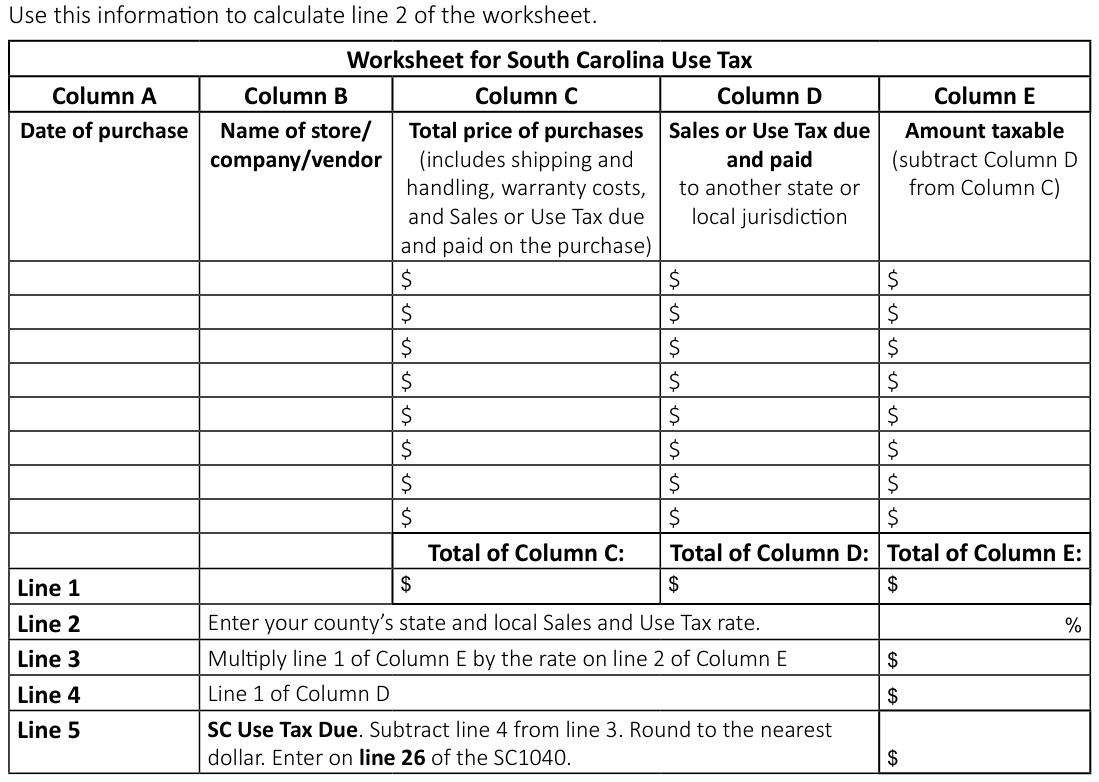
Text version of this table
| Worksheet for South Carolina Use Tax | ||||
| Column A | Column B | Column C | Column D | Column E |
| Date of purchase | Name of store/ company/vendor | Total price of purchases (includes shipping and handling, warranty costs, and Sales or Use Tax due and paid on the purchase) | Sales or Use Tax due and paid to another state or local jurisdiction | Amount taxable (subtract Column D from Column C) |
| $ | $ | $ | ||
| $ | $ | $ | ||
| $ | $ | $ | ||
| $ | $ | $ | ||
| $ | $ | $ | ||
| $ | $ | $ | ||
| $ | $ | $ | ||
| $ | $ | $ | ||
| Total of Column C: | Total of Column D: | Total of Column E: | ||
| Line 1 | $ | $ | $ | |
| Line 2 | Enter your county’s state and local Sales and Use Tax rate. | % | ||
| Line 3 | Multiply line 1 of Column E by the rate on line 2 of Column E | $ | ||
| Line 4 | Line 1 of Column D | $ | ||
| Line 5 | SC Use Tax Due. Subtract line 4 from line 3. Round to the nearest dollar. Enter on line 26 of the SC1040. | $ |
# Line 1 $ $ $
Line 2 Enter your county's state and local Sales and Use Tax rate.
%
Line 3 Multiply line 1 of Column E by the rate on line 2 of Column E $
# Line 4 Line 1 of Column D
# Line 27: Estimated Tax
Enter the amount of your overpayment that you would like to apply to next year's tax.
# Line 28: Contributions for check offs
Refer to the I-330, Contribution for Check-Offs, available at dor.sc.gov/forms, for information about the various funds to which you may contribute. Enter the total from the I-330. Attach the I-330 to your return. Your contribution cannot be made if you do not attach the I-330.
# Line 30: Refund
If line 29 is larger than line 24, go to line 31. Otherwise, subtract line 29 from line 24 and enter the amount to be refunded to you on line 30. We will not automatically issue a refund under $5. However, upon notification, we can release the refund. You are required to mark your refund choice on line 35.
Line 31: Net tax
Add line 25 and line 29.
Refund or Amount You Owe
# Line 32: Late filing and late payment penalties and interest
If you calculated failure to file or failure to pay penalties and interest, enter in the appropriate blanks and put the total of both on line 32.
A failure to file penalty is charged for failing to file a tax return on or before its due date, considering any extension of time for filing. The penalty is 5% of the tax amount if the failure is for not more than one month, with an additional 5% for each additional month or fraction of a month the failure continues, not to exceed 25% in total.
A failure to pay penalty is charged for failing to pay the tax on any return on or before its due date. The penalty is 0.5% of the tax if the failure is for not more than one month, with an additional 0.5% for each additional month or fraction of a month the failure continues, not to exceed 25% in total.
Any unpaid portion of the final tax due will accrue interest at the prevailing federal rates. This amount is computed from the original due date of the tax return to the date of the payment.
Find a Penalty and Interest Calculator on our free online tax portal, MyDORWAY, at
# Line 33: Underpayment of Estimated Tax penalty
You may owe a penalty for underpayment if you did not pay in the lesser of 90% of your tax liability for 2025 or 100% of your liability for 2024 in four equal amounts by the required dates.
If your adjusted gross income is $150,000 or more, the 100% rule is modified to be 110% of the tax shown on your 2024 Income Tax return. Refer to the SC2210, Underpayment of Estimated Tax by Individuals, Estates, and Trusts, available at dor.sc.gov/forms, to calculate any penalty that may be due.
Exceptions to the underpayment of Estimated Tax:
● Enter an A in the box if you completed federal Schedule AI-Annualized Income Installment Method for South Carolina purposes when determining the amount to enter on line 33.
● Enter an F in the box if you are a farmer or fisherman who receives at least two-thirds of your gross income for the year from farming and fishing and you pay your tax due by March 2, 2026.
● Enter a W if you are requesting a waiver of your penalty for any other reason. See the SC2210 instructions, available at dor.sc.gov/forms, for information on what qualifies for a waiver of penalty.
Calculate your penalty for underpayment and enter the amount on line 33. If you are due a refund, subtract the penalty amount from the difference of line 24 and line 29 and enter the result on line 30.
Attach the SC2210 to your tax return when using an exception to waive the penalty.
# Line 34: Balance due
Add line 31 through line 33 and enter the total on line 34. This is the amount you owe.
If you owe $15,000 or more in connection with any SCDOR return, you must pay electronically according to SC Code Sections 12-54-250 and 12-54-210.
Line 35: Refund options (select one). Direct deposit is fast and safe!
You can receive your refund by direct deposit or paper check. Mark an X in one box to indicate your choice.
● Direct deposit - The SCDOR deposits your funds into your bank account. This is the fastest, easiest option for most filers. Enter your bank information on line 37.
● Paper check - The SCDOR mails you a paper check to the address provided on your return. To avoid delays, make sure the address on your return is correct. This is the slowest, least secure way to receive your funds.
Line 36: Payment options (select one). Paying electronically is quick and easy!
You can pay your balance using our free online tax portal, MyDORWAY, or by using ACH Debit. Mark an X in one box to indicate your choice.
● MyDORWAY - The quickest, easiest way to pay is using our free online tax portal, MyDORWAY, at dor.sc.gov/pay. Select Individual Income Tax Payment to get started. Choose the 31-Dec-2025 filing period.
● ACH Debit - Pay electronically by ACH Debit when you file your return. Enter your payment withdrawal date and payment withdrawal amount on line 36. Enter your bank information on line 37. The SCDOR will make a request to your bank for payment of the South Carolina taxes you owe. Your bank will automatically debit your account for the requested funds.
# Line 37: Bank information
You must enter complete and correct account information. If you are requesting direct deposit of your refund and your account information is not complete and correct, we will mail a paper check to the address listed on your return. If you are making a payment by ACH Debit, the withdrawal of the funds will not be successful if your account information is not complete and correct.
You cannot have your funds directly deposited into an account located outside the United States or an ACH Debit withdrawn from an account located outside the United States.
Enter your account information.
- Mark an X to choose checking or savings account.
- Enter your 9 digit routing transit number (RTN). The RTN should begin with 01 through 12 or 21 through 32. Do not use a deposit slip to verify the RTN.
- Enter your bank account number (BAN). The BAN contains 17 or fewer alphanumeric digits.
Enter the BAN from left to right. Do not enter hyphens, spaces, special symbols, or the check number.
Sign and date your return
You must sign your return. If your filing status is Married Filing Jointly, both spouses must sign.
The return for a deceased taxpayer must be signed by a surviving spouse, an executor, or an administrator. If you are signing as a surviving spouse, write filing as surviving spouse by your signature.
If signing as a personal representative, sign in your official capacity and attach a completed SC1310, Statement of Person Claiming Refund Due a Deceased Taxpayer, available at dor.sc.gov/forms.
Any refund check will be issued to the decedent's surviving spouse or estate.
Authorization
The signature section of the return contains a check the box authorization for release of confidential information. A check in the yes box authorizes the Director of the SCDOR or delegate to discuss the return; its attachments; and any notices, adjustments, or assessments with the preparer.
If a person is paid to prepare the Income Tax return, their signature and Preparer Tax Identification Number (PTIN) or Federal Employer Identification Number (FEIN) are required in the spaces provided.
Penalties are applicable for failure to comply.
Important Reminders
Filing online is faster and more accurate.
● You may qualify to file online electronically for free. Even if you don't qualify for free filing options, we recommend you file electronically - It's our fastest, easiest, and safest option. Visit dor.sc.gov/iit-filing to learn more about your options.
Getting a refund? Direct deposit is fast, accurate, and secure!
● With direct deposit, you: get your refund deposited directly into your bank account, giving you the fastest access to ■ your refund.
■ help save tax dollars. don't have to worry about mail processing.
■
Have a balance due? Pay electronically!
Paying online is quick and easy! Use our free online tax portal, MyDORWAY, at dor.sc.gov/pay to make your payment. Select Individual Income Tax Payment to get started. Choose the 31-Dec-2025 filing period.
● On MyDORWAY, you can pay by credit card or from your bank account.
● Pay electronically by ACH Debit when you file your return. Enter your bank information on line 37.
The SCDOR will make a request to your bank for payment of the South Carolina taxes you ■ owe.
Your bank will automatically debit your account for the requested funds.
■
Entering your bank information when filing if you're not able to pay your full balance:
If you owe a balance after filing your return, your filing software will likely allow you to enter your bank information and select a payment date.
If you enter your bank information:
● the SCDOR will debit your account on the payment date you choose.
If you want to enter into a payment plan, or pay using a different payment method:
● do not enter your bank information.
Review your return.
● Attach a complete copy of your federal return if you filed federal Schedules A, C, D, E, or F, or filed a SCH NR, SC1040TC, I-319, or I-335 with your South Carolina return.
● Make sure you received all of your W-2 forms and other tax documents.
● Verify all SSNs on your return.
● Double check your name, address, and all math calculations.
● Be sure you and your tax preparer (if applicable) have signed your return.
● Make a copy of your complete return for your records.
Before you file your return
● Attach all W-2 and 1099 forms with South Carolina withholding.
● If you aren't paying online at dor.sc.gov/pay, or on your return by ACH Debit, mail your SC1040 with payment attached to the proper address.
# COUNTY
Abbeville …
Aiken …
Allendale …
Anderson …
Bamberg …
Barnwell …
Beaufort …
Berkeley …
Calhoun …
Charleston …
Cherokee …
Chester …
Chesterfield …
Clarendon …
Colleton …
Darlington …
CODE
COUNTY CODES
COUNTY
Dillon …
Dorchester …
Edgefield …
Fairfield …
Florence …
Georgetown …
Greenville …
Greenwood …
Hampton …
Horry …
Jasper …
Kershaw …
Lancaster …
Laurens …
Lee …
Lexington …
CODE
COUNTY CODE
McCormick … 33
Marion … 34
Marlboro … 35
Newberry … 36
Oconee … 37
Orangeburg … 38
Pickens … 39
Richland … 40
Saluda … 41
Spartanburg … 42
Sumter … 43
Union … 44
Williamsburg … 45
York … 46
APO/FPO Addresses … 99
Outside of South Carolina … 99
Outside of United States …
SCDOR | SC1040 Book
STATE OF SOUTH CAROLINA
DEPARTMENT OF REVENUE
(Rev. 4/21/25)
2025 INDIVIDUAL INCOME TAX RETURN
Your Social Security Number
Check if deceased
Spouse's Social Security Number
Check if deceased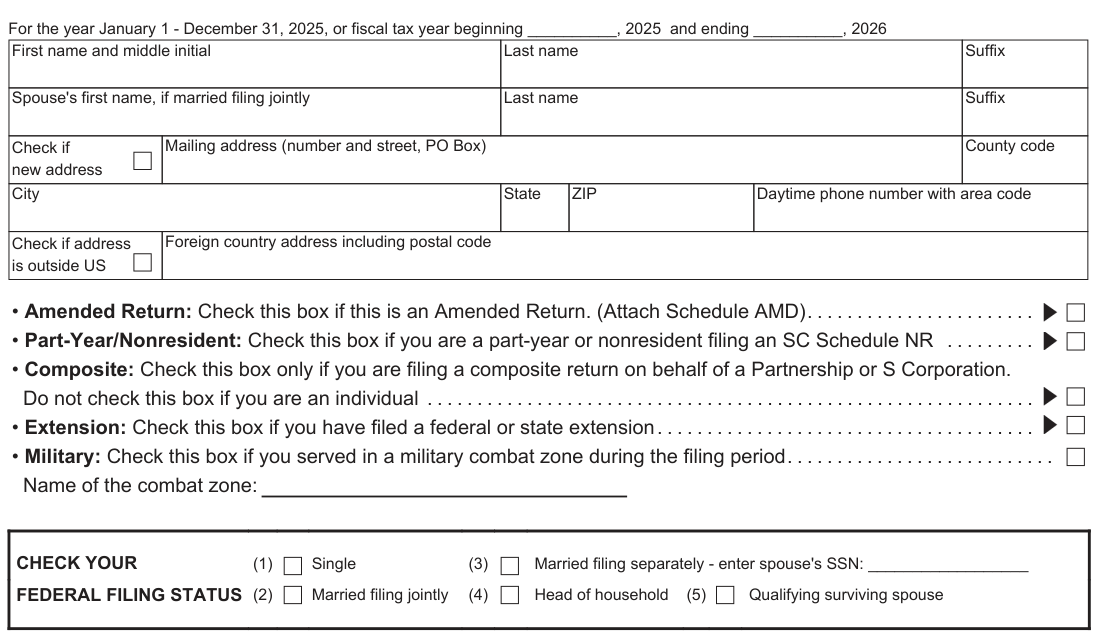
Text version of this table
First name and middle initial Last name Suffix Spouse's first name, if married filing jointly Last name Suffix Check if new address Mailing address (number and street, PO Box) County code City State ZIP Daytime phone number with area code Check if address is outside US Foreign country address including postal code • Amended Return: Check this box if this is an Amended Return. (Attach Schedule AMD). . . . . . . . . . . . . . . . . . . . . . . • Part-Year/Nonresident: Check this box if you are a part-year or nonresident filing an SC Schedule NR . . . . . . . . . • Composite: Check this box only if you are filing a composite return on behalf of a Partnership or S Corporation. Do not check this box if you are an individual . . . . . . . . . . . . . . . . . . . . . . . . . . . . . . . . . . . . . . . . . . . . . . . . . . . . . . . . . . . . . • Extension: Check this box if you have filed a federal or state extension. . . . . . . . . . . . . . . . . . . . . . . . . . . . . . . . . . . . . . • Military: Check this box if you served in a military combat zone during the filing period. . . . . . . . . . . . . . . . . . . . . . . . . . . Name of the combat zone: CHECK YOUR (1) Single (3) Married filing separately - enter spouse's SSN: __________________ FEDERAL FILING STATUS (2) Married filing jointly (4) Head of household (5) Qualifying surviving spouse
Number of dependents claimed on your 2025 federal return … Number of dependents claimed that were under the age of 6 years as of December 31, 2025 … Number of taxpayers age 65 or older as of December 31, 2025 …
# DEPENDENTS
First name Last name
Social Security Number Relationship Date of birth (MM/DD/YYYY)
# INCOME AND ADJUSTMENTS
Your SSN __
Enter federal taxable income from your federal form. If zero or less, enter zero here 1 Dollars Nonresident filers: complete Schedule NR and enter total from line 48 on line 5 below … ADDITIONS TO FEDERAL TAXABLE INCOME a State tax addback, if itemizing on federal return (see instructions) … b Out-of-state losses Type: _ … c Expenses related to National Guard and Military Reserve Income … d Interest income on obligations of states and political subdivisions other than South Carolina e Other additions to income (attach explanation - see instructions) … a b c d e 1 00 Total additions (add line a through line e) … 2 2 00 Add line 1 and line 2 and enter the total here … SUBTRACTIONS FROM FEDERAL TAXABLE INCOME f State tax refund, if included on your federal return … g Total and permanent disability retirement income, if taxed on your federal return h Out-of-state income/gain (do not include personal service income) Check type of income/gain: Rental Business Other i 44% of net capital gains held for more than one year … j Volunteer deductions (see instructions) Type: k Contributions to the SC College Investment Program (Future Scholar) or the SC Tuition Prepayment Program … l Active Trade or Business Income deduction (see instructions) … m Interest income from obligations of the US government … n Certain nontaxable National Guard or Reserve pay … o Social Security and/or railroad retirement, if taxed on your federal return . . p Retirement Deduction (see instructions) p-1 Taxpayer (date of birth: ) … p-2 Spouse (date of birth: ) … p-3 Surviving spouse (date of birth of deceased spouse: ) Military Retirement Deduction (see instructions) p-4 Taxpayer (date of birth: ) … p-5 Spouse (date of birth: ) … p-6 Surviving spouse (date of birth of deceased spouse: ) q Age 65 and older deduction (see instructions) q-1 Taxpayer (date of birth: ) … q-2 Spouse (date of birth: ) … r Negative amount of federal taxable income … s Subsistence allowance (multiply _ days by $16) … t Dependents under the age of 6 years on December 31 of the tax year … u Consumer Protection Services … v Other subtractions (see instructions) … w South Carolina Dependent Exemption (see instructions) … f g h i j k l m n o p-1 p-2 p-3 p-4 p-5 p-6 q-1 q-2 r s t u v w 3 00
<
Total subtractions (add line f through line w) … 4 00 Residents: subtract line 4 from line 3 and enter the difference. Nonresidents: enter amount from Schedule NR line 48. If less than zero, enter zero here. This is your SOUTH CAROLINA INCOME SUBJECT TO TAX 6 TAX on your South Carolina Income Subject to Tax (see SC1040TT) … 7 TAX on Lump Sum Distribution (attach SC4972) … 8 TAX on Active Trade or Business Income (attach I-335) … 9 TAX on excess withdrawals from Catastrophe Savings Accounts … 5 00 10 Add line 6 through line 9 and enter the total here. This is your TOTAL SOUTH CAROLINA TAX … 10
# NON-REFUNDABLE CREDITS
11 Child and Dependent Care (see instructions) … 11 00 12 Two Wage Earner Credit (see instructions) … 12 00 13 Other nonrefundable credits. Attach SC1040TC and other state returns … 13 00 14 Total nonrefundable credits (add line 11 through line 13) … 14 00 15 Subtract line 14 from line 10 and enter the difference. If less than zero, enter zero here … 15 00
# PAYMENTS AND REFUNDABLE CREDITS
16 SC income tax withheld (attach W-2 or SC41) … 16 00 17 2025 Estimated Tax payments … 17 00 18 Amount paid with extension … 18 00 19 Nonresident sale of real estate (paid on I-290) … 19 00 20 Other SC withholding (attach 1099) … 20 00 21 Tuition tax credit (attach I-319) … 21 00 22 Other refundable credits:
22a Anhydrous Ammonia (attach I-333) … 22a 00 22b Milk Credit (attach I-334) … 22b 00 22c Classroom Teacher Expenses (attach I-360) … 22c 00 22d Parental Refundable Credit (attach I-361) … 22d 00 22e Reserved for future use … 22e 00 Total refundable credits (add line 22a through line 22d) … 22 00
AMENDED RETURN: Use Schedule AMD for line 23 calculation.
23 Add line 16 through line 22 and enter the total here … These are your TOTAL PAYMENTS 23 00 24 If line 23 is larger than line 15, subtract line 15 from line 23 and enter the overpayment … 24 00 25 If line 15 is larger than line 23, subtract line 23 from line 15 and enter the amount due … 25 00
AMENDED RETURN: Enter the amount from line 24 on line 30. Enter the amount from line 25 on line 31.
26 USE TAX due on online, mail-order, or out-of-state purchases … 26 00 Use Tax is based on your county's Sales Tax rate. See instructions for more information.
If you certify that no Use Tax is due, check here … 27 Amount of line 24 to be credited to your 2026 Estimated Tax … 27 00 28 Total Contributions for Check-offs (attach I-330) … 28 00 29 Add line 26 through line 28 and enter the total here … 29 00 30 If line 29 is larger than line 24, go to line 31. Otherwise, subtract line 29 from line 24 and enter the amount to be refunded to you (line 35 check box entry is required) … REFUND 30 00 31 Add line 25 and line 29. If line 29 is larger than line 24, subtract line 24 from line 29, enter the total. This is your tax due 31 00 32 Late filing and/or late payment: Penalties_ Interest _ … Enter total here 32 00
# 33 Penalty for Underpayment of Estimated Tax (attach SC2210)
Enter exception code from instructions here if applicable __ … 33 00 34 Add line 31 through line 33 and enter your balance due (select payment option on line 36) BALANCE DUE 34 00
REFUND OPTIONS Getting a refund? Direct deposit is fast, accurate, and secure!
35 Select one: Direct Deposit (line 37 required) (for US accounts only) Paper Check
PAYMENT OPTIONS Have a balance due? Pay electronically! It's quick and easy!
36 Select one:
For payments only: Withdrawal Date Withdrawal Amount
# 37 Type of Account: Checking Savings

Text version of this table
Your signature Date Spouse's signature (if married filing jointly, BOTH must sign) I authorize the Director of the SCDOR or delegate to discuss this return, Yes No attachments, and related tax matters with the preparer. Preparer's printed name Paid Preparer Date Check if self- Preparer's signature employed Use Firm name (or yours if self- Only employed), address, ZIP Date Check if selfemployed PTIN FEIN Phone
MAIL TO: REFUNDS OR ZERO TAX DUE: SC1040 Processing Center, PO Box 101100, Columbia, SC 29211-0100
BALANCE DUE: Taxable Processing Center, PO Box 101105, Columbia, SC 29211-0105
Your SSN __
Must be 9 digits. The first two numbers of the RTN must be 01 through 32.
Routing
Number (RTN)
Bank Account
Number (BAN)
1-17 digits
MyDORWAY (pay at dor.sc.gov/pay) ACH Debit (enter your US bank information on line 37)
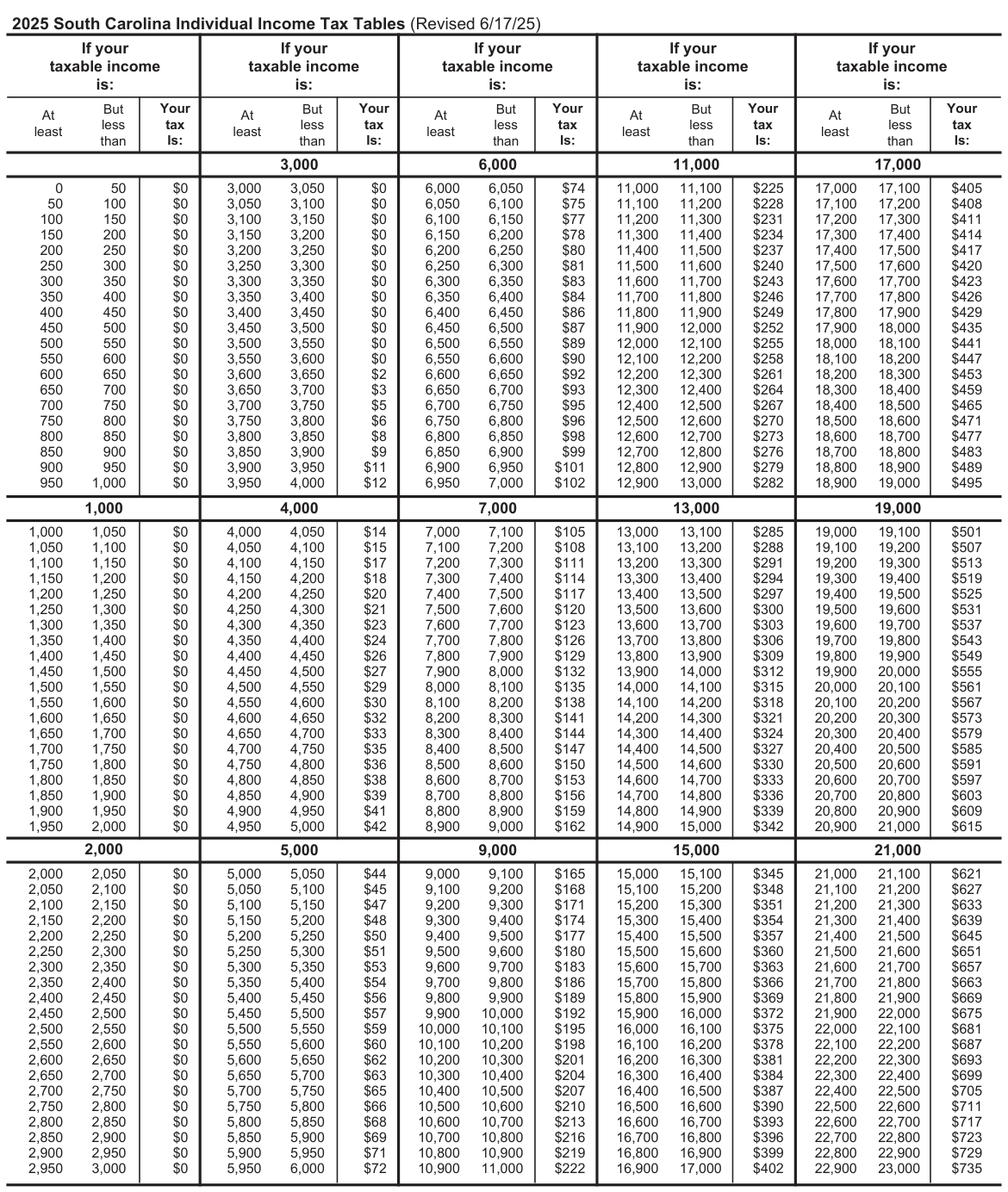
Text version of this table
| If your taxable income is: | If your taxable income is: | If your taxable income is: | If your taxable income is: | If your taxable income is: | |||||
| But At less least than | Your tax Is: | But At less least than | Your tax Is: | But At less least than | Your tax Is: | But At less least than | Your tax Is: | But At less least than | Your tax Is: |
| 3,000 | 6,000 | 11,000 | 17,000 | ||||||
| 0 50 50 100 100 150 150 200 200 250 250 300 300 350 350 400 400 450 450 500 500 550 550 600 600 650 650 700 700 750 750 800 800 850 850 900 900 950 950 1,000 | $0 $0 $0 $0 $0 $0 $0 $0 $0 $0 $0 $0 $0 $0 $0 $0 $0 $0 $0 $0 | 3,000 3,050 3,050 3,100 3,100 3,150 3,150 3,200 3,200 3,250 3,250 3,300 3,300 3,350 3,350 3,400 3,400 3,450 3,450 3,500 3,500 3,550 3,550 3,600 3,600 3,650 3,650 3,700 3,700 3,750 3,750 3,800 3,800 3,850 3,850 3,900 3,900 3,950 3,950 4,000 | $0 $0 $0 $0 $0 $0 $0 $0 $0 $0 $0 $0 $2 $3 $5 $6 $8 $9 $11 $12 | 6,000 6,050 6,050 6,100 6,100 6,150 6,150 6,200 6,200 6,250 6,250 6,300 6,300 6,350 6,350 6,400 6,400 6,450 6,450 6,500 6,500 6,550 6,550 6,600 6,600 6,650 6,650 6,700 6,700 6,750 6,750 6,800 6,800 6,850 6,850 6,900 6,900 6,950 6,950 7,000 | $74 $75 $77 $78 $80 $81 $83 $84 $86 $87 $89 $90 $92 $93 $95 $96 $98 $99 $101 $102 | 11,000 11,100 11,100 11,200 11,200 11,300 11,300 11,400 11,400 11,500 11,500 11,600 11,600 11,700 11,700 11,800 11,800 11,900 11,900 12,000 12,000 12,100 12,100 12,200 12,200 12,300 12,300 12,400 12,400 12,500 12,500 12,600 12,600 12,700 12,700 12,800 12,800 12,900 12,900 13,000 | $225 $228 $231 $234 $237 $240 $243 $246 $249 $252 $255 $258 $261 $264 $267 $270 $273 $276 $279 $282 | 17,000 17,100 17,100 17,200 17,200 17,300 17,300 17,400 17,400 17,500 17,500 17,600 17,600 17,700 17,700 17,800 17,800 17,900 17,900 18,000 18,000 18,100 18,100 18,200 18,200 18,300 18,300 18,400 18,400 18,500 18,500 18,600 18,600 18,700 18,700 18,800 18,800 18,900 18,900 19,000 | $405 $408 $411 $414 $417 $420 $423 $426 $429 $435 $441 $447 $453 $459 $465 $471 $477 $483 $489 $495 |
| 1,000 | 4,000 | 7,000 | 13,000 | 19,000 | |||||
| 1,000 1,050 1,050 1,100 1,100 1,150 1,150 1,200 1,200 1,250 1,250 1,300 1,300 1,350 1,350 1,400 1,400 1,450 1,450 1,500 1,500 1,550 1,550 1,600 1,600 1,650 1,650 1,700 1,700 1,750 1,750 1,800 1,800 1,850 1,850 1,900 1,900 1,950 1,950 2,000 | $0 $0 $0 $0 $0 $0 $0 $0 $0 $0 $0 $0 $0 $0 $0 $0 $0 $0 $0 $0 | 4,000 4,050 4,050 4,100 4,100 4,150 4,150 4,200 4,200 4,250 4,250 4,300 4,300 4,350 4,350 4,400 4,400 4,450 4,450 4,500 4,500 4,550 4,550 4,600 4,600 4,650 4,650 4,700 4,700 4,750 4,750 4,800 4,800 4,850 4,850 4,900 4,900 4,950 4,950 5,000 | $14 $15 $17 $18 $20 $21 $23 $24 $26 $27 $29 $30 $32 $33 $35 $36 $38 $39 $41 $42 | 7,000 7,100 7,100 7,200 7,200 7,300 7,300 7,400 7,400 7,500 7,500 7,600 7,600 7,700 7,700 7,800 7,800 7,900 7,900 8,000 8,000 8,100 8,100 8,200 8,200 8,300 8,300 8,400 8,400 8,500 8,500 8,600 8,600 8,700 8,700 8,800 8,800 8,900 8,900 9,000 | $105 $108 $111 $114 $117 $120 $123 $126 $129 $132 $135 $138 $141 $144 $147 $150 $153 $156 $159 $162 | 13,000 13,100 13,100 13,200 13,200 13,300 13,300 13,400 13,400 13,500 13,500 13,600 13,600 13,700 13,700 13,800 13,800 13,900 13,900 14,000 14,000 14,100 14,100 14,200 14,200 14,300 14,300 14,400 14,400 14,500 14,500 14,600 14,600 14,700 14,700 14,800 14,800 14,900 14,900 15,000 | $285 $288 $291 $294 $297 $300 $303 $306 $309 $312 $315 $318 $321 $324 $327 $330 $333 $336 $339 $342 | 19,000 19,100 19,100 19,200 19,200 19,300 19,300 19,400 19,400 19,500 19,500 19,600 19,600 19,700 19,700 19,800 19,800 19,900 19,900 20,000 20,000 20,100 20,100 20,200 20,200 20,300 20,300 20,400 20,400 20,500 20,500 20,600 20,600 20,700 20,700 20,800 20,800 20,900 20,900 21,000 | $501 $507 $513 $519 $525 $531 $537 $543 $549 $555 $561 $567 $573 $579 $585 $591 $597 $603 $609 $615 |
| 2,000 | 5,000 | 9,000 | 15,000 | 21,000 | |||||
| 2,000 2,050 2,050 2,100 2,100 2,150 2,150 2,200 2,200 2,250 2,250 2,300 2,300 2,350 2,350 2,400 2,400 2,450 2,450 2,500 2,500 2,550 2,550 2,600 2,600 2,650 2,650 2,700 2,700 2,750 2,750 2,800 2,800 2,850 2,850 2,900 2,900 2,950 2,950 3,000 | $0 $0 $0 $0 $0 $0 $0 $0 $0 $0 $0 $0 $0 $0 $0 $0 $0 $0 $0 $0 | 5,000 5,050 5,050 5,100 5,100 5,150 5,150 5,200 5,200 5,250 5,250 5,300 5,300 5,350 5,350 5,400 5,400 5,450 5,450 5,500 5,500 5,550 5,550 5,600 5,600 5,650 5,650 5,700 5,700 5,750 5,750 5,800 5,800 5,850 5,850 5,900 5,900 5,950 5,950 6,000 | $44 $45 $47 $48 $50 $51 $53 $54 $56 $57 $59 $60 $62 $63 $65 $66 $68 $69 $71 $72 | 9,000 9,100 9,100 9,200 9,200 9,300 9,300 9,400 9,400 9,500 9,500 9,600 9,600 9,700 9,700 9,800 9,800 9,900 9,900 10,000 10,000 10,100 10,100 10,200 10,200 10,300 10,300 10,400 10,400 10,500 10,500 10,600 10,600 10,700 10,700 10,800 10,800 10,900 10,900 11,000 | $165 $168 $171 $174 $177 $180 $183 $186 $189 $192 $195 $198 $201 $204 $207 $210 $213 $216 $219 $222 | 15,000 15,100 15,100 15,200 15,200 15,300 15,300 15,400 15,400 15,500 15,500 15,600 15,600 15,700 15,700 15,800 15,800 15,900 15,900 16,000 16,000 16,100 16,100 16,200 16,200 16,300 16,300 16,400 16,400 16,500 16,500 16,600 16,600 16,700 16,700 16,800 16,800 16,900 16,900 17,000 | $345 $348 $351 $354 $357 $360 $363 $366 $369 $372 $375 $378 $381 $384 $387 $390 $393 $396 $399 $402 | 21,000 21,100 21,100 21,200 21,200 21,300 21,300 21,400 21,400 21,500 21,500 21,600 21,600 21,700 21,700 21,800 21,800 21,900 21,900 22,000 22,000 22,100 22,100 22,200 22,200 22,300 22,300 22,400 22,400 22,500 22,500 22,600 22,600 22,700 22,700 22,800 22,800 22,900 22,900 23,000 | $621 $627 $633 $639 $645 $651 $657 $663 $669 $675 $681 $687 $693 $699 $705 $711 $717 $723 $729 $735 |
# But But
# But But But
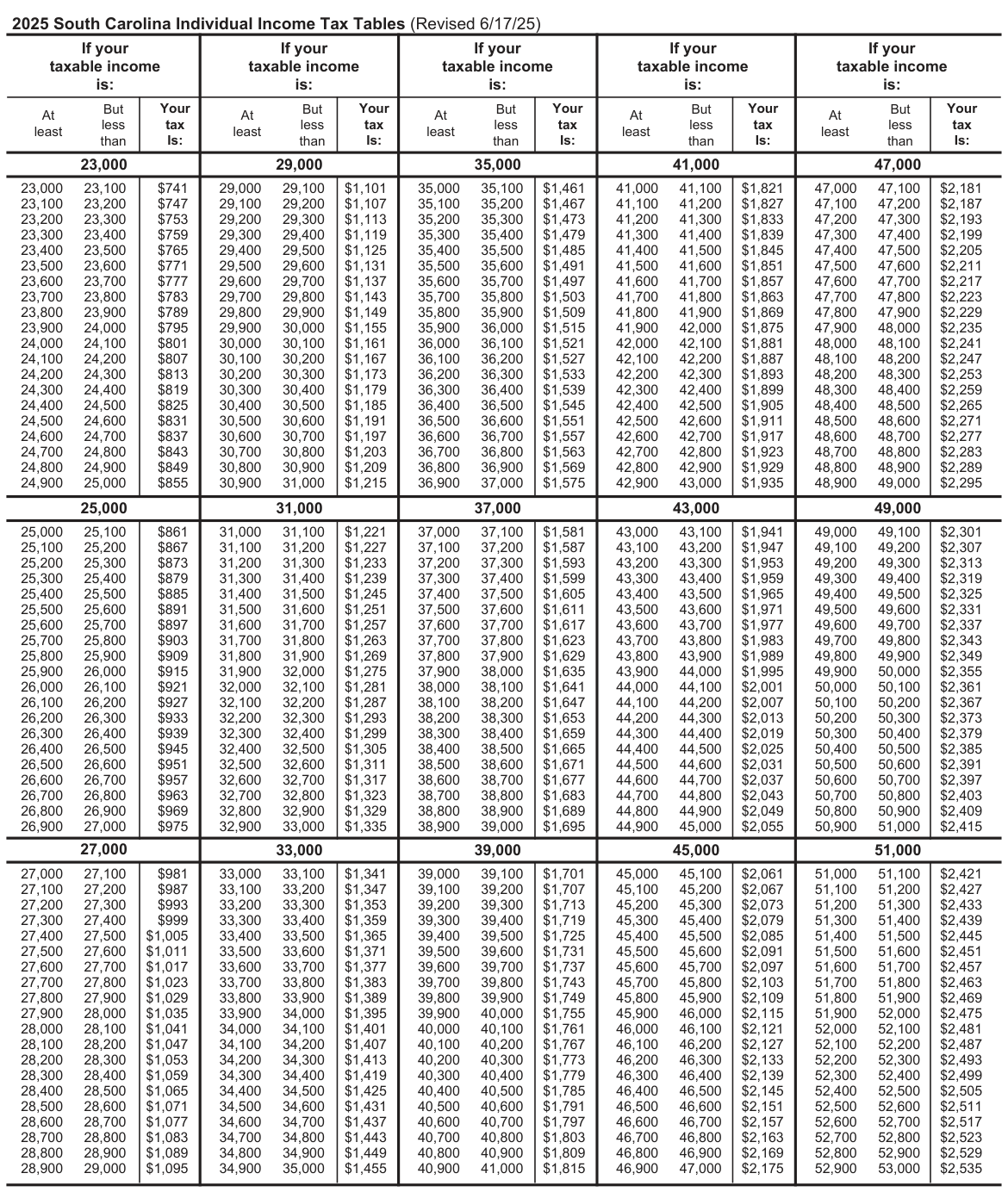
Text version of this table
| If your taxable income is: | If your taxable income is: | If your taxable income is: | If your taxable income is: | If your taxable income is: | |||||
| But At less least than | Your tax Is: | But At less least than | Your tax Is: | But At less least than | Your tax Is: | But At less least than | Your tax Is: | But At less least than | Your tax Is: |
| 23,000 | 29,000 | 35,000 | 41,000 | 47,000 | |||||
| 23,000 23,100 23,100 23,200 23,200 23,300 23,300 23,400 23,400 23,500 23,500 23,600 23,600 23,700 23,700 23,800 23,800 23,900 23,900 24,000 24,000 24,100 24,100 24,200 24,200 24,300 24,300 24,400 24,400 24,500 24,500 24,600 24,600 24,700 24,700 24,800 24,800 24,900 24,900 25,000 | $741 $747 $753 $759 $765 $771 $777 $783 $789 $795 $801 $807 $813 $819 $825 $831 $837 $843 $849 $855 | 29,000 29,100 29,100 29,200 29,200 29,300 29,300 29,400 29,400 29,500 29,500 29,600 29,600 29,700 29,700 29,800 29,800 29,900 29,900 30,000 30,000 30,100 30,100 30,200 30,200 30,300 30,300 30,400 30,400 30,500 30,500 30,600 30,600 30,700 30,700 30,800 30,800 30,900 30,900 31,000 | $1,101 $1,107 $1,113 $1,119 $1,125 $1,131 $1,137 $1,143 $1,149 $1,155 $1,161 $1,167 $1,173 $1,179 $1,185 $1,191 $1,197 $1,203 $1,209 $1,215 | 35,000 35,100 35,100 35,200 35,200 35,300 35,300 35,400 35,400 35,500 35,500 35,600 35,600 35,700 35,700 35,800 35,800 35,900 35,900 36,000 36,000 36,100 36,100 36,200 36,200 36,300 36,300 36,400 36,400 36,500 36,500 36,600 36,600 36,700 36,700 36,800 36,800 36,900 36,900 37,000 | $1,461 $1,467 $1,473 $1,479 $1,485 $1,491 $1,497 $1,503 $1,509 $1,515 $1,521 $1,527 $1,533 $1,539 $1,545 $1,551 $1,557 $1,563 $1,569 $1,575 | 41,000 41,100 41,100 41,200 41,200 41,300 41,300 41,400 41,400 41,500 41,500 41,600 41,600 41,700 41,700 41,800 41,800 41,900 41,900 42,000 42,000 42,100 42,100 42,200 42,200 42,300 42,300 42,400 42,400 42,500 42,500 42,600 42,600 42,700 42,700 42,800 42,800 42,900 42,900 43,000 | $1,821 $1,827 $1,833 $1,839 $1,845 $1,851 $1,857 $1,863 $1,869 $1,875 $1,881 $1,887 $1,893 $1,899 $1,905 $1,911 $1,917 $1,923 $1,929 $1,935 | 47,000 47,100 47,100 47,200 47,200 47,300 47,300 47,400 47,400 47,500 47,500 47,600 47,600 47,700 47,700 47,800 47,800 47,900 47,900 48,000 48,000 48,100 48,100 48,200 48,200 48,300 48,300 48,400 48,400 48,500 48,500 48,600 48,600 48,700 48,700 48,800 48,800 48,900 48,900 49,000 | $2,181 $2,187 $2,193 $2,199 $2,205 $2,211 $2,217 $2,223 $2,229 $2,235 $2,241 $2,247 $2,253 $2,259 $2,265 $2,271 $2,277 $2,283 $2,289 $2,295 |
| 25,000 | 31,000 | 37,000 | 43,000 | 49,000 | |||||
| 25,000 25,100 25,100 25,200 25,200 25,300 25,300 25,400 25,400 25,500 25,500 25,600 25,600 25,700 25,700 25,800 25,800 25,900 25,900 26,000 26,000 26,100 26,100 26,200 26,200 26,300 26,300 26,400 26,400 26,500 26,500 26,600 26,600 26,700 26,700 26,800 26,800 26,900 26,900 27,000 | $861 $867 $873 $879 $885 $891 $897 $903 $909 $915 $921 $927 $933 $939 $945 $951 $957 $963 $969 $975 | 31,000 31,100 31,100 31,200 31,200 31,300 31,300 31,400 31,400 31,500 31,500 31,600 31,600 31,700 31,700 31,800 31,800 31,900 31,900 32,000 32,000 32,100 32,100 32,200 32,200 32,300 32,300 32,400 32,400 32,500 32,500 32,600 32,600 32,700 32,700 32,800 32,800 32,900 32,900 33,000 | $1,221 $1,227 $1,233 $1,239 $1,245 $1,251 $1,257 $1,263 $1,269 $1,275 $1,281 $1,287 $1,293 $1,299 $1,305 $1,311 $1,317 $1,323 $1,329 $1,335 | 37,000 37,100 37,100 37,200 37,200 37,300 37,300 37,400 37,400 37,500 37,500 37,600 37,600 37,700 37,700 37,800 37,800 37,900 37,900 38,000 38,000 38,100 38,100 38,200 38,200 38,300 38,300 38,400 38,400 38,500 38,500 38,600 38,600 38,700 38,700 38,800 38,800 38,900 38,900 39,000 | $1,581 $1,587 $1,593 $1,599 $1,605 $1,611 $1,617 $1,623 $1,629 $1,635 $1,641 $1,647 $1,653 $1,659 $1,665 $1,671 $1,677 $1,683 $1,689 $1,695 | 43,000 43,100 43,100 43,200 43,200 43,300 43,300 43,400 43,400 43,500 43,500 43,600 43,600 43,700 43,700 43,800 43,800 43,900 43,900 44,000 44,000 44,100 44,100 44,200 44,200 44,300 44,300 44,400 44,400 44,500 44,500 44,600 44,600 44,700 44,700 44,800 44,800 44,900 44,900 45,000 | $1,941 $1,947 $1,953 $1,959 $1,965 $1,971 $1,977 $1,983 $1,989 $1,995 $2,001 $2,007 $2,013 $2,019 $2,025 $2,031 $2,037 $2,043 $2,049 $2,055 | 49,000 49,100 49,100 49,200 49,200 49,300 49,300 49,400 49,400 49,500 49,500 49,600 49,600 49,700 49,700 49,800 49,800 49,900 49,900 50,000 50,000 50,100 50,100 50,200 50,200 50,300 50,300 50,400 50,400 50,500 50,500 50,600 50,600 50,700 50,700 50,800 50,800 50,900 50,900 51,000 | $2,301 $2,307 $2,313 $2,319 $2,325 $2,331 $2,337 $2,343 $2,349 $2,355 $2,361 $2,367 $2,373 $2,379 $2,385 $2,391 $2,397 $2,403 $2,409 $2,415 |
| 27,000 | 33,000 | 39,000 | 45,000 | 51,000 | |||||
| 27,000 27,100 27,100 27,200 27,200 27,300 27,300 27,400 27,400 27,500 27,500 27,600 27,600 27,700 27,700 27,800 27,800 27,900 27,900 28,000 28,000 28,100 28,100 28,200 28,200 28,300 28,300 28,400 28,400 28,500 28,500 28,600 28,600 28,700 28,700 28,800 28,800 28,900 28,900 29,000 | $981 $987 $993 $999 $1,005 $1,011 $1,017 $1,023 $1,029 $1,035 $1,041 $1,047 $1,053 $1,059 $1,065 $1,071 $1,077 $1,083 $1,089 $1,095 | 33,000 33,100 33,100 33,200 33,200 33,300 33,300 33,400 33,400 33,500 33,500 33,600 33,600 33,700 33,700 33,800 33,800 33,900 33,900 34,000 34,000 34,100 34,100 34,200 34,200 34,300 34,300 34,400 34,400 34,500 34,500 34,600 34,600 34,700 34,700 34,800 34,800 34,900 34,900 35,000 | $1,341 $1,347 $1,353 $1,359 $1,365 $1,371 $1,377 $1,383 $1,389 $1,395 $1,401 $1,407 $1,413 $1,419 $1,425 $1,431 $1,437 $1,443 $1,449 $1,455 | 39,000 39,100 39,100 39,200 39,200 39,300 39,300 39,400 39,400 39,500 39,500 39,600 39,600 39,700 39,700 39,800 39,800 39,900 39,900 40,000 40,000 40,100 40,100 40,200 40,200 40,300 40,300 40,400 40,400 40,500 40,500 40,600 40,600 40,700 40,700 40,800 40,800 40,900 40,900 41,000 | $1,701 $1,707 $1,713 $1,719 $1,725 $1,731 $1,737 $1,743 $1,749 $1,755 $1,761 $1,767 $1,773 $1,779 $1,785 $1,791 $1,797 $1,803 $1,809 $1,815 | 45,000 45,100 45,100 45,200 45,200 45,300 45,300 45,400 45,400 45,500 45,500 45,600 45,600 45,700 45,700 45,800 45,800 45,900 45,900 46,000 46,000 46,100 46,100 46,200 46,200 46,300 46,300 46,400 46,400 46,500 46,500 46,600 46,600 46,700 46,700 46,800 46,800 46,900 46,900 47,000 | $2,061 $2,067 $2,073 $2,079 $2,085 $2,091 $2,097 $2,103 $2,109 $2,115 $2,121 $2,127 $2,133 $2,139 $2,145 $2,151 $2,157 $2,163 $2,169 $2,175 | 51,000 51,100 51,100 51,200 51,200 51,300 51,300 51,400 51,400 51,500 51,500 51,600 51,600 51,700 51,700 51,800 51,800 51,900 51,900 52,000 52,000 52,100 52,100 52,200 52,200 52,300 52,300 52,400 52,400 52,500 52,500 52,600 52,600 52,700 52,700 52,800 52,800 52,900 52,900 53,000 | $2,421 $2,427 $2,433 $2,439 $2,445 $2,451 $2,457 $2,463 $2,469 $2,475 $2,481 $2,487 $2,493 $2,499 $2,505 $2,511 $2,517 $2,523 $2,529 $2,535 |
# But But But
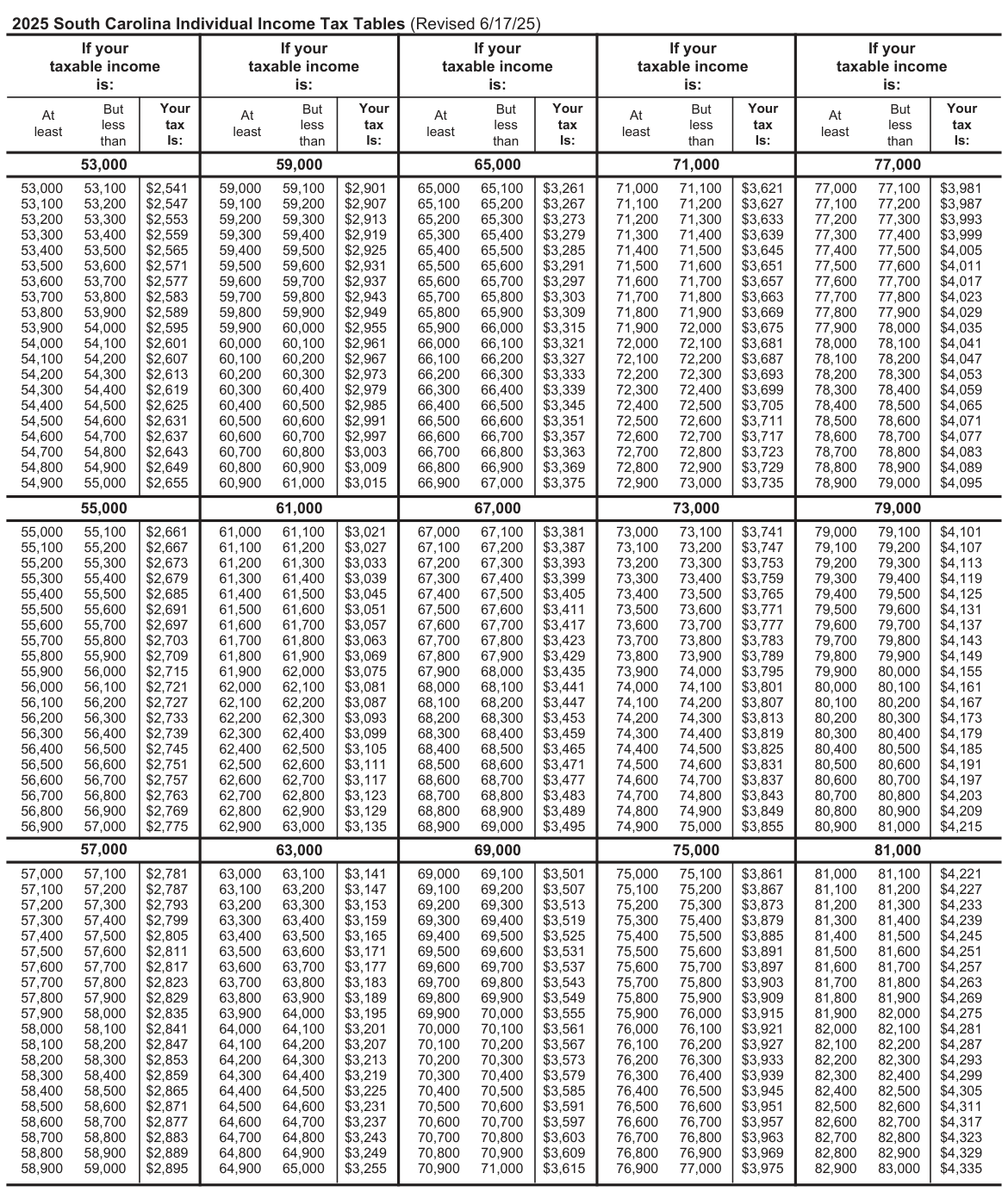
Text version of this table
| If your taxable income is: | If your taxable income is: | If your taxable income is: | If your taxable income is: | If your taxable income is: | |||||
| But At less least than | Your tax Is: | But At less least than | Your tax Is: | But At less least than | Your tax Is: | But At less least than | Your tax Is: | But At less least than | Your tax Is: |
| 53,000 | 59,000 | 65,000 | 71,000 | 77,000 | |||||
| 53,000 53,100 53,100 53,200 53,200 53,300 53,300 53,400 53,400 53,500 53,500 53,600 53,600 53,700 53,700 53,800 53,800 53,900 53,900 54,000 54,000 54,100 54,100 54,200 54,200 54,300 54,300 54,400 54,400 54,500 54,500 54,600 54,600 54,700 54,700 54,800 54,800 54,900 54,900 55,000 | $2,541 $2,547 $2,553 $2,559 $2,565 $2,571 $2,577 $2,583 $2,589 $2,595 $2,601 $2,607 $2,613 $2,619 $2,625 $2,631 $2,637 $2,643 $2,649 $2,655 | 59,000 59,100 59,100 59,200 59,200 59,300 59,300 59,400 59,400 59,500 59,500 59,600 59,600 59,700 59,700 59,800 59,800 59,900 59,900 60,000 60,000 60,100 60,100 60,200 60,200 60,300 60,300 60,400 60,400 60,500 60,500 60,600 60,600 60,700 60,700 60,800 60,800 60,900 60,900 61,000 | $2,901 $2,907 $2,913 $2,919 $2,925 $2,931 $2,937 $2,943 $2,949 $2,955 $2,961 $2,967 $2,973 $2,979 $2,985 $2,991 $2,997 $3,003 $3,009 $3,015 | 65,000 65,100 65,100 65,200 65,200 65,300 65,300 65,400 65,400 65,500 65,500 65,600 65,600 65,700 65,700 65,800 65,800 65,900 65,900 66,000 66,000 66,100 66,100 66,200 66,200 66,300 66,300 66,400 66,400 66,500 66,500 66,600 66,600 66,700 66,700 66,800 66,800 66,900 66,900 67,000 | $3,261 $3,267 $3,273 $3,279 $3,285 $3,291 $3,297 $3,303 $3,309 $3,315 $3,321 $3,327 $3,333 $3,339 $3,345 $3,351 $3,357 $3,363 $3,369 $3,375 | 71,000 71,100 71,100 71,200 71,200 71,300 71,300 71,400 71,400 71,500 71,500 71,600 71,600 71,700 71,700 71,800 71,800 71,900 71,900 72,000 72,000 72,100 72,100 72,200 72,200 72,300 72,300 72,400 72,400 72,500 72,500 72,600 72,600 72,700 72,700 72,800 72,800 72,900 72,900 73,000 | $3,621 $3,627 $3,633 $3,639 $3,645 $3,651 $3,657 $3,663 $3,669 $3,675 $3,681 $3,687 $3,693 $3,699 $3,705 $3,711 $3,717 $3,723 $3,729 $3,735 | 77,000 77,100 77,100 77,200 77,200 77,300 77,300 77,400 77,400 77,500 77,500 77,600 77,600 77,700 77,700 77,800 77,800 77,900 77,900 78,000 78,000 78,100 78,100 78,200 78,200 78,300 78,300 78,400 78,400 78,500 78,500 78,600 78,600 78,700 78,700 78,800 78,800 78,900 78,900 79,000 | $3,981 $3,987 $3,993 $3,999 $4,005 $4,011 $4,017 $4,023 $4,029 $4,035 $4,041 $4,047 $4,053 $4,059 $4,065 $4,071 $4,077 $4,083 $4,089 $4,095 |
| 55,000 | 61,000 | 67,000 | 73,000 | 79,000 | |||||
| 55,000 55,100 55,100 55,200 55,200 55,300 55,300 55,400 55,400 55,500 55,500 55,600 55,600 55,700 55,700 55,800 55,800 55,900 55,900 56,000 56,000 56,100 56,100 56,200 56,200 56,300 56,300 56,400 56,400 56,500 56,500 56,600 56,600 56,700 56,700 56,800 56,800 56,900 56,900 57,000 | $2,661 $2,667 $2,673 $2,679 $2,685 $2,691 $2,697 $2,703 $2,709 $2,715 $2,721 $2,727 $2,733 $2,739 $2,745 $2,751 $2,757 $2,763 $2,769 $2,775 | 61,000 61,100 61,100 61,200 61,200 61,300 61,300 61,400 61,400 61,500 61,500 61,600 61,600 61,700 61,700 61,800 61,800 61,900 61,900 62,000 62,000 62,100 62,100 62,200 62,200 62,300 62,300 62,400 62,400 62,500 62,500 62,600 62,600 62,700 62,700 62,800 62,800 62,900 62,900 63,000 | $3,021 $3,027 $3,033 $3,039 $3,045 $3,051 $3,057 $3,063 $3,069 $3,075 $3,081 $3,087 $3,093 $3,099 $3,105 $3,111 $3,117 $3,123 $3,129 $3,135 | 67,000 67,100 67,100 67,200 67,200 67,300 67,300 67,400 67,400 67,500 67,500 67,600 67,600 67,700 67,700 67,800 67,800 67,900 67,900 68,000 68,000 68,100 68,100 68,200 68,200 68,300 68,300 68,400 68,400 68,500 68,500 68,600 68,600 68,700 68,700 68,800 68,800 68,900 68,900 69,000 | $3,381 $3,387 $3,393 $3,399 $3,405 $3,411 $3,417 $3,423 $3,429 $3,435 $3,441 $3,447 $3,453 $3,459 $3,465 $3,471 $3,477 $3,483 $3,489 $3,495 | 73,000 73,100 73,100 73,200 73,200 73,300 73,300 73,400 73,400 73,500 73,500 73,600 73,600 73,700 73,700 73,800 73,800 73,900 73,900 74,000 74,000 74,100 74,100 74,200 74,200 74,300 74,300 74,400 74,400 74,500 74,500 74,600 74,600 74,700 74,700 74,800 74,800 74,900 74,900 75,000 | $3,741 $3,747 $3,753 $3,759 $3,765 $3,771 $3,777 $3,783 $3,789 $3,795 $3,801 $3,807 $3,813 $3,819 $3,825 $3,831 $3,837 $3,843 $3,849 $3,855 | 79,000 79,100 79,100 79,200 79,200 79,300 79,300 79,400 79,400 79,500 79,500 79,600 79,600 79,700 79,700 79,800 79,800 79,900 79,900 80,000 80,000 80,100 80,100 80,200 80,200 80,300 80,300 80,400 80,400 80,500 80,500 80,600 80,600 80,700 80,700 80,800 80,800 80,900 80,900 81,000 | $4,101 $4,107 $4,113 $4,119 $4,125 $4,131 $4,137 $4,143 $4,149 $4,155 $4,161 $4,167 $4,173 $4,179 $4,185 $4,191 $4,197 $4,203 $4,209 $4,215 |
| 57,000 | 63,000 | 69,000 | 75,000 | 81,000 | |||||
| 57,000 57,100 57,100 57,200 57,200 57,300 57,300 57,400 57,400 57,500 57,500 57,600 57,600 57,700 57,700 57,800 57,800 57,900 57,900 58,000 58,000 58,100 58,100 58,200 58,200 58,300 58,300 58,400 58,400 58,500 58,500 58,600 58,600 58,700 58,700 58,800 58,800 58,900 58,900 59,000 | $2,781 $2,787 $2,793 $2,799 $2,805 $2,811 $2,817 $2,823 $2,829 $2,835 $2,841 $2,847 $2,853 $2,859 $2,865 $2,871 $2,877 $2,883 $2,889 $2,895 | 63,000 63,100 63,100 63,200 63,200 63,300 63,300 63,400 63,400 63,500 63,500 63,600 63,600 63,700 63,700 63,800 63,800 63,900 63,900 64,000 64,000 64,100 64,100 64,200 64,200 64,300 64,300 64,400 64,400 64,500 64,500 64,600 64,600 64,700 64,700 64,800 64,800 64,900 64,900 65,000 | $3,141 $3,147 $3,153 $3,159 $3,165 $3,171 $3,177 $3,183 $3,189 $3,195 $3,201 $3,207 $3,213 $3,219 $3,225 $3,231 $3,237 $3,243 $3,249 $3,255 | 69,000 69,100 69,100 69,200 69,200 69,300 69,300 69,400 69,400 69,500 69,500 69,600 69,600 69,700 69,700 69,800 69,800 69,900 69,900 70,000 70,000 70,100 70,100 70,200 70,200 70,300 70,300 70,400 70,400 70,500 70,500 70,600 70,600 70,700 70,700 70,800 70,800 70,900 70,900 71,000 | $3,501 $3,507 $3,513 $3,519 $3,525 $3,531 $3,537 $3,543 $3,549 $3,555 $3,561 $3,567 $3,573 $3,579 $3,585 $3,591 $3,597 $3,603 $3,609 $3,615 | 75,000 75,100 75,100 75,200 75,200 75,300 75,300 75,400 75,400 75,500 75,500 75,600 75,600 75,700 75,700 75,800 75,800 75,900 75,900 76,000 76,000 76,100 76,100 76,200 76,200 76,300 76,300 76,400 76,400 76,500 76,500 76,600 76,600 76,700 76,700 76,800 76,800 76,900 76,900 77,000 | $3,861 $3,867 $3,873 $3,879 $3,885 $3,891 $3,897 $3,903 $3,909 $3,915 $3,921 $3,927 $3,933 $3,939 $3,945 $3,951 $3,957 $3,963 $3,969 $3,975 | 81,000 81,100 81,100 81,200 81,200 81,300 81,300 81,400 81,400 81,500 81,500 81,600 81,600 81,700 81,700 81,800 81,800 81,900 81,900 82,000 82,000 82,100 82,100 82,200 82,200 82,300 82,300 82,400 82,400 82,500 82,500 82,600 82,600 82,700 82,700 82,800 82,800 82,900 82,900 83,000 | $4,221 $4,227 $4,233 $4,239 $4,245 $4,251 $4,257 $4,263 $4,269 $4,275 $4,281 $4,287 $4,293 $4,299 $4,305 $4,311 $4,317 $4,323 $4,329 $4,335 |
# But But
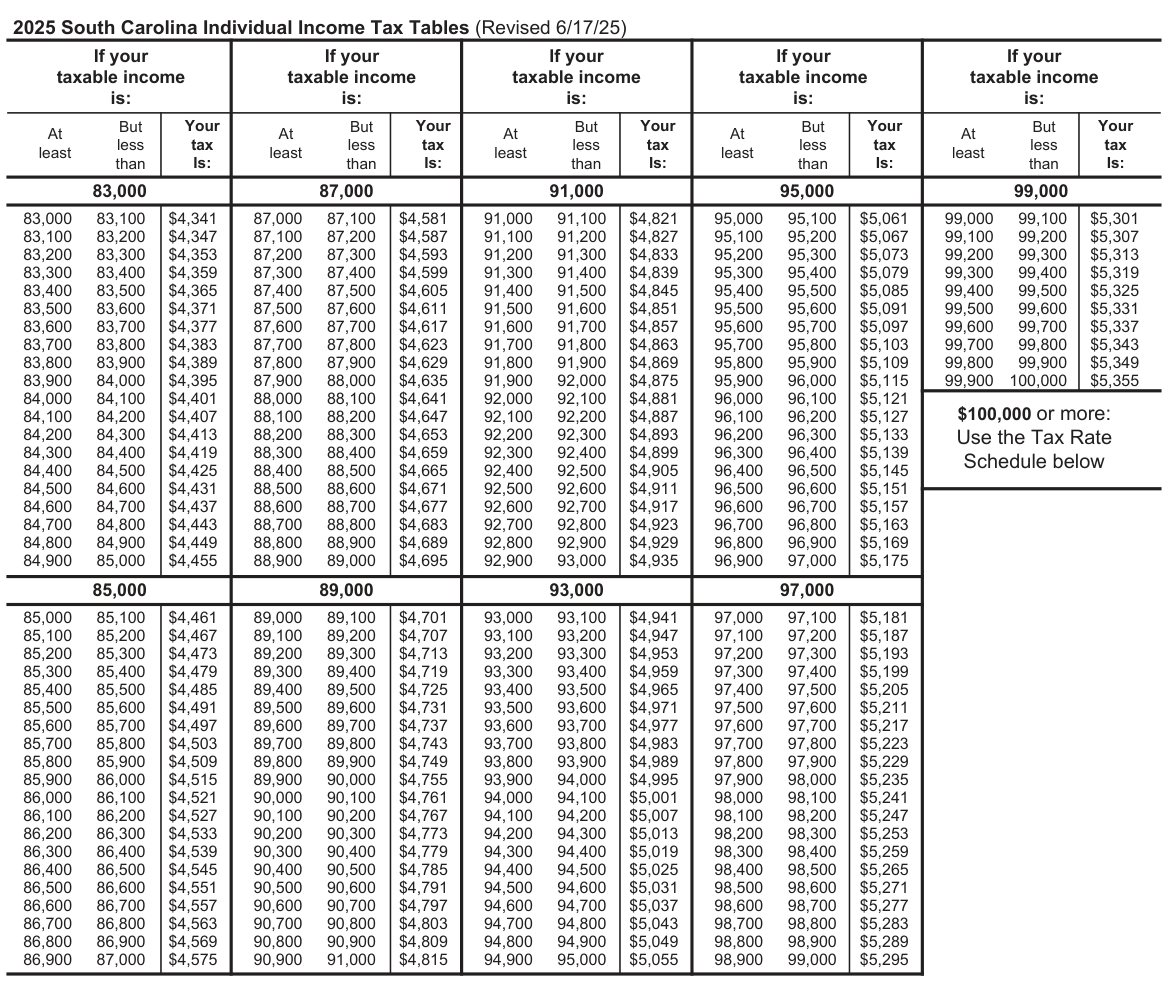
Text version of this table
If your taxable income is: If your taxable income is: If your taxable income is: If your taxable income is: If your taxable income is: But At less least than Your tax Is: But At less least than Your tax Is: But At less least than Your tax Is: But At less least than Your tax Is: But At less least than Your tax Is: 83,000 87,000 91,000 95,000 99,000 83,000 83,100 83,100 83,200 83,200 83,300 83,300 83,400 83,400 83,500 83,500 83,600 83,600 83,700 83,700 83,800 83,800 83,900 83,900 84,000 84,000 84,100 84,100 84,200 84,200 84,300 84,300 84,400 84,400 84,500 84,500 84,600 84,600 84,700 84,700 84,800 84,800 84,900 84,900 85,000 $4,341 $4,347 $4,353 $4,359 $4,365 $4,371 $4,377 $4,383 $4,389 $4,395 $4,401 $4,407 $4,413 $4,419 $4,425 $4,431 $4,437 $4,443 $4,449 $4,455 87,000 87,100 87,100 87,200 87,200 87,300 87,300 87,400 87,400 87,500 87,500 87,600 87,600 87,700 87,700 87,800 87,800 87,900 87,900 88,000 88,000 88,100 88,100 88,200 88,200 88,300 88,300 88,400 88,400 88,500 88,500 88,600 88,600 88,700 88,700 88,800 88,800 88,900 88,900 89,000 $4,581 $4,587 $4,593 $4,599 $4,605 $4,611 $4,617 $4,623 $4,629 $4,635 $4,641 $4,647 $4,653 $4,659 $4,665 $4,671 $4,677 $4,683 $4,689 $4,695 91,000 91,100 91,100 91,200 91,200 91,300 91,300 91,400 91,400 91,500 91,500 91,600 91,600 91,700 91,700 91,800 91,800 91,900 91,900 92,000 92,000 92,100 92,100 92,200 92,200 92,300 92,300 92,400 92,400 92,500 92,500 92,600 92,600 92,700 92,700 92,800 92,800 92,900 92,900 93,000 $4,821 $4,827 $4,833 $4,839 $4,845 $4,851 $4,857 $4,863 $4,869 $4,875 $4,881 $4,887 $4,893 $4,899 $4,905 $4,911 $4,917 $4,923 $4,929 $4,935 95,000 95,100 95,100 95,200 95,200 95,300 95,300 95,400 95,400 95,500 95,500 95,600 95,600 95,700 95,700 95,800 95,800 95,900 95,900 96,000 96,000 96,100 96,100 96,200 96,200 96,300 96,300 96,400 96,400 96,500 96,500 96,600 96,600 96,700 96,700 96,800 96,800 96,900 96,900 97,000 $5,061 $5,067 $5,073 $5,079 $5,085 $5,091 $5,097 $5,103 $5,109 $5,115 $5,121 $5,127 $5,133 $5,139 $5,145 $5,151 $5,157 $5,163 $5,169 $5,175 99,000 99,100 99,100 99,200 99,200 99,300 99,300 99,400 99,400 99,500 99,500 99,600 99,600 99,700 99,700 99,800 99,800 99,900 99,900 100,000 $5,301 $5,307 $5,313 $5,319 $5,325 $5,331 $5,337 $5,343 $5,349 $5,355 $100,000 or more: Use the Tax Rate Schedule below 85,000 89,000 93,000 97,000 85,000 85,100 85,100 85,200 85,200 85,300 85,300 85,400 85,400 85,500 85,500 85,600 85,600 85,700 85,700 85,800 85,800 85,900 85,900 86,000 86,000 86,100 86,100 86,200 86,200 86,300 86,300 86,400 86,400 86,500 86,500 86,600 86,600 86,700 86,700 86,800 86,800 86,900 86,900 87,000 $4,461 $4,467 $4,473 $4,479 $4,485 $4,491 $4,497 $4,503 $4,509 $4,515 $4,521 $4,527 $4,533 $4,539 $4,545 $4,551 $4,557 $4,563 $4,569 $4,575 89,000 89,100 89,100 89,200 89,200 89,300 89,300 89,400 89,400 89,500 89,500 89,600 89,600 89,700 89,700 89,800 89,800 89,900 89,900 90,000 90,000 90,100 90,100 90,200 90,200 90,300 90,300 90,400 90,400 90,500 90,500 90,600 90,600 90,700 90,700 90,800 90,800 90,900 90,900 91,000 $4,701 $4,707 $4,713 $4,719 $4,725 $4,731 $4,737 $4,743 $4,749 $4,755 $4,761 $4,767 $4,773 $4,779 $4,785 $4,791 $4,797 $4,803 $4,809 $4,815 93,000 93,100 93,100 93,200 93,200 93,300 93,300 93,400 93,400 93,500 93,500 93,600 93,600 93,700 93,700 93,800 93,800 93,900 93,900 94,000 94,000 94,100 94,100 94,200 94,200 94,300 94,300 94,400 94,400 94,500 94,500 94,600 94,600 94,700 94,700 94,800 94,800 94,900 94,900 95,000 $4,941 $4,947 $4,953 $4,959 $4,965 $4,971 $4,977 $4,983 $4,989 $4,995 $5,001 $5,007 $5,013 $5,019 $5,025 $5,031 $5,037 $5,043 $5,049 $5,055 97,000 97,100 97,100 97,200 97,200 97,300 97,300 97,400 97,400 97,500 97,500 97,600 97,600 97,700 97,700 97,800 97,800 97,900 97,900 98,000 98,000 98,100 98,100 98,200 98,200 98,300 98,300 98,400 98,400 98,500 98,500 98,600 98,600 98,700 98,700 98,800 98,800 98,900 98,900 99,000 $5,181 $5,187 $5,193 $5,199 $5,205 $5,211 $5,217 $5,223 $5,229 $5,235 $5,241 $5,247 $5,253 $5,259 $5,265 $5,271 $5,277 $5,283 $5,289 $5,295
2025 Tax Rate Schedule for taxable income of $100,000 or more
Important: You must use the Tax Tables instead of this Tax Rate Schedule if your taxable income is less than $100,000.
Use this Tax Rate Schedule for any filing status claimed on the SC1040.
If the amount on SC1040, line 5 is $100,000 or more:
- Multiply the amount on line 5 by 6%;
- Subtract $642; and
- Enter the difference on line 6.
Example of Tax Rate Schedule Computation:
If South Carolina income subject to tax on SC1040, line 5 is $101,000, the tax is calculated as follows:
$101,000.00 Income from SC1040, line 5
X .06 (6%)
$6,060
- $642 subtract $642 (constant) amount of tax, entered on line 6 of SC1040 $5,418
Source: view the official PDF
The source document contains 2 figures (charts or worksheet graphics) not reproduced in this text version. See the official PDF above.
Nearby sections (16 sections)
- i338 · I-338 — Composite Return Affidavit
- i348 · I-348 — Composite Filing Instructions
- i435 · I-435 — Active Trade or Business Income for Electing…
- iit-packet · Individual Income Tax Packet — SC1040 Instructions (full…
- sc1040 · SC1040 — Individual Income Tax Return
- sc1040es · SC1040ES — Individual Declaration of Estimated Tax
- sc1041 · SC1041 — Fiduciary Income Tax Return
- sc1041es · SC1041ES — Fiduciary Declaration of Estimated Tax
- sc1065 · SC1065 — Partnership Return
- sc1065es · SC1065ES — Partnership Declaration of Estimated Income Tax
- sc1120 · SC1120 — 'C' Corporation Income Tax Return
- sc1120cdp · SC1120-CDP — Corporation Declaration of Estimated Income Tax
- sc1120i · SC1120 Instructions — 'C' and 'S' Corporation Income Tax…
- sc1120s · SC1120S — 'S' Corporation Income Tax Return
- sc1120swh · SC1120S-WH — Withholding Tax on Income of Nonresident…
- sc1120t · SC1120-T — Application for Automatic Extension (Corporate)
# Social Security Number, Name, and Address
● Enter your Social Security Number (SSN). Check the appropriate box if the taxpayer is deceased.
● Enter your name, mailing address, and the county code of the county where you live. You can find a list of county codes on page 24 of this guide. Check the box to let us know if this is a new address. To avoid delays, be sure your mailing address is complete and accurate on your return.
● For a foreign address, check the appropriate box to let us know the address is outside the US.
Print or type the complete foreign address, including postal code.
● If you are married and filing a joint return, enter your spouse's name and SSN. Check the appropriate box if the taxpayer is deceased.
● If you are married and filing separate returns, do not include your spouse's name or SSN in this section. Enter your spouse's SSN next to box 3 in the filing status section.
It is mandatory that you provide your Social Security Number on this tax form if you are an individual taxpayer. 42 U.S.C. 405(c)(2)(C)(i) permits a state to use an individual's Social Security Number as means of identification in administration of any tax. SC Regulation 117-201 mandates that any person required to make a return to the SCDOR must provide identifying numbers, as prescribed, for securing proper identification. Your Social Security Number is used for identification purposes.