Internal Revenue Manual
IRM 2.3.78
Command Code LOCAT
# Part 2. Information Technology
Chapter 3. IDRS Terminal Responses
Section 78. Command Code LOCAT
2.3.78 Command Code LOCAT
Manual Transmittal
May 22, 2024
Purpose
(1) This transmits revised IRM 2.3.78, IDRS Terminal Responses, Command Code LOCAT.
Material Changes
(1) Updated Chief Information Officer to Rajiv Uppal.
(2) IRM 2.3.78.1 Updated Wage & Investment(W&I) occurrences to reflect new Taxpayer Services (TS).
(3) IRM 2.3.78.1 Added additional Internal Control Information for Authority, Program Controls and Related Resources.
Effect on Other Documents
IRM 2.3.78, dated August 01, 2023 is superseded.Audience
SB/SE, TE/GE, TS, LB&IEffective Date
(05-22-2024)
Rajiv Uppal
Chief Information Officer
# Program Scope and Objectives
-
Command Code LOCAT is designed to display the Primary Location Code (PLC) and Collection Location Codes (CLC) based on the input of a 5 digit zip code and Business Operation Division (BOD) code. The PLC contains the Universal Location Code (ULC) and the Area Office Code (AO) responsible for the taxpayer's account. "Universal" is meant to indicate that this code is the same across all BODs. The ULC carries the old 65 FIDO values. The CLC (previously known as the TDA location code) identified the area office of the Collection organization. The Area Office Codes have been assigned unique system values. Therefore, all TS AO's will begin with a 1 (11–15) and designates TS area offices 01–05; all SB/SE AO's will begin with a 2 or 3 (21–27, 35) and designates SB/SE area offices 01–07, 15; TE AO's will begin with 4 and designates TE area offices 41–47; and the LM AO will always be 50.
-
Purpose: This transmits revised IRM 2.3.78, IDRS Terminal Responses, Command LOCAT.
-
Audience: LMSB, SB/SE, TE/GE, TS.
-
Program Owner: Customer Service.
-
Primary Stakeholders: Taxpayer Services (TS), Large Business and International (LB&I), Small Business Self-Employed (SB/SE), Tax Exempt and Government Entities (TE/GE).
-
Program Goals: This system is designed to display the Primary Location Code (PLC) and Collection Location Codes (CLC) based on the input of a 5 digit zip code and Business Operation Division (BOD) code.
# Background
-
Command Code LOCAT purpose is to display the Primary Location and Collection Location Codes.
# Authority
-
LOCAT was developed as a means to display Primary Location and Collection Location Codes by inputting a 5 digit zip and BOD code.
# Responsibilities
-
Applications Development is responsible for operation and maintenance of the command code.
# Program Management and Review
-
Program Reports:Upon transmit LOCAT will return the ULC and CLC based on the Zip Code and BOD code.
-
Program Effectiveness: N/A.
# Program Controls
-
Access to this program is governed by SACS.
# Terms/Definitions/Acronyms
-
Acronym Definition PLC Primary Location Code CLC Collection Location Code ULC Universal Location Code BOD Business Operation Division AO Area Office Code TS Taxpayer Services LB&I Large Business & International TE/GE Tax Exempt & Government Entities
# Related Resources
-
No related resources available for Command Code LOCAT.
# Terminal Response: Error Messages
-
The following are error messages for CC LOCAT
-
INVALID ZIP CODE INPUT — The zip code input on the screen is not numeric or was not a valid zip code value.
-
BOD CODE MUST BE WI, SB, TE, or LM — The value input in the BOD-CD field was not one of the 4 valid values.
-
BOD CODE OF TE REQUIRES INPUT OF BOD CLIENT CODE — If the BOD-CD value is TE the BOD-CLIENT-CD must be input.
-
INVALID DEFINER CODE— The command code definer (line 1 position 6 — immediately after command code) must contain either F or blank.
-
ERROR DETERMINING CLC FOR ULCAO— The primary location code calculated by the command code doe not have a corresponding CLC. User support should contact National Office programmer.
-
# Terminal Response: Valid Messages
-
Valid response to CC LOCAT with a definer code of F will be the display of a LOCAT response with literals identifying the input format. Valid response to CC LOCAT with a blank definer will be the requested location information.
# CC LOCAT or LOCATF
There are 2 ways to do LOCAT:
-
LOCAT nnnnn nn n — nnnnn is the 5 digit zip code. nn is the BOD code. n is the TE-BOD-CLIENT-CD. See descriptions below.
OR -
LOCATF — Enter with definer "F" and a second screen will appear with prompts for the zip code, BOD code, and TE-BOD-CLIENT-CD:
LOCAT ZIP>nnnnn BOD>nn TECLIENT>n
Description of Entries:
| ZIP> | required input — 5 digit zip code |
| BOD> | required input. values are: WI —Taxpayer Services SB — Small Business/Self-Employed LM — Large/Mid-sized Business TE — Tax Exempt/Government Entity |
| TECLIENT> (TE-CLIENT-CD) |
Required only if the BOD is TE. Values are: B — Tax Exempt Bonds (TEB) F — Federal, State & Local Govts (FSL) I— Indian Tribal Governments (ITG) 1 — Combo ITG & TEB 2 — Combo FSL & TEB 3– Combo Exempt Org & TEB |
# Response Screen to a CC LOCAT request
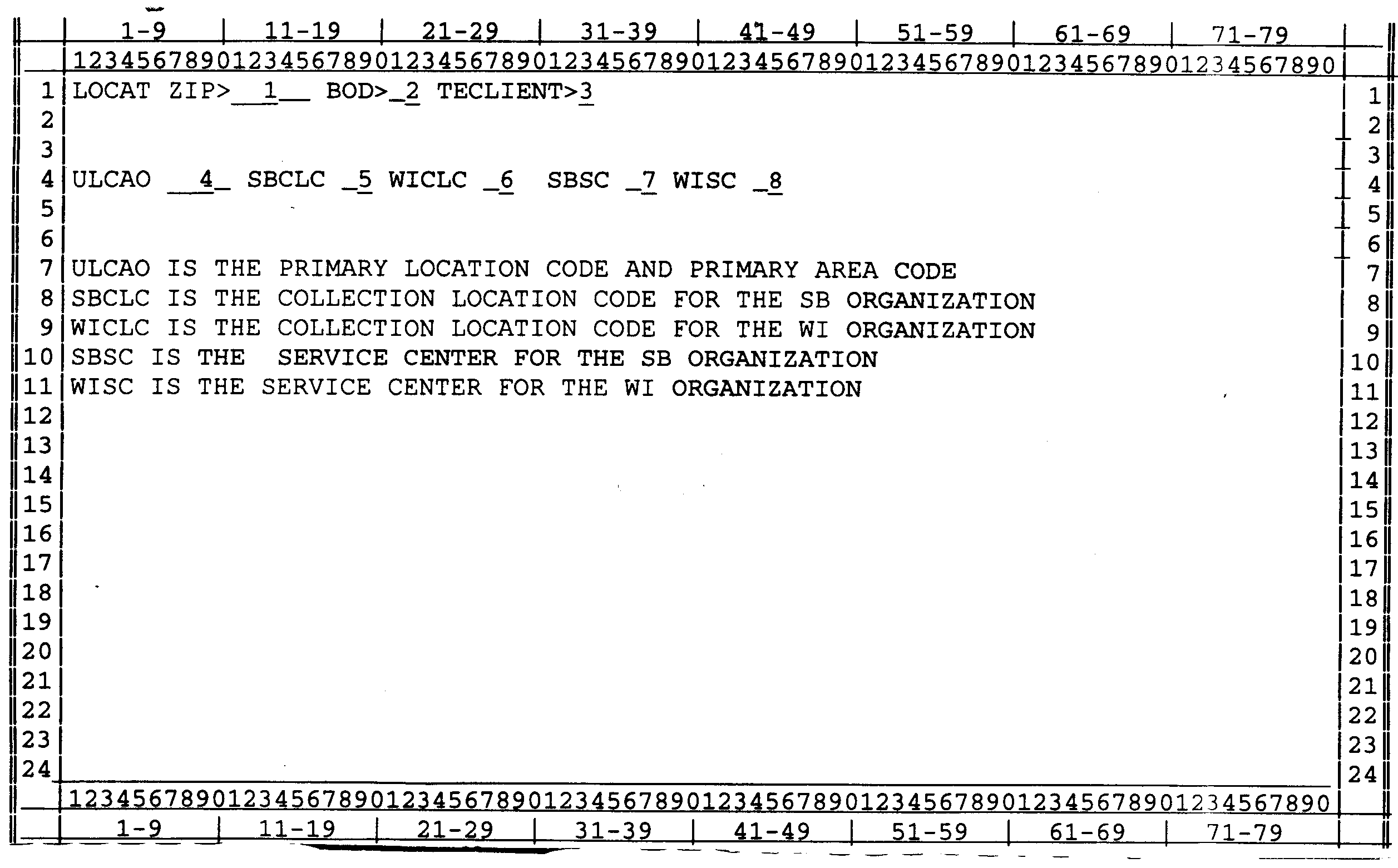
Please click here for the text description of the image.
See figure.
Record Element Specifications
| Item | Line | Position | Description |
| 1 | 1 | 11–15 | Zip code from input |
| 2 | 1 | 21–22 | BOD code from input |
| 3 | 1 | 33 | TE-BOD-CLIENT-CD from input |
| 4 | 4 | 7–10 | Primary Location Code — the Universal Location Code and the Area Office Code for the zip code and BOD code input. |
| 5 | 4 | 18–19 | Small Business Collection Location Code — the CLC Area Office that would be assigned for this zip/BOD if at a SB site. |
| 6 | 4 | 27–28 | Taxpayer Services Collection Location Code —the CLC Area Office that would be assigned to this zip/BOD if at a WI site. |
| 7 | 4 | 35–36 | Small Business Service Center — the Service Center code where the SB organization would work this case. |
| 8 | 4 | 43–44 | Taxpayer Services Service Center — the Service Center code where the WI Organization would work this case. |
| 7–11 | 1–80 | Explanatory messages for codes displayed on line 4. |
Source: view the official text
In this part (40 sections)
- 2.3.53 · Command Code PMFOL
- 2.3.54 · Command Code DDBOL
- 2.3.55 · Command Codes ELFUP and ELFRQ
- 2.3.56 · Command Code ESTABR
- 2.3.57 · Command Code BRTVU
- 2.3.59 · Command Codes BMFOL and BMFOR
- 2.3.60 · Command Codes NAMES, NAMEE, NAMEI, NAMEB, FINDS, FINDE, and…
- 2.3.62 · Command Code ESTAB
- 2.3.63 · Command Codes RPVUE, RPVCU, and RPPRT
- 2.3.64 · Command Code EMFOL
- 2.3.65 · EPMF Return Transaction File On-Line (ERTVU) Research
- 2.3.66 · Command Code PLINF and PLINQ
- 2.3.68 · Command Codes DUPOL and DUPPG
- 2.3.69 · Command Code VPARS
- 2.3.70 · Command Code EFTPS
- 2.3.71 · Command Code ATINQ
- 2.3.73 · Command Codes TRDBV, TRERS, TRPRT, and R8453
- 2.3.74 · Command Code DDPOL
- 2.3.76 · Command Code ISTSD
- 2.3.77 · Command Code ISTSE
- 2.3.78 · Command Code LOCAT
- 2.3.79 · Command Code CDPWEB, (CDPTA, CDPTE)
- 2.3.80 · Command Code DDBKD
- 2.3.81 · Command Code ESTABA
- 2.3.82 · Command Code ESTABH
- 2.3.85 · Command Code DFAST and DLITE
- 2.3.86 · Command Code IRPOL
- 2.3.87 · Command Code DDBMF
- 2.4.1 · Section Titles and Command Codes for IDRS Terminal Input
- 2.4.4 · Command Code MESSG
- 2.4.5 · Command Codes QRADD, QRADDO, QRNCH, QRNCHG, RVIEW, QRACN, and…
- 2.4.6 · Command Codes LETER, LPAGE, LPAGD, LETUP, LETED, LLIST, and…
- 2.4.7 · Command Codes KAFRM, KAFAD, UPTCF, UPRCF, UPNCF, FRM3P, ADD3P,…
- 2.4.8 · Command Codes ESIGN and BSIGN
- 2.4.9 · Command Codes ENREQ, INCHG, IRCHG, BNCHG and BRCHG
- 2.4.10 · Command Codes EOREQ and EOCHG
- 2.4.11 · Command Code NMFTM
- 2.4.12 · Command Codes DELET and CCPYT
- 2.4.13 · Command Code TERUP
- 2.4.14 · Command Code NMFST