Internal Revenue Manual
IRM 2.3.74
Command Code DDPOL
# Part 2. Information Technology
Chapter 3. IDRS Terminal Responses
Section 74. Command Code DDPOL
2.3.74 Command Code DDPOL
Manual Transmittal
December 22, 2025
Purpose
(1) This transmits revised IRM 2.3.74, IDRS Terminal Responses, Command Code DDPOL.
Material Changes
(1) 2.3.74.1 Added Program Scope and Objectives with updated mandatory Internal Controls.
(2) 2.3.74.4 Error Message (a) has been updated to reflect changes to the acceptable Command Code Definers: Definer ‘6’ has been added to access both IMF and BMF tax processing year 2026 (2025 tax return) data, and Deletion of definer code (3 which displayed 2022 return data).
(3) 2.3.74-1 Exhibit Description now shows an updated list of acceptable Command Code Definers.
(4) IRM 2.3.74 revised throughout to update organizational title Taxpayer Services.
Effect on Other Documents
IRM 2.3.74, dated November 17, 2023 is superseded.Audience
IRS Tax Technicians, Account Management employees, and Criminal Investigator.Effective Date
(01-02-2026)Kaschit Pandya
Chief Information Officer (CIO)
# Program Scope and Objectives
-
Overview: Command Code DDPOL is designed to research and display information to help aid in fraud detection by monitoring duplicate direct deposits. This command code is used to further research accounts which are listed on the IMF and BMF weekly Multiple Direct Deposit Reports. The reports list bank accounts that have three or more direct deposits made to them in one processing year.
-
Purpose: These sections provide instructions for accessing Duplicate Direct Deposit information through the IMF and BMF weekly Multiple Direct Deposit Reports files in Martinsburg, WV.
-
Audience: IRS Tax Technicians, Account Management employees, and Criminal Investigator
-
Policy Owner: Director, Corporate Data Domain
-
Program Owner: Tax Data On-line (TDOL), a branch within Corporate Data Domain
-
Primary Stakeholders: Criminal Investigation (CI), Taxpayer Services (TS), and any other IRS organization profiled with IDRS access.
-
Program Goals: As an aid in fraud detection by monitoring duplicate direct deposits, these are the instructions for using the CFOL/IDRS command code DDPOL. Details below.
# Background
-
This IRM and the contained subsections provide the user the necessary information on how to use Command Codes DDPOL
# Authority
-
Unified Work Request (UWR) 999071
# Roles and Responsibilities
-
Applications Development (AD) is responsible for operations and maintenance of the command codes.
-
Director, Corporate Data Domain
-
Branch Chief, TDOL
# Program Management and Review
-
Project’s data source is the weekly Multiple Direct Deposit Reports VSAM files.
# Program Controls
-
Access to this program is governed by SACS.
# Terms and Acronyms
-
Acronym Definition BMF Business Master File CFOL Corporate Files Online DM1 Data Master 1 DDPOL Duplicate Direct Deposit Online IDRS Integrated Data Retrieval System IMDDS Internal Management Document Distribution System IMF Individual Master File IPPIN Identity Theft Protection Pin IRS Internal Revenue Service ISPF Interactive System Productivity Facility IT Information Technology NAP National Account Profile SSN Social Security Number TDOL Tax Data On-line Branch TIN Tax Identification Number
# Related Resources
-
Functional Specifications Package (FSP) 5.30.10.01, Command Code DDPOL
# Command Code DDPOL Input Format
-
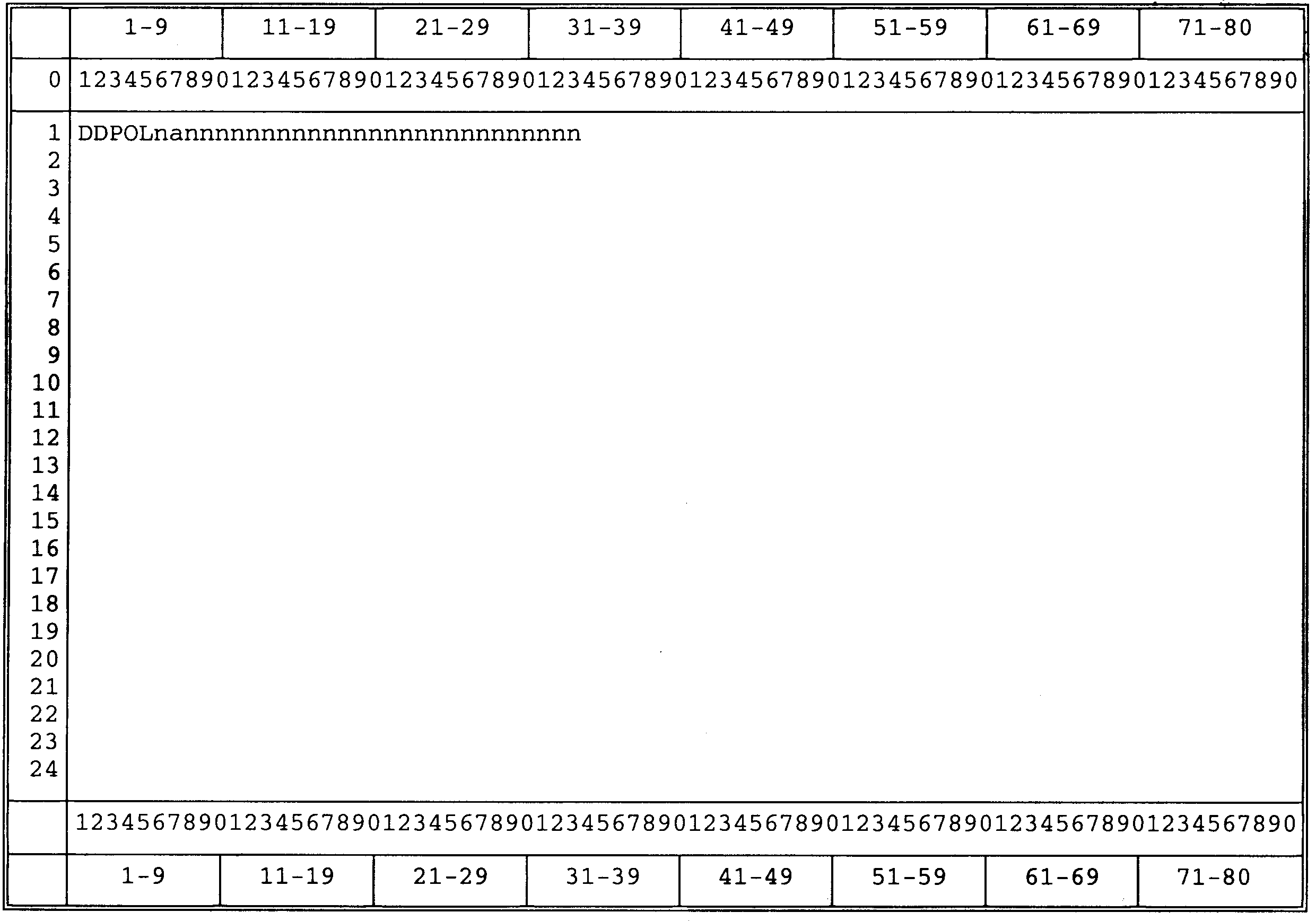
The required input for CC DDPOL is as follows:
-
Command Code
-
Command Code Definer
-
File Type Code
-
Routing Transaction Number (RTN)
-
Bank Account Number (BAN)
-
-
The input screen is shown in Exhibit 2.3.74-1.
# Command Code DDPOL Valid Output Screens
-
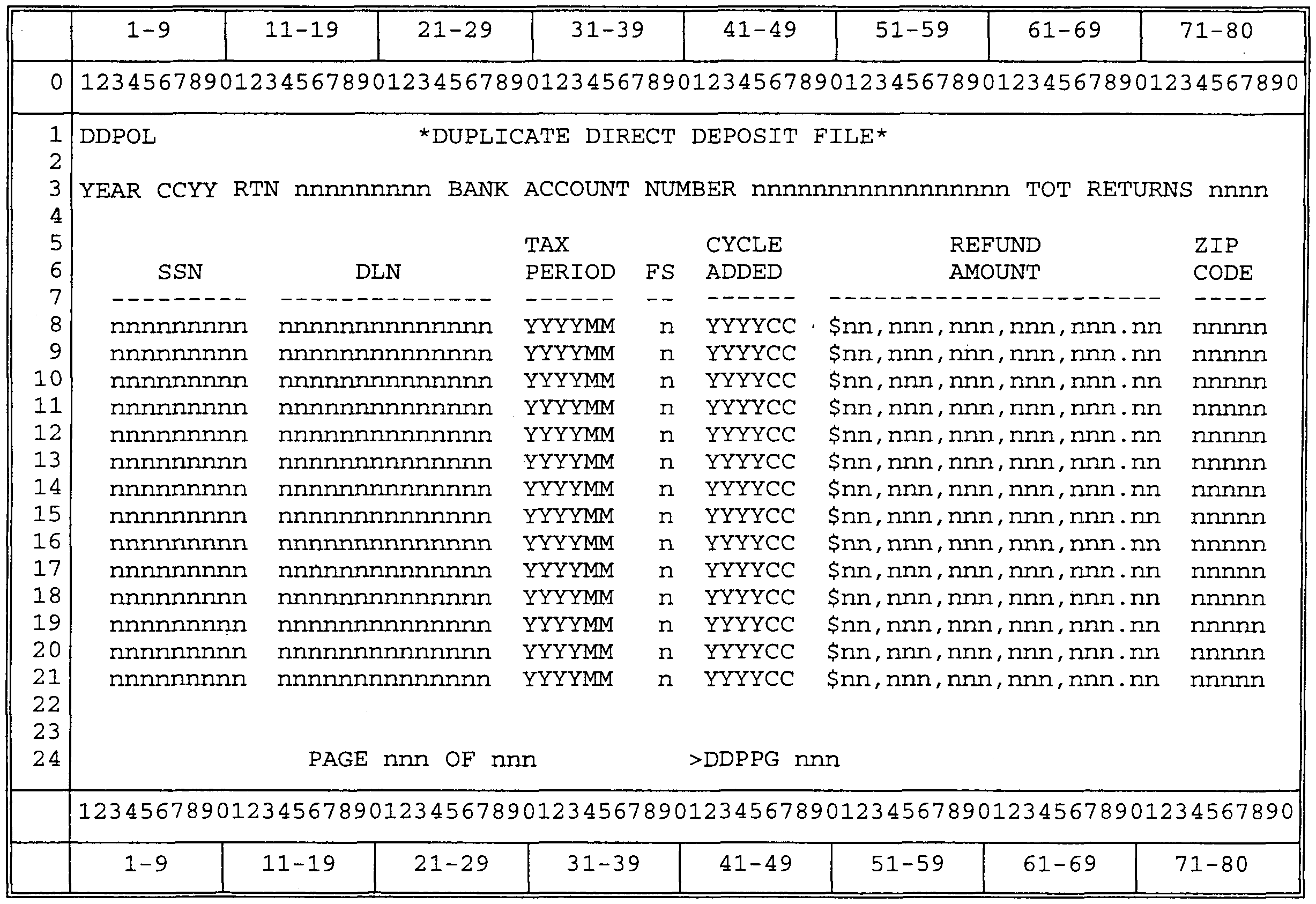
CC DDPOL will display the following:
-
Total number of returns that were filed for deposit into a specific bank account.
-
Up to 999 returns can be displayed for each tax processing year.
-
-
CC DDPOL will provide the following paging features:
-
IDRS-like paging when display of multiple returns fills a page.
-
The paging routine will automatically position the cursor following the Start of Message symbol. When the ENTER key is depressed, the terminal will display the next page or any page designated by overlaying a page number onto the format by key Input.
-
No entry key is needed to move from one page to another.
-
-
The output screen is shown in Exhibit 2.3.74-2.
# Command Code DDPOL Error Screens
-
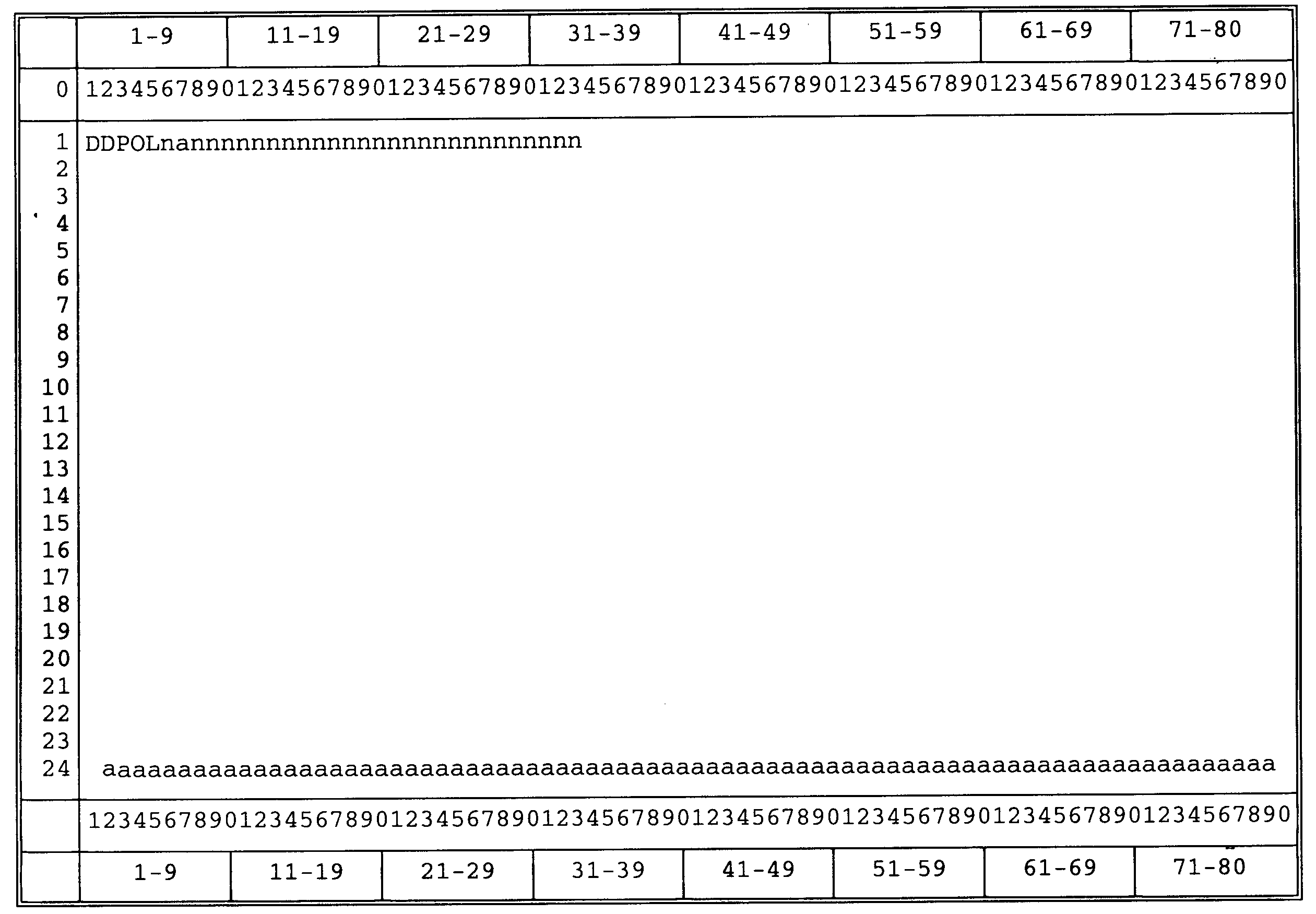
The input screen will be displayed back with one of the following error messages:
-
* * DDPOL REQUIRES A DEFINER 4, 5 or 6 —The input DDPOL command code definer is not valid.
-
** INVALID RTN REQUEST—The Routing Transaction is not numeric.
-
** DDPOL FILE UNAVAILABLE—The attempt to access the Duplicate Direct Deposit Database failed.
-
** NO MATCHING RECORD FOUND—There is no information found for the requested Routing Transaction Number/Bank Account Number in the Duplicate Direct Deposit Database.
-
* * ERROR DETECTED IN RETRIEVING DATA, CONTACT PROGRAMMER—An error has occurred when trying to retrieve a record on the Duplicate Direct Deposit database.
-
** A PAGING REQUEST WAS ENTERED BEFORE A DDPOL REQUEST—The attempt to retrieve an additional page was performed before an initial DDPOL request was made.
-
** NO ADDITIONAL INFORMATION AVAILABLE FOR THIS ACCOUNT—No additional information exists for requested Routing Transaction Number/Bank Account Number.
-
**FILE TYPE CD OF I OR B IS REQUIRED—The input File Type Code is invalid.
-
-
The error screen is shown in Exhibit 2.3.74-3.
# COMMAND CODE DDPOL Input Screen
Description: Screen format to input request.
Please click here for the text description of the image.
| LINE | POSITION | DESCRIPTION | |
|---|---|---|---|
| 1 | 01–05 | Command Code: DDPOL | |
| 1 | 06 | Command Code Definer | |
| 4 is Tax processing year 2024 (2023 tax return). | |||
| 5 is Tax processing year 2025 (2024 tax return). | |||
| 6 is Tax processing year 2026 (2025 tax return). | |||
| 1 | 07 | File Type Code | |
| I = IMF | |||
| B = BMF | |||
| 1 | 08–16 | Routing Transaction Number | |
| 1 | 17–33 | Bank Account Number | |
# COMMAND CODE DDPOL Response Screen
Description: Screen layout for requested Routing Transaction Number/Bank Account Number
Note:
This format is the initial response screen. If more Records exist enter paging command for additional screen.
Please click here for the text description of the image.
| LINE | POSITION | DESCRIPTION |
|---|---|---|
| 1 | 01–05 | Command Code DDPOL |
| 1 | 23–53 | Screen literal |
| 3 | 01–04 | Year literal |
| 3 | 06–09 | Tax year of return |
| 3 | 11–13 | RTN literal |
| 3 | 15–23 | Routing Transaction Number (RTN). (This field recaptures the RTN previously entered) |
| 3 | 25–43 | Bank Account Number literal |
| 3 | 45–61 | Bank Account Number (BAN). (This field recaptures the BAN previously entered). |
| 3 | 63–75 | Total returns literal |
| 3 | 77–80 | Total Returns for this RTN/BAN |
| 5 | 01–80 | Literals |
| 6 | 01–80 | Literals |
| 8–21 | 03–11 | SSN for IMF accounts |
| EIN for BMF accounts | ||
| 8–21 | 14–27 | DLN |
| 8–21 | 30–35 | Tax Period |
| 8–21 | 39 | Filing Status |
| For IMF: | ||
| 0 = None | ||
| 1 = Single | ||
| 2 = Married filing jointly | ||
| 3 = Married filing separately | ||
| 4 = Head of household | ||
| 5 = Qualifying widow(er) with dependent child | ||
| For BMF: | ||
| N = None | ||
| 8–21 | 42–47 | Cycle Added |
| 8–21 | 50–71 | Refund Amount |
| 8–21 | 74–78 | Zip Code |
| 24 | 16–19 | Page literal |
| 24 | 21–23 | Current Screen Number |
| 24 | 25–26 | Page literal |
| 24 | 28–30 | Total number of screens |
| 24 | 42–46 | Command Code to retrieve additional screen |
| 24 | 48–50 | Next screen number |
# COMMAND CODE DDPOL Error Screen
Description: Screen layout for error messages.
Please click here for the text description of the image.
| LINE | POSITION | DESCRIPTION |
|---|---|---|
| 1 | 01–05 | Command Code DDPOL |
| 1 | 06 | Command Code Definer |
| 1 | 07 | File Type Code |
| 1 | 08–16 | Routing Transaction Number |
| 2 | 17–33 | Bank Account Number |
| 24 | 01–79 | Error Message |
Source: view the official text
In this part (40 sections)
- 2.3.49 · Command Code EICMP
- 2.3.51 · Command Code IMFOL
- 2.3.52 · Command Codes RTVUE and RTFTP
- 2.3.53 · Command Code PMFOL
- 2.3.54 · Command Code DDBOL
- 2.3.55 · Command Codes ELFUP and ELFRQ
- 2.3.56 · Command Code ESTABR
- 2.3.57 · Command Code BRTVU
- 2.3.59 · Command Codes BMFOL and BMFOR
- 2.3.60 · Command Codes NAMES, NAMEE, NAMEI, NAMEB, FINDS, FINDE, and…
- 2.3.62 · Command Code ESTAB
- 2.3.63 · Command Codes RPVUE, RPVCU, and RPPRT
- 2.3.64 · Command Code EMFOL
- 2.3.65 · EPMF Return Transaction File On-Line (ERTVU) Research
- 2.3.66 · Command Code PLINF and PLINQ
- 2.3.68 · Command Codes DUPOL and DUPPG
- 2.3.69 · Command Code VPARS
- 2.3.70 · Command Code EFTPS
- 2.3.71 · Command Code ATINQ
- 2.3.73 · Command Codes TRDBV, TRERS, TRPRT, and R8453
- 2.3.74 · Command Code DDPOL
- 2.3.76 · Command Code ISTSD
- 2.3.77 · Command Code ISTSE
- 2.3.78 · Command Code LOCAT
- 2.3.79 · Command Code CDPWEB, (CDPTA, CDPTE)
- 2.3.80 · Command Code DDBKD
- 2.3.81 · Command Code ESTABA
- 2.3.82 · Command Code ESTABH
- 2.3.85 · Command Code DFAST and DLITE
- 2.3.86 · Command Code IRPOL
- 2.3.87 · Command Code DDBMF
- 2.4.1 · Section Titles and Command Codes for IDRS Terminal Input
- 2.4.4 · Command Code MESSG
- 2.4.5 · Command Codes QRADD, QRADDO, QRNCH, QRNCHG, RVIEW, QRACN, and…
- 2.4.6 · Command Codes LETER, LPAGE, LPAGD, LETUP, LETED, LLIST, and…
- 2.4.7 · Command Codes KAFRM, KAFAD, UPTCF, UPRCF, UPNCF, FRM3P, ADD3P,…
- 2.4.8 · Command Codes ESIGN and BSIGN
- 2.4.9 · Command Codes ENREQ, INCHG, IRCHG, BNCHG and BRCHG
- 2.4.10 · Command Codes EOREQ and EOCHG
- 2.4.11 · Command Code NMFTM