Internal Revenue Manual
IRM 2.4.14
Command Code NMFST
# Part 2. Information Technology
Chapter 4. IDRS Terminal Input
Section 14. Command Code NMFST
2.4.14 Command Code NMFST
Manual Transmittal
November 07, 2023
Purpose
(1) This transmits revised IRM 2.4.14, IDRS Terminal Input, Command Code NMFST.
Material Changes
(1) IRM 2.4.14.1 has been revised to include mandatory Internal Controls
Effect on Other Documents
IRM 2.4.14, dated April 17, 2020, is superseded.Audience
LMSB, SB/SE, TE/GE, W&I.Effective Date
(11-07-2023)
Kaschit Pandya
Acting, Chief Technology Officer
# Program Scope and Objectives
-
Overview: This IRM section provides an overview of the NMFST Command Code.
-
Purpose: This IRM contains procedural steps for use of the NMFST Command Code. Command Code NMFST will end up to 10 transactions to a tax module that has already been established on IDRS. Only adjustments, payments, credit transfers, and penalty and interest assessments are valid inputs. DAR transactions must be pended using CC FRM77 or FRM7A. NMFST may be input from Service Center terminals only
-
Audience: These procedures apply to IRS employees who are responsible for the processing of NMFST records. These employees are located in the following areas: Large & Medium-Sized Business, Small Business/Self-Employed, Tax-Exempt & Government Entity’s, and Wage & Investment.
-
Policy Owner: IT
-
Program Owner: The Chief Information Officer (CIO) is responsible for overseeing all aspects of our systems that operate the nation’s tax infrastructure.
-
Primary Stakeholders: Large & Medium-Sized Business, Small Business/Self-Employed, Tax-Exempt & Government Entity’s, and Wage & Investment
-
Program Goals: This IRM provides the fundamental knowledge and procedural guidance for employees who work with NMFST cases. By following the processes and procedures provided by this IRM, employees will process NMFST cases in a manner that follows IRS policy and procedures while promoting the best interests of the Government
# Background
-
This IRM and the contained sections provide the user the necessary information on how to use the command code NMFST
# Authority
-
NMFST was develop to process subsequent transactions on automatic non-master file (ANMF) accounts established on the TIF
# Responsibilities
-
NMFST programmer is responsible for
-
Review and implementation of Work Requests that affects NMFST
-
Updating the contents of this IRM
-
# Program Reports
-
Entity Record: Each individual taxpayer or business is assigned a unique identity that contains information about them such as SSN/EIN,name and address. Transaction Record: Tracks the subsequent transactions for a NMFTM entity record. Transaction records must contain at least one transaction code. One or more transaction records can be assigned to a Module.
# Program Effectiveness
-
CC NMFST formatted screen allow input of subsequent transactions for NMFTM accounts. CC TXMODA is a prerequisite for CC NMFST. CC NMFST must operate within the constraints of the Realtime Operating System
# Program Controls
-
Access to this program is governed by SACS.
# Terms and Acronyms
-
ANMF AUTOMATIC NON-MASTER FILE MFT MASTER FILE TRANSACTION TIF TAXPAYER IDENTIFICATION FILE
# Related Resources
-
IRM 2.9.1 Integrated Data Retrieval Systems Procedures
# NMFST with Definer F Request
| 1. NMFST is the format request for NMFST, and must be preceded by a successful Command Code TXMODA. |
| a. | Format |
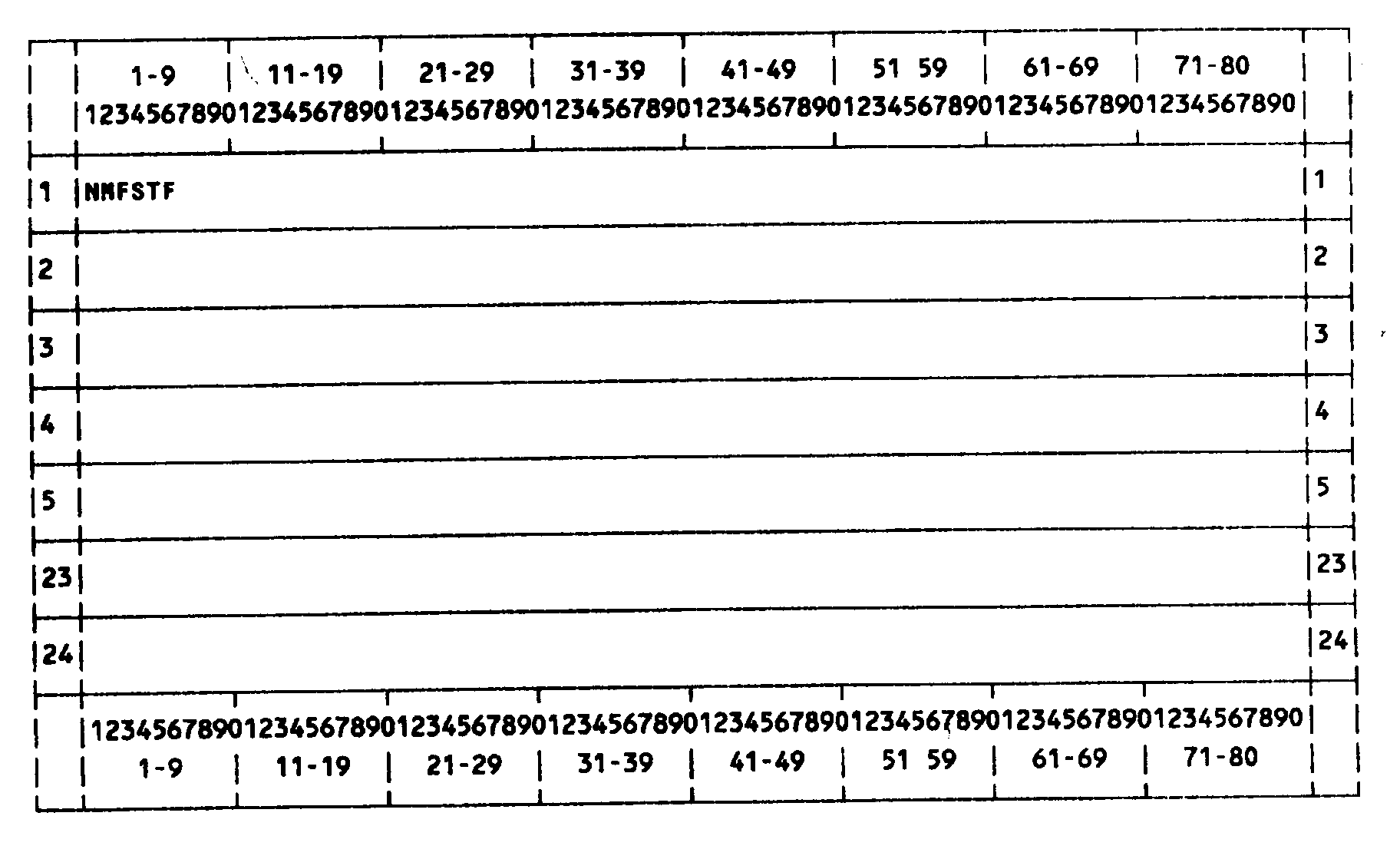
Please click here for the text description of the image.
| b. | Record Element Description |
| ITEM | LINE | POSITION | DESCRIPTION |
|---|---|---|---|
| 1 | 1 | 1–6 | NMFSTF: Command Code and Definer |
| c. | Error messages—returned on line 24 when an invalid request is made. |
| 1. | INITIALIZATION INVALID—Entry of NMFSTF was not immediately preceded by a CC TXMOD or NMFTM that correctly assessed an NMF module. |
| 2. | COMMAND CODE DEFINER INVALID—Command Code definer is other than F or blank. |
# NMFSTF Response
| NMFSTF returns the literals and fields shown on the screen display below, to be overlain for NMFST Input. |
| a. | Format |
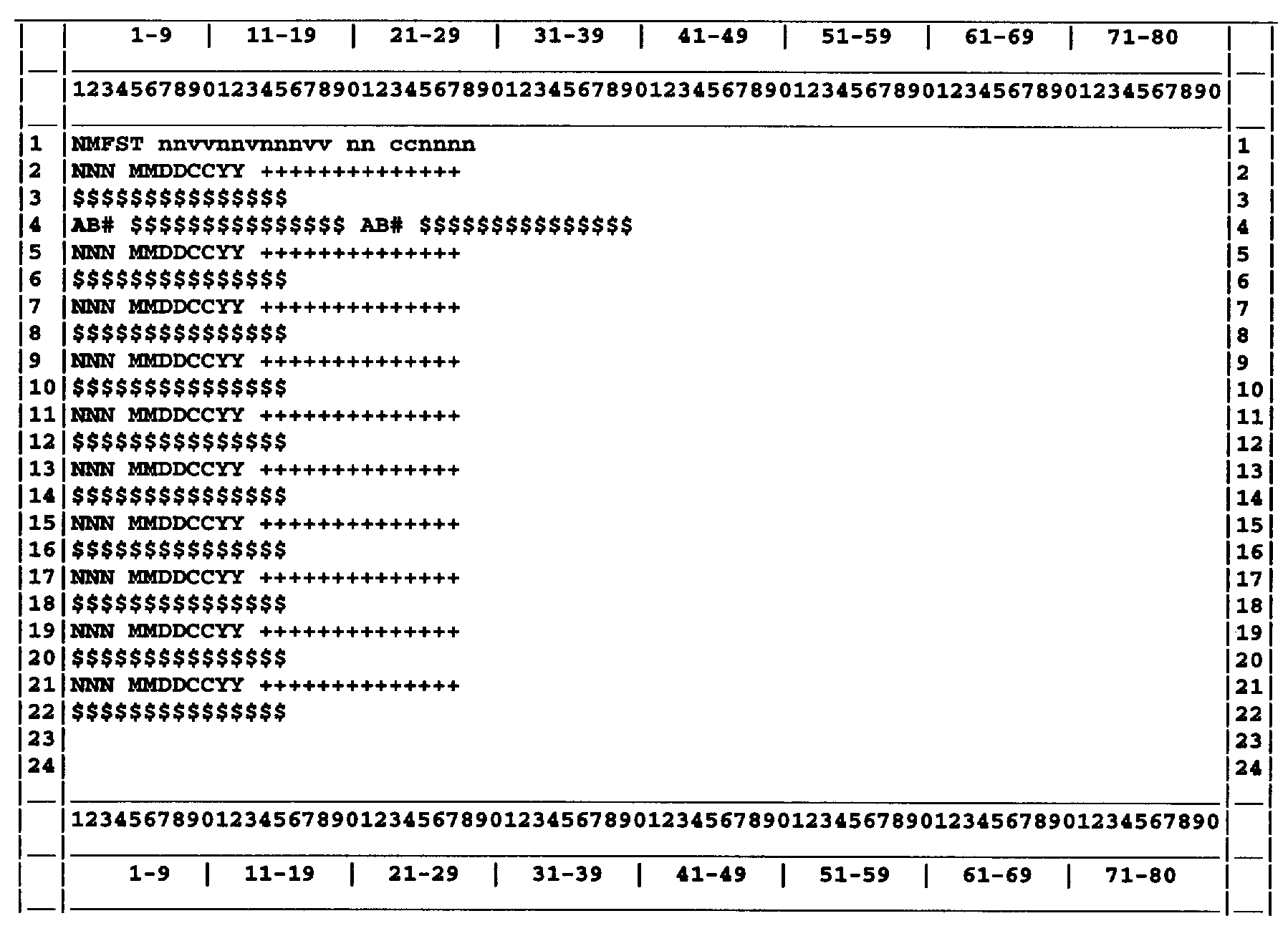
Please click here for the text description of the image.
| b. | Record Element Description |
| ITEM | LINE | POSITION | DESCRIPTION |
|---|---|---|---|
| 1 | 1 | 1–5 | NMFST: Command Code |
| 2 | 1 | 7–18 | TIN and File Source: from preceding TXMODA or NMFTM request |
| 3 | 1 | 20–21 | MFT: from preceding TXMODA or NMFTM request |
| 4 | 1 | 23–29 | Tax Period: from preceding TXMODA or NMFTM request |
| 5 | 2–22 | 1–80 | Literals generated when valid request is made. |
# NMFST Request
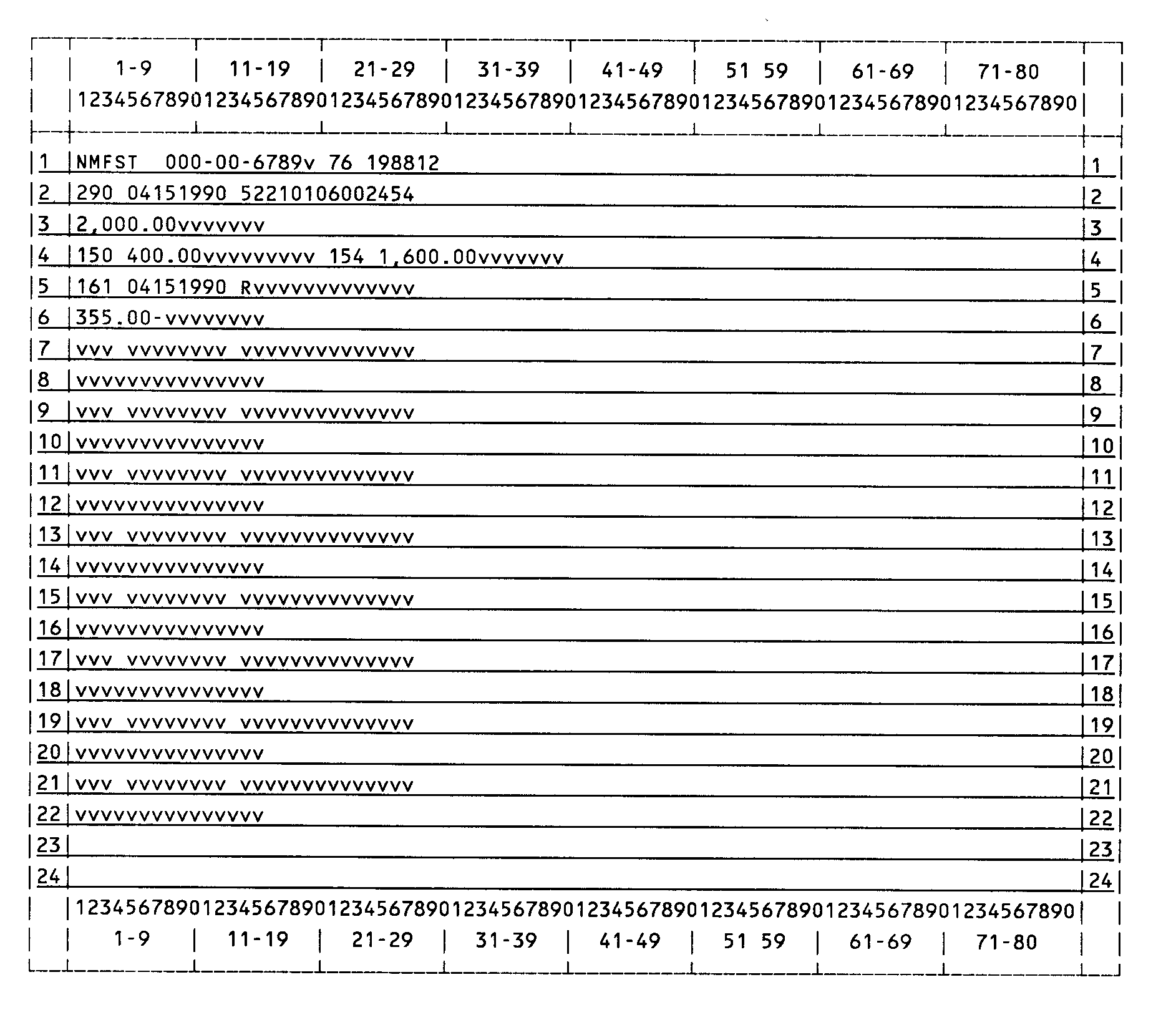
| (1) NMFST will pend up to 10 transactions to a tax module. Valid information must be entered overlaying the literals output by NMFSTF. The tax module identifying information must not be changed. |
| a. | Format |
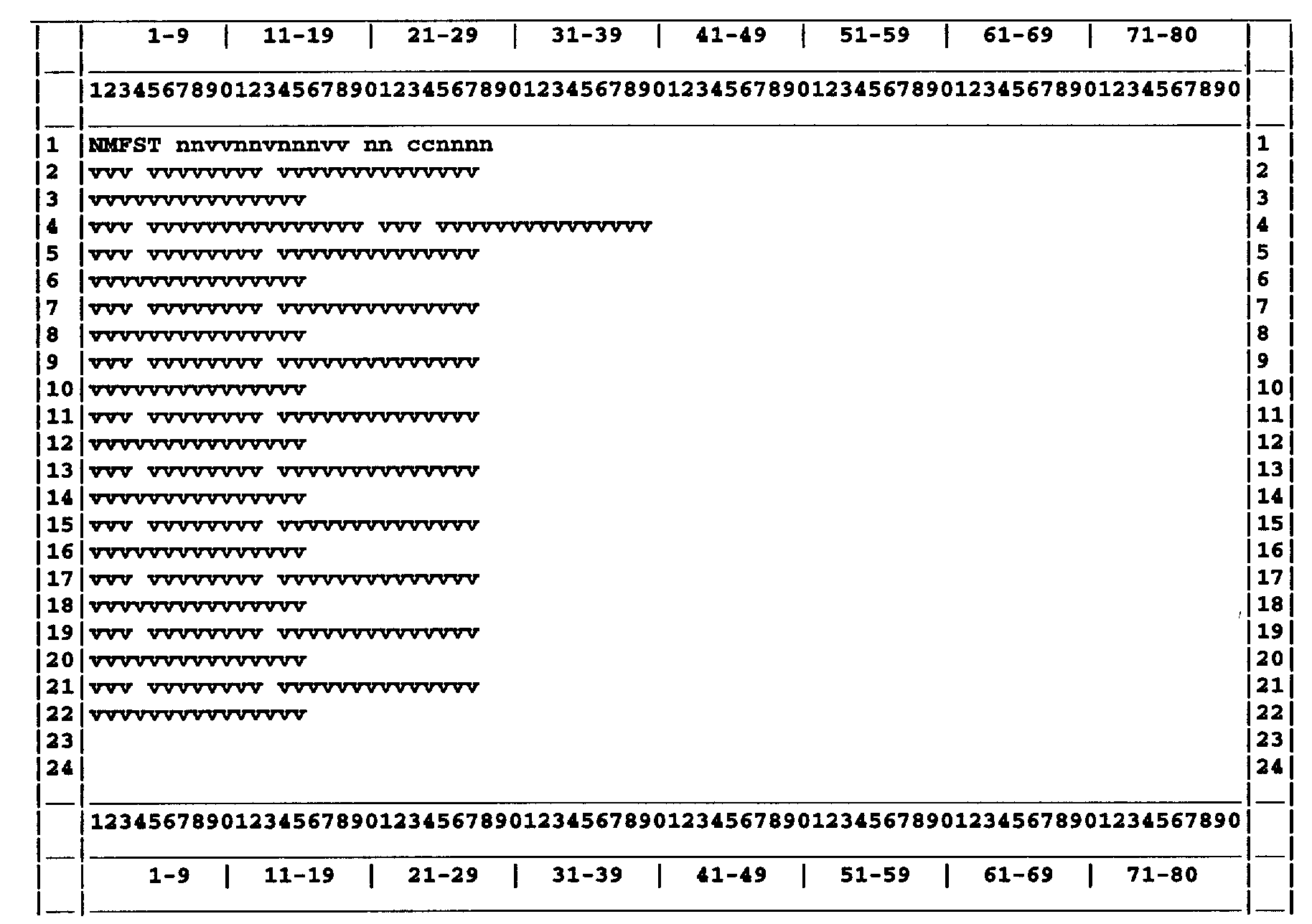
Please click here for the text description of the image.
| b. | Record Element Description |
| ITEM | LINE | POSITION | DESCRIPTION AND VALIDITY |
|---|---|---|---|
| 1 | 1 | 1–5 | Command Code: NMFST |
| 2 | 1 | 6 | Definer: Must be blank |
| 3 | 1 | 7–18 | TIN and File Source: Generated from preceding TXMODA or NMFTM. |
| 4 | 1 | 20–21 | MFT: Generated from preceding TXMODA or NMFTM. |
| 5 | 1 | 23–29 | Tax Period: Generated from preceding TXMODA or NMFTM |
| 6 | 2 | 1–3 | Transaction Code: May or may not be present. If present, must be one of the following: |
| a) Debit transactions are either 290 or 300. | |||
| b) Credit transactions are either 291 or 301. | |||
| 7 | 2 | 5–12 | Transaction Date: Must be present if Element 6 is present. The format is MMDDCCYY. |
| 8 | 2 | 14–27 | DLN: Must be present if Element 6 is present. The 14 digit DLN of the transaction. The first DLN entered on the screen must be numeric, and all 14 digits must be entered. The first two digits must be a valid district office service center. An " R" may be entered at the first character position of the DLN for subsequent transactions if it is desired that the transaction carry the same DLN as the previously entered DLN. Otherwise subsequent DLNs must be numeric. |
| 9 | 3 | 1–15 | Transaction Amount: Must be present if Element 6 is present. Valid range is .00 to 999,999,999.99. For valid credit transaction amounts, a minus sign will be displayed. |
| 10 | 4 | 1–3, 20–22 | Abstract Number: If abstract numbers and amounts are to be entered with an adjustment, overlay the "AB#" with the 3 digit abstract number. Validation will be the same as for input to NMFTM. See Exhibit 2.4.11–4 Element 59. |
| MFT | ABSTRACT NUM | MFT | ABSTRACT NUM | |
|---|---|---|---|---|
| 20 | 004, 188, 189 | 69 | 210–212 | |
| 29 | 160, 162, 177 | 70 | 173–181 | |
| 33 | 220 | 74 | 165–167 | |
| 40 | 087, 093 | 76 | 150, 163, 164 | |
| 41 | 070–072 | 200–206, 209 | ||
| 42 | 155, 157 | 77 | 218 | |
| 45 | 009–069, 073–076, 098 |
78 | 217 | |
| 46 | 022, 024, 206 | 81 | 030 | |
| 50 | 150–154 | 90 | 102, 103, 105– | |
| 53 | 220 | 117, 119–122 | ||
| 56 | 185, 186 | 94 | 075–083, 085, 086 | |
| 65 | 070–137 | 089–092, 094 | ||
| 66 | 150–154, 213, 214 | 95 | 131 |
| 11 | 4 | 5–19, 24–37 | Abstract Amount: Must be entered if Element 10 was entered. Overlay dollar signs with an edited amount from .00 to 999,999,999.99. Abstract amounts must total to equal to transaction amount on line 2 (Element 9). |
| 12 | 5, 7, 9, 11, 13, 15, 17, 19, 21 | 1–3 | Transaction Code: May or may not be present. If present, must be one of the following: |
| a) Debit Transactions | |||
| 160 170 180 200 234 240 270 280 310 320 340 350 360 402 535 607 609 611 612 641 642 651 652 662 671 672 681 682 691 692 695 702 712 732 742 762 765 772 820 830 840 850 860 |
|||
| b) Credit Transactions: | |||
| 161 181 201 235 241 271 281 311 321 341 351 361 400 430 534 606 608 610 640 650 670 680 690 694 700 710 730 740 760 764 770 800 822 832 841 842 851 852 862 |
|||
| c) Other Transactions: | |||
| 582 583 912 914 | |||
| 13 | 5, 7, 9, 11, 13, 15, 17, 19, 21 | 5–12 | Transaction Date: Must be present if Element 12 is present. If present, must be in MMDDCCYY format. |
| 14 | 5, 7, 9, 11, 13, 15, 17, 19, 21 | 14–27 | DLN: Must be present if Element 12 is present. See Element 8 for validity checks. |
| 15 | 6, 8, 10, 12, 14, 16, 18, 20, 22 | 1–15 | Transaction Amount: Must be present if Element 12 is present. Valid range is .00 to 999,999,999.99. For valid credit transaction amounts, a minus sign will be displayed |
# NMFST Response
| a. | Format |
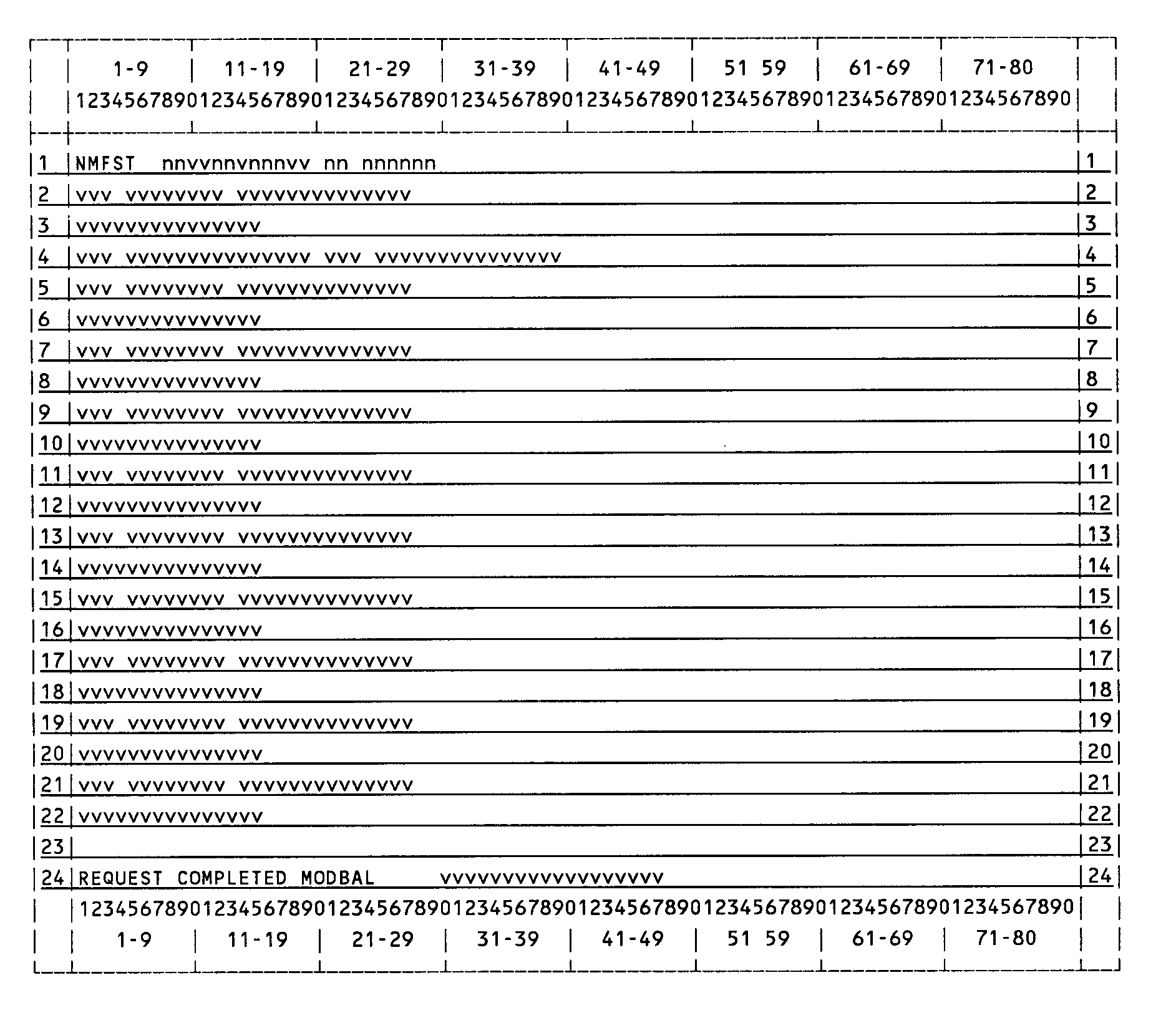
Please click here for the text description of the image.
| b. | Record Element Description |
| NOTE:All elements from Lines 1 through 22 will be returned. There will be a message on Line 24. |
| ELEMENT | LINE | POSITION | DESCRIPTION AND VALIDITY | |
|---|---|---|---|---|
| 1–15 | 1–22 | See Exhibit 2.4.14–3 | ||
| 16 | 24 | 1–17 | " REQUEST COMPLETED" , Message returned after successful NMFST. | |
| 17 | 24 | 19–40 | Updated Module Balance: In positions 26–40 of the screen will be the new module balance after a successful NMFST. The displayed module balance includes the transactions input on the screen. | |
| c. | Error Messages: Returned on line 24 when an invalid request is made. Element 18 will not be present with an error. |
| 1. INITIALIZATION INVALID—Entry of NMFST was not preceded by valid NMFSTF. Reinput TXMODA and NMFSTF or NMFSTN before trying again. | |
| 2. ID CHANGED-REINITIALIZE—the input TIN, File Source, MFT or Tax Period is not the same as that input to TXMODA or NMFTM. | |
| 3. COMMAND CODE DEFINER INVALID—Element 2 is other than F or blank. | |
| 4. CORRECT INVALID DATA—The asterisked input field(s) is invalid or inconsistent. Correct the asterisked field(s) and re-enter. The following fields may be inconsistent | |
| a. Adjustment Transaction Amount and Abstract Amount(s) | |
| b. Abstract Number and MFT Code | |
| c. Transaction Code and MFT Code | |
| d. Transaction Code and Transaction Amount: | |
| e. Transaction Amounts for credit transactions do not have a minus sign as the last character |
# NMFST Display Screen
Source: view the official text
In this part (40 sections)
- 2.3.77 · Command Code ISTSE
- 2.3.78 · Command Code LOCAT
- 2.3.79 · Command Code CDPWEB, (CDPTA, CDPTE)
- 2.3.80 · Command Code DDBKD
- 2.3.81 · Command Code ESTABA
- 2.3.82 · Command Code ESTABH
- 2.3.85 · Command Code DFAST and DLITE
- 2.3.86 · Command Code IRPOL
- 2.3.87 · Command Code DDBMF
- 2.4.1 · Section Titles and Command Codes for IDRS Terminal Input
- 2.4.4 · Command Code MESSG
- 2.4.5 · Command Codes QRADD, QRADDO, QRNCH, QRNCHG, RVIEW, QRACN, and…
- 2.4.6 · Command Codes LETER, LPAGE, LPAGD, LETUP, LETED, LLIST, and…
- 2.4.7 · Command Codes KAFRM, KAFAD, UPTCF, UPRCF, UPNCF, FRM3P, ADD3P,…
- 2.4.8 · Command Codes ESIGN and BSIGN
- 2.4.9 · Command Codes ENREQ, INCHG, IRCHG, BNCHG and BRCHG
- 2.4.10 · Command Codes EOREQ and EOCHG
- 2.4.11 · Command Code NMFTM
- 2.4.12 · Command Codes DELET and CCPYT
- 2.4.13 · Command Code TERUP
- 2.4.14 · Command Code NMFST
- 2.4.15 · Command Codes ETXCL, SEQNC, STBLK, PAYMT, PYBAL, VARIA, CRBLK,…
- 2.4.17 · Command Codes ADD24/34/48, ADC24/34/48, FRM34 and DRT24/48
- 2.4.19 · Command Codes REQ77, FRM77 and FRM7A
- 2.4.20 · Command Codes RFUND and REFAP
- 2.4.21 · Command Codes CHK64 and CHK64R
- 2.4.22 · Command Code CRMNL
- 2.4.23 · Command Code CHKCLR and CHKCL
- 2.4.24 · Command Codes FMADD, URADD, ESAPL, FMREF, URREF, FMAPL, URAPL,…
- 2.4.25 · Command Codes BDADDR, BDADD, BDAPLR, BDAPL, BDOUTR, BDOUT,…
- 2.4.26 · Command Codes FRM14, FRM49, and TDIRQ
- 2.4.27 · Command Code ASGNI/ASGNB formerly TSIGN
- 2.4.28 · Command Codes STAUP, STATI and STATB
- 2.4.29 · Command Codes TELEA, TELEC, TELED and TELER for Telephone…
- 2.4.30 · Command Codes IAGRE, IAORG, IAPND, IAREV, IADFL, and IADIS
- 2.4.31 · Command Code LEVY
- 2.4.32 · Command Code PDTUP
- 2.4.33 · Command Codes EFTNT, EFTAD and EFTOF for Electronic Funds…
- 2.4.34 · Command Code DOALL
- 2.4.35 · Command Code STN90