PA-1000 Instructions — Property Tax or Rent Rebate Claim Booklet
# PENNSYLVANIA RENT REBATE PROGRAM
PROPERTY TAX or
PA-1000 Booklet 04-25
Rebates for eligible seniors, widows, widowers and people with disabilities.
# IMPORTANT DATES
Application deadline: JUNE 30, 2026
Rebates begin: EARLY JULY, 2026
NOTE: The department may extend the application deadline if funds are available.
Applicants can exclude one-half of all Social Security income.
# APPLICATION INSIDE
INCOME MAX. REBATE
$ 0 to $ 8,550 $1,000
$ 8,551 to $ 16,040 $ 770
$16,041 to $ 19,240 $ 460
$19,241 to $ 48,110 $ 380
HOMEOWNERS
AND RENTERS
Property Tax/Rent Rebate Program applications can now be submitted online via the Department of Revenue's myPATH portal at myPATH.pa.gov.
BUREAU OF INDIVIDUAL TAXES
HARRISBURG PA 17128-0503 revenue.pa.gov
FILE YOUR APPLICATION ONLINE
# WHAT'S NEW
Governor Josh Shapiro during his first year in office signed into law a historic expansion of the Property Tax/Rent Rebate (PTRR) program, which means more Pennsylvanians now qualify — and at the same time — the vast majority who qualified in prior years are seeing their rebates increase. This was the first time the program was expanded since 2006. The expansion:
- Increased the maximum standard rebate to $1,000.
- Increased the income cap for both homeowners and renters.
- Increased the income cap to grow with inflation each year moving forward.
This final provision is working as intended and the income limits for the PTRR program have again increased for this application year. This ensures the program keeps up with rising prices and remains impactful for older Pennsylvanians and residents with disabilities.
Additionally, with the recent expansion of the program, individuals who are a resident stockholder of a cooperative housing corporation, such as a condominium, should file as either an owner/renter, or as a renter. Please see the additional instructions on Pages 4, 11, and 12.
WHAT IS THE PROPERTY TAX/RENT
REBATE PROGRAM?
A program that supports homeowners and renters across Pennsylvania by providing rebates on property taxes or rent paid in the prior year.
AM I ELIGIBLE?
The program benefits income-eligible Pennsylvanians age
65 and older; widows and widowers age 50 and older; and people with disabilities age 18 and older.
HOMEOWNERS AND RENTERS
Income Maximum Rebate
$ 0 to $ 8,550 $1,000
$ 8,551 to $16,040 $ 770
$16,041 to $19,240 $ 460
$19,241 to $48,110 $ 380
# ELECTRONIC PTRR FILING
Pennsylvanians can submit a Property Tax/Rent Rebate application online using myPATH at mypath.pa.gov. It's free to use and benefits include:
- Faster processing and direct deposit
- Error-reducing automatic calculators
- Ability to upload required documents
- Security features to safeguard sensitive information
- User-friendly features not available when filing by paper
CHECK APPLICATION STATUS
You can check the status of a rebate online using myPATH at mypath.pa.gov or by calling
1-888-PATAXES (728-2937).
If you include a valid phone number on your application, you will receive updates automatically. The department will make automated phone calls to advise when your claim is received and again when your claim is approved for payment. These calls begin around April.
# DIRECT DEPOSIT
Get your rebate faster with direct deposit.
See Pages 11 and 12 for details.
2 PA-1000 Pennsylvania Property Tax or Rent Rebate Program
# BEFORE YOU BEGIN STATE SUPPLEMENTARY PAYMENT RECIPIENTS
The State Supplementary Payment (SSP) is not included on your SSA-1099 form. The Department of Human Services will issue annual statements to verify your SSP benefit. SSP is still considered reportable income. As with other Social Security income, only half of the SSP income needs to be included on Line 4 of the Property Tax/Rent Rebate claim form.
SOCIAL SECURITY RECIPIENTS WITH
PA ADDRESSES
If you were a Pennsylvania resident for all of 2025, you do not have to submit proof of your Social Security income including Social Security retirement and Supplemental Security benefits. The Social Security Administration provides Social Security income information to the PA Department of Revenue. The PA Department of Human Services will provide State Supplementary Payment information to the department.
However, you or the person who prepares your claim will need these statements to correctly calculate the amount of your rebate. If none of these documents are available, you or your preparer will need to estimate the amount you received during the year. If the dollar amount you provide is not correct, the department will adjust the amount of your rebate based upon income amounts reported directly to the department by the Social Security Administration or the Department of Human Services.
SOCIAL SECURITY RECIPIENTS WITHOUT
PA ADDRESSES
If your address in Social Security Administration records was not a Pennsylvania address for 2025, you must submit a copy of one of the following documents as proof of your 2025 Social Security income: Form SSA-1099 reporting your 2025 Social Security benefits, a statement from Social Security that reports the monthly or yearly Social Security/Supplemental Security Income benefits you received during 2025, or a bank statement showing the amount of Social Security/Supplemental Security Income benefits deposited into your account during 2025.
# PHILADELPHIA RESIDENTS
Please read the special filing instructions on Page 10.
# ELIGIBILITY REQUIREMENTS
You are eligible for a Property Tax/Rent Rebate for claim year 2025, if you meet the requirements in each of the three categories below:
CATEGORY 1 - TYPE OF FILER a. You were 65 or older as of Dec. 31, 2025; b. You were not 65, but your spouse who lived with you was 65 or older as of Dec. 31, 2025; c. You were a widow or widower during all or part of 2025 and were 50 or older as of Dec. 31, 2025; or d. You were permanently disabled and 18 or older during all or part of 2025, you were unable to work because of your medically determined physical or mental disability, and your disability is expected to continue indefinitely. If you received Supplemental Security Income (SSI) payments, you are eligible for a rebate if you meet all other requirements.
NOTE: If you applied for Social Security disability benefits and the Social Security Administration did not rule in your favor, you are not eligible for a Property Tax/Rent Rebate as a disabled claimant.
# CATEGORY 2 - ELIGIBILITY INCOME
When calculating your total eligible annual household income, exclude one-half of your Social Security benefits as shown in Box 5 of your SSA-1099 statement, one-half of your Supplemental Security Income benefits, one-half of your State Supplementary Payment benefits, and one-half of any Railroad Retirement Tier 1 benefits as shown on Form RRB-1099.
Your total eligible annual household income, including the income that your spouse earned and received while residing with you, was $48,110 or less in 2025.
You must report all items of income, except the nonreportable types of income listed on Pages 8 and 9, whether or not the income is taxable for federal or PA income tax purposes.
NOTE: There may be differences between eligibility income and PA-taxable income. Please see specific line instructions for each category of income.
CATEGORY 3 - OWNER, RENTER, OR
# OWNER/RENTER
To file as a property owner, renter, or owner/renter, you must meet all requirements for one of the following categories:
OWNER a. You owned and occupied your home, as evidenced by a contract of sale, deed, trust, or life estate held by a grantee; b. You occupied your home (rebates are for your primary residence only); and c. You or someone on your behalf paid the 2025 property taxes on your home.
RENTER a. You rented and occupied a home, apartment, nursing home, boarding home, or similar residence in Pennsylvania; b. Your landlord paid property taxes or agreed to make a payment in lieu of property taxes on your rental property for 2025 (see Page 11); and c. You or someone on your behalf paid the rent on your residence for 2025.
OWNER/RENTER a. You owned, occupied, and paid property taxes for part of the year and were a renter for part of the year; b. You owned and occupied your home and paid property taxes and paid rent for the land upon which your home is situated; or c. You paid rent for the home you occupied, and paid property taxes on the land upon which your home is situated.
CAUTION: As a renter, if you received cash public assistance during 2025, you are not eligible for any rebate for those months you received cash public assistance. Please complete a PA-1000 Schedule D (enclosed in this booklet).
IMPORTANT: With the expansion of the program and the new income thresholds for renters, individuals who are a resident stockholder of a cooperative housing corporation, such as a condominium, will most likely qualify for a higher rebate if they file as an owner/renter or just as a renter.
The maximum standard rebate cannot exceed $1,000. If your rent exceeds $5,000, and your property taxes are less than $1,000, you should file as a renter, not as an owner/renter.
PROOF DOCUMENTS THAT FIRST
TIME FILERS MUST SUBMIT
IMPORTANT: Please send photocopies, since the department cannot return original documents. Print your Social Security number (SSN) on each proof document that you submit with your claim form.
- If you are age 65 or older, provide proof of your age.
- If you are under age 65 and your spouse is age 65 or older, provide proof of both your and your spouse's age.
- If you are a widow or widower age 50 to 64, provide proof of your age and a photocopy of your spouse's death certificate.
- If you are permanently disabled, age 18 to 64, you must provide proof of your age and proof of your permanent disability.
PROOF OF AGE
NOTE: If you receive Social Security or SSI benefits and have proven your age with the Social Security Administration, you do not need to submit proof of age.
IMPORTANT: The department accepts photocopies of the following documents as proof of your age. Do not send your original documents since the department cannot return original documents.
- Birth certificate
- Blue Cross or Blue Shield 65 Special Card
- Church baptismal record
- Driver's license or PA identification card
- Hospital birth record
- Naturalization/immigration paper, if age is shown
- Military discharge paper, if age is shown
- Medicare card
- PACE/PACENET card
- Passport
The department will not accept a Social Security card or hunting or fishing license as proof of age.
If you have questions on other types of acceptable documents, please call the department at 1-888-222-9190.
PROOF OF DISABILITY
- For Social Security disability, SSI permanent and total disability, Railroad Retirement permanent and total disability, or Black Lung disability, provide a copy of your award letter.
- For Veterans Administration disability, provide a letter from the Veterans Administration stating that you are 100 percent disabled.
- For Federal Civil Service disability, provide a letter from
Civil Service stating that you are 100 percent disabled.
- If you do not qualify under any of the disability programs mentioned above, did not apply for Social Security benefits, or do not have a letter from the Veterans Administration or Civil Service Administration, you must submit a Physician's Statement of Permanent Disability (PA-1000 PS), enclosed in this booklet. The form must describe your disability as permanent and your physician must sign the statement to certify that the information is true and accurate to the best of his/her knowledge and belief.
IMPORTANT: The Physician's Statement of Permanent
Disability cannot be used if you were denied Social
Security disability. The Department of Revenue has the legal authority to require additional evidence that you are permanently disabled and eligible for a rebate.
HOUSEHOLDS WITH MORE THAN
ONE QUALIFIED CLAIMANT
Only one member of your household may file a claim even if more than one person qualifies for a rebate. If someone other than your spouse appears on the deed or the lease, please complete a PA-1000 Schedule F (enclosed in this booklet). You may apply for only one rebate each year.
# DECEASED CLAIMANT
To be eligible for a rebate, the claimant must have lived at least one day of a claim year, owned and occupied and paid taxes or rented and occupied and paid rent for the claim year during the time period the claimant was alive.
The property tax paid for a deceased claimant will be prorated based upon the number of days the claimant lived during the claim year. See Schedule A for the calculation of the prorated property tax rebate.
To determine if a deceased claimant is eligible for a rebate, a deceased claimant's claim form must also include an annualized income amount in the calculation of total household income. See Schedule G, specifically the instructions for Line 11g, for information on the calculation of annualized income to be included in household income. A copy of the death certificate must also be included with the claim form.
A surviving spouse, estate or personal representative may file a claim on behalf of a deceased claimant. A personal representative can also have a previously filed rebate issued in his or her name, instead of the name of the decedent, in certain circumstances. Please see sections entitled SURVIVING SPOUSE, AN ESTATE, and PERSONAL REPRESENTA-TIVE for details.
# SURVIVING SPOUSE
The surviving spouse can file the completed claim and include a copy of the death certificate and a letter stating that he/she was the spouse of the claimant at the time of death.
The surviving spouse may sign on the claimant's signature line.
OR
If the surviving spouse is eligible to file a claim, he/she can file under his/her own name instead of submitting a claim using the deceased individual's claim form.
The surviving spouse should print his/her name, address, and Social Security number (SSN) in Section I, and follow the filing instructions. The surviving spouse should furnish proof required for a first time filer. Do not use the label the department sent to the decedent in the booklet. The surviving spouse should enter the deceased spouse's SSN and name in the spouse information area, and fill in the oval in box 3 on the claim form next to "Spouse" and fill in the date of death.
# AN ESTATE
The executor or the administrator of the claimant's estate may file the claim and submit a Short Certificate showing the will was registered or probated. When there is no will and there are assets (an estate), submit a copy of the Letters of Administration. A Short Certificate or Letters of Administration can be obtained from the county courthouse where the death is recorded. The person filing on behalf of the deceased person must fill in the oval next to "Claimant" in box 3 of the claim form and provide the date of death. The person may sign on the claimant's signature line.
# PERSONAL REPRESENTATIVE
If a person dies and there is no will, the will has not been registered or probated or there is no estate, then a personal representative may file a claim on behalf of an eligible decedent.
A decedent's personal representative must fill in the oval next to "Claimant" in box 3 of the claim form and provide the date of death, submit a copy of the decedent's death certificate, a DEX-41, Application for Refund/Rebate Due the Decedent, and a receipted copy of the decedent's funeral bill showing that the personal representative personally paid the decedent's funeral expenses in an amount that is greater than or equal to the amount of the Property Tax/Rent Rebate to which the decedent is entitled.
If a person dies after filing a claim and there is no will, or if the will has not been registered or probated, or there is no estate, then a personal representative can also request that the department change the rebate to be issued into his/her name. In cases where the rebate check has been received but cannot be cashed, the check must be returned with a request to have the rebate issued in the name of the personal representative. The decedent's personal representative must submit a copy of the decedent's death certificate, a DEX-41, Application for Refund/Rebate Due the Decedent, and a receipted copy of the claimant's funeral bill showing that the personal representative personally paid the funeral expenses in an amount that is greater than or equal to the amount of the Property Tax/Rent Rebate to the claimant is entitled.
The DEX-41, Application for Refund/Rebate Due the
Decedent, can be obtained by visiting the department's website at revenue.pa.gov or by using one of the department's Forms Ordering Services found on Page 18.
If you have any questions regarding the filing of a claim on behalf of a deceased claimant, please call the department at 1-888-222-9190.
# PRIVACY NOTIFICATION
By law, (42 U.S.C. § 405(c)(2)(C)(i); 61 Pa. Code §117.16) the Pennsylvania Department of Revenue has the authority to use the Social Security number (SSN) to administer the Property Tax or Rent Rebate Program, the Pennsylvania personal income tax and other Commonwealth of Pennsylvania tax laws. The department uses the SSN to identify individuals and verify their incomes. The department also uses the SSN to administer a number of tax-offset and child-support programs federal and Pennsylvania laws require. The commonwealth may also use the SSN in exchange-of-tax-information agreements with governmental authorities.
Pennsylvania law prohibits the commonwealth from disclosing information that individuals provide on income tax returns and rebate claims, including the SSN(s), except for official purposes.
PA - 1000 FILING INSTRUCTIONS
# SECTION I - SOCIAL SECURITY NUMBER, NAME, ADDRESS, AND RESIDENCE INFORMATION
- Do not include any punctuation such as apostrophes, commas, periods, and hyphens.
- Use black ink. Another color such as red ink will delay the processing of your rebate claim.
- Do not use pencil or pens labeled as gel pens or any red ink.
- Print all information on your claim neatly inside the boxes.
- Use upper case (capital) letters. Use a blank box to separate words.
- Print one letter or number in each box when entering your Social Security number, name, address, dollar amounts, and other information. If your name, address, or city begins with Mc, Van, O', etc., do not enter a space or a punctuation mark.
1-888-222-9190 5
I
Check your label for accuracy. If incorrect, do not use the label. Complete Section I.
Your Social Security Number Spouse's Social Security Number
PLEASE WRITE IN YOUR SOCIAL SECURITY NUMBER(S) ABOVE
Last Name First Name MI
First Line of Address
Second Line of Address
City or Post Office State ZIP Code
CODES
*
# REQUIRED
Spouse's First Name MI County Code School District Code Country Code
- *
4 5 6
Claimant's Birthdate Spouse's Birthdate Daytime Telephone Number
M M D D Y Y M M D D Y Y
7 8
When completing the information in Section I, the following guidelines must be followed:
- The claimant's SSN must be entered on the application. The spouse's SSN must also be entered if the claimant and spouse resided together for the entire year. Do not enter the spouse's SSN if they were deceased during the claim year.
2 Enter the claimant's name as last name, first name, and middle initial.
- Enter the current address of the claimant (or the address where correspondence is to be delivered).
This should match the address on the tax bills or the current rental address; if not, an explanation must be included. There are two lines for entering an address.
For the First Line of Address, enter the street address. If the address has an apartment number
(APT), suite (STE), floor (FL), or rural route number
(RR), enter it after the street address. If the street address and the apartment number, suite, etc. do not fit on the First Line of Address, enter the street address on the Second Line of Address and the apartment number, suite, etc. on the First Line of Address. For the Second Line of Address, enter the post office box, if applicable. If there is no post office box, leave the Second Line of Address blank.
The U.S. Postal Service prefers that the actual delivery address appears on the line immediately above the city, state, and ZIP code.
On the third line, enter the city or post office. If either exceeds 14 letters, use the approved postal abbreviation. Also enter the two-letter state abbreviation and five-digit ZIP Code.
- If the spouse is deceased during the claim year, fill-in completely the oval in box 3 of the claim form next to "Spouse" and provide the date of death. This is especially important if the spouse's name still appears on the tax bill (whether living or deceased).
- Enter the two-digit county and five-digit school district codes indicating where the claimant resided as of
Dec. 31 of the claim year (see pages 15 - 17). If you do not know the name of the county or school district where you reside, you can either check the county and school property tax bills used to complete this claim, or you can obtain this information from the Online Customer Service Center at revenue.pa.gov.
- If the address is in the United States, you are not required to enter the country code. If the current mailing address is in another country but you are claiming a rebate because you lived at least part of the year in Pennsylvania and meet the eligibility requirements of the program, you must enter the alphabetic abbreviation for the country. A list of country codes can be found at irs.gov/e-file-providers/country-codes.
- Enter the birth date of all claimants. A claimant must provide their birth date, and if applicable, their spouse's birth date, and name.
- A daytime telephone number should be provided. The department will make automated phone calls to advise when applications are received and again when they are approved for payment.
# SECTION II - FILING STATUS CATEGORIES
Line 1 - Please fill in the oval that shows your correct filing status. Fill in only one oval. Filling in more than one oval may reduce the amount of your rebate.
(P) Property Owners: Fill in this oval if you owned and occupied your home for all or part of 2025 and did not rent for any part of the year.
(R) Renters: Fill in this oval if you rented and occupied your residence for all or part of 2025.
(B) Owner/Renter: Fill in this oval if you owned and occupied your residence for part of 2025, and also rented and occupied another residence for the rest of 2025, or if you owned your residence and rented the land where your residence is located.
EXAMPLE: John pays property taxes on a mobile home that he owns and occupies. His mobile home is on land that he leases. John may claim a property tax rebate on the mobile home and a rent rebate on the land. See Pages 9, 10, and 11 for documents you must send as proof of property taxes or rents paid.
Line 2 - Certification. Please read each description and select the type of filer that applies best to your situation as of Dec. 31, 2025. A surviving spouse age 50 to 64 is eligible for a rebate as a widow or widower, while a surviving spouse who is 65 or older can file as a claimant.
A surviving spouse under 50 may be able to file a claim for a deceased claimant if the deceased was 65 or older.
Please complete the claim form using your Social Security number, name and address, and supply all appropriate documentation. a. Claimant age 65 or older b. Claimant under age 65, with a spouse age 65 or older who resided in the same household (You must submit proof of your and your spouse's age the first time you file.) c. Widow or widower, age 50 to 65 (If your most recent marriage ended in divorce, you do not qualify as a widow/widower.) d. Permanently disabled and age 18 to 64 See Page 4 for acceptable proof of age documents.
Line 3 - If you are filing on behalf of a decedent (a claimant who died during the claim year who otherwise would have been an eligible claimant under a, b, c, or d for Line 2 above), completely fill in the oval next to "Claimant" in box 3 of the claim form and provide the date of death.
If your spouse died "during the claim year" completely fill in the oval next to "Spouse" and provide the date of death.
A copy of the death certificate must be included with the claim form for each decedent.
SECTION III - LINES 4 THROUGH 18
You must report the total household income you earned and/or received during 2025 for each category, which includes your spouse's income earned and/or received while residing with you.
All claimants must submit proof of annual income.
IMPORTANT: The department reserves the right to request additional information or make adjustments to federal data if credits or deductions were taken to reduce income.
CAUTION: Spouses may not offset each other's income and losses.
The department has the legal authority to require evidence of the income you report on your claim. The following lists the kinds of income you must report and the documents you must submit as proof of the reported income. You must include the income that your spouse received while residing with you. See Pages 8 and 9 for a list of the kinds of income that you do not need to report.
NOTE: Print your Social Security number on each Proof Document that you submit with your claim form.
Line 4 - Include one-half of your 2025 Social Security Benefits as shown in Box 5 of your benefit statement SSA-1099, one-half of your 2025 SSI, one-half of your 2025 Social Security Disability Income, and one-half of your 2025 State Supplementary Payment. No documentation is required, if using a PA address.
Line 5 - Include one-half of your Railroad Retirement Tier 1 Benefits. Submit a copy of form RRB-1099.
CAUTION: The total income from old age benefit programs from other countries, such as Service Canada Old Age Security, must be converted into U.S. dollars and reported on Line 6.
Line 6 - Include the gross amount (not the taxable amount) of pensions, annuities, Individual Retirement Account distributions, Tier 2 Railroad Retirement Benefits, and Civil Service Disability Benefits. Do not include Black Lung Benefits, federal veterans' disability payments, or state veterans' benefits. State veterans' benefits include service connected compensation or benefits of any kind provided to a veteran or unmarried surviving spouse paid by a commonwealth agency or authorized under the laws of the commonwealth. Submit photocopies of pension/annuity benefits statements along with other forms 1099 showing income for 2025.
IMPORTANT: Do not include rollovers from Individual Retirement Accounts and employer pensions. However, proof must be provided. Proof includes, but is not limited to, a federal Form 1099-R showing a rollover or other documentation indicating that the distribution was rolled into a new account.
If you have one or more distributions from annuity, life insurance, or endowment contracts reported on Form 1099-R that are included as interest income on your PA-40 Personal Income Tax Return, please write "Included as Interest Income on PA-40" across the top of any Form 1099-R for such distributions and include copies of all your Forms 1099-R with your claim form.
Line 7 - Report interest and dividends received or credited during the year, whether or not you actually received the cash. If you received dividends and capital gains distributions from mutual funds, report the capital gains distributions portion of the income as dividends, not as gains from the sale or exchange of property. Include interest received from government entities. You must also include all tax-exempt interest income from direct obligations of the U.S. government, any state government, or any political subdivision thereof in the amount shown on Line 7.
SUBMIT THE FOLLOWING:
- A copy of your federal Form 1040 Schedule B or your PA-40 Schedule A and/or B; or copies of any federal Forms 1099 you received; OR
- A copy of the front page of your PA or federal income tax return verifying the income reported on Line 7.
IMPORTANT: If you received capital gains distributions from a mutual fund, you must use PA Schedule B or the front page of your PA tax return to verify your income. If you have PA tax-exempt interest income, you must include federal Form 1040 Schedule B along with a copy of the front page of your federal tax return.
Line 8 - Include gains or losses you realized from the sale of stocks, bonds, and other tangible or intangible property as well as any gains or losses realized as a partner in a partnership or shareholder in a PA S corporation. Do not include capital gains distributions from mutual funds required to be reported on Line 7.
NOTE: The nontaxable gain on the sale of your principal residence must also be reported on this line. If you realized a loss from the sale of your principal residence, this loss may be used to offset any other gains you realized from the sale of tangible or intangible property. However, any net loss reported on this line cannot be deducted from any other income. You may also submit photocopies of each
# PA Schedule RK-1, PA Schedule NRK-1, or federal
Schedule K-1 that shows your gains or losses for each partnership or PA S corporation.
Submit a copy of your federal Form 1040 Schedule D, a copy of your PA-40 Schedule D, or copies of any federal Forms 1099 you received which will verify any gains or losses you realized. If you received capital gains distributions from mutual funds, do not include a copy of federal Form 1040 Schedule D. You must include a copy of your PA-40 Schedule D.
If you sold your personal residence during this claim year, submit a statement showing the sale price less selling expenses, minus the sum of the original cost and permanent improvements.
CAUTION: You may only use losses from the sale or exchange of property to offset gains from the sale or exchange of property.
Line 9 - Include net rental, royalty, and copyright income or loss realized during 2025 from property owned and rented to others, oil and gas mineral rights, royalties, or income received from a copyright as well as any net income or loss realized as a partner in a partnership or shareholder in a PA S corporation.
CAUTION: You may only use rental losses to offset rental income.
IMPORTANT: If you receive income from the rental of a portion of your own home, you must complete and submit a PA-1000 Schedule E (enclosed in this booklet). Submit a copy of your federal Form 1040 Schedule E, Part I, or PA-40 Schedule E from your income tax return. You may also submit photocopies of each PA Schedule RK-1, PA Schedule NRK-1, or federal Schedule K-1 that shows your net income or loss from rents, royalties, patents, and copyrights for each partnership or PA S corporation.
Line 10 - Include net income or loss from a business, profession, or farm, and net income or loss you realized as a partner in a partnership or a shareholder in a PA S corporation.
CAUTION: You may only use business losses to offset business income.
IMPORTANT: If you operate your business or profession at your residence, you must complete and submit a PA-1000 Schedule E (enclosed in this booklet).
Submit a photocopy of each federal Form 1040 Schedule
C or F, or PA-40 Schedule C or F from your income tax return. You may also submit photocopies of each PA
# Schedule RK-1, PA Schedule NRK-1, or federal Schedule
K-1 that shows your income or loss for each business.
Lines 11a - 11g - Other Income - Complete Lines 11a through 11g to report all other income that you and your spouse earned, received, and realized.
For each category of income on Lines 11a through 11g, you must submit proof, such as photocopies of Forms W-2, Department of Human Services cash assistance statements, your federal or PA income tax returns, and any other documents verifying income.
Line 11a. - Gross salaries, wages, bonuses, commissions, and estate or trust income not included in business, profession, or farm income.
Line 11b. - Gambling and lottery winnings, including PA Lottery, Powerball and Mega Millions winnings, prize winnings, and the value of other prizes and awards. (A PA-40 Schedule T must be submitted to verify these winnings, as well as a W-2G to document PA Lottery winnings.) Line 11c. - Value of inheritance, alimony, and spousal support money.
Line 11d. - Cash public assistance/relief, unemployment compensation, and workers' compensation benefits, except Section 306(c) benefits.
Line 11e. - Gross amount of loss of time insurance benefits, disability insurance benefits, long-term care insurance benefits (if received directly by the claimant), and life insurance benefits and proceeds, except the first $5,000 of the total death benefit payments.
Line 11f. - Gifts of cash or property totaling more than $300, except gifts between members of a household.
Line 11g. - Miscellaneous income and annualized income amount. Include any income not identified above prior to the calculation of annualized income. If a claimant died during the claim year, an annualized income amount must also be included if there is no surviving spouse. To calculate the annualized income amount, complete Schedule G. When adding amounts for Line 3 of Schedule G, do not add any negative amounts reported on Lines 8, 9, or 10.
Do not report the following income:
- Medicare or health insurance reimbursements;
- Food stamps, surplus foods, or other such non-cash relief supplied by a governmental agency;
- Property Tax/Rent Rebate received in 2025;
- The amount of any damages due to personal injuries or sickness. Damages include Black Lung benefits and benefits granted under Section 306(c) of the Workers' Compensation Security Fund Act (relating to Schedule of Compensation for disability from permanent injuries of certain classes);
- Payments provided to eligible low-income households under the commonwealth's Low Income Home Energy Assistance Program;
- Payments received by home providers of the domiciliary care program administered by the Department of Aging, except those payments in excess of the actual expenses of the care;
- Disability income received by disabled children in the household;
- Federal veterans' disability payments or state veterans' benefits received by the veteran or unmarried surviving spouse;
- The difference between the purchase price of your residence and its selling price, if you used the proceeds from the sale to purchase a new residence. This new residence must be your principal residence;
- Federal or state tax refunds;
- Spouse's income earned or received while not living with you;
- Public Assistance benefits received by children in the household, even though the check is issued in claimant's name;
- Qualified distributions from ABLE (Achieving a Better Life Experience) Savings Programs;
- Federal stimulus or economic impact payments;
- STRIVE Program credits;
- Child support; and
- Individual Retirement Account and employer pension rollovers (must provide a copy of federal Form 1099-R indicating rollover or other supporting documentation).
CAUTION: If a claimant had significant income that is not typically received in equal amounts throughout the claim year, or if the number-of-days method does not accurately calculate the annualized income, the claim may be filed using an alternative method for determining the annualized income amount to be included on Line 11g. A worksheet must be included to show how the amount of annualized income was determined in those instances. The worksheet must clearly show how the income was determined and an explanation of the reason for deviating from the Schedule G method. Examples of when the claim would be filed using an alternative method would include instances where there is income from a one-time event such as a gain on the sale of stock, lump sum payments from an IRA or annuity, an amount is reported as an inheritance, or a payment is received as a beneficiary on a life insurance policy. Proof of the deviation from the number-of-days method may be required by the department. The department will accept reasonable methods of calculating the annualized income amount.
Line 12 - If you and/or your spouse received benefits from the federal Civil Service Retirement System (CSRS) as (a) retired federal civil service employee(s) or as a surviving spouse, you may reduce your total eligibility income by 50 percent of the average retired worker Social Security payment for 2025. The average retired worker Social Security payment for 2025 is $11,432. Enter $11,432 on Line 12 only if you include CSRS benefits in Line 6. If both you and your spouse received CSRS benefits, or if you received your own CSRS benefits and CSRS benefits as a surviving spouse, enter $22,864 on Line 12. Otherwise, enter $0.
Line 13 - Add the positive income figures reported on Lines 4 through 11g, subtract the amount on Line 12 (if applicable) and enter the net result on Line 13 and 23. Do not include losses reported on Lines 8, 9, and/or 10.
IMPORTANT: If you have over $48,110 of income claimed on Line 13, you are not eligible for either Property Tax or Rent Rebate relief under this program.
# Line 14 - For Property Owners Only
Before completing Line 14 of the claim form, complete any schedules listed in the instructions for this line. If you must complete more than one schedule, you must complete them in alphabetical order. If one schedule does not apply to you, skip it, and go to the next schedule. You must carry forward, as the total tax paid, the last amount shown on the previous schedule you complete to the next schedule you complete.
Enter the total amount of the property taxes paid for your primary residence, or the amount shown as eligible property taxes paid on the last schedule completed.
IMPORTANT: If you do not enter the amount of all taxes paid on the primary residence, you will limit the department's ability to determine your eligibility for and amount of a supplemental rebate. See Page 13 for more information on supplemental rebates.
You must deduct interest or penalty payments, municipal assessments, per capita taxes, or occupation taxes included in your payment. If you paid early and received a discount, you enter the amount you actually paid on Line 14. You must also deduct other charges included in your tax bills.
See taxes that are not acceptable on Page 10.
If your name does not appear on the receipted tax bills, you must submit proof of ownership. Examples of proper proof are: a copy of the deed or a copy of the trust agreement, will, or decree of distribution if you inherited your property. If your address is not on your receipted property tax bill or mortgage statement, you also must submit a letter from your tax collector or mortgage company verifying your home address.
NOTE: If your tax bills include a name and/or names other than yours and your spouse's, you must complete PA-1000 Schedule F or submit proof that you are the sole owner of the property.
Include only the property tax on the amount of land that is necessary for your personal use.
PA-1000 Schedule A - If you owned and occupied your home for less than the entire year of 2025 or a claim is being filed on behalf of a deceased owner who died during 2025.
PA-1000 Schedule B - If you were a widow or widower age 50 to 64 who remarried in 2025.
PA-1000 Schedule E - If you used part of your residence for a purpose other than living quarters in 2025.
PA-1000 Schedule F - If your deed shows owners other than your spouse.
As proof of property tax paid, homeowners must provide photocopies of one of the following real estate documents:
- All 2025 real estate tax bills that have been marked
"paid" by the tax collector (see the instructions beginning on this page for the proper calculation of the amount on Line 14). If you paid your taxes in quarterly installments, a tax bill must be submitted for each period. For tax bills that are not marked paid by the tax collector, the department will accept a photocopy of both sides of the cancelled check along with a copy of the tax bill;
- Your year-end mortgage statement showing the amount of real estate taxes paid;
- A letter signed by the tax collector certifying that you paid your 2025 real estate taxes. The letter should also declare the total tax does not include nuisance taxes or penalty; OR
- A receipted copy of your tax billing from your owner's association or corporation. Resident stockholders of a cooperative housing corporation, such as a condominium, may qualify as property owners based on their pro rata share of the property taxes paid to the corporation for their residence.
IMPORTANT: If you are a resident stockholder and you paid rent exceeding $5,000, and your property taxes are less than $1,000, please see instructions for Line 16 and file as a renter only. If you paid rent less than $5,000, see instructions for Line 19 and file as an owner/renter.
The following types of receipted real estate tax bills are acceptable:
- County
- School district
- City
- Borough
- Township
Taxes/charges that are not acceptable (even if based on millage):
- Flat rate charges
- Footage charges
- Personal property tax
- Per capita tax
- Occupational privilege tax
- Sewer rent
- Garbage collection charges
- Municipal assessments such as, or including, road, institution, street, library, light, water, fire, debt, and sinking fund taxes
- Interest or penalty payments
If your tax bills contain any of these charges, you must deduct them when completing Line 14.
ATTENTION PHILADELPHIA RESIDENTS:
The City of Philadelphia has provided the department with electronic records of all receipted 2025 property tax bills for Philadelphia that were paid by Dec. 31,
- If you live in the City of Philadelphia and paid your 2025 property taxes by Dec. 31, 2025, do not include a copy of your receipted property tax bills. If you live in Philadelphia and paid your 2025 property taxes in 2026, please submit proof of payment as outlined in the preceding information.
NOTE: You or the person who prepares your claim will need to know the amount of tax you paid in order to correctly calculate your rebate. If you do not have a copy of your original tax bill or a copy of your tax payment, you or your preparer will need to estimate the amount of taxes you paid. If the tax amount you provide is not correct, the department will adjust the amount of your rebate based upon the paid taxes reported to the department by the City of Philadelphia.
Line 15 - To determine the amount for Line 15, start with the amount of your total income on Line 23. In The Rebate Table, find the income range that includes your Line 23 amount and circle the corresponding maximum standard rebate amount. Compare your maximum standard rebate amount to the amount on Line 14 and enter the lesser amount on Line 15. The maximum standard rebate cannot exceed $1,000.
# Line 16 - For Renters Only
PA Rent Certificate (PA-1000 Schedule RC) - You must always complete this schedule before completing Line 16 or the additional schedules noted later in the instructions for this line. If none of the additional schedules apply, report the amount from Line 8 of Schedule RC on Line 16 of your claim form.
You may claim a rebate only if you pay rent to a property owner for a dwelling that you rent for use as a home that is a self-contained unit.
NOTE: A landlord-tenant relationship exists when the landlord (lessor) provides the claimant (lessee) with a lease for a self-contained unit. This usually means a separate kitchen, bath and bedroom.
The landlord (lessor) must maintain a lease agreement, have separate utility bills, have other evidence of a selfcontained unit, and report the rental income on federal and PA tax returns. If the landlord (lessor) also claims a Property Tax/Rent Rebate, they must submit a PA-1000 Schedule E (enclosed in this booklet), and provide their federal or PA tax return. You, as the claimant for a rebate, are responsible to prove a landlord-tenant relationship.
Self-contained dwellings for rent eligible for rent rebates can include:
- Apartment in a house
- Apartment building
- Boarding home
- Mobile home
- Mobile home lot
- Nursing home
- Private home
- Personal care home
- Assisted living
- Condominium
- Domiciliary care
- Foster care
Rent Payment Subsidies - For the purpose of this rebate claim, subtract rent payment subsidies provided by or through a governmental agency from the total rent you paid. See Line 5 of the PA Rent Certificate.
Renters must provide one of the following proof documents:
# 1. A fully completed PA Rent Certificate (PA-1000
Schedule RC), filled out by the landlord, for each place you rented during the year. Keep copies for your records. Your landlord or his/her authorized agent should complete Lines 1 through 8 and sign the PA Rent Certificate.
- A fully completed PA Rent Certificate, filled out by the claimant, along with a notarized Occupancy Affidavit or rent receipts. If you cannot get your landlord to sign the form, you must still complete and submit the PA Rent Certificate (PA-1000 Schedule
RC) along with the notarized Occupancy Affidavit that is below the PA Rent Certificate. The reason the landlord's signature could not be obtained must be included. You may also submit the form with copies of your rent receipts. The rent receipts for each period in which you paid the rent must include the landlord or his/her agent's signature, the full amount of rent paid, your name and the complete address of the rental property.
NOTE: The department will not accept cancelled checks as proof of rent paid. Print your Social Security number on each proof document that you submit with your claim form.
IMPORTANT: If your landlord is a tax-exempt entity and is not required to pay property taxes on your rental property, you do not qualify for a rent rebate unless your landlord makes payments in lieu of taxes. In this situation, landlords agree to make reasonable cash payments in lieu of taxes to a local government authority (county, municipality, school district, fire/police department, etc.) in order to allow their residents to claim rent rebates.
Before completing Line 16 of the claim form, complete any schedules listed in the instructions for this line. If you must complete more than one schedule, you must complete them in alphabetical order.
If one schedule does not apply to you, skip it, and go to the next schedule. You must carry forward, as the total rent paid, the last amount shown on the previous schedule you complete to the next schedule you complete.
Report the amount shown on the last schedule that applies to you on Line 16 of the claim form.
PA-1000 Schedule B - If you were a widow or widower age
50 to 64 who remarried in 2025.
PA-1000 Schedule D - If you were a renter who received cash public assistance in 2025.
PA-1000 Schedule E - If you used part of your residence for a purpose other than living quarters in 2025.
PA-1000 Schedule F - If your lease shows persons other than your spouse or minor children.
If you were required to complete Schedules B, D, E, or F, enter the lesser amount of the total rent paid in 2025 or the amount shown as eligible rents paid, on the last schedule completed.
Line 17 - Multiply Line 16 by 20 percent (0.20).
Line 18 - To determine the amount for Line 18, start with the amount of your total income on Line 23. In The Rebate Table, find the income range that includes your Line 23 amount and circle the corresponding maximum rebate amount. Compare your maximum rebate amount to the amount on Line 17 and enter the lesser amount on Line 18.
The maximum standard rebate cannot exceed $1,000.
# Line 19 - For Owner/Renter Only
CAUTION: As an owner/renter, only fill in Oval B
(Owner/Renter) in Section II of the claim form. Do not fill in
Oval P or R. Filling in other ovals may reduce your rebate amount. If you were both a property owner and a renter in 2025, you must calculate your property tax rebate separately from your rent rebate. Complete Lines 14 and 15 to calculate your property tax rebate and complete Lines 16 through 18 to calculate your rent rebate.
Add Lines 15 and 18 - To determine the amount for Line
19, start with the amount of your total income in Line 23. In
The Rebate Table, find the income range that includes your Line 23 amount and circle the corresponding maximum standard rebate amount. Compare your maximum standard rebate amount to the sum of Lines 15 and 18 and enter the lesser amount on Line 19. The maximum standard rebate cannot exceed $1,000.
# DIRECT DEPOSIT
Line 20 - In order to comply with banking rules, direct deposits are not available for rebates going to bank accounts outside the U.S. If your bank account is outside the U.S., do not complete the direct deposit Lines 20, 21, and 22. The department will send you a paper check.
If your rebate will be going to a bank account within the
U.S., you have the option to have your rebate directly deposited.
If you want the Department of Revenue to directly deposit your rebate into your checking or savings account at your bank, credit union, or other financial institution, place an X in the appropriate box on Line 20. Then complete Lines 21 and 22.
IMPORTANT: If the direct deposit request is to a representative payee bank account or bank account for anyone other than the claimant or the claimant's spouse (in the case of a joint claim), each claim filed requesting payment to that account must include a copy of the contract, agreement, or other document authorizing the payee as the proper receiver of the claimant's rebate.
CAUTION: Be sure to enter the correct routing and account numbers. Please check with your financial institution to
# SAMPLE CHECK
Routing Number Account Number Check Number
Joe & Jane Taxpayer 50-42 0001
123 Drive Avenue 370
Nowhere, PA 78910 1234567890
Date
Pay To The Order Of:
$
Dollars
Your Bank
Commonwealth Region
Harrisburg, PA
# Memo Signature
I: 250250025 :I 202III02III086 III0001
Please do not send a copy of a blank or voided check with your rebate application. make sure your direct deposit will be accepted and to get the correct routing and account numbers. The Department of Revenue:
- Is not responsible for a lost rebate if you enter the wrong account information.
- Cannot change the banking information you enter in these spaces.
- Will send a check instead of making a direct deposit into your account if the information you entered is not accurate or up to date.
- Will convert a direct deposit payment request into a paper check to be mailed to the claimant if the department cannot verify the rebate is authorized for direct deposit into a representative payee bank account.
By placing an X in either box on Line 20, you are authorizing the department to directly deposit your rebate into your checking or savings account. Direct deposits cannot be made to Social Security Direct Express ® cards.
IMPORTANT: Do not include a copy of a blank check with your rebate application. The department cannot complete this information on your application.
# Line 21 - Routing Number
Enter your bank or financial institution's nine-digit routing number. The first two digits must be 01 through 12, or 21 through 32. Do not use spaces or special characters when entering the routing number. EXAMPLE: The routing number on the sample check above is 250250025.
If you are attempting to complete this line using a deposit slip, please contact your financial institution to determine if the routing number is correct. Many times the number on the deposit slip is for internal use by the institution and using it may delay the payment of your rebate.
NOTE: This number must be nine digits. Otherwise, your financial institution will reject the direct deposit, and the department will mail you a check.
IMPORTANT: Your check may state that it is payable through a bank different from the financial institution where you have your account (i.e. your check may have two banks listed on the face). If so, do not use the routing number on your check. Instead, ask your financial institution for the correct routing number and enter it on Line 21.
# Line 22 - Checking or Savings Account Number
Enter your checking or savings account number. Your account number may be as many as 17 digits and may contain both numbers and letters.
Enter the numbers and letters from left to right. Do not use spaces or special characters when you enter your account number and leave any unused boxes blank.
EXAMPLE: The checking account number on the sample check above is 20202086. Do not include the check number. The check number on the sample check is 0001.
If you are attempting to complete this line using a direct deposit slip, please contact your financial institution to determine if the account number is correct. Many times the number on the deposit slip is for internal use by the institution and using it may delay the payment of your rebate.
CAUTION: If your bank has recently changed ownership, the routing and account numbers on your check may be incorrect. Please verify the routing and account numbers with your bank before you enter them on Lines 21 and 22.
IMPORTANT: If you apply before the end of May and opt for direct deposit of your rebate, you may notice a zero dollar transaction on your April or May bank statement.
This transaction is part of a security process conducted to verify your account information and ensure your rebate arrives quickly and accurately. If account information cannot be verified for direct deposit, the department will send you a paper check.
# Line 23 - Total Income
Line 23 is used to determine the correct rebate amount.
Enter the amount from Line 13 of the claim form on this line and circle the corresponding Maximum Standard Rebate or Maximum Rebate amount for your income level. Use The Rebate Table.
# SECTION IV - OATH
Please read the following oath before signing the claim form.
CLAIMANT OATH: I declare that this claim is true, correct, and complete to the best of my knowledge and belief, and this is the only claim filed by members of my household. I authorize the PA Department of Revenue access to my federal and Pennsylvania personal income tax records, my PACE records, my Social Security Administration records, and/or my Department of Human Services records. This access is for verifying the truth, correctness, and completeness of the information reported in this claim.
If you do not agree with the oath, do not sign the claim form. However, the department will not process the claim form or issue a rebate without a signature.
NOTE: The Property Tax or Rent Rebate program is a benefit provided to qualifying homeowners who apply.
The Department of Revenue will not place a lien or judgment on your property because of a Property Tax/Rent Rebate paid to you.
SIGNATURES: Sign and date the claim form in the space provided. The signature must match the name listed on the label or printed on the name line. If someone other than the claimant signs the claim form, a copy of the Power of Attorney, guardianship papers, or other documents entitling that person to sign must accompany the claim form. In the case of a deceased claimant, see the instructions beginning on Page 4.
If the claimant makes a mark instead of a signature, two people must sign the form as witnesses to the claimant's mark.
Also please provide the name, address, and telephone number of the claimant's nearest relative. This helps the department locate claimants if the Post Office returns a rebate check as undeliverable.
If you are signing the claim form on the behalf of the claimant(s) under the authority of a Power of Attorney, complete the name, telephone number and address lines as indicated on Page 2 of the PA-1000, Property Tax or Rent Rebate Claim Form. You must also include a copy of the Power of Attorney form with the PA-1000 claim form when filed.
SUBMIT YOUR APPLICATION
File electronically via myPATH in order to receive your rebate faster. See Page 18.
You must complete and submit one original claim form to the Department of Revenue. Do not submit a photocopy of the claim form.
IMPORTANT: Do not use staples. Using staples delays the processing of your claim and damages your claim form and other documents.
Place your completed claim form and other necessary documents in the envelope provided. Use the checklist on the back of the envelope to verify that your claim is complete. Incomplete claims will delay your rebate. If you do not have the envelope the department provided, mail your completed claim form and necessary documents to:
# PA DEPARTMENT OF REVENUE PROPERTY TAX OR RENT REBATE PROGRAM
PO BOX 280503
HARRISBURG PA 17128-0503
# SUPPLEMENTAL PROPERTY TAX REBATES
Revenue from slots gaming is providing general property tax relief to all Pennsylvania homeowners. Supplemental property tax rebates, equal to 50 percent of taxpayers' base rebates, are available to provide extra relief to homeowners who need it the most.
Homeowners in Pittsburgh, Scranton, and Philadelphia with eligibility income of $32,070 or less will receive additional payments, as will homeowners in the rest of the state who meet the same income-eligibility requirement and pay more than 15 percent of their household income in property taxes.
IMPORTANT: If you are eligible for a supplemental payment above the maximum rebate, the department will calculate it for you. Please follow the instructions for Lines 14 and 15 on Pages 9 and 10 of this booklet to complete your rebate application; do not adjust the amounts on Line 15.
# REBATE TABLE
Maximum
# TOTAL INCOME
Rebate
From Line 13 of your claim form $ 0 to $ 8,550 $1,000 $ 8,551 to $ 16,040 $ 770 $ 16,041 to $ 19,240 $ 460 $ 19,241 to $ 48,110 $ 380
PA-1000 COMPLETION SAMPLE
Fill in your Social Security Number. Fill in only one oval for Line 1.
Fill in only one oval for Line 2.
PA-1000 2505010013
Property Tax or Rent
Rebate Claim 04-25
PA Department of Revenue
P.O. Box 280503 2025
Fill in oval if claimant is
Harrisburg PA 17128-0503 OFFICIAL USE ONLY
Check your label for accuracy. If incorrect, do not use the label. Complete Section I.
I II Fill in one oval for 1 and 2.
If your label deceased and include the date Your Social Security Number Spouse's Social Security Number
1. I am filing for a rebate as a:
P. Property Owner - See is correct, of death. Also fill in the oval instructions PLEASE WRITE IN YOUR SOCIAL SECURITY NUMBER(S) ABOVE R. Renter - See instructions Last Name First Name MI and include date of death for place it here. B. Owner/Renter - See PLACE LABEL HERE instructions spouse if applicable.
2. I Certify that as of Dec. 31, 2025,
First Line of Address I am (a):
A. Claimant age 65 or older
B. Claimant under age 65,
Discard label if Second Line of Address with a spouse age 65 or older who resided in the Fill in School District Code same household it is not correct C. Widow or widower, age City or Post Office State ZIP Code
- CODES 50 to 64
(see Pages 15 and 17). Fill in
REQUIRED D. Permanently disabled and fill in all and age 18 to 64 Spouse's First Name MI County Code School District Code Country Code 3. Deceased:
County Code (see Pages 15
- * data in Section I. Claimant
Date of death _//_
Claimant's Birthdate Spouse's Birthdate Daytime Telephone Number Spouse through 17). Fill in Country
Date of death _//_
M M D D Y Y M M D D Y Y
Dollars Cents
Code if applicable (see Page 6).
TOTAL INCOME received by you and your spouse during 2025
III
- Social Security, SSI, and SSP Income (Total benefits $ divided by 2) … 4. s
Other Income.
11a. Salaries, wages, bonuses, commissions, and estate and trust income … 11a. s
11b. Gambling and Lottery winnings, including PA Lottery winnings, prize winnings, and the value
11b. s of other prizes …
11c. s
11c. Value of inheritances, alimony, and spousal support …
Report your total Railroad
11d. Cash public assistance/relief. Unemployment compensation and workers' compensation,
11d. except Section 306(c) benefits … s
11e. Gross amount of loss of time insurance benefits, disability insurance benefits, and life insurance Retirement Tier 1 benefits here. benefits, except the first $5,000 of total death benefit payments … 11e. s
11f. Gifts of cash or property totaling more than $300, except gifts between Divide the total by 2 and enter members of a household … 11f. s
11g. Miscellaneous income and annualized income amount … 11g. s the result on Line 5.
- Claimants with Federal Civil Service Retirement System Benefits enter $11,432 or $22,864. See the instructions … 12. s
- TOTAL INCOME. Add only the positive income amounts from Lines 4 through 11g and subtract the amount on Line 12. See Page 3 for income limitations. Enter this amount on Line 23 … 13. s IMPORTANT: You must submit proof of the income you reported - See the instructions on Pages 7 to 9.
Enter the total of Lines 4 through 11g, less Line 12.
PA-1000 2025 04-25
Your Social Security Number
Property Owners
Your Name: complete Lines PROPERTY OWNERS ONLY
- Total 2025 property tax. Submit copies of receipted tax bills … 14. s 14 and 15. 15. Property Tax Rebate. Enter the maximum standard rebate Compare this amount to line 14 and amount from the table for your income level here: (__) enter the lesser amount to the right. 15. s Sample
# RENTERS ONLY
- Total 2025 rent paid. Submit PA Rent Certificate … 16. s Renters complete 17. Multiply Line 16 by 20 percent (0.20) … 17. s
- Rent Rebate. Enter the maximum rebate amount Compare this amount to line 17 and If you were both a Property from the table for your income level here: (__) enter the lesser amount to the right. 18. s
Lines 16, 17, and 18.
OWNER - RENTER ONLY
- Property Tax/Rent Rebate. Enter the maximum Compare this amount to the sum of Owner and a Renter,
- s rebate amount from the table for your income Lines 15 and 18 and enter the lesser level here: (__) amount to the right. complete Lines 14 through 19.
DIRECT DEPOSIT. Banking rules do not permit direct deposits to bank accounts outside the U.S. If your bank account is outside the U.S., do not complete the direct deposit Lines 20, 21, and 22. The department will mail you a paper check. If your rebate will be going to a bank account within the U.S., you have the option to have your rebate directly deposited. If you want the department to directly deposit your rebate into your checking or savings account, complete Lines 20, 21, and 22.
If you want your
- Place an X in one box to authorize the Department of Revenue to directly deposit your rebate Checking Enter your Routing Number rebate directly into your: … 20.
Savings here (direct deposit only). deposited, complete
- Routing number. Enter in boxes to the right … 21.
Lines 20,
- Account number. Enter in boxes to the right … 22.
21, and 22. REBATE TABLE
INCOME LEVEL Maximum Enter your Account Number 23.
Rebate
Enter the amount from Line 13 of the claim form on this line and circle the $ 0 to $ 8,550 $1,000 here (direct deposit only). corresponding Maximum Rebate $ 8,551 to $16,040 $ 770 amount for your income level.
$ 16,041 to $19,240 $ 460
$ 19,241 to $48,110 $ 380
IV An excessive claim with intent to defraud is a misdemeanor punishable by a maximum fine of $1,000, and/or imprisonment for up to one year upon conviction. The claimant is also subject to a penalty of 25 percent of the entire amount claimed.
Claimant signs here.
CLAIMANT OATH: I declare that this claim is true, correct, and complete to the best of my knowledge and belief, and this is the only claim filed by members of my household. I authorize the PA Department of Revenue access to my federal and state Personal Income Tax records, PACE records, Social Security Administration records, and/or Department of Human Services records. This access is for verifying the truth, correctness, and completeness of the information reported in this claim.
Claimant's Signature Date Witnesses' Signatures: If the claimant cannot sign, but only makes a mark.
1.
Spouse's Signature Date
2.
PREPARER: I declare that I prepared this return, and that it is to the best of my Name of claimant's power of attorney or nearest relative. Please print. knowledge and belief, true, correct, and complete.
Preparer's Signature, if other than the claimant Date Telephone number of claimant's power of attorney or nearest relative.
( )
Preparer's Name. Please print. Home address of claimant's power of attorney or nearest relative. Please print.
Preparer's telephone number City or Post Office State ZIP Code ( ) Claim filing deadline - June 30, 2026
You can call 1-888-728-2937 after June 1 to verify the status of your claim.
2505120010 2505120010
PA-1000 2505010054
Property Tax or Rent
Rebate Claim 04-25
(FI)
PA Department of Revenue
P.O. Box 280503
Harrisburg PA 17128-0503
OFFICIAL USE ONLY
Check your label for accuracy. If incorrect, do not use the label. Complete Section I.
I
START Your Social Security Number
§
II Fill in one oval for 1 and 2.
Spouse's Social Security Number
1. I am filing for a rebate as a:
P. Property Owner - See instructions
PLEASE WRITE IN YOUR SOCIAL SECURITY NUMBER(S) ABOVE
Last Name
First Line of Address
Second Line of Address
City or Post Office
Spouse's First Name
R. Renter - See instructions
First Name MI
B. Owner/Renter - See instructions
I Certify that as of Dec. 31, 2025,
2.
I am (a):
A. Claimant age 65 or older
B. Claimant under age 65, with a spouse age 65 or older who resided in the same household
C. Widow or widower, age
State ZIP Code
50 to 64
- CODES
D. Permanently disabled
REQUIRED and age 18 to 64
MI County Code School District Code Country Code
Deceased:
3.
MM/DD/YY
- *
Claimant
Date of death __
Spouse's Birthdate
Claimant's Birthdate
MM/DD/YY
III
Daytime Telephone Number Spouse
MM/DD/YY
Date of death __
Dollars Cents
TOTAL INCOME received by you and your spouse during 2025
- divided by 2) …
- Social Security, SSI, and SSP Income (Total benefits $ 5.
- Railroad Retirement Tier 1 Benefits (Total benefits $ divided by 2) …
- Total Benefits from Pension, Annuity, IRA Distributions, and Railroad Retirement Tier 2 (Do not
- include federal veterans' disability payments or state veterans' payments.) … 7.
- Interest and Dividend Income …
LOSS
8.
- Gain or Loss on the Sale or Exchange of Property … If a loss, fill in this oval … LOSS 9.
- Net Rental Income or Loss … If a loss, fill in this oval … LOSS 10.
- Net Business Income or Loss … If a loss, fill in this oval … Other Income.
11a.
11a. Salaries, wages, bonuses, commissions, and estate and trust income …
11b. Gambling and Lottery winnings, including PA Lottery winnings, prize winnings, and the value
11b. of other prizes …
11c.
11c. Value of inheritances, alimony, and spousal support …
11d. Cash public assistance/relief. Unemployment compensation and workers' compensation,
11d. except Section 306(c) benefits …
11e. Gross amount of loss of time insurance benefits, disability insurance benefits, and life insurance
11e. benefits, except the first $5,000 of total death benefit payments …
11f. Gifts of cash or property totaling more than $300, except gifts between
11f. members of a household …
11g. Miscellaneous income and annualized income amount … 11g.
- Claimants with Federal Civil Service Retirement System Benefits enter $11,432 or $22,864. See the instructions … 12.
- TOTAL INCOME. Add only the positive income amounts from Lines 4 through 11g and subtract
- the amount on Line 12. See Page 3 for income limitations. Enter this amount on Line 23 … IMPORTANT: You must submit proof of the income you reported - See the instructions on Pages 7 to 9.
Reset Entire Form PRINT
# NEXT PAGE
PA-1000 2025 04-25
(FI)
Your Social Security Number
START
§
Your Name:
PROPERTY OWNERS ONLY
- Total 2025 property tax. Submit copies of receipted tax bills …
- Property Tax Rebate. Enter the maximum standard rebate
14.
Compare this amount to line 14 and amount from the table for your income level here: (__) enter the lesser amount to the right.
# RENTERS ONLY
15.
- Total 2025 rent paid. Submit PA Rent Certificate … 16.
- Multiply Line 16 by 20 percent (0.20) …
- Rent Rebate. Enter the maximum rebate amount from the table for your income level here: (__)
OWNER - RENTER ONLY
- Property Tax/Rent Rebate. Enter the maximum rebate amount from the table for your income level here: (__) 17.
Compare this amount to line 17 and enter the lesser amount to the right. 18.
Compare this amount to the sum of
19.
Lines 15 and 18 and enter the lesser amount to the right.
DIRECT DEPOSIT. Banking rules do not permit direct deposits to bank accounts outside the U.S. If your bank account is outside the U.S., do not complete the direct deposit Lines 20, 21, and 22. The department will mail you a paper check. If your rebate will be going to a bank account within the U.S., you have the option to have your rebate directly deposited. If you want the department to directly deposit your rebate into your checking or savings account, complete Lines 20, 21, and 22.
Checking
- Place an X in one box to authorize the Department of Revenue to directly deposit your rebate
- into your: …
Savings
- Routing number. Enter in boxes to the right …
- Account number. Enter in boxes to the right …
23.
Enter the amount from Line 13 of the claim form on this line and circle the corresponding Maximum Rebate amount for your income level.
IV
21.
22.
# REBATE TABLE
INCOME LEVEL Maximum
Rebate
$ 0 to $ 8,550 $1,000
$ 8,551 to $16,040 $ 770
$ 16,041 to $19,240 $ 460
$ 19,241 to $48,110 $ 380
An excessive claim with intent to defraud is a misdemeanor punishable by a maximum fine of $1,000, and/or imprisonment for up to one year upon conviction. The claimant is also subject to a penalty of 25 percent of the entire amount claimed.
CLAIMANT OATH: I declare that this claim is true, correct, and complete to the best of my knowledge and belief, and this is the only claim filed by members of my household. I authorize the PA Department of Revenue access to my federal and state Personal Income Tax records, PACE records, Social 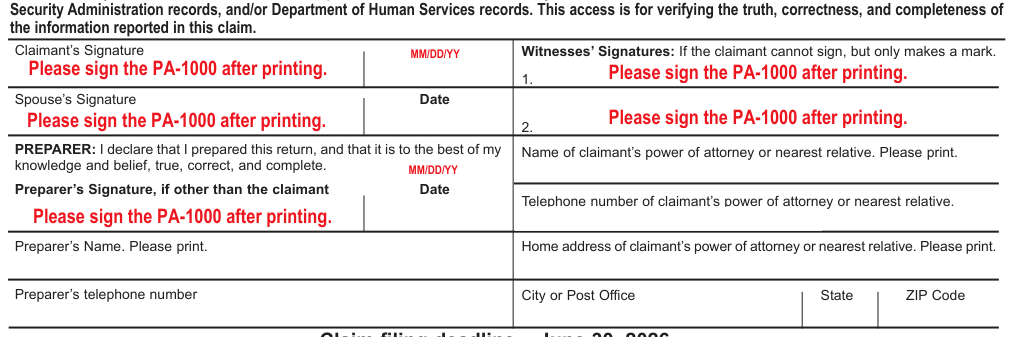
Text version of this table
Claimant’s Signature M MD/aDDte/Y Y Please sign the PA-1000 after printing. Witnesses’ Signatures: If the claimant cannot sign, but only makes a mark. Please sign the PA-1000 after printing. 1. Spouse’s Signature Date Please sign the PA-1000 after printing. Please sign the PA-1000 after printing. 2. PREPARER: I declare that I prepared this return, and that it is to the best of my knowledge and belief, true, correct, and complete. MM/DD/YY Preparer’s Signature, if other than the claimant Date Please sign the PA-1000 after printing. Home address of claimant's power of attorney or nearest relative. Please print. Home address of claimant's power of attorney or nearest relative. Please print. Preparer's Name. Please print. Home address of claimant's power of attorney or nearest relative. Please print. Preparer's telephone number City or Post Office State ZIP Code
You can call 1-888-728-2937 after June 1 to verify the status of your claim.
RETURN TO PAGE 1
PA-1000 2505010054
Property Tax or Rent
Rebate Claim 04-25
(FI)
PA Department of Revenue
P.O. Box 280503
Harrisburg PA 17128-0503
OFFICIAL USE ONLY
Check your label for accuracy. If incorrect, do not use the label. Complete Section I.
I
START Your Social Security Number
§
II Fill in one oval for 1 and 2.
Spouse's Social Security Number
1. I am filing for a rebate as a:
P. Property Owner - See instructions
PLEASE WRITE IN YOUR SOCIAL SECURITY NUMBER(S) ABOVE
Last Name
First Line of Address
Second Line of Address
City or Post Office
Spouse's First Name
R. Renter - See instructions
First Name MI
B. Owner/Renter - See instructions
I Certify that as of Dec. 31, 2025,
2.
I am (a):
A. Claimant age 65 or older
B. Claimant under age 65, with a spouse age 65 or older who resided in the same household
C. Widow or widower, age
State ZIP Code
50 to 64
- CODES
D. Permanently disabled
REQUIRED and age 18 to 64
MI County Code School District Code Country Code
Deceased:
3.
MM/DD/YY
- *
Claimant
Date of death __
Spouse's Birthdate
Claimant's Birthdate
MM/DD/YY
III
Daytime Telephone Number Spouse
MM/DD/YY
Date of death __
Dollars Cents
TOTAL INCOME received by you and your spouse during 2025
- divided by 2) …
- Social Security, SSI, and SSP Income (Total benefits $
5.
- Railroad Retirement Tier 1 Benefits (Total benefits $ divided by 2) …
- Total Benefits from Pension, Annuity, IRA Distributions, and Railroad Retirement Tier 2 (Do not
- include federal veterans' disability payments or state veterans' payments.) …
7.
- Interest and Dividend Income …
LOSS
8.
- Gain or Loss on the Sale or Exchange of Property … If a loss, fill in this oval …
LOSS
9.
- Net Rental Income or Loss … If a loss, fill in this oval …
LOSS
10.
- Net Business Income or Loss … If a loss, fill in this oval …
Other Income.
11a.
11a. Salaries, wages, bonuses, commissions, and estate and trust income …
11b. Gambling and Lottery winnings, including PA Lottery winnings, prize winnings, and the value
11b. of other prizes …
11c.
11c. Value of inheritances, alimony, and spousal support …
11d. Cash public assistance/relief. Unemployment compensation and workers' compensation,
11d. except Section 306(c) benefits …
11e. Gross amount of loss of time insurance benefits, disability insurance benefits, and life insurance
11e. benefits, except the first $5,000 of total death benefit payments …
11f. Gifts of cash or property totaling more than $300, except gifts between
11f. members of a household …
11g. Miscellaneous income and annualized income amount … 11g.
- Claimants with Federal Civil Service Retirement System Benefits enter $11,432 or $22,864. See the instructions … 12.
- TOTAL INCOME. Add only the positive income amounts from Lines 4 through 11g and subtract
- the amount on Line 12. See Page 3 for income limitations. Enter this amount on Line 23 …
IMPORTANT: You must submit proof of the income you reported - See the instructions on Pages 7 to 9.
Reset Entire Form PRINT
# NEXT PAGE
PA-1000 2025 04-25
(FI)
Your Social Security Number
START
§
Your Name:
PROPERTY OWNERS ONLY
- Total 2025 property tax. Submit copies of receipted tax bills …
- Property Tax Rebate. Enter the maximum standard rebate
14.
Compare this amount to line 14 and amount from the table for your income level here: (__) enter the lesser amount to the right.
# RENTERS ONLY
15.
- Total 2025 rent paid. Submit PA Rent Certificate … 16.
- Multiply Line 16 by 20 percent (0.20) …
- Rent Rebate. Enter the maximum rebate amount from the table for your income level here: (__)
OWNER - RENTER ONLY
- Property Tax/Rent Rebate. Enter the maximum rebate amount from the table for your income level here: (__) 17.
Compare this amount to line 17 and enter the lesser amount to the right. 18.
Compare this amount to the sum of
19.
Lines 15 and 18 and enter the lesser amount to the right.
DIRECT DEPOSIT. Banking rules do not permit direct deposits to bank accounts outside the U.S. If your bank account is outside the U.S., do not complete the direct deposit Lines 20, 21, and 22. The department will mail you a paper check. If your rebate will be going to a bank account within the U.S., you have the option to have your rebate directly deposited. If you want the department to directly deposit your rebate into your checking or savings account, complete Lines 20, 21, and 22.
Checking
- Place an X in one box to authorize the Department of Revenue to directly deposit your rebate
- into your: …
Savings
- Routing number. Enter in boxes to the right …
- Account number. Enter in boxes to the right …
23.
Enter the amount from Line 13 of the claim form on this line and circle the corresponding Maximum Rebate amount for your income level.
IV
21.
22.
# REBATE TABLE
INCOME LEVEL Maximum
Rebate
$ 0 to $ 8,550 $1,000
$ 8,551 to $16,040 $ 770
$ 16,041 to $19,240 $ 460
$ 19,241 to $48,110 $ 380
An excessive claim with intent to defraud is a misdemeanor punishable by a maximum fine of $1,000, and/or imprisonment for up to one year upon conviction. The claimant is also subject to a penalty of 25 percent of the entire amount claimed.
CLAIMANT OATH: I declare that this claim is true, correct, and complete to the best of my knowledge and belief, and this is the only claim filed by members of my household. I authorize the PA Department of Revenue access to my federal and state Personal Income Tax records, PACE records, Social Security Administration records, and/or Department of Human Services records. This access is for verifying the truth, correctness, and completeness of the information reported in this claim.
Claimant's Signature Date
MM/DD/YY
Please sign the PA-1000 after printing.
Spouse's Signature Date
Please sign the PA-1000 after printing.
Witnesses' Signatures: If the claimant cannot sign, but only makes a mark.
Please sign the PA-1000 after printing.
1.
Please sign the PA-1000 after printing.
2.
PREPARER: I declare that I prepared this return, and that it is to the best of my knowledge and belief, true, correct, and complete.
MM/DD/YY
Preparer's Signature, if other than the claimant Date
Please sign the PA-1000 after printing.
Preparer's Name. Please print.
Preparer's telephone number
Name of claimant's power of attorney or nearest relative. Please print.
Telephone number of claimant's power of attorney or nearest relative.
Home address of claimant's power of attorney or nearest relative. Please print.
City or Post Office State ZIP Code Claim filing deadline - June 30, 2026
You can call 1-888-728-2937 after June 1 to verify the status of your claim.
RETURN TO PAGE 1
PA Rent Certificate 2505210050
PA Rent Certificate and
Rental Occupancy Affidavit
PA-1000 RC (EX) MOD 04-25
(FI)
PA Department of Revenue
OFFICIAL USE ONLY
Name as shown on PA-1000 Social Security Number
START
§
You may make photocopies of this form as needed.
If filing as a renter, you must provide proof of the rent you paid. If you rented at more than one address, you must submit proof for each address.
PA RENT CERTIFICATE
Your landlord must provide all the information on Lines 1 through 8. Your landlord, or your landlord's authorized agent, must sign this PA Rent Certificate. If your landlord, or your landlord's authorized agent, does not sign this PA Rent Certificate, you must complete Lines 1 through 8 and the Rental Occupancy Affidavit below. Your Rental Occupancy Affidavit must be notarized.
- Street address of the residence for which the claimant paid rent 3. Rental unit is (fill in the appropriate oval): City, State, ZIP Code
- Owner's business name or landlord's name (last, first, middle initial) if an individual Landlord's Address City, State, ZIP Code Landlord's FEIN (if applicable) and daytime telephone number Apartment in a House Mobile Home Lot Apartment Building Nursing Home Boarding Home Private Home Mobile Home Assisted Living Personal Care Home Condominium Building Name: Domiciliary Care Foster Care If Domiciliary or Foster Care or if a Boarding or Personal Care Home, you must submit a copy of your contract agreement.
Dollars Cents
YOU MUST COMPLETE ALL LINES. IF NONE, ENTER "0".
- What was the amount of rent per month? (Include only the amount charged for rental.
Do not include security deposits or amounts paid for food, medicine, medical care, or personal care.) If your rental amounts changed during the year, please explain in the space provided … 4.
- How much of the monthly rental amount was paid or subsidized by a governmental agency? … 5.
- Total monthly amount of rent paid. (Subtract Line 5 from Line 4.) … 6.
- Number of months unit was occupied by the claimant in 2025.
(If less than 12 months, please explain in the space provided.) … 7.
- What was the total rent paid in 2025 by the claimant?
(Multiply Line 6 by Line 7.) Enter the amount here and on Line 16 of the claim form or the appropriate line(s) of Schedules D, E, or F … 8.
LANDLORD'S OATH: (Read carefully before signing)
Explanation of Item 4.
Explanation of Item 7.
I certify that the information provided on this PA Rent Certificate is true, correct, and complete to the best of my knowledge, information, and belief. I further certify that - fill in the applicable oval(s).
I was required to pay 2025 property taxes on the property in which the claimant resided in 2025.
I made, or was required to make, a payment in lieu of taxes for 2025 on the property in which the claimant resided in 2025.
The property in which the claimant resided in 2025 was tax exempt.
Other names, excluding the spouse or minor children, appear on the lease.
Please sign and date after printing.
X
Landlord's Signature Date
# OCCUPANCY AFFIDAVIT
MM/DD/YY
I am, or am filing on behalf of, the claimant named above. I certify that I was unable to obtain the landlord's signature on the PA Rent Certificate for the following reason(s):
Notarize:
Affidavit: I certify that I am, or am filing on behalf of, the claimant named above. I also affirm all the information on the above PA Rent Certificate Subscribed and sworn before me this and Occupancy Affidavit is true, correct, and complete to the best of my knowledge, information, and belief. day of 20 Claimant's Signature. Please sign after printing. Signature of Notary Public. Please sign after printing. x x Claimant's Signature Date MM/DD/YY
Signature of Notary Public
PHYSICIAN'S STATEMENT 2505310058
Physician's Statement of
Permanent and Total Disability
PA-1000 PS 04-25 (FI)
PA Department of Revenue
OFFICIAL USE ONLY
START
Name as shown on PA-1000 Social Security Number
§
Instructions
A claimant not covered under the federal Social Security Act or the federal Railroad Retirement Act who is unable to submit proof of permanent and total disability may submit this Physician's Statement. The physician must determine the claimant's status using the same standards used for determining permanent and total disability under the federal Social Security Act or the federal Railroad Retirement Act. CAUTION: If the claimant applied for Social Security disability benefits and the Social Security Administration did not rule in the claimant's favor, the claimant is not eligible for a Property Tax or Rent Rebate.
Confidentiality Statement. All information on this Physician's Statement and claim form is confidential. The department shall only use this information for the purposes of determining the claimant's eligibility for a Property Tax or Rent Rebate.
# CERTIFICATION
I certify the claimant named above is my patient and is permanently and totally disabled under the standards that the federal Social Security Act or the federal Railroad Retirement Act requires for determining permanent and total disability. Upon request from the PA Department of Revenue, I will provide the medical reports or records indicating diagnosis and prognosis of the claimant's condition, including signs, symptoms, and laboratory findings, if applicable or appropriate.
Please sign after printing.
Physician Signature Date MM/DD/YY
Description of Claimant's Permanent and Total Disability. Briefly describe the reason(s) the above-named claimant is totally and permanently disabled.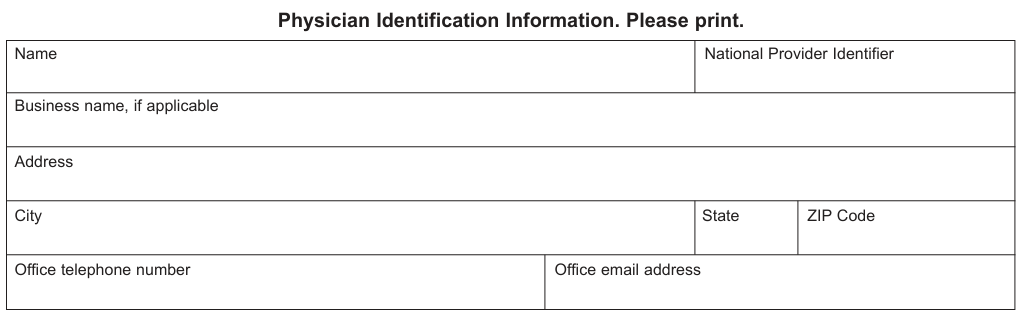
Text version of this table
Name National Provider Identifier Business name, if applicable Address City State ZIP Code Office telephone number Office email address
2505310058 2505310058
# PA SCHEDULE A
Deceased Claimant and/or
Multiple Home Prorations
PA-1000 A 03-25 (FI)
PA Department of Revenue
START
Name as shown on PA-1000
§
OFFICIAL USE ONLY
Social Security Number
You may make photocopies of this form as needed.
If you owned, paid the property taxes on, and resided in a Pennsylvania located home during 2025, then sold that residence and bought another Pennsylvania located home, paid the property taxes on and resided in that home for the remainder of the year, fill in the appropriate dates for each residence. Complete the address and occupancy dates along with Lines 1 through 5 for each home in the applicable columns.
If you owned, paid the property taxes on, and resided in a Pennsylvania located home during 2025, then sold the property and moved into a rental property and paid rent or if you lived in a rental property and paid rent, then bought a Pennsylvania located home, paid the property taxes and resided in that home for the remainder of the year, complete the address and occupancy dates and complete the information for the First Home column on Lines 1 through 5 for the portion of the year that you owned your home. You should also complete a PA Rent Certificate for the portion of the year that you rented a Pennsylvania located rental property. NOTE: If you resided part of the year in a home located outside PA, do not claim the property tax paid for that period. Enter zero in the appropriate column on Line 1.
Additionally, if a deceased individual owned, paid property taxes on, and resided in a Pennsylvania located home during 2025 and died during the claim year, complete the address and occupancy dates and complete the information for the First Home column for Lines 1 through 5. If the deceased previously owned another Pennsylvania located home before owning the Pennsylvania located home he or she was living in preceding death, complete the address and occupancy dates along with Lines 1 through 5 for both columns of the form. If the deceased resided part of a year outside PA, do not claim the property tax paid for that period. Enter zero in the appropriate column on Line 1. If the deceased paid property taxes and resided in a Pennsylvania located home during 2025, then sold the property, moved into a rental property, and paid rent; or if the deceased lived in a rental property and paid rent, then bought a Pennsylvania located home, paid the property taxes and resided in that home for the remainder of his or her life, complete the address and occupancy dates and complete the information for the First Home column for Lines 1 through 5 for the portion of the year that the deceased owned the home. The surviving spouse, estate, or personal representative claiming the rebate on behalf of the deceased should also complete a PA Rent Certificate for the portion of the year the deceased rented a Pennsylvania located rental property.
Total taxes paid on Line 1 for the First Home Column includes the amount of property taxes paid by the claimant directly or on the claimant's behalf from an escrow account for a claimant that owned the first home as of Jan. 1 of the claim year. For first homes purchased during the claim year, include the amount of property taxes paid by the claimant directly or on the claimant's behalf from an escrow account and the total property taxes, before any pro-rata allocation of the property taxes, from a HUD-1 Closing Statement from the purchase of the property. Total taxes paid on Line 1 for the Second Home Column includes the amount of property taxes paid by the claimant directly or on the claimant's behalf from an escrow account and the total property taxes, before any pro-rata allocation of the property taxes, from a HUD-1 Closing Statement from the purchase of the property.
Street address (First Home)
City or Post Office
State
Street address (Second Home)
City or Post Office
State
- Total property taxes paid on each home. See above instructions.
I/The deceased owned and occupied this home from
Month Day 2025 until
ZIP Code
Month Day 2025
I/The deceased owned and occupied this home from
(Date moved into this home):
ZIP Code
Month Day 2025 until
Month Day 2025
First Home Second Home
$ $
- Number of days you or the deceased owned and occupied each home.
- Percentage of the year that you or the deceased owned and occupied each home. Divide Line 2 by the number of days in the claim year (365 or 366). Round to two decimal places.
- Multiply Line 1 by Line 3. $ $
- Total property taxes paid. Add Line 4 for both homes. Enter the amount on Line 14 of your or the deceased's claim form or the next schedule you or the deceased must complete.
$
PA SCHEDULE B/D/E 2505510053
Widow or Widower/Public
Assistance/ Business Use Prorations
PA-1000 B/D/E 04-25 (FI)
PA Department of Revenue
OFFICIAL USE ONLY
START
Name as shown on PA-1000 Social Security Number
§
You may make photocopies of this form as needed.
Widow/Widower SCHEDULE B. If you were a widow or widower age 50 to 64 during 2025, and you remarried, use this schedule to determine the percentage of the year for which you qualify for a Property Tax or Rent Rebate.
Date you remarried: Month / Day / 2025
- Total property tax or rent that you paid in 2025. If you were an owner and completed Schedule A, enter the amount from Line 5. If you were a renter, enter the amount from Line 8 of Schedule RC … 1. $
- Number of days you were a widow or widower during 2025 … 2.
- Percentage of the year you were a widow or widower. Divide Line 2 by the number of days in the claim year (365 or 366). Round to two decimal places … 3.
- Eligible property taxes or rent paid. Multiply Line 1 by Line 3. Enter this amount on the next schedule you must complete or … 4. $ a) If an owner, enter the amount on Line 14 of your claim form. b) If a renter, enter the amount on Line 16 of your claim form.
Renter SCHEDULE D. Renters who received cash public assistance are not eligible for rebates for those months when they received that assistance. If you received cash public assistance during any part of 2025, use this schedule to determine the amount of rent for which you qualify for a rebate. IMPORTANT: If you received cash public assistance for all of 2025, you may not claim a rebate.
- Total number of months during which you received cash public assistance: 1.
NOTE: If you received cash public assistance for a full year, you may not claim a rebate.
- Total rent that you paid in 2025 from Line 8 of Schedule RC, or if you completed Schedule B, enter the result from Line 4 of Schedule B … 2. $
- Total rent you paid during the months that you received cash public assistance … 3. $
- Eligible rent paid. Subtract Line 3 from Line 2. Enter this amount on the next schedule you must complete, or on Line 16 of your claim form. . . . 4. $ Owner/Renter SCHEDULE E. You must complete this schedule if you also used part of your homestead for a purpose other than your personal residence.
- If you operated a business in part of your home, you must submit a 1040 Schedule C or PA-40 Schedule C.
- If you rented part of your home to others, you must submit a 1040 Schedule E or PA-40 Schedule E.
- Total property taxes or rent paid on your residence in 2025. Enter the amount of your total property taxes paid or total rent paid from Line 8 of Schedule RC, or, if you completed Schedule A, B, or D, enter the result from that schedule … 1. $
- Enter the percentage of your home that you used as your residence from the chart below … 2. . or %
- Eligible property taxes or rent paid. Multiply Line 1 by Line 2.
Enter this amount on the next schedule you must complete or … 3. $ a) If an owner, enter the amount on Line 14 of your claim form b) If a renter, enter the amount on Line 16 of your claim form
CHART OF PERSONAL
20% 25% 30% 33% 40% 50% 67% 75% 80% 90%
__% Other percentage
# USE PERCENTAGE
0.20 0.25 0.30 0.33 0.40 0.50 0.67 0.75 0.80 0.90 . __
2505510053 2505510053
PA Rent Certificate 2505210050
PA Rent Certificate and
Rental Occupancy Affidavit
PA-1000 RC (EX) MOD 04-25
(FI)
PA Department of Revenue
OFFICIAL USE ONLY
Name as shown on PA-1000 Social Security Number
START
§
You may make photocopies of this form as needed.
If filing as a renter, you must provide proof of the rent you paid. If you rented at more than one address, you must submit proof for each address.
PA RENT CERTIFICATE
Your landlord must provide all the information on Lines 1 through 8. Your landlord, or your landlord's authorized agent, must sign this PA Rent Certificate. If your landlord, or your landlord's authorized agent, does not sign this PA Rent Certificate, you must complete Lines 1 through 8 and the Rental Occupancy Affidavit below. Your Rental Occupancy Affidavit must be notarized.
- Street address of the residence for which the claimant paid rent 3. Rental unit is (fill in the appropriate oval): City, State, ZIP Code
- Owner's business name or landlord's name (last, first, middle initial) if an individual Landlord's Address City, State, ZIP Code Landlord's FEIN (if applicable) and daytime telephone number Apartment in a House Mobile Home Lot Apartment Building Nursing Home Boarding Home Private Home Mobile Home Assisted Living Personal Care Home Condominium Building Name: Domiciliary Care Foster Care
If Domiciliary or Foster Care or if a Boarding or Personal Care
Home, you must submit a copy of your contract agreement.
Dollars Cents
YOU MUST COMPLETE ALL LINES. IF NONE, ENTER "0".
- What was the amount of rent per month? (Include only the amount charged for rental.
Do not include security deposits or amounts paid for food, medicine, medical care, or personal care.) If your rental amounts changed during the year, please explain in the space provided … 4.
- How much of the monthly rental amount was paid or subsidized by a governmental agency? … 5.
- Total monthly amount of rent paid. (Subtract Line 5 from Line 4.) … 6.
- Number of months unit was occupied by the claimant in 2025.
(If less than 12 months, please explain in the space provided.) … 7.
- What was the total rent paid in 2025 by the claimant?
(Multiply Line 6 by Line 7.) Enter the amount here and on Line 16 of the claim form or the appropriate line(s) of Schedules D, E, or F … 8.
LANDLORD'S OATH: (Read carefully before signing)
Explanation of Item 4.
Explanation of Item 7.
I certify that the information provided on this PA Rent Certificate is true, correct, and complete to the best of my knowledge, information, and belief. I further certify that - fill in the applicable oval(s).
I was required to pay 2025 property taxes on the property in which the claimant resided in 2025.
I made, or was required to make, a payment in lieu of taxes for 2025 on the property in which the claimant resided in 2025.
The property in which the claimant resided in 2025 was tax exempt.
Other names, excluding the spouse or minor children, appear on the lease.
Please sign and date after printing.
X
Landlord's Signature Date
# OCCUPANCY AFFIDAVIT
MM/DD/YY
I am, or am filing on behalf of, the claimant named above. I certify that I was unable to obtain the landlord's signature on the PA Rent Certificate for the following reason(s):
Notarize:
Affidavit: I certify that I am, or am filing on behalf of, the claimant named above. I also affirm all the information on the above PA Rent Certificate Subscribed and sworn before me this and Occupancy Affidavit is true, correct, and complete to the best of my knowledge, information, and belief. day of 20 Claimant's Signature. Please sign after printing. Signature of Notary Public. Please sign after printing. x x Claimant's Signature Date MM/DD/YY
Signature of Notary Public
PA SCHEDULE F/G 2505610051
Multiple Owner or Lessor
Prorations/ Income Annualization
PA-1000 F/G 04-25 (FI)
PA Department of Revenue
OFFICIAL USE ONLY
START
Name as shown on PA-1000 Social Security Number
§
You may make photocopies of this form as needed.
Owner/Renter SCHEDULE F. If your deed or lease shows additional names (other than your spouse or minor children) during 2025, complete this schedule. You must list all owners and renters. If your deed or lease shows more than three names, make copies of this schedule or make your own schedule.
Claimant's name Address, if different than claim form Age
Name Address, if different than claim form Age Relationship Social Security Number
Name Address, if different than claim form Age Relationship Social Security Number
- Total property taxes or rent paid on your residence in 2025. Enter the amount of your total property taxes paid or total rent paid from Line 8 of Schedule RC, or, if you completed Schedule A, B, D, or E, enter the result from that schedule … 1. $
- Eligible claimant percentage. Divide the number of owners or renters that qualify as claimants by the total number of persons listed on the deed or lease … 2. . or %
- Eligible property taxes or rent paid. Multiply the amount on Line 1 by the percentage on Line 2, and enter the result: … 3. $ a) If an owner, enter the amount on Line 14 of your claim form b) If a renter, enter the amount on Line 16 of your claim form
Owner/Renter SCHEDULE G. Annualized income calculation for owners and renters.
- Enter the date of death of the claimant: Month / Day / 2025
- Number of days the claimant lived during the claim year … 2.
- Add the positive amounts from Lines 4 through 11f of your claim form plus any amount for Line 11g before the calculation of the annualized income amount and enter the result here … 3. $
- Enter the result of dividing the days in the claim year (365 or 366) by
Line 2. Round to two decimal places … 4.
- Multiply Line 3 times Line 4 … 5. $
- Subtract Line 3 from Line 5 and enter the result here and include in
Line 11g of the claim form … 6. $
2505610051 2505610051
# TOP OF PAGE PRINT PA SCHEDULE A
Deceased Claimant and/or
Multiple Home Prorations
PA-1000 A 03-25 (FI)
PA Department of Revenue
START
Name as shown on PA-1000
§
OFFICIAL USE ONLY
Social Security Number
You may make photocopies of this form as needed.
If you owned, paid the property taxes on, and resided in a Pennsylvania located home during 2025, then sold that residence and bought another Pennsylvania located home, paid the property taxes on and resided in that home for the remainder of the year, fill in the appropriate dates for each residence. Complete the address and occupancy dates along with Lines 1 through 5 for each home in the applicable columns.
If you owned, paid the property taxes on, and resided in a Pennsylvania located home during 2025, then sold the property and moved into a rental property and paid rent or if you lived in a rental property and paid rent, then bought a Pennsylvania located home, paid the property taxes and resided in that home for the remainder of the year, complete the address and occupancy dates and complete the information for the First Home column on Lines 1 through 5 for the portion of the year that you owned your home. You should also complete a PA Rent Certificate for the portion of the year that you rented a Pennsylvania located rental property. NOTE: If you resided part of the year in a home located outside PA, do not claim the property tax paid for that period. Enter zero in the appropriate column on Line 1.
Additionally, if a deceased individual owned, paid property taxes on, and resided in a Pennsylvania located home during 2025 and died during the claim year, complete the address and occupancy dates and complete the information for the First Home column for Lines 1 through 5. If the deceased previously owned another Pennsylvania located home before owning the Pennsylvania located home he or she was living in preceding death, complete the address and occupancy dates along with Lines 1 through 5 for both columns of the form. If the deceased resided part of a year outside PA, do not claim the property tax paid for that period. Enter zero in the appropriate column on Line 1. If the deceased paid property taxes and resided in a Pennsylvania located home during 2025, then sold the property, moved into a rental property, and paid rent; or if the deceased lived in a rental property and paid rent, then bought a Pennsylvania located home, paid the property taxes and resided in that home for the remainder of his or her life, complete the address and occupancy dates and complete the information for the First Home column for Lines 1 through 5 for the portion of the year that the deceased owned the home. The surviving spouse, estate, or personal representative claiming the rebate on behalf of the deceased should also complete a PA Rent Certificate for the portion of the year the deceased rented a Pennsylvania located rental property.
Total taxes paid on Line 1 for the First Home Column includes the amount of property taxes paid by the claimant directly or on the claimant's behalf from an escrow account for a claimant that owned the first home as of Jan. 1 of the claim year. For first homes purchased during the claim year, include the amount of property taxes paid by the claimant directly or on the claimant's behalf from an escrow account and the total property taxes, before any pro-rata allocation of the property taxes, from a HUD-1 Closing Statement from the purchase of the property. Total taxes paid on Line 1 for the Second Home Column includes the amount of property taxes paid by the claimant directly or on the claimant's behalf from an escrow account and the total property taxes, before any pro-rata allocation of the property taxes, from a HUD-1 Closing Statement from the purchase of the property.
Street address (First Home)
City or Post Office
State
Street address (Second Home)
City or Post Office
State
- Total property taxes paid on each home. See above instructions.
I/The deceased owned and occupied this home from
Month Day 2025 until
ZIP Code
Month Day 2025
I/The deceased owned and occupied this home from
(Date moved into this home):
ZIP Code
Month Day 2025 until
Month Day 2025
First Home Second Home
$ $
- Number of days you or the deceased owned and occupied each home.
- Percentage of the year that you or the deceased owned and occupied each home. Divide Line 2 by the number of days in the claim year (365 or 366). Round to two decimal places.
- Multiply Line 1 by Line 3. $ $
- Total property taxes paid. Add Line 4 for both homes. Enter the amount on Line 14 of your or the deceased's claim form or the next schedule you or the deceased must complete.
$
PA SCHEDULE B/D/E 2505510053
Widow or Widower/Public
Assistance/ Business Use Prorations
PA-1000 B/D/E 04-25 (FI)
PA Department of Revenue
OFFICIAL USE ONLY
START
Name as shown on PA-1000 Social Security Number
§
You may make photocopies of this form as needed.
Widow/Widower SCHEDULE B. If you were a widow or widower age 50 to 64 during 2025, and you remarried, use this schedule to determine the percentage of the year for which you qualify for a Property Tax or Rent Rebate.
Date you remarried: Month / Day / 2025
- Total property tax or rent that you paid in 2025. If you were an owner and completed Schedule A, enter the amount from Line 5. If you were a renter, enter the amount from Line 8 of Schedule RC … 1. $
- Number of days you were a widow or widower during 2025 … 2.
- Percentage of the year you were a widow or widower. Divide Line 2 by the number of days in the claim year (365 or 366). Round to two decimal places … 3.
- Eligible property taxes or rent paid. Multiply Line 1 by Line 3. Enter this amount on the next schedule you must complete or … 4. $ a) If an owner, enter the amount on Line 14 of your claim form. b) If a renter, enter the amount on Line 16 of your claim form.
Renter SCHEDULE D. Renters who received cash public assistance are not eligible for rebates for those months when they received that assistance. If you received cash public assistance during any part of 2025, use this schedule to determine the amount of rent for which you qualify for a rebate. IMPORTANT: If you received cash public assistance for all of 2025, you may not claim a rebate.
- Total number of months during which you received cash public assistance: 1.
NOTE: If you received cash public assistance for a full year, you may not claim a rebate.
- Total rent that you paid in 2025 from Line 8 of Schedule RC, or if you completed Schedule B, enter the result from Line 4 of Schedule B … 2. $
- Total rent you paid during the months that you received cash public assistance … 3. $
- Eligible rent paid. Subtract Line 3 from Line 2. Enter this amount on the next schedule you must complete, or on Line 16 of your claim form. . . . 4. $ Owner/Renter SCHEDULE E. You must complete this schedule if you also used part of your homestead for a purpose other than your personal residence.
- If you operated a business in part of your home, you must submit a 1040 Schedule C or PA-40 Schedule C.
- If you rented part of your home to others, you must submit a 1040 Schedule E or PA-40 Schedule E.
- Total property taxes or rent paid on your residence in 2025. Enter the amount of your total property taxes paid or total rent paid from Line 8 of Schedule RC, or, if you completed Schedule A, B, or D, enter the result from that schedule … 1. $
- Enter the percentage of your home that you used as your residence from the chart below … 2. . or %
- Eligible property taxes or rent paid. Multiply Line 1 by Line 2.
Enter this amount on the next schedule you must complete or … 3. $ a) If an owner, enter the amount on Line 14 of your claim form b) If a renter, enter the amount on Line 16 of your claim form
CHART OF PERSONAL
20% 25% 30% 33% 40% 50% 67% 75% 80% 90%
__% Other percentage
# USE PERCENTAGE
0.20 0.25 0.30 0.33 0.40 0.50 0.67 0.75 0.80 0.90 . __
2505510053 2505510053
THE PENNSYLVANIA LOTTERY
The Pennsylvania Lottery, established by law in 1971, remains the only U.S. lottery to dedicate all proceeds to benefit older adults.
Where does the money go*?
RETAILER & VENDOR
BENEFIT PROGRAMS
WINNER PRIZES COMMISIONS OPERATING EXPENSES
23 cents
68 cents 7 cents 2 cents
*Profits based on sales and interest income
For more than 50 years, the Pennsylvania Lottery has provided In addition to property tax and rent rebates, the Lottery has profunding for the Property Tax/Rent Rebate program. This is one of vided funding for transportation services, care services, prescripmany programs for PA seniors that has been funded by the tion assistance, and a broad range of local services provided by Lottery, which remains the only U.S. lottery to dedicate all of its proceeds to benefit older adults.
Area Agencies on Aging.
The Pennsylvania Lottery is a bureau of the Pennsylvania
Fiscal Year 2024-25 marked the 14th consecutive year that the
Department of Revenue, and a successful enterprise of which all
Lottery has generated more than $1 billion for programs that benstate residents may be proud. efit older Pennsylvanians. Additionally, the Lottery has con-Players must be 18 or older. Please play responsibly. tributed more than $37 billion for these critical programs since its very first game went on sale in 1972. Problem Gambling Helpline: 1-800-GAMBLER.
For more information about Lottery games and benefits for older Pennsylvanians, visit palottery.com.
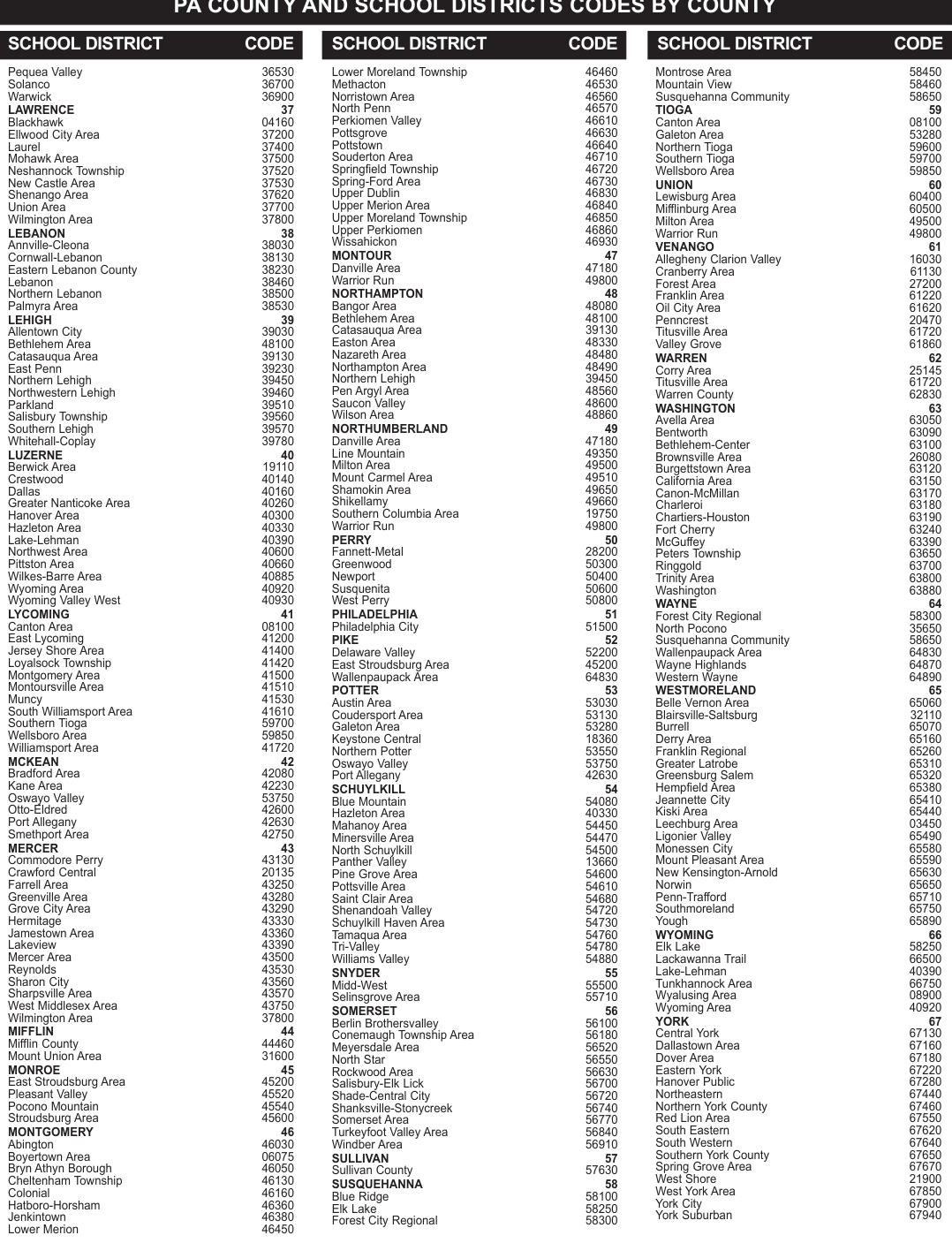
Text version of this table
| SCHOOL DISTRICT CODE | CODE | SCHOOL DISTRICT | CODE | SCHOOL DISTRICT C | ODE |
|---|---|---|---|---|---|
| Pequea Valley | 36530 | Lower Moreland Township | 46460 | Montrose Area | 58450 |
| Solanco | 36700 | Methacton | 46530 | Mountain View | 58460 |
| Warwick | 36900 | Norristown Area | 46560 | Susquehanna Community | 58650 |
| LAWRENCE | 37 | North Penn 46570 | 46570 | TIOGA | 59 |
| Blackhawk | 04160 | Perkiomen Valley | 46610 | Tyrone Area 07800 | 08100 |
| Ellwood City Area | 37200 | Pottsgrove | 46630 | Galeton Area | 53280 |
| Laurel | 37400 | Pottstown | 46640 | Northern Tioga | 59600 |
| Mohawk Area | 37500 | Souderton Area 46710 | 46710 | Southern Tioga | 59700 |
| Neshannock Township | 37520 | Springfield Township | 46720 | Wellsboro Area | 59850 |
| New Castle Area | 37530 | Spring-Ford Area 46730 | 46730 | UNION | 60 |
| Shenango Area | 37620 | Upper Dublin | 46830 | Lewisburg Area | 60400 |
| Union Area | 37700 | Upper Merion Area | 46840 | Mifflinburg Area | 60500 |
| Wilmington Area | 37800 | Upper Moreland Township | 46850 | Milton Area | 49500 |
| LEBANON | 38 | Upper Perkiomen 46860 | 46860 | Warrior Run | 49800 |
| Annville-Cleona | 38030 | Wissahickon | 46930 | VENANGO | 61 |
| Cornwall-Lebanon | 38130 | MONTOUR | 47 | Allegheny Clarion Valley 16030 | 16030 |
| Eastern Lebanon County | 38230 | Danville Area | 47180 | Cranberry Area | 61130 |
| Lebanon | 38460 | Warrior Run | 49800 | Forest Area 27200 | 27200 |
| Northern Lebanon | 38500 | NORTHAMPTON | 48 | FRANKLIN 28 | 61220 |
| Palmyra Area | 38530 | Bangor Area | 48080 | Oil City Area | 61620 |
| LEHIGH | 39 | Bethlehem Area | 48100 | Penncrest 20470 | 20470 |
| Allentown City | 39030 | Catasauqua Area | 39130 | Titusville Area 61720 | 61720 |
| Bethlehem Area | 48100 | Jamestown Area 43360 | 48330 | Valley Grove | 61860 |
| Catasauqua Area | 39130 | Nazareth Area | 48480 | WARREN | 62 |
| East Penn | 39230 | Northampton Area | 48490 | Corry Area 25145 | 25145 |
| Northern Lehigh | 39450 | Northern Lehigh | 39450 | Titusville Area 61720 | 61720 |
| Northwestern Lehigh | 39460 | Pen Argyl Area | 48560 | Warren County | 62830 |
| Parkland | 39510 | Saucon Valley | 48600 | WASHINGTON | 63 |
| Salisbury Township | 39560 | Wilson Area | 48860 | Avella Area | 63050 |
| Southern Lehigh | 39570 | NORTHUMBERLAND | 49 | Bentworth | 63090 |
| Whitehall-Coplay | 39780 | Danville Area | 47180 | Bethlehem-Center | 63100 |
| LUZERNE | 40 | Line Mountain | 49350 | Connellsville Area 26130 | 26080 |
| Berwick Area 19110 | 19110 | Milton Area | 49500 | Burgettstown Area | 63120 |
| Crestwood | 40140 | Mount Carmel Area 49510 | 49510 | California Area | 63150 |
| Dallas | 40160 | Shamokin Area | 49650 | Canon-McMillan | 63170 |
| Greater Nanticoke Area | 40260 | Shikellamy | 49660 | Charleroi | 63180 |
| Hanover Area | 40300 | Southern Columbia Area 19750 | 19750 | Chartiers-Houston | 63190 |
| Jamestown Area 43360 | 40330 | Warrior Run | 49800 | Fort Cherry 63240 | 63240 |
| Lake-Lehman | 40390 | PERRY | 50 | McGuffey | 63390 |
| Northwest Area | 40600 | Fannett-Metal 28200 | 28200 | Peters Township | 63650 |
| Pittston Area | 40660 | Greenwood 50300 | 50300 | Ringgold | 63700 |
| Wilkes-Barre Area | 40885 | Newport | 50400 | Trinity Area | 63800 |
| Wyoming Area | 40920 | Susquenita 50600 | 50600 | Washington | 63880 |
| Wyoming Valley West | 40930 | West Perry | 50800 | WAYNE | 64 |
| LYCOMING | 41 | PHILADELPHIA | 51 | Forest City Regional 58300 | 58300 |
| Tyrone Area 07800 | 08100 | Philadelphia City | 51500 | North Pocono 35650 | 35650 |
| East Lycoming | 41200 | PIKE | 52 | Susquehanna Community | 58650 |
| Jersey Shore Area 41400 | 41400 | Delaware Valley | 52200 | Wallenpaupack Area | 64830 |
| Loyalsock Township | 41420 | East Stroudsburg Area | 45200 | Wayne Highlands | 64870 |
| Montgomery Area | 41500 | Wallenpaupack Area | 64830 | Western Wayne | 64890 |
| Montoursville Area | 41510 | POTTER | 53 | WESTMORELAND | 65 |
| Muncy | 41530 | Austin Area | 53030 | Belle Vernon Area 65060 | 65060 |
| South Williamsport Area | 41610 | Coudersport Area | 53130 | Blairsville-Saltsburg 32110 | 32110 |
| Southern Tioga | 59700 | Galeton Area | 53280 | Burrell | 65070 |
| Wellsboro Area | 59850 | Keystone Central 18360 | 18360 | Derry Area | 65160 |
| Williamsport Area | 41720 | Northern Potter | 53550 | Franklin Regional | 65260 |
| MCKEAN | 42 | Oswayo Valley | 53750 | Greater Latrobe | 65310 |
| CRAWFORD 20 | 42080 | Port Allegany | 42630 | Greensburg Salem | 65320 |
| Kane Area 42230 | 42230 | SCHUYLKILL | 54 | Hempfield Area | 65380 |
| Oswayo Valley | 53750 | Blue Mountain | 54080 | Jeannette City | 65410 |
| Otto-Eldred | 42600 | Jamestown Area 43360 | 40330 | Kiski Area | 65440 |
| Port Allegany | 42630 | Mahanoy Area | 54450 | Leechburg Area | 03450 |
| Smethport Area | 42750 | Minersville Area | 54470 | Ligonier Valley | 65490 |
| MERCER | 43 | North Schuylkill 54500 | 54500 | Monessen City | 65580 |
| Commodore Perry | 43130 | Panther Valley 13660 | 13660 | Mount Pleasant Area | 65590 |
| Crawford Central 20135 | 20135 | Pine Grove Area | 54600 | New Kensington-Arnold | 65630 |
| Farrell Area | 43250 | Titusville Area 61720 | 54610 | Norwin | 65650 |
| Greenville Area | 43280 | Saint Clair Area | 54680 | Penn-Trafford | 65710 |
| Grove City Area | 43290 | Shenandoah Valley | 54720 | Southmoreland 65750 | 65750 |
| Hermitage | 43330 | Schuylkill Haven Area | 54730 | Yough | 65890 |
| Jamestown Area 43360 | 43360 | Tamaqua Area | 54760 | WYOMING | 66 |
| Lakeview | 43390 | Tri-Valley | 54780 | Elk Lake | 58250 |
| Mercer Area | 43500 | Williams Valley 54880 | 54880 | LACKAWANNA 35 | 66500 |
| Reynolds | 43530 | SNYDER | 55 | Lake-Lehman | 40390 |
| Sharon City | 43560 | Midd-West | 55500 | Tunkhannock Area | 66750 |
| Sharpsville Area | 43570 | Selinsgrove Area | 55710 | Wyalusing Area 08900 | 08900 |
| West Middlesex Area | 43750 | SOMERSET | 56 | Wyoming Area | 40920 |
| Wilmington Area | 37800 | Berlin Brothersvalley | 56100 | YORK | 67 |
| MIFFLIN | 44 | Conemaugh Township Area | 56180 | Central York | 67130 |
| Mifflin County | 44460 | Meyersdale Area | 56520 | Dallastown Area | 67160 |
| Mount Union Area 31600 | 31600 | North Star | 56550 | Dover Area | 67180 |
| MONROE | 45 | Rockwood Area | 56630 | Eastern York | 67220 |
| East Stroudsburg Area | 45200 | Salisbury-Elk Lick | 56700 | Hanover Public | 67280 |
| Pleasant Valley | 45520 | Shade-Central City | 56720 | Northwestern 25850 | 67440 |
| Pocono Mountain | 45540 | Shanksville-Stonycreek | 56740 | Northern York County | 67460 |
| Stroudsburg Area | 45600 | Somerset Area | 56770 | Red Lion Area | 67550 |
| MONTGOMERY | 46 | Turkeyfoot Valley Area | 56840 | South Eastern | 67620 |
| Abington | 46030 | Windber Area 56910 | 56910 | South Western | 67640 |
| Boyertown Area | 06075 | SULLIVAN | 57 | Southern York County | 67650 |
| Bryn Athyn Borough | 46050 | Sullivan County | 57630 | Spring Grove Area | 67670 |
| Cheltenham Township | 46130 | SUSQUEHANNA | 58 | West Shore 21900 | 21900 |
| Colonial | 46160 | Blue Ridge | 58100 | West York Area | 67850 |
| Hatboro-Horsham | 46360 | Elk Lake | 58250 | York City | 67900 |
| Jenkintown | 46380 | Forest City Regional 58300 | 58300 | York Suburban | 67940 |
| Lower Merion | 46450 |
# CUSTOMER SERVICES AND ASSISTANCE PREPARATION ASSISTANCE
# FREE PREPARATION ASSISTANCE
You can receive free assistance in preparing your Property
Tax/Rent Rebate form through the Volunteer Income Tax
Assistance (VITA) and Tax Counseling for the Elderly
(TCE) programs. Visit the department's website or contact the nearest Revenue district office for information.
REVENUE DISTRICT OFFICES
If you need assistance preparing your claim form or have questions, please contact your local Department of Revenue district office. See Page 19 for a list of offices.
# OTHER PROGRAMS AND SERVICES
PA DEPARTMENT OF AGING (AGING.PA.GOV)
The Department of Aging has served as an advocate for the interests of older Pennsylvanians at all levels of government since 1978. Information on the following programs and services can be found on its website.
AREA AGENCIES ON AGING
Each Area Agency on Aging has trained staff available to answer questions and make referrals to other agencies in the community that provide the specific services needed by the individual. Refer to the government pages of your local phone directory to find the Area Agency on Aging office nearest you.
PACE, PACENET, AND PACE PLUS MEDICARE
(1-800-225-7223)
PACE, PACENET, and PACE Plus Medicare are
Pennsylvania's prescription assistance programs for older adults, offering low-cost prescription medication to qualified residents age 65 and older.
LONG-TERM CARE SERVICES (1-866-286-3636)
This program, administered by the Department of Human
Services and funded by the Pennsylvania Lottery and federal Medical Assistance money, provides nursing facility and home- and community-based services to qualifying low-income seniors and individuals with disabilities.
FREE AND REDUCED-FARE TRANSPORTATION
The Department of Transportation distributes Lottery funding to local transit authorities to provide free and reduced-fare mass transit for older residents. Contact your local transit authority for more information.
PA MEDI (1-800-783-7067)
PA MEDI is a free health insurance counseling program designed to help older Pennsylvanians with Medicare.
Counselors are specially trained volunteers who can answer your questions about Medicare and provide you with objective, easy-to-understand information about Medicare, Medicare Supplemental Insurance, Medicaid, and Long-Term Care Insurance.
REPORT ELDER ABUSE (1-800-490-8505)
Any person who believes an older adult is being abused, neglected, exploited, or abandoned may call the statewide elder abuse hotline toll-free, 24 hours a day.
ONLINE SERVICES mypath.pa.gov
- Pennsylvanians can electronically submit a Property
Tax/Rent Rebate application or check the status of a rebate using myPATH. You will be asked to answer questions and provide specific information when submitting an online application or checking the status of a rebate. The online application offers many user-friendly features and automatic calculators not available on the paper application. revenue-pa.custhelp.com
- You can find answers to commonly asked questions by using the department's Online Customer Service Center. Use the Frequently Asked Questions feature to search the database of commonly asked questions. If you do not find your answer you can submit your question to a customer service representative.
# TELEPHONE SERVICES CUSTOMER EXPERIENCE CENTER
- Call 1-888-222-9190 for assistance from 8 a.m. to 5 p.m.
1-888-PATAXES
Touch-tone service is required for this automated 24-hour toll-free line.
Services for Taxpayers with Special Hearing and/or
Speaking Needs: Dial 711 to use the Telecommunications
Relay Service (TRS), a text-based telephone option.
# FORMS ORDERING SERVICES
To obtain forms, visit a Revenue district office or use one of the following services:
Online: revenue.pa.gov/ptrr
Email Requests for Forms: ra-forms@pa.gov
Automated 24-hour Forms Ordering Message Service:
1-800-362-2050.
- This line serves taxpayers without touch-tone telephone service.
Written Requests: PA DEPARTMENT OF REVENUE
# TAX FORMS SERVICE UNIT
1854 BROOKWOOD STREET
HARRISBURG PA 17104-2244
PA DEPARTMENT OF REVENUE DISTRICT OFFICES
NOTE: Please call ahead to verify a district office's address and its services.
Visit the department's website at revenue.pa.gov for more information.
Taxpayer assistance hours are from 8:30 AM to 5:00 PM.
# ALLENTOWN
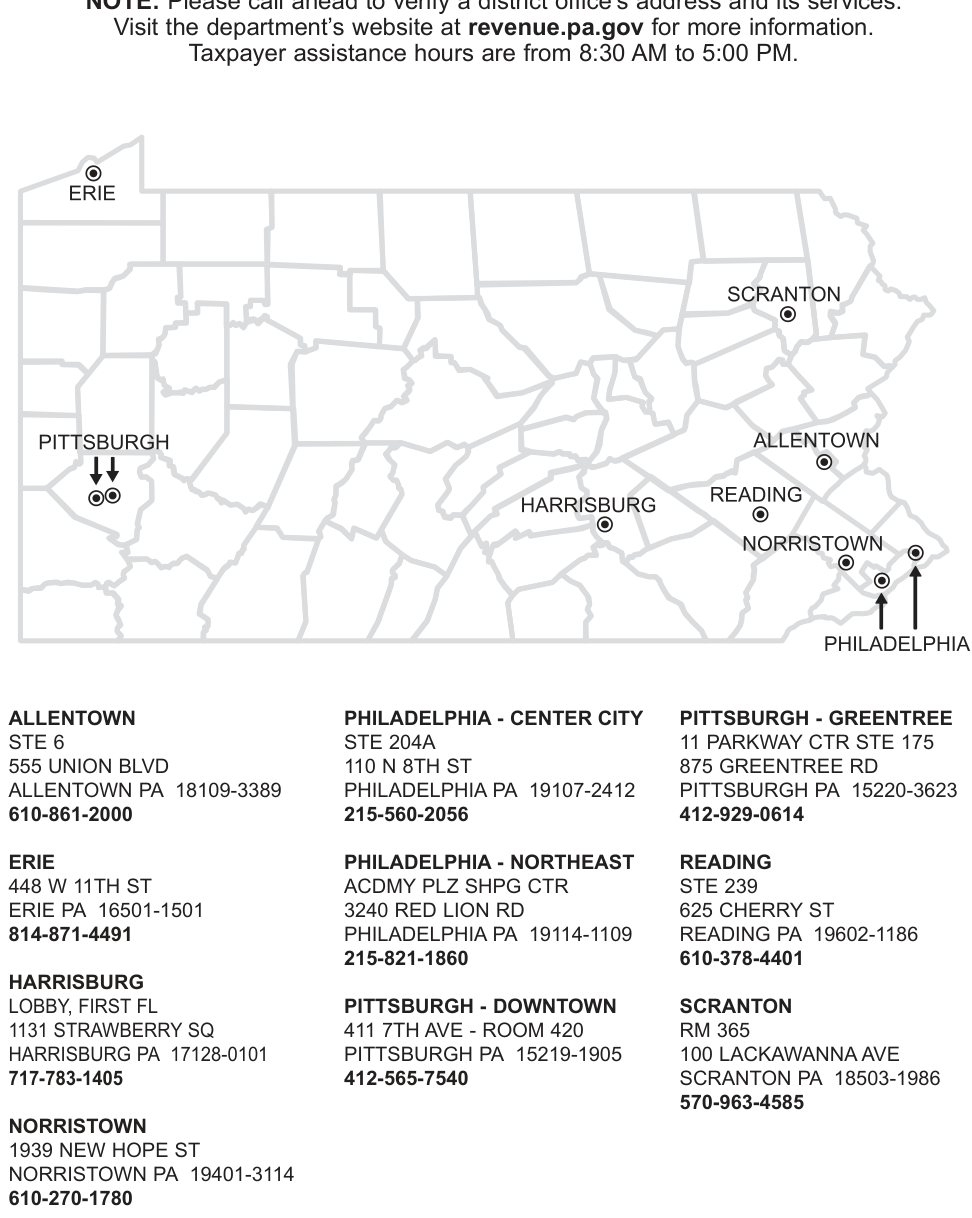
Text version of this table
| Taxpayer assis | tance hours a | re from 8:30 AM t | o 5:00 PM. | ||
| ALLENTOWN | PHILADELPHIA | - CENTER CITY | PITTSBURGH | - GREENT | |
| STE 6 | STE 204A | 11 PARKWAY | CTR STE 17 | ||
| 555 UNION BLVD | 110 N 8TH ST | 875 GREENTR | EE RD | ||
| ALLENTOWN PA 1 | 8109-3389 | PHILADELPHIA | PA 19107-2412 | PITTSBURGH | PA 15220- |
| 610-861-2000 | 215-560-2056 | 412-929-0614 | |||
| ERIE | PHILADELPHIA | - NORTHEAST | READING | ||
| 448 W 11TH ST | ACDMY PLZ SH | PG CTR | STE 239 | ||
| ERIE PA 16501-150 | 1 | 3240 RED LION | RD | 625 CHERRY | ST |
| 814-871-4491 | PHILADELPHIA | PA 19114-1109 | READING PA | 19602-1186 | |
| 215-821-1860 | 610-378-4401 | ||||
| HARRISBURG | |||||
| LOBBY, FIRST FL | PITTSBURGH - | DOWNTOWN | SCRANTON | ||
| 1131 STRAWBERRY | SQ | 411 7TH AVE - R | OOM 420 | RM 365 | |
| HARRISBURG PA 17 | 128-0101 | PITTSBURGH P | A 15219-1905 | 100 LACKAWA | NNA AVE |
| 717-783-1405 | 412-565-7540 | SCRANTON P | A 18503-19 | ||
| 570-963-4585 | |||||
| NORRISTOWN | |||||
| 1939 NEW HOPE S | T | ||||
| NORRISTOWN PA | 19401-3114 | ||||
| 610-270-1780 |
# PITTSBURGH - GREENTREE
# NORRISTOWN
# PITTSBURGH - DOWNTOWN
# READING
# SCRANTON
My Fellow Pennsylvanians:
I've made it a priority to listen — especially to our seniors — throughout my tenure as
Governor of Pennsylvania. In every corner of our Commonwealth, older residents have expressed to me how rising costs are making everyday essentials harder to afford, and how a little extra financial relief could go along way. I promised our seniors that my Administration would do more to help and put money back in their pockets.
I'm proud to say that we delivered on this promise by leading the charge and garnering support for bipartisan legislation that greatly expanded the Property Tax/Rent Rebate (PTRR) program.
When I signed this historic bill into law, we delivered the largest targeted tax cut for our seniors in nearly two decades. We did this by increasing the PTRR program's income limits for both homeowners and renters and boosting the maximum standard rebate to $1,000 (up from the prior $650 max). We're now in a position where the PTRR program will continue to be a lifeline for our seniors and people with disabilities, especially those on a fixed income.
Today, we're already seeing the results of this important work. During 2024, the PTRR program delivered 522,434 rebates totaling more than $319 million to eligible Pennsylvanians.
Additionally, as of July 2025, the expanded PTRR program has already reached approximately
150,000 Pennsylvanians who received a rebate for the very first time. The legislation that expanded the PTRR program also included a provision to ensure the program's income limits are tied to the cost of living, which means our residents who receive a rebate are no longer losing eligibility simply because of increases to their Social Security payments.
Together, these important changes have made a major difference for our seniors and residents with disabilities. We are doing everything we can to keep this momentum going, and that's where we need your help. If you, a loved one, or someone else you know is eligible for the PTRR program, we strongly encourage you to file a rebate application. Remember, rebates are based on annual income and property taxes or rent paid during the prior year, so even if you've applied before, it's important to reapply and make sure you receive the support you deserve.
Apply online at pa.gov/PTRR, or find free in-person support at Department of Revenue offices, your local Area Agency on Aging, or your state legislator's office. It is easier than ever to get the help you need, and there is no wrong door to apply for this relief.
Pennsylvania works best when we invest in our people, and we're proud to do just that for those who have spent decades building up our communities. Together, we will continue to deliver real results that make a difference in Pennsylvanians' lives.
All the best,
# JOSH SHAPIRO
Governor
COMMONWEALTH OF PENNSYLVANIA
OFFICE OF THE GOVERNOR
HARRISBURG
20 PA-1000 Pennsylvania Property Tax or Rent Rebate Program
Source: view the official PDF
The source document contains 2 figures (charts or worksheet graphics) not reproduced in this text version. See the official PDF above.
Nearby sections (14 sections)
- dpo-05 · DPO-05 — Pennsylvania State Tax Due Date Reference Guide (2026…
- pa-1000_inst · PA-1000 Instructions — Property Tax or Rent Rebate Claim…
- pa-20s-pa-65 · PA-20S/PA-65 — S Corporation/Partnership Information…
- pa-20s-pa-65i · PA-20S/PA-65 Schedule I — Amortization of Intangible…
- pa-20s-pa-65nrk-1 · PA-20S/PA-65 Schedule NRK-1 — Nonresident Schedule…
- pa-20s-pa-65rk-1 · PA-20S/PA-65 Schedule RK-1 — Resident Schedule of…
- pa-40_pa-41oc · PA-40/PA-41 Schedule OC — Other Credits
- pa-40a · PA-40 Schedule A — Interest Income
- pa-40b · PA-40 Schedule B — Dividend Income
- pa-40d · PA-40 Schedule D — Sale, Exchange or Disposition of Property
- pa-40e · PA-40 Schedule E — Rents and Royalty Income (Loss)
- pa-40es · PA-40 ES — Declaration of Estimated Personal Income Tax
- pa-40in · PA-40 IN — Pennsylvania Personal Income Tax Return…
- pa-40j · PA-40 Schedule J — Income from Estates or Trusts