Minnesota Department of Revenue Form Instructions
Instructions for Form M2 — Fiduciary (2025)
# Contents
What's New . . . . . . . . . . . . 1 Filing Requirements . . . 1-2 General Information . . . 2-3 Filing Reminders . . . . . . . . 3 Form M2 Instructions 4-13 Allocation of Adjustments . . . . . 13-14 Schedule KF . . . . . . . .14-17 Tax Tables . . . . . . . . .18-21
# Questions?
You can find forms and information, including answers to frequently asked questions and options for filing and paying electronically, on our website at: www.revenue.state.mn.us
Send us an e-mail at:
businessincome .tax@state . mn .us Call us at 651-556-3075 This information is available in alternate formats.
# Before You File
Complete a Federal
Return
Before you complete Form
M2, complete federal
Form 1041, U.S. Income
Tax Return for Estates and
Trusts, and supporting schedules . You will need to reference them .
Minnesota Tax ID
Number
Your Minnesota tax
ID is the seven-digit number you're assigned when you register with the department . It's important to include your Minnesota tax ID on your return so that any payments you make are properly credited to your account .
If you don't have a
Minnesota tax ID, you must apply for one . Go to www.revenue.state.mn.us and type Business Registration in the search box or call 651-282-5225 or 1-800-657-3605 .
What's New for 2025
# For taxpayers affected by federal tax law passed after May 1, 2023
Under current law, definitions used in determining Minnesota taxable income are based on the Internal Revenue Code, as amended through May 1, 2023. Since that date, Congress has enacted the 2025 Federal Tax Budget and Reconciliation Bill (H.R. 1). This act contains changes affecting estates and trusts for tax year 2025. Use Schedules M2NC, M2SBNC, and KFNC to calculate the nonconformity adjustments relating to H.R. 1.
# Credit for Increasing Research Activities (R&D Credit)
A portion of the current year R&D credit is now refundable. You must make an election on a timely filed return (including extensions) to claim the refundable portion. See the instructions for lines 22 and 32 for more details.
# Short Line Railroad Infrastructure Modernization Tax Credit
Eligible taxpayers must now apply with the Department of Transportation for a credit certificate. This change is effective for taxable years beginning after December 31, 2024. The Department of Revenue will continue to manage credit transfer agreements. See the instructions for line 20 and Schedule RAIL for more details.
# Employee Retention Credit Subtraction
Taxpayers may claim a subtraction for wages not deducted from income in the current taxable year and used for the calculation of the federal Employee Retention Credit under CARES Act Sec. 2301; TCDTR20 Sec. 206 and 207; and/or ARPA Sec. 9651. See the instructions for line 69 for more details.
# Filing Requirements
An estate or trust, regardless of residency status, must file Minnesota Form M2, Income Tax Return for Estates and Trusts (Fiduciaries) when it has $600 or more of gross income allocable to Minnesota or a nonresident alien as a beneficiary. [M.S. 289A.08.subd. 2] When required, the trustee of a trust or the personal representative of an estate must file Form M2 and pay the tax.
# Bankruptcy Estates
If the fiduciary of a bankruptcy estate of a Minnesota resident filed a federal return, a Minnesota return must also be filed. Use Form M1, Individual Income Tax Return, to determine the Minnesota tax and attach it to Form M2. File it in the same way you file federal returns.
# Resident Estates
A resident estate is an estate of a deceased person where:
(1) The decedent was domiciled in Minnesota at the date of death, or
(2) The personal representative or fiduciary was appointed by a Minnesota court in a proceeding other than an ancillary proceeding, or
(3) The administration of the estate is carried on in Minnesota in a proceeding other than an ancillary proceeding.
[M.S. 290.01, subd. 7a]
# Resident trusts
The definition of a resident trust differs depending on the date—before or after December 31, 1995—the trust becomes irrevocable or is first administered in Minnesota.
For trusts that became irrevocable or were first administered in Minnesota after December 31, 1995, a resident trust means a trust, except a grantor type trust, which meets one of the following criteria:
- The trust was created by a will of a decedent who at their death was a Minnesota resident
- The trust is irrevocable, and at the time it became irrevocable, the grantor was a Minnesota resident. A trust is considered irrevocable if the grantor is not treated as the owner as defined in sections 671 to 678 of the IRC.
For trusts that became irrevocable or were first administered in Minnesota before January 1, 1996, a resident trust, except a grantor type trust, means any trust administered in Minnesota.
To be considered a resident trust administered in Minnesota, you must meet two of these three criteria:
- A majority of the discretionary investment decisions are made in Minnesota
- The majority of discretionary distribution decisions are made in Minnesota
- The trust's official books and records are kept in Minnesota [M.S. 290.01, subd. 7b]
Relevant Minimum Connection of Resident Trusts. The Minnesota Supreme Court ruled in Fielding v.
Commissioner of Revenue, 916 N.W.2d 323 (Minn. 2018) that a trust may be taxed as a resident if there is "(1) some 'minimum connection' between the state and the entity subject to tax, and (2) a 'rational relationship' between the income the state seeks to tax and the protections and benefits conferred by the state."
The court set out "relevant connections" to be considered, which include Minnesota's connections to:
- the trustee
- the trust's assets
- the administration of the trust
- the trust in the tax year at issue Rev . 1/26
The resident trust statute is presumed to be constitutional. Complete and enclose Schedule M2RT with your return if you meet the statutory definition of a resident trust, but believe you may not have sufficient minimum connections to Minnesota to be taxed as a resident trust. Complete Form M2 as a nonresident and use Schedule M2NM to determine your non-Minnesota income (loss) to include on lines 2 and 7 of Form M2.
# Due Date for Filing and Paying
The regular due date for filing Form M2 and paying the tax due is April 15, 2026. If the due date lands on a weekend or legal holiday, returns and payments electronically made or postmarked the next business day are considered timely. If you file your return according to a fiscal year, your return and payment are due the 15th day of the fourth month following the end of the tax year. Short-year returns are due by the 15th day of the fourth month following the month in which the short year ends. Example: If the fiscal year end is May 31, the due date is September 15.
# Extension of Time to File
All estates and trusts are granted an automatic six-month extension to file Form M2, if the tax is paid in full by the regular due date. If the tax is not paid by the regular due date, the extension of time to file is invalid.
If the IRS grants an extension to file your federal return, your state filing due date is extended to the federal due date. This is a filing extension only. To avoid penalties, you must make an extension tax payment by the regular due date. See Extension Payment below for details.
# Payments
There are four types of fiduciary income tax payments—extension payments, estimated tax payments, tax return payments, and amended return payments. Note: If you are currently paying electronically using the ACH credit method, continue to call your bank as usual. If you want to make payments using the ACH credit method, instructions are available at www.revenue.state.mn.us.
Extension Payment
Your tax is due by the regular due date, even if you're filing under an extension. Any tax not paid by the regular due date is subject to penalties and interest (see lines 36 and 37 instructions on page 9).
If you're filing after the regular due date, you can avoid penalty and interest by making an extension payment for the full amount of the tax owed by the regular due date. For information about payment options see Payment Options on page 3. If you administer 100 or more trusts or are required to make other payments electronically, you are required to pay all fiduciary income taxes electronically. [M.S. 289A.20, subd.
1c]
Estimated Payments
A trust must make quarterly estimated tax payments if it has:
- an estimated tax of $500 or more
- any nonresident beneficiary's share of estimated composite income tax of $500 or more Payments are due by the 15th day of the fourth, sixth, and ninth months of the tax year and the first month following the end of the tax year. Installments for a short tax year are due in equal payments on the 15th day of the fourth, sixth, ninth and final months of the tax year depending on the number of months in the short tax year. No installments are required for a short tax year of fewer than four months.
The required annual payment is the lesser of:
- 90 percent of your current year's tax liability, or
- 100 percent of the prior year's tax liability. However, if the trust has more than $150,000 of Minnesota assignable adjusted gross income, you must use 110 percent, rather than 100 percent, of the prior year's tax liability.
The required annual payment must be paid in four equal installments unless certain exceptions apply (see the instructions for Schedule EST, Additional Charge for Underpayment of Estimated Tax).
If estimated tax is required for both the estimated tax and the composite income tax, include both on the same quarterly payment. [M.S.
289A.25]
To make an estimated tax payment, see Payment Options on page 3. If paying by check, send a completed payment voucher with your payment.
Tax Return Payment
If there is an amount due on line 39 of Form M2, you must make a tax return payment. If you're paying by check, send a completed payment voucher with your payment.
# Penalties and Interest
Late payment. A late payment penalty is assessed on any tax not paid by the regular due date. The penalty is 6% of the unpaid tax. If you file your return after the regular due date with a balance due, and you do not pay that balance, an additional 5% penalty will be assessed on the unpaid tax.
Late filing. There is also a penalty if you file after the extended due date and owe tax. The late filing penalty is 5% of any tax not paid by the extended due date.
Interest. You must also pay interest on the penalty and tax you are sending in late. The interest rate for 2026 is 7%.
Other penalties. There are also civil and criminal penalties for intentionally failing to file a Minnesota return, evading tax and for filing a false, fraudulent or frivolous return.
# Payment Options
If you administer 100 or more trusts, you are required to pay all the fiduciary income taxes electronically. We will assess a penalty of 5% of the payment if you fail to do so when required.
Pay with your Bank Account
Go to www.revenue.state.mn.us and click Log in to e-Services If you're using the system for the first time and need a temporary password, call 651-282-5225 or 1-800-657-3605.
To be timely, you must complete your transaction and receive a confirmation number on or before the due date for that payment.
Pay by Credit or Debit Card
We use a third-party vendor to process credit and debit card payments. A fee is charged for this service.
- Go to www.revenue.state.mn.us and click Make a Payment
- Click By Credit or Debit Card and follow the prompts to complete the payment
Pay by Check
- Go to our website at www.revenue.state.mn.us and click Make a Payment
- Click By Check or Money Order to create a payment voucher
- Mail with your check to the address on the voucher Your check authorizes us to make a one-time electronic fund transfer from your account. You may not receive your cancelled check.
# Reporting Federal Changes
If the Internal Revenue Service (IRS) changes or audits your federal return and it affects your Minnesota return or distributions to beneficiaries, you must file a Form M2X, Amended Income Tax Return for Estates and Trusts, with the department within 180 days after you were notified by the IRS. Enclose a copy of the IRS report or your amended federal return with your amended Minnesota return.
If the changes do not affect your Minnesota return or Schedules K-1, you have 180 days to send a letter of explanation to the department. Send your letter and a complete copy of your amended federal return or the correction notice to: Minnesota Fiduciary Income Tax, Mail Station 5140, 600 N. Robert St., St. Paul, MN 55146-5140 If you amended your 2025 federal return solely due to the 2025 Federal Tax Budget and Reconciliation Bill (H.R. 1), your Minnesota NC (nonconformity) adjustment will offset the changes to your federal taxable income. For these amended returns, write "H.R. 1" in red at the top of your amended return (Form M2X) and the amended Schedules KF you issue to beneficiaries. For more details, see the Schedule M2NC instructions.
If you fail to report as required, a 10% penalty will be assessed on any additional tax. [M.S. 289A.60, subd. 24]
# Composite Income Tax
Minnesota allows estates and trusts to file composite Minnesota income tax on behalf of their beneficiaries who are nonresident individuals and elect to be included. As a result, the electing beneficiary is not required to file Minnesota Form M1, Minnesota Individual Income Tax Return.
The electing individuals must not have any Minnesota source income other than the income from this trust or estate and other entities for which they are electing composite tax or are a part of a PTE tax return.
Beneficiaries receiving distributions from an estate or trust reporting installment sale gains on line 6 of Schedule KF are not eligible for inclusion in a composite return.
If you are paying composite income tax for your electing beneficiaries, check the box for composite income tax on the front of Form M2 and see the line 14 instructions on page 5.
# Request for Early Audit
You may request an early audit of a decedent's income tax return, property tax refund claim, the return of an estate, or of a terminating trust by filing Minnesota Form M22, Request for Early Audit of Minnesota Income Tax Return. The request reduces the time the department has to assess additional taxes from 3 1/2 years from the later of the date the return was due, or when it was filed, to 18 months after the request was received.
# Use of Information
Your Minnesota tax ID number is public information. All other information on this form is private, and cannot be given to others except as provided by state law. The identity and income information of the beneficiaries are required under state law so the department can determine the beneficiary's correct Minnesota taxable income and verify if the beneficiary has filed a return and paid the tax. The Social Security numbers of the beneficiaries are required under M.S. 289A.12, subd. 13.
# How to Assemble
Arrange your Minnesota schedules in the order they were completed and place them behind your Form M2. Schedules KF should be grouped together and sorted with the largest share of Minnesota source income first. Then place your federal return and its schedules behind the Minnesota material. Do not staple or tape any enclosures to your return.
# Where to Send
Minnesota Department of Revenue
Mail your Minnesota and federal forms and schedules, using this mailing label.
Cut on the dotted line and tape to your envelope.
Or mail to: Minnesota Department of Revenue, Fiduciary Income Tax, Mail Station 1310, 600 N. Robert St., St. Paul, MN 55146-1310
Fiduciary Income Tax
Mail Station 1310
600 N. Robert St.
St. Paul, Minnesota 55146-1310
# Form M2 Instructions
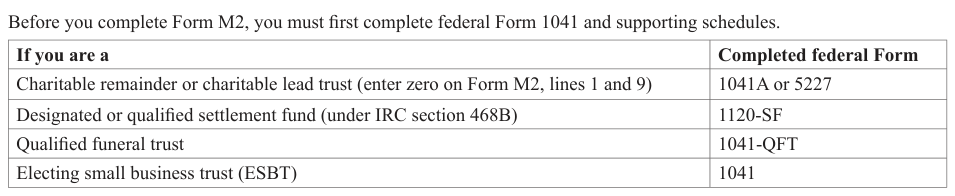
Text version of this table
| If you are a | Completed federal Form |
|---|---|
| Charitable remainder or charitable lead trust (enter zero on Form M2, lines 1 and 9) | 1041A or 5227 |
| Designated or qualified settlement fund (under IRC section 468B) | 1120-SF |
| Qualified funeral trust | 1041-QFT |
| Electing small business trust (ESBT) | 1041 |
# Tax Year
If you are filing on a fiscal year basis, enter the beginning and ending dates. Without the dates, your filing and payments may not be considered timely.
# Minnesota Tax ID Number
Enter your Minnesota tax ID number on Form M2. Without it, processing of the return is delayed, and your estimated tax and extension prepayments cannot be verified and credited properly.
# Check Boxes
Place an X in all boxes that apply.
Bankruptcy estate. A separate and distinct taxable entity created when an individual debtor files for bankruptcy under Chapter 7 or 11 of Title 11 of the United States Code. Enter the bankruptcy debtor's SSN in the bankruptcy debtor SSN box and, if filing jointly, enter the second debtor's SSN in the corresponding box.
Composite income tax. If you are paying composite income tax for your electing nonresident beneficiaries. See the line 14 instructions on page 5.
Due Process Nonresident. A trust or estate that meets the definition of a statutory resident (check the statutory resident checkbox), but you believe may not have sufficient minimum connections to Minnesota to be taxed as a resident trust or estate. If you check this box and are a trust, you must also complete and enclose Schedule M2RT with your return. See the instructions on pages 1- 2 and Schedule M2RT for more details.
ESBT (Electing Small Business Trust). An ESBT is a non-grantor trust that has income from one or more S corporations. The portion of an ESBT that consists of stock of one or more S corporations is treated as a separate trust. See Schedule M2SB for more details.
Initial return. If this is the fiduciary's first return filed in Minnesota.
Final return. If this is the fiduciary's final return. For income tax purposes, Minnesota follows federal law on termination of estates and trusts.
All income, deductions and credits are passed through to the beneficiaries.
Form M706 Filed. If the decedent's estate or trust had a M706 estate tax return filed. Enter the gross value of the estate on the line provided.
Grantor Trust. A trust is a grantor trust if the grantor retains certain powers or ownership benefits.
Installment Sale of Pass-through Assets or Interests. If the trust or estate:
- executed an installment sale, after December 31, 2016, of S corporation stock or partnership interests being reported on federal Form 6252,
- executed an installment sale, after December 31, 2016, of the assets of an S corporation or partnership being reported on federal Form 6252, or
- owns an interest in an S corporation, partnership, trust, or estate reporting installment sale gains on line 7 of Schedule KPI or KS, line 6 of Schedule KF, or line 10 of Schedule KPC.
If you are required to check the box and the gain from the sale was distributed, complete line 6 of all applicable Schedules KF to report installment sale information to your beneficiaries. Instructions are provided with Schedule KF. Beneficiaries who are receiving Schedules KF with positive values on line 6 may not be included in a composite return.
Irrevocable Trust. A trust is considered irrevocable if the grantor no longer has control over the trust assets and administration. Enter the date the trust became irrevocable.
Owns or Operates Business. If the estate or trust owns or operates a business through the estate or trust. Provide the Federal Identification Number(FEIN) of the business in the box provided. If the estate or trust owns or operates more than one business, provide a list of all FEINs of the businesses in an attachment.
QSST. If the trust is filing as a Qualified Subchapter S Trust.
Section 645 Election. The IRC section 645 election allows a qualified revocable trust to be treated and taxed as part of the related estate during the election period. If the election is made for federal income tax purposes, it also applies for Minnesota. Enclose a copy of federal Form 8855 or letter making the election.
Statutory Nonresident. A trust or estate that does not meet the definition of a statutory resident under Minnesota Statute section 290.01, subdivisions 7a and 7b and therefore is considered a statutory nonresident. See instructions on pages 1- 2 for more details.
Statutory Resident. A trust or estate that meets the definition of a statutory resident under Minnesota Statute section 290.01, subdivisions 7a and 7b. See instructions on pages 1- 2 for more details.
Tax Position Disclosure. If you filed Form TPD to disclose items or positions that are not otherwise adequately disclosed on your return.
See Form TPD for more details. Continued 4
# Line Instructions
Round amounts to whole dollars. Drop amounts less than 50 cents and increase amounts 50 cents or more to the next higher dollar.
# Line 2 — Deductions and Losses not Al lowed
Use Schedule M2NM to determine the amount to include on Line 2.
# Line 3 — Capital Gain of Lump Sum Distribution
If you received a qualifying lump-sum distribution in 2025 and chose the capital gain election on federal Form 4972, enter the capital gain from line 6 of federal Form 4972. Include a copy of federal Form 4972 when you file Form M2.
# Lines 4 and 6 —Additions and Subtractions
Include the amount from line 77, column E of Form M2. See the instructions for Allocation of Adjustments on pages 13 and 14 for more details.
# Line 7— Income from Non-Minnesota Sources
Use Schedule M2NM to determine the amount to include on Line 7.
# Line 10 — Minnesota Tax
Use the table starting on page 17 to determine the amount to enter on line 10.
# Line 11 — Tax from S portion of an Electing Small Business Trust
If you are filing as an Electing Small Business Trust (ESBT), you must file Schedule M2SB to report all items relating to the S portion of the trust. Enter the tax calculated on the M2SB on line 11 of Form M2. Include Schedule M2SB when you file Form M2.
# Line 12 — Minnesota Net Investment Income Tax
If you have over $1,000,000 of investment income during the tax year, you must complete Schedule NIIT. Enter the tax calculated on Schedule NIIT on line 12 of Form M2. Include Schedule NIIT when you file Form M2.
# Line 13 — Additional Tax
Schedule M1LS—Tax on a Lump-Sum Distribution. If you received a lump-sum distribution from a qualified pension plan, profit sharing plan or stock bonus plan and the 10-year averaging method on federal Form 4972 was used, you must complete Minnesota Schedule M1LS, Tax on Lump-Sum Distribution.
Include the amount from line 11 of Schedule M1LS on line 13 of Form M2. Check the box for Schedule M1LS and include a copy of the schedule when you file your return.
Schedule M2MT—Alternative Minimum Tax. If you had to complete federal Schedule I, Alternative Minimum Tax, you must complete Minnesota Schedule M2MT, Alternative Minimum Tax for Estates and Trusts.
Include the amount from line 18 of Schedule M2MT on line 13 of Form M2. Check the box for Schedule M2MT and include a copy of the schedule with your return.
# Line 14 — Composite Income Tax
Add the composite income tax attributed to all electing beneficiaries (the total of line 51 from all Schedules KF), and enter the result on line 14 of Form M2.
# Line 16 — Credit for Taxes Paid to Another State
You may claim a nonrefundable credit on line 16 for taxes paid to another state if all of the following are true:
- You are filing as a Minnesota resident estate or trust.
- You paid 2025 income tax to Minnesota.
- You paid 2025 income tax to another state on the same income as Minnesota. For purposes of this credit, a Canadian province or territory and the District of Columbia are considered a state.
The credit cannot exceed the sum of the taxes shown on lines 10 and 11 of Form M2.
Use Schedule M1CR, Credit for Income Tax Paid to Another State, as a worksheet to determine the credit and enter the result on line 16.
You may not carry forward any unused credit.
# Line 17 - Film Production Credit
If you received a credit certificate from the Department of Employment and Economic Development (DEED) for eligible production costs, enter the credit amount on line 17 and the certificate number in the space provided.
You may carry any unused credit forward for up to 5 years.
For more details regarding this tax credit, go to the DEED website at mn.gov/deed.
# Line 18 - Tax Credit for Owners of Agricultural Assets
If you received a credit certificate from the Minnesota Rural Finance Authority for selling or leasing agricultural assets to a beginning farmer, enter the credit amount on line 18 and certificate number in the space provided.
If you have multiple credits, enter the certificate number the estate or trust received directly from the Rural Finance Authority within the certificate number box. If you have multiple credits and received all credits from other pass-through entities, enter the certificate number relating to the largest credit amount within the certificate number box. Include a statement showing the certificate numbers and corresponding credit amounts for all credits you included on line 18. Subtotal all credit amounts on line 18.
You may carry any unused credit forward for up to 15 years.
# Line 19 — State Housing Tax Credit
If you received a certificate from Minnesota Housing for qualifying contributions to a state fund, enter the credit amount on line 19 and the certificate number in the space provided.
You may carry any unused credit forward for up to 10 years.
For more details regarding this tax credit, go to Minnesota Housing's website at www.mnhousing.gov.
# Line 20 - Short Line Railroad Infrastructure Modernization Credit
If you applied to the Department of Transportation and received a short line railroad infrastructure modernization credit certificate or had a credit transferred to you, you may claim the credit here. Include the amount of the credit and credit certificate on line 20.
Any unused credit amount may be carried forward for up to five years.
You may also transfer the entire amount of the credit before any has been used, or the entire amount of the remaining carryforward to one other taxpayer. To transfer the credit, you may utilize Schedule RAIL.
# Line 21 - Credit for Sales of Manufactured Home Parks to Cooperatives
You may be eligible for the nonrefundable Credit for Sales of Manufactured Parks to Cooperatives if the estate or trust sold a manufactured home park to a cooperative.
If you qualify, complete Schedule MHP, Credit for Sales of Manufactured Home Parks to Cooperatives. Enter the credit amount on line 21.
You may carry any unused credit forward for up to 5 years.
# Line 22 — Nonrefundable Credit for Increasing Research Activities
Follow the steps below to determine lines 22d, 22e, and 22f.
Worksheet for Lines 22 and 32, Credit for Increasing Research Activities
1 Tentative Current-Year Credit: Include the sum of credits received on Schedules KF line 34 and Schedules KPI and KS lines 26 … 2 Regular Tax: Include the sum of lines 10 and 11 … 3 Nonrefundable Credits: Include the sum of lines 16 through 21, 23, and 24. Do not include any portion of line 23 relating to the Alternative Minimum Tax Credit … 4 Regular Tax Less Nonrefundable Credits: Subtract step 3 from step 2 … 5 Prior Year Credit Carryover: Include the portion of line 24 relating to a research credit carryover from prior years .
6 Liability for Tax: Add steps 4 and 5 … 7 Limitation: Enter the lesser of step 2 and step 6. If the result is zero or less, leave blank … 8 Current-Year Credit After Limitation: Enter the lesser of step 1 and step 7. Include the result here and on line 22d 9 Unused Current-Year Nonrefundable Credit: Subtract step 8 from step 1. Include the result here and on line 22e . .
If the result is 0, stop here. Your refundable credit amount is $0.
10 Refundable Credit Amount: Multiply step 9 by 19.2% (0.192). Include the result here and on line 32 … 11 Current-Year Credit Carryover: Subtract step 10 from step 9. Include the result here and on line 22f … You may carry any unused credit forward for up to 15 years. You cannot use the carryover amount when determining the refundable portion of the credit.
# Line 23 — Other Nonrefundable Credits
If you are claiming a nonrefundable credit other than the credits listed on lines 16 through 22, include the credit on line 23.
Include on line 23 any credits eligible outright by an estate or trust or received on Schedules KPI, KS, or KF as a partner, shareholder, or beneficiary of another entity.
Include on line 23 only the portion of the credit(s) being retained by the estate or trust. Any portion of the credit(s) being distributed to beneficiaries should be reported on the beneficiaries' Schedules KF.
If you are including an amount on line 23, include a statement indicating which credit(s) the estate or trust is claiming. Include with your return filing any required forms, schedules, credit certificates, or documentation.
# Employer Transit Pass Credit
You may be eligible for the nonrefundable Employer Transit Pass Credit if the estate or trust operated a business that purchases transit passes to sell or give to employees. The credit is equal to 30 percent of the difference between the price you paid for the pass and the price charged employees.
If you qualify, complete Schedule ETP, Employer Transit Pass Credit. Enter the credit amount on line 23.
You may not carry forward any unused credit.
# SEED Capital Investment Credit
You may be eligible for the SEED Capital Investment Credit if:
- The estate or trust invested in a qualified business in Breckenridge, Dilworth, East Grand Forks, Moorhead, or Ortonville.
- The business has been certified by the Minnesota Department of Employment and Economic Development (DEED) as qualifying for the SEED Capital Investment Program.
Enter the credit amount from the credit certificate you received from the DEED on line 23.
You may carry any unused credit forward for up to four years.
# Alternative Minimum Tax Credit
You may be eligible for the Alternative Minimum Tax Credit if the estate or trust paid Minnesota alternative minimum tax in one or more taxable years from 1989 through 2024. If the estate or trust did not pay Minnesota alternative minimum tax, you do not qualify for the credit.
Use the Schedule M1MTC, Alternative Minimum Tax Credit, as a worksheet to determine if you qualify or have a credit carryover from a prior year of any unused portion of your minimum tax credit. Enter the credit calculated from Schedule M1MTC on line 23.
# Line 24 - Carryover Credits from Prior Years
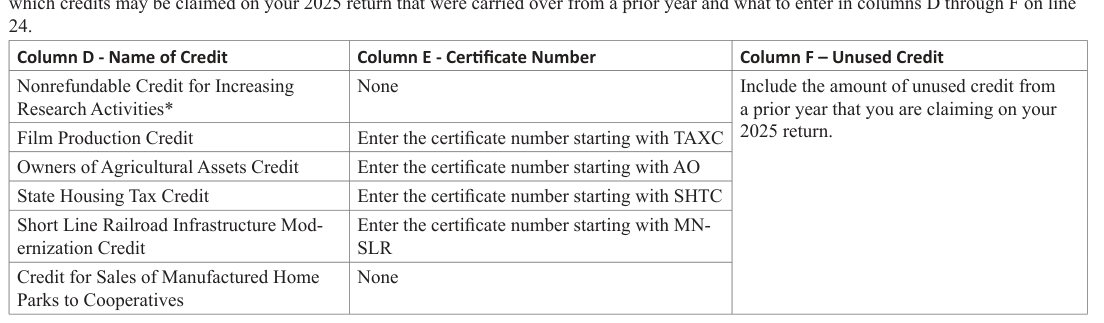
Text version of this table
| Column D - Name of Credit | Column E - Certificate Number | Column F – Unused Credit |
|---|---|---|
| Nonrefundable Credit for Increasing Research Activities* | None | Include the amount of unused credit from a prior year that you are claiming on your 2025 return. |
| Film Production Credit | Enter the certificate number starting with TAXC | |
| Owners of Agricultural Assets Credit | Enter the certificate number starting with AO | |
| State Housing Tax Credit | Enter the certificate number starting with SHTC | |
| Short Line Railroad Infrastructure Mod ernization Credit | Enter the certificate number starting with MN- SLR | |
| Credit for Sales of Manufactured Home Parks to Cooperatives | None |
- You cannot use the carryover amount for the nonrefundable credit for increasing research activities when determining the refundable portion of the credit. See the instructions for lines 22 and 32.
# Line 27 — Pass-Through Entity Tax Credit
An estate or trust may receive a tax credit as a qualifying owner of an electing pass-through entity.
Include on line 27 the credit amount you received on the:
- 2025 Schedule KS, line 33
- 2025 Schedule KPI, line 33
- 2025 Schedule KF, line 43
# Line 28 — Minnesota Income Tax Withheld
Enter the total of any 2025 Minnesota tax withheld, including:
- Minnesota income tax withheld in error (and not repaid) by an employer on wages and salaries of a decedent that was received by the decedent's estate (enclose a copy of federal Form W-2, Wage and Tax Statement), and
- The fiduciary's share of any Minnesota income tax withholding from Schedule KS or KPI not passed through to the beneficiaries.
Minnesota requires backup withholding to be made when the payee is subject to federal backup withholding on reportable payments made to a trust for personal services. (IRC section 3406). The Minnesota backup withholding is equal to the payment multiplied by the highest Minnesota tax rate for trusts. The Minnesota backup withholding must be passed through to the trust's beneficiary(s) based upon the income distributed to the beneficiary(s). Report each beneficiary's portion of the backup withholding on line 44 of Schedule KF.
If you are including withholding on line 28, include a copy of the federal Form 1099, Schedule KPI, Schedule KS, or other documentation showing the amount withheld. If the documentation is not included with your Form M2, the department will disallow the amount and assess the tax or reduce your refund.
# Line 29 — Total Estimated Tax Payments and Any Extension Payments
Enter your total estimated tax and extension payments paid for the tax year, including:
- your total 2025 estimated tax payments made in 2025 and 2026, either paid electronically or by check,
- the portion of your 2024 refund applied to your 2025 estimated tax, and
- any 2025 extension payment, paid electronically or by check, that was made by the due date when filing under an extension.
# Line 30 — Credit for Historic Structure Rehabilitation
You may be eligible for the refundable Minnesota Credit for Historic Structure Rehabilitation if all of the following apply:
- You made qualified improvements to a certified historic structure in Minnesota.
- The improvements qualify for the federal Rehabilitation Credit under IRC, section 47.
- You applied for certification to the Minnesota State Historic Preservation Office (SHPO) before starting the project.
- SHPO issued a credit certificate upon the project's completion.
For estates and trusts who receive a credit certificate from Minnesota SHPO, enter the National Park Service (NPS) project number from the credit certificate you received in the space provided, and include on line 30:
- The credit amount shown on the credit certificate if the initial application for allocation certificate was submitted to SHPO on or before December 31, 2017.
- One-fifth of the credit amount shown on the credit certificate if the initial application for allocation certificate was submitted to SHPO after December 31, 2017.
For details about the Minnesota and federal credits, go to the SHPO website at mn.gov/admin/shpo.
# Line 31 — Credit for Sustainable Aviation Fuel
If you received a certificate from Department of Agriculture for the refundable Minnesota Credit for Sustainable Aviation Fuel, enter the credit amount on line 31 and the certificate number in the space provided.
For more details regarding this tax credit, go to the Department of Agriculture's website at www.mda.state.mn.us.
Line 32 - Refundable Credit for Increasing Research Activities Use the Worksheet for Lines 22 and 32 on page 6 of these instructions to determine line 32.
Note: You cannot use the carryover amount for the nonrefundable credit for increasing research activities when determining the refundable portion of the credit.
# Line 33 — Other Refundable Credits
If you are claiming a refundable credit other than the credits listed on lines 27, 30, 31, and 32, include the credit on line 33.
Include on line 33 any credits eligible outright by an estate or trust or received on Schedules KPI, KS, or KF as a partner, shareholder, or beneficiary of another entity.
Include on line 33 only the portion of the credit(s) being retained by the estate or trust. Any portion of the credit(s) being distributed to beneficiaries should be reported on the beneficiaries' Schedules KF.
If you are including an amount on line 33, include a statement indicating which credit(s) the estate or trust is claiming. Include with your return filing any required forms, schedules, credit certificates, or documentation.
Enterprise Zone Credit
You may be eligible for the refundable Enterprise Zone Credit if the estate or trust operated a business that has been approved by the Minnesota Department of Employment and Economic Development (DEED) as employment property in an enterprise zone.
If you received are approval from DEED for the Enterprise Zone Credit, enter the credit amount on line 33. Attach the certification document received from the DEED.
For more details about the zones, go to the DEED website at mn.gov/deed.
Angel Investment Tax Credit
You may be eligible for the refundable Angel Investment Tax Credit if you made investment in certain Minnesota businesses. The Minnesota Department of Employment and Economic Development (DEED) certifies investors, investment funds, and businesses as being eligible to participate in this credit program.
If you received the Angel Investment Tax Credit Certificate issued by DEED, enter the credit amount on line 33.
For more information about credit eligibility, go to the DEED website at mn.gov/deed.
# Line 36 — Penalty
Penalties are collected as part of the tax and are in addition to any charge for underpaying estimated tax. If you are paying your tax after the regular due date, include the appropriate penalties on line 36. Include a statement showing how you arrived at the penalty amount.
Late Payment. If the tax is not paid by the original due date, a penalty is due of 6 percent of the unpaid tax on line 35.
Balance Not Paid. If you file your return after the regular due date with a balance due, an additional 5 percent penalty will be assessed on the unpaid tax.
Late Filing. If you are filing your return after the extended due date, you must pay a late filing penalty. The late filing penalty is 5 percent of the unpaid tax on line 35.
Payment Method. If you are required to pay electronically and do not, an additional 5 percent penalty applies to payments not made electronically, even if your paper check is sent on time.
If, during the 12 months ending June 30 of the tax year, you paid $10,000 or more in estimated tax payments, you are required to make all future estimated tax payments electronically beginning January 1 of the following tax year. Once you meet the electronic payment threshold, you are required to pay electronically for all future periods.
You must also pay electronically if you're required to pay any Minnesota business tax electronically.
# Line 37 — Interest
You must pay interest on the unpaid tax and penalty from the regular due date until the total is paid. The interest rate for calendar year 2026 is 7%. To figure how much interest you owe, use the following formula with the appropriate interest rate:
Interest = (tax + penalty) x # of days late x interest rate ÷ 365
# Line 38 — Trusts Only - Additional Charge
Skip this line if you are an estate.
Trusts: If you did not pay the correct amount of estimated tax by the due dates, you may have to pay an additional charge for underpaying or not paying estimated tax.
You may also owe an additional charge if the sum of the following is more than $500:
- Line 15
- Less the sum of any credits on lines 16 through 24.
Complete Schedule EST, Additional Charge for Underpayment of Estimated Tax (for Trusts, Partnerships and S Corporations), to determine the additional charge for underpaying estimated tax, if any, to enter on line 38. Include Schedule EST with your return.
# Line 39 — Amount Due
Add lines 35 through 38. This is the total amount you owe.
Check the appropriate box on line 39 to indicate your method of payment. See Payment Options on page 3.
# Line 40 — Overpayment
If you have an overpayment, you may choose to have it directly deposited into your bank account, apply all or a portion of your overpayment toward your 2026 estimated tax account, or receive a check.
# Line 41 — 2026 Estimated Tax
Skip this line if you owe additional tax or you will be electing to have your entire refund directly deposited (see line 43).
If you are paying 2026 estimated tax, you may apply all or a portion of your refund to your 2026 estimated tax.
Enter the portion of line 40 you want to apply toward your 2026 estimated tax.
# Line 42 — Minnesota Income Tax Refund
Subtract line 41 from line 40. The result is the amount of your 2025 Minnesota income tax refund that will be refunded to you.
If you want to request your refund to be direct deposited into your bank account, complete line 43. Your bank statement will indicate when your refund was deposited to your account. Otherwise, skip line 43 and your refund will be sent to you in the mail.
# Line 43 — To Request Direct Deposit of Refund
If you want your refund to be directly deposited into your checking or savings account, enter the routing and account numbers.
The routing number must have nine digits. The account number may contain up to 17 digits (both numbers and letters). Enter the number and leave out any hyphens, spaces and symbols.
You can find your bank's routing number and
If the routing or account number is incorrect or is not accepted by your financial institution, your account number on the bottom of your check. refund will be sent to you in the form of a paper check.
By completing line 43, you are authorizing the department and your financial institution to initiate electronic credit entries, and if necessary, debit entries and adjustments for any credits made in error.
# Signature
The return must be signed by the fiduciary or authorized officer of the organization receiving, controlling or managing the income of the estate or trust. The person must also include his or her ID number.
If someone other than the fiduciary prepared the return, the preparer must also sign and provide their Preparer Tax Identification Number
(PTIN) and phone number.
Check the box to authorize the department to discuss this return with the preparer. This authority allows us to discuss with your preparer these items from this return: line item details; tax due on original and adjustments made during processing; penalty or interest due; documents received or sent like a tax order or bill; and dates and amounts of payments, credits, or refunds. The authority also allows your preparer to cancel direct deposit or debit payments and submit an abatement request.
The authority granted by a marked return checkbox is valid for one year after the due date for current original returns, or one year from the date the form was submitted for amended and noncurrent original returns.
Checking the box does not give your preparer the authority to sign any tax documents on your behalf, represent you at any audit or appeals conference, or discuss abatement progress. For these types of authorities, you must file Form REV184b, Business Power of Attorney, with the department.
# E-mail Address
If the department has questions regarding your return and you want to receive correspondence electronically, indicate the e-mail address below your signature. Check a box to indicate if the e-mail address belongs to the fiduciary or paid preparer.
By providing an e-mail address, you are authorizing the department to correspond with you or the designated person via email and you understand that the entity's nonpublic tax data may be transmitted over the Internet.
You also accept the risk that the data may be accessed by someone other than the intended recipient. The department is not liable for any damages that the fiduciary may incur as a result of an interception.
# Line 44 — State and Municipal Bond In terest
Enter the amount of interest or dividends received from bonds or a bond mutual fund which invests in non-Minnesota state or municipal securities.
For dividends received from a bond mutual fund, determine the amount to include using the following instructions:
- If 95 percent or more of the federally tax-exempt dividends from a mutual fund came from bonds issued by Minnesota, only the portion of the dividend generated by non-Minnesota bonds must be included.
- If less than 95 percent of all federally tax-exempt interest dividends from a mutual fund came from bonds issued by Minnesota, all of the federally tax-exempt interest dividend from that fund must be included.
Nonresident estates and trusts: Non-Minnesota interest or dividends received from bonds or a bond mutual fund do not have to be added back to Minnesota income. [M.S. 290.0131, subd. 2]
# Line 45 — State Taxes Deducted in Arriving at Net Income
Enter the amount of state income tax, sales and use tax, motor vehicle sales tax, excise tax, or tax based on net income paid or accrued within the taxable year and deducted on the federal return. Include state tax deductions reported to you on Minnesota Schedules KF, KS, and KPI. For the purposes of this addition, "state" means any state or any province or territory of Canada to the extent the tax is deducted under IRC section 63(d). [M.S. 290.0131, subd. 3] State income tax deductions are not allowed on the Minnesota return.
# Line 47 — Suspended Loss of Bonus Depreciation
1 Bonus depreciation from 2001-2005 or 2008-2024 not added back on Form M2 … 2 Total suspended loss from activity remaining after 2025 … 3 Subtract step 2 from step 1 (if a negative amount, enter zero) … 4 Multiply step 3 by 80 percent (.80) … 5 Total of the 80 percent bonus depreciation addition passed through to you as a beneficiary of another estate or trust (from line 4 of Schedule KF) … 6 Add steps 4 and 5. Enter here and on line 47 … If you're claiming a suspended loss from 2001-2005 or 2008-2024 on your federal return that was generated by bonus depreciation, and you did not add back 80 percent of the bonus depreciation in those years, complete the following steps:
# Line 48 — Bonus Depreciation Addition
If you claimed federal bonus depreciation, you must add back 80 percent of the bonus depreciation to Minnesota. Follow the steps on the next page to determine line 48.
1 Add line 14 and line 25 of your federal Form 4562* … 2 Include the amount from line 2a of Schedule M2NC … 3 Include the amount from line 7a of Schedule M2NC … 4 Include the amount from line 15a of Schedule M2NC … 5 Add steps 2, 3, and 4 … 6 Subtract step 5 from step 1 … 7 Total bonus depreciation passed through to you as a shareholder of an S corporation (from line 4 of Schedule KS), or as a partner of a partnership (from line 4 of Schedule KPI) … 8 Include the total amount from line 2a of all Schedules KPINC, KSNC, and KFNC you received … 9 Include the total amount from line 7a of all Schedules KPINC, KSNC, and KFNC you received … 10 Include the total amount from line 15a of all Schedules KPINC, KSNC, and KFNC you received … 11 Include the amount from line 20 of Schedule M2NC as a positive number … 12 Add steps 6 through 11 … 13 Multiply step 12 by 80% (.80) … 14 Total of any 80% federal bonus depreciation addition you received as a beneficiary of another estate or trust (from line 5 of Schedule KF) … 15 Add steps 13 and 14. Enter here and on line 48 …
- If bonus depreciation included in step 1 or 2 generated a loss in an activity that cannot be deducted in 2025 (e.g., a passive activity loss, a loss in excess of basis, or an excess business loss), you may reduce step 1 or 2 by the amount of loss not allowed from the activity for 2025, up to the bonus depreciation claimed by the activity.
# Line 49 — Section 199A Qualified Business Income (QBI)
Enter the amount of QBI you deducted from net income under IRC section 199A for the taxable year. Include on line 49 only the portion of the QBI deduction being retained by the estate or trust. Allocate 100% of line 49 to the fiduciary on line 77 of Form M2. [M.S. 290.0131, subd. 16]
# Line 50 — Addition Due to Federal Changes Not Adopted by Minnesota
Enter the amount from Schedule M2NC, line 31. If the amount is negative, leave line 50 blank and enter it as a positive number on line 62.
# Line 51 — Net Operating Loss (NOL) Carryover Adjustment
If you claimed a federal net operating loss deduction on line 15b of federal Form 1041 in this tax year, add that amount to line 51 as a positive number.
# Line 52 — Foreign-Derived Intangible Income (FDII) Deduction
Enter the amount of foreign-derived intangible income (FDII) you deducted from net income under IRC section 250 for the taxable year.
[M.S. 290.0131, subd. 17]
# Line 53 — Other Additions
Include an amount on line 53 if the estate or trust is required to make any of the following Minnesota additions:
- First-time home buyer savings account addition [M.S. 290.0131, subd. 14]
- 529 plan addition [M.S. 290.0131, subd. 15]
# Lines 54 through 57
These lines are intentionally left blank.
# Line 59 — Net Interest from U.S. Bonds
Interest earned on certain direct federal obligations is taxable on the federal return, but is not taxable on the state return. You may reduce your taxable income if you reported interest on your federal return that is exempt from state income tax.
Include the interest you received from certain U.S. bonds, bills, notes and other debt instruments, reduced by any related investment interest and other expenses you deducted on your federal return that relate to this income.
You may also include the portion of dividends from mutual funds that are attributable to such bonds, bill or notes, reduced by any related expenses you deducted on your federal return.
Enclose a statement from the fund indicating the proportionate interest earned on the above securities. [M.S. 290.0132, subd. 2]
# Line 60 — State Income Tax Refunds
Income tax refunded by Minnesota or any other taxing jurisdiction that was included as income on the federal return is not taxed by Minnesota. [M.S. 290.0132, subd. 3]
# Line 61 — Federal Bonus Depreciation Subtraction
You may be able to reduce your taxable income if you:
- deducted bonus depreciation on your 2020 through 2024 federal return, and
- reported 80 percent of the federal bonus depreciation as an addition to income on your 2020 through 2024 Form M2, or
- received a federal bonus depreciation subtraction in 2025 from another flow-through entity.
If an individual has unused bonus depreciation subtractions when they die, the subtractions are not allowed to be carried to the fiduciary income tax return of the individual's estate or trust.
To determine the amount, see Worksheet for Line 61.
Worksheet for Line 61
If you claimed bonus depreciation as an addition on your 2020 Form M2:
1 Portion of lines 38 and 39 of your 2020 Form M2 allocated to fiduciary … 1 2 Net operating loss generated for tax year 2020 (line 24, Schedule A of 2020 federal Form 1045). Enter as a positive number . . 2 3 Subtract step 2 from step 1 … 3 4 Multiply step 3 by 20% (.20) … 4
If you claimed bonus depreciation as an addition on your 2021 Form M2:
5 Portion of lines 41 and 42 of your 2021 Form M2 allocated to fiduciary … 5 6 Net operating loss generated for tax year 2021 (line 24, Schedule A of 2020 federal Form 1045). Enter as a positive number . . 6 7 Subtract step 6 from step 5 … 7 8 Multiply step 7 by 20% (.20) … 8
If you claimed bonus depreciation as an addition on your 2022 Form M2:
9 Portion of lines 41 and 42 of your 2022 Form M2 allocated to fiduciary … 9 10 Net operating loss generated for tax year 2022 (line 24, Schedule A of 2022 federal Form 1045). Enter as a positive number 10 11 Subtract step 10 from step 9 … 11 12 Multiply step 11 by 20% (.20) … 12
If you claimed bonus depreciation as an addition on your 2023 Form M2:
13 Portion of lines 44 and 45 of your 2023 Form M2 allocated to fiduciary … 13 14 Net operating loss generated for tax year 2023 (line 24, Schedule A of 2023 federal Form 1045). Enter as a positive number 14 15 Subtract step 14 from step 13 (if zero or less, enter 0) … 15 16 Multiply step 15 by 20% (.20) … 16
If you claimed bonus depreciation as an addition on your 2024 Form M2:
17 Portion of lines 46 and 47 of your 2024 Form M2 allocated to fiduciary … 17 18 Net operating loss generated for tax year 2024 (line 24, Schedule A of 2024 federal Form 1045). Enter as a positive number 18 19 Subtract step 18 from step 17 (if zero or less, enter 0) … 19 20 Multiply step 19 by 20% (.20) … 20
If you received a subtraction in 2025 from an estate or trust:
21 Total of any bonus depreciation subtraction amounts you received as a beneficiary of an estate or trust (from line 18 of Schedule KF) … 21
Total subtraction
22 Add steps 4, 8, 12, 16, 20, and 21. Enter here and on line 61 of Form M2 … 22
# Line 62 — Subtraction Due to Federal Changes Not Adopted by Minnesota
Enter the amount from Schedule M2NC, line 31. If the amount is a positive, leave line 62 blank and enter it as a positive number on line 50.
# Line 63 — Subtraction for Railroad Maintenance Expenses
Enter the amount of any qualified railroad track maintenance expenditures that are not allowed to be deducted on your federal return due to claiming the federal credit under IRC section 45G(a). This includes the amount of depreciation expenses you were not allowed for federal income tax purposes due to making a basis adjustment as a result of claiming the federal credit. The Minnesota subtraction is allowed regardless of when the railroad purchased the asset to support the federal Railroad Track Maintenance Credit. [M.S. 290.0132, subd. 22]
Line 64 — Net Operating Loss (NOL) Carryover Adjustment Enter the amount of your Minnesota net operating loss allowed in this year. [M.S. 290.095, subd. 11]
# Line 65 — Deferred Foreign Income (IRC Section 965)
Enter the amount of deferred foreign income included in net income under IRC section 965 for the taxable year. [M.S. 290.0132, subd. 27]
# Line 66 — Disallowed IRC Section 280E Expenses of a Licensed Cannabis or Hemp Business
If you are a licensed cannabis or hemp business with the Office of Cannabis Management, you may subtract expenses that were not allowed for federal tax purposes under IRC section 280E. Enter the disallowed IRC section 280E expenses on line 66. [M.S. 290.0132, subd. 29]
# Lines 67 — Delayed Business Interest
You may be able to reduce your taxable income if you:
- Reported a nonconformity adjustment in tax years 2019 through 2022 for business interest expense deducted under the special rule (CARES Act Section 2306) in IRC section 163(j)(10)(A) and (B).
- Have an unused Minnesota-only excess business interest expense carried forward from your 2019 through 2022 Minnesota returns.
If you filed a 2023 return, enter the same amount of the subtraction you claimed on your 2023 return.
If you did not file a 2023 return, determine the amount of your subtraction by summing the amounts reported on the following nonconformity adjustment lines:
- 2019 Form M2, line 36, or 2019 Form M2SB, line 23
- 2020 Schedule M2NC, line 6, or 2020 Schedule M2SBNC, line 6
- 2021 Schedule M2NC, line 5, or 2021 Schedule M2SBNC, line 5
- 2022 Schedule M2NC, line 5, or 2022 Schedule M2SBNC, line 5 Multiply the total of the above lines by 20 percent. This is the amount of your subtraction in tax year 2025. The remaining 2/5th of the total 12 can be taken as a 20 percent subtraction in each of the tax years 2026 and 2027.
# Lines 68 — Delayed Net Operating Loss Deduction
You may be able to reduce your taxable income if you:
- Reported a nonconformity adjustment in tax years 2017 through 2022 for net operating loss deducted as a result of the CARES Act Section 2303.
- Have an unused Minnesota-only net operating loss deduction carried forward from your 2017 through 2022 Minnesota returns.
To determine the amount of your subtraction, sum the amounts reported on the following nonconformity adjustment lines:
- 2017 Form M2, line 31b with Code 19, or 2017 Form M2SB, line 18b with Code 19
- 2018 Schedule M2NC, line 26, or 2018 Schedule M2SBNC, line 27
- 2019 Form M2, line 35, or 2019 Form M2SB, line 22
- 2020 Schedule M2NC, line 4, or 2020 Schedule M2SBNC, line 4
- 2021 Schedule M2NC, line 3, or 2021 Schedule M2SBNC, line 3
- 2022 Schedule M2NC, line 3, or 2022 Schedule M2SBNC, line 3 Use the worksheet below to determine your Minnesota subtraction.
Worksheet for Line 68
1 Enter the amount from your prior year nonconformity adjustments totaled above … 2 Enter the amount of federal taxable income from line 23 of federal Form 1041. If less than zero, enter 0 … 3 Multiply step 2 by 80% (.80) … 4 Enter the lesser of step 1 or step 3. Include this amount on line 68 … 5 Subtract step 4 from step 1. This is your Minnesota NOL carried into 2026. Retain this amount for your records …
# Line 69 — Employee Retention Credit Subtraction
Enter the amount of wages not deducted from income in the current taxable year and used for the calculation of the federal Employee Retention Credit under CARES Act Sec. 2301; TCDTR20 Sec. 206 and 207; and/or ARPA Sec. 9651.
# Line 70 — Other Subtractions
Include an amount on line 70 if the estate or trust is required to make any of the following Minnesota subtractions:
- Gain on forced sale of farm property subtraction [M.S. 290.0132, subd. 6]
- National Guard and reserve compensation subtraction [M.S. 290.0132, subd. 11]
- Armed forces active-duty compensation paid to Minnesota residents subtraction [M.S. 290.0132, subd. 12]
- Nonresident military service compensation subtraction [M.S. 290.0132, subd. 15]
- National service educational awards subtraction [M.S. 290.0132, subd. 16]
- Military service pension and retirement pay subtraction [M.S. 290.0132, subd. 21]
- Contributions to section 529 plan subtraction [M.S. 290.0132, subd. 23]
- First-time home buyer savings account subtraction [M.S. 290.0132, subd. 25]
- Social Security benefits subtraction [M.S. 290.0132, subd. 26]
- Volunteer driver reimbursement subtraction [M.S. 290.0132, subd. 30]
- Qualified public pension subtraction [M.S. 290.0132, subd. 34]
- Damages for sexual harassment or abuse subtraction [M.S. 290.0132, subd. 35]
- Coerced debt subtraction [M.S. 290.0132, subd. 36]
- Consumer enforcement public compensation subtraction [M.S. 290.0132, subd. 37]
- Foreign service retirement subtraction [M.S. 290.0132, subd. 39]
# Lines 71 through 74
These lines are intentionally left blank.
# Allocation of Adjustments (Lines 76 through 78)
The beneficiary(s) of a trust or an estate must file an individual or fiduciary income tax return to report their portion of the income distributed.
A resident individual beneficiary must report all income from the trust or estate. A nonresident individual beneficiary who receives $14,950 or more of Minnesota gross income must report income assignable to Minnesota.
The purpose of this section is to allocate any adjustments noted on lines 44 through 57 and 59 through 74 between the beneficiary(s) and fiduciary. If all the income is retained by the trust or estate, then any adjustment is allocated entirely to the fiduciary. If all of the income is distributed, then any adjustment is passed through to the beneficiary(s) in proportion to their share of distributable net income. If part of the income is retained and part distributed, then part of the adjustment is allocated to the fiduciary and part to the beneficiary(s).
The share of adjustments in column E is the same percentage share as the fiduciary's and each beneficiary's share of federal distributable net income to the total distributable net income (the amount on Form 1041, Schedule B, line 7). Divide each share by the total distributable net income to determine the percentage.
Certain adjustments must be assigned entirely to the fiduciary or the beneficiary. See the instructions for line 28 on page 7 for the allocation instructions for Minnesota backup withholding. See the instructions for line 49 on page 11 for the allocation instructions for the Section 199A QBI addition.
Where the adjustment is an addition, that portion of the adjustment allocated to each beneficiary and to the fiduciary must be shown as an addition.
Where the adjustment is a subtraction, that part of the adjustment allocated to each beneficiary and to the fiduciary must be shown as a subtraction.
# Column C
Enter the federal distributable net income assigned to each beneficiary and the fiduciary as determined for federal purposes. Add the amounts and enter the total on line 78, column C.
# Column D
To obtain the proper percentage, divide each figure from column C on lines 76 and 77 by the total of column C on line 78. Enter this percentage in column D to correspond with each beneficiary and the fiduciary. The total of column D must equal 100%.
# Column E
To obtain the proper share for each beneficiary and the fiduciary, multiply the adjustment on line 78, column E, under additions and subtractions by the percentage in column D. Enter the result for each beneficiary and the fiduciary in column E, under additions or subtractions.
Complete a Schedule KF for each beneficiary who is assigned adjustments. Complete and provide Schedule KF to each nonresident beneficiary with Minnesota source income and any Minnesota beneficiary who has adjustments to income.
# Completing Schedule KF
Complete and provide Schedule KF to each nonresident beneficiary and any Minnesota resident beneficiary who has adjustments to income.
Enter the information associated with this estate or trust and beneficiary.
# Purpose
An estate or trust must provide each nonresident beneficiary, and any Minnesota beneficiary with adjustments to income, with enough information for them to complete a Minnesota income tax return and determine their correct Minnesota tax.
Schedule KF provides beneficiaries the information they need to file a Minnesota income tax return. The schedule shows each beneficiary their specific share of the fiduciary's income, credits and modifications. Provide the beneficiary a copy of both the front and back of the completed Schedule KF and instructions.
If there are no modifications or credits and the beneficiary is a full-year Minnesota resident, you do not have to provide Schedule KF.
You must enclose with your Form M2 copies of the Schedules KF and attachments issued to your beneficiaries and copies of your federal Schedules K-1.
# Line Instructions
Enter the name, address and social security number of the beneficiary.
Calculate lines 1 through 44 the same for all resident and nonresident beneficiaries. Calculate lines 45 through 49 for estate, trust, and nonresident individual beneficiaries only. Calculate lines 50 and 51 for nonresident beneficiaries only. Round amounts to the nearest whole dollar.
# KF, lines 1-5 and 7-32
If all or part of the fiduciary's income is distributed, then any adjustment shown on lines 44 through 57 and 59 through 74 of Form M2 is passed through to the beneficiary(s) in proportion to their share of distributable net income. Certain adjustments must be assigned entirely to the fiduciary or the beneficiary. See the Allocation of Adjustments instructions on page 13 for more details. From line 76 of Form M2, enter the adjustments to income allocated to each beneficiary.
# KF, line 6
If you checked the box for Installment Sale of Pass-through Assets or Interests and the gain from the sale was distributed, then complete line 6 for all applicable Schedules KF to report installment sale information to your beneficiaries.
Line 6a. Enter each beneficiary's share of the gross profit from any installment sale of S corporation stock or assets, or partnership interests or assets executed after December 31, 2016.
If the sale was completed by the fiduciary, then the total gross profit is found on federal Form 6252, line 16. If the sale was executed by an entity owned by the fiduciary, or another entity in a multi-tiered structure, then this information is reported on:
- Schedules KS and KPI, line 7a
- Schedule KPC, line 10a
- Schedule KF, line 6a
This amount is allocable amongst the beneficiaries in proportion to their share of distributable net income.
If installment sale information is reported to the fiduciary on informational schedules from other entities, then the amount reported to the beneficiaries should equal the total amount reported on all Schedules KF, KPI, KS, and KPC.
If the fiduciary receives installment payments from multiple sales executed after December 31, 2016, attach a schedule to Form M2 detailing the different sales and distributive allocations.
Line 6b. Enter each beneficiary's share of installment sale income from the sale of S corporation stock, or partnership interests, and any installment sale income from the sale of the assets of any S corporation or partnership. If the sale was completed by the fiduciary completing this schedule, then the total installment sale income is found on Form 6252, line 24. If the sale was executed by an entity owned by the fiduciary, or another entity in a multi-tiered structure, then this information is reported on:
- Schedules KS and KPI, line 7b
- Schedule KPC, line 10a
- Schedule KF, line 6b
This amount is allocable amongst the beneficiaries in proportion to their share of distributable net income.
If installment sale information is reported to the fiduciary on informational schedules from other entities, then the amount reported to the beneficiaries should equal the total amount reported on all Schedules KF, KPI, KS, and KPC.
Line 6c. Enter the S corporation's or partnership's apportionment percentage in the year of the installment sale. This information is reported on:
- Schedule KS, line 50, for shareholders of a S corporation
- Schedule KPI, line 52, for partners of a partnership
- Schedule KF, line 6c, for beneficiaries of a trust or estate. Enter the amount as a positive number carried to five decimal places.
Note: If you are reporting a gain from an entity in a multi-tiered pass-through structure, you may need to gather information from the tax preparer of the company that executed the sale.
# KF, line 7
If the amount reported on the beneficiary's line 31 of Schedule KFNC is a positive number, include the amount from line 31 of Schedule KFNC on the beneficiaries Schedule KF, line 7.
# KF, line 8
For individual beneficiaries, include only the portion of the NOL adjustment relating to the WHBA of 2009. [M.S. 290.095, subd. 11(c)]
# KF, lines 11 through 15
These lines are intentionally left blank.
# KF, line 20
If the amount reported on the beneficiary's line 31 of Schedule KFNC is a negative number, include the amount from line 31 of Schedule KFNC as a positive number on the beneficiary's Schedule KF, line 20.
# KF, line 21
For individual beneficiaries, include only the portion of the NOL adjustment relating to the WHBA of 2009. [M.S. 290.095, subd. 11(c)]
# KF, lines 27 through 30
These lines are intentionally left blank.
# KF, line 31
Enter the beneficiary's share of a net gain relating to dispositions of Class 2a property. The gain must meet the definition of net investment income under IRC section 1411.
# KF, line 32
Enter the beneficiary's share of deductions and modifications relating to dispositions of Class 2a property on Schedule KF, line 32.
# KF, line 33
If you received a Minnesota income tax withholding credit, enter the beneficiary's distributive share of any credit that is passed through to the beneficiary. Do not include amounts reported on line 28 of Form M2.
# KF, line 34
If you are a partner of a partnership or a shareholder of an S corporation that conducted qualified research and development in Minnesota, enter the beneficiary's distributive share of the nonrefundable credit from line 26 of Schedules KPI and KS. Attach the appropriate schedule when you file your return.
# KF, line 35
If you received a credit certificate from DEED, enter the beneficiary's distributive share of the credit on line 35.
# KF, line 36
If you received a credit certificate from the Minnesota Rural Finance Authority for selling or leasing agricultural assets to a beginning farmer, enter the certificate number in the space provided and the beneficiary's distributive share of the credit on line 36.
If you have multiple credits, enter the certificate number your fiduciary received directly from the Rural Finance Authority within the certificate number box. If you have multiple credits and received all credits from other pass-through entities, enter the certificate number relating to the largest credit amount within the certificate number box. Subtotal all credit amounts on line 36.
# KF, line 37
If you received a credit certificate from Minnesota Housing, enter the beneficiary's distributive share of the credit on line 37.
# KF, line 38
If you are eligible for the nonrefundable Short Line Railroad Infrastructure Modernization Credit, enter the beneficiary's distributive share of the credit on line 38.
# KF, line 39
If you are eligible for the nonrefundable Credit for Sales of Manufactured Home Parks to Cooperatives, enter the beneficiary's distributive share of the credit on line 39.
# KF, line 40
The estate or trust must distribute unused credits from a prior year to beneficiaries based upon the percentage of income distributed to the beneficiary. Use the table below to determine the information you must distribute to beneficiaries in columns D through G on line 40.
Column D - Name of Credit Column E - Certificate Number Column F - Unused Credit Column G - Remaining Years Nonrefundable Credit for Increasing Research Activities* None Include the amount of unused credit from a prior year that you are distributing to a beneficiary in tax year 2025 .
Include the remaining carryover years of the unused credit . The carryover years include the current tax year and must be a number between 1 and 15 .
For example, the estate or trust received the credit in tax year 2024 and retained all income . Then the estate or trust is distributing some or all income in tax year 2025 . The estate or trust should include the number "15" on the Remaining Carryover Years line on the 2024 Schedule KF .
Film Production Credit Enter the certificate number starting with TAXC Owners of Agricultural Assets Credit Enter the certificate number starting with AO State Housing Tax Credit Enter the certificate number starting with SHTC Short Line Railroad Infrastructure Modernization Credit Enter the certificate number starting with MN-SLR Credit for Sales of Manufactured Home Parks to Cooperatives None
- You cannot use the carryover amount for the nonrefundable credit for increasing research activities when determining the refundable portion of the credit. See the instructions for lines 22 and 32 of Form M2.
# KF, Line 41
If you are eligible for or received the Credit for Sustainable Aviation Fuel as an owner of a partnership or S corporation, enter the beneficiary's distributive share of the credit on line 41. Attach the appropriate certificate when you file your return and enter the certificate number in the space provided.
# KF, line 42
If you are eligible for or received the Credit for Historic Structure Rehabilitation as an owner of a partnership or S corporation, enter the beneficiary's distributive share of the credit on line 42. Attach the appropriate certificate when you file your return and enter the NPS project number in the space provided.
# KF, line 43
If you are a qualifying owner of an electing pass-through entity, enter the beneficiary's distributive share of the credit that is passed through to the beneficiary. Do not include amounts reported on line 27 of Form M2.
# KF, line 44
If you remitted Minnesota backup withholding on a reportable payment made for personal services, include the beneficiary(s) portion of the backup withholding on line 44. The Minnesota backup withholding must be passed through to the trust's beneficiary(s) based upon the income distributed to the beneficiary(s). See the instructions for line 28 of Form M2 for more details.
# Estate, Trust, and Nonresident Individual Beneficiaries, Lines 45 through 49
Lines 45 through 49 apply to estate, trust, and nonresident individual beneficiaries. This beneficiary will be taxed on the income that is allocable to Minnesota.
# KF, lines 45 through 48
From the beneficiary's federal Schedule K-1 (1041), enter the Minnesota portion of amounts on lines 45 through 48.
Interest or dividend income derived from a trade or business (S corporations and partnerships) that is apportioned to Minnesota should be included on line 47.
Include only other income allocable to Minnesota on line 48. For example, include other income from services performed in Minnesota, but do not include interest, dividends or distribution from a pension plan or an annuity.
# KF, line 49
Minnesota source gross income is used to determine if a nonresident individual is required to file a Minnesota individual income tax return (Form M1). Gross income is income before business or rental deductions and does not include losses.
Enter the beneficiary's distributive share of the fiduciary's Minnesota source gross income.
# KF, line 50
Use the Worksheet for Line 50 to determine line 50.
Worksheet for Line 50
1 Sum of: 80 percent of bonus depreciation from line 5 of the beneficiary's Schedule KF and 80 percent of Minnesota-only bonus depreciation from line 20 of the beneficiary's Schedule KFNC as a positive number … 2 Combine lines 7 and 9 of the beneficiary's Schedule KF … 3 Combine lines 45 through 48 of the beneficiary's Schedule KF … 4 Add steps 1, 2 and 3 … 5 To the extent allowed by law, enter one-fifth of the beneficiary's share of the federal bonus depreciation that was added back in a year the beneficiary elected to be included in composite income tax … 6 Combine lines 20, 22, 24, and 25 of the beneficiary's Schedule KF … 7 Add steps 5 and 6 … 8 Subtract step 7 from step 4 … Enter the result from step 8 on line 50 of the beneficiary's Schedule KF. The result in step 8 is the beneficiary's adjusted Minnesota source distributive income from this fiduciary.
# KF, line 51
Nonresident beneficiaries must pay tax if their Minnesota gross income is more than the minimum filing requirement for the year ($14,950 for 2025). Skip this line if the nonresident beneficiary did not elect the fiduciary to pay composite income tax on his or her behalf.
To determine the amount of composite income tax to pay on behalf of each electing beneficiary, follow the steps on the Worksheet for Line 51.
Check the box next to line 51 indicating the beneficiary's election for composite income tax filing.
If the beneficiary elects to be included in composite income tax but has zero tax due, enter zero on line 51 and still check the box to indicate the election.
Once you have completed all Schedules KF for your electing nonresident beneficiaries, add the amounts on line 51 of all schedules and enter the total on line 14 of Form M2. This is the amount of composite income tax you are required to pay on behalf of your electing beneficiaries.
Worksheet for Line 51
1 Multiply line 50 of Schedule KF by 9.85% (.0985) … 2 Add the credits and backup withholding from lines 33, 35 through 42, and 44 of Schedule KF … 3 Subtract step 2 from step 1. If the result is less than zero, enter zero … The result in step 3 is the amount you are required to pay on behalf of the electing beneficiary.
Enter this amount on line 51 of the beneficiary's Schedule KF and check the box to indicate the beneficiary's election to be included.
# 2025 Tax Table
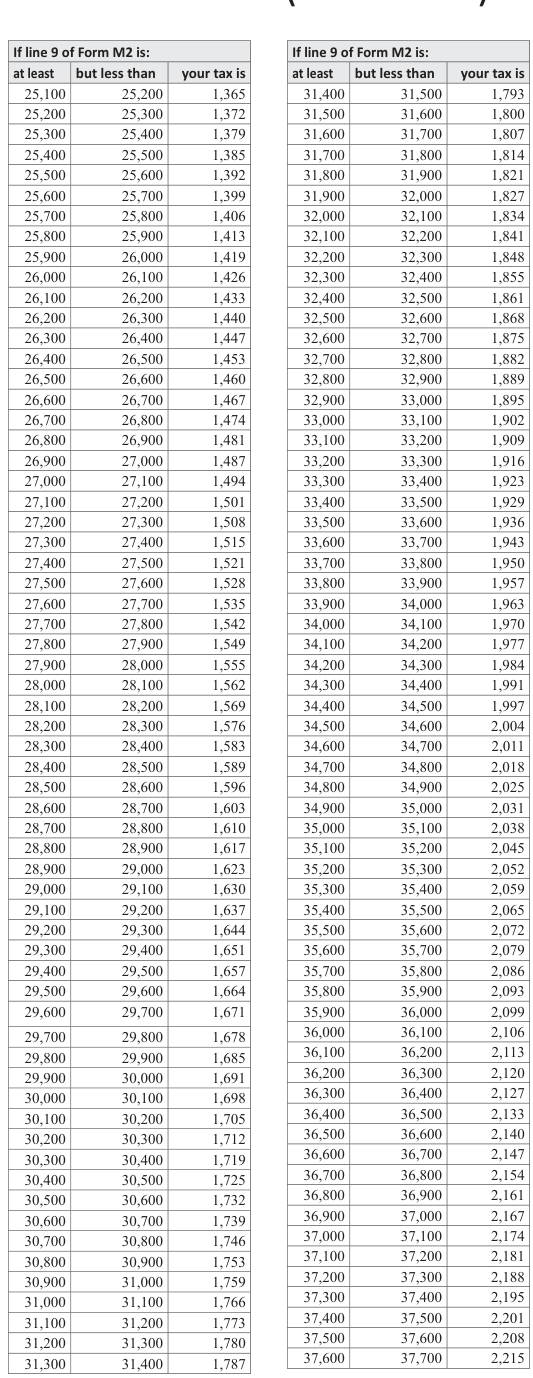
Text version of this table
If line 9 of Form M2 is: at least but less than your tax is 25,100 25,200 1,365 25,200 25,300 1,372 25,300 25,400 1,379 25,400 25,500 1,385 25,500 25,600 1,392 25,600 25,700 1,399 25,700 25,800 1,406 25,800 25,900 1,413 25,900 26,000 1,419 26,000 26,100 1,426 26,100 26,200 1,433 26,200 26,300 1,440 26,300 26,400 1,447 26,400 26,500 1,453 26,500 26,600 1,460 26,600 26,700 1,467 26,700 26,800 1,474 26,800 26,900 1,481 26,900 27,000 1,487 27,000 27,100 1,494 27,100 27,200 1,501 27,200 27,300 1,508 27,300 27,400 1,515 27,400 27,500 1,521 27,500 27,600 1,528 27,600 27,700 1,535 27,700 27,800 1,542 27,800 27,900 1,549 27,900 28,000 1,555 28,000 28,100 1,562 28,100 28,200 1,569 28,200 28,300 1,576 28,300 28,400 1,583 28,400 28,500 1,589 28,500 28,600 1,596 28,600 28,700 1,603 28,700 28,800 1,610 28,800 28,900 1,617 28,900 29,000 1,623 29,000 29,100 1,630 29,100 29,200 1,637 29,200 29,300 1,644 29,300 29,400 1,651 29,400 29,500 1,657 29,500 29,600 1,664 29,600 29,700 1,671 29,700 29,800 1,678 29,800 29,900 1,685 29,900 30,000 1,691 30,000 30,100 1,698 30,100 30,200 1,705 30,200 30,300 1,712 30,300 30,400 1,719 30,400 30,500 1,725 30,500 30,600 1,732 30,600 30,700 1,739 30,700 30,800 1,746 30,800 30,900 1,753 30,900 31,000 1,759 31,000 31,100 1,766 31,100 31,200 1,773 31,200 31,300 1,780 31,300 31,400 1,787
37,700 37,800 2,222 44,000 44,100 2,650 37,800 37,900 2,229 44,100 44,200 2,657 37,900 38,000 2,235 44,200 44,300 2,664 38,000 38,100 2,242 44,300 44,400 2,671 38,100 38,200 2,249 44,400 44,500 2,677 38,200 38,300 2,256 44,500 44,600 2,684 38,300 38,400 2,263 44,600 44,700 2,691 38,400 38,500 2,269 44,700 44,800 2,698 38,500 38,600 2,276 44,800 44,900 2,705 38,600 38,700 2,283 44,900 45,000 2,711 38,700 38,800 2,290 45,000 45,100 2,718 38,800 38,900 2,297 45,100 45,200 2,725 38,900 39,000 2,303 45,200 45,300 2,732 39,000 39,100 2,310 45,300 45,400 2,739 39,100 39,200 2,317 45,400 45,500 2,745 39,200 39,300 2,324 45,500 45,600 2,752 39,300 39,400 2,331 45,600 45,700 2,759 39,400 39,500 2,337 45,700 45,800 2,766 39,500 39,600 2,344 45,800 45,900 2,773 39,600 39,700 2,351 45,900 46,000 2,779 39,700 39,800 2,358 46,000 46,100 2,786 39,800 39,900 2,365 46,100 46,200 2,793 39,900 40,000 2,371 46,200 46,300 2,800 40,000 40,100 2,378 46,300 46,400 2,807 40,100 40,200 2,385 46,400 46,500 2,813 40,200 40,300 2,392 46,500 46,600 2,820 40,300 40,400 2,399 46,600 46,700 2,827 40,400 40,500 2,405 46,700 46,800 2,834 40,500 40,600 2,412 46,800 46,900 2,841 40,600 40,700 2,419 46,900 47,000 2,847 40,700 40,800 2,426 47,000 47,100 2,854 40,800 40,900 2,433 47,100 47,200 2,861 40,900 41,000 2,439 47,200 47,300 2,868 41,000 41,100 2,446 47,300 47,400 2,875 41,100 41,200 2,453 47,400 47,500 2,881 41,200 41,300 2,460 47,500 47,600 2,888 41,300 41,400 2,467 47,600 47,700 2,895 41,400 41,500 2,473 47,700 47,800 2,902 41,500 41,600 2,480 47,800 47,900 2,909 41,600 41,700 2,487 47,900 48,000 2,915 41,700 41,800 2,494 48,000 48,100 2,922 41,800 41,900 2,501 48,100 48,200 2,929 41,900 42,000 2,507 48,200 48,300 2,936 42,000 48,300 42,100 2,514 48,400 2,943 42,100 42,200 2,521 48,400 48,500 2,949 42,200 42,300 2,528 48,500 48,600 2,956 42,300 42,400 2,535 48,600 48,700 2,963 42,400 42,500 2,541 48,700 48,800 2,970 42,500 42,600 2,548 48,800 48,900 2,977 42,600 42,700 2,555 48,900 49,000 2,983 42,700 42,800 2,562 49,000 49,100 2,990 42,800 42,900 2,569 49,100 49,200 2,997 42,900 43,000 2,575 49,200 49,300 3,004 43,000 43,100 2,582 49,300 49,400 3,011 43,100 43,200 2,589 49,400 49,500 3,017 43,200 43,300 2,596 49,500 49,600 3,024 43,300 43,400 2,603 49,600 49,700 3,031 43,400 43,500 2,609 49,700 49,800 3,038 43,500 43,600 2,616 49,800 49,900 3,045 43,600 43,700 2,623 49,900 50,000 3,051 43,700 43,800 2,630 50,000 50,100 3,058 43,800 43,900 2,637 50,100 50,200 3,065 43,900 44,000 2,643 50,200 50,300 3,072 Continued 19
If line 9 of Form M2 is: If line 9 of Form M2 is: at least but less than your tax is at least but less than your tax is 50,300 50,400 3,079 56,700 56,800 3,514 50,400 50,500 3,085 56,800 56,900 3,521 50,500 50,600 3,092 56,900 57,000 3,527 50,600 50,700 3,099 57,000 57,100 3,534 50,700 50,800 3,106 57,100 57,200 3,541 50,800 50,900 3,113 57,200 57,300 3,548 50,900 51,000 3,119 57,300 57,400 3,555 51,000 51,100 3,126 57,400 57,500 3,561 51,100 51,200 3,133 57,500 57,600 3,568 51,200 51,300 3,140 57,600 57,700 3,575 51,300 51,400 3,147 57,700 57,800 3,582 51,400 51,500 3,153 57,800 57,900 3,589 51,500 51,600 3,160 57,900 58,000 3,595 51,600 51,700 3,167 58,000 58,100 3,602 51,700 51,800 3,174 58,100 58,200 3,609 51,800 51,900 3,181 58,200 58,300 3,616 51,900 52,000 3,187 58,300 58,400 3,623 52,000 52,100 3,194 58,400 58,500 3,629 52,100 52,200 3,201 58,500 58,600 3,636 52,200 52,300 3,208 58,600 58,700 3,643 52,300 52,400 3,215 58,700 58,800 3,650 52,400 52,500 3,221 58,800 58,900 3,657 52,500 52,600 3,228 58,900 59,000 3,663 52,600 52,700 3,235 59,000 59,100 3,670 52,700 52,800 3,242 59,100 59,200 3,677 52,800 52,900 3,249 59,200 59,300 3,684 52,900 53,000 3,255 59,300 59,400 3,691 53,000 53,100 3,262 59,400 59,500 3,697 53,100 53,200 3,269 59,500 59,600 3,704 53,200 53,300 3,276 59,600 59,700 3,711 53,300 53,400 3,283 59,700 59,800 3,718 53,400 53,500 3,289 59,800 59,900 3,725 53,500 53,600 3,296 59,900 60,000 3,731 53,600 53,700 3,303 60,000 60,100 3,738 53,700 53,800 3,310 60,100 60,200 3,745 53,800 53,900 3,317 60,200 60,300 3,752 53,900 54,000 3,323 60,300 60,400 3,759 54,000 54,100 3,330 60,400 60,500 3,765 54,100 54,200 3,337 60,500 60,600 3,772 54,200 54,300 3,344 60,600 60,700 3,779 54,300 54,400 3,351 60,700 60,800 3,786 54,400 54,500 3,357 60,800 60,900 3,793 54,500 54,600 3,364 60,900 61,000 3,799 54,600 61,000 54,700 3,371 61,100 3,806 54,700 54,800 3,378 61,100 61,200 3,813 54,800 54,900 3,385 61,200 61,300 3,820 54,900 55,000 3,391 61,300 61,400 3,827 55,000 55,100 3,398 61,400 61,500 3,833 55,100 55,200 3,405 61,500 61,600 3,840 55,200 55,300 3,412 61,600 61,700 3,847 55,300 55,400 3,419 61,700 61,800 3,854 55,400 55,500 3,425 61,800 61,900 3,861 55,500 55,600 3,432 61,900 62,000 3,867 55,600 55,700 3,439 62,000 62,100 3,874 55,700 55,800 3,446 62,100 62,200 3,881 55,800 55,900 3,453 62,200 62,300 3,888 55,900 56,000 3,459 62,300 62,400 3,895 56,000 56,100 3,466 62,400 62,500 3,901 56,100 56,200 3,473 62,500 62,600 3,908 56,200 56,300 3,480 62,600 62,700 3,915 56,300 56,400 3,487 62,700 62,800 3,922 56,400 56,500 3,493 62,800 62,900 3,929 56,500 56,600 3,500 62,900 63,000 3,935 56,600 56,700 3,507 63,000 63,100 3,942 If line 9 of Form M2 is: If line 9 of Form M2 is: at least but less than your tax is at least but less than your tax is 63,100 63,200 3,949 69,500 69,600 4,384 63,200 63,300 3,956 69,600 69,700 4,391 63,300 63,400 3,963 69,700 69,800 4,398 63,400 63,500 3,969 69,800 69,900 4,405 63,500 63,600 3,976 69,900 70,000 4,411 63,600 63,700 3,983 70,000 70,100 4,418 63,700 63,800 3,990 70,100 70,200 4,425 63,800 63,900 3,997 70,200 70,300 4,432 63,900 64,000 4,003 70,300 70,400 4,439 64,000 64,100 4,010 70,400 70,500 4,445 64,100 64,200 4,017 70,500 70,600 4,452 64,200 64,300 4,024 70,600 70,700 4,459 64,300 64,400 4,031 70,700 70,800 4,466 64,400 64,500 4,037 70,800 70,900 4,473 64,500 64,600 4,044 70,900 71,000 4,479 64,600 64,700 4,051 71,000 71,100 4,486 64,700 64,800 4,058 71,100 71,200 4,493 64,800 64,900 4,065 71,200 71,300 4,500 64,900 65,000 4,071 71,300 71,400 4,507 65,000 65,100 4,078 71,400 71,500 4,513 65,100 65,200 4,085 71,500 71,600 4,520 65,200 65,300 4,092 71,600 71,700 4,527 65,300 65,400 4,099 71,700 71,800 4,534 65,400 65,500 4,105 71,800 71,900 4,541 65,500 65,600 4,112 71,900 72,000 4,547 65,600 65,700 4,119 72,000 72,100 4,554 65,700 65,800 4,126 72,100 72,200 4,561 65,800 65,900 4,133 72,200 72,300 4,568 65,900 66,000 4,139 72,300 72,400 4,575 66,000 66,100 4,146 72,400 72,500 4,581 66,100 66,200 4,153 72,500 72,600 4,588 66,200 66,300 4,160 72,600 72,700 4,595 66,300 66,400 4,167 72,700 72,800 4,602 66,400 66,500 4,173 72,800 72,900 4,609 66,500 66,600 4,180 72,900 73,000 4,615 66,600 66,700 4,187 73,000 73,100 4,622 66,700 66,800 4,194 73,100 73,200 4,629 66,800 66,900 4,201 73,200 73,300 4,636 66,900 67,000 4,207 73,300 73,400 4,643 67,000 67,100 4,214 73,400 73,500 4,649 67,100 67,200 4,221 73,500 73,600 4,656 67,200 67,300 4,228 73,600 73,700 4,663 67,300 67,400 4,235 73,700 73,800 4,670 67,400 73,800 67,500 4,241 73,900 4,677 67,500 67,600 4,248 73,900 74,000 4,683 67,600 67,700 4,255 74,000 74,100 4,690 67,700 67,800 4,262 74,100 74,200 4,697 67,800 67,900 4,269 74,200 74,300 4,704 67,900 68,000 4,275 74,300 74,400 4,711 68,000 68,100 4,282 74,400 74,500 4,717 68,100 68,200 4,289 74,500 74,600 4,724 68,200 68,300 4,296 74,600 74,700 4,731 68,300 68,400 4,303 74,700 74,800 4,738 68,400 68,500 4,309 74,800 74,900 4,745 68,500 68,600 4,316 74,900 75,000 4,751 68,600 68,700 4,323 75,000 75,100 4,758 68,700 68,800 4,330 75,100 75,200 4,765 68,800 68,900 4,337 75,200 75,300 4,772 68,900 69,000 4,343 75,300 75,400 4,779 69,000 69,100 4,350 75,400 75,500 4,785 69,100 69,200 4,357 75,500 75,600 4,792 69,200 69,300 4,364 75,600 75,700 4,799 69,300 69,400 4,371 75,700 75,800 4,806 69,400 69,500 4,377 75,800 75,900 4,813
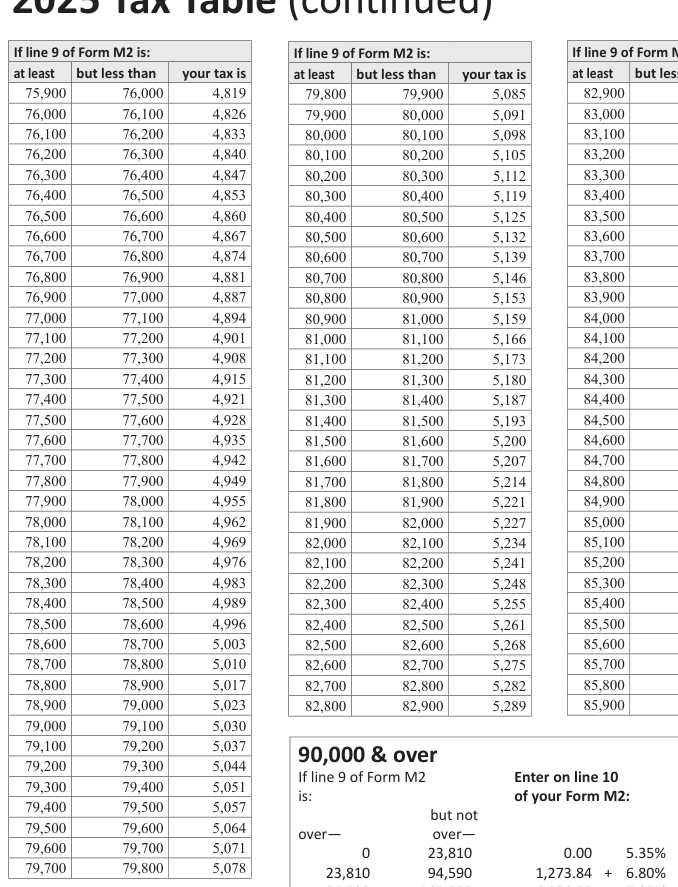
Text version of this table
| If line 9 of Form M2 is: | ||
| at least | but less than | your tax is |
| 75,900 | 76,000 | 4,819 |
| 76,000 | 76,100 | 4,826 |
| 76,100 | 76,200 | 4,833 |
| 76,200 | 76,300 | 4,840 |
| 76,300 | 76,400 | 4,847 |
| 76,400 | 76,500 | 4,853 |
| 76,500 | 76,600 | 4,860 |
| 76,600 | 76,700 | 4,867 |
| 76,700 | 76,800 | 4,874 |
| 76,800 | 76,900 | 4,881 |
| 76,900 | 77,000 | 4,887 |
| 77,000 | 77,100 | 4,894 |
| 77,100 | 77,200 | 4,901 |
| 77,200 | 77,300 | 4,908 |
| 77,300 | 77,400 | 4,915 |
| 77,400 | 77,500 | 4,921 |
| 77,500 | 77,600 | 4,928 |
| 77,600 | 77,700 | 4,935 |
| 77,700 | 77,800 | 4,942 |
| 77,800 | 77,900 | 4,949 |
| 77,900 | 78,000 | 4,955 |
| 78,000 | 78,100 | 4,962 |
| 78,100 | 78,200 | 4,969 |
| 78,200 | 78,300 | 4,976 |
| 78,300 | 78,400 | 4,983 |
| 78,400 | 78,500 | 4,989 |
| 78,500 | 78,600 | 4,996 |
| 78,600 | 78,700 | 5,003 |
| 78,700 | 78,800 | 5,010 |
| 78,800 | 78,900 | 5,017 |
| 78,900 | 79,000 | 5,023 |
| 79,000 | 79,100 | 5,030 |
| 79,100 | 79,200 | 5,037 |
| 79,200 | 79,300 | 5,044 |
| 79,300 | 79,400 | 5,051 |
| 79,400 | 79,500 | 5,057 |
| 79,500 | 79,600 | 5,064 |
| 79,600 | 79,700 | 5,071 |
| 79,700 | 79,800 | 5,078 |
79,200 79,300 5,044
If line 9 of Form M2
If line 9 of Form M2 is: If line 9 of Form M2 is: at least but less than your tax is at least but less than your tax is 82,900 83,000 5,295 86,000 86,100 5,506 83,000 83,100 5,302 86,100 86,200 5,513 83,100 83,200 5,309 86,200 86,300 5,520 83,200 83,300 5,316 86,300 86,400 5,527 83,300 83,400 5,323 86,400 86,500 5,533 83,400 83,500 5,329 86,500 86,600 5,540 83,500 83,600 5,336 86,600 86,700 5,547 83,600 83,700 5,343 86,700 86,800 5,554 83,700 83,800 5,350 86,800 86,900 5,561 83,800 83,900 5,357 86,900 87,000 5,567 83,900 84,000 5,363 87,000 87,100 5,574 84,000 84,100 5,370 87,100 87,200 5,581 84,100 84,200 5,377 87,200 87,300 5,588 84,200 84,300 5,384 87,300 87,400 5,595 84,300 84,400 5,391 87,400 87,500 5,601 84,400 84,500 5,397 87,500 87,600 5,608 84,500 84,600 5,404 87,600 87,700 5,615 84,600 84,700 5,411 87,700 87,800 5,622 84,700 84,800 5,418 87,800 87,900 5,629 84,800 84,900 5,425 87,900 88,000 5,635 84,900 85,000 5,431 88,000 88,100 5,642 85,000 85,100 5,438 88,100 88,200 5,649 85,100 85,200 5,445 88,200 88,300 5,656 85,200 85,300 5,452 88,300 88,400 5,663 85,300 85,400 5,459 88,400 88,500 5,669 85,400 85,500 5,465 88,500 88,600 5,676 85,500 85,600 5,472 88,600 88,700 5,683 85,600 85,700 5,479 88,700 88,800 5,690 85,700 85,800 5,486 88,800 88,900 5,697 85,800 85,900 5,493 88,900 89,000 5,703 85,900 86,000 5,499 89,000 89,100 5,710 89,100 89,200 5,717 89,200 89,300 5,724 89,300 89,400 5,731
Enter on line 10
79,300 79,400 5,051 is:
89,400 89,500 5,737 of the
of your Form M2:
79,400 79,500 5,057 but not
79,500 79,600 5,064 over— over— 79,600 79,700 5,071 0 23,810 79,700 79,800 5,078 89,500 89,600 5,744 amount over— 89,600 89,700 5,751 89,700 89,800 5,758 0.00 5.35% 0 89,800 89,900 5,765 1,273.84 + 6.80% 23,810 94,590 23,810 89,900 90,000 5,771 6,086.88 + 7.85% 94,590 165,205 94,590 11,630.16 + 9.85% 165,205 and up 165,205
# Common Problems Using Software Packages
If you use tax preparation software, be careful to buy packages acceptable to the Department of Revenue. Forms produced by the software must meet requirements and be approved before being sold or provided to consumers.
If you are considering any company's tax preparation software, ask to see the vendor's approval letter for the forms you will be using. Keep in mind that we usually won't know if they are approved until late January. It is also important to test the software before filing forms prepared with it. We do not, however, approve the operation or accuracy of any software.
Below are common problems found on fiduciary returns submitted using software packages:
- Verify that the program uses updated tax tables. Tax tables are required to be updated every year for inflation. Be sure that the amount on line 10 of your Form M2 is the same amount shown in the tax tables. — Fiscal year filers must use the table based on the beginning year of the return. — If you are an Electing Small Business Trust (ESBT), verify that the software package uses the tax table when determining the tax. The ESBT is taxed at the highest tax rate only for federal purposes.
- Look for a payment voucher if you have an amount due on line 39 of Form M2. If you owe tax, your software package is required to include a payment voucher when you print out a copy of your return. If you are paying your tax by check, you must complete and send this payment voucher with your check to ensure your payment is credited properly.
- Verify that estimated tax payments were made. Some software programs may insert the amount of estimated tax payments that should have been paid, not the amount of tax actually paid.
Tables and rate charts from the source document
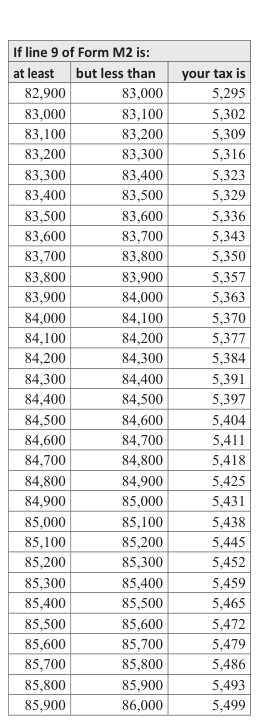
Text version of this table
| If line 9 of Form M2 is: | ||
| at least | but less than | your tax is |
| 82,900 | 83,000 | 5,295 |
| 83,000 | 83,100 | 5,302 |
| 83,100 | 83,200 | 5,309 |
| 83,200 | 83,300 | 5,316 |
| 83,300 | 83,400 | 5,323 |
| 83,400 | 83,500 | 5,329 |
| 83,500 | 83,600 | 5,336 |
| 83,600 | 83,700 | 5,343 |
| 83,700 | 83,800 | 5,350 |
| 83,800 | 83,900 | 5,357 |
| 83,900 | 84,000 | 5,363 |
| 84,000 | 84,100 | 5,370 |
| 84,100 | 84,200 | 5,377 |
| 84,200 | 84,300 | 5,384 |
| 84,300 | 84,400 | 5,391 |
| 84,400 | 84,500 | 5,397 |
| 84,500 | 84,600 | 5,404 |
| 84,600 | 84,700 | 5,411 |
| 84,700 | 84,800 | 5,418 |
| 84,800 | 84,900 | 5,425 |
| 84,900 | 85,000 | 5,431 |
| 85,000 | 85,100 | 5,438 |
| 85,100 | 85,200 | 5,445 |
| 85,200 | 85,300 | 5,452 |
| 85,300 | 85,400 | 5,459 |
| 85,400 | 85,500 | 5,465 |
| 85,500 | 85,600 | 5,472 |
| 85,600 | 85,700 | 5,479 |
| 85,700 | 85,800 | 5,486 |
| 85,800 | 85,900 | 5,493 |
| 85,900 | 86,000 | 5,499 |
Source: view the official PDF
Nearby sections (16 sections)
- kpi · Schedule KPI — Partner's Share of Income, Credits and…
- ks · Schedule KS — Shareholder's Share of Income, Credits and…
- m1 · Form M1 — Minnesota Individual Income Tax Return (2025)
- m1-instructions · Instructions for Form M1 — Individual Income Tax…
- m1pr · Form M1PR — Homestead Credit Refund and Renter's Property Tax…
- m1pr-instructions · Instructions for Form M1PR (2025)
- m2 · Form M2 — Income Tax Return for Estates and Trusts (2025)
- m2-instructions · Instructions for Form M2 — Fiduciary (2025)
- m3 · Form M3 — Partnership Return (including M3A) (2025)
- m3-instructions · Instructions for Form M3 — Partnership (2024 — most…
- m4-instructions · Instructions for Form M4 — Corporation Franchise Tax…
- m4-series · Form M4 — Corporation Franchise Tax Return (incl. M4I, M4A,…
- m8 · Form M8 — S Corporation Return (including M8A) (2025)
- m8-instructions · Instructions for Form M8 — S Corporation (incl. M8A,…
- st3 · Form ST3 — Certificate of Exemption (Revised 7/19)
- w-4mn · Form W-4MN — Minnesota Employee Withholding Allowance/Exemption…