Missouri Department of Revenue Form Instructions
Form 53-1 — Sales Tax Return
Form
Reset Form Print Form
Department Use Only
Select this box if return is amended 53-1 Sales Tax Return (MM/DD/YY) In the event your mailing address, primary business location, Filing Due Date or a reporting location changed, please complete the Frequency PIN (MM/DD/YY) Registration Change Request (Form 126) and submit with your return.
# Missouri Tax Federal Employer
I.D. Number I.D. Number
Owner
Name
Address
Reporting Period
(MM/YY)
Business
Name
ZIP
City State Code
Adjustments
Gross
Totals For This Return
Receipts
- Totals (All Pages) …
# Provide Tax Breakdown Starting With Page Two
(Indicate + or -) Taxable Sales Amount of Tax . . . . .
- Subtract: 2% timely payment allowance (if applicable) … -
You must provide a breakdown of tax, by location and item, on page two. If a breakdown is not provided your filing will be considered incomplete and may be subject to penalties and interest.
Attach additional pages if necessary.
Select this box if you have added new locations Final Return .
- Subtract quarter-monthly payments submitted (if applicable). - .
- Subtract: Approved credit … - .
- Balance Due … =
If this is your final return, enter the close date below and check the reason for closing your account.
# Date Closed
(MM/DD/YY)
Out of Business Sold Business .
- Add: Interest for late payments (See Line 6 instructions) … + .
- Add: Additions to tax … + .
- Pay this amount (U.S. funds only) … = By signing this return I am authorizing the Department of Revenue to issue any potential refund(s). Under penalties of perjury, I declare that the Department .
Use Only above information and any attached supplement is true, complete, and correct. I have direct control, supervision, or responsibility for filing this return and payment of the tax due. I attest that I have no gross receipts to report for locations left blank.
Taxpayer or
Printed
Authorized Agent's
Signature Name
Telephone
E-mail
Number
Address
Mail to: Phone: (573) 751-2836
Taxation Division
TDD: (800) 735-2966
P.O. Box 840
Fax: (573) 526-8747
Jefferson City, MO 65105-0840
Title
Date Signed
(MM/DD/YY)
Form 53-1 (Revised 08-2024)
Visit mytax.mo.gov
14001010001 to file your sales tax return electronically.
E-mail: BusinessTaxProcessing@dor.mo.gov 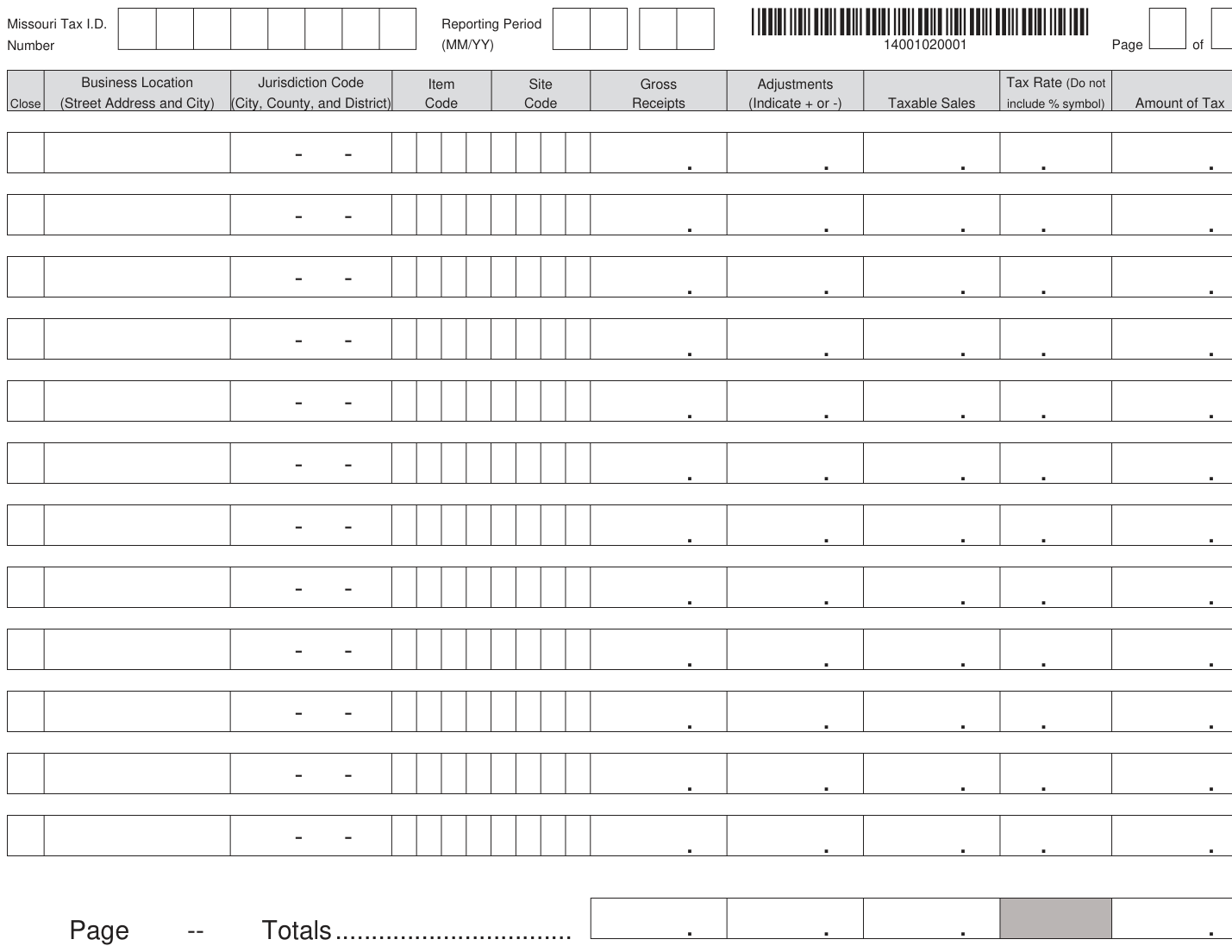
Text version of this table
(MM/YY) 14001020001 Page of iction C ode Item Site Gross Adjustme nts Tax R ate (Do not nty, and District) Code Code Receipts (Indicate + or -) Taxable Sales includ e % symbol) Amount of T a - - . . . . . - - . . . . . - - . . . . . - - . . . . . - - . . . . . - - . . . . . - - . . . . . - - . . . . . - - . . . . . - - . . . . . - - . . . . . - - . . . . . tals.. ................................ . . . .
# Business Location Item Site Gross Adjustments Tax Rate (Do not
Important: This return must be filed for the reporting period even though you have no tax to report.
Effective July 30, 2021, all businesses reporting sales or use tax from 3 or more locations, are required to file sales and use tax return(s) electronically.
Returns can be conveniently filed electronically through the secure MyTax Missouri Portal at, mytax.mo.gov. Amended Return Check Box - This box should be checked to correct a previously filed return to show an increase or decrease in the amount of tax liability. A separate return must be filed for each period being amended. If the return and payment are being submitted after the period(s) due date, interest and penalty will apply to the additional amount being reported.
Please note if an overpayment has been authorized, the overpayment is subject to be used as an offset towards any debt. In addition, to receive a refund of the overpayment or to have the overpayment applied to another period as a credit attach a Seller's Claim for Sales or Use Tax Refund or Credit (Form 472S).
Filing Frequency - This is the frequency in which you are required to file your returns. Not a required field. If unknown leave blank.
PIN - This is a unique four digit number that is issued to you by the Department of Revenue. Not a required field. If unknown leave blank.
Due Date - Visit dor.mo.gov/taxcalendar/ for a list of due dates.
Missouri Tax I.D. Number - This is an eight digit number issued by the Missouri Department of Revenue to identify your business. If you have not registered with the Department, complete the Missouri Tax Registration Application (Form 2643) or complete your registration online by going to mytax.mo.gov/rptp/portal/business/register-new-business/.
If you have misplaced your Missouri Tax I.D Number, you can call (573) 751-5860.
Federal Employer I.D. Number - This is a nine digit identification number issued by the Internal Revenue Service to identify your business.
Reporting Period - This is the tax period you are required to file based on your filing frequency.
Examples:
Type of Filer: Annual Filer Monthly Quarterly
# Period(s) 2021 February 2022 1st Qrt 2022 (Jan - Mar)
Reporting Period (MM/YY) 12 21 02 22 03 22 Owner and Business Name, Address, City, State and ZIP Code - Enter the name, address, city, state and ZIP code. Note: In the event your mailing address, primary business location, or a reporting location has changed you will need to complete the Missouri Registration Change Request (Form 126) and submit it with your return.
Line 1- Totals (All Pages) - Enter the total gross receipts, adjustments, taxable sales, and tax due for all pages.
Each page must have a breakdown per business location identifying the item code, site code, gross receipts, adjustment, taxable sales, and amount of tax. See the page two instructions for more information. If a breakdown is not provided, your filing will be considered incomplete and may be subject to penalties and interest. Attach additional pages if necessary.
Adding New Locations - This box should be checked when adding a new business location(s). The location information (street address and city) on page two or subsequent pages must be completed when this box is checked. A breakdown per location which identifies the item code, gross receipts, adjustments, taxable sales, and amount of tax must also be provided. See page two instructions for more information.
Final Return - If this is your final return, enter the close date and check the reason for closing your account. Missouri law requires any person selling or discontinuing business to make a final sales tax return within 15 days of the sale or closing.
Line 2 - Subtract: 2% Timely Payment Allowance - Multiply total amount of tax by 2% and enter the amount on this line. If the return is late the discount is not allowed.
Line 3 - Subtract: Quarter-Monthly Payments Submitted - If you are a quarter-monthly filer and have made payment(s) on the period, enter amount of payment(s) that have been made.
If you are a registered user of the Missouri Portal you can access the amount of payments made under your tax account.
Line 4 - Subtract: Approved Credit - Approved credits are credits approved by the Department through filing of Form 472S. Overpayments that have not been approved for refund or credit will not automatically populate on the "approved credit" line on the tax return or on the account period.
Line 5 - Balance Due - Amount of Tax from line 1 minus line 2, 3 and 4 (if applicable).
Line 6 - Add Interest for Late Payments - If tax is not paid by the due date, (A) multiply Line 5 by the daily interest rate*. Then (B) multiply this amount by the number of days late. See example below. Note: The number of days late is counted from the due date to the postmark date.
For example, if the due date is March 31, and the postmark date is April 20, the payment is 20 days late. The example below is based on an annual interest rate of 4% and a daily rate of .0001096.
Sales Tax Return (Form 53-1) Instructions 14000000001
# Example: Line 5 is $480
(A) $480 x .0001096 = .05261 (B) . 05261 x 20 days late = 1.05
1.05 is the interest for late payment *The annual interest rate is subject to change each year. Visit dor.mo.gov/intrates.php to access the annual interest rate. Visit dor.mo.gov/calculators/interest/ for assistance calculating the appropriate interest.
Lines 7 - Add Additions to Tax - For failure to pay sales tax on or before the due date, calculate 5% of Line 5. For failure to file a sales tax return on or before the due date, calculate 5% of Line 5 for each month late up to a maximum of 25% (5 months late in filing = 25%). Note: If additions to tax for failure to file apply, do not pay additions to tax for failure to pay.
For example, if a return due March 31 is filed any time between April 1-April 30, the rate would be 5%; if filed any time between May 1-May 31, the rate would be 10%; and so on, up to a maximum of 25%.
Example: Return is due March 31, but is filed (postmarked) April 20 Example: Return is due March 31, but is filed (postmarked) May 1
Line 5 is $480 Line 5 is $480
$480 x 5% = $24 $480 x 10% = $48
$24 is the additions to tax $48 is the additions to tax Access http://dor.mo.gov/calculators/interest/ for assistance calculating the appropriate additions.
Line 8 - Pay This Amount - Enter total amount due (Line 5 "plus" Line 6 "plus" Line 7). Send a check for the total amount. Make check, draft, or money order payable to Director of
Revenue (U.S. funds only). Do not send cash or stamps. Visit dor.mo.gov/business/payonline.php to pay your sales tax online using a credit card or e-check (electronic bank draft).
Page 2 Instructions
Missouri Tax I.D. Number - Enter your Missouri I.D. Number from page 1.
Reporting Period - Enter reporting period from page 1 Examples:
Type of Filer: Annual Filer Monthly Quarterly
# Period(s) 2021 February 2022 1st Qrt 2022 (Jan - Mar)
Reporting Period (MM/YY) 12 21 02 22 03 22 Page _ of __ - The front page acts as page 1. Any sequent pages start with page 2. Please indicate total to ensure all pages are received.
Business Locations - List each of your business locations in this column. If you have discontinued operation of a business location, check the close box in front of the location.
Jurisdiction Code - Enter the jurisdiction code of each location from which you made sales. This is a numeric code that is assigned by the Missouri Department of Revenue to each city, county, and district. If unknown, leave blank.
Item Code - Enter the four digit item code that is assigned by the Department. Item taxes, such as the food tax, are reported on a separate line for each business location. If unknown, clearly indicate what the item tax is. For example, if you are reporting food sales at the lower food tax rate, write "Food".
Site Code - Enter the one to four digit site code that is assigned by the Department. If unknown, leave blank.
Gross Receipts - Enter gross receipts from all sales of tangible personal property and taxable services made during the reporting period for each business location. If none, enter "zero" (0).
Adjustments - Make any adjustments for each location for which you are reporting. Indicate "plus" or "minus" for the total adjustment claimed for each location. A negative figure may be exempt sales or nontaxable receipts. Positive adjustments are items that were purchased exempt, but subsequently used by the seller.
Taxable Sales - Enter the amount of taxable sales for each business location. Gross Receipts (+) or (-) Adjustments = Taxable Sales.
Rate: The rate percentage must include the combined state, conservation, parks and soils, and any applicable local or transportation sales tax rate percentages. Enter the sales tax rate for each location. If you are unsure of the correct tax rate, access the Department's website at dor.mo.gov/business/sales/rates or contact the Taxation Division at (573) 751-2836 for assistance.
Amount of Tax - Multiply your taxable sales for each location by the applicable tax rate percent and enter the amount of tax.
Page Totals - Enter the total gross receipts, adjustments, taxable sales and tax due for each page.
Sales Tax Return (Form 53-1) Instructions Continued 14000000001
Form 53-1 (Revised 08-2024)
Source: view the official PDF
Nearby sections (13 sections)
- 53-1 · Form 53-1 — Sales Tax Return
- 53-v · Form 53-V — Vendor's Use Tax Return
- mo-1040 · MO-1040 — Individual Income Tax Return (Long Form)
- mo-1040-instructions · MO-1040 Instructions — Individual Income Tax…
- mo-1040a-instructions · MO-1040A Instructions — Individual Income Tax…
- mo-1040es · MO-1040ES — Declaration of Estimated Tax for Individuals
- mo-1041 · MO-1041 — Fiduciary Income Tax Return (form + instructions)
- mo-1065 · MO-1065 — Partnership Return of Income (form + instructions)
- mo-1120 · MO-1120 — Corporation Income Tax Return
- mo-1120-instructions · MO-1120 Instructions — Corporation Income Tax…
- mo-1120s · MO-1120S — S-Corporation Income Tax Return
- mo-1120s-instructions · MO-1120S Instructions — S-Corporation Income…
- mo-3nr · MO-3NR — Partnership/S-Corp Withholding Exemption /…